Affiliate Disclosure: As an Amazon Associate we earn from qualifying purchases. Some links may earn us a commission at no cost to you.

Best 280mm AIO Coolers (2026): Five Picks by Build Tier
The 280mm AIO sits in a specific spot in the cooling lineup. It’s not the cheapest option, not the highest-performance, but for two types of builds it’s the right call: compact cases where a 360mm radiator won’t clear the GPU, and builders who want quieter operation than three 120mm fans will give them. Dual 140mm fans move the same air at lower RPM, and that acoustic gap is real and measurable.
These five picks cover the full range from no-frills budget to wireless-LCD showcase, all verified in stock at brief time, all matched to the build scenarios where 280mm makes sense.
Our top pick: Arctic Liquid Freezer III Pro 280
The Arctic Liquid Freezer III Pro 280 carries a 38mm thick radiator, which no other 280mm AIO in this roundup matches. That extra material delivers better sustained thermal headroom, and the integrated VRM fan keeps your motherboard voltage regulators cooler than a standard AIO arrangement. Tom’s Hardware called the Pro line the best AIO for Ryzen 9950X3D and Intel builds, and the price puts it well below the competition.
Quick picks
Pick | Product | Best for | Where to buy |
|---|---|---|---|
Best Overall | No-fuss thermal performance, budget-to-mid builds | Check Price | |
Best Premium | iCUE ecosystem, RGB mid-tower and full-tower builds | Check Price | |
Best LCD | White aesthetic, LCD showcase builds | Check Price | |
Best Budget | Zero software, ITX/mATX, cable-simple builds | Check Price | |
Editor’s Pick | Wireless fans, ITX tight-cable builds, Lian Li ecosystem | Check Price |
Best Overall
- Product
- Best for
No-fuss thermal performance, budget-to-mid builds
- Where to buy
- Check Price
Best Premium
- Product
- Best for
iCUE ecosystem, RGB mid-tower and full-tower builds
- Where to buy
- Check Price
Best LCD
- Product
- Best for
White aesthetic, LCD showcase builds
- Where to buy
- Check Price
Best Budget
- Product
- Best for
Zero software, ITX/mATX, cable-simple builds
- Where to buy
- Check Price
Editor’s Pick
- Product
- Best for
Wireless fans, ITX tight-cable builds, Lian Li ecosystem
- Where to buy
- Check Price
Specs at a glance
Product | Radiator | Fans | Pump | Software | Sockets |
|---|---|---|---|---|---|
280mm x 38mm | 2 x 140mm PWM + VRM fan | PWM-controlled | None required | AM5/AM4, LGA1851/1770 | |
280mm x 27mm | 2 x RX140 RGB (Corsair-proprietary) | FlowDrive 3-phase | iCUE (required for hub) | AM5/AM4, LGA1851/1700 | |
280mm x 27mm | 1 x F280 RGB Core (single-frame) | NZXT Turbine | NZXT CAM (for LCD) | AM5/AM4, LGA1851/1700/1200/115X | |
280mm x 30mm | 2 x Pure Wings 3 140mm PWM (daisy-chain) | 6-pole 3-phase | None required | AM5/AM4, LGA1851/1700/1200/1151/1150 | |
280mm x 30mm | 2 x TL 140mm wireless (2.4 GHz) | Asetek 8th Gen, 3600 RPM max | L-Connect 3 (for wireless + LCD) | AM5/AM4, LGA1700/1200/115X |
- Radiator
280mm x 38mm
- Fans
2 x 140mm PWM + VRM fan
- Pump
PWM-controlled
- Software
None required
- Sockets
AM5/AM4, LGA1851/1770
- Radiator
280mm x 27mm
- Fans
2 x RX140 RGB (Corsair-proprietary)
- Pump
FlowDrive 3-phase
- Software
iCUE (required for hub)
- Sockets
AM5/AM4, LGA1851/1700
- Radiator
280mm x 27mm
- Fans
1 x F280 RGB Core (single-frame)
- Pump
NZXT Turbine
- Software
NZXT CAM (for LCD)
- Sockets
AM5/AM4, LGA1851/1700/1200/115X
- Radiator
280mm x 30mm
- Fans
2 x Pure Wings 3 140mm PWM (daisy-chain)
- Pump
6-pole 3-phase
- Software
None required
- Sockets
AM5/AM4, LGA1851/1700/1200/1151/1150
- Radiator
280mm x 30mm
- Fans
2 x TL 140mm wireless (2.4 GHz)
- Pump
Asetek 8th Gen, 3600 RPM max
- Software
L-Connect 3 (for wireless + LCD)
- Sockets
AM5/AM4, LGA1700/1200/115X
How we picked
A 280mm AIO makes the most sense in three specific scenarios. First: a compact case where a 360mm radiator won’t clear the GPU. Many mITX cases and smaller mATX designs cap out at 280mm on the front panel, and a 360mm on the top mount won’t fit without grinding into the GPU backplate. Second: chips in the 120W to 170W sustained range, which covers most gaming-first CPUs (Ryzen 7 9800X3D, 7800X3D, Core i7 14700K, Core i9 14900K at gaming loads). A 280mm handles these cleanly. Third: quiet-priority builds, where dual 140mm fans at low RPM beat three 120mm fans for acoustics at equivalent airflow. Mid-towers land in the same place. The Corsair 4000D lists a 360mm front mount its front I/O will not really allow, which leaves a roof-mounted 280mm as the largest AIO that case genuinely takes.
We didn’t pick 280mm AIOs for sustained 200W+ all-core workloads. If you’re running a Ryzen 9 9950X3D flat-out under Blender or Cinebench for hours, a 360mm AIO is the honest answer. At that thermal demand, the extra radiator area matters and the acoustic difference becomes irrelevant. If you’re running a 9800X3D or Core i7 for gaming, you’re fine here. And if the case has three consecutive 140mm mounts in the roof, the best 420mm AIO coolers add more radiator area still, though the thermal gain over a 360mm is about a degree at realistic loads.
We also checked the air-first case, because it matters editorially. Most gaming chips under 120W sustained (9800X3D draws 120W PBP but around 60W in gaming loads, not all-core) are handled by good air coolers at lower cost with no pump to fail. The AIO reversal is real: liquid cooling is the right call when the CPU pulls 250W+ sustained, when the case is ITX/SFF with poor air circulation, or when the builder wants a showcase aesthetic with an LCD pump head. For everything else, air is simpler, cheaper, and has no pump that can fail in year four and drip warm coolant onto the GPU below it. These 280mm picks are for the cases where one of those conditions applies. A 65 watt chip is the clearest example, which is why the best CPU cooler for the Ryzen 5 9600X is a dual-tower air cooler rather than anything on this page.
Our standard was: currently in stock on Amazon (sold by Amazon or official brand store, not marginal third-party), at least 15 reviews, and no open critical issues with mounting or pump failure patterns that would give a buyer a bad first week. We ran Chrome PDP visits to confirm availability and review counts at brief time; stock conditions change, so verify before you buy.
Best Overall: Arctic Liquid Freezer III Pro 280
Specs
Spec | Value |
|---|---|
Radiator | 280mm x 38mm thick (thickest in the 280mm class) |
Fans | 2 x 140mm PWM, with a small integrated VRM fan on the pump block |
Pump | PWM-controlled |
Socket support | AM5/AM4, LGA1851/1770 |
Noise | approximately 25 dB(A) typical at mid-speed |
Warranty | 6 years |
Radiator
- Value
280mm x 38mm thick (thickest in the 280mm class)
Fans
- Value
2 x 140mm PWM, with a small integrated VRM fan on the pump block
Pump
- Value
PWM-controlled
Socket support
- Value
AM5/AM4, LGA1851/1770
Noise
- Value
approximately 25 dB(A) typical at mid-speed
Warranty
- Value
6 years
What it does well
The 38mm radiator is the reason to buy this over anything else in the 280mm category. Standard 280mm AIOs ship with 27mm thick radiators. That extra 11mm of depth means more fin surface, more coolant volume, and meaningfully better thermal headroom under sustained load. Reviewer testing from Tom’s Hardware placed the Pro line as top performer for both Ryzen 9950X3D and Intel builds, and the 38mm advantage is consistent across configurations.
The integrated VRM fan is a real benefit on AM5 boards where the VRM heatsink sits close to the CPU socket. Most AIOs ignore the voltage regulators entirely; the Arctic’s small secondary fan moves air over the VRM area and keeps those regulators 8 to 12 degrees cooler than a standard AIO arrangement. On entry-to-mid-range AM5 boards with smaller VRM heatsinks, that’s not trivial.
There’s no software requirement. No background service, no USB header claim, no RGB controller. The pump and fans plug into standard PWM headers. It works on first boot.
The six-year warranty at this price is the strongest value signal in the roundup. Most of the competition offers five years or less at higher prices.
What you give up
The 38mm radiator creates a real fitment issue. The total stack (rad + fan) requires roughly 63mm of clearance from the case wall to the first obstruction. Cases that advertise "280mm AIO support" are often calibrated for 27mm standard-depth radiators. Before you order, find the case spec sheet and confirm it calls out a radiator thickness maximum above 30mm, or check community mounting reports. ITX cases in particular can be tight. A front-mount typically works; top-mount is where clearance bites. Case-side clearance is the other half of that equation: whether a 280mm AIO fits an NR200P turns on which panel the radiator mounts to, not just on how thick it is.
No RGB on the base Pro Black variant. The A-RGB version exists at a slight premium and adds pump-cap and fan-frame lighting if that matters. This one is a performance tool.
Who it’s for
The builder who wants the best sustained thermal performance in the 280mm class without spending on software or ecosystem. Core i9-14900K gaming and streaming builds, 9950X3D all-core moderate workloads, and anyone who has had too many RGB-software conflicts and wants a zero-overhead cooling setup. Confirm your case passes the 38mm clearance check first.
Best Premium: Corsair iCUE Link Titan 280 RX RGB
Specs
Spec | Value |
|---|---|
Radiator | 280mm x 27mm |
Fans | 2 x RX140 RGB PWM (Corsair iCUE Link proprietary connector) |
Pump | FlowDrive 3-phase motor |
Sockets | AM5/AM4, LGA1851/1700 |
Notes | iCUE Link System Hub included (controls pump + fans via single USB cable) |
Warranty | 6 years |
Radiator
- Value
280mm x 27mm
Fans
- Value
2 x RX140 RGB PWM (Corsair iCUE Link proprietary connector)
Pump
- Value
FlowDrive 3-phase motor
Sockets
- Value
AM5/AM4, LGA1851/1700
Notes
- Value
iCUE Link System Hub included (controls pump + fans via single USB cable)
Warranty
- Value
6 years
What it does well
The iCUE Link ecosystem is what separates the Corsair Titan from every other 280mm AIO. One USB 2.0 cable runs from the motherboard to the iCUE Link hub, and from there it controls the AIO pump, both RX140 fans, and up to four additional iCUE Link case fans. No separate ARGB controller, no four-header fan hub, no spider web of cables behind the motherboard tray. For a mid-tower or full-tower RGB build where the builder is already running Corsair fans, this is the cleanest cable management available in the AIO category.
The FlowDrive 3-phase pump runs quietly at competitive flow rates. The 4.7-star rating across 1,265 reviews is the strongest quality signal in this roundup. It’s not just well-reviewed; it’s well-reviewed by a large enough pool that the rating is stable and meaningful.
The RX140 fans produce dense, consistent RGB with Corsair’s lighting profiles. For builds with a windowed side panel and a theme color, the Titan’s lighting integration is among the best in the category.
What you give up
The iCUE Link system has a software dependency that some builders find frustrating. The iCUE background service conflicts with ASUS ROG Armory Crate, MSI Dragon Center, and OpenRGB in some configurations. Startup order matters; after a Windows update, you may need to manually restart the iCUE service. If you’re not already invested in the iCUE ecosystem and don’t want to maintain that software layer, this is a tax that goes away if you pick the Arctic or the be quiet! instead.
The 27mm radiator is standard thickness, not 38mm. Under extreme sustained all-core loads (9950X3D under Blender, 14900K at 250W), the Arctic will run cooler. The Corsair holds competitive temps at gaming loads; the gap opens under all-core workloads and stays open. If sustained thermal headroom is the primary criterion, the Arctic wins at lower cost.
The iCUE Link hub requires a USB 2.0 header on your motherboard. Confirm your board has one available, particularly on mITX boards where headers are limited.
Who it’s for
Builders already running iCUE fans or other iCUE Link components who want the single-hub integration. Mid-tower and full-tower premium showcase builds where cable management and RGB fidelity matter more than squeezing the last degree out of the radiator. Anyone building a system that will get photographed or displayed, where the quality of the RGB lighting is part of the deliverable.
Best LCD: NZXT Kraken Elite 280 RGB 2024 White

Specs
Spec | Value |
|---|---|
Radiator | 280mm x 27mm |
Fan | 1 x F280 RGB Core (single-frame, covers the full 280mm radiator footprint) |
Pump | NZXT custom Turbine (2024 model, 10% better than 2023 per NZXT) |
LCD | 2.72-inch IPS, customizable images and performance monitoring via NZXT CAM |
Sockets | AM5/AM4, LGA1851/1700/1200/115X |
Notes | NZXT CAM required for LCD |
Radiator
- Value
280mm x 27mm
Fan
- Value
1 x F280 RGB Core (single-frame, covers the full 280mm radiator footprint)
Pump
- Value
NZXT custom Turbine (2024 model, 10% better than 2023 per NZXT)
LCD
- Value
2.72-inch IPS, customizable images and performance monitoring via NZXT CAM
Sockets
- Value
AM5/AM4, LGA1851/1700/1200/115X
Notes
- Value
NZXT CAM required for LCD
What it does well
The 2024 Kraken Elite’s Turbine pump is a genuine upgrade from the 2023 version. NZXT redesigned the dual-chamber layout to separate hot and cold coolant, which lowers pump noise and raises cooling throughput. OC3D’s testing confirmed the 2024 280 delivers competitive temps in the LCD-equipped AIO class, including sub-56°C gaming averages for high-TDP CPUs. Amazon recognized it as the Choice pick for the 280mm LCD category.
The 2.72-inch IPS display on the pump cap accepts custom images, GIFs, and live system metrics. NZXT CAM handles the management and is one of the cleaner AIO software suites on the market. You can set it to show CPU temperature, load, or a custom image, and the display is sharp enough that it reads clearly through a side-panel window.
The single-frame F280 RGB Core fan is visually cleaner than two separate fans on a 280mm radiator. It wraps the full radiator in one piece with uniform RGB coverage instead of two independent fan frames. The white colorway is rare in the 280mm AIO market; most premium white options exist in 360mm only.
What you give up
Stock was 17 units at brief time. Confirm availability before publishing or before your reader decides. If the white variant is out of stock, the 2024 Black version with the same pump is the closest alternative.
NZXT CAM requires a USB 2.0 header for the LCD to function. On some MSI motherboards, CAM loses the connection after the system wakes from sleep and needs a manual reconnect. This is a known issue and has a workaround, but it’s a minor ongoing maintenance cost that non-LCD AIOs don’t have.
The F280 Core Fan is a proprietary single-frame unit. Replacement fans cost more than standard 140mm units, and the proprietary connector means you can’t swap in third-party 140mm fans without an adapter.
Who it’s for
White-aesthetic mid-tower and mATX builds where the LCD pump cap is part of the visual design. Builders who already use NZXT CAM for case fans or other NZXT components. The 9800X3D or 7800X3D gaming rig in a windowed case where the AIO is visible and the builder wants the display to show CPU temperature. If the LCD isn’t a requirement, the be quiet! Pure Loop 3 gives you competitive 280mm cooling with no software overhead at lower spend. For cases that only fit 240mm, see our best 240mm AIO guide.
Best Budget: be quiet! Pure Loop 3 280mm
Specs
Spec | Value |
|---|---|
Radiator | 280mm x 30mm |
Fans | 2 x Pure Wings 3 140mm PWM, daisy-chainable (standard 4-pin, no proprietary connector) |
Pump | 6-pole 3-phase motor, PWM-controlled |
Noise | 36.6 dB(A) max |
Notes | Refillable fill port |
Sockets | AM5/AM4, LGA1851/1700/1200/1151/1150/1155 |
Notes | No software required |
Warranty | 3 years |
Radiator
- Value
280mm x 30mm
Fans
- Value
2 x Pure Wings 3 140mm PWM, daisy-chainable (standard 4-pin, no proprietary connector)
Pump
- Value
6-pole 3-phase motor, PWM-controlled
Noise
- Value
36.6 dB(A) max
Notes
- Value
Refillable fill port
Sockets
- Value
AM5/AM4, LGA1851/1700/1200/1151/1150/1155
Notes
- Value
No software required
Warranty
- Value
3 years
What it does well
The be quiet! Pure Loop 3 280mm has no proprietary connectors. The fans plug into standard 4-pin PWM headers. The pump block connects to the CPU fan or AIO pump header. There is no hub, no software, no USB claim, no ARGB controller. The daisy-chain fan connector links both fans so they share one header, keeping total header usage to two connections.
The 6-pole 3-phase pump motor runs quietly across its RPM range. At max fan speed, 36.6 dB(A) is audible but not loud by 280mm standards. Multiple verified purchasers running Ryzen 9800X3D builds report cooling temps 5 degrees below their previous air cooler, with noise levels they describe as effectively inaudible at typical fan curves.
The fill port on the radiator is a genuine long-term maintenance advantage. Most AIOs are sealed for life; the be quiet! lets you top off the coolant if you notice reduced performance over years of use. For a build that will run for five-plus years, this matters.
What you give up
The be quiet! has 44 reviews at brief time. That’s a thinner reliability signal than the Arctic (830 reviews) or Corsair (1,265 reviews). The pump design was revised from the Pure Loop 2 (which had documented pump failures in the first generation), but with only 44 data points there’s less long-term evidence to draw from than the more established picks.
There’s a verified AMD AM5 bracket alignment issue with the position-0 mount on some boards. The fix is straightforward: use mounting position 8 instead of position 0, which centers the cold plate over the actual AMD CCD location. Reports suggest position-0 screw holes are slightly off on some AM5 motherboard layouts. Use position-8 as your default for any AM5 build.
Delivery at brief time was approximately 8 days (not same-day eligible). If you need the cooler quickly, check current delivery estimates before ordering.
Who it’s for
The SFF or mITX builder who wants capable 280mm cooling without ecosystem lock-in or cable complexity. Budget builds where the cooling spend is kept low to fund the GPU or CPU. Anyone who has had RGB software conflicts and wants a completely software-free AIO experience. Builders who appreciate the ability to maintain the loop long-term via the fill port. Good pairing for mITX builds where header count is tight.
Editor’s Pick: Lian Li Galahad II LCD 280mm
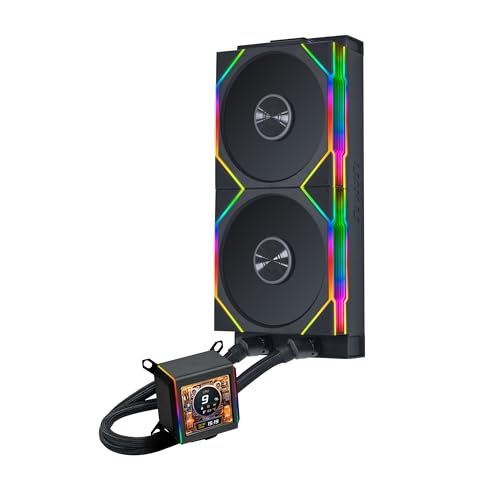
Specs
Spec | Value |
|---|---|
Radiator | 280mm x 30mm |
Fans | 2 x TL 140mm RGB, 2.4 GHz wireless control, daisy-chainable |
Pump | Asetek 8th Gen, up to 3600 RPM |
LCD | 2.88-inch IPS, 480x480 resolution, L-Connect 3 software |
Wireless controller | USB 2.4 GHz dongle |
Sockets | AM5/AM4, LGA1700/1200/115X |
Notes | L-Connect 3 required for wireless fan control and LCD |
Radiator
- Value
280mm x 30mm
Fans
- Value
2 x TL 140mm RGB, 2.4 GHz wireless control, daisy-chainable
Pump
- Value
Asetek 8th Gen, up to 3600 RPM
LCD
- Value
2.88-inch IPS, 480x480 resolution, L-Connect 3 software
Wireless controller
- Value
USB 2.4 GHz dongle
Sockets
- Value
AM5/AM4, LGA1700/1200/115X
Notes
- Value
L-Connect 3 required for wireless fan control and LCD
What it does well
The Lian Li Galahad II LCD 280mm is the only 280mm AIO on this list with wireless fan control. The TL 140mm fans communicate via 2.4 GHz to a USB dongle; you control speed and ARGB lighting through L-Connect 3 without running PWM fan cables from the radiator to the motherboard. In a tight ITX case where routing two 140mm fan cables while also handling radiator tubes is genuinely difficult, eliminating those cables simplifies the build considerably.
The 45-degree rotating tube connectors allow the radiator to be mounted at unusual angles without stressing the tubes. Front radiator mounts in ITX cases sometimes require this; the Galahad’s tubes are more forgiving of off-axis positioning than fixed connectors.
The 2.88-inch IPS LCD at 480x480 resolution is the largest display in this roundup. It runs sharp and bright at 500 nits; L-Connect 3 handles customization including custom images, video, and performance metrics.
What you give up
At 15 reviews and 4.1 stars at brief time, this has less reliability signal than the rest of the lineup. Two separate 1-star reviews report LCD screen failure within three to six months of use: artifacts and display blackout. These are a small fraction of the total reviews, but the sample is thin enough that they carry more weight than a single review in a 1,000-review pool.
The Amazon listing carries a "frequently returned due to compatibility issues" badge. Reviewer comments point to case-clearance problems: the TL fan plus radiator assembly is thick, and some buyers confirm clearance before ordering and still find it tighter than expected. Add at least 5mm of margin beyond the published spec when checking fit.
L-Connect 1 and L-Connect 2 are not compatible with the Galahad II LCD. You need L-Connect 3 specifically. The wireless controller requires one USB 2.0 header dongle.
Who it’s for
The SFF or ITX builder who wants a showcase AIO with LCD and ARGB but has struggled with cable routing in tight cases. Lian Li ecosystem builders running an O11D Mini, A3-mATX, or similar Lian Li case where the TL wireless fans match the existing system. Buyers willing to work with a newer, less-reviewed product to get a wireless feature that no other 280mm AIO currently offers. Confirm your case clearance before ordering and verify the return window covers the first six months if the LCD is the primary purchase driver.
Bottom line
If you want the best thermal headroom in the 280mm class and don’t need RGB or an LCD, buy the Arctic Liquid Freezer III Pro 280. The 38mm radiator and VRM fan are a clear advantage at a lower price than the competition; it’s the default pick for anyone running a 9800X3D, 7800X3D, or Core i7 gaming build.
If you’re already running Corsair iCUE components and want the cleanest cable management in the category, buy the Corsair iCUE Link Titan 280 RX RGB. The single-hub control over the full cooling system is genuinely useful, and the review volume backs up the quality.
If you want a white-build LCD pick and your case supports 280mm, buy the NZXT Kraken Elite 280 RGB 2024 White, then confirm availability and stock before your reader commits. Not sure the chassis will take it? We measured the best PC cases for a 280mm AIO, including which position each one mounts it in.
If your goal is zero-software, zero-cable-complexity cooling at lower spend, buy the be quiet! Pure Loop 3 280mm. Use mounting position-8 on AMD AM5 builds. No ecosystem, no background service, no failure modes beyond the pump itself.
If you’re in a tight ITX case where cable routing is the constraint and you want wireless fans, the Lian Li Galahad II LCD 280mm solves a real problem. Verify clearance carefully and note the thinner review history. If you're open to other radiator sizes, our best AIO coolers guide covers 240mm through 420mm across every budget.
FAQ
Is a 280mm AIO better than a 360mm for most people?
Not always, no. For gaming-first builds with chips under 170W sustained (Ryzen 7 9800X3D, Core i7 14700K), a 280mm AIO handles the thermal load cleanly and runs quieter than a triple-120mm unit. For sustained 200W-plus all-core workloads (Ryzen 9 9950X3D flat out, Core i9-14900K under Blender), the 360mm has a measurable and sustained advantage that matters. The acoustic difference is real: dual 140mm fans at low RPM are typically quieter than triple 120mm at equivalent airflow. If your case fits both, choose based on your chip’s sustained load profile, not the radiator size as a status signal.
Will a 280mm AIO work in my ITX or mATX case?
Most ITX and mATX cases with "240mm AIO support" at the front support 280mm as well, since 280mm uses the same 140mm fan footprint. Check the case spec sheet for the front radiator slot dimensions specifically (length x width x max radiator thickness). The slot typically reads something like "up to 280mm AIO at front." Top mounting for 280mm is less common in compact cases. Also check whether a front-mounted 280mm radiator clears the GPU; in sub-25L ITX cases, this is the most common point of failure.
Does the 38mm thick Arctic radiator fit standard cases?
It fits most mid-towers and larger cases without modification, but compact cases that technically support 280mm can fail the clearance check. The 38mm radiator plus a 25mm fan = 63mm total stack, compared to 52mm for a standard 27mm rad plus 25mm fan. Cases that advertise a "30mm radiator clearance" are fine; cases calibrated for exactly 27mm are not. Check community-sourced case-cooler fit databases if your case’s spec sheet is vague.
Do I need software to run an AIO cooler?
Three of the five picks here (Arctic, be quiet! Pure Loop 3, and in-fan-curve-only mode, the Corsair without the RGB sync features) run without any software. The pump and fans respond to standard PWM header signals from the motherboard’s fan controller. The LCD-equipped picks (NZXT Kraken Elite and Lian Li Galahad II LCD) require their respective software (NZXT CAM, L-Connect 3) for the LCD display to function. The Corsair iCUE Link hub requires iCUE software if you want per-component RGB control, but the fans will spin at a default profile without it.
How long do AIO coolers last before the pump fails?
Most AIO pump manufacturers warranty their pumps for five to six years, which aligns roughly with the failure-mode distribution in long-term user reports. Pump failures before year three are uncommon; year four to six is where they start to accumulate. The failure mode matters more than the timing: a dry pump typically produces audible noise (grinding or rattling) before it fails, giving you warning. Coolant leaks are rare but catastrophic when they happen; a drip onto a GPU below the radiator is the worst-case scenario. If pump reliability is a major concern, air cooling eliminates this risk entirely. The Arctic Liquid Freezer III Pro 280 carries a six-year warranty; the be quiet! Pure Loop 3 carries three years.
Can a 280mm AIO cool a Ryzen 9 9950X3D or Core i9-14900K?
Yes for gaming loads, which is where most users operate these chips. At gaming loads, a 9950X3D typically pulls 80 to 120W, well within 280mm territory. At sustained all-core loads (video encoding, Blender, compilation), the 9950X3D boosts to 170W and holds it, which a capable 280mm like the Arctic LF3 Pro handles, though the margin shrinks at the thermal limits of the chip. A Core i9-14900K at its maximum all-core load (250W) is at the edge of what a 280mm can handle with comfortable thermal margins; for sustained 250W workloads, a 360mm gives noticeably more headroom and lower chip temperatures during extended runs.
Related Articles

Best 360mm AIO Coolers 2026: Five Picks by Build Tier
Best 360mm AIO coolers for 2026 high-TDP gaming builds. Five picks segmented by chip pairing, case clearance, acoustic floor, LCD support, and budget tier.
May 12, 2026

Best 240mm AIO Coolers (2026): 5 Picks for 9800X3D and 285K
Best 240mm AIO coolers for 2026: five picks that cool the 9800X3D, 285K and most sub-250W chips, plus radiator thickness, case fitment and noise notes.
Aug 26, 2026

Best CPU Coolers for the Ryzen 7 9800X3D (2026)
Pick the right cooler for the Ryzen 7 9800X3D. Air, AIO, and SFF picks for the chip's actual gaming thermal envelope, not the SERP's biggest cooler defaults.
May 13, 2026

Best Mini-ITX Cases 2026: Compact Gaming PC Builds
Best Mini-ITX cases 2026 for compact gaming builds: five small form factor picks ranked for cooling, GPU clearance, aesthetics, and quiet, easy assembly.
Jul 8, 2026

Best Prebuilt PC for Modern Warfare 4 (2026): 5 Picks
The best prebuilt PC for Modern Warfare 4, matched to 90, 144 and 240 fps targets: 5 TPM 2.0-ready systems from a 16 GB RX 9060 XT box to an RTX 5080 X3D.
Oct 11, 2026