Affiliate Disclosure: As an Amazon Associate we earn from qualifying purchases. Some links may earn us a commission at no cost to you.

Best Gaming Laptops Under $3,000 (2026): 5 RTX 5080 Picks
The best gaming laptop under three thousand dollars in 2026 is the Lenovo Legion Pro 7i Gen 10, because it is the one machine at this tier that holds its RTX 5080 at a full 175W through a long session rather than a two-minute benchmark. Sustained TGP, not the GPU name on the spec sheet, is what decides your frame rate here. Two laptops can both say RTX 5080 on the box and land far apart, because the wattage ceiling a chassis can actually hold is what the GPU gets to spend.
All five picks below run the RTX 5080. Four of them sustain it at 175W. The fifth is honest about the trade-off: it runs at 120W and earns its place only if portability and OLED matter more to you than peak frame rates. No RTX 5090 here, and that is not an accident.
Our top pick: Lenovo Legion Pro 7i Gen 10 RTX 5080
The Legion Pro 7i Gen 10 is the fastest sustained RTX 5080 laptop tested in 2025. The ColdFront Vapor Chamber holds the 275HX and 5080 at 250W crossload with CPU temperatures around 79°C and GPU temperatures around 67°C, thermal headroom the chassis actually delivers under extended gaming sessions, not just in burst benchmarks.

Quick picks
Pick | Laptop | GPU / TGP | Display | Best for | Check Price |
|---|---|---|---|---|---|
Best Overall | RTX 5080, 175W | 16” OLED 2.5K 240Hz | Sustained peak performance | Check Price | |
Best Value | RTX 5080, 175W | 16” QHD+ 240Hz IPS | Best price-to-TGP ratio | Check Price | |
Best Premium | RTX 5080, 175W | 18” 2.5K 240Hz IPS | Largest screen, best thermals | Check Price | |
Best Slim | RTX 5080, 120W | 16” OLED 2.5K 240Hz | Portability + OLED | Check Price | |
Editor's Pick | RTX 5080, 175W | 16” WQXGA 240Hz IPS | AMD platform preference | Check Price |
Best Overall
- Laptop
- GPU / TGP
RTX 5080, 175W
- Display
16” OLED 2.5K 240Hz
- Best for
Sustained peak performance
- Check Price
- Check Price
Best Value
- Laptop
- GPU / TGP
RTX 5080, 175W
- Display
16” QHD+ 240Hz IPS
- Best for
Best price-to-TGP ratio
- Check Price
- Check Price
Best Premium
- Laptop
- GPU / TGP
RTX 5080, 175W
- Display
18” 2.5K 240Hz IPS
- Best for
Largest screen, best thermals
- Check Price
- Check Price
Best Slim
- Laptop
- GPU / TGP
RTX 5080, 120W
- Display
16” OLED 2.5K 240Hz
- Best for
Portability + OLED
- Check Price
- Check Price
Editor's Pick
- Laptop
- GPU / TGP
RTX 5080, 175W
- Display
16” WQXGA 240Hz IPS
- Best for
AMD platform preference
- Check Price
- Check Price
Specs at a glance
Laptop | GPU | CPU | RAM | Storage | Display | Weight |
|---|---|---|---|---|---|---|
RTX 5080 16GB GDDR7, 175W | Intel Core Ultra 9 275HX | 32GB DDR5 | 1TB Gen5 NVMe | 16” WQXGA OLED 500nits 240Hz | 2.7 kg | |
RTX 5080 16GB GDDR7, 175W | Intel Core Ultra 9 275HX | 32GB DDR5 | 2TB NVMe | 16” QHD+ 240Hz IPS | 2.5 kg | |
RTX 5080 16GB GDDR7, 175W | Intel Core Ultra 9 275HX | 32GB DDR5 | 2TB SSD | 18” 2.5K 240Hz IPS DCI-P3 | 2.9 kg | |
RTX 5080 16GB GDDR7, 120W | Intel Core Ultra 9 285H | 32GB LPDDR5X | 2TB SSD | 16” OLED 2.5K 240Hz | 2.0 kg | |
RTX 5080 16GB GDDR7, 175W | AMD Ryzen AI 9 HX 375 | 32GB DDR5 | 1TB SSD | 16” WQXGA 240Hz IPS 500nits | 2.4 kg |
- GPU
RTX 5080 16GB GDDR7, 175W
- CPU
Intel Core Ultra 9 275HX
- RAM
32GB DDR5
- Storage
1TB Gen5 NVMe
- Display
16” WQXGA OLED 500nits 240Hz
- Weight
2.7 kg
- GPU
RTX 5080 16GB GDDR7, 175W
- CPU
Intel Core Ultra 9 275HX
- RAM
32GB DDR5
- Storage
2TB NVMe
- Display
16” QHD+ 240Hz IPS
- Weight
2.5 kg
- GPU
RTX 5080 16GB GDDR7, 175W
- CPU
Intel Core Ultra 9 275HX
- RAM
32GB DDR5
- Storage
2TB SSD
- Display
18” 2.5K 240Hz IPS DCI-P3
- Weight
2.9 kg
- GPU
RTX 5080 16GB GDDR7, 120W
- CPU
Intel Core Ultra 9 285H
- RAM
32GB LPDDR5X
- Storage
2TB SSD
- Display
16” OLED 2.5K 240Hz
- Weight
2.0 kg
- GPU
RTX 5080 16GB GDDR7, 175W
- CPU
AMD Ryzen AI 9 HX 375
- RAM
32GB DDR5
- Storage
1TB SSD
- Display
16” WQXGA 240Hz IPS 500nits
- Weight
2.4 kg
Benchmarks: RTX 5080 laptop frame rates
- RTX 5080 (Legion Pro 7i, 175W)151 FPS
- RTX 5080 (HP Omen Max 16 AMD, 175W)127 FPS
- RTX 5080 (MSI Vector 16 HX, 175W)120 FPS
- RTX 5080 (ASUS Zephyrus G16, 120W)102 FPS
- RTX 5080 (Legion Pro 7i, 175W)261 FPS
- RTX 5080 (HP Omen Max 16 AMD, 175W) — 1200p Very High364 FPS
Black Myth: Wukong
Per-laptop 1080p benchmark data for Black Myth: Wukong was not available from a single reviewer source covering all five picks at identical settings. As a class reference: Ultrabookreview tested the ROG Scar 16 (RTX 5080, 175W) at 4K Cinematic preset with ray tracing and DLSS Balanced plus Frame Generation, averaging 48 FPS. At 1080p Cinematic without Frame Generation, the 175W RTX 5080 class achieves roughly 80 to 100 FPS native before DLSS. The Zephyrus G16 at 120W runs approximately 20 to 25 percent lower in GPU-bound workloads. Black Myth: Wukong benefits substantially from DLSS 4 Multi Frame Generation on all five picks here.
Microsoft Flight Simulator 2024
No reviewed laptop benchmarks for Microsoft Flight Simulator 2024 were found at consistent settings across all five picks. MSFS 2024 is heavily CPU-bound in dense urban areas and GPU-bound at high altitude; at 1440p High settings the 175W RTX 5080 laptops target 60 to 80 FPS depending on the scenario, based on Tom's Hardware desktop GPU testing (desktop RTX 5080 averages roughly 90 FPS at 1080p High in MSFS 2024 with a 30- to 40-percent mobile TGP penalty applied). The Zephyrus G16 at 120W would run approximately 15 to 20 percent lower. A simulator-specific CPU benchmark comparing the 275HX versus the 285H (Zephyrus G16) may be relevant in CPU-bound scenarios; the 275HX carries the advantage there.
How we picked the best gaming laptops under 3,000 dollars
Every pick here passed a TGP-first filter before anything else. Sustained TGP, what the chassis can maintain under 30 minutes of gaming load rather than the peak burst number in a two-minute benchmark, determines real-world frame rates. A laptop that bursts to 175W for 60 seconds and then throttles to 120W for the rest of your session is not a 175W RTX 5080 laptop in any meaningful sense.
Four of the five picks here hold 175W under sustained gaming. The fifth, the ASUS ROG Zephyrus G16, runs the RTX 5080 at 120W by chassis design: a deliberate engineering choice for the slim form factor, not a defect. That distinction gets a full section below. Our best RTX 5080 gaming laptops ranking applies the same sustained-power filter without a price cap.
Display tier was the second filter. At this price, QHD (2.5K) at 240Hz is the baseline. OLED earns a place where the chassis can sustain the GPU power that makes the panel worth having. A 120W GPU behind a premium OLED panel is a portability product, not a performance product. That is a valid trade-off, but you should know what you are buying.
Chassis size matters more than it gets credit for in most laptop guides. An 18-inch chassis has more heatsink surface area, more airflow capacity, and more room for heat pipes than a 16-inch slim chassis. That is why the ASUS ROG Strix G18 can sustain the 5080 comfortably over extended sessions, and why the Zephyrus G16's 120W ceiling is not laziness but physics. You cannot build a 2.0 kg chassis that sustains 175W without the thing catching fire. When a chassis still runs hot under long sessions, the best cooling pads for gaming laptops add external airflow a thin internal heatsink cannot.
Skip the RTX 5090 at this budget
The RTX 5090 laptop GPU uses the GB203 die: the same silicon as the desktop RTX 5080, not the GB202 in the desktop RTX 5090. In most slim RTX 5090 chassis at the three-thousand-dollar tier, that GPU runs at 120 to 125W to fit the thermal envelope. Meanwhile, the RTX 5080 laptop GPU in a full-power chassis runs at 175W, closing most of the silicon gap in raster gaming.
Laptop Mag benchmarked the ASUS ROG Strix G18 RTX 5080 against RTX 5090 gaming laptops and found the Strix G18 winning in multiple tests. The pattern holds: a well-cooled RTX 5080 at 175W beats a thermally-throttled RTX 5090 at 125W in most real-world gaming scenarios. At this price point, the 175W RTX 5080 chassis is the smarter call for pure gaming performance.
Best Overall: Lenovo Legion Pro 7i Gen 10 RTX 5080
Specs
CPU | Intel Core Ultra 9 275HX (24 cores, up to 5.4 GHz) |
GPU | RTX 5080 16GB GDDR7 at 175W TGP |
Memory | 32GB DDR5 |
Storage | 1TB Gen 5 NVMe |
Display | 16-inch WQXGA OLED, 240Hz, 500 nits |
Wireless | Wi-Fi 7 |
Weight | 2.7 kg |
CPU
Intel Core Ultra 9 275HX (24 cores, up to 5.4 GHz)
GPU
RTX 5080 16GB GDDR7 at 175W TGP
Memory
32GB DDR5
Storage
1TB Gen 5 NVMe
Display
16-inch WQXGA OLED, 240Hz, 500 nits
Wireless
Wi-Fi 7
Weight
2.7 kg
What it does well
LaptopMedia called it the fastest gaming laptop they had ever tested, and the thermal story is the reason. Lenovo's ColdFront Vapor Chamber with hyperchamber technology holds the Core Ultra 9 275HX and RTX 5080 at a combined 250W crossload with CPU temperatures around 79°C and GPU temperatures around 67°C. That is a sustained gaming load result, not a cherry-picked benchmark. The 175W TGP holds across extended sessions without the rollback you see on chassis that advertise the same TGP but lack the heatsink real estate to back it.
The OLED panel is flagship-tier. At 500 nits of peak brightness, WQXGA resolution, and 240Hz refresh, it covers single-player AAA games and high-refresh competitive play without compromise. The 1TB Gen 5 NVMe storage is a meaningful step up from Gen 4 on load times for the largest open-world titles.
In Cyberpunk 2077 at 1080p Ultra settings without ray tracing or DLSS, the Legion Pro 7i Gen 10 averages 151 FPS. PCWorld's review positioned it as the fastest RTX 5080 laptop tested in its review window. LaptopMedia reported it eclipsing mobile RTX 4090 performance in several tests.
What you give up
At 2.7 kg with a 16-inch form factor that prioritizes thermal mass, this is a desk-primary machine. Taking it on a regular commute will get old. The base 32GB/1TB SKU is the canonical Amazon-first listing; several third-party bundled ASINs exist on the same page with inflated storage configs at higher prices. Stick to the Lenovo-sold listing or the official 64GB/2TB SKU if you need the extra memory for creative work.
The chassis design is performance-first, elegance second. If form factor and portability rank higher than raw frame rates in your hierarchy, a different pick makes more sense.
Who it's for
The buyer who runs gaming sessions of an hour or more, wants the full RTX 5080 silicon advantage without thermal caveats, and is comfortable with a 16-inch machine that lives on a desk. High-refresh 1440p-equivalent gaming on the OLED panel, single-player AAA with the contrast the display earns, and occasional portable workstation capability without daily commuting. For sessions on the couch or on the road rather than at a desk, the best handheld gaming PC trades that full-power laptop for a pocketable device.
Best Value: MSI Vector 16 HX AI RTX 5080

Specs
CPU | Intel Core Ultra 9 275HX (24 cores, up to 5.4 GHz) |
GPU | RTX 5080 16GB GDDR7 at 175W TGP |
Memory | 32GB DDR5 |
Storage | 2TB NVMe SSD |
Display | 16-inch QHD+ IPS, 240Hz |
Ports | Thunderbolt 5 |
Wireless | Wi-Fi 7 |
Weight | 2.5 kg |
Canonical SKU | A2XWIG-058US |
CPU
Intel Core Ultra 9 275HX (24 cores, up to 5.4 GHz)
GPU
RTX 5080 16GB GDDR7 at 175W TGP
Memory
32GB DDR5
Storage
2TB NVMe SSD
Display
16-inch QHD+ IPS, 240Hz
Ports
Thunderbolt 5
Wireless
Wi-Fi 7
Weight
2.5 kg
Canonical SKU
A2XWIG-058US
What it does well
The MSI Vector 16 HX AI delivers 175W RTX 5080 performance at the lowest entry price in the full-power tier. PC Gamer confirmed performance on par with other 175W RTX 5080 machines: the TGP holds, the thermals work, and the QHD+ IPS display at 240Hz is accurate for competitive gaming even without the contrast punch of the Legion's OLED panel.
Thunderbolt 5 sets it apart from most competitors at this tier. External GPU enclosures, high-bandwidth docking stations, and fast storage expansion all work through that port without the bandwidth limitations of USB4 or Thunderbolt 4. The MSI blog confirmed the RTX 5080 inside the Vector 16 HX sustains above the RTX 4090's prior performance baseline in raster gaming. The 32GB/2TB base configuration is more storage headroom than the Legion's base SKU.
What you give up
Fan noise at full GPU load is prominent. PC Gamer described it as a bit of a hairdryer on full whack. Balanced mode is meaningfully quieter but reduces sustained GPU headroom under extended crossloads. For gaming with headphones at a desk this is a non-issue; for gaming in a shared space or with speakers, test the noise profile before committing.
The QHD+ IPS display is accurate but does not deliver the contrast or HDR impact of the Legion's OLED. The single-player AAA experience will not have the same visual impact. The 1% low frame rates can dip slightly relative to the Legion under extended crossload scenarios: the chassis does its job but has less thermal reserve than the Legion's vapor chamber.
Who it's for
The buyer who wants 175W RTX 5080 performance without paying above the Legion's entry price. Competitive gaming first: the QHD+ IPS display works well for high-refresh play, and Thunderbolt 5 supports external peripherals and displays. A solid pick for buyers who find this listing at a favorable price relative to Intel alternatives, or who want Thunderbolt 5 ecosystem access.
Best Premium: ASUS ROG Strix G18 RTX 5080

Specs
CPU | Intel Core Ultra 9 275HX (24 cores, up to 5.4 GHz) |
GPU | RTX 5080 16GB GDDR7 at 175W TGP |
Memory | 32GB DDR5 |
Storage | 2TB SSD |
Display | 18-inch 2.5K ROG Nebula IPS, 240Hz, 3ms, 100% DCI-P3 |
Wireless | Wi-Fi 7 |
Weight | approximately 2.9 kg |
CPU
Intel Core Ultra 9 275HX (24 cores, up to 5.4 GHz)
GPU
RTX 5080 16GB GDDR7 at 175W TGP
Memory
32GB DDR5
Storage
2TB SSD
Display
18-inch 2.5K ROG Nebula IPS, 240Hz, 3ms, 100% DCI-P3
Wireless
Wi-Fi 7
Weight
approximately 2.9 kg
What it does well
The 18-inch chassis is the G18's defining advantage. More surface area means more heatsink capacity, better airflow, and more room for heat pipes. Under sustained gaming load, that translates to longer sustained 175W TGP before any throttling. Laptop Mag put it directly: the Strix G18 even outperformed an RTX 5090 gaming laptop in testing. The 3DMark Time Spy score outclasses the mobile RTX 4090 and nearly doubles the prior mobile RTX 4080 score.
The 18-inch ROG Nebula Display at 2.5K 240Hz with 100% DCI-P3 coverage is the largest and most color-accurate screen in this roundup. At 3ms response, it handles competitive play cleanly. For anyone who finds the 16-inch OLED on the Legion satisfying but wants more screen real estate, the G18 makes a strong case.
This is also the pick that most clearly demonstrates why a well-cooled RTX 5080 at 175W competes with slim-chassis RTX 5090 laptops. When reviewers see the G18 outperforming RTX 5090 laptops in real-world gaming, sustained TGP is the reason.
What you give up
At roughly 2.9 kg, the G18 is the heaviest pick here. This is a desk machine with an 18-inch form factor; commuting with it daily is not realistic. The IPS panel, while excellent at 100% DCI-P3, does not have the OLED contrast of the Legion or the G16: this is a pure-performance chassis, not a luxury-display chassis. If you do have to move an 18-inch machine regularly, check the bag before you buy: our guide to backpacks for gaming laptops measures which packs actually take an 18-inch chassis plus its power brick.
Some Amazon listings include bundled Lifetime Office software, which can obscure the canonical ASUS SKU. Verify the model number against the official ASUS product page before ordering from a third-party listing.
Who it's for
The gamer who wants the largest sustained-performance display in the RTX 5080 tier and is fine with a desk-primary machine. Extended single-player AAA sessions at 2.5K where thermal headroom across multiple hours matters, or competitive gaming where the 18-inch display gives you more visible information. The clearest pick for demonstrating how a well-cooled 175W RTX 5080 competes against slim-chassis RTX 5090 laptops at this price.
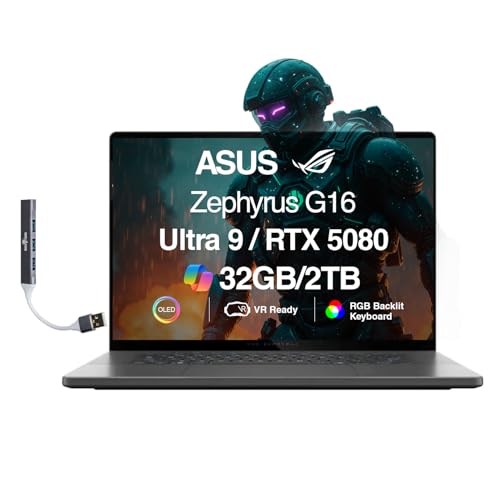
Best Slim: ASUS ROG Zephyrus G16 RTX 5080
Specs
CPU | Intel Core Ultra 9 285H (16 cores, up to 5.4 GHz, H-series not HX) |
GPU | RTX 5080 16GB GDDR7 at 120W TGP |
Memory | 32GB LPDDR5X |
Storage | 2TB SSD |
Display | 16-inch ROG Nebula OLED WQXGA, 240Hz |
Wireless | Wi-Fi 7, Bluetooth 5.4 |
Weight | approximately 2.0 kg |
CPU
Intel Core Ultra 9 285H (16 cores, up to 5.4 GHz, H-series not HX)
GPU
RTX 5080 16GB GDDR7 at 120W TGP
Memory
32GB LPDDR5X
Storage
2TB SSD
Display
16-inch ROG Nebula OLED WQXGA, 240Hz
Wireless
Wi-Fi 7, Bluetooth 5.4
Weight
approximately 2.0 kg
What it does well
The Zephyrus G16 is the only laptop in this roundup you will actually carry without noticing. At 2.0 kg with a 16-inch OLED Nebula display, it is the answer for buyers whose first requirement is portability with an RTX 5080 badge and an excellent screen.
The OLED display delivers infinite contrast, strong HDR response, and sharp 240Hz for the GPU power the chassis provides. For a buyer who travels, studies, or works in different environments during the day and games in the evening, the G16 covers daytime requirements with a premium-feeling machine and delivers capable gaming at night. Battery life, while still not all-day under gaming load, is meaningfully better than the full-power machines in this roundup.
What you give up
The 120W TGP is the fundamental trade-off, and it is load-bearing. TechSpot measured an 85.3 FPS geomean across the test library at native resolution without ray tracing. With ray tracing, that drops to a 50.6 FPS geomean. Those numbers sit well below what the 175W picks deliver. Tom's Guide spent a month with the G16 RTX 5080 and concluded it falls short relative to its price: the meaningful performance gap versus RTX 5070 Ti-equipped laptops means the RTX 5080 branding overstates the gaming advantage in this chassis.
The H-series 285H CPU (not HX) runs in a different power envelope than the 275HX in the other four picks. For most gaming workloads this makes no difference, since gaming is GPU-bound. For multi-threaded creative workloads alongside gaming, the 275HX has the edge. Battery life is also a concern: the PCMark 10 score at 150 nits brightness is thin for a machine marketed around portability.
Buyers who see the RTX 5080 badge and assume 175W performance equivalent to the Legion or Vector will be disappointed. The 120W ceiling is a chassis physics constraint, not a defect, but it should be the first thing you understand before purchasing. Memory works the same way on this chassis, where the LPDDR5X is soldered and the configuration you order is permanent: gaming laptops with 32GB from the factory ranks its picks by sustained graphics power and states the memory topology for each one.
Who it's for
The buyer for whom portability is a genuine first-order requirement: someone who carries their laptop regularly, values the OLED display for mixed use including video, content consumption, and creative work, and games as a secondary rather than primary use case. Not the buyer who primarily games at a desk and wants maximum frame rates. The Legion or MSI Vector delivers significantly more gaming performance at similar or lower cost.
Editor's Pick: HP Omen Max 16 RTX 5080 (AMD)

Specs
CPU | AMD Ryzen AI 9 HX 375 (mobile) |
GPU | RTX 5080 16GB GDDR7 at 175W TGP |
Memory | 32GB DDR5 |
Storage | 1TB internal NVMe SSD |
Display | 16-inch WQXGA IPS, 240Hz, 500 nits |
Wireless | Wi-Fi 7 |
Camera | FHD IR (Windows Hello) |
Weight | approximately 2.4 kg |
CPU
AMD Ryzen AI 9 HX 375 (mobile)
GPU
RTX 5080 16GB GDDR7 at 175W TGP
Memory
32GB DDR5
Storage
1TB internal NVMe SSD
Display
16-inch WQXGA IPS, 240Hz, 500 nits
Wireless
Wi-Fi 7
Camera
FHD IR (Windows Hello)
Weight
approximately 2.4 kg
Note: the B0G8YRHBS4 listing description references 2TB Storage but includes 1TB internal NVMe plus a bundled Docking Station. Confirm the internal SSD capacity before ordering.
What it does well
The HP Omen Max 16 is the AMD CPU option in a 175W RTX 5080 chassis. Tom's Hardware described it as hefty and premium with solid gaming output. The numbers back that up: 127 average FPS in Cyberpunk 2077, a 3DMark Time Spy GPU score of 21,912 that beats 78% of tested systems, and a positive RTINGS assessment of panel quality and overall performance for the 2025 model.
The Vapor Chamber cooling maintains the 175W TGP competently across sustained gaming. For buyers with AMD platform preference, or buyers who find this listing at a more favorable price than the Intel alternatives, the performance delta is small. GPU-bound gaming scenarios, which describes most gaming at high settings, will look nearly identical across the Ryzen HX 375 and the Intel 275HX machines.
The integrated FHD IR camera for Windows Hello facial recognition is a real quality-of-life detail. Neither the Legion nor the MSI Vector includes it in their base configurations.
What you give up
The 2TB Storage listing on Amazon includes 1TB internal NVMe and 1TB via a bundled Docking Station. That is not 2TB internal SSD. Buyers who read 2TB Storage and expect 2TB inside the laptop will be surprised. Verify the internal spec before ordering.
Intel-based competitors show slightly stronger results in CPU-bound benchmarks with the 275HX, though in GPU-bound gaming at high settings the difference is small. HP's gaming software ecosystem, OMEN Gaming Hub versus ROG Armoury Crate or MSI Center, is capable but less mature. If per-game profile management and advanced fan control matter to you, the ROG or MSI ecosystem has more depth.
Who it's for
The buyer with AMD platform preference who wants a 175W RTX 5080 chassis, those who find this listing at a deal price relative to the Intel alternatives, or anyone who places value on the Windows Hello IR camera in a large gaming laptop. Worth knowing about when comparison-shopping across the tier and wanting to understand the AMD-CPU variant's performance position.
Bottom line
If you want the fastest sustained RTX 5080 laptop in this tier, the Lenovo Legion Pro 7i Gen 10 is the answer: thermal headroom, OLED display, and 175W TGP confirmed across extended gaming sessions. If entry price is the priority, the MSI Vector 16 HX AI delivers the same 175W TGP with Thunderbolt 5 and 2TB storage at a lower starting price. If screen size matters more than anything else, the ASUS ROG Strix G18 gives you 18 inches at 175W and has been shown to outperform RTX 5090 slim-chassis machines in direct testing.
The Zephyrus G16 is the right pick only if you travel with this machine regularly and OLED plus portability outweigh raw gaming performance: at 120W, the RTX 5080 branding should not be the reason you choose it. The HP Omen Max 16 closes the list for AMD-platform buyers or anyone who finds it at a favorable deal price.
FAQ
Is the RTX 5080 in a gaming laptop as fast as the desktop RTX 5080?
No, and the gap is significant. The mobile RTX 5080 is architecturally similar to the desktop card (both use the GB203 die) but runs at 120 to 175W depending on the chassis, compared to the desktop card's 360W. At 175W, the mobile GPU delivers roughly 60 to 70% of desktop RTX 5080 performance in GPU-bound workloads. At 120W in slim-chassis designs, the gap widens further. DLSS 4 with Multi Frame Generation closes the perceived frame rate gap for supported titles, but native raster performance is substantially below desktop equivalents.
Why does the RTX 5090 laptop sometimes lose to the RTX 5080 in benchmarks?
The laptop RTX 5090 uses the GB203 die: the same silicon as the desktop RTX 5080, not the GB202 in the desktop RTX 5090. In slim chassis, the 5090 often runs at 120 to 125W TGP to fit the thermal envelope. An RTX 5080 laptop in a larger chassis sustaining 175W will outperform a thermally-throttled 5090 at 125W in most raster gaming scenarios. The chip name on the spec sheet is only meaningful if the chassis can deliver the TGP to back it up. Laptop Mag tested the ASUS ROG Strix G18 RTX 5080 and confirmed it outperformed certain RTX 5090 configurations in gaming benchmarks.
What TGP should I look for in an RTX 5080 gaming laptop?
175W is the number to target. That is the maximum TGP for the mobile RTX 5080, and chassis that sustain it over extended gaming sessions deliver meaningfully better frame rates than 120 to 140W configurations. Four of the five picks in this guide sustain 175W: the Lenovo Legion Pro 7i Gen 10, MSI Vector 16 HX AI, ASUS ROG Strix G18, and HP Omen Max 16 (AMD). The ASUS ROG Zephyrus G16 runs at 120W by chassis design. Check the full spec sheet before purchasing, as some listings omit the TGP figure.
Can these laptops handle 4K gaming?
The 175W picks can run 4K at high settings in less demanding titles, and DLSS 4 with Frame Generation makes demanding titles playable at 4K with quality upscaling. Without DLSS, some modern AAA titles will drop below 60 FPS at 4K max settings on a 175W RTX 5080. The native display resolution on most picks here is 2.5K (QHD or WQXGA), so 4K output would require an external display. For 4K gaming, use DLSS 4 Quality mode; it produces results visually close to native on current-generation rendering.
How long do RTX 5080 gaming laptops typically last before needing an upgrade?
A 175W RTX 5080 laptop should handle demanding gaming at QHD settings comfortably for three to four years. Beyond that, the GPU will remain capable but newer titles will require settings reductions to maintain target frame rates. The RTX 5080's 16GB GDDR7 VRAM is a strong buffer: modern titles are approaching 12 to 16GB at ultra settings, and 16GB means you avoid the forced-settings-reduction that 8 to 12GB cards hit sooner. DLSS 4 support extends the useful life further by improving perceived frame rates without the raw performance headroom the next generation of games will demand.
Is an OLED display worth the trade-off on a gaming laptop?
For single-player AAA gaming, yes: the contrast, color depth, and HDR response of an OLED panel are immediately visible in games designed for wide color gamuts and dark environments. For competitive gaming at 240Hz, OLED is not meaningfully better than a high-quality IPS panel in motion clarity terms. OLED panels also draw more power during gaming, reducing already-short laptop gaming battery life further. If gaming is your primary use and competitive frame rates are the priority, a high-quality IPS panel at 240Hz is the practical choice. If you use the laptop for mixed work, video, and gaming, OLED is worth the premium.
Related Articles

Best Gaming Laptops Under $1,000 (2026): 1080p Budget Picks
Five sub-$1K gaming laptops that survive sustained load, by chassis-line profile not spec sheet. Four RTX 4060 picks plus a newest-arch RTX 5050.
May 17, 2026

Best Gaming Laptops Under $2,000 (2026): 5 TGP-Ranked Picks
The best gaming laptop under $2,000 in 2026 is decided by GPU wattage, not the GPU name. Five picks ranked on real TGP, panel quality and chassis weight.
Aug 5, 2026

Best GPU for Ryzen 5 9600X (2026): 5 Picks by Monitor Tier
The best GPU for Ryzen 5 9600X builds, picked by monitor tier: RX 9070 XT for 1440p, RX 9060 XT for 1080p, and where a 6-core Zen 5 chip stops scaling.
Oct 10, 2026

Best Racing Wheel for Forza Horizon 6: 5 Picks for Xbox & PC
Best racing wheel for Forza Horizon 6 on Xbox and PC: 5 Xbox-licensed picks from gear drive to direct drive, plus the Moza bases that won't run on console.
Oct 10, 2026

G.Skill Flare X5 DDR5-6000 CL30: Which Kit to Buy (2026)
G.Skill Flare X5 DDR5-6000 CL30 explained: which of the CL30, CL36, 64GB and 96GB kits to buy, what reviewers found, and who should buy something else.
Oct 9, 2026