Affiliate Disclosure: As an Amazon Associate we earn from qualifying purchases. Some links may earn us a commission at no cost to you.

5 Best Prebuilt Gaming PCs Under $1500 (2026): 8GB vs 16GB
The Skytech Shadow 5 is the best prebuilt gaming PC under this budget ceiling right now, but the spec that decides which of these machines you should actually buy is VRAM. "RTX 5060 Ti" now covers two meaningfully different cards: the 8GB and 16GB versions of the same chip, both shipping inside identically priced boxes. At 1440p ultra the 16GB version runs roughly 18% faster on average, and in ray-tracing-heavy titles the gap reaches 40%. Which one you get matters more than the badge on the case.
The five prebuilt gaming PCs below cover the full tier, from 1080p high-refresh builds to 16GB cards that hold up at 1440p. They're filtered for Amazon availability, non-proprietary parts, and brand warranty honesty. One brand on this list quietly gives Amazon buyers less coverage than its direct-channel customers. That's in the pick section so you can factor it in before clicking.
Our top pick: Skytech Shadow 5
The Skytech Shadow 5 is the best-reviewed RTX 5060 Ti prebuilt at this price ceiling, with a Ryzen 7 8700F, 16GB DDR5-6000, a 750W Gold PSU, and 1,266 Amazon ratings backing it up.

Quick picks
Pick | PC | GPU / VRAM | Target use | Buy |
|---|---|---|---|---|
Best Overall | RTX 5060 Ti 8GB | 1080p to 1440p 144Hz | Check Price | |
Best Value | RTX 5060 Ti 16GB | 1440p on a budget | Check Price | |
Best for 1440p | RTX 5060 Ti 16GB | 1440p 100fps+ sustained | Check Price | |
Editor's Pick | RTX 5060 Ti 8GB | Brand confidence + connectivity | Check Price | |
Best Brand Name | RTX 5060 Ti 8GB | Name-brand buyers (read warranty note) | Check Price |
Best Overall
- PC
- GPU / VRAM
RTX 5060 Ti 8GB
- Target use
1080p to 1440p 144Hz
- Buy
- Check Price
Best Value
- PC
- GPU / VRAM
RTX 5060 Ti 16GB
- Target use
1440p on a budget
- Buy
- Check Price
Best for 1440p
- PC
- GPU / VRAM
RTX 5060 Ti 16GB
- Target use
1440p 100fps+ sustained
- Buy
- Check Price
Editor's Pick
- PC
- GPU / VRAM
RTX 5060 Ti 8GB
- Target use
Brand confidence + connectivity
- Buy
- Check Price
Best Brand Name
- PC
- GPU / VRAM
RTX 5060 Ti 8GB
- Target use
Name-brand buyers (read warranty note)
- Buy
- Check Price
Specs at a glance
PC | CPU | GPU | RAM | Storage | Cooling | WiFi | Warranty |
|---|---|---|---|---|---|---|---|
Ryzen 7 8700F | RTX 5060 Ti 8GB | 16GB DDR5-6000 | 1TB NVMe | Air | WiFi 5 | 1yr Skytech | |
i5-14400F | RTX 5060 Ti 16GB | 16GB DDR5-5200 | 1TB Gen4 NVMe | Air | WiFi 5 | 1yr Skytech | |
i7-14700F | RTX 5060 Ti 16GB | 16GB DDR5-5200 | 1TB Gen4 NVMe | 360mm AIO | WiFi 5 | 1yr Skytech | |
Core Ultra 7 265F | RTX 5060 Ti 8GB | 16GB DDR5-5600 | 1TB PCIe SSD | 180W Coldfront | WiFi 6E | 1yr Lenovo | |
Ryzen 7 8700F | RTX 5060 Ti 8GB | 16GB DDR5 | 1TB PCIe 4.0 NVMe | Air | WiFi 6 | 1yr (Amazon) |
- CPU
Ryzen 7 8700F
- GPU
RTX 5060 Ti 8GB
- RAM
16GB DDR5-6000
- Storage
1TB NVMe
- Cooling
Air
- WiFi
WiFi 5
- Warranty
1yr Skytech
- CPU
i5-14400F
- GPU
RTX 5060 Ti 16GB
- RAM
16GB DDR5-5200
- Storage
1TB Gen4 NVMe
- Cooling
Air
- WiFi
WiFi 5
- Warranty
1yr Skytech
- CPU
i7-14700F
- GPU
RTX 5060 Ti 16GB
- RAM
16GB DDR5-5200
- Storage
1TB Gen4 NVMe
- Cooling
360mm AIO
- WiFi
WiFi 5
- Warranty
1yr Skytech
- CPU
Core Ultra 7 265F
- GPU
RTX 5060 Ti 8GB
- RAM
16GB DDR5-5600
- Storage
1TB PCIe SSD
- Cooling
180W Coldfront
- WiFi
WiFi 6E
- Warranty
1yr Lenovo
- CPU
Ryzen 7 8700F
- GPU
RTX 5060 Ti 8GB
- RAM
16GB DDR5
- Storage
1TB PCIe 4.0 NVMe
- Cooling
Air
- WiFi
WiFi 6
- Warranty
1yr (Amazon)
Benchmarks
RTX 5060 Ti 8GB hits its VRAM ceiling at 1440p ultra; 16GB runs without stutter.
- 104 FPS
- 88 FPS
At 1440p medium, the 8GB card runs comfortably. This is the realistic target for 8GB builds.
- 115 FPS
- 118 FPS
Esports titles are CPU-bound at competitive settings; VRAM tier makes negligible difference.
- RTX 5060 Ti 16GB325 FPS
- RTX 5060 Ti 8GB320 FPS
VRAM-hungry UE5 title; the 16GB variant handles 1440p high cleanly where the 8GB shows texture pop.
- 92 FPS
- 78 FPS
How we picked the best prebuilt gaming PCs under this price ceiling
Every pick on this list ships from Amazon with standard return windows, uses non-proprietary ATX components you can upgrade later, and came from a brand with real warranty infrastructure. That filtered out a fair number of options. Whether those parts add up to less than a self-built list at this ceiling is a separate question, and we ran the numbers on whether a prebuilt is cheaper than building a PC tier by tier for 2026.
The first thing we look at is GPU tier: specifically, which version of the RTX 5060 Ti is in the box. The 8GB and 16GB variants run the same Blackwell chip, but the VRAM difference starts to show at 1440p ultra in texture-heavy titles. If you're gaming at 1080p on a 144Hz panel, the 8GB version is fine and you'd be paying for headroom you won't use. If you're targeting 1440p at high-to-max settings, the 16GB model is the better long-term call. Its frame-rate advantage is meaningful and grows as games push harder. The benchmarks above show what that gap looks like in practice. We ranked the whole tier by that split in our guide to the best RTX 5060 Ti prebuilt gaming PCs, which lists which machines ship which version.
The second axis is brand reputation and warranty. Most prebuilt brands in this tier offer one year of parts and labor when bought through Amazon. One brand here, CyberPowerPC, gives you one year if you buy from Amazon and two years parts plus three years labor if you buy from their own site or Costco. That difference isn't disclosed anywhere on the Amazon listing. It's worth knowing before you click.
Third is upgrade path. AM5 and LGA1700 are both represented in this guide. AM5 (Ryzen) has a longer CPU upgrade runway: future Ryzen generations will drop into the same socket. LGA1700 is Intel's last stop on that socket family; CPU upgrades are limited to 12th/13th/14th gen used-market chips. That matters if you're thinking about a CPU swap in two or three years. That same socket question splits the field among the best white prebuilt gaming PCs, where two of five sit on AM5 and one does not publish a platform at all.
Finally, we looked at self-build parity. A DIY build with equivalent specs sits within a few hundred dollars of the best picks here once you add OS licensing and account for assembly time. The prebuilt tax at this tier is real but not obscene. You're paying for warranty coverage, tech support, and not spending an afternoon watching YouTube tutorials on thermal paste application. The picks below are the ones where the convenience math works out.
We cross-referenced our initial shortlist with our under-1K prebuilt roundup and our under-2K guide to make sure these picks occupy a distinct middle tier.
Best Overall: Skytech Shadow 5
Specs
CPU | AMD Ryzen 7 8700F (4.1GHz base, 5.0GHz boost), 8 cores / 16 threads |
GPU | NVIDIA GeForce RTX 5060 Ti 8GB GDDR7 |
Memory | 16GB DDR5-6000 |
Storage | 1TB NVMe SSD |
PSU | 750W 80+ Gold |
Cooling | Air cooled with ARGB fans |
Networking | WiFi 5 (802.11AC) |
OS | Windows 11 Home |
Warranty | 1 year parts and labor |
CPU
AMD Ryzen 7 8700F (4.1GHz base, 5.0GHz boost), 8 cores / 16 threads
GPU
NVIDIA GeForce RTX 5060 Ti 8GB GDDR7
Memory
16GB DDR5-6000
Storage
1TB NVMe SSD
PSU
750W 80+ Gold
Cooling
Air cooled with ARGB fans
Networking
WiFi 5 (802.11AC)
OS
Windows 11 Home
Warranty
1 year parts and labor
What it does well
The Ryzen 7 8700F is a capable chip for a prebuilt gaming machine. Its 8 cores handle streaming while gaming without frame-rate drops you'd notice mid-session, and the AM5 platform means you have a real CPU upgrade path when you want one. Future Ryzen generations slot into the same socket.
The 750W Gold PSU is the number that most prebuilt guides skip over. At this price tier, a lot of competitors ship 650W units that leave thin headroom for a future GPU swap. The Shadow 5 gives you 100W of extra runway, which is relevant when the next GPU generation's mid-range cards run 300W TGPs.
Skytech's build quality is non-proprietary across the board. The motherboard, RAM, and storage are all standard parts you can pull and replace without sourcing weird connectors or dealing with locked BIOS menus. Buyers in the Amazon reviews report this explicitly. It's one of the reasons the 4.6-star average across 1,266 ratings has held up.
This is the tier's most-reviewed and most-purchased RTX 5060 Ti prebuilt. That scale of review volume, held over time, is a meaningful signal.
What you give up
The 8GB VRAM is the honest constraint here. Modern AAA titles like Black Myth: Wukong, Indiana Jones, and Clair Obscur push past 8GB of texture budget at 1440p ultra. The machine won't fail; you'll get a stutter before you hit a crash. At 1080p, this isn't a daily issue. At 1440p max settings, you'll hit it in a subset of newer titles and manage it by dropping to high instead of ultra.
WiFi is 802.11AC, which is WiFi 5. It works fine, but the Lenovo Legion Tower 5i ships with WiFi 6E. If wireless latency matters to you and your router supports 6GHz, the Lenovo is worth the comparison.
The air cooling runs warm under sustained load compared to the AIO-cooled Shadow 4. It doesn't throttle in normal use, but the interior temps are higher over long sessions, and a warm room without good case placement makes that visible.
Skytech's "brand may vary" GPU language means the AIB you receive isn't locked at purchase. Reports suggest most units ship with mid-tier AIBs (Zotac, Palit, similar), which are fine performers. A small number of buyers have flagged fan and cable issues that Skytech's warranty team resolved via return. The documented failure rate looks within normal range for the category.
Who it's for
1080p to 1440p 144Hz players who want a proven prebuilt with good brand support, plan to keep the machine as-is for three to four years at those settings, and value the confidence that comes with the highest review volume in this tier. Not the pick for 1440p max-everything buyers or anyone planning a GPU swap within the next two years: the 750W PSU is excellent but the 8GB VRAM starts showing limits before the rest of the machine does.
Best Value: Skytech Chronos 3

Specs
CPU | Intel Core i5-14400F (2.5GHz base, 4.7GHz boost), 10 cores (6P + 4E) |
GPU | NVIDIA GeForce RTX 5060 Ti 16GB GDDR7 |
Memory | 16GB DDR5-5200 |
Storage | 1TB Gen4 NVMe SSD |
PSU | 650W 80+ Gold |
Cooling | Air cooled with ARGB fans |
Networking | WiFi 5 (802.11AC) |
OS | Windows 11 Home |
Warranty | 1 year parts and labor |
CPU
Intel Core i5-14400F (2.5GHz base, 4.7GHz boost), 10 cores (6P + 4E)
GPU
NVIDIA GeForce RTX 5060 Ti 16GB GDDR7
Memory
16GB DDR5-5200
Storage
1TB Gen4 NVMe SSD
PSU
650W 80+ Gold
Cooling
Air cooled with ARGB fans
Networking
WiFi 5 (802.11AC)
OS
Windows 11 Home
Warranty
1 year parts and labor
What it does well
The Chronos 3 is the cheapest way to put a 16GB VRAM card inside a prebuilt at this ceiling. That VRAM headroom is the whole case for this machine. At 1440p ultra in texture-heavy titles, the 16GB version of the RTX 5060 Ti runs about 18% faster on average than the 8GB, and in ray-tracing-heavy scenarios the gap widens further. For buyers who want to run 1440p at max settings for the next three years without tuning settings downward, the extra VRAM is worth more than any other single spec here.
The Gen4 NVMe SSD loads modern open-world games noticeably faster than a plain NVMe. Not a make-or-break feature, but it shows up in practice.
At its lower price point, it leaves money on the table for a monitor upgrade or peripherals if this is a first-time PC build.
What you give up
The i5-14400F is a 10-core chip built on Intel's LGA1700 platform, which is end-of-life for Intel's socket roadmap. Future CPU upgrades are limited to 12th, 13th, and 14th-gen options on the used market. There's no next-gen Intel processor coming to this socket. For gaming-only use, the i5-14400F won't bottleneck the RTX 5060 Ti at 1080p or 1440p. For streaming-while-gaming or running productivity software in the background, the lower core count and clock speed relative to the Ryzen 7 8700F in the Shadow 5 starts to show.
The 650W PSU is tight for a future GPU upgrade. If you eventually swap in a next-generation mid-range card, a 650W unit may require a PSU replacement at the same time.
This listing has very few Amazon ratings at time of publish (new listing). That's not a knock on the build quality, but the purchase confidence that comes from a large review base isn't there yet.
Who it's for
The budget-forward 1440p buyer who wants the VRAM headroom without paying full top-tier price for it, isn't streaming simultaneously while gaming, and isn't planning a CPU swap. The Intel dead-end socket is the trade-off in exchange for 16GB GDDR7 at a lower total cost.
Best for 1440p: Skytech Shadow 4

Specs
CPU | Intel Core i7-14700F (2.1GHz base, 5.3GHz boost), 20 cores (8P + 12E) |
GPU | NVIDIA GeForce RTX 5060 Ti 16GB GDDR7 |
Memory | 16GB DDR5-5200 |
Storage | 1TB Gen4 NVMe SSD |
PSU | 650W 80+ Gold |
Cooling | 360mm ARGB AIO liquid cooler |
Networking | WiFi 5 (802.11AC) |
OS | Windows 11 Home |
Warranty | 1 year parts and labor |
CPU
Intel Core i7-14700F (2.1GHz base, 5.3GHz boost), 20 cores (8P + 12E)
GPU
NVIDIA GeForce RTX 5060 Ti 16GB GDDR7
Memory
16GB DDR5-5200
Storage
1TB Gen4 NVMe SSD
PSU
650W 80+ Gold
Cooling
360mm ARGB AIO liquid cooler
Networking
WiFi 5 (802.11AC)
OS
Windows 11 Home
Warranty
1 year parts and labor
What it does well
This is the only prebuilt at this ceiling pairing a 16GB VRAM GPU with an AIO-cooled i7. Skytech's own product page positions this as the 1440p Quad HD config, which is accurate: 16GB GDDR7 removes the VRAM constraint that clips the 8GB version at 1440p ultra, and the i7-14700F's 20 cores handle concurrent streaming or background workloads cleanly.
The 360mm AIO cooler runs the CPU at consistent thermals under sustained gaming loads, keeping effective clock speeds stable over long sessions. Air-cooled prebuilts at this price tier can see the CPU throttle slightly after an hour of sustained load in warm environments. The AIO prevents that.
The i7-14700F's 8 performance cores are meaningfully faster than the i5-14400F's 6 in multi-threaded workloads. If you stream, record, or run anything CPU-intensive in the background while gaming, this chip handles it without the frame dips you'd see on lighter configurations. Sim racing is a different kind of CPU load, where cache matters more than core count, so if iRacing or ACC is the main use, start with our best prebuilt gaming PC for sim racing picks, all built on Ryzen X3D chips.
At the same price as the Shadow 5 (Best Overall), you're trading the Ryzen 7's AM5 upgrade path and higher review count for better VRAM, a stronger CPU, and liquid cooling. For a buyer who's going to keep this machine for four-plus years without upgrading components, this is the better long-term spec.
What you give up
LGA1700 is Intel's last generation on this socket. No next-gen Intel CPU drops in: the upgrade path is 12th/13th/14th gen chips on the used market only. This matters if CPU upgrades are part of your long-term plan. If they aren't, it's academic: the i7-14700F outperforms every gaming scenario the RTX 5060 Ti will encounter.
The 650W PSU carries the same constraint as the Chronos 3. Plan to replace it alongside any future GPU upgrade.
Delivery windows are longer than the Shadow 5, which matters if you're building for an event.
Buyers have flagged occasional quality-control issues. One verified review documented a unit where GPU fans wouldn't spin under stress and Bluetooth was non-functional. That unit was returned via warranty. Reports suggest this is within the normal failure rate for the category, but it's worth knowing Skytech's 1-year warranty covers it.
Who it's for
The 1440p 100fps-plus buyer who plans to keep this machine for four or five years at current settings, values consistent thermal performance over long sessions, and doesn't need it tomorrow. The best spec-for-spec choice at this ceiling for sustained 1440p use.
Editor's Pick: Lenovo Legion Tower 5i

Specs
CPU | Intel Core Ultra 7 265F (2.4GHz base, 5.3GHz boost), 20 cores (8P + 12E) |
GPU | NVIDIA GeForce RTX 5060 Ti 8GB GDDR7 |
Memory | 16GB DDR5-5600, expandable to 128GB |
Storage | 1TB PCIe SSD |
Cooling | 180W Coldfront air cooling |
Networking | 2.5G Ethernet, WiFi 6E, Bluetooth 5.2 |
OS | Windows 11 Home |
Warranty | 1 year Lenovo (same coverage regardless of where you buy) |
Extras | Includes 3 months of Xbox Game Pass |
CPU
Intel Core Ultra 7 265F (2.4GHz base, 5.3GHz boost), 20 cores (8P + 12E)
GPU
NVIDIA GeForce RTX 5060 Ti 8GB GDDR7
Memory
16GB DDR5-5600, expandable to 128GB
Storage
1TB PCIe SSD
Cooling
180W Coldfront air cooling
Networking
2.5G Ethernet, WiFi 6E, Bluetooth 5.2
OS
Windows 11 Home
Warranty
1 year Lenovo (same coverage regardless of where you buy)
Extras
Includes 3 months of Xbox Game Pass
What it does well
The Lenovo Legion Tower 5i is the connectivity pick of this roundup and the only machine here with WiFi 6E. On a 6GHz router, the reduced interference and lower latency are noticeable in online gaming. Competitive players in apartments with crowded 2.4GHz and 5GHz spectrums will feel the difference. The 2.5G Ethernet port is also the best wired option in this tier; competitors ship 1G.
The Intel Core Ultra 7 265F is Arrow Lake silicon, Intel's 2024 architecture, not a repackaged 12th or 13th-gen chip. The NPU inside supports local AI workloads and has a longer support runway from Intel's driver team than the 14-series CPUs in the Skytech options.
RAM expandability to 128GB is unusual at this price. If you do content creation, run VMs, or anticipate heavier workloads over the machine's life, the headroom is there. No other pick in this roundup offers it. If memory capacity is the deciding line rather than the price ceiling, our picks for prebuilt gaming PCs with 32GB of RAM sort these machines by what the RAM is rated at and how the DIMM slots are filled.
Lenovo's warranty is consistent across purchase channels. Whether you buy from Amazon, directly from Lenovo, or from a third-party retailer, you get the same coverage. That's different from CyberPowerPC's tiered warranty, and it matters if the machine develops an issue in year two.
What you give up
The RTX 5060 Ti 8GB is the same VRAM constraint as the Shadow 5. At this price, you're buying the connectivity and brand quality, not extra VRAM. The Shadow 4 delivers 16GB of GDDR7 for the same or slightly higher price if VRAM headroom is the priority.
No keyboard or mouse included. Both Skytech configurations and CyberPowerPC bundle them.
The Amazon listing carries a "frequently returned item" flag. One verified review documented a unit arriving in what appeared to be used condition, with accessories not individually packaged and visible dust on the chassis. Lenovo's fulfillment and support process appears standard based on other reviews; this may have been a warehouse-level issue rather than a product defect. Worth checking the unit on arrival before the return window closes.
Who it's for
First-time PC buyers who want Lenovo's brand reputation and consistent warranty. Buyers in apartments or dense WiFi environments who will notice the WiFi 6E advantage. Anyone who anticipates the machine growing into workstation or content-creation territory and wants the 128GB DDR5 upgrade path. The pick when brand confidence and connectivity matter more than raw VRAM headroom.
Best Brand Name: CyberPowerPC Gamer Master GMA2900A3
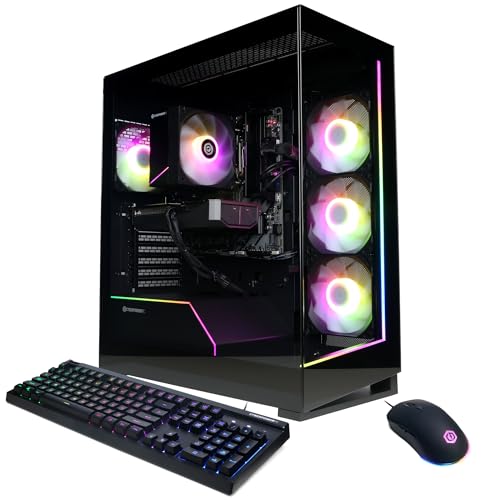
Specs
CPU | AMD Ryzen 7 8700F (4.1GHz), 8 cores / 16 threads |
GPU | NVIDIA GeForce RTX 5060 Ti 8GB GDDR7 |
Memory | 16GB DDR5 |
Storage | 1TB PCIe 4.0 NVMe SSD |
Chipset | AMD B850 |
Networking | WiFi 6 (802.11AX), Bluetooth 5.3 |
Ports | 2x USB-C 3.2, 4x USB-A 3.2 |
OS | Windows 11 Home |
Warranty | 1 year parts and labor (Amazon purchase) |
CPU
AMD Ryzen 7 8700F (4.1GHz), 8 cores / 16 threads
GPU
NVIDIA GeForce RTX 5060 Ti 8GB GDDR7
Memory
16GB DDR5
Storage
1TB PCIe 4.0 NVMe SSD
Chipset
AMD B850
Networking
WiFi 6 (802.11AX), Bluetooth 5.3
Ports
2x USB-C 3.2, 4x USB-A 3.2
OS
Windows 11 Home
Warranty
1 year parts and labor (Amazon purchase)
What it does well
CyberPowerPC is one of the most recognized prebuilt gaming brands in retail. First-time buyers who've done research have seen the name; it carries purchase confidence that less-known brands don't. The Gamer Master series uses non-proprietary parts, no locked BIOS and no weird connectors, which matters for long-term upgrades and for getting third-party tech support.
The AMD B850 chipset is the best motherboard platform in this roundup for future CPU upgrades. AM5 is AMD's current socket family, and AMD has committed to platform longevity through future generations. The Ryzen 7 8700F can be upgraded to a faster AM5 chip down the line. If that AM5 upgrade path is the reason you are here, our guide to the best AMD prebuilt gaming PCs ranks the RX 9070 XT and Ryzen towers built on the same socket.
WiFi 6 and two USB-C 3.2 ports on the rear are ahead of Skytech's connectivity specs at the same price point. This is a real-world advantage if you use USB-C peripherals or are connected to a WiFi 6 router.
More than 200 units sold per month on Amazon. That purchase velocity, combined with 901 ratings at 4.4 stars, means the good reviews reflect sustained real-world experience rather than early-adopter outliers.
What you give up
This is the critical gotcha in the roundup and it needs to be stated directly. CyberPowerPC buyers who purchase through Amazon receive a 1-year parts and labor warranty. The same PC purchased from CyberPowerPC.com or Costco includes 2 years of parts coverage and 3 years of labor coverage. This difference is not disclosed on the Amazon product page. Multiple verified Amazon reviewers have confirmed being told this after their units developed problems just outside the 1-year window. CyberPowerPC's response was that the warranty terms differ by purchase channel and that Amazon purchases do not qualify for the extended coverage.
If you want the longer warranty, buy from cyberpowerpc.com directly. The price is typically comparable, and you get substantially more post-purchase protection.
A subset of Amazon reviews also document PSU-related failures and customer service difficulty when resolving issues through Amazon versus CyberPowerPC's direct support channel. These aren't universal experiences. The majority of buyers report no issues, but they correlate with the warranty gap. Warranty terms and support quality vary more by badge than by price, and how Skytech, iBUYPOWER and CyberPowerPC compare on warranty terms and published specs lays the three side by side.
The RTX 5060 Ti 8GB carries the same VRAM constraints described in the Best Overall and Editor's Pick sections.
Who it's for
Buyers who specifically want the CyberPowerPC brand name and are either comfortable with the 1-year Amazon warranty or planning to purchase directly from CyberPowerPC.com. The AM5 platform and better connectivity specs make it a reasonable pick for buyers who value those features and read the warranty fine print before buying.
Bottom line
The Skytech Shadow 5 is the right default for most buyers in this tier. The highest review count, AM5 upgrade path, and 750W PSU give it the best long-term support case of any 8GB VRAM option here.
If 1440p at max settings is the target, the Skytech Shadow 4 is the spec upgrade worth making. The 16GB GDDR7 and an AIO-cooled i7 at the same price point make it the better sustained-performance choice. The VRAM difference is real and growing.
The Skytech Chronos 3 is the same 16GB VRAM story at a lower price, with a less capable CPU. The pick for 1440p buyers who don't stream simultaneously.
The Lenovo Legion Tower 5i is for buyers who prioritize brand consistency, WiFi 6E, or the 128GB DDR5 upgrade ceiling.
The CyberPowerPC Gamer Master is a solid machine. Read the warranty section before buying from Amazon.
FAQ
Is the RTX 5060 Ti good enough for 1440p gaming in 2026?
Yes, with an important qualifier on VRAM. The 16GB version handles 1440p at ultra settings cleanly in current titles, including texture-heavy games like Black Myth: Wukong and Indiana Jones. The 8GB version runs 1440p well at medium-to-high settings but starts stuttering before it drops frames in the most demanding scenarios at ultra. For 1440p high-to-max use in 2026 and into 2027, the 16GB variant is the more confident choice. At 1080p, either version is capable.
What's the difference between the RTX 5060 Ti 8GB and 16GB inside a prebuilt? Does it matter?
Both run the same Blackwell GPU die; the difference is VRAM capacity. At 1440p ultra settings, modern AAA titles are already pushing 8 to 10GB of texture data, which puts the 8GB card near its ceiling. Benchmark comparisons show the 16GB model averaging 18% faster at 1440p ultra and up to 40% faster in ray-tracing-heavy titles where the VRAM gap becomes binding. At 1080p, the difference is marginal. If your primary target is 1440p at max settings for the next two to three years, the 16GB version is worth the search. Two of the picks in this guide deliver it at the same or lower price as the 8GB alternatives.
Can you upgrade a prebuilt gaming PC, or are you stuck with what you bought?
Most prebuilts in this roundup use standard ATX components: non-proprietary motherboards, off-the-shelf RAM slots, standard PCIe GPU slots, and commodity power supply form factors. Adding RAM, swapping the SSD, or replacing the GPU are straightforward operations that don't require sourcing special parts. CPU upgrades depend on the platform: AM5 (Ryzen) has a forward upgrade path through future AMD generations; LGA1700 (Intel 12th to 14th gen) is end-of-life for that socket. Neither Lenovo's Legion Tower 5i nor the Skytech configs use proprietary motherboards. The one thing that can block a GPU upgrade is the PSU. The Shadow 5's 750W unit gives more headroom than the 650W units in the Chronos 3 and Shadow 4.
Is it worth building a gaming PC yourself vs. buying a prebuilt?
At this price tier, a self-build using a Ryzen 7 9700X or Core Ultra 5 265F plus an RTX 5060 Ti 16GB, 32GB DDR5, and a 1TB Gen4 SSD lands around comparable total cost before adding Windows (roughly 120 to 140 for a retail license). That rough cost parity means the prebuilt tax here is mostly the assembly time and warranty convenience. The prebuilt wins if you want a warranty-backed machine that ships ready to plug in. The self-build wins if you want to pick your own AIB, choose your case, and control every component. At this tier, neither is a bad choice.
Which prebuilt gaming PC brand has the best warranty and customer support?
For this roundup, Lenovo offers the most consistent warranty experience: the same coverage regardless of where you buy. Skytech's 1-year parts and labor warranty is standard for the category and their Amazon reviews show a responsive support team for defective units. CyberPowerPC's warranty is a split: 1 year on Amazon, 2 years parts plus 3 years labor on their direct site or at Costco. If warranty length matters to you and you're considering the CyberPowerPC Gamer Master, buy it from cyberpowerpc.com. The price is comparable and the post-purchase coverage is materially better.
Related Articles

Best Prebuilt Gaming PCs Truly Under $1,000 (2026): 5 Picks
The best prebuilt gaming PCs genuinely under $1,000 in 2026: five RTX towers ranked on sustained 1080p frame rates, PSU headroom, and airflow quality.
Sep 20, 2026

Best Prebuilt Gaming PCs Under $2,000 in 2026
The five best prebuilt gaming PCs under $2,000 in 2026, all running RTX 5070 + DLSS 4. Tested picks from Skytech, Alienware, and iBUYPOWER with real buyer context.
May 27, 2026

Best Mini-ITX Prebuilt Gaming PCs (2026): Compact Rigs That Actually Sustain Load
The 5 best mini-ITX prebuilt gaming PCs in 2026, ranked by thermal headroom and chassis volume, from ultra-portable 8.1L SFF to full 18L ITX systems.
May 27, 2026

Is 16GB RAM Enough for Gaming in 2026? 1080p, 1440p and 4K
Is 16GB RAM enough for gaming in 2026? Yes at 1080p or 1440p with few apps open. Add Discord, OBS or a browser behind the game and 32GB stops the stutter.
Oct 14, 2026

Best Gaming Laptop for Modern Warfare 4 (2026): 5 Picks
The best gaming laptop for Modern Warfare 4 comes down to GPU wattage and VRAM. Five picks from RTX 5060 to RTX 5080, matched to 144Hz and 240Hz targets.
Oct 15, 2026