Affiliate Disclosure: As an Amazon Associate we earn from qualifying purchases. Some links may earn us a commission at no cost to you.
Best $2500 Gaming PC
Radeon RX 9070 XT and Ryzen 7 9800X3D with a 2TB Samsung 990 Pro, 32GB of DDR5 and a 360mm AIO, fit to this budget at today's prices.
$2,500.00(target price)
Components
| Component | Part Name | Price | Buy |
|---|---|---|---|
| GPU | $831.99$1,079.99 | Buy on Amazon | |
| CPU | $443.00$479.00 | Buy on Amazon | |
| Mobo | $99.99 | Buy on Amazon | |
| RAM | $479.99$505.99 | Buy on Amazon | |
| SSD | $398.14$639.99 | Buy on Amazon | |
| Cheaper option | SSD prices are running above MSRP. This swap keeps the build's performance target and saves $78.15 today. | $319.99 | Buy on Amazon |
| Cooler | $76.99 | Buy on Amazon | |
| PSU | $72.99$144.99 | Buy on Amazon | |
| Case | $93.99 | Buy on Amazon | |
| Total at today's prices | $2,497.08Normally about $1,900 at MSRP | ||
| With the cheaper options | $2,418.93 | ||
Who This Build Is For
This is for a gamer who wants a fast 1440p machine with a high-refresh monitor, plays some games at 4K with upscaling, and wants 2TB of fast storage from day one instead of adding a drive later. It also suits a part-time creator who records gameplay or edits video and wants room for project files next to a large game library.
We'll be upfront about one thing: this build shares its processor and graphics card with our two-thousand-dollar build. Memory, storage and graphics cards are all selling well above their normal prices right now, and the next graphics step, an RTX 5080, doesn't fit this budget at today's prices. So instead of a faster card, this budget buys a larger, faster SSD and lands right on its target.
If 1TB of storage is enough for you, or you're happy to add a second drive later, the two-thousand-dollar build plays games exactly the same and is the better buy. At today's prices it already sits above its own target, so the gap between the two pages is smaller than the names suggest, but it is still the cheaper machine.
Build Overview
Key Specs
CPU | AMD Ryzen 7 9800X3D (8c/16t) |
GPU | ASUS Prime Radeon RX 9070 XT 16GB |
Motherboard | ASRock B650M-HDV/M.2 (micro-ATX, AM5, no Wi-Fi) |
Memory | 32GB (2x16GB) Corsair Vengeance RS DDR5-6000 |
Storage | Samsung 990 Pro 2TB NVMe Gen4 |
Cooling | ARCTIC Liquid Freezer III Pro 360 AIO |
Power Supply | Corsair RM850e 850W 80+ Gold, ATX 3.1 |
Case | NZXT H7 Flow RGB (white) |
CPU
AMD Ryzen 7 9800X3D (8c/16t)
GPU
ASUS Prime Radeon RX 9070 XT 16GB
Motherboard
ASRock B650M-HDV/M.2 (micro-ATX, AM5, no Wi-Fi)
Memory
32GB (2x16GB) Corsair Vengeance RS DDR5-6000
Storage
Samsung 990 Pro 2TB NVMe Gen4
Cooling
ARCTIC Liquid Freezer III Pro 360 AIO
Power Supply
Corsair RM850e 850W 80+ Gold, ATX 3.1
Case
NZXT H7 Flow RGB (white)
Here are the parts that make up this build, with links to current pricing on Amazon for each one.
Performance Summary
The Radeon RX 9070 XT runs every game in our test slate above 60 fps at native 1440p, and six of the eight stay above 90 fps. At native 4K, half the slate holds 60 fps or better, and the rest want FSR upscaling to get there. The Ryzen 7 9800X3D never holds the card back in these games, even at 1080p, so the frame rates below are the graphics card's numbers.
Performance Expectations
Average FPS across eight current AAA games, native rendering (no upscaling).
- Cyberpunk 2077184 FPS
- Alan Wake 2139 FPS
- Black Myth: Wukong112 FPS
- Stalker 288 FPS
- Marvel's Spider-Man 2170 FPS
- Starfield117 FPS
- Baldur's Gate 3199 FPS
- Hogwarts Legacy119 FPS
Average FPS across eight current AAA games at each game's listed preset, native rendering with no upscaling or frame generation. Expect about 10% either way depending on the scene, the driver version and the save you load.
At 1440p, Baldur's Gate 3 runs around 171 fps, Cyberpunk 2077 around 127 and Marvel's Spider-Man 2 around 124, so a 144Hz or 165Hz monitor gets used in lighter titles. The heavy Unreal Engine 5 games are the floor: Black Myth: Wukong lands around 83 fps and Stalker 2 around 66 fps at 1440p.
At 4K the picture changes. Baldur's Gate 3 holds about 98 fps and Spider-Man 2 about 69, while Cyberpunk 2077 and Starfield sit just above 60. Alan Wake 2 and Hogwarts Legacy land in the high 50s, Wukong around 46 and Stalker 2 around 37, so for those turn on FSR 4 quality mode rather than dropping presets.
Parts Breakdown
CPU

The Ryzen 7 9800X3D is one of the fastest gaming processors on AM5, without paying for extra cores games don't use. Its 3D V-Cache keeps it ahead of the card in every game here, with Baldur's Gate 3 and Stalker 2 coming closest at 1080p. That headroom matters more on a 240Hz esports setup than in the table, and it means a faster card later still has a processor that can feed it. The trade-off against a 12- or 16-core chip is fewer threads for long video exports; for a gaming-first machine the 9800X3D is the better spend.
GPU

The ASUS Prime Radeon RX 9070 XT carries 16GB of VRAM and a 2.5-slot cooler, which keeps textures at high settings in 1440p and 4K without running out of memory. The trade-off versus an RTX 5070 Ti, the closest NVIDIA card, is ray tracing: with heavy path tracing the NVIDIA card pulls ahead, while in raster games like the ones in our table the two trade blows. The Prime card is 312mm long and takes three 8-pin power plugs.
Motherboard

The ASRock B650M-HDV/M.2 is a micro-ATX AM5 board with 2.5Gb Ethernet, one PCIe Gen5 M.2 slot and one Gen4 M.2 slot, and a white finish that matches the case. It has no Wi-Fi or Bluetooth, so plan on an Ethernet cable or budget for a PCIe or USB Wi-Fi adapter. A B850 board with Wi-Fi 7 and four memory slots is the step up; you'd be paying for features this build doesn't need. Update to the latest BIOS before you install Windows, since ASRock has released several AM5 BIOS updates aimed at X3D chips.
Memory (RAM)
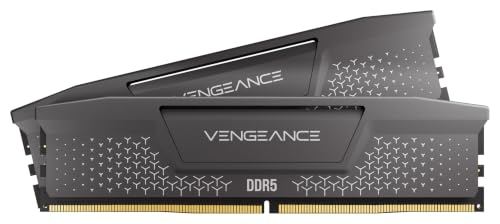
The Corsair Vengeance RS 32GB DDR5-6000 kit is two 16GB sticks at the speed AM5 chips like best. Memory is the part hit hardest by the shortage, which is why this build stops at 32GB rather than 64GB. 32GB covers gaming plus Discord, a browser and OBS without paging. The board has only two slots, so going to 64GB later means swapping in a 2x32GB kit, not adding sticks.
Storage

The Samsung 990 Pro 2TB is the part that separates this build from the two-thousand-dollar one. It is a PCIe Gen4 drive with a DRAM cache, and it holds its speed better during long writes like recording gameplay or copying large projects. In games, load times are close to any good Gen4 drive, so the real gain is capacity: 2TB fits a dozen or so big AAA installs. The drive takes one of the board's two M.2 slots, leaving the other free for later.
Power Supply

The Corsair RM850e is an 850W, 80+ Gold, ATX 3.1 unit, more than the 750W ASUS recommends for this card. Use the PSU's own cables for the card's three 8-pin plugs: one standard 8-pin cable plus the supplied 12V-2x6 to dual 8-pin cable. That native 12V-2x6 support also matters later, because an RTX 5080 upgrade plugs straight in. A 1000W unit is the alternative if you plan on an RTX 5090 one day; for anything up to an RTX 5080, 850W is the right size.
Case

The NZXT H7 Flow RGB in white is a mid-tower with a mesh front, room for a 360mm radiator up front, and 410mm of graphics card clearance. It ships with one F360 RGB Core fan unit (three 120mm fans) in the front and no rear fan. The micro-ATX board leaves empty space at the bottom of an ATX tower, which makes cable routing easy. A smaller micro-ATX case would cost less and take less desk space, but you'd lose the front radiator mount and some airflow.
Cooling

The ARCTIC Liquid Freezer III Pro 360 is more cooler than a 120W 9800X3D strictly needs, and that's the point: it stays quiet under long gaming sessions and leaves headroom for a hotter chip later. The radiator is 38mm thick, plus 25mm fans, so mount it in the front. NZXT only lists top clearance for 280mm radiators, and front mounting still leaves plenty of room for the 312mm card. A good dual-tower air cooler would do the job for less, with a bit more noise under load.
Why This Build Works
The 9800X3D and RX 9070 XT are a balanced pair: the processor never caps the card in our slate, and the card has 16GB of memory for high texture settings. Everything around them is sized for the next card: the 850W supply has the 12V-2x6 plug an RTX 5080 needs, the case takes long cards, and the cooler leaves no thermal ceiling on the processor.
The 2TB Samsung 990 Pro is where this budget goes today, because a faster graphics card doesn't fit at current prices. That's an honest trade: you get double the storage on a faster drive and the same frame rates as the cheaper build.
Alternative Options
If you don't need 2TB right now, build the two-thousand-dollar version. It has the same processor, graphics card, board, memory, cooler, power supply and case, and only the SSD changes.
If you want more frames at 4K, look at our three-thousand-dollar build, which steps up to an RTX 5080 on the same platform. At today's prices it runs over that budget too, so it only makes sense if 4K at high settings matters more to you than waiting for prices to settle.
If you mostly play competitive shooters at 1080p, the Ryzen 7 9800X3D still earns its place, but a cheaper graphics card would leave you with the same esports frame rates.
Build & Setup Tips
Check the BIOS version on first boot and update it with ASRock's Instant Flash tool from a USB stick before installing Windows. Then enable the memory's DDR5-6000 profile (EXPO or XMP, whichever the BIOS shows), because out of the box it runs well below its rated speed.
Mount the ARCTIC radiator in the front as intake and move the case's F360 fan unit to the top as exhaust. Add a 120mm or 140mm fan at the rear if you want more exhaust; the case doesn't include one.
Power the graphics card's three 8-pin plugs with the cables that came with the RM850e, and never mix in modular cables from another power supply. Either M.2 slot runs the Samsung drive at full speed, since it's a Gen4 drive, which keeps the Gen5 slot open for a faster drive later if you want one.
Upgrade Paths
The graphics card is the upgrade this build is waiting for. Once graphics card prices come back down, an RTX 5080 drops into the same system and takes advantage of the 850W supply's native 12V-2x6 cable. Check the card's length against the case first: some RTX 5080 models run close to the clearance left with a front radiator.
Memory is next. When DDR5 prices return to normal, a 2x32GB DDR5-6000 kit doubles capacity for heavier video work. Storage is easy: the second M.2 slot takes another NVMe drive with no cables.
Final Thoughts
This is a fast 1440p machine that handles 4K with upscaling, with 2TB of fast storage and room to grow. It shares its frame rates with our two-thousand-dollar build because the RTX 5080 doesn't fit this budget at today's prices. Buy this one for the storage and the headroom, buy the cheaper one if 1TB is enough, and plan on the graphics card upgrade once prices fall.
FAQs
How is this build different from the two-thousand-dollar build?
Only the SSD changes. Both builds use the Ryzen 7 9800X3D, Radeon RX 9070 XT, ASRock B650M-HDV/M.2, 32GB of DDR5-6000, the ARCTIC 360mm cooler, the Corsair RM850e and the NZXT H7 Flow RGB, so they post the same frame rates. This build swaps the 1TB drive for a 2TB Samsung 990 Pro. If 1TB is enough for your library, the cheaper build is the better buy.
Why doesn't this build use an RTX 5080?
Graphics cards, memory and storage are all selling well above normal prices right now, and at today's prices an RTX 5080 build doesn't fit this budget. Our three-thousand-dollar build uses the RTX 5080 on the same platform, and it runs over that budget too. Once graphics card prices fall, the RTX 5080 step returns to this tier, and this build's power supply and case are already sized for it.
Can this PC run games at 4K?
Yes, with some help. At native 4K, Baldur's Gate 3 holds about 98 fps and Marvel's Spider-Man 2 about 69, while Cyberpunk 2077 and Starfield sit just above 60. Alan Wake 2, Hogwarts Legacy, Black Myth: Wukong and Stalker 2 fall below 60 at native 4K, so turn on FSR 4 upscaling for those. At 1440p every game in our slate runs above 60 fps.
Is the Samsung 990 Pro worth it over a cheaper SSD?
For capacity, yes: 2TB holds roughly twice as many large games as a 1TB drive. For speed, the gain is small in games, where load times are close to any good Gen4 drive. The 990 Pro's DRAM cache helps more with long writes like gameplay recording or moving large video projects.
Does the motherboard have Wi-Fi?
No. The ASRock B650M-HDV/M.2 has 2.5Gb Ethernet but no Wi-Fi or Bluetooth. Use a wired connection, or add a PCIe or USB Wi-Fi adapter if the PC sits away from your router.
Is an 850W power supply enough for this build?
Yes. ASUS recommends 750W for the Prime RX 9070 XT, and the 9800X3D is a 120W chip, so the Corsair RM850e has headroom. The card needs three 8-pin plugs: use the PSU's standard 8-pin cable plus its supplied 12V-2x6 to dual 8-pin cable. The same supply also has a native 12V-2x6 cable for an RTX 5080 upgrade later.