Affiliate Disclosure: As an Amazon Associate we earn from qualifying purchases. Some links may earn us a commission at no cost to you.

5 Best 1440p Gaming Monitors Under $300 (2026): Mini-LED HDR
The best 1440p gaming monitor under 300 dollars in 2026 is the AOC Q27G3XMN: a 27-inch 180 Hz mini-LED panel with 336 dimming zones and real HDR, which no IPS at this price can match. If you would rather have the cleanest motion for the least money, the ViewSonic VX2728J-2K (180 Hz IPS) and the KTC H27T22C-3 (210 Hz IPS) sit well below the cap, and every pick below asks for exactly one compromise that you get to choose.
Five picks below, sorted by price band and by the compromise each one asks for. Every section names the SKU, the panel-tech bet, and the buyer it lands on. If you're cross-shopping the broader 1440p frame including the GPU side, our GPUs under the value tier for 1440p guide pairs with this article on the build-out side, and how to choose a GPU and display covers the cluster-level framing.
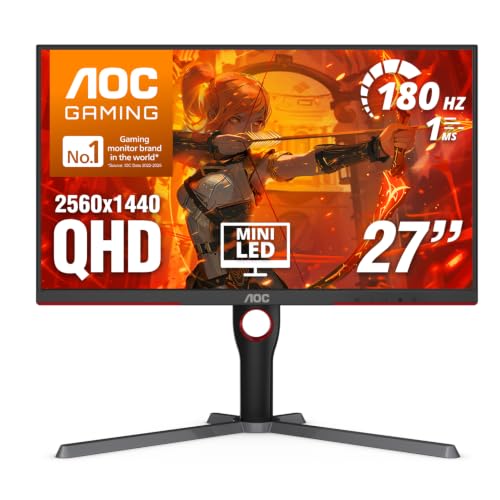
Our top pick: AOC Gaming Q27G3XMN (Mini-LED 27" 180 Hz)
For 1440p AAA gaming where HDR contrast actually matters, the AOC Q27G3XMN is the category upset of 2026. Mini-LED with 336 local dimming zones and 1300-nit peak HDR at the budget tier wasn't supposed to exist yet, and the panel delivers real bright-against-black separation no IPS at this price can match.
Quick picks
Slot | Monitor | Panel | Refresh | Buy |
|---|---|---|---|---|
Best Overall | VA Mini-LED | 180 Hz | ||
Best Value | IPS | 180 Hz | ||
Best Premium | IPS | 200 Hz | ||
Best Budget | IPS | 210 Hz | ||
Editor's Pick | SS-IPS | 200 Hz |
Best Overall
- Monitor
- Panel
VA Mini-LED
- Refresh
180 Hz
- Buy
Best Value
- Monitor
- Panel
IPS
- Refresh
180 Hz
- Buy
Best Premium
- Monitor
- Panel
IPS
- Refresh
200 Hz
- Buy
Best Budget
- Monitor
- Panel
IPS
- Refresh
210 Hz
- Buy
Editor's Pick
- Monitor
- Panel
SS-IPS
- Refresh
200 Hz
- Buy
Specs at a glance
Slot | Monitor | Panel tech | Refresh | Response | HDR | Color gamut | Stand |
|---|---|---|---|---|---|---|---|
Best Overall | VA Mini-LED, 336 zones | 180 Hz | 1 ms MPRT | DisplayHDR 1000, 1300-nit peak | 95% DCI-P3 | Tilt only | |
Best Value | IPS | 180 Hz | 0.5 ms GTG (spec) | HDR10 input, ~250-nit peak | 99% sRGB | Tilt only | |
Best Premium | IPS | 200 Hz | 1 ms GTG | HDR10 input, ~350-nit peak | 99% sRGB | Height / tilt / pivot / swivel | |
Best Budget | IPS | 210 Hz | 1 ms GTG | HDR10 input, ~300-nit peak | 99% sRGB | Tilt only | |
Editor's Pick | SS-IPS | 200 Hz | 1 ms GTG | HDR Ready, ~400-nit peak | 92% DCI-P3 | Height / tilt / pivot / swivel |
Best Overall
- Monitor
- Panel tech
VA Mini-LED, 336 zones
- Refresh
180 Hz
- Response
1 ms MPRT
- HDR
DisplayHDR 1000, 1300-nit peak
- Color gamut
95% DCI-P3
- Stand
Tilt only
Best Value
- Monitor
- Panel tech
IPS
- Refresh
180 Hz
- Response
0.5 ms GTG (spec)
- HDR
HDR10 input, ~250-nit peak
- Color gamut
99% sRGB
- Stand
Tilt only
Best Premium
- Monitor
- Panel tech
IPS
- Refresh
200 Hz
- Response
1 ms GTG
- HDR
HDR10 input, ~350-nit peak
- Color gamut
99% sRGB
- Stand
Height / tilt / pivot / swivel
Best Budget
- Monitor
- Panel tech
IPS
- Refresh
210 Hz
- Response
1 ms GTG
- HDR
HDR10 input, ~300-nit peak
- Color gamut
99% sRGB
- Stand
Tilt only
Editor's Pick
- Monitor
- Panel tech
SS-IPS
- Refresh
200 Hz
- Response
1 ms GTG
- HDR
HDR Ready, ~400-nit peak
- Color gamut
92% DCI-P3
- Stand
Height / tilt / pivot / swivel
How we picked these 1440p gaming monitors under the cap
A few things to think about before clicking buy. The first one is the load-bearing reframe for 2026.
The value floor changed everything
27-inch 1440p 180 to 210Hz IPS panels now ship below the value tier. The KTC H27T22C-3 and the ViewSonic VX2728J-2K live at price points that didn't exist for this resolution two years ago. Mini-LED arrived in the same window at the top of the bracket (the AOC Q27G3XMN with 336 dimming zones and DisplayHDR 1000 certification). OLED panels are starting to clearance into the upper edge of the price cap.
The picks that made sense at the upper end of the bracket in 2024 no longer make sense at the same tier in 2026 because better panels exist below. If you're shopping this category off advice older than the current cycle, the recommendation set is stale on price.
What the cap buys now: 240 Hz and 32-inch made it under
Two things crossed under the price cap during 2026 that did not fit a year ago. 240 Hz at 1440p is now available below the cap, and so is 32-inch 1440p. Both are real options rather than next-tier-up aspirations, which is worth knowing before you spend. A third thing crossed one bracket up: OLED gaming monitors under 500 dollars are now a standing shelf rather than a sale-day fluke.
Neither one displaces the five picks here, because both buy their headline number with something else. The 240 Hz panels at this price give up color volume and stand ergonomics, and 32-inch at 1440p drops pixel density to roughly 93 PPI against the 109 PPI a 27-inch panel delivers. If the refresh number is the whole reason you are shopping, the 1440p 240 Hz monitors guide covers that tier properly. If the size is what you are after, the 32-inch 1440p monitors list is the right one.
What about the 1,152-zone mini-LED models?
Two newer mini-LED monitors carry 1,152 dimming zones against the 336 on our top pick. The AOC Q27G40XMN is the direct successor: the same 27-inch 1440p 180 Hz VA panel, plus a quantum-dot layer for a wider color gamut and much finer local dimming. It gives up stand ergonomics, and its lower DisplayPort bandwidth keeps it from reaching 180 Hz on NVIDIA cards and lowers its refresh rate in HDR, both of which the Q27G3XMN handles. The KTC M27T6 pairs 1,152 zones with 180 Hz, DisplayHDR 1400 certification, and a fully adjustable stand.
We kept the Q27G3XMN as the pick because it runs at full refresh on any GPU you pair it with. If HDR is the main reason you are buying and either 1,152-zone panel lands under the cap on the day you shop, it is the better HDR display and worth the cross-shop.
VA versus IPS at this price
The panel-tech split is the second axis. IPS panels at this price (the LG, the ViewSonic, the KTC, the Gigabyte) trade contrast for wider viewing angles, faster pixel response, and more accurate color. Native contrast lands around 1000:1, which means dark scenes look flat compared to VA but motion stays clean and text rendering holds up across off-axis viewing.
VA panels at this price trade response speed for native contrast. The AOC Q27G3XMN's VA chassis hits 3000:1 native contrast with the dimming layer disabled, and with mini-LED active the panel delivers real HDR performance no IPS in the bracket can match. The tradeoff is response time. VA pixels transition slower than IPS, and RTINGS measures the Q27G3XMN above 8 ms gray-to-gray in the worst-case transitions, which surfaces as motion blur in fast esports scenes.
Competitive players favor IPS. AAA single-player and HDR-content viewers favor VA or mini-LED. The picks below land across both sides of that split because the buyer profile decides the tradeoff.
27 inches is the desk sweet spot
Pixel density at 1440p comes from the panel size. A 27-inch QHD lands around 109 PPI, which is the size-and-resolution sweet spot for desk gaming at a normal viewing distance. 24-inch 1440p over-densifies (~122 PPI), pushing text and UI smaller than most users want. 32-inch 1440p under-densifies (~92 PPI), making individual pixels visible at normal viewing distance and softening the image.
Every pick on the list lands at 27 inches because that is where pixel density and price meet at this resolution. A 27-inch QHD panel sits at roughly 109 PPI. 32-inch 1440p has made it under the cap since, but it drops to roughly 93 PPI, which reads visibly softer at desk distance. If the 27-inch call is what you are still weighing, our guide to the best gaming monitors sets that size against the 4K and ultrawide options above this price cap.
Refresh rate versus panel quality
Refresh tops out at 210 Hz across this list (the KTC H27T22C-3), with 200 Hz on the LG and the Gigabyte and 180 Hz on the other two. 165 Hz no longer competes here. Every panel worth recommending in 2026 clears 180 Hz at this resolution and price. Panels advertising 240 Hz and up do exist under the cap now, but they buy that number by giving up color volume and stand ergonomics.
The refresh rate should match the GPU's ceiling in the games you actually play. A buyer pairing an RTX 5060 or RX 9060 XT 16GB to 1440p ultra in modern AAA isn't pushing past 165 fps in those titles, which means the 200 Hz overclock on the LG is wasted headroom. A buyer running CS2 at 1440p competitive on an RTX 4070 Super pushes 300+ fps, and the panel's refresh ceiling becomes the binding constraint instead of the GPU. If the GPU side of that pairing is still open, our roundup of the best GPU for 1440p gaming matches five 16 GB cards to 144 Hz and 240 Hz panels.
Best Overall: AOC Gaming Q27G3XMN (Mini-LED 27" 180 Hz)
Specs
Panel | 27-inch VA with mini-LED backlight, 336 local dimming zones |
Resolution | 2560×1440 |
Refresh rate | 180 Hz |
Response time | 1 ms MPRT via backlight strobing (native gray-to-gray runs higher) |
HDR | DisplayHDR 1000, 1300-nit peak |
Color gamut | 95% DCI-P3 |
Adaptive sync | FreeSync Premium Pro |
Ports | HDMI 2.0 ×2, DisplayPort 1.4 ×1, USB 3.2 hub |
Stand | Tilt only |
Panel
27-inch VA with mini-LED backlight, 336 local dimming zones
Resolution
2560×1440
Refresh rate
180 Hz
Response time
1 ms MPRT via backlight strobing (native gray-to-gray runs higher)
HDR
DisplayHDR 1000, 1300-nit peak
Color gamut
95% DCI-P3
Adaptive sync
FreeSync Premium Pro
Ports
HDMI 2.0 ×2, DisplayPort 1.4 ×1, USB 3.2 hub
Stand
Tilt only
What it does well
Mini-LED HDR is the entire pitch. 336 local dimming zones at the budget tier puts contrast performance into territory that IPS panels at twice the price can't reach. HDR content in titles that actually master for HDR (Cyberpunk 2077, Alan Wake 2, the Resident Evil remakes, Dolby Vision sources in streaming apps) shows genuine bright-against-black separation, not just elevated overall brightness. The 1300-nit peak gives HDR highlights real punch when the scene calls for it.
The native VA contrast hits 3000:1 even with the dimming layer disabled, which means SDR content looks better than any IPS in the bracket. Black levels in dark game scenes (horror titles, Cyberpunk night cycles, Alan Wake 2's woodland sections) hold their depth without the IPS glow that washes shadow detail.
180 Hz refresh with FreeSync Premium Pro covers the high-refresh competitive use case cleanly for buyers whose libraries include both AAA and esports. The 95% DCI-P3 color gamut is wider than every IPS pick on the list and supports color-accurate work alongside gaming. RTINGS leads their budget-tier monitor coverage with this panel for these reasons.
What you give up
VA response time. RTINGS measures the panel above 8 ms gray-to-gray in worst-case transitions, which surfaces as motion blur in fast competitive scenes. The 1 ms MPRT spec is achieved through backlight strobing rather than native pixel response, and enabling MPRT mode drops brightness significantly. Buyers tracking heroes in Valorant or CS2 at 180+ fps will notice the smearing relative to an IPS panel at the same refresh rate.
Local-dimming halos around bright objects on dark backgrounds are visible in HDR content despite the 336-zone count. Less aggressive HDR modes (DisplayHDR 400 instead of DisplayHDR 1000) reduce the blooming at the cost of peak brightness. Viewing-angle color shift is meaningful. The panel looks correct head-on but washes out at 30+ degrees off-axis, which limits multi-viewer use.
The stand is tilt-only with no height or swivel adjustment, which forces a monitor arm purchase for ergonomic setups. Stock has been street-tight through 2026. Mini-LED demand at this price tier outran AOC's production volume early, and the listing has surfaced out-of-stock periodically. Verify availability before committing to the build timeline.
Who it's for
1440p gamers playing AAA and single-player content who want HDR performance that delivers, not just an HDR badge. Buyers with libraries that lean into dark scenes (Alan Wake 2, Cyberpunk night cycles, horror titles, Resident Evil remakes). Mixed-use creators who want a wide color gamut for video editing, photo work, or content production alongside gaming. 27-inch desk-gaming buyers in the entry-mainstream-to-mid-mainstream build tier where the monitor spend lands in the upper edge of the price cap.
Don't confuse the Q27G3XMN with the Q27G3X (older variant, IPS panel, no mini-LED). Verify the listing names "Mini LED" or "336 Local Dimming Zones" before ordering.
Best Value: ViewSonic VX2728J-2K (27" 180 Hz IPS)

Specs
Panel | 27-inch IPS |
Resolution | 2560×1440 |
Refresh rate | 180 Hz |
Response time | 0.5 ms GTG manufacturer spec (real-world lands closer to 3 to 5 ms) |
HDR | HDR10 input, ~250-nit peak, no local dimming |
Color gamut | 99% sRGB |
Adaptive sync | FreeSync Premium |
Ports | HDMI 2.0 ×1, DisplayPort 1.4 ×1, 3.5 mm audio out |
Extras | Integrated speakers |
Stand | Tilt only |
Panel
27-inch IPS
Resolution
2560×1440
Refresh rate
180 Hz
Response time
0.5 ms GTG manufacturer spec (real-world lands closer to 3 to 5 ms)
HDR
HDR10 input, ~250-nit peak, no local dimming
Color gamut
99% sRGB
Adaptive sync
FreeSync Premium
Ports
HDMI 2.0 ×1, DisplayPort 1.4 ×1, 3.5 mm audio out
Extras
Integrated speakers
Stand
Tilt only
What it does well
IPS speed in the price band. The 0.5 ms GTG spec uses the manufacturer's optimistic measurement methodology; real-world testing lands closer to 3 to 5 ms which is still IPS-fast at this refresh rate. Motion stays clean in CS2, Valorant, Apex Legends, and Overwatch 2 at 180 Hz refresh. The wider viewing angles relative to VA matter for multi-viewer use and for off-axis text rendering during desk work.
99% sRGB color gamut covers non-color-critical creative work alongside gaming. The 27-inch QHD pixel density at ~109 PPI hits the desk-gaming sweet spot. FreeSync Premium handles tear-free gaming across the refresh range, and the panel is G-Sync Compatible by reports for buyers running Nvidia hardware. Build quality is honest entry-tier with a plastic chassis and basic stand, but the panel itself is the value here.
For the GPU side of a 1440p build pairing with this monitor, the GPUs under the value tier for 1440p guide walks the candidate set.
What you give up
HDR. The HDR10 input badge is marketing on this panel. Peak brightness around 250 nits with no local dimming is too dim for meaningful HDR content. Treat the VX2728J-2K as an SDR panel and the value math holds; treat it as an HDR panel and the experience disappoints.
Contrast lands at IPS-typical ~1000:1 native, well below the VA panels at the same price (the Q27G3XMN's 3000:1 native, the bracket's VA picks above the value floor). Dark scenes show the IPS glow that washes shadow detail. Color gamut is 99% sRGB only, with no wide-gamut DCI-P3 expansion, so HDR-graded content loses saturation when displayed here.
The integrated speakers exist but are unusable for anything past system sounds. Tilt-only stand forces a monitor arm for height-adjusted setups. Panel uniformity tolerance is loose at this price tier; some buyer reports flag visible bezel-area backlight bleed on individual units. The panel lottery is real on the value floor.
Who it's for
First-time 1440p buyers shopping the value floor. Competitive players who care about IPS response speed and wider viewing angles more than HDR or native contrast. Esports library bias where motion clarity matters most (CS2, Valorant, Apex, Overwatch 2, Rocket League, Marvel Rivals). Entry-tier build where the monitor spend has to stay in the value band. Anyone running multi-monitor setups where matching IPS panels matter more than per-panel HDR performance.
Don't confuse the VX2728J-2K (1440p variant, this pick) with the VX2728J-1440-PRO (older revision), the VX2728-2K-PRO (premium tier above the price cap), or the VX2728J at 1080p (separate product line). Verify the listing title contains both "2K" or "1440p" and "180Hz" before ordering.
Best Premium: LG 27GS75Q-B UltraGear (27" 200 Hz IPS)

Specs
Panel | 27-inch IPS |
Resolution | 2560×1440 |
Refresh rate | 200 Hz, overclocked from a native 180 Hz via the menu setting |
Response time | 1 ms GTG |
HDR | HDR10 input, ~350-nit peak, no local dimming |
Color gamut | 99% sRGB |
Adaptive sync | FreeSync Premium, G-Sync Compatible |
Ports | HDMI 2.0 ×2, DisplayPort 1.4 ×1, 3.5 mm audio out |
Stand | Height, tilt, pivot, swivel |
Panel
27-inch IPS
Resolution
2560×1440
Refresh rate
200 Hz, overclocked from a native 180 Hz via the menu setting
Response time
1 ms GTG
HDR
HDR10 input, ~350-nit peak, no local dimming
Color gamut
99% sRGB
Adaptive sync
FreeSync Premium, G-Sync Compatible
Ports
HDMI 2.0 ×2, DisplayPort 1.4 ×1, 3.5 mm audio out
Stand
Height, tilt, pivot, swivel
What it does well
Refresh-rate ceiling is the differentiator. 200 Hz native (overclocked from the panel's 180 Hz baseline) gives buyers with high-end GPUs the headroom that the 165 to 180 Hz panels in the lower bands waste. Pairing the LG with an RTX 4070 Super, RX 7800 XT, or RTX 5060 Ti class GPU in CS2 or Valorant at 1440p competitive pushes well past 200 fps, and the panel keeps up where the lower-refresh picks bottleneck on the display side.
1 ms GTG response holds at the higher refresh rate. Motion clarity in fast esports scenes is clean at 200 fps native without the artifacts that show on aggressive overdrive presets at the highest setting. The LG UltraGear panel quality is well-documented through prior generations (the 27GS75Q is the refreshed successor to the 27GR75Q-B 180 Hz panel). G-Sync Compatible certification covers Nvidia VRR cleanly. 99% sRGB color coverage handles non-color-critical creative work alongside gaming.
Stand ergonomics matter at this tier. Height-adjust, tilt, pivot-to-portrait, and swivel match prosumer-grade displays at twice the price. Multi-monitor and portrait-secondary setups have the pivot adjustability built in. For broader 1440p coverage at higher refresh tiers and panel-tech options, our 1440p OLED monitors and 1440p 240 Hz monitors guides cover the tier just above this cap.
What you give up
HDR is still entry-tier. The 350-nit peak with no local dimming means HDR content shows brighter highlights but not the contrast separation the mini-LED panels deliver. Treat this as a refresh-and-response pick, not an HDR pick.
Native contrast at IPS-typical ~1000:1 sits well below the VA panels at the same or lower price. Speakers absent (use desktop speakers or headphones). The 200 Hz overclock is fine but pushed above native 180 Hz only via the menu setting, and buyers report occasional pixel overdrive artifacts at the most aggressive overdrive preset. The standard or "Fast" preset is clean; the "Faster" preset is where the artifacts surface.
Color gamut at 99% sRGB only, with no wide-gamut DCI-P3 coverage like the Q27G3XMN's 95% DCI-P3 mini-LED panel or the Gigabyte M27Q2's 92% DCI-P3 IPS. HDR-graded content loses saturation when displayed at sRGB coverage.
Who it's for
Competitive players with high-end GPUs (RTX 4070 Super, RX 7800 XT, RTX 5060 Ti and above) that can push past 180 fps in modern titles. Mixed competitive and AAA libraries where the IPS color profile and 200 Hz refresh ceiling matter more than VA contrast or mini-LED HDR. Buyers who want full ergonomic stand adjustability and care about long desk-gaming session comfort. 1440p 200 Hz buyers in the upper-mainstream build tier where the monitor spend lands at the upper edge of the price cap. Multi-monitor or portrait-secondary setups where the pivot capability is load-bearing.
Don't confuse the 27GS75Q-B (200 Hz refreshed variant, this pick) with the 27GR75Q-B (older 180 Hz prior-gen panel), the 27GR93U-B (4K resolution, higher tier above the cap), the 27GS65F-B (1080p resolution), or the 27GS95QE-B (OLED, premium tier above the cap). Verify the listing title contains "27GS75Q-B" and "200Hz" before ordering.
Best Budget: KTC H27T22C-3 (27" 210 Hz IPS)

Specs
Panel | 27-inch IPS |
Resolution | 2560×1440 |
Refresh rate | 210 Hz |
Response time | 1 ms GTG manufacturer spec |
HDR | HDR10 input, ~300-nit peak, no local dimming |
Color gamut | 99% sRGB |
Adaptive sync | FreeSync |
Ports | HDMI 2.0 ×2, DisplayPort 1.4 ×1, 3.5 mm audio out |
Chassis | Unbranded, thin bezels |
Stand | Tilt only |
Panel
27-inch IPS
Resolution
2560×1440
Refresh rate
210 Hz
Response time
1 ms GTG manufacturer spec
HDR
HDR10 input, ~300-nit peak, no local dimming
Color gamut
99% sRGB
Adaptive sync
FreeSync
Ports
HDMI 2.0 ×2, DisplayPort 1.4 ×1, 3.5 mm audio out
Chassis
Unbranded, thin bezels
Stand
Tilt only
What it does well
The price-to-performance math is the entire pitch. KTC sells direct-from-AIB panel hardware that competes with established brands at meaningfully lower price points. The H27T22C-3's IPS panel is the same class as the ViewSonic VX2728J-2K with slightly tighter response time spec and a smaller brand premium. 210 Hz refresh handles modern competitive gaming cleanly. 99% sRGB color gamut covers non-color-critical creative work.
27-inch QHD pixel density at ~109 PPI hits the desk sweet spot. Thin-bezel design works well in multi-monitor setups where matched panels matter more than per-panel brand reputation. KTC has built reputation through prior generations (the H27S17 OLED, the M27P20 mini-LED at the higher price tiers). The brand isn't a no-name shipping its first product.
For the build that pairs with this monitor, the best gaming PC build for the entry-mainstream tier guide walks the parts list.
What you give up
Brand warranty depth and customer service. KTC's RMA and warranty process is less polished than ViewSonic, LG, or AOC at the same price tier. Some buyer reports flag longer turnaround on defective units and more friction in the warranty claim process. If reliability and post-sale support are non-negotiable, the value-floor brand-name competitor is the safer pick at a small price premium.
HDR is the same marketing-badge entry-tier as the VX2728J-2K. No local dimming, peak brightness too dim for meaningful HDR content. Build quality is honest budget. Plastic chassis, tilt-only stand. Panel uniformity tolerance at this price tier is loose, and some buyers report visible bezel-area backlight bleed on individual units. The panel lottery is real here.
Color accuracy out-of-box requires calibration for color-critical work. The panel ships with looser factory calibration than the brand-name competitors. For gaming and non-color-critical work the panel runs fine; for video editing or photo work, plan a colorimeter pass.
Who it's for
Entry-tier builders who refuse to compromise on 1440p resolution. First-time 1440p buyers shopping the absolute price floor. Esports library bias where IPS response speed matters more than HDR or color accuracy. Secondary or multi-monitor setups where the budget-tier price lets the buyer pair two panels instead of one. Buyers comfortable with brand-name tradeoffs in exchange for the absolute best 1440p-per-dollar at the bracket floor.
Don't confuse the H27T22C-3 (210 Hz IPS, this pick) with the original H27T22 (180 Hz, now retired), the H27P22 (older 165 Hz variant), the H27V13 (VA panel variant), the H27S17 (OLED, premium tier above the cap), or the M27P20 (mini-LED, premium tier above the cap). Verify the listing title contains "H27T22C-3" before ordering. KTC's warranty process is slower than the established brands; factor the support tradeoff into the buy decision if reliability matters most.
Editor's Pick: Gigabyte M27Q2 (27" 200 Hz IPS, USB-C)

Specs
Panel | 27-inch SS-IPS (Super-Speed IPS) |
Resolution | 2560×1440 |
Refresh rate | 200 Hz, 210 Hz overclocked |
Response time | 1 ms GTG |
HDR | HDR Ready input, ~400-nit peak, no local dimming |
Color gamut | 92% DCI-P3 |
Adaptive sync | FreeSync Premium |
Ports | HDMI 2.0 ×2, DisplayPort 1.2 ×1, USB-C with 18 W power delivery and KVM |
Stand | Height, tilt, pivot, swivel |
Panel
27-inch SS-IPS (Super-Speed IPS)
Resolution
2560×1440
Refresh rate
200 Hz, 210 Hz overclocked
Response time
1 ms GTG
HDR
HDR Ready input, ~400-nit peak, no local dimming
Color gamut
92% DCI-P3
Adaptive sync
FreeSync Premium
Ports
HDMI 2.0 ×2, DisplayPort 1.2 ×1, USB-C with 18 W power delivery and KVM
Stand
Height, tilt, pivot, swivel
What it does well
Feature-set richness at the price. USB-C with 18 W power delivery and KVM functionality lets a single monitor handle a desktop and a work laptop with one input switch, which no other pick in the bracket offers. The KVM saves the cost of a separate KVM switch and the desk space the switch occupies, and the 18 W power delivery is enough to keep a thin-and-light laptop charging during the workday.
92% DCI-P3 color gamut is wider than every other IPS pick on the list, closing the gap with the Q27G3XMN's 95% DCI-P3 mini-LED panel for content work. The Super-Speed IPS panel technology delivers 1 ms GTG real-world response. 200 Hz refresh matches the LG and clears the modern competitive bar for high-refresh 1440p builds.
Stand ergonomics match the LG 27GS75Q-B. Height, tilt, pivot-to-portrait, and swivel are all there. Black Equalizer 2.0 lifts shadows in dark game scenes; the feature is debated as a real differentiator but it's available. 400-nit peak HDR is the highest non-mini-LED HDR brightness on the list, which makes HDR-mastered content visibly brighter even without the local-dimming contrast advantage of the AOC.
What you give up
Refresh rate ceiling. 200 Hz matches the LG but sits just under the KTC H27T22C-3's 210 Hz at the high end of this list. Buyers chasing the absolute frame ceiling in competitive titles get marginal headroom from the KTC. The trade is real but small. 200 Hz already clears the threshold where extra refresh stops paying back for most GPU pairings short of an RTX 4080 in light esports loads.
The Super-Speed IPS panel has documented buyer reports of a BGR subpixel layout (subpixel arrangement is B-G-R instead of R-G-B). The layout can cause text-rendering color fringing in some applications. The workaround on Windows is enabling ClearType cleartype tuning, which resolves the fringing for most users, but it's a setup tax. Mac and Linux setups don't have an equivalent fix and may show persistent fringing for the affected workflows.
HDR is still entry-tier at 400 nits peak with no local dimming. Speakers absent. The upper-bracket price band overlaps with the LG 27GS75Q-B; buyers split between the two on the refresh-rate-versus-USB-C-and-KVM tradeoff.
Who it's for
Mixed work-and-play setups where USB-C and KVM functionality matters. Content creators wanting wider color gamut at the IPS-not-mini-LED tier. Buyers who value full ergonomic stand adjustability and prosumer-friendly features. 1440p 200 Hz buyers in the upper-mainstream build tier where the monitor doubles as a work display. Multi-input switching setups where KVM saves the cost of a separate switch.
For day-to-day live pricing on this monitor and the adjacent tier, the current GPU deals page tracks the street-pricing market on the GPU side of a paired build.
Don't confuse the M27Q2 (current revision, this pick) with the older M27Q P (now retired), the original M27Q (pre-P revision), the M27Q X (240 Hz variant at higher price above the cap), or the M28U (4K variant). Verify the listing title contains "M27Q2" before ordering. The BGR subpixel layout is a documented characteristic of the Super-Speed IPS panel; reports suggest Windows ClearType tuning resolves the text-rendering fringing for most users, but Mac and Linux setups without ClearType have no equivalent fix.
Bottom line
Five picks, one decision tree. If you're playing AAA and single-player content and want HDR performance that delivers, the AOC Gaming Q27G3XMN (Mini-LED 27" 180 Hz) is the category upset of the year. Mini-LED HDR at the budget tier puts contrast performance into territory no IPS at twice the price can match.
If you're shopping the value floor for 27-inch 1440p IPS, the ViewSonic VX2728J-2K (27" 180 Hz IPS) is the volume pick at the price band where 1440p became real. If you have a high-end GPU and want a prestige IPS with a full ergonomic stand, the LG 27GS75Q-B UltraGear (27" 200 Hz IPS) is the brand-name pick at the top of the bracket.
If you're building at the entry-mainstream tier and refuse to compromise on 1440p, the KTC H27T22C-3 (27" 210 Hz IPS) is the budget floor breaker, and the refresh-rate ceiling for this list. And if your setup needs USB-C with KVM for mixed work-and-play, the Gigabyte M27Q2 (27" 200 Hz IPS, USB-C) earns the smart-buy slot.
For broader display coverage outside the price cap, the best 1440p OLED monitors guide picks up where this article ends, and the best 27-inch 1440p monitors for high FPS sibling covers the size-matched upgrade tier.
FAQ
Can you actually get a good 1440p gaming monitor under the budget cap in 2026?
Yes, and the category is genuinely better than it was two years ago. The value floor reset the bracket. 27-inch 1440p 180 Hz IPS panels now ship below the value tier (the KTC H27T22, the ViewSonic VX2728J-2K). Mini-LED with hundreds of dimming zones arrived at the top of the price cap (the AOC Q27G3XMN with 336 zones and 1300-nit peak HDR). Refresh rate ceilings hit 200 Hz at the prestige end (the LG 27GS75Q-B). Picking the right monitor in the bracket is now about matching the panel-tech tradeoff to the use case, not about finding a credible option in a sparse category.
Is mini-LED HDR worth it at this price, or is IPS still the safer pick?
Depends on the library. If you play AAA single-player titles that master for HDR (Cyberpunk 2077, Alan Wake 2, Resident Evil remakes, the Horizon series), the AOC Q27G3XMN's mini-LED HDR is genuinely transformative at the price. Bright highlights against dark backgrounds show the separation no IPS panel at twice the price can deliver. If you're a competitive player whose library is mostly esports (CS2, Valorant, Apex, Overwatch 2), IPS is the safer pick. Motion clarity at high refresh matters more than HDR contrast for those workloads, and the IPS panels deliver cleaner pixel transitions than the Q27G3XMN's VA chassis under fast motion.
What's the difference between the value monitors and the premium monitors at this resolution?
Panel quality, stand ergonomics, and refresh ceiling. The value tier (KTC H27T22, ViewSonic VX2728J-2K) is 180 Hz IPS on tilt-only stands with 99% sRGB color and HDR10 input badging that doesn't deliver real HDR. The mid tier (Gigabyte M27Q P) adds wider color gamut (92% DCI-P3), full ergonomic stand, and USB-C with KVM but caps refresh at 170 Hz. The premium tier (LG 27GS75Q-B) adds 200 Hz refresh, full ergonomic stand, G-Sync Compatible certification, and brand-name warranty depth. The top of the cap (AOC Q27G3XMN) trades IPS speed for mini-LED HDR and 95% DCI-P3 color gamut. Match the tier to the buyer profile.
Is 27 inches the right size for 1440p, or should I go bigger or smaller?
27 inches is the sweet spot. Pixel density at 1440p on a 27-inch panel lands around 109 PPI, which is the size-and-resolution combination that hits cleanly at normal desk viewing distance. 24-inch 1440p over-densifies at ~122 PPI, pushing UI and text smaller than most users want. 32-inch 1440p under-densifies at ~92 PPI, softening the image and making individual pixels visible at typical viewing distance. The budget cap doesn't include 32-inch 1440p panels at acceptable quality, which is why every pick on this list lands at 27 inches. If you want a 32-inch QHD panel, see our 32-inch 1440p gaming monitor guide for picks at the next price tier up.
Do I need 200 Hz refresh, or is 165 to 180 Hz enough at 1440p?
Depends on the GPU and the games. A buyer pairing an RTX 5060 or RX 9060 XT to 1440p ultra in modern AAA isn't pushing past 165 fps in those titles, which means the 200 Hz overclock on the LG 27GS75Q-B is wasted headroom. For that buyer, 165 to 180 Hz is more than enough. A buyer running CS2 or Valorant at 1440p competitive on an RTX 4070 Super or above pushes 300+ fps, and the panel's refresh ceiling becomes the binding constraint instead of the GPU. For that buyer, the LG's 200 Hz overclock is the right pick, and the 240 Hz tier above this cap is the natural upgrade path.
Related Articles

Best 1440p OLED Gaming Monitors (2026): QD-OLED vs WOLED Picks
The best 1440p OLED gaming monitors of 2026, from value-tier 360Hz QD-OLED to 480Hz WOLED flagship. With burn-in mitigation guidance.
May 14, 2026

Best GPUs Under $500 for 1440p (2026): 5 Picks by VRAM
The best GPUs under $500 for 1440p, sorted by monitor pairing and VRAM ceiling. Honest street pricing, the 8GB-vs-16GB call, and which card fits your library.
May 19, 2026

Best Monitors for Marvel Rivals (2026): 5 Picks, 165-360Hz
The best monitors for Marvel Rivals, matched to your GPU: 5 picks from a 280Hz 1080p esports panel up to a 4K 240Hz OLED, plus honest OLED burn-in verdicts.
Sep 25, 2026

Best $1,000 Gaming PC Build 2026: RTX 5060 Parts List
Build the best $1,000 gaming PC for 2026 — Ryzen 5 7600X and RTX 5060 parts list, real 1080p/1440p FPS expectations, and the smart upgrade path.
Aug 3, 2025

Best Gaming Headset 2026: 5 Picks by Platform, Budget & Mic
Find the best gaming headset for your setup in 2026: 5 picks matched to PC, PS5 or Xbox, budget and mic needs, plus the SKU mistake that breaks Xbox wireless.
Oct 2, 2026