Affiliate Disclosure: As an Amazon Associate we earn from qualifying purchases. Some links may earn us a commission at no cost to you.

Best Budget Gaming Handheld Under $400 (2026): 5 Picks
Under four hundred dollars, the handheld market has quietly split in two, and that split matters more than any spec sheet. On one side sits a single true handheld PC: the ROG Ally on the base Z1 chip. It runs the Steam library you already own, natively. On the other side sits a deep field of Android handhelds that emulate whole console generations beautifully and stream games from the desktop in your other room, but cannot run a PC game without a compatibility layer.
Choose the wrong side and the wrong device arrives in the box. Here are the five worth buying, and exactly what each one costs you.
Our top pick: ASUS ROG Ally Z1 (512 GB)
If you want a handheld that plays the games already in your library, the base ROG Ally is the only one at this price that does it without an emulator or a stream. Seven inches, 1080p, 120 Hz, 16 GB of memory, Windows 11. Go in knowing the Z1 is the modest chip, not the Extreme.

Quick picks
Handheld | Chip | Best for | Buy |
|---|---|---|---|
Ryzen Z1 | Native PC games | ||
Snapdragon 865 | Emulation plus PC streaming | ||
Snapdragon 8+ Gen 1 | Vertical and arcade libraries | ||
MediaTek Helio G99 | Retro on a commute | ||
Dimensity 8300 | Hardest-tier emulation |
- Chip
Ryzen Z1
- Best for
Native PC games
- Buy
- Chip
Snapdragon 865
- Best for
Emulation plus PC streaming
- Buy
- Chip
Snapdragon 8+ Gen 1
- Best for
Vertical and arcade libraries
- Buy
- Chip
MediaTek Helio G99
- Best for
Retro on a commute
- Buy
- Chip
Dimensity 8300
- Best for
Hardest-tier emulation
- Buy
Specs at a glance
Handheld | Chip | Display | OS | Ceiling |
|---|---|---|---|---|
Ryzen Z1 | 7-inch 1080p IPS, 120 Hz | Windows 11 | Native Windows games | |
Snapdragon 865 | 5.5-inch 1080p touchscreen | Android 13 | GameCube and PS2 class | |
Snapdragon 8+ Gen 1 | 3.5-inch 1440x1600 LCD | Android | Arcade, handheld-era, cloud | |
MediaTek Helio G99 | 4.2-inch 4:3 HD | Android | PS1 and Dreamcast class | |
Dimensity 8300 | 5.48-inch AMOLED | Android 14 | GameCube, PS2 and Switch class |
- Chip
Ryzen Z1
- Display
7-inch 1080p IPS, 120 Hz
- OS
Windows 11
- Ceiling
Native Windows games
- Chip
Snapdragon 865
- Display
5.5-inch 1080p touchscreen
- OS
Android 13
- Ceiling
GameCube and PS2 class
- Chip
Snapdragon 8+ Gen 1
- Display
3.5-inch 1440x1600 LCD
- OS
Android
- Ceiling
Arcade, handheld-era, cloud
- Chip
MediaTek Helio G99
- Display
4.2-inch 4:3 HD
- OS
Android
- Ceiling
PS1 and Dreamcast class
- Chip
Dimensity 8300
- Display
5.48-inch AMOLED
- OS
Android 14
- Ceiling
GameCube, PS2 and Switch class
What you give up at this price
Start with the thing no spec sheet will tell you. Under four hundred dollars you are giving up native PC gaming almost entirely. Exactly one device here runs a Windows game the way your desktop does, and it does it on the modest half of AMD's handheld silicon.
You give up sustained performance in modern AAA. The base Z1's four RDNA 3 compute units are a third of what the Z1 Extreme carries, so recent big-budget releases land at 720p with upscaling and low settings rather than 1080p high. Older AAA, indies and 2D games are a different story, and that is most of what people actually play on a handheld anyway.
You give up battery under load on every device here. And on the Android side you give up convenience: ROMs, frontends and Moonlight pairing are a setup tax that Windows and SteamOS do not charge. If configuring an emulator frontend sounds like a chore rather than a hobby, that is a real signal about which side of the fork you belong on. If you are willing to go above the cap, the calculus changes completely, and our handheld gaming PC guide covers that tier. If portable PC gaming at real settings is the actual goal, the money is often better spent on a budget gaming laptop or a budget prebuilt than on stretching for a handheld.
What you do not give up is build quality. The Hall effect sticks, AMOLED panels and metal chassis in this article are not compromises. The compromise is the software you are allowed to run.
How we picked
Every device here is in stock on Amazon at or under the cap, checked against the live listing rather than a press release. That sounds trivial. It is the hardest filter in this category right now, and it eliminated more candidates than any performance test did.
We threw out anything sold only through marketplace resellers at inflated pricing, which took out the Steam Deck, the MSI Claw and the Lenovo Legion Go S in a single pass. We threw out devices that were listed but not actually purchasable. Where a device offered Hall effect sticks, that counted, because drift is the failure mode that kills a handheld first.
Then we sorted by honest capability ceiling rather than by chip name. A handheld that emulates PS2 flawlessly and a handheld that runs Windows badly are not competing for the same buyer, and pretending otherwise is how people end up disappointed. Each pick below names its ceiling plainly.
Best Overall: ASUS ROG Ally Z1 (512 GB)
Specs
Chip | AMD Ryzen Z1 (Zen 4, 6 cores) |
Graphics | RDNA 3, 4 compute units |
Memory | 16 GB LPDDR5 |
Storage | 512 GB NVMe (M.2 2230) |
Display | 7-inch 1080p IPS, 120 Hz, VRR |
OS | Windows 11 |
Expansion | microSD card reader |
Weight | About 608 g |
Chip
AMD Ryzen Z1 (Zen 4, 6 cores)
Graphics
RDNA 3, 4 compute units
Memory
16 GB LPDDR5
Storage
512 GB NVMe (M.2 2230)
Display
7-inch 1080p IPS, 120 Hz, VRR
OS
Windows 11
Expansion
microSD card reader
Weight
About 608 g
What it does well
This is the only handheld in the article that runs the games you already bought. No emulator, no stream, no compatibility layer. You install Steam, you install Epic, you sign into Game Pass, and Windows behaves like Windows.
The screen is the best here by a clear margin. Seven inches, 1080p, 120 Hz, with variable refresh, which matters on a device that spends its life bouncing between 40 and 90 frames. 16 GB of LPDDR5 is the right amount of memory for a handheld in 2026, and the 512 GB drive is a real M.2 2230 you can swap rather than a soldered chip.
It also docks. Plug it into a monitor with a keyboard and it becomes a small Windows PC, which no Android handheld here can claim. Our dock guide covers the display-out and charging limits worth knowing first.
What you give up
The Z1 is not the Z1 Extreme, and this is the mistake buyers make most often in this category. The base chip carries four RDNA 3 compute units against the Extreme's twelve. That is not a trim level. It is the difference between a handheld that plays modern AAA at 1080p and one that plays it at 720p with FSR on low.
So calibrate. Baldur's Gate 3, Elden Ring and Hades will be fine. The newest ray-traced release will not be. Battery under real load is short, and Windows on a 7-inch touchscreen stays fiddly in a way SteamOS is not: small targets, driver prompts, a desktop that was never meant for thumbs.
You are buying native compatibility, not performance headroom. If native compatibility is not what you need, three of the four devices below will serve you better for less money.
Who it's for
The reader who already owns a PC games library and refuses to give it up on the road. Be honest about what you actually play on a handheld. If the answer is indies, older AAA and 2D games, the Ally is excellent. If the answer is the newest AAA at high settings, no handheld at this price does that, and this one does not either. When the road stop is long enough to want a bigger screen, our guide to the best portable monitor for gaming covers the panels an Ally can drive off one USB-C cable.
Best Value: Retroid Pocket 5
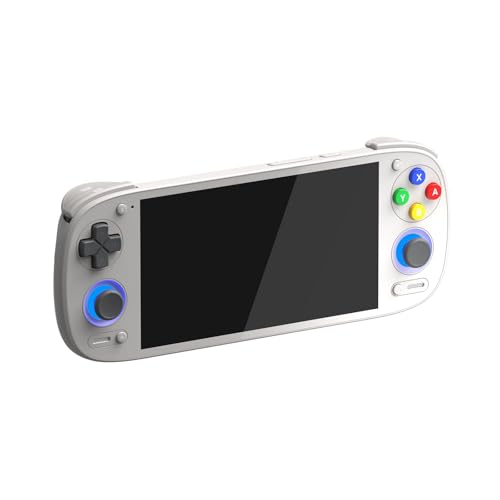
Specs
Chip | Qualcomm Snapdragon 865 |
Graphics | Adreno 650 |
Memory | 8 GB |
Storage | 128 GB plus microSD |
Display | 5.5-inch 1080p touchscreen |
OS | Android 13 |
Wireless | Wi-Fi 6, Bluetooth 5.1 |
Sticks | Hall effect |
Chip
Qualcomm Snapdragon 865
Graphics
Adreno 650
Memory
8 GB
Storage
128 GB plus microSD
Display
5.5-inch 1080p touchscreen
OS
Android 13
Wireless
Wi-Fi 6, Bluetooth 5.1
Sticks
Hall effect
What it does well
The Snapdragon 865 and its Adreno 650 buy more emulation than the price implies. The whole retro back catalogue is trivial for it. GameCube and PS2 run cleanly rather than grudgingly, and that is the line most budget Android handhelds fail to cross.
The sticks are Hall effect, so they will not drift into uselessness in eighteen months. The 5.5-inch 1080p panel is a real screen rather than a token one. Wi-Fi 6 matters more than it sounds, for the reason in the next paragraph.
Install Moonlight, run Sunshine on the desktop you already built, and this becomes a wireless display for your gaming PC. For a reader who owns a real machine with a real GPU in it, that reframes the entire purchase. You are not buying a weak gaming PC. You are buying a good screen for the strong one sitting in the other room. Add a fast microSD card and the 128 GB of onboard storage stops being a constraint.
What you give up
It is not a PC, and no amount of enthusiasm changes that. Windows games run only through translation layers, and that path is a hobby with an evening of reading attached, not a feature you can lean on.
Switch-era emulation is possible and inconsistent. Expect to tune per title rather than press play. The streaming trick also carries a hard dependency: it needs your desktop powered on and a good network behind it. On hotel Wi-Fi, the Retroid is an emulation handheld and nothing more.
Who it's for
The builder who already has a desktop and wants a couch screen plus a travel emulator without spending near the cap. If you own a gaming PC and mostly want to play it somewhere else in the house, this is the most sensible purchase in the article. That profile is exactly the one we make the case for in why you should consider a handheld gaming PC, along with the buyers who should skip the category entirely.
Best Premium: AYANEO Pocket VERT
Specs
Chip | Qualcomm Snapdragon 8+ Gen 1 |
Memory | 8 GB |
Storage | 128 GB |
Display | 3.5-inch 1440x1600 high-PPI LCD |
Form factor | Vertical (portrait) slab |
Build | Full CNC metal body, glass panel |
OS | Android |
Focus | Retro emulation and cloud gaming |
Chip
Qualcomm Snapdragon 8+ Gen 1
Memory
8 GB
Storage
128 GB
Display
3.5-inch 1440x1600 high-PPI LCD
Form factor
Vertical (portrait) slab
Build
Full CNC metal body, glass panel
OS
Android
Focus
Retro emulation and cloud gaming
What it does well
The Snapdragon 8+ Gen 1 is the strongest silicon in this list, and the chassis is the only one that feels like it costs what it costs. Full CNC metal, a glass panel, and a standard of assembly the plastic competition does not attempt.
The screen is the argument. A 3.5-inch panel at 1440x1600 is absurdly dense, and the portrait shape is a precise fit for arcade cabinets, vertical shooters and the handheld-era libraries this device is built around. Game Boy, GBA and DS content looks better here than on any widescreen device in this article.
Cloud gaming is the other half of the pitch, and the panel flatters it.
What you give up
The portrait screen is the whole device, and it is also the whole limitation. Widescreen console emulation gets letterboxed into a thin strip across the middle of the panel, which makes this a poor general-purpose PS2 or GameCube machine despite having the chip to be a good one.
So you are paying near the cap for build quality and silicon you cannot fully use on widescreen 3D content. That is a coherent trade if you know you are making it. Buyers who wanted a general emulator and bought this for the chip tend to regret the shape.
Who it's for
The reader who wants something pocketable and beautifully made for arcade, vertical and handheld-era libraries plus cloud streaming, and who already owns something larger for widescreen 3D. It is a specialist. Buy it as one.
Best Budget: AYANEO Pocket AIR Mini

Specs
Chip | MediaTek Helio G99 (octa-core) |
Memory | 2 GB |
Storage | 32 GB |
Display | 4.2-inch 4:3 HD retro screen |
Sticks | Hall effect joysticks and triggers |
OS | Android |
Emulation ceiling | PS1, GBA, SNES and Dreamcast class |
Colour | Aurora Black |
Chip
MediaTek Helio G99 (octa-core)
Memory
2 GB
Storage
32 GB
Display
4.2-inch 4:3 HD retro screen
Sticks
Hall effect joysticks and triggers
OS
Android
Emulation ceiling
PS1, GBA, SNES and Dreamcast class
Colour
Aurora Black
What it does well
This is the honest floor of the category, and it is honest in a way the cheapest shelf is not. The Helio G99 is enough for everything up to roughly PS1 and Dreamcast, and the 4:3 screen is the aspect ratio those libraries were actually drawn for. Widescreen panels stretch or pillarbox that content. This one does not.
Hall effect joysticks and triggers at this price are rare. Most budget handhelds fit membrane or potentiometer sticks that drift within a year. This one will still track accurately after a year of commutes.
It is small enough to live in a jacket pocket, which is the only spec that matters for a device you carry every day.
What you give up
Two gigabytes of memory and 32 GB of storage. Those two numbers are the ceiling, and they are not negotiable. GameCube and PS2 are out of reach, and no firmware update will change that.
You will be buying a microSD card on day one, so treat that as part of the purchase rather than an upgrade. And the small screen that makes it pocketable also makes long sessions less comfortable than the 5.5-inch devices above.
Who it's for
The reader whose honest use case is 16-bit through PS1 on a commute, or a first handheld for a kid. It reaches its ceiling quickly and hits it cleanly, which is a better outcome than a device that overpromises and misses.
Editor's Pick: Anbernic RG557

Specs
Chip | MediaTek Dimensity 8300 |
Display | 5.48-inch AMOLED |
OS | Android 14 |
Wireless | Wi-Fi 6E, Bluetooth 5.3 |
Sticks | Hall effect |
Emulation ceiling | GameCube, PS2 and Switch class |
Colour | Transparent Purple |
Chip
MediaTek Dimensity 8300
Display
5.48-inch AMOLED
OS
Android 14
Wireless
Wi-Fi 6E, Bluetooth 5.3
Sticks
Hall effect
Emulation ceiling
GameCube, PS2 and Switch class
Colour
Transparent Purple
What it does well
The Dimensity 8300 is a newer and faster part than the Snapdragon 865 in the Retroid, and it shows exactly where you would want it to. At the hardest tier of emulation, GameCube, PS2 and Switch titles either hold frame or they do not, and this chip holds frame more often.
The 5.48-inch AMOLED is the best-looking panel in the article for the content this device exists to run. Retro and 2D libraries live and die on black levels and colour saturation, and an AMOLED gives you both in a way the LCDs here cannot.
It runs Android 14, the most current OS in this list, on Wi-Fi 6E with Bluetooth 5.3.
What you give up
Anbernic's software is the weak link. The hardware runs ahead of the firmware, and the update cadence and long-term support record trail Retroid's noticeably. Buyers have flagged a rougher out-of-box software experience, so budget an evening for setup.
The transparent purple shell is a taste, and you do not get a choice about having it. Stock on this SKU is thin. And, like every Android device here, it does not run PC games natively.
Who it's for
The emulation-first reader who wants the strongest chip and the best panel under the cap and does not care about native PC play at all. If your honest goal was always to run the console libraries you grew up with, and run them well, this is the one.
What to skip
Skip the Steam Deck on Amazon. That is the most important sentence in this article. Valve discontinued the LCD model in December 2025, and every Deck listed on Amazon now comes from a marketplace reseller at two to three times what Valve charges, including units labelled as renewed. If you want a Deck, buy a certified refurbished one from Valve directly, with a warranty attached. Do not buy one here. If your budget can stretch past this article’s cap, our Steam Deck OLED versus ROG Ally X comparison is where that decision actually gets made.
Skip the MSI Claw and the Lenovo Legion Go S for the same reason. Both are decent handhelds, and neither is available on Amazon at anything close to a budget price. The listings we checked were marketplace sellers well into four figures, or simply unavailable.
Skip the cheapest Android handhelds with membrane sticks and unnamed chips. If a listing will not tell you which processor is inside, that is your answer. And skip any device whose product page leads with a preloaded game count rather than hardware, which is a legal problem waiting to happen and usually a hardware compromise as well.
Bottom line
If you want to play the PC games you already own, buy the ASUS ROG Ally Z1 (512 GB), and go in clear-eyed that the base Z1 is the modest chip. If you already have a gaming PC and want a screen for it plus a superb emulator, buy the Retroid Pocket 5, which is the best value here by a distance. If your goal is the hardest tier of emulation on the best panel, buy the Anbernic RG557. If you want something pocketable and beautifully built for arcade and handheld-era libraries, buy the AYANEO Pocket VERT. And if your honest need is PS1-era games on a commute, the AYANEO Pocket AIR Mini does that job without pretending to do others.
The fork is the decision, not the spec sheet. Pick your side first, then pick the device.
FAQ
Can you actually play PC games on a budget gaming handheld?
Only on one device in this price bracket. The base ROG Ally runs Windows 11, so it plays your Steam, Epic and Game Pass libraries natively, though the Z1 chip means modern AAA lands at 720p with upscaling rather than 1080p high. Every other handheld at this price runs Android. Those emulate console games and can stream PC games from a desktop you already own, but they cannot install and run a Windows game on their own. Compatibility layers exist, and they are a hobby rather than a reliable feature.
Is the Steam Deck still worth buying in 2026?
The hardware still is, but not from Amazon. Valve discontinued the LCD model in December 2025, and the Decks listed on Amazon now come from marketplace resellers at two to three times what Valve asks, including units labelled renewed. If you want one, buy a certified refurbished Deck from Valve directly, where it ships with a warranty. As a device it remains excellent for indies, older AAA and 2D games, though it struggles with the most demanding recent releases, and its Linux base still blocks several anti-cheat live-service titles.
Is an Android gaming handheld good enough for emulation?
For most people, yes, and comfortably so. The Retroid Pocket 5 and the Anbernic RG557 both clear GameCube and PS2 cleanly, and the RG557's Dimensity 8300 pushes into Switch-era titles. Everything older than that, meaning PS1, Dreamcast, SNES and the Game Boy family, is trivial for every pick here, including the entry-level AYANEO Pocket AIR Mini. The real cost is setup. You supply the games, configure a frontend and tune settings per title. That work is either enjoyable or annoying, and which one it is for you should drive the decision.
How much battery life do budget gaming handhelds get?
It depends far more on what you run than on which device you buy. The Android handhelds here will comfortably manage a long session on retro and 2D content, because those workloads barely tax the chip. Push the same devices into PS2 or GameCube emulation and that shrinks substantially. The ROG Ally is the shortest-lived of the group under load, because it is a Windows PC driving a 1080p 120 Hz panel, and a demanding game drains it quickly. Lower the frame cap and the wattage and every device here lasts noticeably longer.
Should you buy a used or refurbished handheld instead of a new budget one?
Refurbished from the manufacturer, often yes. Valve's certified refurbished Steam Decks ship with a warranty and are the best way into that ecosystem now that the LCD is discontinued. Used from a marketplace, be careful. Stick drift and battery wear are the two failure modes, and neither one is visible in a listing photo. Every device in this article ships new with Hall effect sticks, which is precisely the component that fails first on a used handheld, so a new budget pick is often the safer buy than a used premium one.
Related Articles

Best Handheld Gaming PC (2026): SteamOS vs Windows
The best handheld gaming PC in 2026 comes down to SteamOS vs Windows and battery vs raw performance. Picks for AAA, Game Pass, emulation, and budget.
Jul 7, 2026

Best Docks for Gaming Handhelds (2026): 5 Picks by Device
The best docks for Steam Deck, ROG Ally, and Legion Go in 2026: picks by device, with display-out limits and charging wattage explained so you buy right.
Jul 7, 2026

Best microSD Cards for Steam Deck & ROG Ally: 5 Picks (2026)
The best microSD cards for Steam Deck and ROG Ally in 2026. The handheld slot caps near 104 MB/s, so we pick on A2 random reads and capacity, not box speed.
Aug 21, 2026

Best Prebuilt Gaming PCs Truly Under $1,000 (2026): 5 Picks
The best prebuilt gaming PCs genuinely under $1,000 in 2026: five RTX towers ranked on sustained 1080p frame rates, PSU headroom, and airflow quality.
Sep 20, 2026

Best Gaming Laptops Under $700 (2026): Budget RTX Picks That Actually Sustain Load
The $700 gaming laptop market in 2026 is full of RTX 4060 badges that hide wildly different power limits. We break down what each chassis delivers over a 45-minute gaming session.
May 31, 2026