Affiliate Disclosure: As an Amazon Associate we earn from qualifying purchases. Some links may earn us a commission at no cost to you.

Best Gaming Laptops for College Students (2026): 5 Tested
Gaming laptops have a built-in contradiction: the machine built for sitting at a desk with a power cable has to fit inside a backpack for 8 hours first. This list exists because the answer varies by how you actually live. Five picks, five honest assessments of the portability and battery and gaming performance triangle every college buyer is actually navigating.
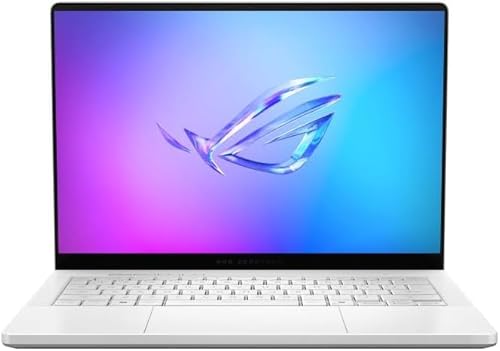
Our top pick: ASUS ROG Zephyrus G14 (2025)
The ASUS ROG Zephyrus G14 solves the core tension: RTX 5070 Ti gaming performance in a 3.46-pound chassis that disappears in a backpack. If you game seriously 3 nights a week and carry a laptop to class every morning, the G14 is the answer most college buyers should land on.
Quick picks
Pick | Laptop | Display | Gaming tier | Where to buy |
|---|---|---|---|---|
Best Overall | 14" 3K OLED 120Hz | RTX 5070 Ti | Check Price | |
Best Value | 15.6" FHD 144Hz | RTX 5060 | Check Price | |
Best Premium | 16" 2.5K 240Hz | RTX 5070 Ti | Check Price | |
Best Budget | 16" FHD+ 165Hz | RTX 5060 | Check Price | |
Editor's Pick | 16" WUXGA 180Hz | RTX 5060 | Check Price |
Best Overall
- Laptop
- Display
14" 3K OLED 120Hz
- Gaming tier
RTX 5070 Ti
- Where to buy
- Check Price
Best Value
- Laptop
- Display
15.6" FHD 144Hz
- Gaming tier
RTX 5060
- Where to buy
- Check Price
Best Premium
- Laptop
- Display
16" 2.5K 240Hz
- Gaming tier
RTX 5070 Ti
- Where to buy
- Check Price
Best Budget
- Laptop
- Display
16" FHD+ 165Hz
- Gaming tier
RTX 5060
- Where to buy
- Check Price
Editor's Pick
- Laptop
- Display
16" WUXGA 180Hz
- Gaming tier
RTX 5060
- Where to buy
- Check Price
At a glance
Laptop | GPU | Display | Weight | Battery (est.) | Where to buy |
|---|---|---|---|---|---|
RTX 5070 Ti 12GB | 14" 3K OLED 120Hz | 3.46 lbs | 6-8 hrs light / fast-charge | Check Price | |
RTX 5060 8GB | 15.6" FHD 144Hz | 5.1 lbs | ~90 min gaming / 4-5 hrs light | Check Price | |
RTX 5070 Ti 12GB | 16" 2.5K 240Hz | 5.1 lbs | 4-5 hrs light use | Check Price | |
RTX 5060 8GB | 16" FHD+ 165Hz | 4.9 lbs | 4-6 hrs light use | Check Price | |
RTX 5060 8GB | 16" WUXGA 180Hz | 4.4 lbs | 7-8 hrs light use | Check Price |
- GPU
RTX 5070 Ti 12GB
- Display
14" 3K OLED 120Hz
- Weight
3.46 lbs
- Battery (est.)
6-8 hrs light / fast-charge
- Where to buy
- Check Price
- GPU
RTX 5060 8GB
- Display
15.6" FHD 144Hz
- Weight
5.1 lbs
- Battery (est.)
~90 min gaming / 4-5 hrs light
- Where to buy
- Check Price
- GPU
RTX 5070 Ti 12GB
- Display
16" 2.5K 240Hz
- Weight
5.1 lbs
- Battery (est.)
4-5 hrs light use
- Where to buy
- Check Price
- GPU
RTX 5060 8GB
- Display
16" FHD+ 165Hz
- Weight
4.9 lbs
- Battery (est.)
4-6 hrs light use
- Where to buy
- Check Price
- GPU
RTX 5060 8GB
- Display
16" WUXGA 180Hz
- Weight
4.4 lbs
- Battery (est.)
7-8 hrs light use
- Where to buy
- Check Price
Which gaming laptop for college fits your life?
Profile | What matters most | Winner | Get it |
|---|---|---|---|
Esports dorm grinder (always plugged in) | GPU performance, price | Lenovo LOQ 15 (2026) | Get the Lenovo LOQ 15 |
AAA gamer who takes notes in class | Portability plus gaming | ASUS ROG Zephyrus G14 (2025) | Get the ASUS ROG G14 |
Full-time student who games evenings | Battery plus gaming balance | Acer Nitro V 16S AI | Get the Acer Nitro V 16S |
Streaming plus content creation hybrid | Max GPU plus display | ASUS ROG Strix G16 (2025) | Get the ASUS ROG Strix G16 |
Tight budget, daily campus carry | Value plus durability | ASUS TUF A16 (2025) | Get the ASUS TUF A16 |
Esports dorm grinder (always plugged in)
- What matters most
GPU performance, price
- Winner
Lenovo LOQ 15 (2026)
- Get it
- Get the Lenovo LOQ 15
AAA gamer who takes notes in class
- What matters most
Portability plus gaming
- Winner
ASUS ROG Zephyrus G14 (2025)
- Get it
- Get the ASUS ROG G14
Full-time student who games evenings
- What matters most
Battery plus gaming balance
- Winner
Acer Nitro V 16S AI
- Get it
- Get the Acer Nitro V 16S
Streaming plus content creation hybrid
- What matters most
Max GPU plus display
- Winner
ASUS ROG Strix G16 (2025)
- Get it
- Get the ASUS ROG Strix G16
Tight budget, daily campus carry
- What matters most
Value plus durability
- Winner
ASUS TUF A16 (2025)
- Get it
- Get the ASUS TUF A16
How we picked
The standard gaming laptop review compares FPS numbers and calls it done. That misses the specific constraint of college: this machine needs to be physically with you most of the day before you get to use it at night.
Three things shaped every pick here. Weight: at 14 to 16 inches, there's a 1.7-pound spread between the lightest and heaviest picks. That gap is real and felt daily. Battery life: gaming battery and light-use battery are separate numbers, and a student who needs 6 hours of Google Docs and lecture slides has fundamentally different constraints than someone who games in the student center. GPU wattage (TGP): the number on the spec sheet and the number the laptop actually delivers at its power envelope are different. We checked both where reviewer data was available.
Two things we didn't weight heavily: absolute peak FPS and RGB. A gaming laptop for college is a productivity machine first with gaming as a core feature. The pick that gives you 130 FPS while running for 6 hours on battery matters more than one that benchmarks at 160 FPS and dies in 90 minutes off AC. If you need the budget-floor options, see our best gaming laptops under $1,000 guide; if you're shopping the higher end without the portability constraint, see best gaming laptops under $2,000.
Best Overall: ASUS ROG Zephyrus G14 (2025)
Specs
CPU | AMD Ryzen AI 9 HX 370 (12 cores, up to 5.1 GHz) |
GPU | RTX 5070 Ti 12GB GDDR7 (120W TGP) |
RAM | 32GB LPDDR5X |
Storage | 1TB NVMe SSD |
Display | 14" 3K OLED 120Hz (100% DCI-P3, 500 nits peak) |
Weight | 3.46 lbs |
Battery | 73 WHr with fast charge (50% in approximately 30 minutes) |
Ports | 2x USB-C, 2x USB-A, HDMI 2.1, MicroSD |
CPU
AMD Ryzen AI 9 HX 370 (12 cores, up to 5.1 GHz)
GPU
RTX 5070 Ti 12GB GDDR7 (120W TGP)
RAM
32GB LPDDR5X
Storage
1TB NVMe SSD
Display
14" 3K OLED 120Hz (100% DCI-P3, 500 nits peak)
Weight
3.46 lbs
Battery
73 WHr with fast charge (50% in approximately 30 minutes)
Ports
2x USB-C, 2x USB-A, HDMI 2.1, MicroSD
What it does well
The G14 is the only laptop at RTX 5070 Ti tier that comes in under 3.5 pounds. ASUS has spent four generations refining the CNC-milled aluminum chassis, and the result feels closer to a MacBook Pro in a bag than to a gaming laptop. The 3K OLED panel is the sharpest display in this group. Text for coursework renders noticeably crisper than any IPS alternative; the 100% DCI-P3 coverage matters for design and media students who need accurate color during the day.
The Ryzen AI 9 HX 370 handles everything the curriculum throws at it. Coding projects, video rendering, Blender work: the 12-core chip doesn't stall on academic workloads. Gaming in the evenings, the RTX 5070 Ti delivers over 100 FPS in Cyberpunk 2077 at 1440p High and 146 FPS at 1080p. Valorant and Apex Legends run at well over 200 FPS, though the 120Hz panel is the ceiling there.
The fast-charge system is the underrated feature for college schedules. A 20-minute charge from near-empty adds roughly 2 hours of capacity. The rhythm works: charge between classes in short windows, game through the evening.
What you give up
The 120W TGP is a real constraint. The RTX 5070 Ti in a full-size desktop chassis runs at 140W; this one is running 14% below that ceiling. In GPU-bound AAA titles, the gap is measurable. It doesn't matter for most gaming use cases, but if Cyberpunk 2077 at max settings with ray tracing is the primary reason you're buying, calibrate that expectation.
Port selection at 14 inches means a USB-C hub for any dorm desk setup with monitor, keyboard, and external storage. Buyers have flagged fan noise under sustained gaming loads: the G14 runs audible in Performance mode. The stock situation for this listing was fragile at publication; confirm availability before committing.
Who it's for
The student who games 3 to 4 nights a week and carries the laptop to every class. Doesn't want to notice the weight. Does want to notice the OLED screen during coursework and gaming alike. The fast-charge is a feature built for the schedule: top off between lectures, game when you're back. If it does have to survive a daily commute, pair it with one of our picks for gaming laptop backpacks.
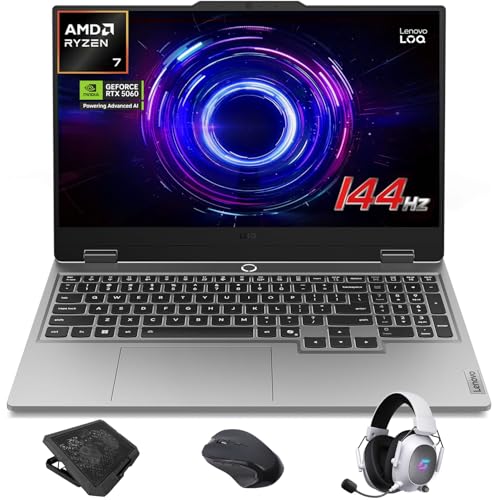
Best Value: Lenovo LOQ 15 (2026)
Specs
CPU | AMD Ryzen 7 250 (8 cores) |
GPU | RTX 5060 8GB GDDR7 |
RAM | 32GB DDR5 |
Storage | 1TB SSD |
Display | 15.6" FHD IPS 144Hz G-Sync (100% sRGB) |
Weight | 5.1 lbs |
Battery | 60 WHr (approximately 89 minutes gaming, 4 to 5 hours light use) |
Ports | 3x USB-A, 1x USB-C, HDMI, RJ-45 Ethernet |
CPU
AMD Ryzen 7 250 (8 cores)
GPU
RTX 5060 8GB GDDR7
RAM
32GB DDR5
Storage
1TB SSD
Display
15.6" FHD IPS 144Hz G-Sync (100% sRGB)
Weight
5.1 lbs
Battery
60 WHr (approximately 89 minutes gaming, 4 to 5 hours light use)
Ports
3x USB-A, 1x USB-C, HDMI, RJ-45 Ethernet
What it does well
The Ryzen 7 250 and RTX 5060 combination delivers the strongest gaming performance per dollar at the mid-range. Real-world benchmarks land around 100 FPS in Indiana Jones and the Great Circle at 1080p Ultra. Counter-Strike 2 and Valorant run comfortably over 200 FPS at max settings with DLSS quality mode enabled.
The 32GB DDR5 from the factory is generous at this tier. Most competitors at a similar price ship with 16GB and a RAM upgrade tax. The RJ-45 Ethernet port matters in dorms where shared Wi-Fi slows under load: wired gaming is noticeably more stable during peak hours. G-Sync keeps frames smooth across the 60 to 144Hz range, which matters more than the ceiling when you're running demanding titles at medium settings.
What you give up
The battery is the core trade-off that determines whether this laptop fits your life. At approximately 89 minutes under gaming load, gaming away from an outlet isn't feasible. For light use, it runs 4 to 5 hours, which is short for a full class day. At 5.1 lbs, you'll notice the bag weight after an hour of walking.
The FHD 15.6" panel is color-accurate but not remarkable. IPS rather than OLED means lower contrast depth, and 300-nit brightness makes outdoor or near-window use limited. The 1080p resolution at 15.6 inches is adequate for gaming but less sharp than 2.5K or 3K alternatives at close reading distance.
Who it's for
The student who games at their desk most evenings, has a power outlet at the workstation, and wants maximum GPU performance for the money. This is a dorm-desk laptop that you carry to class when needed, not a campus-carry machine. Factor the battery constraint into your living situation before buying: if the outlet is across the room or the library has no accessible power, this isn't the pick. If that describes your setup, the laptop is only half of it: our guide to the best monitors for college students covers the external panels that pair with a desk-bound machine like this one.
Best Premium: ASUS ROG Strix G16 (2025)
Specs
CPU | Intel Core Ultra 9 275HX (24 cores, up to 5.4 GHz) |
GPU | RTX 5070 Ti 12GB GDDR7 |
RAM | 32GB DDR5-5600 |
Storage | 1TB PCIe Gen 4 SSD |
Display | 16" ROG Nebula 2.5K 240Hz, 3ms (16:10, ACR anti-glare) |
Weight | 5.1 lbs |
Battery | 4 to 5 hours light use |
Ports | 2x USB-C Thunderbolt 4, 3x USB-A, HDMI 2.1, SD card reader |
CPU
Intel Core Ultra 9 275HX (24 cores, up to 5.4 GHz)
GPU
RTX 5070 Ti 12GB GDDR7
RAM
32GB DDR5-5600
Storage
1TB PCIe Gen 4 SSD
Display
16" ROG Nebula 2.5K 240Hz, 3ms (16:10, ACR anti-glare)
Weight
5.1 lbs
Battery
4 to 5 hours light use
Ports
2x USB-C Thunderbolt 4, 3x USB-A, HDMI 2.1, SD card reader
What it does well
The ROG Nebula 240Hz display is the best gaming screen in this roundup. The 2.5K resolution at 16 inches hits the sharpness point where individual pixels disappear at normal viewing distance, and the 3ms response keeps fast-paced titles visually clean. The ACR anti-glare film cuts reflections in library study sessions near windows. The 16:10 aspect ratio gives additional vertical space for document and browser work, which matters as much during coursework as the extra inches help gaming.
Two Thunderbolt 4 ports open real options. Single-cable docking stations, VR headsets, high-speed external drives: the bandwidth is there. The Intel Core Ultra 9 275HX is a content creation workhouse. Video exports, Blender renders, and compilation jobs that take 15 minutes on a mid-range chip finish in 8. For students who stream, record, or do serious creative work alongside gaming, the 24-core Intel configuration is the right tool. Not every dock keeps up with a gaming panel, though: our guide to the best docking stations for gaming laptops covers which ones actually drive 1440p at 165Hz and which fall back to compression.
What you give up
At 5.1 lbs and 16 inches, this doesn't disappear into a bag. It's a workstation that travels rather than a daily-carry laptop. Battery requires an outlet for gaming; 4 to 5 hours of light use is workable for a destination session but marginal for a full class day without charging access. Early production units of this model generated buyer reports of occasional freezing and system instability, likely firmware-related. ROG typically addresses these issues in BIOS updates, but worth monitoring after setup.
Who it's for
The student who treats the laptop as a full production workstation where gaming is one demanding workflow among several. Streaming setup, video editing portfolio, CAD homework, gaming session: this machine handles all of them without bottlenecking. A desk presence, not a backpack companion.
Best Budget: ASUS TUF A16 (2025)

Specs
CPU | AMD Ryzen 7 260 (8 cores) |
GPU | RTX 5060 8GB GDDR7 |
RAM | 32GB DDR5 |
Storage | 1TB SSD |
Display | 16" FHD+ (1920x1200) IPS 165Hz G-Sync (16:10) |
Weight | 4.9 lbs |
Durability | MIL-STD-810H certified |
Ports | Thunderbolt 4/USB4, USB-C 3.2 Gen 2, 2x USB-A, HDMI 2.1, RJ-45 |
CPU
AMD Ryzen 7 260 (8 cores)
GPU
RTX 5060 8GB GDDR7
RAM
32GB DDR5
Storage
1TB SSD
Display
16" FHD+ (1920x1200) IPS 165Hz G-Sync (16:10)
Weight
4.9 lbs
Durability
MIL-STD-810H certified
Ports
Thunderbolt 4/USB4, USB-C 3.2 Gen 2, 2x USB-A, HDMI 2.1, RJ-45
What it does well
MIL-STD-810H testing covers drops, humidity, temperature swings, and vibration. The TUF line has earned this reputation over several generations. For a student who throws a laptop into a bag without a sleeve, hauls it across campus in rain, or lives in a dorm without climate control, the military-grade certification reflects how the chassis is actually built, not just a marketing checkbox.
The 16:10 aspect ratio and 165Hz G-Sync panel punch above the budget tier. Thunderbolt 4 at this price is unusual: most budget gaming laptops cut it to reduce cost. The Arc Flow Fans 2nd Gen with full-width exhaust manage temperatures during sustained gaming without significant throttling.
What you give up
The FHD+ resolution (1920x1200) at 16 inches is noticeably lower pixel density than the 2.5K or 3K options in this guide. At close reading distance, the pixel structure is visible if you're used to higher-density panels. The third-party seller (PCOnline US via Amazon) means warranty service processes through Amazon returns rather than a direct ASUS channel. After setup, confirm the GPU TGP via Armoury Crate: some budget gaming builds ship at reduced wattage to keep thermals manageable in thinner chassis.
Who it's for
The college student on a tight budget who needs a laptop that handles daily physical abuse and delivers RTX 5060 gaming in the evenings. The MIL-SPEC certification and Thunderbolt 4 port are genuine inclusions at this price. If the semester involves daily campus commuting through variable weather, this chassis handles the conditions better than any competitor at the tier. If the budget can stretch, our best gaming laptops under 1500 roundup puts a 32GB configuration of the TUF A16 up against an OLED Lenovo Legion.
Editor's Pick: Acer Nitro V 16S AI

Specs
CPU | AMD Ryzen 7 260 (8 cores) |
GPU | RTX 5060 8GB GDDR7 (572 AI TOPS) |
RAM | 32GB DDR5 |
Storage | 1TB PCIe Gen 4 SSD |
Display | 16" WUXGA IPS 180Hz (100% sRGB) |
Weight | 4.4 lbs |
Battery | 75 WHr (7 to 8 hours light use, approximately 2 hours gaming) |
Ports | USB-C 3.2 Gen 2, 3x USB-A, HDMI, RJ-45, SD reader |
CPU
AMD Ryzen 7 260 (8 cores)
GPU
RTX 5060 8GB GDDR7 (572 AI TOPS)
RAM
32GB DDR5
Storage
1TB PCIe Gen 4 SSD
Display
16" WUXGA IPS 180Hz (100% sRGB)
Weight
4.4 lbs
Battery
75 WHr (7 to 8 hours light use, approximately 2 hours gaming)
Ports
USB-C 3.2 Gen 2, 3x USB-A, HDMI, RJ-45, SD reader
What it does well
Notebookcheck measured roughly 8 hours in mixed productivity use, and multiple Amazon buyers report 6 to 7 hours of real-world class-day endurance. That's the standout number in this comparison. The slim chassis at 4.4 lbs is lighter than both 16-inch competitors in this roundup, which makes it genuinely portable without the G14's premium price tag.
The RTX 5060 with DLSS 4 delivers solid gaming evenings. Multi Frame Generation in DLSS 4 boosts FPS meaningfully in supported titles with minimal quality loss. The 180Hz display captures the frames the RTX 5060 actually delivers in lighter titles. The 100% sRGB coverage makes design coursework color-accurate for students where the screen needs to hold up beyond gaming.
What you give up
The 135W charger is the gotcha buyers have consistently flagged. In Performance mode, heavy gaming drains the battery even while plugged in. The practical fix is gaming in Balance mode, which keeps the battery neutral and still delivers solid gaming performance. The display is IPS rather than OLED: good color accuracy but less contrast depth than the G14's panel. Wi-Fi 6 rather than Wi-Fi 7 is adequate for current campus environments but not forward-looking.
Who it's for
The student who prioritizes covering a full class day on battery, with gaming as a meaningful but secondary feature. Daily carry to class, library, and campus commons; gaming sessions in the evenings from a desk in Balance mode with AC plugged in. If hunting for outlets every 2 hours is the problem you want to solve, this is the pick.
Battery life reality: what gaming actually drains vs. class use
Gaming laptop spec sheets measure battery in conditions that don't match how you'll use the machine. Here's the honest breakdown.
The Lenovo LOQ 15's 60 WHr battery with Ryzen 7 250 delivers roughly 89 minutes under gaming load. That's not a manufacturing defect: it's the physics of a 120W GPU in a compact body with a conservative battery pack. The LOQ's use case is desk gaming with AC power. Treat it as a desktop that can travel to class occasionally.
The Acer Nitro V 16S AI has the best all-day story here. The 75 WHr battery with efficient thermals covers 7 to 8 hours of mixed browsing and productivity. Gaming on battery runs approximately 2 hours before you need AC. Gaming on AC in Balance mode keeps the battery neutral rather than draining. The right daily rhythm: class on battery, game on AC in Balance mode in the evening.
The ASUS ROG Strix G16 and TUF A16 land in the 4 to 6 hour light-use zone. Comfortable for a half day of classes, marginal for a full day without a charger. Both require AC for gaming. The ASUS ROG Zephyrus G14 makes fast-charge its practical advantage: the 73 WHr battery covers about 6 hours in mixed use, and a 20-minute charge from near-empty adds roughly 2 hours of capacity.
Bottom line
If you game seriously 3 to 4 nights a week and carry your laptop to class every day, the ASUS ROG Zephyrus G14 is the answer. RTX 5070 Ti at 3.46 lbs with an OLED screen and fast-charge is a combination nobody else ships at that weight.
If you game at your dorm desk most evenings and the laptop rarely leaves the room, the Lenovo LOQ 15 delivers the strongest gaming performance at its price. Know that the battery life means it stays plugged in. At that point it is worth pricing a tower instead, and our prebuilt gaming PCs for college students roundup covers the dorm-specific picks on footprint, noise, and Wi-Fi.
If all-day battery without finding outlets is the priority, the Acer Nitro V 16S AI covers a full class day on a charge and delivers solid RTX 5060 gaming in Balance mode evenings. If you need a creation workstation that games at the highest level in this group, the ASUS ROG Strix G16 with its 240Hz 2.5K display and Intel Core Ultra 9 is the pick, understanding it's a desk presence. If the budget is tight and the laptop is going to take campus abuse daily, the ASUS TUF A16's MIL-SPEC durability and RTX 5060 make it the practical call.
And if the machine never actually leaves the dorm room, read our gaming laptop versus desktop breakdown first, because a tower buys more performance for the same money.
FAQ
Can a gaming laptop last a full day of college classes?
It depends on the laptop. Battery life in light-use mode ranges from roughly 4 hours (Lenovo LOQ 15, ASUS ROG Strix G16) to 7 to 8 hours (Acer Nitro V 16S AI, ASUS ROG Zephyrus G14) across the picks in this guide. If all-day coverage without a charger is the requirement, the Nitro V 16S AI and the G14 are the realistic options. Gaming on battery shortens that window significantly on every laptop here.
Is it better to bring a gaming laptop to class or have a separate laptop?
One laptop that handles both is the right call for most students. Managing two devices, two chargers, and two sets of files is real overhead that most people underestimate before they try it. The picks in this guide are capable academic machines. The G14 and Nitro V 16S AI specifically are light and battery-efficient enough that class-day use isn't a concession.
How much RAM do I need for gaming and college work?
32GB DDR5 is the correct spec for 2026 and beyond. All five picks here ship with 32GB standard. Modern games, browser tabs open for research, Spotify, Discord, and background cloud sync eat into 16GB visibly. With 32GB you run all of it without slowdowns.
Does battery life matter for a gaming laptop in college?
Yes, in ways spec sheets obscure. Gaming battery and class-day battery are different numbers. The Lenovo LOQ 15 runs approximately 89 minutes under gaming load but 4 to 5 hours of light use. The Acer Nitro V 16S AI gets 7 to 8 hours in light use. Map the number to your actual schedule and living situation before deciding, not to the marketing summary.
What's the difference between a gaming laptop and a regular college laptop?
The GPU. A standard college laptop has integrated graphics that handle 1080p video and office applications. A gaming laptop has a dedicated GPU (RTX 5060 to RTX 5070 Ti in this guide) that runs actual games at playable framerates. The trade-offs are weight, battery life, and price. Gaming laptops also run faster displays (144Hz to 240Hz in this guide) and more aggressive cooling, which typically means larger, sometimes louder chassis.
Related Articles

Best Gaming Laptops Under $1,000 (2026): 1080p Budget Picks
Five sub-$1K gaming laptops that survive sustained load, by chassis-line profile not spec sheet. Four RTX 4060 picks plus a newest-arch RTX 5050.
May 17, 2026

Best Gaming Laptops Under $2,000 (2026): 5 TGP-Ranked Picks
The best gaming laptop under $2,000 in 2026 is decided by GPU wattage, not the GPU name. Five picks ranked on real TGP, panel quality and chassis weight.
Aug 5, 2026

Best CPU for Star Citizen (2026): 5 Picks for Landing Zones
Best CPU for Star Citizen in 2026: the Ryzen 7 9800X3D leads in busy landing zones; the 7800X3D trails it by about 5 fps for less. 5 picks + the 32GB RAM rule.
Oct 13, 2026

Do You Need X3D for Valorant? Not Below 360Hz (2026)
Do you need X3D for Valorant? Not at 144-240Hz: a Ryzen 5 7600 holds that target with room to spare. See when the 9800X3D pays off: 360Hz, streaming, or CS2.
Oct 14, 2026

Best Monitor for RTX 4060 Ti (2026): 8GB and 16GB Picks
The best monitor for an RTX 4060 Ti is 1440p 180Hz IPS for the 16GB card, or 1080p 240Hz for the 8GB one. Five picks matched to what each variant drives.
Oct 14, 2026