Affiliate Disclosure: As an Amazon Associate we earn from qualifying purchases. Some links may earn us a commission at no cost to you.

5 Best Prebuilt Gaming PCs for College Dorms (2026)
A dorm changes what a good gaming PC is. The tower has to share a desk with a monitor, a stack of textbooks, and a lamp. It has to stay quiet enough that a roommate three feet away can sleep through a late Marvel Rivals session. It has to get online over dorm Wi-Fi, because almost no dorm room gives you a wired drop. And it has to survive being boxed up and hauled home and back at least twice a year for four years.
Five prebuilts made the cut, and every one was judged on those four things first: footprint, noise, wireless, and durability. They decide more about how happy a college buyer is with a machine than the frame rate does. All five are real Amazon listings you can buy today, and each one links out for the live price.
Laptop or desktop for college?
This is the real first question, so answer it honestly before spending anything. A laptop travels to the library, the lecture hall, and the coffee shop. A desktop does not move, but for the same money it gives you more frames, runs cooler and quieter, and lasts longer because you can upgrade it instead of replacing it.
The clean split: if you need one machine that goes everywhere and games sometimes, buy a laptop, and our guide to gaming laptops for college students covers that side. If you have a desk you return to every night and gaming is a real part of your week, a desktop is the better buy, and it is not close on value. Most students who game seriously already carry a cheap laptop for class notes and want the desktop for the actual playing. If that is you, keep reading.
Our top pick: Skytech Nebula RTX 5060 Ti 16GB
It checks every dorm box at once: a 16GB graphics card with real four-year headroom, 32GB of memory, a genuine 80+ Gold power supply that runs quiet, Wi-Fi built in, and a compact tower that fits a shared desk. Nothing else here does all five.

Quick picks
Pick | Machine | GPU | Best for | Where to buy |
|---|---|---|---|---|
Best Overall | Skytech Nebula RTX 5060 Ti 16GB | RTX 5060 Ti 16GB | The all-round dorm tower | |
Best Value | CyberPowerPC Gamer Xtreme VR RTX 5060 | RTX 5060 8GB | Lowest smart spend with DDR5 and Wi-Fi | |
Best Premium | CyberPowerPC Xtreme VR i7 RTX 5060 Ti | RTX 5060 Ti 16GB | Buying once for all four years | |
Best Budget | iBUYPOWER Element RTX 5060 Ti | RTX 5060 Ti 8GB | The smallest footprint, peripherals included | |
Editor's Pick | iBUYPOWER Trace 9700F RTX 5060 Ti | RTX 5060 Ti 16GB | A modern platform that can grow |
Best Overall
- Machine
Skytech Nebula RTX 5060 Ti 16GB
- GPU
RTX 5060 Ti 16GB
- Best for
The all-round dorm tower
- Where to buy
Best Value
- Machine
CyberPowerPC Gamer Xtreme VR RTX 5060
- GPU
RTX 5060 8GB
- Best for
Lowest smart spend with DDR5 and Wi-Fi
- Where to buy
Best Premium
- Machine
CyberPowerPC Xtreme VR i7 RTX 5060 Ti
- GPU
RTX 5060 Ti 16GB
- Best for
Buying once for all four years
- Where to buy
Best Budget
- Machine
iBUYPOWER Element RTX 5060 Ti
- GPU
RTX 5060 Ti 8GB
- Best for
The smallest footprint, peripherals included
- Where to buy
Editor's Pick
- Machine
iBUYPOWER Trace 9700F RTX 5060 Ti
- GPU
RTX 5060 Ti 16GB
- Best for
A modern platform that can grow
- Where to buy
Which dorm are you?
Your dorm reality | What matters most | The machine | Get it |
|---|---|---|---|
Shared desk, roommate who sleeps early, Wi-Fi only | Quiet, compact, wireless | Skytech Nebula RTX 5060 Ti 16GB | |
Tightest budget, still want DDR5 and a real chassis | Lowest price that is not a trap | CyberPowerPC Gamer Xtreme VR RTX 5060 | |
Buying once, want it to last the whole degree | CPU muscle plus 16GB VRAM | CyberPowerPC Xtreme VR i7 RTX 5060 Ti | |
Cramped desk, want the smallest box and no extra shopping | Footprint and included peripherals | iBUYPOWER Element RTX 5060 Ti | |
Thinking in four-year horizons, want an upgrade path | A current platform, not a dead socket | iBUYPOWER Trace 9700F RTX 5060 Ti |
Shared desk, roommate who sleeps early, Wi-Fi only
- What matters most
Quiet, compact, wireless
- The machine
Skytech Nebula RTX 5060 Ti 16GB
- Get it
Tightest budget, still want DDR5 and a real chassis
- What matters most
Lowest price that is not a trap
- The machine
CyberPowerPC Gamer Xtreme VR RTX 5060
- Get it
Buying once, want it to last the whole degree
- What matters most
CPU muscle plus 16GB VRAM
- The machine
CyberPowerPC Xtreme VR i7 RTX 5060 Ti
- Get it
Cramped desk, want the smallest box and no extra shopping
- What matters most
Footprint and included peripherals
- The machine
iBUYPOWER Element RTX 5060 Ti
- Get it
Thinking in four-year horizons, want an upgrade path
- What matters most
A current platform, not a dead socket
- The machine
iBUYPOWER Trace 9700F RTX 5060 Ti
- Get it
Specs at a glance
Machine | CPU | GPU | RAM | Storage | Networking |
|---|---|---|---|---|---|
Skytech Nebula RTX 5060 Ti 16GB | Ryzen 7 5700 (8C/16T) | RTX 5060 Ti 16GB | 32 GB DDR4-3200 | 1 TB Gen4 NVMe | Wi-Fi |
CyberPowerPC Gamer Xtreme VR RTX 5060 | Core i5-13400F (10C/16T) | RTX 5060 8GB | 16 GB DDR5 | 1 TB Gen4 NVMe | Wi-Fi Ready |
CyberPowerPC Xtreme VR i7 RTX 5060 Ti | Core i7-14700F | RTX 5060 Ti 16GB | 16 GB DDR5 | 1 TB Gen4 NVMe | Wi-Fi Ready |
iBUYPOWER Element RTX 5060 Ti | Core Ultra 5 225F | RTX 5060 Ti 8GB | 16 GB DDR5 | 1 TB NVMe | Wired |
iBUYPOWER Trace 9700F RTX 5060 Ti | Ryzen 7 9700F (AM5) | RTX 5060 Ti 16GB | 16 GB DDR5-5200 | 1 TB NVMe | Wired |
Skytech Nebula RTX 5060 Ti 16GB
- CPU
Ryzen 7 5700 (8C/16T)
- GPU
RTX 5060 Ti 16GB
- RAM
32 GB DDR4-3200
- Storage
1 TB Gen4 NVMe
- Networking
Wi-Fi
CyberPowerPC Gamer Xtreme VR RTX 5060
- CPU
Core i5-13400F (10C/16T)
- GPU
RTX 5060 8GB
- RAM
16 GB DDR5
- Storage
1 TB Gen4 NVMe
- Networking
Wi-Fi Ready
CyberPowerPC Xtreme VR i7 RTX 5060 Ti
- CPU
Core i7-14700F
- GPU
RTX 5060 Ti 16GB
- RAM
16 GB DDR5
- Storage
1 TB Gen4 NVMe
- Networking
Wi-Fi Ready
iBUYPOWER Element RTX 5060 Ti
- CPU
Core Ultra 5 225F
- GPU
RTX 5060 Ti 8GB
- RAM
16 GB DDR5
- Storage
1 TB NVMe
- Networking
Wired
iBUYPOWER Trace 9700F RTX 5060 Ti
- CPU
Ryzen 7 9700F (AM5)
- GPU
RTX 5060 Ti 16GB
- RAM
16 GB DDR5-5200
- Storage
1 TB NVMe
- Networking
Wired
Benchmarks
- 101 FPS
- 88 FPS
- 74 FPS
- 63 FPS
The RTX 5060 Ti sits roughly 14 percent ahead of the RTX 5060 on average, and the gap you feel in a dorm is less about that number and more about the 16GB versus 8GB of memory. At 1080p high, either card runs the games a student actually opens. At 1440p, or at Ultra textures in the newest titles, the 16GB card holds together where the 8GB card starts dropping texture detail. Both numbers are native, with no upscaling and no frame generation, which is the honest floor: turn DLSS on and every one of these plays comfortably above what the panel in a dorm usually shows.
How we picked
We started with the desk, not the spec sheet. A dorm desk is small and already crowded, so a tower that is quiet and compact beats a bigger one with slightly more raw performance. Every pick here is a standard tower that fits beside a monitor without owning the whole surface, and the most compact prebuilts are worth a look if space is genuinely the hard constraint.
Noise came next, because a roommate makes it a shared problem rather than a personal preference. The parts that decide how loud a machine gets under a long session are the power supply and the front airflow. A machine with an 80+ Gold unit and a mesh front, like the Skytech Nebula, spins its fans slower and holds a steadier clock than a cheaper sled with a Bronze supply behind a solid decorative panel. We favored the quieter builds and said plainly which ones cut that corner.
Wi-Fi was a hard gate, not a nice-to-have. Most dorm rooms give you a wireless network and nothing else, so a machine without built-in Wi-Fi means buying an adapter before you can play at all. Three of these picks state Wi-Fi outright, and for the two that ship wired-only we flag it in their sections so you can add a cheap adapter with eyes open.
Durability and the upgrade path were the last call, because a college machine lives four years and moves often. A current platform that accepts a future CPU, enough VRAM to avoid an early graphics swap, and a power supply with headroom all extend that life. That is why the picks lean toward 16GB graphics cards and, in the Editor's Pick, a modern AM5 socket. If you want the wider view across budgets, our prebuilt gaming PC hub covers the whole range, and the next tier up in budget overlaps with what a student buying for four years should consider. Treat 16GB of memory and a 1TB SSD as the floor rather than the target, because a machine that starts at the floor is the one you end up replacing early.
Best Overall: Skytech Nebula RTX 5060 Ti 16GB
Specs
CPU | Ryzen 7 5700 (8 cores / 16 threads, up to 4.6 GHz) |
GPU | GeForce RTX 5060 Ti 16 GB |
Memory | 32 GB DDR4-3200 |
Storage | 1 TB Gen4 NVMe SSD |
PSU | 650 W 80+ Gold |
Networking | Wi-Fi |
OS | Windows 11 Home |
CPU
Ryzen 7 5700 (8 cores / 16 threads, up to 4.6 GHz)
GPU
GeForce RTX 5060 Ti 16 GB
Memory
32 GB DDR4-3200
Storage
1 TB Gen4 NVMe SSD
PSU
650 W 80+ Gold
Networking
Wi-Fi
OS
Windows 11 Home
What it does well
This is the pick that does not make you choose. The RTX 5060 Ti with 16GB of memory is the card that clears 1080p high in everything a student plays and steps up to 1440p in most of it, and the 16GB buffer is the part that keeps it honest three years from now when texture packs have grown. Pairing it with 32GB of system memory means the machine runs a game, a browser full of tabs, Discord, and a lecture recording in the background without swapping.
The parts a dorm actually cares about are all here. The 80+ Gold power supply runs quieter and cooler than the Bronze units in cheaper towers, which matters when the machine is three feet from a sleeping roommate. Wi-Fi is built in, so it works on day one in a room with no ethernet. And the eight-core Ryzen 7 keeps 1% lows steady in the busy moments, the horde waves and final circles, where a weaker chip would stutter.
What you give up
The platform is the honest limitation. The AM4 socket and DDR4 memory are at the end of their upgrade road, so the practical CPU ceiling is a 5800X3D drop-in later and nothing beyond it. For a four-year machine that is a real path, but a short one, and a student who wants a long CPU upgrade ladder should look at the Editor's Pick instead.
The single 1TB drive fills faster than you expect once a Steam library grows, so plan on adding a second NVMe stick in year two. That is a fifteen-minute job and the easiest upgrade this tower takes.
Who it's for
The student who wants one tower that plays everything at 1080p or 1440p high, stays quiet next to a roommate, and works on dorm Wi-Fi without a trip to buy an adapter. If you want to buy once and not think about it again until you add storage, this is the box.
Best Value: CyberPowerPC Gamer Xtreme VR RTX 5060

Specs
CPU | Core i5-13400F (10 cores / 16 threads, 2.5 GHz base) |
GPU | GeForce RTX 5060 8 GB |
Memory | 16 GB DDR5 |
Storage | 1 TB PCIe Gen4 NVMe SSD |
Networking | Wi-Fi Ready |
OS | Windows 11 Home |
Model | GXiVR8060A40 |
CPU
Core i5-13400F (10 cores / 16 threads, 2.5 GHz base)
GPU
GeForce RTX 5060 8 GB
Memory
16 GB DDR5
Storage
1 TB PCIe Gen4 NVMe SSD
Networking
Wi-Fi Ready
OS
Windows 11 Home
Model
GXiVR8060A40
What it does well
This is the lowest smart spend on the list, and it earns the spot by not cutting the corners that matter. It runs DDR5 memory where cheaper towers still ship DDR4, it has the mesh-front Gamer Xtreme VR chassis with real intake rather than a decorative panel, and it is Wi-Fi ready for a dorm with no wired drop. The ten-core i5-13400F is a stronger CPU than the graphics tier usually comes paired with, which keeps the 1% lows stable in the games that spike the processor.
For 1080p high-refresh play, the RTX 5060 is the right amount of card. Esports titles run well above a fast panel's refresh, and modern AAA holds 1080p high with the built-in upscaler doing its job.
What you give up
The 8GB frame buffer is the ceiling. At 1080p high it is a non-issue, but 1080p Ultra in the newest titles pushes past 8GB and forces you down to high settings, which is the correct setting at this tier anyway rather than a real loss. A student who wants Ultra textures should step up to a 16GB pick.
The 16GB of system memory is the working floor, not the comfort floor. Running a game alongside a browser full of tabs and Discord is fine; adding a lecture recording or a heavy editing timeline is where you would want to add a second stick sooner than later.
Who it's for
The cash-tight freshman who plays esports plus some AAA, wants DDR5 and dorm Wi-Fi, and does not want to overpay for headroom they will not use in year one. It is the honest entry point, and every part of it is a real one.
Best Premium: CyberPowerPC Xtreme VR i7 RTX 5060 Ti

Specs
CPU | Core i7-14700F (20 cores: 8P + 12E) |
GPU | GeForce RTX 5060 Ti 16 GB |
Memory | 16 GB DDR5 |
Storage | 1 TB PCIe Gen4 NVMe SSD |
Networking | Wi-Fi Ready |
OS | Windows 11 Home |
Model | GXiVR8040A17 |
CPU
Core i7-14700F (20 cores: 8P + 12E)
GPU
GeForce RTX 5060 Ti 16 GB
Memory
16 GB DDR5
Storage
1 TB PCIe Gen4 NVMe SSD
Networking
Wi-Fi Ready
OS
Windows 11 Home
Model
GXiVR8040A17
What it does well
This is the buy-once-for-four-years pick. The i7-14700F is the strongest processor in the roundup by a wide margin, with the core count to handle a game and a stream or an editing export at the same time, and it is paired with the 16GB RTX 5060 Ti that carries texture headroom into 1440p and into the back half of a degree. For a student who will lean on this machine for coursework as well as gaming, the extra CPU is not wasted.
The Gamer Xtreme VR chassis brings the same real front airflow and DDR5 memory as the value pick, plus Wi-Fi for the dorm. It is the most capable machine here that still reads as a sensible college purchase rather than an indulgence.
What you give up
It sits at the top of the budget band, so a student stretched for cash should take the value or budget pick and not feel they missed much for day-one gaming. The premium is real, and so is the gap in dollars.
The 16GB of system memory is the one place the configuration lags its own ambition. A processor this strong invites heavy multitasking, and 16GB is tight for it, so budget for a jump to 32GB if you plan to stream or edit alongside the game.
Who it's for
The student who wants to buy once and cover all four years, who will use the machine for creative coursework or streaming as well as gaming, and who values the strongest CPU plus a 16GB card with dorm Wi-Fi. If your plan is one purchase and no second thoughts, this is the one to stretch for.
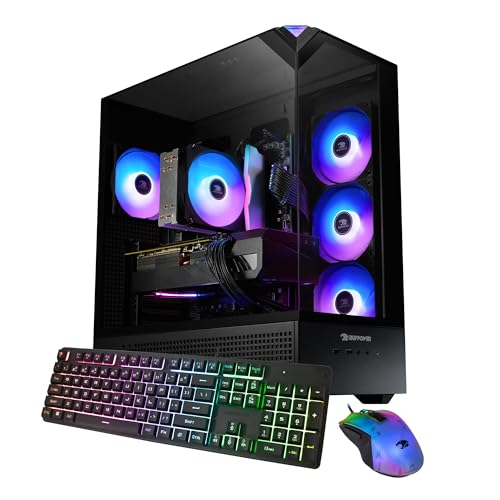
Best Budget: iBUYPOWER Element RTX 5060 Ti
Specs
CPU | Core Ultra 5 225F |
GPU | GeForce RTX 5060 Ti 8 GB |
Memory | 16 GB DDR5-5200 |
Storage | 1 TB NVMe SSD |
Included | Keyboard and mouse |
OS | Windows 11 Home |
Model | EBI5N56T03 |
CPU
Core Ultra 5 225F
GPU
GeForce RTX 5060 Ti 8 GB
Memory
16 GB DDR5-5200
Storage
1 TB NVMe SSD
Included
Keyboard and mouse
OS
Windows 11 Home
Model
EBI5N56T03
What it does well
This is the pick for the most crowded desk. The Element chassis is the smallest footprint in the roundup, which is the whole point when a monitor, textbooks, and a lamp already own most of the surface. It still carries a 5060 Ti rather than dropping to a weaker card to save space, so the small box is not a slow one.
It also ships with a keyboard and mouse, which means a dorm buyer is genuinely plug-and-play on arrival rather than making a second and third purchase before the first game loads. The DDR5 memory and current Core Ultra 5 keep it feeling modern.
What you give up
The 5060 Ti here carries 8GB of memory rather than 16GB, so it has the raster speed of the Ti but the texture ceiling of the smaller buffer. At 1080p that is fine; at 1440p Ultra in the newest titles it is the pick most likely to ask you to turn textures down a notch.
Storage is a single 1TB drive and it fills fast, and the listing is wired rather than Wi-Fi, so a dorm buyer should add an inexpensive USB Wi-Fi adapter or a PCIe card. Neither is expensive, but both are worth knowing before it arrives.
Who it's for
The student on the tightest desk who wants the smallest real gaming tower, values the included peripherals, and would rather add a cheap Wi-Fi adapter than give up floor space. If the constraint is the desk, this is the pick built for it.
Editor's Pick: iBUYPOWER Trace 9700F RTX 5060 Ti

Specs
CPU | Ryzen 7 9700F (AM5, 8 cores / 16 threads) |
GPU | GeForce RTX 5060 Ti 16 GB |
Memory | 16 GB DDR5-5200 |
Storage | 1 TB NVMe SSD |
Included | Keyboard and mouse |
OS | Windows 11 Home |
Model | TBA7N56T01 |
CPU
Ryzen 7 9700F (AM5, 8 cores / 16 threads)
GPU
GeForce RTX 5060 Ti 16 GB
Memory
16 GB DDR5-5200
Storage
1 TB NVMe SSD
Included
Keyboard and mouse
OS
Windows 11 Home
Model
TBA7N56T01
What it does well
This is the longevity play. The Ryzen 7 9700F sits on the current AM5 socket, which means the CPU upgrade path is open for years rather than capped at a single drop-in, and for a machine that has to last a four-year degree that is the difference between upgrading and replacing. It pairs a modern eight-core chip with the 16GB RTX 5060 Ti, so it has both the platform runway and the VRAM headroom.
It ships with a keyboard and mouse, so it is plug-and-play out of the box, and the current-generation Ryzen keeps 1% lows steady in the CPU-heavy moments.
What you give up
The 16GB of system memory is the floor and worth a bump to 32GB in year two, especially given how long this platform is meant to last. And the listing does not state the power supply wattage, which on any prebuilt is the component most likely to be where the builder saved money, so treat it as an unknown rather than a strength and plan to check it on arrival.
Like the budget pick, it is wired rather than Wi-Fi on the listing, so a dorm buyer should budget a small adapter.
Who it's for
The student who thinks in four-year horizons and wants a platform that can grow, not a dead-end socket. If you would rather add a faster CPU in year three than buy a whole new machine, the AM5 socket is the reason to pick this one.
What to skip
Skip the RGB tower that sounds like a hairdryer. A wall of fans behind a glass panel looks great in a product photo and turns into a noise complaint the first week when a roommate is trying to sleep. In a shared room, quiet is a feature, and a Gold power supply with a mesh front beats a light show every time.
Skip any configuration without Wi-Fi unless you already know your room has a wired drop, which most dorms do not. A tower with no wireless is not broken, but it is unusable on day one until you buy an adapter, and that is a surprise nobody wants after unboxing. And skip the models that hide a mechanical hard drive as the main storage: a single small SSD you can expand beats a slow spinning disk that makes every load screen longer. The other dorm-day purchase worth making in advance is power. Housing rules ban daisy-chained extension cords but allow a UL-listed unit, and our dorm-safe surge protector picks cover what actually passes inspection.
Bottom line
If you want one tower that handles everything a student plays, stays quiet next to a roommate, and works on dorm Wi-Fi from the first minute, buy the Skytech Nebula RTX 5060 Ti 16GB. It is the most complete dorm machine here.
If you are cash-tight and want DDR5 and Wi-Fi at the lowest honest price, buy the CyberPowerPC Gamer Xtreme VR RTX 5060. If you are buying once for all four years and want the strongest CPU with a 16GB card, stretch for the CyberPowerPC Xtreme VR i7 RTX 5060 Ti. If your desk is the constraint, the iBUYPOWER Element RTX 5060 Ti is the smallest real gaming tower and includes the peripherals. And if you think in four-year horizons and want a socket that can grow, the iBUYPOWER Trace 9700F RTX 5060 Ti is the one built to last the whole degree. If the budget is tighter than any of these, prebuilt gaming PCs under 600 dollars sets out what the next rung down honestly gets you.
FAQ
Laptop or desktop for college gaming: which should I actually buy?
Buy the desktop if you have a desk you return to every night and gaming is a real part of your week, because for the same money it gives you more frames, quieter and cooler operation, and a longer life through upgrades. Buy the laptop if you need one machine that travels to class and games sometimes. Many students carry a cheap laptop for notes and keep a desktop for the actual playing, which is the best of both without paying flagship-laptop prices for gaming performance a desktop delivers for less.
Is a prebuilt gaming PC too loud for a dorm room with a roommate?
Not if you pick for it. Noise under load comes down to the power supply and the front airflow, not the graphics card. A machine with an 80+ Gold supply and a mesh front, like the Skytech Nebula, spins its fans slower and stays quiet through a long session. The towers to avoid in a shared room are the RGB-forward ones with a solid decorative front panel that chokes airflow and pushes the fans loud. Quiet is a feature worth choosing on purpose when a roommate is three feet away.
Will a gaming desktop work on dorm Wi-Fi if there's no ethernet port?
Only if it has built-in Wi-Fi, and not every prebuilt does. Most dorm rooms give you a wireless network and no wired drop, so a Wi-Fi-included machine works on day one and a wired-only one needs an adapter first. Three of the picks here state Wi-Fi outright; for the two wired-only listings, a cheap USB Wi-Fi adapter or a PCIe Wi-Fi card solves it for very little money. Check the listing for Wi-Fi before you buy, or budget the small adapter into the purchase.
How small does a gaming PC need to be to fit a dorm desk?
Smaller than you think, because the desk is already crowded with a monitor, books, and a lamp. A standard compact tower fits beside a monitor without owning the whole surface, and the iBUYPOWER Element is the smallest footprint on this list for the tightest desks. If space is the hard constraint, a mini-ITX prebuilt goes smaller still, though you pay a little more for the compact chassis. For most dorms a normal tower placed on the floor or beside the monitor is fine.
Can a prebuilt under about a thousand dollars handle both schoolwork and modern games?
Yes, comfortably. The RTX 5060 and RTX 5060 Ti machines here run modern AAA at 1080p high and esports well above a fast panel's refresh, and every one of them handles a full course load of documents, browser tabs, video calls, and lecture recordings without noticing. The value pick is the entry point and it does both jobs. The only thing to plan for is memory: 16GB is fine for gaming plus normal schoolwork, and a jump to 32GB helps if you also stream or edit video.
Is an RTX 5060 or RTX 5060 Ti enough for four years of college?
Yes, especially the 16GB RTX 5060 Ti versions. The RTX 5060 is enough today for 1080p high and will stay useful across a degree, though its 8GB buffer means turning textures to high rather than Ultra in the newest titles. The 16GB RTX 5060 Ti is the more future-proof choice, holding texture detail into 1440p and into the later years when games grow heavier. For a machine meant to last the whole four years, the 16GB card is the one worth the small step up.
Related Articles

Best Prebuilt Gaming PCs (2026): 5 Picks, Warranty First
The best prebuilt gaming PCs in 2026: 5 picks from a 1080p budget box up to a 4K rig, judged on warranty and RMA support first, then build quality and VRAM.
Aug 18, 2026

Best Prebuilt Gaming PCs Truly Under $1,000 (2026): 5 Picks
The best prebuilt gaming PCs genuinely under $1,000 in 2026: five RTX towers ranked on sustained 1080p frame rates, PSU headroom, and airflow quality.
Sep 20, 2026

5 Best Prebuilt Gaming PCs Under $1500 (2026): 8GB vs 16GB
The best prebuilt gaming PC under $1500 in 2026: five RTX 5060 Ti rigs ranked for 1080p and 1440p, and the 8GB vs 16GB VRAM call that decides your buy.
Aug 2, 2026

Best Mini-ITX Prebuilt Gaming PCs (2026): Compact Rigs That Actually Sustain Load
The 5 best mini-ITX prebuilt gaming PCs in 2026, ranked by thermal headroom and chassis volume, from ultra-portable 8.1L SFF to full 18L ITX systems.
May 27, 2026

Best Gaming Laptops for College Students (2026): 5 Tested
The best gaming laptops for college students in 2026: five tested picks ranked by weight, honest battery life, and gaming power you can carry to class.
Aug 8, 2026