Affiliate Disclosure: As an Amazon Associate we earn from qualifying purchases. Some links may earn us a commission at no cost to you.

Best Gaming Mouse for Medium Hands 2026: 5 Picks, Size Chart
Medium hands run 17 to 19cm from wrist crease to middle fingertip, and they fit gaming mice roughly 120mm to 130mm long. Where you land inside that range depends on your grip style, so this guide gives you five mice matched across the span, each listed with the dimensions that actually decide fit. For claw and fingertip grip, our top pick is the 128mm Razer Viper V3 Pro; palm grippers who want a defined thumb shelf should look at the 130mm Razer Basilisk V3 Pro. The size chart below maps your hand length and grip to a mouse length before you pick.
Measuring medium hands: the 30-second method
Lay your hand flat on a desk, fingers together. Measure from the crease where your palm meets your wrist to the tip of your middle finger. That's your hand length. Medium hands land between 17cm and 19cm.
Hand width matters less than length for mouse fit, but if you're at the wider end (8cm+), ergonomic right-handed shapes tend to feel more supported under the thumb and ring finger than pure symmetrical designs. Grip style is the second axis. Claw and fingertip grip players sit higher on the mouse, so they can size down slightly from what a palm gripper needs to fill the rear hump. A 17cm palm gripper wants 125-130mm mouse length. A 19cm claw gripper often fits the same range. The mice below cover that full span.
What size mouse fits a 17, 18, or 19cm hand
Hand length | Palm grip | Claw or fingertip |
|---|---|---|
17cm | 125-130mm | 118-125mm |
18cm | 126-132mm | 120-128mm |
19cm | 130-135mm | 125-130mm |
17cm
- Palm grip
125-130mm
- Claw or fingertip
118-125mm
18cm
- Palm grip
126-132mm
- Claw or fingertip
120-128mm
19cm
- Palm grip
130-135mm
- Claw or fingertip
125-130mm
Hand length sets the range and grip style decides where you sit inside it. Claw and fingertip players load the front of the mouse and can size down from what a palm gripper needs to fill the rear hump. Every pick below states its length, so you can check it against your own band before you buy. If you measure outside the medium band in either direction, our ergonomic gaming mice for large and small hands guide covers the small and large ends with the same dimension-first framing.
Our top pick: Razer Viper V3 Pro
The Viper V3 Pro is 128mm long and 54g. For medium-hand claw and fingertip players who spend most of their time in FPS games, nothing in 2026 matches its combination of tracking precision, wireless reliability, and battery life at this price. The shape fills medium hands without crowding the fingers at claw grip, and the low rear profile doesn't fight fingertip placement the way a high-humped ergonomic does.
Quick picks
Pick | Mouse | Where to buy |
|---|---|---|
Best Overall | ||
Best Value | ||
Best for MMO | ||
Best Budget | ||
Editor's Pick |
Best Overall
- Mouse
- Where to buy
Best Value
- Mouse
- Where to buy
Best for MMO
- Mouse
- Where to buy
Best Budget
- Mouse
- Where to buy
Editor's Pick
- Mouse
- Where to buy
Specs at a glance
Pick | Mouse | Weight | Length | Buttons | Sensor | Best For |
|---|---|---|---|---|---|---|
Best Overall | 54g | 128mm | 8 | 35K DPI | FPS / Competitive | |
Best Value | 60g | 125mm | 5 | 44K DPI | FPS / All-around | |
Best for MMO | 112g | 130mm | 11 | 30K DPI | MMO / RPG | |
Best Budget | 74g | ~125mm | 9 | 18K DPI | Mixed / Budget | |
Editor's Pick | 64g | 122mm | 5 | 19K DPI | FPS / Flat-profile |
Best Overall
- Mouse
- Weight
54g
- Length
128mm
- Buttons
8
- Sensor
35K DPI
- Best For
FPS / Competitive
Best Value
- Mouse
- Weight
60g
- Length
125mm
- Buttons
5
- Sensor
44K DPI
- Best For
FPS / All-around
Best for MMO
- Mouse
- Weight
112g
- Length
130mm
- Buttons
11
- Sensor
30K DPI
- Best For
MMO / RPG
Best Budget
- Mouse
- Weight
74g
- Length
~125mm
- Buttons
9
- Sensor
18K DPI
- Best For
Mixed / Budget
Editor's Pick
- Mouse
- Weight
64g
- Length
122mm
- Buttons
5
- Sensor
19K DPI
- Best For
FPS / Flat-profile
How we picked
Every mouse here was evaluated against three criteria: does it fit a 17-19cm hand at the intended grip style, is the sensor competitive for the primary use case, and does the button count and weight match what that genre actually demands.
For FPS picks, the target is a symmetrical shape between 120mm and 130mm long, sub-70g, with an optical sensor above 18K DPI and polling at 1K Hz or higher. FPS is where sensor precision and weight have the most measurable impact on outcomes. A heavier ergonomic mouse that's comfortable in MMO sessions adds unnecessary inertia when you're tracking a moving target at 1440p 165Hz.
For MMO picks, button count and scroll-wheel quality move to the front. An MMO player needs 9+ programmable buttons for action-bar bindings, and the scroll wheel doubles as navigation in inventory and map screens. Weight matters less because most MMO sessions involve low-sensitivity sweeping movements, not rapid micro-flicks. An ergonomic right-hand shape helps for 4+ hour sessions.
For general gaming, the balance point is a sub-75g wireless mouse with at least 6 programmable buttons and a proven sensor. The Logitech G Pro X Superlight 2 anchors this slot: it's the most-used competitive wireless mouse in esports and handles any genre with 5 buttons.
If you're unsure about grip style, check our guide to how to choose gaming peripherals. It covers palm vs claw vs fingertip grips and how to match a shell to your hand.
Best Overall: Razer Viper V3 Pro
Specs
Shape | Symmetrical |
Weight | 54g |
Dimensions | 128 x 44 x 38mm |
Sensor | Focus Pro 35K Gen-2 optical |
Switches | Gen-3 optical |
Wireless | 8K HyperPolling |
Buttons | 8 programmable |
Battery | 95 hours at 1K Hz |
Charging | USB-C |
Shape
Symmetrical
Weight
54g
Dimensions
128 x 44 x 38mm
Sensor
Focus Pro 35K Gen-2 optical
Switches
Gen-3 optical
Wireless
8K HyperPolling
Buttons
8 programmable
Battery
95 hours at 1K Hz
Charging
USB-C
What it does well
The Viper V3 Pro's 128mm length lands at the upper edge of the ideal medium-hand range, which means the rear of the mouse contacts the palm reliably in claw grip without the fingers cramping at the front. At 54g, the weight is present enough to feel intentional, light enough that extended flicking sessions don't fatigue the forearm.
The Focus Pro 35K Gen-2 sensor is among the most accurate in any gaming mouse at this tier. It tracks cleanly on cloth, hard, and glass surfaces with no jitter at high DPI and no angle snapping. Gen-3 optical switches have zero debounce delay, which registers fast clicks as single inputs rather than double-firing. For ranked play in Counter-Strike 2, Valorant, or Apex Legends, that matters.
At 8K HyperPolling (with the included HyperPolling Wireless Dongle), the connection updates faster than any monitor can render. Most buyers will run 2K or 4K Hz to preserve battery, and still get a responsiveness advantage over standard 1K Hz wireless. The 95-hour rated battery at 1K Hz means weekly charging in normal use.
What you give up
The Viper V3 Pro is not the lightest mouse in this class. The Endgame Gear XM2we and the G Pro X Superlight 2 are both lighter. If sub-60g is the priority, the Superlight 2 is the better fit. The symmetrical shape offers no dedicated thumb shelf. Palm-grip players who spend long sessions in MMO or RPG games may prefer the ergonomic form of the Basilisk V3 Pro.
Razer Synapse is required for button remapping and polling adjustments. Reviewers consistently recommend configuring your profiles, enabling on-board memory, and then uninstalling Synapse to avoid the RAM overhead. The mouse works without it; the software just enables customization.
Who it's for
FPS-primary players with medium hands (17-19cm) who run claw or relaxed fingertip grip on a 1440p 165Hz or higher display. If your primary games are ranked shooters and you want the most capable wireless FPS mouse in this price range, the Viper V3 Pro is the answer. Claw grippers who want the shape rules spelled out before the spec sheet should read our claw grip picks sized by hand first.
Best Value: Logitech G Pro X Superlight 2

Specs
Shape | Symmetrical low-profile |
Weight | 60g |
Dimensions | 125 x 63.5 x 40mm |
Sensor | HERO 2, 44K DPI, 888+ IPS |
Switches | LIGHTFORCE hybrid |
Polling | 8K |
Buttons | 5 programmable |
Battery | 95 hours |
Charging | USB-C |
Shape
Symmetrical low-profile
Weight
60g
Dimensions
125 x 63.5 x 40mm
Sensor
HERO 2, 44K DPI, 888+ IPS
Switches
LIGHTFORCE hybrid
Polling
8K
Buttons
5 programmable
Battery
95 hours
Charging
USB-C
What it does well
The G Pro X Superlight 2 is the most battle-tested competitive wireless mouse available. Hundreds of partnered esports players use it across multiple titles, which means years of community feedback have driven Logitech to fix every meaningful pain point from the original Superlight. The scroll wheel no longer breaks (a persistent failure mode on the first generation). The LIGHTFORCE hybrid switches deliver the sharpest-feeling click in this roundup: tactile without being heavy, fast without being mushy.
At 125mm and 40mm height, it's the flattest of the symmetrical picks, which benefits fingertip-grip players who don't want rear-hump contact. LIGHTSPEED wireless is the most reliable 2.4GHz implementation on the market. The 95-hour battery at 1K Hz holds up in real use. Buyers report 1.5 to 2 weeks between charges with daily gaming sessions.
HERO 2 sensor outputs 44K DPI and 888+ IPS tracking. In practical terms, this means it handles the fastest flick shots at any DPI setting without sensor saturation. On-board memory stores profiles so you can run the mouse without G HUB installed once it's configured.
What you give up
Five buttons is the limit. No side panel, no extra thumb buttons. For FPS and general gaming, 5 buttons covers everything: primary, secondary, scroll, and two side buttons for push-to-talk and grenade. For MMO players who need more than two thumb bindings, the Aerox 5 or Basilisk V3 Pro fit better.
At 125mm, the G Pro X Superlight 2 is 3mm shorter than the Viper V3 Pro. For most medium-hand players this is imperceptible, but buyers at the 19cm end who palm-grip may feel the rear profile doesn't fully contact the palm. The 40mm height is intentionally low. If you prefer a taller rear hump, look at the Basilisk.
The Classic size variant (the standard pick in this roundup) is slightly different from the DEX right-handed version and the Compact smaller variant. Confirm you're buying the Classic when ordering from the listing.
Who it's for
Medium-hand players who split time across FPS, battle royale, and general gaming. The player who wants the most proven competitive wireless mouse without worrying about whether a newer, lighter option has a worse scroll wheel or weaker switch feel. Also strong for players considering the budget gaming mice category who are ready to step up.
Best for MMO: Razer Basilisk V3 Pro
Specs
Shape | Right-handed ergonomic |
Weight | 112g |
Dimensions | 130 x 75.4 x 42.5mm |
Sensor | Focus Pro 30K optical |
Switches | Gen-3 optical |
Buttons | 11 programmable |
Scroll | HyperScroll tilt wheel |
Battery | 110 hours at 1K Hz HyperSpeed |
Connectivity | 2.4GHz HyperSpeed, Bluetooth, USB-C wired |
Shape
Right-handed ergonomic
Weight
112g
Dimensions
130 x 75.4 x 42.5mm
Sensor
Focus Pro 30K optical
Switches
Gen-3 optical
Buttons
11 programmable
Scroll
HyperScroll tilt wheel
Battery
110 hours at 1K Hz HyperSpeed
Connectivity
2.4GHz HyperSpeed, Bluetooth, USB-C wired
What it does well
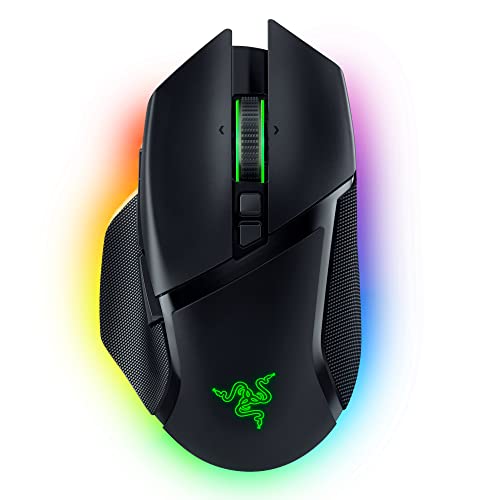
The Basilisk V3 Pro fills medium hands in palm grip. The 130mm length and 75.4mm width match the lateral span of a 17-19cm hand well, and the right-handed contour means the thumb lands on a defined shelf rather than floating unsupported. For 4+ hour sessions in World of Warcraft, Final Fantasy XIV, or Diablo IV, the ergonomic shape reduces wrist strain compared to keeping fingers arched on a symmetrical mouse.
The HyperScroll tilt wheel is the best scroll wheel in this roundup. Three modes: tactile ratchet for precise weapon or ability selection, free-spin for fast map navigation, and Smart-Reel for automatic switching between the two. In practice, free-spin through long talent trees or inventory pages is noticeably faster than ratchet scrolling.
Eleven programmable buttons (two thumb buttons, a DPI-shift button, and tilt-wheel left/right) cover the standard action-bar layouts in MMO games without needing a dedicated side-panel mouse. Three connection modes mean it doubles as a productivity mouse on a laptop without a dongle.
What you give up
At 112g, the Basilisk V3 Pro is the heaviest mouse in this roundup. For FPS gaming, that weight adds inertia that affects flick shot precision. This is an MMO and RPG tool, not a competitive FPS mouse. Right-handed only. Left-hand players need a different pick.
Battery life with RGB lighting enabled is much shorter than the rated 110-hour spec. With RGB active, buyers consistently report 2-3 days of heavy use. Turn RGB off and it stretches to weeks. Razer Synapse installs at roughly 150MB and is required for full button customization, which some buyers find excessive for a mouse configuration tool.
Note that a newer Basilisk V3 Pro 35K model now exists at a higher price point. This slot covers the standard V3 Pro. The sensor difference (35K vs 30K) makes no perceptible difference for MMO gameplay.
Who it's for
The MMO or RPG player with medium hands who prioritizes session comfort, button count, and scroll-wheel versatility. If your main game is World of Warcraft, Final Fantasy XIV, or Diablo IV and you spend 3 or more hours per session, the Basilisk V3 Pro's ergonomic form and HyperScroll wheel make it the right tool.
Best Budget: SteelSeries Aerox 5 Wireless

Specs
Shape | Symmetrical honeycomb |
Weight | 74g |
Water resistance | IP54 AquaBarrier |
Sensor | TrueMove Air optical, 18K DPI |
Buttons | 9 programmable |
Connectivity | 2.4GHz and Bluetooth |
Battery | 180 hours |
Feet | 100% PTFE |
Shape
Symmetrical honeycomb
Weight
74g
Water resistance
IP54 AquaBarrier
Sensor
TrueMove Air optical, 18K DPI
Buttons
9 programmable
Connectivity
2.4GHz and Bluetooth
Battery
180 hours
Feet
100% PTFE
What it does well
The Aerox 5 Wireless has the best battery life in this roundup at 180 hours rated, with 15 minutes of charging delivering 40+ hours of use. For buyers who forget to charge overnight, that runtime is a real advantage. The honeycomb shell sheds weight without the structural fragility common in older perforated designs. The shell feels solid, not hollow.
Nine buttons give the budget buyer meaningful programmable real estate without spending flagship pricing. The five-button side panel covers standard MMO bindings: two thumb buttons plus three additional via the up/down flick switch. IP54 dust and water resistance is a certified spec, not a marketing description. A knocked-over water glass won't destroy the mouse.
Dual wireless (2.4GHz and Bluetooth) means one dongle-free connection mode for laptop use. At 74g, it's noticeably lighter than the Basilisk V3 Pro while offering more buttons than the symmetrical FPS picks.
What you give up
The 18K DPI TrueMove Air sensor underperforms the 30K and 35K sensors in the other picks at high polling rates. For general and MMO gaming this is irrelevant; 18K DPI is more than sufficient. For competitive FPS at 500Hz+ polling, the sensor ceiling becomes a constraint. No 8K polling on the Aerox 5.
The five-button side panel uses an up/down flick switch layout rather than the thumb-grid of a dedicated MMO mouse like the Razer Naga series. The layout is functional but has a learning curve. SteelSeries GG software is less polished than Logitech G HUB or Razer Synapse for profile management.
Build quality is a measurable step below the Razer and Logitech flagship picks. The honeycomb shell can accumulate debris in the perforations over time. If you're comparing to dedicated FPS mice, the sensor and polling rate gap is real.
Who it's for
The budget-conscious medium-hand gamer who plays a mix of FPS, battle royale, and occasionally MMO and wants wireless freedom with a meaningful button count without spending flagship pricing. A strong pairing with a hot-swappable mechanical keyboard for a full peripherals upgrade at a reasonable total spend.
Editor's Pick: Endgame Gear XM2we

Specs
Shape | Symmetrical low-profile |
Weight | ~64g |
Dimensions | 122 x 66 x 38mm |
Sensor | PixArt PAW3370, 19K DPI |
Switches | Kailh GO |
Wireless | 2.4GHz |
Battery | ~70 hours |
Charging | USB-C |
Buttons | 5 programmable |
Shape
Symmetrical low-profile
Weight
~64g
Dimensions
122 x 66 x 38mm
Sensor
PixArt PAW3370, 19K DPI
Switches
Kailh GO
Wireless
2.4GHz
Battery
~70 hours
Charging
USB-C
Buttons
5 programmable
What it does well
The XM2we is the flattest mouse in this roundup at 38mm height. For medium-hand fingertip-grip players who find the rear humps on the Viper V3 Pro and G Pro X Superlight 2 too pronounced, the XM2we's near-flat profile sits naturally under the fingertips without pushing the hand higher than the grip style calls for.
At 122mm, the length still accommodates 17-19cm hands comfortably at fingertip grip. Fingers land at the front edge without overhang. The PAW3370 sensor is a proven PixArt chip used across dozens of well-regarded competitive mice. It tracks cleanly, zero acceleration, and hits 19K DPI with no interpolation. Kailh GO switches feel precise and have a satisfying click response.
The XM2we is Endgame Gear's accessible entry into wireless gaming at a lower price than the newer XM2w 4K iterations. For the buyer whose primary concern is getting the shape right rather than having the latest sensor revision, it delivers.
What you give up
Seventy-hour battery trails the 95-hour and 180-hour options in this roundup. At normal use patterns (4-6 hours daily), expect charging every 2 weeks or less. Five buttons means no side-panel options. The XM2we uses an older PAW3370 sensor compared to the PAW3395 or PAW3950 found in the newer XM2w 4K variants, which cap out at 26K-30K DPI and higher polling rates.
Endgame Gear has less brand recognition than Razer or Logitech in the mainstream market. Community resources, YouTube coverage, and software troubleshooting documentation are thinner than the flagship brands. Availability can fluctuate; the Viper V3 Pro and G Pro X Superlight 2 are consistently stocked across major retailers.
Confirm you're purchasing the XM2we (ASIN B0BVKX7XSF, the wireless edition) rather than the wired XM2w. The naming difference is subtle. The new XM2w 4K v2 is a different, higher-priced product.
Who it's for
The FPS player with medium hands who has already tried higher-profile symmetrical mice and found the rear hump uncomfortable at fingertip grip. The buyer who wants a flat, low-profile wireless shape and doesn't need more than 5 buttons. Also relevant for players interested in gaming mice for palm grip who want to compare fit between palm and fingertip options.
Bottom line
If you have medium hands and play FPS games, buy the Razer Viper V3 Pro. The 128mm length, 54g weight, and 35K sensor hit the right spec targets for claw and fingertip grip, and the 8K HyperPolling wireless is competition-ready.
If you want the most battle-tested competitive mouse at a lower price, the Logitech G Pro X Superlight 2 is the pick. It's what most esports players are actually using, and the LIGHTFORCE switches are the best-feeling clicks in this roundup.
For MMO and RPG sessions, the Razer Basilisk V3 Pro's ergonomic form, 11 programmable buttons, and HyperScroll tilt wheel make it the right tool for long sessions in World of Warcraft or Final Fantasy XIV. If you're specifically deciding between the DeathAdder V3, V3 HyperSpeed, V3 Pro, and V4 Pro, see our Razer DeathAdder family comparison for a side-by-side with buy recommendations by use case.
If budget is the constraint, the SteelSeries Aerox 5 Wireless gives you 9 buttons, dual wireless, IP54 protection, and a 180-hour battery for less than the flagship picks.
For the flat-profile fingertip crowd, the Endgame Gear XM2we's 38mm height and 122mm length fill medium hands at fingertip grip better than any other option here. If you're shopping specifically for wireless, our best wireless gaming mice roundup covers the full range from ultralight FPS picks to ergonomic palm-grip options.
FAQ
How do I measure my hand size for a gaming mouse?
Lay your hand flat and measure from the crease at the base of your palm to the tip of your middle finger. That's your hand length. Separately, measure across the widest part of your palm for hand width. Medium hands are 17-19cm in length. Both measurements matter. Length determines how much of the mouse your palm and fingers contact; width affects whether an ergonomic right-hand shape fits comfortably under your thumb.
Is 17–19cm considered medium hands, or is that large?
Seventeen to 19cm is medium by industry convention. Small hands run under 17cm, large hands are typically 19cm and above. The 17-19cm range covers the largest single segment of gaming mouse buyers. Mice designed for "medium" fit typically run 120-130mm in length. The picks in this roundup are all within that window.
Does grip style matter as much as hand size when choosing a mouse?
Yes, grip style often matters more than hand size alone. A claw-grip player with 18cm hands needs a different shape than a palm-grip player with the same measurement. Claw and fingertip grip players typically prefer lower-profile, lighter mice because they want less rear-hump contact. Palm-grip players usually need the hump to fill the palm and distribute contact across the whole hand. Check grip style first, then filter by hand size within the shapes that suit your grip.
Can medium-hand players use an ergonomic mouse, or should they stick to symmetrical?
Medium-hand players can use both. The choice depends on use case and dominant hand. Ergonomic right-handed mice (like the Basilisk V3 Pro) provide more thumb support and a natural rest position, which is useful for long MMO sessions. Symmetrical mice suit players who switch hands, prefer consistent finger placement, or prioritize rapid wrist movements for FPS. If you're left-handed, symmetrical is your only option from this list.
What mouse dimensions work best for 18cm hands with a claw grip?
For 18cm hands at claw grip, target 125-130mm in length and 38-42mm in height. The Razer Viper V3 Pro (128 x 44 x 38mm) and the Logitech G Pro X Superlight 2 (125 x 63.5 x 40mm) both land in this range. The Endgame Gear XM2we (122mm, 38mm height) works if you prefer a flatter profile. Avoid mice under 120mm at 18cm. The fingers crowd toward the front and the rear provides no palm contact at claw grip.
Which Logitech G mouse fits medium hands?
The Logitech G Pro X Superlight 2 is the Logitech pick in this roundup for medium hands. At 125mm long and 40mm tall, it suits claw and fingertip grip across the 17 to 19cm range. Palm grippers at the 19cm end may find its low rear profile does not fill the palm; the Razer Basilisk V3 Pro is the fuller palm-grip shape here.
Related Articles

Best Hot-Swappable Gaming Keyboards (2026): 5 Top Picks
Five hot-swap gaming keyboards picked by form factor, budget, and switch philosophy. Covers wired budget, wireless value, Hall Effect premium, and full-size.
May 27, 2026

Best Monitor for RTX 3060 (2026): 5 Picks, 1080p and 1440p
The best monitor for the RTX 3060 is a 27-inch 1440p 180Hz panel run with DLSS, or a 24-inch 1080p one if you stay native. Five picks matched to the 12GB card.
Oct 14, 2026

Best NR200 Fans (2026): 5 Picks + the Right Airflow Setup
Best fans for NR200 builds, by slot: 25mm top exhaust, slim 120mm bottom intake for thick GPUs, a 92mm rear upgrade, and the airflow setup that beats PSU heat.
Oct 13, 2026

Best Monitor for RTX 4060 Ti (2026): 8GB and 16GB Picks
The best monitor for an RTX 4060 Ti is 1440p 180Hz IPS for the 16GB card, or 1080p 240Hz for the 8GB one. Five picks matched to what each variant drives.
Oct 14, 2026

Best Monitor for RTX 4060 (2026): 1080p and 1440p Picks
The best monitor for an RTX 4060 is a 1080p 180Hz panel for most games, with 1440p only if you run DLSS. Five picks matched to what the 8GB card drives.
Oct 13, 2026