Affiliate Disclosure: As an Amazon Associate we earn from qualifying purchases. Some links may earn us a commission at no cost to you.

Best Sim Racing Pedals 2026: 5 Load Cell Picks, Desk or Rig
Your wheel came with pedals. They are almost certainly the weakest part of your setup, and the brake is why. Bundled pedals read brake input by how far the pedal travels, so you brake by position and your muscle memory never settles. A load cell brake reads pressure instead, and that single change is the one pedal upgrade that moves your lap times, worth 0.3 to 2 seconds depending on how much room your braking still has.
The catch nobody mentions is mounting. A load cell brake only works if the whole set stays put when you stand on it, so the pedals you can buy depend on whether you have a rigid cockpit or a desk clamp. These five sort that out by tier, wheel ecosystem, and where you can bolt them down.
Our top pick: Thrustmaster T-LCM
The T-LCM is the one load cell set that does not care what wheel you own. It plugs in over USB and works with Thrustmaster, Logitech, Fanatec, MOZA, and direct drive bases alike, so it is the safest upgrade for most people leaving bundled pedals behind.

Load cell vs potentiometer vs hydraulic
Three brake technologies show up in this category, and only one of them changes how you drive. Here is the honest version.
Potentiometer (and Hall-effect) brakes
These read pedal travel, the same way a volume knob reads rotation. You brake by moving the pedal to a position, which is fine for arcade racers but never builds real threshold-braking muscle memory because the resistance never tells you how hard you are pressing. Most bundled pedals and the cheapest upgrade sets use this. Swapping one potentiometer set for another buys you almost nothing.
Load cell brakes
A load cell measures force, not distance. You press until the sensor reads the pressure you want, and because your leg feels the resistance build, you learn to brake by feel and repeat it lap after lap. This is the upgrade that matters, and it is measurable: drivers moving off travel-based pedals typically tighten their braking points from around 2 to 3 meters of variation down to 0.5 to 1 meter, which is where the 0.3 to 2 second lap-time gain comes from. Every pick here except the desk-friendly Editor's Pick uses a load cell brake, and that is deliberate.
Hydraulic brakes
Hydraulic pedals push fluid through a damper for a firmer, more progressive feel closer to a real car. They are endgame hardware, they cost the most, and they demand the most rigid mounting. For the vast majority of sim racers a good load cell already covers the meaningful gain, so hydraulics sit outside this list on purpose.
Quick picks
Pedal set | Best for | Brake | Buy |
|---|---|---|---|
Works with any wheel | Load cell 100 kg | ||
Best value load cell | Load cell 100 kg | ||
Endgame brake feel | Load cell 200 kg | ||
Cheapest real load cell | Load cell 75 kg | ||
Desk setups | Hall-effect |
- Best for
Works with any wheel
- Brake
Load cell 100 kg
- Buy
- Best for
Best value load cell
- Brake
Load cell 100 kg
- Buy
- Best for
Endgame brake feel
- Brake
Load cell 200 kg
- Buy
- Best for
Cheapest real load cell
- Brake
Load cell 75 kg
- Buy
- Best for
Desk setups
- Brake
Hall-effect
- Buy
Mounting and compatibility
This is the table the spec sheets skip. A load cell brake is only as good as the surface it is bolted to, and half of these sets lock you into a wheel ecosystem. Check this before you check the price. If the wheel these pedals will plug into is still undecided and Forza Horizon 6 is the game, our guide to the best racing wheel for Forza Horizon 6 sorts the Xbox-licensed bases by drive type.
If your rig is not sorted yet, our guide to budget sim racing cockpits covers the rigid mounts a load cell brake needs to earn its keep.
Pedal set | Desk clamp viable | Cockpit recommended | Ecosystem |
|---|---|---|---|
With a firm clamp | Yes, for full brake force | Any wheel (USB) | |
With a firm clamp | Yes | Any wheel (USB); MOZA native | |
Not really | Required | MOZA hub or base | |
Yes | Optional | Logitech G base only | |
Yes, anti-slip base | Optional | MOZA base (R3 / R5) |
- Desk clamp viable
With a firm clamp
- Cockpit recommended
Yes, for full brake force
- Ecosystem
Any wheel (USB)
- Desk clamp viable
With a firm clamp
- Cockpit recommended
Yes
- Ecosystem
Any wheel (USB); MOZA native
- Desk clamp viable
Not really
- Cockpit recommended
Required
- Ecosystem
MOZA hub or base
- Desk clamp viable
Yes
- Cockpit recommended
Optional
- Ecosystem
Logitech G base only
- Desk clamp viable
Yes, anti-slip base
- Cockpit recommended
Optional
- Ecosystem
MOZA base (R3 / R5)
Specs at a glance
Pedal set | Pedals | Brake | Frame | Connection |
|---|---|---|---|---|
3 | Load cell 100 kg | Steel / composite | USB | |
3 | Load cell 100 kg | Steel | USB | |
3 | Load cell 200 kg + angle | Aluminum / carbon | MOZA hub | |
2 (+clutch) | Load cell 75 kg | Modular steel | Logitech base | |
2 (+clutch) | Hall-effect | Steel | MOZA base |
- Pedals
3
- Brake
Load cell 100 kg
- Frame
Steel / composite
- Connection
USB
- Pedals
3
- Brake
Load cell 100 kg
- Frame
Steel
- Connection
USB
- Pedals
3
- Brake
Load cell 200 kg + angle
- Frame
Aluminum / carbon
- Connection
MOZA hub
- Pedals
2 (+clutch)
- Brake
Load cell 75 kg
- Frame
Modular steel
- Connection
Logitech base
- Pedals
2 (+clutch)
- Brake
Hall-effect
- Frame
Steel
- Connection
MOZA base
How we picked
Pedals are the upgrade most sim racers reach for right after the wheel itself, so we treated them as a real performance decision rather than an afterthought.
We started from a simple rule: the brake is the whole point, so a set earns its place only if it upgrades how you brake or how you mount. That put load cell braking at the center of four of the five picks, with the fifth reserved for the desk-bound buyer who genuinely cannot hard-mount anything yet.
From there we sorted by two things the rankings usually ignore. First, mounting reality: whether the set survives a desk clamp or truly needs a cockpit to deliver its rated brake force. Second, ecosystem lock-in: whether it runs over plain USB with any wheel or ties you to one brand's base. Price sets the tiers, but those two factors decide whether a set is right for you.
We stuck to sets sold with stable listings and stayed inside the Amazon program, which is why a few direct-sale-only brands that sim racers love do not appear here. If you are still building out the rest of your setup, our peripherals buying framework covers how the other pieces fit together.
Every pick below carries its honest weak spot, because a pedal set that is wrong for your rig is a bad buy at any tier.
Best Overall: Thrustmaster T-LCM
Specs
Pedals | 3 (throttle, brake, clutch) |
Brake sensor | Load cell up to 100 kg |
Throttle / clutch | Hall-effect (contactless) |
Resolution | 16-bit |
Adjustable | Height, spacing, inclination |
Brake springs | 6 swappable |
Connection | USB (standalone) |
Works with | PC, PS5, PS4, Xbox |
Pedals
3 (throttle, brake, clutch)
Brake sensor
Load cell up to 100 kg
Throttle / clutch
Hall-effect (contactless)
Resolution
16-bit
Adjustable
Height, spacing, inclination
Brake springs
6 swappable
Connection
USB (standalone)
Works with
PC, PS5, PS4, Xbox
What it does well
The T-LCM's advantage is that it ignores brand politics. It connects over USB and shows up as a standalone controller, so it works with a Thrustmaster wheel, a Logitech base, a Fanatec setup, a MOZA rig, or a direct drive wheel with no adapters and no fuss. If you ever change wheels, the pedals come with you.
The brake itself is a real load cell rated to 100 kg, and Thrustmaster bundles six swappable springs so you can dial the resistance from soft to genuinely firm. The calibration app lets you set brake force curves and dead zones per pedal, which is more tuning than most people at this tier expect. Three pedals means you get a clutch for H-pattern cars out of the box.
What you give up
The frame is lighter than the all-metal ecosystem sets, so on a bare desk it wants a firm clamp to stop it walking forward under hard braking. Give it a solid mount and it is rock steady, but it is not the set you drop on a glass coffee table.
Only the brake is a load cell. The throttle and clutch use Hall-effect sensors, which is normal at this price and fine in practice, but worth knowing if you expected load cell feel on all three.
Who it's for
Anyone leaving bundled pedals who does not want to commit to a single wheel brand, and who has at least a firm clamp or a cockpit to mount to.
Best Value: MOZA SR-P

Specs
Pedals | 3 (brake, throttle, clutch) |
Brake sensor | Load cell 100 kg |
Sensors | 16-bit magnetic encoder |
Frame | High-strength steel |
Adjustable | Spacing, height, angle |
Curves | Pit House software |
Connection | USB |
Works with | PC (standalone or MOZA base) |
Pedals
3 (brake, throttle, clutch)
Brake sensor
Load cell 100 kg
Sensors
16-bit magnetic encoder
Frame
High-strength steel
Adjustable
Spacing, height, angle
Curves
Pit House software
Connection
USB
Works with
PC (standalone or MOZA base)
What it does well
The SR-P is the value sweet spot because it delivers a metal, three-pedal load cell set without premium pricing. The brake is a 100 kg load cell, the pedals ride on a high-strength steel frame, and the sensors are 16-bit magnetic encoders, so nothing here feels like a corner was cut on the parts that matter.
It runs standalone over USB, so you do not need a MOZA wheel to use it, but if you do own one it drops straight into the ecosystem and tunes through MOZA's Pit House software. That gives you brake curves, dead zones, and per-pedal calibration without extra hardware.
What you give up
It does not reach the outright brake ceiling or the adjustment range of the CRP2 above it, so the very last tenths of consistency belong to the premium set.
All the tuning lives in MOZA's software, so you are in their app to change anything meaningful. That is a small ask, but it is worth knowing if you prefer hardware knobs.
Who it's for
The value buyer who wants a genuine metal load cell set and an upgrade path into MOZA, without paying premium money.
Best Premium: MOZA CRP2
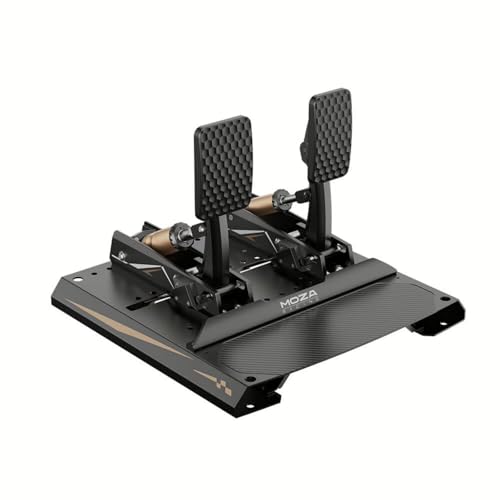
Specs
Pedals | 3 (brake, throttle, clutch) |
Brake sensor | Load cell 200 kg + angle sensor |
Body | Aluminum, carbon heel plate |
Adjustment | Tool-free |
Tuning | Up to 1,764 options |
Curves | Pit House software |
Connection | MOZA hub / base |
Works with | PC |
Pedals
3 (brake, throttle, clutch)
Brake sensor
Load cell 200 kg + angle sensor
Body
Aluminum, carbon heel plate
Adjustment
Tool-free
Tuning
Up to 1,764 options
Curves
Pit House software
Connection
MOZA hub / base
Works with
PC
What it does well
The CRP2 is where the brake stops being the limiting factor. It pairs a 200 kg load cell with a 15-bit angle sensor for dual-sensing brake input, so the pedal reads both how hard you press and how far, and the result is the most precise, most repeatable brake in this lineup.
The hardware backs it up. The body is aerospace-grade aluminum with a carbon fiber heel plate, adjustment is tool-free, and MOZA quotes over 1,700 tuning combinations across springs, elastomers, and travel. For a committed racer chasing consistency, that adjustment range is the point.
What you give up
That 200 kg cell only pays off if you can brace against it, which means a rigid cockpit. On a desk you will slide the whole rig before you reach the top of the brake's range, and you will have paid for headroom you cannot use.
It usually connects through a MOZA hub or wheelbase rather than a bare USB port, so if you are not already in the MOZA ecosystem, factor the hub into the cost and the plan.
Who it's for
The committed sim racer with a cockpit who wants the brake to stop being the weak link and has the mount to exploit it.
Best Budget: Logitech G RS Pedals

Specs
Pedals | 2 (throttle, brake); clutch optional |
Brake sensor | Load cell 75 kg |
Throttle sensor | Hall-effect |
Frame | Extendable steel, modular |
Adjustable | Pedal spacing and positions |
Connection | Logitech G wheel base |
Works with | PC, Xbox, PS (with wheel) |
Pedals
2 (throttle, brake); clutch optional
Brake sensor
Load cell 75 kg
Throttle sensor
Hall-effect
Frame
Extendable steel, modular
Adjustable
Pedal spacing and positions
Connection
Logitech G wheel base
Works with
PC, Xbox, PS (with wheel)
What it does well
The RS Pedals are the cheapest honest way into load cell braking. The brake is a 75 kg load cell, the throttle is Hall-effect, and the frame is extendable modular steel that you can respace to fit your legs. There is an optional clutch module if you want to go three-pedal down the line.
The lower 75 kg brake force is a feature for a lot of buyers. It is firm enough to teach real pressure braking but light enough to be manageable without a hard-mounted rig, so it bridges the gap between a desk setup and a cockpit better than the heavier sets.
What you give up
The big constraint is the ecosystem. The RS Pedals connect through a Logitech G wheel base, so they only make sense if you own or are buying an RS50 or G PRO wheel. They are not a standalone USB set.
You get two pedals out of the box, so the clutch is an extra purchase if you drive H-pattern cars.
Who it's for
Logitech G wheel owners who want real load cell braking without leaving the ecosystem or building a full cockpit first.
Editor's Pick: MOZA SR-P Lite

Specs
Pedals | 2 (throttle, brake); clutch add-on |
Brake sensor | Hall-effect (not load cell) |
Frame | High-strength steel |
Adjustable | Spacing, height; anti-slip base |
Curves | Pit House software |
Connection | MOZA base (R3 / R5) |
Works with | PC (MOZA ecosystem) |
Pedals
2 (throttle, brake); clutch add-on
Brake sensor
Hall-effect (not load cell)
Frame
High-strength steel
Adjustable
Spacing, height; anti-slip base
Curves
Pit House software
Connection
MOZA base (R3 / R5)
Works with
PC (MOZA ecosystem)
What it does well
The SR-P Lite is the honest desk-first pick, and the one set here that is not a load cell. It is a dual-pedal steel set with an anti-slip base that keeps it planted when it is clamped to a desk rather than bolted to a rig, which is exactly what a lot of first-time buyers have.
For MOZA R3 or R5 owners it is the cheapest on-ramp into a proper metal pedal set, it tunes through Pit House like the rest of the range, and a clutch add-on is available if you want a third pedal later.
What you give up
The brake is a Hall-effect sensor, not a load cell, so it reads travel rather than pressure. It will feel far better than a bundled plastic set, but it will not deliver the pressure-based braking that changes lap times. It is the entry ticket, not the destination.
It leans on the MOZA ecosystem for the smoothest experience, so it is happiest paired with a MOZA base.
Who it's for
The desk-bound MOZA owner who wants a solid, planted set right now and plans to move up to a load cell later.
What to skip
Skip potentiometer upgrade sets. If a pedal set brags about a new spring or a smoother travel but still reads the brake by position, it is not the upgrade you think it is. Spending on a second potentiometer set is the most common mistake in this category. Save the money toward a load cell instead.
Skip hydraulic pedals until you have the rig for them. Hydraulics are wonderful and completely wasted on a desk. If you cannot hard-mount to a rigid cockpit, the fluid damper and the firm pedal have nothing to push against, and you have bought endgame hardware you cannot feel. Get the cockpit first, then talk hydraulics.
Bottom line
If you want one set that upgrades your braking and works with any wheel you own now or later, buy the Thrustmaster T-LCM. If you want the best value metal load cell, the MOZA SR-P is the pick. Chasing the last tenths from a cockpit, the MOZA CRP2 is the brake to beat. On a Logitech G base, the RS Pedals are the cheapest real load cell. And if you are clamped to a desk and not ready to hard-mount, the MOZA SR-P Lite gets you a solid set today with a clear path up later.
Still deciding on the base these pedals will live behind? Our MOZA R5 vs Logitech G PRO comparison breaks down the two ecosystems most of these picks tie into.
FAQ
Do I really need load cell pedals, or are potentiometer pedals fine?
For casual arcade racing, potentiometer pedals work. For any kind of consistent lap times, a load cell brake is the single upgrade that matters, because braking by pressure instead of by pedal position is what builds repeatable threshold braking. If you only buy one upgrade over your bundled pedals, make it a load cell brake.
Can I use sim racing pedals on a desk, or do I need a cockpit?
You can use many of them on a desk, but a load cell brake needs the set to stay put when you press hard. Lighter sets like the Logitech G RS Pedals and the anti-slip MOZA SR-P Lite handle a desk clamp well. Heavier, high-force sets like the MOZA CRP2 really want a rigid cockpit, or you will slide the rig before you reach the top of the brake.
Will these pedals work with my wheel?
It depends on the set. The Thrustmaster T-LCM and MOZA SR-P run standalone over USB and work with any wheel brand. The Logitech G RS Pedals connect through a Logitech G base, and the MOZA CRP2 and SR-P Lite are built around MOZA's hub or base. Check the mounting and compatibility table above before you buy.
How much braking force should a load cell pedal have?
More force is not automatically better. A 75 kg load cell like the one in the Logitech G RS Pedals is plenty for most people and easier to manage on a desk. A 100 kg cell suits a firmly mounted set, and a 200 kg cell like the CRP2 only pays off in a rigid cockpit where you can brace against it. Match the force to your mount, not to the spec sheet.
Do I need three pedals with a clutch, or are two enough?
Two pedals cover almost every modern car with paddle shifting and automatic clutches. You want the third pedal only if you drive H-pattern manual cars in sims like Assetto Corsa or want a heel-and-toe clutch. The T-LCM, MOZA SR-P, and CRP2 come with three pedals; the Logitech G RS and MOZA SR-P Lite start at two with a clutch available separately.
Are load cell pedals worth it for casual sim racing?
If you play a few hours a week and care about improving, yes, a load cell is the upgrade you will feel every session. If you only dabble in arcade racers with a controller-style driving style, the gain is smaller and a good two-pedal set like the MOZA SR-P Lite is a sensible, affordable place to start.
Related Articles

How to Choose a Mouse, Keyboard, and Headset
A builder's framework for gaming peripherals: start with the games you play, then match shape, switch, and sound to how you actually use them.
Jun 29, 2026

Best Sim Racing Wheel for iRacing and Assetto Corsa (2026)
The best sim racing wheels for iRacing and Assetto Corsa, from the MOZA R5 direct drive bundle to the Logitech G Pro, matched to your torque and mounting.
Jul 3, 2026

Best Sim Racing Cockpits 2026: 5 Picks Under $1,000
The best sim racing cockpits of 2026 for your room and wheel: a rig that folds in 10 seconds, a seat-included 13 Nm direct drive pick, and an aluminum frame.
Oct 12, 2026

MOZA R5 vs Logitech G Pro Racing Wheel: 5.5Nm vs 11Nm (2026)
MOZA R5 vs Logitech G Pro Racing Wheel: a 5.5Nm all-in-one bundle versus an 11Nm premium base. Pick by how much torque your desk can take, not by Nm alone.
Aug 25, 2026

Best CPU for VR Sim Racing (2026): 5 X3D Picks by Tier
The best CPU for VR sim racing is an X3D chip: VR racing is brutally CPU-bound, and V-cache holds your frametimes steady. Here are five picks by budget tier.
Jul 5, 2026