Affiliate Disclosure: As an Amazon Associate we earn from qualifying purchases. Some links may earn us a commission at no cost to you.

Best Prebuilt Gaming PCs Under $800 (2026): 1080p Picks
Here is the honest state of the budget prebuilt market in 2026: eight hundred dollars no longer buys a current-generation graphics card. Every tower under the cap ships an RTX 3050, a card NVIDIA launched in 2022. The towers that ship an RTX 5050 or better all start above the cap.
That is not a reason to walk away. It is a reason to know exactly what you are buying, because there is one trap in this tier that costs a third of your frame rate, and almost nobody names it.
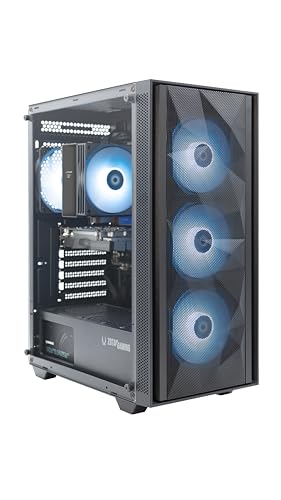
Our top pick: ZOTAC MEK (RTX 3050)
The ZOTAC MEK is the only tower under the cap that publishes an 80+ Gold power supply and backs the graphics card with a three-year warranty. At this budget you are not buying performance, you are buying accountability, and ZOTAC is the only builder here selling any.
Quick picks
Tower | GPU | CPU | RAM | Buy |
|---|---|---|---|---|
RTX 3050 6 GB | Ryzen 5 5500 | 16 GB DDR4 | ||
RTX 3050 6 GB | Ryzen 5 5500 | 16 GB DDR4 | ||
RTX 3050 6 GB | Ryzen 5 5500 | 16 GB DDR4 | ||
RTX 3050 6 GB | Xeon E3 v6 | 16 GB DDR4 | ||
RTX 3050 8 GB | Core i7 (prior-gen) | 16 GB DDR4 |
- GPU
RTX 3050 6 GB
- CPU
Ryzen 5 5500
- RAM
16 GB DDR4
- Buy
- GPU
RTX 3050 6 GB
- CPU
Ryzen 5 5500
- RAM
16 GB DDR4
- Buy
- GPU
RTX 3050 6 GB
- CPU
Ryzen 5 5500
- RAM
16 GB DDR4
- Buy
- GPU
RTX 3050 6 GB
- CPU
Xeon E3 v6
- RAM
16 GB DDR4
- Buy
- GPU
RTX 3050 8 GB
- CPU
Core i7 (prior-gen)
- RAM
16 GB DDR4
- Buy
Specs at a glance
Tower | CPU | GPU | RAM | Storage | PSU / notes |
|---|---|---|---|---|---|
Ryzen 5 5500 | RTX 3050 6 GB | 16 GB DDR4 | 500 GB NVMe | 650 W 80+ Gold, 3-yr GPU warranty | |
Ryzen 5 5500 | RTX 3050 6 GB | 16 GB DDR4 | 512 GB SSD | PSU unrated | |
Ryzen 5 5500 | RTX 3050 6 GB | 16 GB DDR4 | 500 GB SSD | Liquid cooler, PSU unrated | |
Xeon E3 v6 | RTX 3050 6 GB | 16 GB DDR4 | 512 GB M.2 | PSU unrated | |
Core i7 (prior-gen) | RTX 3050 8 GB | 16 GB DDR4 | 512 GB SSD | PSU unrated, unknown brand |
- CPU
Ryzen 5 5500
- GPU
RTX 3050 6 GB
- RAM
16 GB DDR4
- Storage
500 GB NVMe
- PSU / notes
650 W 80+ Gold, 3-yr GPU warranty
- CPU
Ryzen 5 5500
- GPU
RTX 3050 6 GB
- RAM
16 GB DDR4
- Storage
512 GB SSD
- PSU / notes
PSU unrated
- CPU
Ryzen 5 5500
- GPU
RTX 3050 6 GB
- RAM
16 GB DDR4
- Storage
500 GB SSD
- PSU / notes
Liquid cooler, PSU unrated
- CPU
Xeon E3 v6
- GPU
RTX 3050 6 GB
- RAM
16 GB DDR4
- Storage
512 GB M.2
- PSU / notes
PSU unrated
- CPU
Core i7 (prior-gen)
- GPU
RTX 3050 8 GB
- RAM
16 GB DDR4
- Storage
512 GB SSD
- PSU / notes
PSU unrated, unknown brand
The RTX 3050 trap nobody names
NVIDIA sells two completely different cards under the name RTX 3050. There is the original 8 GB version from 2022, and there is the 6 GB version that arrived later. Retail listings call both of them an RTX 3050, and prebuilt spec sheets almost always write the name without the memory size.
They are not the same card. The 6 GB version has 11 percent fewer CUDA cores, a 21 percent lower boost clock, a third less memory bandwidth, and a third less memory. TechPowerUp measured it as almost 30 percent slower at 1080p. That is not a memory-capacity footnote, it is a different tier of graphics card wearing the same badge.
Four of the five towers below ship the 6 GB card. One ships the 8 GB card, and it happens to be the cheapest machine on the list. That single fact is the most useful thing this article can tell you, and it is why the Editor's Pick sits where it does.
Benchmarks
The comparison that matters at this budget is not tower against tower. Four of these machines carry the same graphics card and the same Ryzen 5 5500, so they perform within a rounding error of each other. The comparison that matters is the 6 GB RTX 3050 against the 8 GB one.
Relative 1080p performance
Aggregate 1080p performance index across a reviewer test suite, with the 8 GB card as the baseline.
- 100 %
- 72 %
Counter-Strike 2 at 1080p
Esports is where the gap narrows and both cards stay comfortable.
- 209 FPS
- 178 FPS
In AAA the picture is harsher. TechSpot measured the 6 GB card at 58 FPS in Cyberpunk 2077 at 1080p, and that was on the lowest quality preset. The 8 GB card cleared 66 FPS on medium. Both are playable. Neither is comfortable, and both will be less comfortable next year.
What you actually give up at this budget
You give up the current generation. The RTX 3050 has no DLSS 4 multi-frame generation, which is the single biggest thing the 50-series added for budget cards. On an RTX 5050 you can turn frame generation on and turn a rough 45 FPS into a smooth-feeling 90. On a 3050 you cannot. That feature gap is worth more at the low end than at the high end, and it is exactly what the cap denies you.
You give up the power supply. Four of these five towers list a wattage with no efficiency rating, which in practice means a generic unit chosen on price. It will run the machine. It is also the part that, when it fails, has the best odds of taking something else with it. Only the ZOTAC MEK publishes an 80+ Gold rating.
You give up the storage. Every tower here ships 500 GB or 512 GB, which is two modern games and nothing else. Budget an extra NVMe drive into the real cost of the machine, because you will be buying one within the first month, and at this tier the empty M.2 slot is the cheapest upgrade you will ever make.
And you give up the platform. The Ryzen 5 5500 sits on AM4 and the Xeon and Core i7 options sit on sockets that were finished years ago. The CPU you buy is the CPU you keep. There is no drop-in upgrade waiting for you in year three, which is a real cost if you were counting on one.
How we picked
Graphics memory first, because it is the one spec in this tier that changes the answer. An RTX 3050 with 8 GB is roughly 30 percent faster than an RTX 3050 with 6 GB, and the listings do not make the difference obvious. Any tower whose spec sheet refuses to say which one it ships was treated as a 6 GB machine, because builders who ship the faster part advertise it.
Then the power supply, because it is the part that decides whether the machine is still running in year five. A published 80+ rating is not a luxury spec at this budget, it is the difference between a unit someone tested and a unit someone sourced. Where the rating is missing, we say so rather than pretending the wattage number tells you anything.
Then accountability. A tower with a real brand, a real warranty, and a real returns process is worth paying for when the parts inside are commodity. Every machine here has 16 GB of memory in a dual-channel pair and a real NVMe boot drive; anything shipping a single 8 GB stick or a mechanical drive was cut before it reached this list. If none of this clears your bar, a handheld or a laptop is a better use of the money than a worse tower.
Best Overall: ZOTAC MEK (RTX 3050)
Specs
CPU | AMD Ryzen 5 5500 (6C/12T, 4.2 GHz boost) |
GPU | GeForce RTX 3050 6 GB GDDR6 |
RAM | 16 GB DDR4 |
Storage | 500 GB NVMe SSD |
PSU | 650 W 80+ Gold |
Warranty | 1-year system, 3-year GPU |
OS | Windows 11 Home (pre-installed) |
CPU
AMD Ryzen 5 5500 (6C/12T, 4.2 GHz boost)
GPU
GeForce RTX 3050 6 GB GDDR6
RAM
16 GB DDR4
Storage
500 GB NVMe SSD
PSU
650 W 80+ Gold
Warranty
1-year system, 3-year GPU
OS
Windows 11 Home (pre-installed)
What it does well
The MEK is the only machine in this group that behaves like a product rather than a parts list. The power supply is a 650 W 80+ Gold unit and ZOTAC says so on the listing, which puts it alone among five towers. The graphics card carries a three-year warranty and the system carries one year, with no registration required. It arrives with Windows 11 already installed and the drivers already tested.
The rest is the tier standard: a Ryzen 5 5500, 16 GB of DDR4 in a dual-channel pair, a 500 GB NVMe boot drive. None of that is exciting. What you are buying is the part of the machine you cannot see and cannot easily replace, and a company that will still answer the phone in year two.
What you give up
It ships the 6 GB RTX 3050, which is the slower of the two cards that wear that name and roughly 30 percent behind the 8 GB version at 1080p. ZOTAC is at least honest about it in the listing, but you are paying more than the Editor's Pick costs and getting less graphics card.
The 500 GB drive is the smallest here, which means the NVMe upgrade is not optional, it is deferred. And the Ryzen 5 5500 sits on AM4, a socket that is finished, so the processor is terminal.
Who it's for
The buyer who has been burned by a cheap power supply before, or who does not want to be. If you want one tower on this list that you can plug in and stop thinking about, this is it.
Best Value: Cooler Master Ryzen 5 5500 RTX 3050

Specs
CPU | AMD Ryzen 5 5500 (6C/12T) |
GPU | GeForce RTX 3050 6 GB |
RAM | 16 GB DDR4 |
Storage | 512 GB SSD |
PSU | Not published |
OS | Windows 11 Home |
CPU
AMD Ryzen 5 5500 (6C/12T)
GPU
GeForce RTX 3050 6 GB
RAM
16 GB DDR4
Storage
512 GB SSD
PSU
Not published
OS
Windows 11 Home
What it does well
Cooler Master has been making the parts inside budget prebuilts for two decades, and this is the rare case where the brand on the box also made the chassis, the cooler, and probably the power supply. That vertical integration is worth something in a tier where most towers are anonymous parts in an anonymous case.
The specification is the tier standard and it is competently assembled: Ryzen 5 5500, RTX 3050, 16 GB of DDR4, a 512 GB SSD, Windows 11 already licensed. It costs less than the ZOTAC and it comes from a company you have heard of, which in this market is most of the decision.
What you give up
Cooler Master does not publish a power-supply efficiency rating on this configuration, which is the standard silence in this tier and the reason the ZOTAC takes the top slot rather than this one. You are trusting a brand rather than a spec.
It is the 6 GB RTX 3050 again, so the same 30 percent performance gap applies. And stock on this configuration has been thin, which is worth knowing before you build a plan around it.
Who it's for
The buyer who wants a name they recognise on the box, is comfortable trusting Cooler Master's component sourcing without a published rating, and would rather bank the difference than pay for the ZOTAC's warranty.
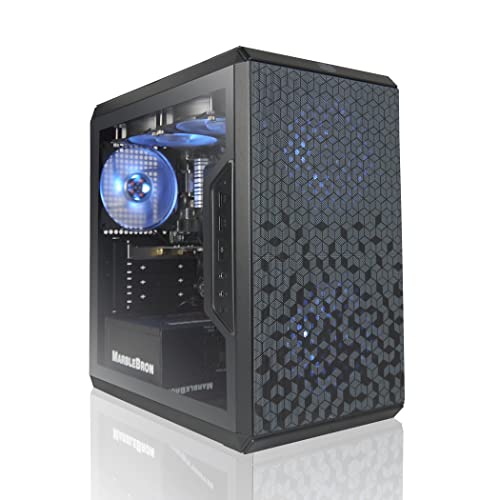
Best Premium: AVGPC Q-Box (RTX 3050)
Specs
CPU | AMD Ryzen 5 5500 (6C/12T, 4.2 GHz boost) |
GPU | GeForce RTX 3050 6 GB GDDR6 |
RAM | 16 GB DDR4 3200 |
Storage | 500 GB SSD (spare bay free) |
Cooling | Liquid CPU cooler |
Included | Gaming keyboard and mouse |
OS | Windows 11 |
CPU
AMD Ryzen 5 5500 (6C/12T, 4.2 GHz boost)
GPU
GeForce RTX 3050 6 GB GDDR6
RAM
16 GB DDR4 3200
Storage
500 GB SSD (spare bay free)
Cooling
Liquid CPU cooler
Included
Gaming keyboard and mouse
OS
Windows 11
What it does well
The Q-Box spends its extra money on the two things you can feel every day: a liquid cooler on the CPU and a keyboard and mouse in the box. The liquid cooler is genuinely unusual at this budget, where the norm is a stock heatsink that runs loud under load, and it means the Ryzen 5 5500 holds its boost clock without turning the case into a hairdryer.
It also leaves a drive bay free and says so, which is a small honesty that matters given every machine here needs a second drive within a month. Sixteen gigabytes of DDR4 3200, a 500 GB SSD, Windows 11, and a peripheral set that gets you playing the day it arrives.
What you give up
It is the most expensive tower on this list and it does not buy you a faster graphics card. It is still the 6 GB RTX 3050, which means you are paying the top of the budget for the cooling and the accessories, not for frames. That is a defensible trade, but be clear-eyed that it is the trade you are making.
No published power-supply rating, and an AIO on a budget machine is a part that will need replacing before the rest of the system does. The bundled keyboard and mouse are packaging, not equipment.
Who it's for
The buyer who wants the machine to run quiet, wants to unbox one thing and start playing, and does not intend to open the case.
Best Budget: NOVATECH Phantom 2 (RTX 3050)

Specs
CPU | Intel Xeon E3 v6 (server-grade, 3.5 GHz) |
GPU | GeForce RTX 3050 6 GB |
RAM | 16 GB DDR4 |
Storage | 512 GB M.2 SSD |
Networking | Wi-Fi + Bluetooth |
PSU | Not published |
OS | Windows 11 Pro |
CPU
Intel Xeon E3 v6 (server-grade, 3.5 GHz)
GPU
GeForce RTX 3050 6 GB
RAM
16 GB DDR4
Storage
512 GB M.2 SSD
Networking
Wi-Fi + Bluetooth
PSU
Not published
OS
Windows 11 Pro
What it does well
The Phantom 2 is the cheapest tower here with a real review base behind it, and it is the one to buy if the number is genuinely hard. It ships the same RTX 3050 as the machines costing meaningfully more, with 16 GB of memory, a 512 GB M.2 drive, and Windows 11 Pro rather than Home.
NOVATECH's listing is direct about what it is, and the buyers who left reviews are largely happy. At the price floor, a machine that does the boring things right is a better outcome than a machine that promises more.
What you give up
The processor is the catch, and it is a big one. This is a Xeon E3 v6, a server chip from 2017, not a modern desktop part. It has the cores to feed an RTX 3050 at 1080p and it will not embarrass itself, but it has no modern instruction support, no upgrade path, and no future. Buyers have flagged the Xeon labelling as confusing, and it is worth understanding before you order.
It is the 6 GB RTX 3050, no published power-supply rating, and a 512 GB drive. This is the price floor and it looks like the price floor.
Who it's for
The reader whose budget will not stretch, who plays at 1080p, and who wants the cheapest machine on this list that other people have actually bought and kept.
Editor's Pick: Tisukisu RTX 3050 8 GB Tower

Specs
CPU | Intel Core i7 (prior-generation) |
GPU | GeForce RTX 3050 8 GB |
RAM | 16 GB DDR4 |
Storage | 512 GB SSD |
Cooling | Four case fans |
PSU | Not published |
OS | Windows 11 Home |
CPU
Intel Core i7 (prior-generation)
GPU
GeForce RTX 3050 8 GB
RAM
16 GB DDR4
Storage
512 GB SSD
Cooling
Four case fans
PSU
Not published
OS
Windows 11 Home
What it does well
This is the tower that quietly wins the benchmark. It ships the 8 GB RTX 3050, the only machine on this list that does, and that card is roughly 30 percent faster at 1080p than the 6 GB part in every other pick here. It is also the cheapest machine on the list. You read that correctly: the fastest graphics card in this group costs the least money.
The rest is unremarkable in the way budget towers are: 16 GB of DDR4, a 512 GB SSD, four case fans, Windows 11 pre-installed. But the graphics card is the part doing the work at 1080p, and this is the only tower here that does not hobble it.
What you give up
You are buying from a brand you have never heard of, and that is the whole cost. There is no published power-supply rating, no meaningful warranty story, and no company with a reputation to protect if the machine arrives dead. The processor is a prior-generation Core i7 whose exact model the listing does not commit to, which is its own kind of tell.
This is the honest trade of the tier laid bare: the ZOTAC sells you accountability and a slower card, and this sells you a faster card and no accountability. Neither is wrong. But you should know which one you are choosing rather than discovering it later.
Who it's for
The buyer who understands the risk, wants the most frames per dollar on this list, and is comfortable handling a return themselves if it goes wrong. If that sentence made you uneasy, buy the ZOTAC.
What to skip at this budget
Skip anything with an RX 6500 XT. It turns up constantly just under the cap because it is cheap, and it is a 4 GB card on a four-lane PCIe link, which means it collapses in exactly the modern titles you bought the machine to play. A 6 GB RTX 3050 is meaningfully better and usually costs the same.
Skip the RX 580 and GTX 1650 towers. They are 2017 and 2019 parts being sold in 2026 at prices that only make sense if you do not know what year it is. Skip anything with 8 GB of memory or a single memory stick, and skip anything that will not tell you which RTX 3050 it ships, because the ones shipping the 8 GB card say so. If that is the tier your budget lands in, read what 600 dollars actually buys before you spend, because the trade-offs there are sharper again.
And be honest about whether you should be shopping in this tier at all. The step up buys a current-generation card, DLSS 4 frame generation, and a machine that will still be current in three years. It is the single highest-leverage extra spend in the whole prebuilt ladder, and if you can reach it, reach it.
Bottom line
If you want a machine you can plug in and forget, buy the ZOTAC MEK: it is the only tower here with a rated power supply and a real warranty. If you want the most frames for the least money and you accept the risk of an unknown brand, the Tisukisu tower and its 8 GB RTX 3050 is roughly 30 percent faster than everything else on this list and costs the least. If you want a familiar name, the Cooler Master is the safe middle. If the number is hard, the NOVATECH Phantom 2 is the floor. And if you want it quiet and fully kitted, the AVGPC Q-Box spends the last of your budget on a liquid cooler.
But the real answer is the one nobody selling you a tower wants to give: this tier is a compromise, and the compromise got worse this year. If you can find another two hundred dollars, the next rung up changes the machine from a 2022 graphics card to a current one, and that is a bigger difference than anything on this page.
FAQ
Is a prebuilt gaming PC at this budget worth it in 2026, or should I just build one?
Building it yourself is the better buy here, and by a wider margin than at higher budgets. The prebuilts under the cap are mostly commodity parts in anonymous cases with unrated power supplies, and the value the builder adds is assembly plus a Windows licence. If you have built before, you can do better yourself. If you have not, the prebuilts on this list are honest enough to start on, and the ZOTAC in particular comes with a warranty worth having.
What GPU should a prebuilt gaming PC at this budget have?
An RTX 3050, and specifically the 8 GB version. That is the ceiling of what the cap reaches in 2026. The 6 GB RTX 3050 is a genuinely different and roughly 30 percent slower card sold under the same name, so check which one a listing ships before you order. Anything with an RX 6500 XT, an RX 580, or a GTX 1650 is a step backwards even when it is cheaper.
What is the difference between the RTX 3050 6 GB and the RTX 3050 8 GB?
More than the memory. The 6 GB card has 11 percent fewer CUDA cores, a 21 percent lower boost clock, and a third less memory bandwidth on top of the smaller memory pool. TechPowerUp measured it at almost 30 percent slower at 1080p. It draws far less power, which is why builders like it, but it is a lower tier of card wearing the same name. If a prebuilt spec sheet just says RTX 3050 with no memory size, assume it is the 6 GB one.
Can a prebuilt gaming PC at this budget handle 1440p?
Not in any way you will enjoy. An RTX 3050 is a 1080p card and it is already working hard there. You can run 1440p in esports titles and older games, but modern AAA at 1440p is out of reach even with upscaling. Treat these as 1080p machines and buy the monitor to match.
Is 16 GB of RAM enough, or should I upgrade right away?
16 GB in a dual-channel pair is enough for gaming in 2026 and every pick here ships it. The upgrade to plan for is storage. Every tower on this list ships 500 GB or 512 GB, which is two modern games, and a second NVMe drive is the cheapest and most immediately useful thing you can add.
What should I upgrade first on a budget prebuilt?
Storage, then the power supply, then the graphics card in that order. Storage because you will run out within a month. The power supply because four of these five towers ship an unrated unit and it protects everything else. The graphics card last, because on a tower with an unrated PSU you should replace the power supply before you ask it to feed a bigger card, and because by the time you want a bigger card the whole machine may be worth replacing.
Related Articles

Best Prebuilt Gaming PCs (2026): 5 Picks, Warranty First
The best prebuilt gaming PCs in 2026: 5 picks from a 1080p budget box up to a 4K rig, judged on warranty and RMA support first, then build quality and VRAM.
Aug 18, 2026

Best Prebuilt Gaming PCs Truly Under $1,000 (2026): 5 Picks
The best prebuilt gaming PCs genuinely under $1,000 in 2026: five RTX towers ranked on sustained 1080p frame rates, PSU headroom, and airflow quality.
Sep 20, 2026

Best Gaming Laptops Under $1,000 (2026): 1080p Budget Picks
Five sub-$1K gaming laptops that survive sustained load, by chassis-line profile not spec sheet. Four RTX 4060 picks plus a newest-arch RTX 5050.
May 17, 2026

Best Handheld Gaming PC (2026): SteamOS vs Windows
The best handheld gaming PC in 2026 comes down to SteamOS vs Windows and battery vs raw performance. Picks for AAA, Game Pass, emulation, and budget.
Jul 7, 2026

Best Monitor for Modern Warfare 4 (2026): 5 Picks by FPS
The best monitor for Modern Warfare 4 is the one your GPU can feed. Five picks keyed to Call of Duty frame rates, from 1080p 310Hz to a 4K dual-mode OLED.
Oct 10, 2026