Affiliate Disclosure: As an Amazon Associate we earn from qualifying purchases. Some links may earn us a commission at no cost to you.

Best Prebuilt Gaming PCs (2026): 5 Picks, Warranty First
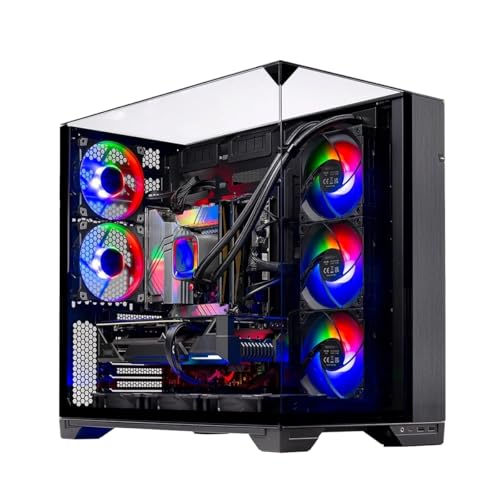
The best prebuilt gaming PC for most people in 2026 is the Skytech O11 Vision with a Ryzen 7 7700X and an RTX 5070: a real 850W Gold PSU, a 360mm AIO, and 1440p high-refresh performance without the corners most prebuilts cut. Below it sit four more picks, from a 1080p budget box up to a 4K rig, judged on warranty and RMA support before spec sheet.
Buying a prebuilt in 2026 is a different math problem than it was two years ago. A memory crunch pushed DDR5 and NAND prices up, so the prebuilt floor rose with them, and the genuinely cheap entry machine mostly disappeared. The flip side: a prebuilt arrives assembled, warrantied, and running, and at most tiers the old prebuilt tax has shrunk to almost nothing. Pick the tier that matches your budget and resolution, then go deeper in the price-banded guides linked at the bottom.
Our top pick: Skytech O11 Vision (RTX 5070)
For most buyers the Skytech O11 Vision with a Ryzen 7 7700X and RTX 5070 is the right default: it pairs a real 850W Gold PSU, a 360mm AIO, and an X670 board with the highest review base of any RTX 5070 prebuilt in the category. It is the 1440p high-refresh machine that does not cut corners where it counts.
Quick picks
Pick | Machine | Best for | Where to buy |
|---|---|---|---|
Best Overall | 1440p high-refresh, the safe default | ||
Best Value | Best rating, value 1080p/1440p high | ||
Best Budget | Budget 1080p high-refresh entry | ||
Best for 4K | 4K and the fastest gaming CPU | ||
Best Brand Name | Warranty, support, upgrade headroom |
Best Overall
- Machine
- Best for
1440p high-refresh, the safe default
- Where to buy
Best Value
- Machine
- Best for
Best rating, value 1080p/1440p high
- Where to buy
Best Budget
- Machine
- Best for
Budget 1080p high-refresh entry
- Where to buy
Best for 4K
- Machine
- Best for
4K and the fastest gaming CPU
- Where to buy
Best Brand Name
- Machine
- Best for
Warranty, support, upgrade headroom
- Where to buy
Specs at a glance
Machine | CPU | GPU | RAM | Storage | PSU |
|---|---|---|---|---|---|
Ryzen 7 7700X | RTX 5070 12GB | 32GB DDR5 | 1TB NVMe | 850W Gold | |
Core i7-14700F | RTX 5060 Ti 8GB | 16GB DDR5 | 1TB NVMe | Brand PSU | |
Core i5-14400F | RTX 5060 8GB | 16GB DDR5 | 1TB NVMe | 650W Gold | |
Ryzen 7 9850X3D | RTX 5070 Ti 16GB | 32GB DDR5 | 2TB NVMe | 850W Gold | |
Core Ultra 7 265F | RTX 5070 12GB | 32GB DDR5 | 1TB SSD | 1000W Platinum |
- CPU
Ryzen 7 7700X
- GPU
RTX 5070 12GB
- RAM
32GB DDR5
- Storage
1TB NVMe
- PSU
850W Gold
- CPU
Core i7-14700F
- GPU
RTX 5060 Ti 8GB
- RAM
16GB DDR5
- Storage
1TB NVMe
- PSU
Brand PSU
- CPU
Core i5-14400F
- GPU
RTX 5060 8GB
- RAM
16GB DDR5
- Storage
1TB NVMe
- PSU
650W Gold
- CPU
Ryzen 7 9850X3D
- GPU
RTX 5070 Ti 16GB
- RAM
32GB DDR5
- Storage
2TB NVMe
- PSU
850W Gold
- CPU
Core Ultra 7 265F
- GPU
RTX 5070 12GB
- RAM
32GB DDR5
- Storage
1TB SSD
- PSU
1000W Platinum
Benchmarks
These are component-level numbers from reviewer testing, not figures from these exact prebuilt SKUs, so read them as the band each GPU lands in. The pattern is what matters: the RTX 5070 Ti tops the stack, the RTX 5070 is the 1440p workhorse, and the 8GB cards hold 1080p and 1440p high before the VRAM ceiling shows up at ultra.
Approximate average FPS at 1440p high settings with ray tracing off, drawn from reviewer testing of each GPU.
- 110 FPS
- 90 FPS
- RTX 5060 Ti 8GB70 FPS
- RTX 506060 FPS
The same chip with 8GB versus 16GB of VRAM, showing where 8GB runs out of memory before it runs out of speed.
- 109 FPS
- 67 FPS
How we picked
The prebuilt market is full of machines that look identical on a spec sheet and behave very differently in year two. Four things separate them, and only one is the part list. If the finish matters as much as the spec sheet, the best white prebuilt gaming PCs run these same warranty, VRAM and PSU screens across all-white builds, where the marketing photo usually stops at the front panel.
Warranty and RMA experience come first. A prebuilt is a bet that when something fails, someone answers the phone and ships a part. The brand and the channel you buy through change that answer, sometimes more than the parts inside the case do.
Build quality is second. Cable routing, airflow, and a real PSU decide whether the machine runs cool and quiet at year three or throttles and whines. A boutique-grade 80+ Gold or Platinum unit with headroom matters more than one more boost bin on the CPU. Those same substitutions decide whether a finished machine really undercuts a parts list, which is the question behind whether a prebuilt is cheaper than building a PC at each budget tier in 2026.
VRAM is third, and it is the spec most roundups soft-pedal. Eight gigabytes is fine at 1080p and 1440p high, but it hits a wall at 1440p ultra and in ray-traced titles. We flag every 8GB pick plainly so you know what you are accepting. If 1440p is the resolution you are actually shopping for, our best 1440p prebuilt gaming PC roundup screens the same machines by GPU tier, VRAM pool and published power supply spec.
Upgrade path is fourth. Standard ATX parts, spare DIMM slots, an open M.2, and PSU headroom mean the machine grows with you. A proprietary case or a maxed-out PSU means it does not. If memory capacity is the line you are optimizing, our roundup of prebuilts that ship with 32GB of RAM ranks these machines by rated speed and DIMM layout rather than by price tier.
Best Overall: Skytech O11 Vision (RTX 5070)
The machine most 1440p buyers should start with. A Ryzen 7 7700X and RTX 5070 in the O11 Vision case, with the full 850W Gold and 360mm AIO plumbing, and the deepest review base in the category.
Specs
CPU | AMD Ryzen 7 7700X (4.5/5.4GHz), 8c/16t |
GPU | NVIDIA RTX 5070 12GB GDDR7 |
RAM | 32GB DDR5-5600 |
Storage | 1TB Gen4 NVMe SSD |
PSU | 850W 80+ Gold ATX 3.0 |
Cooling | 360mm ARGB AIO |
Motherboard | AMD X670 |
Warranty | 1yr parts + labor, lifetime support |
CPU
AMD Ryzen 7 7700X (4.5/5.4GHz), 8c/16t
GPU
NVIDIA RTX 5070 12GB GDDR7
RAM
32GB DDR5-5600
Storage
1TB Gen4 NVMe SSD
PSU
850W 80+ Gold ATX 3.0
Cooling
360mm ARGB AIO
Motherboard
AMD X670
Warranty
1yr parts + labor, lifetime support
What it does well
This is the best-supported RTX 5070 prebuilt on the shelf, with close to two thousand ratings behind it, which matters when you are betting on a brand to back a warranty. The plumbing is genuinely good for the tier: a real 850W 80+ Gold ATX 3.0 unit with headroom for a future GPU, a 360mm ARGB AIO keeping the 7700X cool and quiet, and an X670 board rather than the bargain A620 some spec sheets hide. The RTX 5070 is the 1440p high-refresh sweet spot, clearing high settings comfortably in most titles and reaching into 4K once DLSS 4 is on. With 32GB of DDR5 and a 1TB Gen4 NVMe, nothing here needs a day-one upgrade, and the O11 Vision case brings strong airflow and a wraparound glass front rather than the afterthought chassis many prebuilts ship in. If you have already settled on the card and want to compare the machines built around it, our roundup of the best RTX 5070 prebuilt gaming PCs grades five of them on CPU pairing and published power supply headroom.
What you give up
The 7700X is last-generation Zen 4, not a 9000-series or X3D part, so it gives up a little in the most CPU-bound games, though the RTX 5070 is the binding limit at 1440p far more often than the chip. Storage is a single 1TB drive, which is four to six modern installs before you are managing space, so plan on adding an NVMe. The RTX 5070's 12GB of VRAM is comfortable at 1440p but is not the 16GB you would want for maxed 4K texture packs. And like every Skytech listing, the GPU board partner can vary by supply, so you might receive a Gigabyte, ASUS, or MSI RTX 5070 depending on stock. None of these are AIB partners to worry about, but it is worth knowing the exact card is not locked at checkout.
Who it's for
The mainstream 1440p builder who wants one safe, well-supported default and does not want to think about which corner got cut. It suits a 1440p 144Hz or 165Hz panel and a library that mixes competitive shooters with AAA on high. Buyers who value a deep review history and a real warranty channel over squeezing the last few frames out of a newer CPU. If your budget lands here, this is the machine to start from.
Best Value: CyberPowerPC Gamer Xtreme GXiVR8040A19
The rating-per-dollar pick. A 20-core i7-14700F paired with an RTX 5060 Ti, from a brand most buyers recognize, with the highest customer rating in this roundup.

Specs
CPU | Intel Core i7-14700F, 20c/28t |
GPU | NVIDIA RTX 5060 Ti 8GB GDDR7 |
RAM | 16GB DDR5 |
Storage | 1TB PCIe 4.0 NVMe SSD |
Connectivity | WiFi Ready |
OS | Windows 11 Home |
Warranty | 1yr via Amazon listing |
CPU
Intel Core i7-14700F, 20c/28t
GPU
NVIDIA RTX 5060 Ti 8GB GDDR7
RAM
16GB DDR5
Storage
1TB PCIe 4.0 NVMe SSD
Connectivity
WiFi Ready
OS
Windows 11 Home
Warranty
1yr via Amazon listing
What it does well
This is the pick that earns its slot on trust. At 4.7 stars across several hundred ratings, it is the highest-rated machine here, and CyberPowerPC is a name buyers know rather than a marketplace unknown. The i7-14700F is the surprise: twenty cores and twenty-eight threads is far more CPU than this price tier usually delivers, and it means the machine handles streaming, multitasking, and CPU-heavy games without breaking a sweat. The RTX 5060 Ti is a strong 1080p and 1440p-high card, and the 1TB Gen4 SSD plus 16GB of DDR5 cover the basics. For a buyer who wants a recognizable brand and a proven track record without paying the boutique premium, this is the value lane.
What you give up
The honest catch is the 8GB of VRAM on the RTX 5060 Ti. At 1080p and 1440p high it is fine, but at 1440p ultra and in ray-traced titles it hits a wall: reviewers have measured the 8GB version of this exact chip dropping to roughly 67 fps in The Last of Us Part 2 at 1080p Very High where the 16GB sibling holds well over a hundred. If you intend to push ultra textures or heavy RT, the VRAM is the ceiling, not the GPU's raw speed. Memory is 16GB rather than 32GB, which is fine for gaming but tighter for heavy multitasking given the strong CPU. The warranty is one year through the Amazon listing, and CyberPowerPC's longer coverage usually comes through its own channel rather than the Amazon purchase, so check the terms if longevity matters.
Who it's for
The value-focused 1080p or 1440p-high player who wants a known brand and a strong rating behind the purchase. The big-core i7 makes it a good fit for anyone who streams or runs CPU-heavy games alongside the GPU load. Buyers who play mostly esports, older AAA, or 1440p titles at high rather than ultra, and who would rather not pay for headroom they will not use.
Best Budget: Skytech Nebula (RTX 5060)
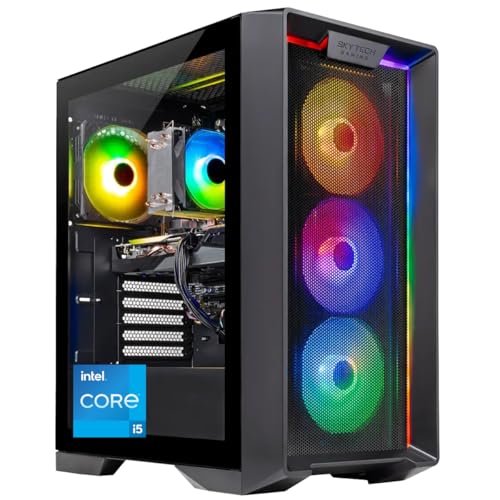
The entry point. An i5-14400F and RTX 5060 with a real 650W Gold PSU, for the 1080p high-refresh builder working at the bottom of the 2026 market.
Specs
CPU | Intel Core i5-14400F, 10c/16t |
GPU | NVIDIA RTX 5060 8GB GDDR7 |
RAM | 16GB DDR5-6000 |
Storage | 1TB NVMe SSD |
PSU | 650W 80+ Gold |
Cooling | Air |
Warranty | 1yr parts + labor, lifetime support |
CPU
Intel Core i5-14400F, 10c/16t
GPU
NVIDIA RTX 5060 8GB GDDR7
RAM
16GB DDR5-6000
Storage
1TB NVMe SSD
PSU
650W 80+ Gold
Cooling
Air
Warranty
1yr parts + labor, lifetime support
What it does well
This is the cleanest way onto the ladder at a tier where the 2026 memory crunch made genuinely cheap machines scarce. The RTX 5060 is a solid 1080p high-refresh card, roughly a quarter faster than the last-gen 4060 and capable of well over two hundred frames in esports titles with frame generation on. The i5-14400F is a sensible match, enough CPU to keep the GPU fed at 1080p without paying for cores the card cannot use. The detail that separates this from the no-name budget box is the PSU: a real 650W 80+ Gold unit rather than the unrated bargain supply that sinks cheap prebuilts in year two. DDR5-6000, a 1TB NVMe, and close to a thousand ratings round out a machine that does the budget job without an obvious weak link. Below this rung the market changes character, and prebuilt gaming PCs under 600 dollars walks through what the floor actually gets you.
What you give up
This is a 1080p machine, full stop. The RTX 5060's 8GB of VRAM caps ultra textures and rules out comfortable 1440p in demanding titles, so do not pair it with a 1440p panel expecting the same headroom as the pricier picks. Memory is 16GB, which is the gaming floor in 2026 rather than comfortable headroom, and you will want to add a stick before long. Cooling is air rather than an AIO, which is fine for the i5 but means less thermal margin than the AIO-equipped machines higher up. Storage is a single 1TB drive. None of this is a defect at the price, but it is a machine sized exactly to the 1080p job with little room above it. If a 16 GB frame buffer matters more to you than the NVIDIA feature set, our roundup of AMD prebuilt gaming PCs covers the RX 9070 XT towers that ship one as standard.
Who it's for
The first-time builder or budget buyer who wants high-refresh 1080p gaming for the lowest credible price in a tough pricing year, and who plays mostly esports and older AAA. It pairs naturally with a 1080p 144Hz or 165Hz panel. Buyers who would rather put the saved money toward a monitor or peripherals than chase 1440p they are not ready to feed. Anyone who wants a real PSU and a known brand under the budget ceiling rather than a marketplace gamble.
Best for 4K: Skytech O11 Vision X3D (RTX 5070 Ti)
The headroom pick. A Ryzen 7 9850X3D with 3D V-Cache and an RTX 5070 Ti 16GB, plus a 2TB drive, for the buyer who wants 4K and the fastest gaming CPU in the lineup.

Specs
CPU | AMD Ryzen 7 9850X3D (4.7GHz), 3D V-Cache |
GPU | NVIDIA RTX 5070 Ti 16GB GDDR7 |
RAM | 32GB DDR5-5600 |
Storage | 2TB Gen4 NVMe SSD |
PSU | 850W 80+ Gold ATX 3.0 |
Cooling | 360mm ARGB AIO |
Warranty | 1yr parts + labor, lifetime support |
CPU
AMD Ryzen 7 9850X3D (4.7GHz), 3D V-Cache
GPU
NVIDIA RTX 5070 Ti 16GB GDDR7
RAM
32GB DDR5-5600
Storage
2TB Gen4 NVMe SSD
PSU
850W 80+ Gold ATX 3.0
Cooling
360mm ARGB AIO
Warranty
1yr parts + labor, lifetime support
What it does well
This is the machine for the buyer who wants to stop thinking about settings. The RTX 5070 Ti sits roughly thirty to thirty-five percent ahead of the RTX 5070 at 1440p and is the only card here that does comfortable 4K, clearing a hundred frames in demanding titles once DLSS 4 Multi-Frame Generation is on. Its 16GB of VRAM removes the texture ceiling that limits the 8GB picks, so ultra settings and heavy ray tracing are on the table. The 9850X3D is the standout: 3D V-Cache makes it the fastest gaming CPU in this roundup, and it pulls ahead in the CPU-bound titles where the cheaper machines leave frames on the table. A 2TB Gen4 drive doubles the storage of the other picks, and the 850W Gold and 360mm AIO carry over from the top pick. This is a genuinely high-end rig in a nice case. That combination of a 16GB frame buffer and 3D V-Cache is also the floor a headset asks for, which is why the same pairing anchors our guide to the best prebuilt gaming PC for VR, picked by headset class rather than by price.
What you give up
The obvious one is price: this sits at the top of the ladder and asks for it. Stock is also the tightest of the five, sitting at a handful of units with more on the way at the time of writing, so it can come and go rather than always being one-click ready. Like the other Skytech picks, the GPU board partner can vary by supply. And as with every machine here, it ships with a single capacious drive rather than a second one, though 2TB delays the storage problem considerably. For a pure 1440p player who never touches 4K, the extra spend over the top pick buys headroom you may not use.
Who it's for
The buyer who wants 4K, or who wants a 1440p machine that will stay comfortable for years, and is willing to pay for the fastest gaming CPU and a 16GB card to get there. It suits a 4K 120Hz or 144Hz panel, or a high-refresh 1440p screen the buyer plans to keep a long time. Anyone who plays CPU-bound titles where 3D V-Cache earns its premium. Buyers who would rather over-buy once than upgrade in two years. If 4K with nothing held back is the actual goal, the tier above this one is a different conversation: our RTX 5090 prebuilt picks grade those machines on whether the builder paid for a 1200W supply and a cooling path to match.
Best Brand Name: Alienware Aurora ACT1250
The brand-infrastructure pick. An RTX 5070 machine from Dell with a 1000W Platinum PSU and real warranty muscle, for the buyer who values support and a recognizable name over raw spec-per-dollar.

Specs
CPU | Intel Core Ultra 7 265F (Arrow Lake, 20c) |
GPU | NVIDIA RTX 5070 12GB GDDR7 |
RAM | 32GB DDR5 |
Storage | 1TB SSD |
PSU | 1000W 80+ Platinum |
Cooling | Air (Alienware proprietary) |
Warranty | 1yr Dell hardware + onsite option |
CPU
Intel Core Ultra 7 265F (Arrow Lake, 20c)
GPU
NVIDIA RTX 5070 12GB GDDR7
RAM
32GB DDR5
Storage
1TB SSD
PSU
1000W 80+ Platinum
Cooling
Air (Alienware proprietary)
Warranty
1yr Dell hardware + onsite option
What it does well
This is the pick for buyers who want a phone number, not a forum thread, when something goes wrong. Dell's warranty includes an onsite service option, which is genuinely rare at this price and the kind of support boutique builders charge a premium for. The PSU is the technical standout: a 1000W 80+ Platinum unit gives the most GPU-upgrade headroom in this roundup, so dropping in a much hungrier card later is a real option rather than a PSU swap. The RTX 5070 plus a 20-core Core Ultra 7 265F and 32GB of DDR5 makes a capable 1440p machine, and it carries an Amazon's Choice badge with a solid rating. For the buyer who wants brand infrastructure and a clean upgrade runway, this is the lane.
What you give up
You pay a brand premium here, and the spec-per-dollar is not the strongest in the group. The case is Alienware's proprietary design, which looks sharp behind the clear panel but limits some upgrades and large aftermarket GPUs more than a standard ATX chassis does. Cooling is Alienware's proprietary air solution rather than a 360mm AIO, which is competent but less flexible. One thing to verify on arrival: the current listing routes through Amazon Resale, so while it is fulfilled by Amazon and warranty-backed by Dell, confirm the unit's condition when it lands in case it is open-box. Storage is a single 1TB drive, same as most picks here. Proprietary chassis and board design is what separates a machine you can keep from one you replace, and our guide to the most upgradeable prebuilt gaming PCs ranks systems on that basis alone.
Who it's for
The buyer who wants a recognizable OEM, real warranty muscle including onsite service, and the cleanest upgrade path in the roundup thanks to that 1000W Platinum PSU. It suits anyone who values support and brand confidence over squeezing maximum frames per dollar, and anyone planning a serious GPU upgrade down the line. A solid 1440p machine for a buyer who treats the warranty and the headroom as the feature. If you are still choosing between badges rather than between SKUs, how Skytech, iBUYPOWER and CyberPowerPC compare on the parts you cannot see is the brand-level version of that question.
Where to go for deeper coverage
This hub is the map; the price-banded guides are the detail. If you have a hard budget, start there. Our best prebuilt gaming PCs under 1,000 dollars guide covers the 1080p budget floor in depth, the under-1,500 tier digs into the RTX 5060 Ti machines and the 8GB-versus-16GB call, and the under-2,000 guide covers the RTX 5070 sweet spot where the top pick here lives. If a compact build is the goal, the Mini-ITX prebuilt guide covers small-form-factor rigs. Still deciding on the GPU and resolution underneath all of this? Our guide to choosing a GPU and a matching monitor frames that decision, and the RTX 5060 Ti versus RTX 5070 comparison is the place to settle the VRAM question. Not sure where to start at all? Find My PC Build matches a machine to your budget, resolution, and target frame rate. If you stream, the best prebuilt gaming PC for streaming is a different question again: it turns on how many NVENC encoders the GPU carries, not on core count. Chasing one use case in particular? Our guide to the best prebuilt gaming PCs for sim racing ranks the X3D-first machines that matter for iRacing and Assetto Corsa Competizione. Still deciding between a tower and something portable? Our guide to whether a gaming laptop or a gaming desktop fits you better walks through the value and portability tradeoff.
Bottom line
If you want one safe default for 1440p, buy the Skytech O11 Vision with the RTX 5070. If you want the best rating and a known brand for less, the CyberPowerPC Gamer Xtreme is the value call, with the 8GB VRAM as the trade. If you are on a tight budget and play at 1080p, the Skytech Nebula is the clean entry point. If you want 4K and the fastest gaming CPU, the O11 Vision X3D with the RTX 5070 Ti is the headroom pick. And if warranty and support matter most, the Alienware Aurora ACT1250 buys you Dell's infrastructure and a 1000W Platinum upgrade runway. If your ceiling sits a tier higher, the best prebuilt gaming PCs under $2,500 are the RTX 5070 Ti and 5080 machines that push into real 4K.
FAQ
What is the best prebuilt gaming PC brand in 2026?
There is no single best brand, because the right answer depends on what you weigh. For raw value and the deepest review history, Skytech dominates the Amazon prebuilt category right now. For brand infrastructure and warranty muscle including onsite service, Dell's Alienware line is the safe call. CyberPowerPC sits in the middle as a recognizable name with strong ratings. We weighed warranty and RMA experience first, because a prebuilt is a bet on who answers when something fails.
Is it cheaper to build a gaming PC or buy a prebuilt right now?
In 2026 the gap has narrowed at most tiers. A memory crunch pushed DDR5 and NAND prices up, which raised both DIY part costs and prebuilt prices, but prebuilts include assembly, a warranty, and a Windows license that a DIY build has to add. At the budget floor the prebuilt premium is small, and at the mid and high tiers it is often a wash once you count the OS and your time. Build it yourself if you want exact parts and enjoy the process; buy a prebuilt if you want it warrantied and running out of the box.
How much should I spend on a prebuilt gaming PC for 1440p?
1440p high-refresh is the RTX 5070 tier, and that is where our top pick sits. That class of machine pairs a real 850W Gold PSU and 32GB of DDR5 with a card that clears high settings comfortably in most titles. If your budget is tighter, an RTX 5060 Ti machine handles 1440p at high settings well as long as you accept the 8GB VRAM ceiling at ultra. If you want 4K or want the machine to last, step up to the RTX 5070 Ti tier.
Is 8GB of VRAM enough in a prebuilt gaming PC, or do I need 16GB?
Eight gigabytes is fine at 1080p and at 1440p on high settings, but it hits a wall at 1440p ultra and in ray-traced titles. Reviewers have measured the 8GB version of the RTX 5060 Ti dropping to roughly 67 fps in The Last of Us Part 2 at 1080p Very High, where the 16GB version of the same chip holds well over a hundred. If you plan to push ultra textures or heavy ray tracing, treat 16GB as the floor. For esports and high-settings play, 8GB is enough.
Can you upgrade a prebuilt gaming PC later?
Most of these can, and how easily is one of the things we judged. RAM and storage are the easy wins: spare DIMM slots and an open M.2 mean adding memory or a second drive is straightforward on the picks here. GPU upgrades depend on the case and the PSU. The Alienware's 1000W Platinum unit has the most headroom for a hungrier card, while the budget Nebula's 650W is sized to its current GPU. A proprietary case, like Alienware's, limits very large aftermarket cards more than a standard ATX chassis does.
Which prebuilt gaming PC has the best warranty and support?
Among these picks, Dell's Alienware offers the strongest support package: a one-year hardware warranty with an onsite service option, which is rare at this price. Skytech includes one year of parts and labor plus lifetime technical support, which is solid for a value brand. CyberPowerPC's coverage is one year through the Amazon listing, with longer terms usually available through its own channel. If after-sale support is your top priority, the Alienware is the pick built around it.
Related Articles

Best Prebuilt Gaming PCs Under $2,000 in 2026
The five best prebuilt gaming PCs under $2,000 in 2026, all running RTX 5070 + DLSS 4. Tested picks from Skytech, Alienware, and iBUYPOWER with real buyer context.
May 27, 2026

5 Best Prebuilt Gaming PCs Under $1500 (2026): 8GB vs 16GB
The best prebuilt gaming PC under $1500 in 2026: five RTX 5060 Ti rigs ranked for 1080p and 1440p, and the 8GB vs 16GB VRAM call that decides your buy.
Aug 2, 2026

Best Prebuilt Gaming PCs Truly Under $1,000 (2026): 5 Picks
The best prebuilt gaming PCs genuinely under $1,000 in 2026: five RTX towers ranked on sustained 1080p frame rates, PSU headroom, and airflow quality.
Sep 20, 2026

Best Mini-ITX Prebuilt Gaming PCs (2026): Compact Rigs That Actually Sustain Load
The 5 best mini-ITX prebuilt gaming PCs in 2026, ranked by thermal headroom and chassis volume, from ultra-portable 8.1L SFF to full 18L ITX systems.
May 27, 2026

How to Choose a GPU (and a Monitor That Matches)
A buyer's framework for picking a GPU and the monitor that pairs with it. Start with the panel and work the card back.
May 17, 2026