Best 1440p 144fps Gaming PC Under $1500
A 1440p 144fps gaming PC built around the Ryzen 7 7700X and RTX 5070. Honest framing for the high-refresh 1440p slot, with DLSS guidance for the heaviest UE5 titles.
$1,500.00(target price)
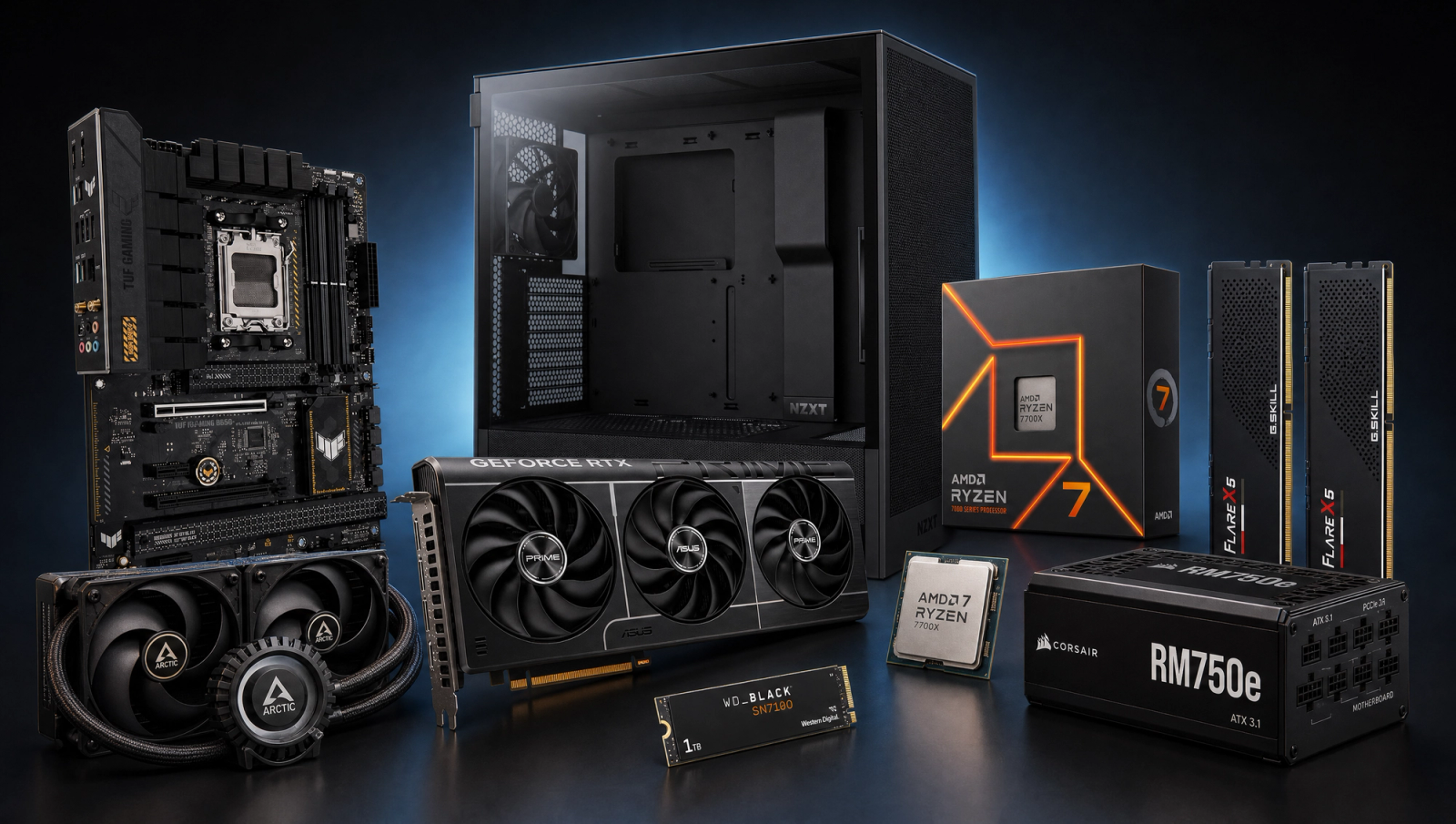
Components
- $309.00
- $549.00
- $180.00
- $110.00
- $70.00
- $100.00
- $130.00
- $85.00
Who This Build Is For
This is the build for someone shopping a 1440p 144Hz IPS panel and wanting a PC that actually feeds it. You play a mix of competitive multiplayer and the occasional heavy AAA release, and you do not want to flip settings every time a new game lands. The budget target lands near the fifteen-hundred mark before tax and a monitor, with the goal of clearing 144 fps in esports natively and getting close in modern AAA with light DLSS use.
It is not a 4K build, and it is not a 1080p build that happens to have a strong GPU. The RTX 5070 with 12GB of GDDR7 is sized for 1440p, and the Ryzen 7 7700X keeps frame pacing clean in the CPU-limited titles where 8 cores actually matter. If your monitor is locked at 1080p 240Hz, look at a cheaper tier. If you are eyeing 4K, the heavy UE5 titles will hurt here.
Build Overview
Key Specs
CPU | AMD Ryzen 7 7700X (8c/16t, Zen 4) |
GPU | NVIDIA GeForce RTX 5070 12GB GDDR7 |
Motherboard | ASUS TUF Gaming B650-PLUS WiFi |
Memory | 32GB (2x16GB) DDR5-6000 CL30 EXPO |
Storage | WD_Black SN7100 1TB NVMe Gen4 |
Cooling | Arctic Liquid Freezer III Pro 240 AIO |
Power Supply | Corsair RM750e 80+ Gold ATX 3.1 |
Case | NZXT H5 Flow ATX Mid-Tower |
CPU
AMD Ryzen 7 7700X (8c/16t, Zen 4)
GPU
NVIDIA GeForce RTX 5070 12GB GDDR7
Motherboard
ASUS TUF Gaming B650-PLUS WiFi
Memory
32GB (2x16GB) DDR5-6000 CL30 EXPO
Storage
WD_Black SN7100 1TB NVMe Gen4
Cooling
Arctic Liquid Freezer III Pro 240 AIO
Power Supply
Corsair RM750e 80+ Gold ATX 3.1
Case
NZXT H5 Flow ATX Mid-Tower
The core spec sheet at a glance.
Performance Summary
Native 1440p High clears 144 fps in every game on the standard slate that is not a UE5 path-traced showcase. Esports titles run 130 to 175 fps, BG3 and Hogwarts Legacy land in the 95 to 115 range, and the heaviest titles (Stalker 2, Wukong, Alan Wake 2) sit in the 55 to 72 range natively and need DLSS Quality to hit 144. That tracks with what an RTX 5070 is built to do at this resolution.
Performance Expectations
Average FPS across the standard 10-game slate.
- Cyberpunk 2077138 FPS
- Alan Wake 295 FPS
- Black Myth: Wukong105 FPS
- Stalker 278 FPS
- Marvel's Spider-Man 2148 FPS
- Starfield115 FPS
- Baldur's Gate 3142 FPS
- Helldivers 2130 FPS
- Hogwarts Legacy132 FPS
- Call of Duty: Black Ops 6175 FPS
Reviewer-sourced averages across the standard 10-game slate at 1440p High, native rendering. Expect plus or minus 5 fps depending on settings, drivers, and CPU. DLSS Quality typically adds 30 to 50 percent on top of native in titles that support it. 1080p numbers are included if you ever connect a high-refresh secondary display; 4K numbers are there so you can see where this card stops being the right tool.
Parts Breakdown
CPU

The Ryzen 7 7700X is the right slot in the AM5 stack for a 1440p high-refresh build. Eight Zen 4 cores and sixteen threads handle modern multiplayer (COD MP, Helldivers 2, Spider-Man 2 traversal) without becoming the bottleneck before the GPU does. Boost clocks hit 5.4 GHz, which is what carries the CPU-sensitive titles like BG3 Act 3 and Starfield city scenes.
The obvious alternative at the same tier is the Ryzen 7 7800X3D. The X3D is faster in CPU-bound games (5 to 15 percent in the worst spots) but typically costs noticeably more and runs into stock issues. At 1440p, you are GPU-bound in 9 out of the 10 games on the slate, so the X3D upgrade buys very little here. Save that uplift for a 9800X3D / 4K future when it actually pays.
GPU

The RTX 5070 with 12GB of GDDR7 is the matching part for the 1440p 144fps slot. It clears 144 fps natively in the entire esports tier and lands in the 88 to 132 range across modern AAA at 1440p High. DLSS 4 with Multi Frame Generation is the lever for the heaviest titles, and 12GB of VRAM is enough headroom for current 1440p High textures with margin.
The trade-off vs. the RX 9070 XT is real: AMD wins on raw raster in some titles and has more VRAM, but loses on DLSS quality, frame generation, ray-tracing, and the broader software stack (DLAA, NVENC, Reflex, Broadcast). For a 1440p build where DLSS is part of the plan, the 5070 is the cleaner buy.
Motherboard

The ASUS TUF B650-PLUS WiFi is the right B650 board for a 7700X. Fourteen power stages handle the 105W TDP cleanly with no throttling under sustained loads, PCIe 5.0 x16 for the GPU slot, two M.2 slots (one Gen5, one Gen4), Wi-Fi 6, and 2.5GbE on the rear IO. DDR5 EXPO support is what matters for pairing with the Flare X5 kit.
Why not X670E at this tier? Two reasons. You get the same boost behavior on this CPU with B650 (the chipset only matters at the extreme edges of memory tuning), and X670E adds chipset cost without anything you will use on a single-GPU 1440p build. PCIe 5.0 SSD support is on B650 here; chipset PCIe lane count and Gen5 second-slot bandwidth are the only real X670E perks.
Memory (RAM)

32GB of G.Skill Flare X5 DDR5-6000 CL30 is the AM5 sweet spot. DDR5-6000 with CL30 timings runs 1:1 with the Infinity Fabric on Zen 4, which is where you get the best gaming latency. Going to DDR5-7200 forces a 2:1 fabric ratio that costs a few fps in CPU-bound games even though the bandwidth number looks bigger. 32GB is the floor for modern AAA plus a browser plus a Discord stack open in the background.
Dual-rank 2x16GB beats 4x8GB on bandwidth and is more stable at higher EXPO speeds; do not buy a four-stick kit on AM5 unless you have a specific reason.
Storage

The WD_Black SN7100 1TB is the practical pick. PCIe Gen4, DRAM-less but uses HMB effectively, 7250 MB/s sequential reads, and stays cool without a chunky heatsink (the motherboard's M.2 shield is enough). Game installs land in the 80 to 150 GB range now, so 1TB is the floor for a primary drive. If you carry a large library, plan to add a 2TB secondary later.
The Gen5 alternative (something like the Crucial T705) reads faster on paper but does not load games meaningfully faster and runs hotter. Save the budget delta for a second drive instead.
Power Supply

The Corsair RM750e is the right unit for this build. 750W, 80+ Gold, fully modular, ATX 3.1 with a native 12V-2x6 connector for the RTX 5070, and a 10-year warranty. The 5070 has a 250W TBP with transient spikes around 350W; 750W gives you a comfortable headroom margin and leaves room to step up to a 5070 Ti or 5080 later without swapping the PSU.
The RM650e would work today and saves a few dollars, but the 100W of extra headroom on the 750e is worth keeping for one upgrade cycle.
Case

The NZXT H5 Flow (2024) is a compact ATX mid-tower with a perforated front panel and a clean internal layout. Front mesh plus top exhaust gives the AIO and GPU enough air to keep noise down under load. The 240mm AIO fits cleanly in the top slot. Two included fans up front; you may want to add a rear 120mm for a positive pressure setup.
If you want a quieter build with a solid front panel, the Fractal North works on the same chassis size, but you will give up a few degrees of headroom on the GPU and CPU. The H5 Flow is the better thermal pick for this hardware.
Cooling

The Arctic Liquid Freezer III Pro 240 is the cooling pick. 240mm AIO with a 38mm thick radiator and a dedicated VRM fan on the pump block. The 7700X is a hot chip at stock (its 95C boost target is by design), and a strong 240mm AIO keeps it pegged at boost clocks without the fans going into jet-engine mode. The VRM fan is a small detail that adds up under long sessions.
A top-tier 240mm air cooler (Peerless Assassin 120 SE, NH-D15) can match the AIO on a 7700X under most workloads, but you give up the option of letting the CPU breathe in a heavy multi-threaded scene without throttling. For this budget the AIO is the safer call.
Final Thoughts
This is a clean 1440p 144fps build that does not pretend to be more than that. It clears 144 in esports natively, gets there with DLSS Quality in most AAA, and leans on DLSS Performance for the heaviest UE5 titles. Pair it with a midrange 1440p 144Hz IPS panel and a good mouse; the upgrade path is a 5070 Ti or 5080 swap in two years when those drop in price.
FAQs
Will this build actually hit 144 fps at 1440p?
In esports and most modern AAA at 1440p High, yes. Native rendering clears 144 fps in COD, Helldivers 2, Spider-Man 2, BG3, Starfield, Hogwarts Legacy, and Cyberpunk 2077 with DLSS Quality. The heaviest UE5 titles (Stalker 2, Black Myth: Wukong, Alan Wake 2) sit at 55 to 72 fps natively and need DLSS Quality or Performance to hit 144. That is the honest answer.
Why the 7700X and not the 7800X3D?
At 1440p you are GPU-bound on 9 of the 10 games on the standard slate. The X3D's extra cache buys 5 to 15 percent in CPU-bound titles, but you rarely see that uplift here because the GPU is the ceiling. The 7700X holds boost clocks in MSFS, BG3 Act 3, and Starfield without bottlenecking the 5070. Save the X3D money for a 9800X3D / 4K future.
Is 12GB of VRAM enough for 1440p?
At 1440p High in 2026, yes. Texture pools at this resolution typically land in the 8 to 10 GB range, with margin on the heaviest titles (Hogwarts Legacy, Alan Wake 2 with Ray Reconstruction). Where 12GB tightens up is 1440p with frame generation and texture mods cranked, or at 4K. If you are planning a 4K upgrade in two years, look at the 5070 Ti's 16GB.
Should I get an OLED 1440p monitor with this?
If the budget exists, a 1440p 240Hz QD-OLED is a great pairing because the 5070 has enough headroom in esports to push past 144. For a strict fifteen-hundred-dollar total system budget without the monitor, a midrange 1440p 144Hz IPS panel is the practical pick and will not bottleneck the build for most use.
Can I upgrade this later?
Yes. The AM5 socket runs through 2027+ per AMD's commitment, so a 9800X3D or 10000-series drop-in is real. The B650 board and 750W PSU give you room to step up to a 5070 Ti or 5080 without a full rebuild. The DDR5-6000 CL30 kit carries forward to any future Zen 4 or Zen 5 chip cleanly.
Does the case fit the 240mm AIO and full-length GPU?
The NZXT H5 Flow accepts a 240mm radiator in the top slot and clears the full ASUS Prime RTX 5070 OC card on length (under 305mm). The 38mm-thick Arctic Liquid Freezer III Pro 240 radiator fits without RAM clearance issues since it mounts up top, not on the front.
Do I need the AIO or would a tower air cooler work?
A top-tier 240mm air cooler (Peerless Assassin 120 SE, NH-D15) handles the 7700X under most loads. The AIO is the safer pick because the 7700X is designed to boost to 95C at stock, and a good 240mm AIO gives you the thermal headroom to keep fans quiet under long multi-threaded sessions. Either works; the AIO is the cleaner long-term call.