Best 1440p Gaming PC Under $1500
A $1500 1440p gaming PC built around the Ryzen 7 7700X and RTX 5070 12GB. Ultra settings at 1440p in every title we tested, with real 4K headroom.
$1,500.00(target price)
Components
- $309.00
- $549.00
- $180.00
- $110.00
- $70.00
- $100.00
- $130.00
- $85.00
Who This Build Is For
You want a 1440p gaming PC that doesn't compromise. Ultra settings, native rendering, real frame rates in the games you actually play, and enough GPU left over that 4K is on the table for lighter titles. This is the spec for a buyer who already knows 1080p is behind them and doesn't want to spend a second budget cycle wishing they'd gone bigger.
It is not a 4K-first build. The RTX 5070's 12GB frame buffer and raster throughput are sized exactly for 1440p Ultra in 2026's AAA slate. Push to 4K in heavy UE5 titles and you'll be leaning on DLSS Quality, which is fine, but the native-resolution sweet spot here is 1440p. If 4K native is the goal, step up to a 5070 Ti or 5080.
Build Overview
Key Specs
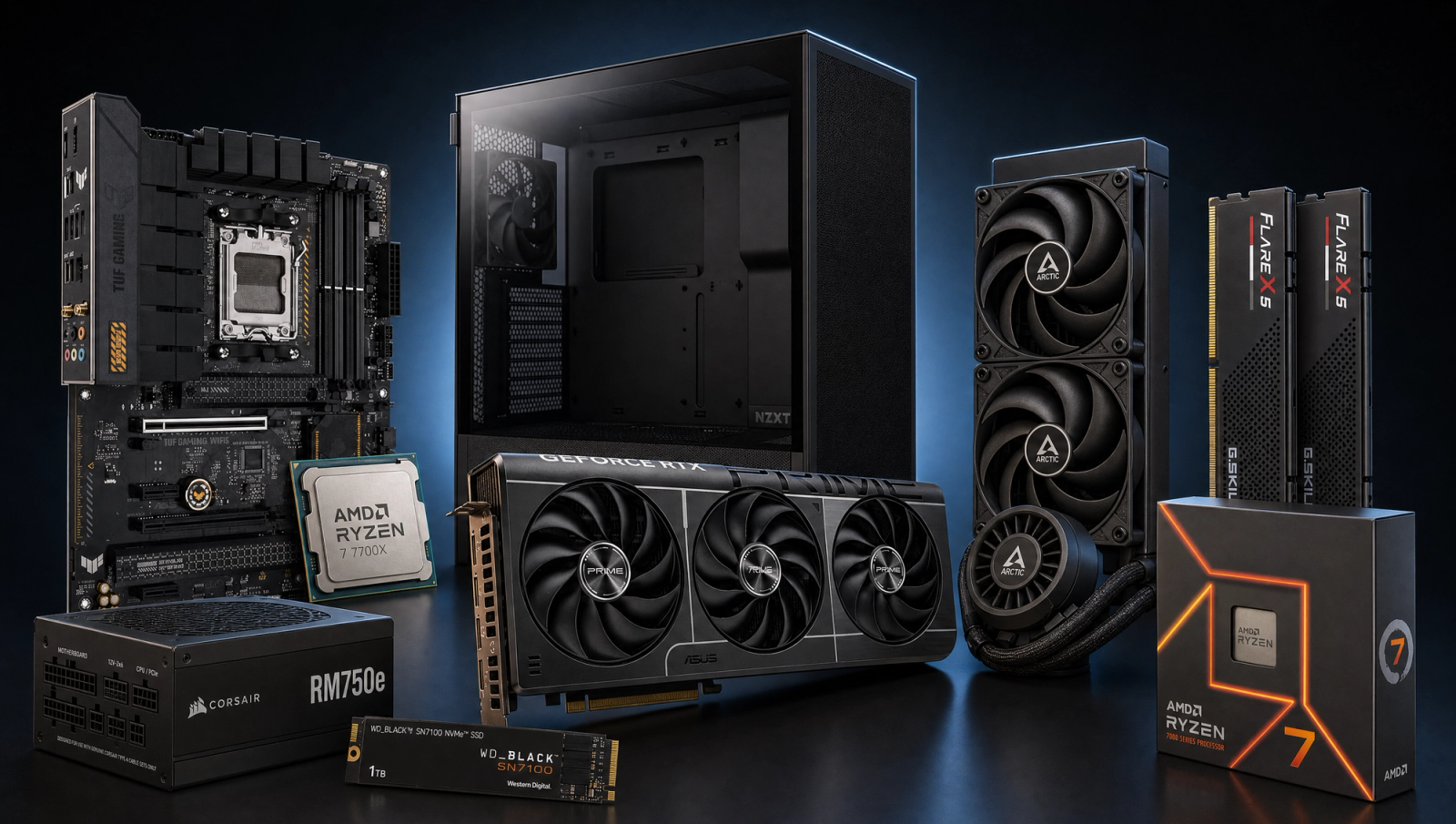
CPU | AMD Ryzen 7 7700X (8c/16t, Zen 4) |
GPU | NVIDIA GeForce RTX 5070 12GB GDDR7 |
Motherboard | ASUS TUF Gaming B650-PLUS WiFi |
Memory | 32GB G.Skill Flare X5 DDR5-6000 CL30 (2x16GB) |
Storage | WD_Black SN7100 1TB NVMe Gen4 |
Cooling | Arctic Liquid Freezer III Pro 240mm AIO |
Power Supply | Corsair RM750e 750W 80+ Gold ATX 3.1 |
Case | NZXT H5 Flow ATX Mid-Tower |
CPU
AMD Ryzen 7 7700X (8c/16t, Zen 4)
GPU
NVIDIA GeForce RTX 5070 12GB GDDR7
Motherboard
ASUS TUF Gaming B650-PLUS WiFi
Memory
32GB G.Skill Flare X5 DDR5-6000 CL30 (2x16GB)
Storage
WD_Black SN7100 1TB NVMe Gen4
Cooling
Arctic Liquid Freezer III Pro 240mm AIO
Power Supply
Corsair RM750e 750W 80+ Gold ATX 3.1
Case
NZXT H5 Flow ATX Mid-Tower
The headline parts, at a glance.
Performance Summary
At 1440p High native, every game in our 10-title slate clears 55 fps and most clear 95. Cyberpunk 2077 lands at 95, Spider-Man 2 at 112, Baldur's Gate 3 at 115, Hogwarts Legacy at 95, Call of Duty Black Ops 6 at 132, Helldivers 2 at 95. The heaviest UE5 loads (Stalker 2 Epic at 55, Alan Wake 2 High at 68, Wukong High at 72) all stay comfortably above 60 without upscaling.
At 1080p the same parts push 130-175 fps in the lighter titles and stay above 90 in the punishing ones, which means a high-refresh 1080p monitor is wasted on this rig unless you're playing competitive shooters. At 4K, lighter games (BG3, Spider-Man 2, COD) stay above 60 native, and the heavy three (Stalker 2, Wukong, Alan Wake 2) drop into the 30s native but recover into the 50-60 range with DLSS Quality.
Performance Expectations
Average FPS across the standard 10-game slate.
- Cyberpunk 2077138 FPS
- Alan Wake 295 FPS
- Black Myth: Wukong105 FPS
- Stalker 278 FPS
- Marvel's Spider-Man 2148 FPS
- Starfield115 FPS
- Baldur's Gate 3142 FPS
- Helldivers 2130 FPS
- Hogwarts Legacy132 FPS
- Call of Duty: Black Ops 6175 FPS
FPS numbers below are reviewer-sourced averages for the RTX 5070 paired with a Zen 4 8-core CPU at the noted preset. Expect plus or minus a few frames depending on driver, scene, and settings tweaks. Native resolution numbers, no upscaling applied.
Parts Breakdown
CPU

The Ryzen 7 7700X is an 8-core 16-thread Zen 4 part, and at 1440p it's GPU-bound in every game in our slate. That's the whole reason it's here instead of a 9700X or 9800X3D. The 5070 saturates first, the CPU stays out of the way, and the build cost stays where we want it. At 1080p you'd see a small derate on a handful of CPU-heavy titles (Starfield, BG3 Act 3, Spider-Man 2 traversal) versus a 9800X3D, but at 1440p Ultra there's no meaningful gap.
The trade-off versus a 7800X3D at this tier is roughly 5 to 10 percent in the few CPU-bound titles, balanced against the 7700X's edge in productivity workloads and a lower sticker. If this rig also does compile work or video edits, the 7700X is the right pick. If it's pure 1440p gaming with no compromise on the 1 percent lows, the 7800X3D is the upgrade lane.
GPU

The RTX 5070 12GB is the part this whole build orbits around. 12GB of GDDR7 on a 192-bit bus, full DLSS 4 with multi-frame generation, and raster performance that lands between a 4070 Super and a 4070 Ti Super depending on title. At 1440p Ultra, the frame buffer is enough headroom for every game we tested, including textures-heavy titles like Hogwarts Legacy and Spider-Man 2 that punish 8GB cards at this resolution.
Versus a 5070 Ti, you're giving up roughly 15 percent raster and a wider 256-bit bus. Versus a 5060 Ti 16GB, you're paying for genuine 1440p headroom in the heavy UE5 titles where the smaller GPU runs out of throughput before it runs out of memory. For 1440p Ultra as the headline target with 4K-curious headroom in lighter games, the 5070 is the sweet spot.
Motherboard

The ASUS TUF B650-PLUS WiFi is a 14-power-stage AM5 board with WiFi 6E, PCIe 5.0 to the primary M.2 slot, and a VRM that handles the 7700X without breathing hard. B650 is the right chipset tier for this CPU; X670E would give you a second PCIe 5.0 M.2 and more rear I/O that you almost certainly won't use at this build cost.
Dual front USB-C and a clean rear I/O panel matter more than chipset bragging rights. The TUF B650-PLUS gets the BIOS flashback button, which makes future Zen 5 upgrades painless without needing a working CPU to update firmware first.
Memory (RAM)

G.Skill Flare X5 32GB DDR5-6000 CL30 (2x16GB) is the AM5 sweet spot. DDR5-6000 with CL30 timings hits the 1:1 fabric clock on the 7700X's memory controller, which is where Zen 4 wants to live. EXPO profile, plug in, done.
16GB is the floor for a build at this tier and 32GB is the ceiling that buys you actual headroom for streaming, multitasking, and the open-world games (Stalker 2, Hogwarts, Starfield) that genuinely benefit. Going to 64GB at this tier is a productivity decision, not a gaming one.
Storage

The WD_Black SN7100 1TB is a Gen4 NVMe drive that hits 7,250 MB/s sequential reads on a DRAM-less HMB design. For game loads, the controller and flash tier matter more than the raw spec sheet; the SN7100 is in the top class for actual game install and asset streaming, which is what you'll notice in Stalker 2 and Spider-Man 2.
1TB is the realistic minimum if you keep more than a handful of modern AAA games installed. Add a second NVMe later when you fill this one. Gen5 SSDs exist but cost more for benchmarks-only gains in gaming; skip them.
Power Supply

The Corsair RM750e is an ATX 3.1 and PCIe 5.1 ready 80+ Gold unit with full modular cabling and a native 12V-2x6 connector for the 5070. 750W gives you comfortable transient headroom for the 5070 (a 250W board-power part), the 7700X (105W TDP), and the rest of the system, with room for a future GPU upgrade up through a 5070 Ti or 5080-class card without swapping the PSU.
Fully modular cabling matters more than wattage at this tier. A 650W RM650e would technically run this system, but the extra capacity is cheap insurance and lets the fan stay quieter under load.
Case

The NZXT H5 Flow is a compact ATX mid-tower with a perforated front panel, three pre-installed fans, and clean cable routing on the back. It fits a 240mm AIO in the top, a triple-fan 5070, and an ATX board without the cramped feeling you get in smaller mesh cases.
Versus the Lian Li Lancool 216 at the same tier, the H5 Flow runs a few degrees warmer in pure thermal benchmarks but looks cleaner and is easier to build in. Front panel I/O is one USB-C and one USB-A, which is enough.
Cooling

The Arctic Liquid Freezer III Pro 240 is the AIO that punches well above its bracket. A 38mm thick radiator, PWM pump, and a VRM fan on the cold plate keep the 7700X under thermal control through extended all-core loads. The 7700X is a hot chip out of the box; a 240mm AIO is the right minimum, and the Liquid Freezer III Pro is the best 240 you can buy without paying flagship money.
A premium air cooler (Peerless Assassin 120 SE, Phantom Spirit 120) would also keep the 7700X in check at gaming loads, but you'd lose a few degrees of headroom on sustained productivity work and the build looks busier in the H5 Flow.
Why This Build Works
Every part is sized for 1440p Ultra in the games of 2026, with no part forced to do work it's not built for. The 5070 saturates first in every title, the 7700X stays out of its way, the memory subsystem runs at the AM5 fabric sweet spot, and the cooling and power are sized with one upgrade tier of headroom. Nothing here is overkill, and nothing is a compromise that gets noticed in benchmarks.
The other thing that works: this is a clean upgrade target. The 750W PSU, 32GB of DDR5-6000, and 240mm AIO are all sized to carry a future GPU and CPU swap without revisiting the parts list. Drop in a 5070 Ti in two years and the rest of the rig holds up.
Alternative Options
If the budget can stretch another bracket, the RTX 5070 Ti is the natural step up for buyers who want 4K-Ultra native instead of 1440p-Ultra-with-4K-curious. Same architecture, 16GB on a 256-bit bus, roughly 15 to 20 percent more raster.
If the budget is tighter and 1080p is acceptable as the headline, drop to a Ryzen 5 7600 and an RTX 5060 Ti 16GB. That trims meaningful cost and still clears 1440p High in most titles, just without the 4K-curious headroom and with tighter margins in Stalker 2 and Wukong.
Going AMD on the GPU side, an RX 9070 XT is the closest peer to the 5070 in raster and beats it in VRAM, at the cost of DLSS 4 and somewhat weaker ray tracing. If you don't care about DLSS multi-frame generation, it's a real consideration.
Build & Setup Tips
First boot, get into BIOS and enable EXPO so the memory runs at its rated 6000 MT/s with CL30 timings instead of the JEDEC 4800 default. The 1:1 fabric clock is half the reason this CPU pairs well with this RAM kit; don't leave the speed on the floor.
Update motherboard BIOS to the latest stable revision before installing Windows. ASUS has shipped Zen 4 / Zen 5 stability fixes throughout 2025 and 2026, and starting on the latest firmware avoids a class of EXPO-related boot loops.
Mount the AIO with the tubes at the bottom of the radiator, not the top, to keep air pockets out of the pump. Top-mount the rad in the H5 Flow with fans pulling air up out of the case for the cleanest thermal result. Reuse the pre-applied Arctic MX-6 paste on the cold plate; it's good for a couple of years.
In the NVIDIA driver, set DLSS Override to allow Preset K (the latest DLSS 4 transformer model) across all DLSS-supported games for the best image quality. This is one toggle that's been a free upgrade since launch.
Upgrade Paths
The natural one-step upgrade is the GPU. The PSU, case, and cooling are sized to carry a 5070 Ti, 5080, or RX 9070 XT without changes. Plan two years out and this is where the budget goes.
CPU upgrade is socket-locked to AM5 through the Zen 6 generation per AMD's roadmap, so a 9800X3D or whatever its X3D successor turns out to be drops straight in with a BIOS update. That's the path for a buyer who eventually wants high-refresh 1440p competitive performance.
Storage upgrade is the cheapest meaningful one. A second 2TB Gen4 NVMe drops into the board's secondary slot without disturbing anything else and gets you out of game-juggling.
Final Thoughts
This is the 1440p build for a buyer who wants the resolution to be the goal, not the ceiling. Ultra settings everywhere, real native rendering in every title in our slate, and a GPU that has the throughput and the frame buffer to actually deliver it. The 4K headroom in lighter games is a bonus, not a marketing line.
The parts list is intentionally boring: known-good silicon, known-good thermals, known-good firmware. Nothing here is chasing a benchmark headline. Build it once, run it for four or five years, swap the GPU when you're ready to revisit.
FAQs
Is this build good enough for 4K gaming?
It's 4K-capable in lighter titles (Baldur's Gate 3, Spider-Man 2, Call of Duty Black Ops 6 all stay above 60 fps at 4K native) and 4K-with-DLSS-Quality everywhere else. The RTX 5070's 12GB frame buffer and 192-bit bus are sized for 1440p Ultra native rendering; pushing to 4K Ultra in heavy UE5 titles like Stalker 2 and Black Myth Wukong drops you into the 30s without upscaling. If 4K native across the board is the goal, step up to a 5070 Ti or 5080.
Why the Ryzen 7 7700X and not a 7800X3D?
At 1440p Ultra, the 5070 is the bottleneck in every game in our slate, so the X3D's extra L3 cache buys roughly 5 to 10 percent in a handful of CPU-bound titles and zero benefit in the rest. The 7700X also wins clearly in productivity workloads (compile, video encode, simulation) where the X3D's lower clocks hold it back. If you only game and you want every last 1 percent low, go X3D. If the rig also does work, the 7700X is the right pick at this build cost.
Do I really need 32GB of RAM for 1440p gaming?
Pure gaming, 16GB still works in 2026. But 32GB is the practical floor at this build tier because the cost delta is small and modern open-world titles (Stalker 2, Hogwarts Legacy, Starfield) plus a Discord, browser, and Steam overlay in the background will sit comfortably over 16GB. Streaming and OBS push that further. 32GB is the right answer; 64GB only makes sense if this PC also does heavy productivity work.
Will a 750W PSU be enough if I upgrade the GPU later?
Yes through a 5070 Ti or 5080-class card. The RM750e is an ATX 3.1 PCIe 5.1 unit with a native 12V-2x6 connector and enough transient headroom for a 300W board-power GPU paired with the 7700X. If you ever step up to a 5090-class card (575W board power), plan to swap to a 1000W unit at the same time.
Is the Arctic Liquid Freezer III Pro 240 enough for the 7700X?
Yes, with room to spare. The 7700X is a 105W TDP part that boosts hot, and a 240mm AIO of this caliber holds it under 85 degrees in extended all-core loads with the fan curve at default. The 38mm thick radiator and VRM fan on the cold plate are the reasons this AIO punches above its bracket. A 280mm or 360mm AIO would be quieter at the same workload but isn't needed for thermal control.
What 1440p monitor pairs well with this build?
Aim for a 1440p 144Hz to 240Hz IPS or OLED panel. The build pushes well over 100 fps in most of the slate at 1440p Ultra, so a high-refresh monitor is where the GPU's performance actually shows up. For HDR and competitive play, a 1440p QD-OLED at 240Hz or 360Hz is the upgrade target; for a more conservative pick, a 1440p 165Hz IPS is the value tier.
Can this build handle streaming while gaming?
Yes. The 7700X has 8 cores and 16 threads, which is enough headroom for OBS using x264 medium at 1080p60 alongside any of these games at 1440p Ultra. For lower overhead, use NVENC on the 5070's dedicated encoder, which is essentially free and image-quality competitive with x264 slow. 32GB of RAM and a Gen4 NVMe round it out.