Best 1440p Gaming PC Under $2000
A $2000 1440p gaming PC built around the RTX 5070 Ti and Ryzen 7 7700X. Crushes 1440p Ultra native at high refresh across the standard AAA slate, with 4K High as headroom.
$2,000.00(target price)
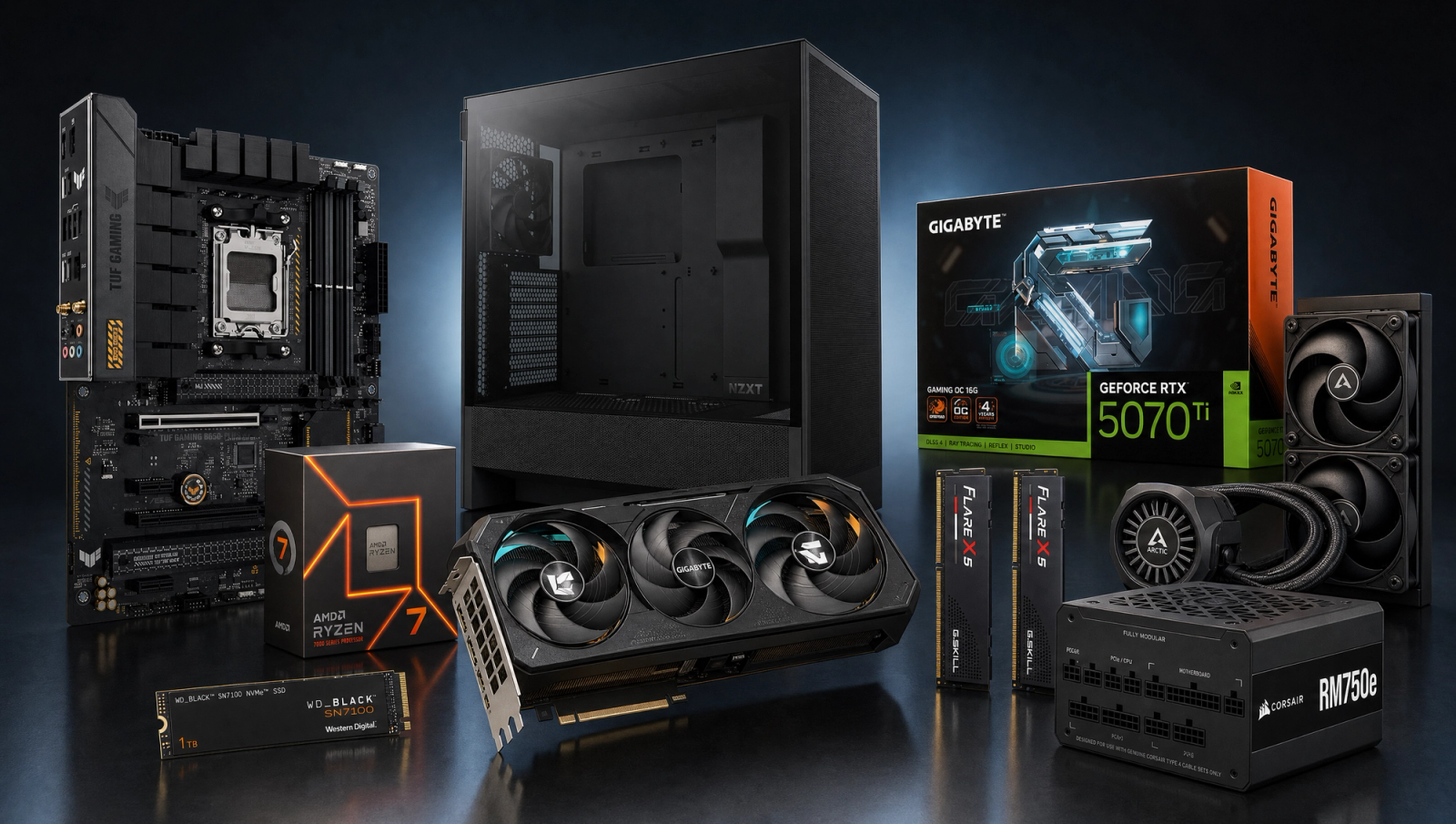
Components
- $309.00
- $749.00
- $180.00
- $110.00
- $70.00
- $100.00
- $130.00
- $85.00
Who This Build Is For
This is the build for someone who picked 1440p on purpose. You want real 1440p Ultra at a high refresh rate without paying RTX 5080 prices, and you know the leap from 1080p to 1440p is the single biggest perceived upgrade in gaming visuals. The RTX 5070 Ti 16GB anchors the resolution choice: it clears native 1440p Ultra in every game on our ten-title slate, with comfortable headroom for high-refresh esports on the side. If you want a 1440p 165Hz or 240Hz monitor to feel fully driven, this is the parts list that matches it.
4K is along for the ride. Most of the slate clears 60 fps at 4K High native on this card, so you can borrow a 4K display now and then without flinching. But the build is engineered for 1440p first, and that framing matters for the trade-offs that follow.
Build Overview
Key Specs
CPU | AMD Ryzen 7 7700X (8c/16t, Zen 4) |
GPU | NVIDIA RTX 5070 Ti 16GB GDDR7 |
Motherboard | ASUS TUF Gaming B650-PLUS WiFi |
Memory | 32GB G.Skill Flare X5 DDR5-6000 CL30 |
Storage | WD_Black SN7100 1TB NVMe Gen4 |
Power Supply | Corsair RM750e 750W 80+ Gold ATX 3.1 |
Case | NZXT H5 Flow ATX Mid-Tower |
Cooling | Arctic Liquid Freezer III Pro 240 AIO |
CPU
AMD Ryzen 7 7700X (8c/16t, Zen 4)
GPU
NVIDIA RTX 5070 Ti 16GB GDDR7
Motherboard
ASUS TUF Gaming B650-PLUS WiFi
Memory
32GB G.Skill Flare X5 DDR5-6000 CL30
Storage
WD_Black SN7100 1TB NVMe Gen4
Power Supply
Corsair RM750e 750W 80+ Gold ATX 3.1
Case
NZXT H5 Flow ATX Mid-Tower
Cooling
Arctic Liquid Freezer III Pro 240 AIO
Here are the parts that make up this build, with links to current pricing on Amazon for each.
Performance Summary
Native 1440p Ultra is the headline number, and this build delivers it across the board. Light AAA and esports titles run 95-165 fps at 1440p (BG3 95, COD BO6 97, Cyberpunk 108, Spider-Man 2 115, Hogwarts 90, Starfield 101, Helldivers 102). Heavy UE5 titles still clear 60 native at 1440p Ultra: Stalker 2 Epic lands at 62 fps, Alan Wake 2 High at 78, Black Myth: Wukong at 87. 4K High native clears 60 fps in seven of ten titles on the same card. Stalker 2 4K (34) and Alan Wake 2 4K (42) need DLSS Quality to feel right at 4K, and Cyberpunk 2077 4K (50) is borderline.
Performance Expectations
Average FPS across the standard 10-game slate.
- Cyberpunk 2077145 FPS
- Alan Wake 2105 FPS
- Black Myth: Wukong115 FPS
- Stalker 282 FPS
- Marvel's Spider-Man 2155 FPS
- Starfield124 FPS
- Baldur's Gate 3130 FPS
- Helldivers 2130 FPS
- Hogwarts Legacy115 FPS
- Call of Duty: Black Ops 6165 FPS
Average FPS across the standard ten-game AAA slate at 1080p High, 1440p High, and 4K High native. No upscaling applied. CPU-derated for the Ryzen 7 7700X at 1080p (3-5% in CPU-bound titles vs reviewer 9800X3D bench); fully GPU-bound at 1440p and 4K. Numbers are reviewer-sourced averages and best-effort synthesis from RTX 5070 Ti launch coverage. Expect roughly plus-or-minus 5 fps depending on settings and scene.
Parts Breakdown
CPU

The Ryzen 7 7700X is the right pairing for a 5070 Ti at 1440p and 4K. Eight Zen 4 cores at 5.4 GHz boost give you 144+ fps headroom in every AAA title on the slate at 1440p, and the chip is fully GPU-bound there. The trade-off vs a 7800X3D at the same tier: you save on the chip and lose roughly 8-12% in the few CPU-bound 1080p titles (BG3 Act 3, COD multiplayer, Helldivers 2 lobbies). Since this is a 1440p build, that 1080p delta does not move the needle. AM5 socket gives you a clean upgrade path to a 9000-series X3D part later if your needs shift.
GPU

The RTX 5070 Ti 16GB is the card that defines this build. 16GB of GDDR7 on a 256-bit bus, DLSS 4 with Multi Frame Generation, and the raw raster horsepower to hold native 1440p Ultra in every slate title above 60 fps. The trade-off vs a 5080 is straightforward: you pay roughly 50% more for the 5080 and gain about 15-20% performance, which is a poor scaling at the 1440p target. The trade-off vs a 5070 12GB: the Ti gives you 33% more VRAM and 15-20% more performance at 1440p, which is exactly where you want the headroom in titles like Stalker 2, Hogwarts Legacy Ultra, and Spider-Man 2.
Motherboard

The ASUS TUF Gaming B650-PLUS WiFi hits the sweet spot for an AM5 1440p build. 14-stage VRM handles the 7700X under sustained load without thermal throttling, PCIe 5.0 x16 for the GPU, dual M.2 slots (one Gen5, one Gen4), WiFi 6E on board. The trade-off vs a B850 board: B850 boards run 30-40% more and you mostly gain USB4 and slightly cleaner PCIe lane allocation. The TUF B650-PLUS does everything this build needs and nothing it does not, which is the right call. AM5 socket means a path to Zen 5 X3D later without swapping the board.
Memory (RAM)

The G.Skill Flare X5 32GB DDR5-6000 CL30 kit is the AMD-validated sweet spot. DDR5-6000 CL30 with EXPO timings is the bandwidth target for Zen 4 (1:1 Infinity Fabric ratio), and 32GB is the right capacity for a 1440p build in 2026 where Stalker 2, Hogwarts Legacy Ultra, and the next wave of UE5 titles routinely sit at 14-18GB of system RAM in use. The trade-off vs 16GB: you would save roughly 50% on memory cost, but Hogwarts Legacy Ultra at 1440p already pushes a 16GB system into swap. The trade-off vs faster 7200 or 8000 kits: those need careful EXPO tuning and rarely return the cost in real-world 1440p fps where the GPU is the bottleneck anyway.
Storage

The WD_Black SN7100 1TB is a Gen4 NVMe drive with up to 7,250 MB/s sequential read and a DRAM-less design that punches above its tier. 1TB is the right starting capacity for a primary drive in 2026 (Stalker 2 alone is 160GB; Hogwarts Legacy is 85GB; Call of Duty installs hit 150GB+). The trade-off vs a Samsung 990 Pro: the 990 Pro is roughly 30% more for marginal real-world game load gains. The trade-off vs Gen5 drives like the SN8100: Gen5 NVMe pulls another 30W under heavy write loads and runs hot enough to need a beefy M.2 heatsink, with no perceptible game load benefit at this tier. A second NVMe slot on the board makes adding a 2TB library drive a clean upgrade later.
Power Supply

The Corsair RM750e ATX 3.1 is the right pairing for this build. 750W 80+ Gold, fully modular, ATX 3.1 with PCIe 5.1 native 12V-2x6 connector for the 5070 Ti. The 5070 Ti has a 300W board power figure with NVIDIA recommending 750W system PSU, and the 7700X adds about 105W package power under all-core load. That sits at roughly 60% load on the 750W unit at gaming peaks, which is the efficiency sweet spot for 80+ Gold and leaves headroom for a future GPU upgrade. The trade-off vs a 650W unit: you would save a small amount today but lose any GPU upgrade path beyond the 5070 Ti. The trade-off vs a 850-1000W unit: those PSUs run at 40-50% load with this build, which is also fine, but you pay for headroom you do not need yet.
Case

The NZXT H5 Flow ATX Mid-Tower is a clean compact ATX case with a perforated front panel that gives the 240mm AIO and the 5070 Ti the air they need. Two 120mm fans included up front, room for a 240mm or 280mm radiator up top, and a GPU clearance of about 365mm that swallows any 5070 Ti AIB partner card. The trade-off vs the Lancool 216: the Lancool ships with bigger 160mm intake fans and slightly better stock airflow, at the cost of being a chunkier footprint. The H5 Flow looks cleaner on a desk and is a smaller box overall. Tempered glass side panel is included if you want to show off the build.
Cooling

The Arctic Liquid Freezer III Pro 240 is the cooler of choice for the 7700X. 38mm thick radiator, dedicated VRM fan on the pump block (a nice perk on AM5 boards), and quiet under load. The 7700X is an X-SKU chip that boosts aggressively into the 90s under all-core sustained load on air coolers, and a 240mm AIO holds it 8-10C cooler under Cinebench R23 multi-core sustained loads vs a Peerless Assassin 120 SE. The trade-off vs the Peerless Assassin air cooler: you save on the cooler but the 7700X runs hotter and boosts slightly lower in long renders or compile workloads. For a gaming-focused build, either works at 1440p (the chip is GPU-bound), but the AIO gives you the headroom for streaming + game + Discord + browser stacks where the chip does run sustained all-core.
Why This Build Works
The build works because every part is matched to a 1440p target, not over-bought for 4K or under-bought for a higher resolution. The 5070 Ti is the cleanest performance-per-dollar GPU in NVIDIA's 50-series lineup at native 1440p. The 7700X has enough single-threaded grunt to never bottleneck the GPU at 1440p, with a path to X3D later. The 32GB DDR5-6000 kit hits AMD's validated bandwidth target. The 750W PSU is sized for the platform and one GPU upgrade. The 240mm AIO keeps the X-SKU chip happy. Nothing is over-provisioned, nothing is starving the next part downstream.
Alternative Options
If you want to stretch toward 4K, swap the 5070 Ti for a 5080 16GB and you gain about 15-20% at native 4K High in the slate, at a meaningful premium. If you want to spend less and accept a step down from 1440p Ultra to 1440p High in heavy UE5 titles, drop to a 5070 12GB and save roughly 20%. If you want a CPU upgrade for esports-heavy 1080p competitive play, swap the 7700X for a 7800X3D and gain 8-12% in CPU-bound titles at the cost of being roughly the same total budget once cooler savings are accounted for (X3D chips run cool enough for the Peerless Assassin). For storage, a 2TB SN7100 is about 70% more than the 1TB if you want all your library on one drive.
Build & Setup Tips
Flash the motherboard BIOS to the latest version before installing the 7700X. ASUS ships AM5 boards with a USB BIOS Flashback button, which lets you update without a CPU or RAM in the socket. Enable EXPO in BIOS after first POST to lock the DDR5-6000 CL30 timings; without EXPO the kit defaults to JEDEC 4800. Mount the Liquid Freezer III Pro 240 in the top of the H5 Flow with fans pulling air out of the case, and keep the two front fans as intake. In NVIDIA Control Panel, set the global power management mode to Prefer Maximum Performance after the first driver install, and turn on DLSS 4 Multi Frame Generation in any game that supports it for an easy 1440p 144+fps win.
Upgrade Paths
The natural upgrade path on AM5 is a Zen 5 X3D chip (9800X3D or whatever AMD's next-gen X3D is when prices fall). The board, RAM, cooler, PSU, case, and SSD all carry forward. The GPU upgrade lane on the PSU goes up to a 5080 or 9070 XT class part without swapping the 750W. A second NVMe in the spare M.2 slot is a one-screw upgrade. If you want to push to 4K Ultra in heavy UE5 titles, the 5080 swap is the single biggest jump and uses the same case, PSU, and connector.
Final Thoughts
This build buys you real 1440p Ultra at high refresh, with 4K High as bonus headroom for the lighter half of your library. It is the price-to-performance sweet spot in NVIDIA's 50-series stack for a 1440p target, and the rest of the parts are matched to keep the 5070 Ti fed. If 1440p is your resolution, this is the parts list to start with.
FAQs
Can this build run 1440p 240Hz?
Yes, comfortably for esports and lighter AAA titles. Call of Duty: Black Ops 6 lands at 97 fps native 1440p High, and DLSS 4 Multi Frame Generation pushes that well past 200 fps in supported titles. For heavy UE5 games like Stalker 2 and Alan Wake 2, expect 62-78 fps native 1440p Ultra, which a 240Hz panel handles fine with G-Sync or FreeSync.
Is the RTX 5070 Ti enough for 4K gaming?
It is enough for 4K High native in seven of the ten games on our standard slate (Cyberpunk 50 fps is borderline). Stalker 2 (34 fps) and Alan Wake 2 (42 fps) need DLSS Quality at 4K to feel right. The build is engineered for 1440p, but 4K High native is a real option for most of your library.
Why the Ryzen 7 7700X instead of the 7800X3D?
At 1440p and 4K, the 5070 Ti is fully GPU-bound, so the 7800X3D's gaming-only advantage shrinks to roughly 5% in most titles. The 7700X gives you eight Zen 4 cores at 5.4 GHz boost, fully GPU-bound performance at 1440p, and saves enough budget for the 240mm AIO and a quality motherboard. If you play CPU-bound esports titles at 1080p competitively, the 7800X3D is the better pick.
Why 32GB of DDR5 and not 16GB?
32GB is the right capacity for a 1440p build in 2026. Stalker 2, Hogwarts Legacy Ultra, and Cyberpunk 2077 with mods routinely sit at 14-18GB system RAM in use, and 16GB pushes a modern OS into swap fast once a browser, Discord, and a game share memory. DDR5-6000 CL30 with EXPO is AMD's validated sweet spot for Zen 4 (1:1 Infinity Fabric).
Will a 750W PSU handle a future GPU upgrade?
Yes, up to a 5080 or 9070 XT class card. The 5080 has a 360W board power figure with NVIDIA recommending 850W system PSU as a comfort margin, but the RM750e ATX 3.1 has the native 12V-2x6 connector and the 80+ Gold efficiency to handle a 5080 swap with a real measured load around 500-550W. For a 5090 swap, you would want to step up to 1000W.
Do I need an AIO or will a good air cooler work?
Either works at 1440p where the 7700X is GPU-bound. A Peerless Assassin 120 SE or Thermalright Phantom Spirit holds the 7700X at roughly 85-90C under sustained all-core load. The 240mm AIO holds it 8-10C cooler under Cinebench multi-core, which buys you headroom for streaming + gaming stacks where the chip runs sustained all-core. For a gaming-only build, an air cooler saves a bit and works fine.