Best 4K Gaming PC Under $2000
A no-nonsense $2000 build that pairs the Ryzen 7 7700X with the RTX 5070 Ti to clear 4K High in most modern AAA, with DLSS Quality covering the heavy hitters.
$2,000.00(target price)
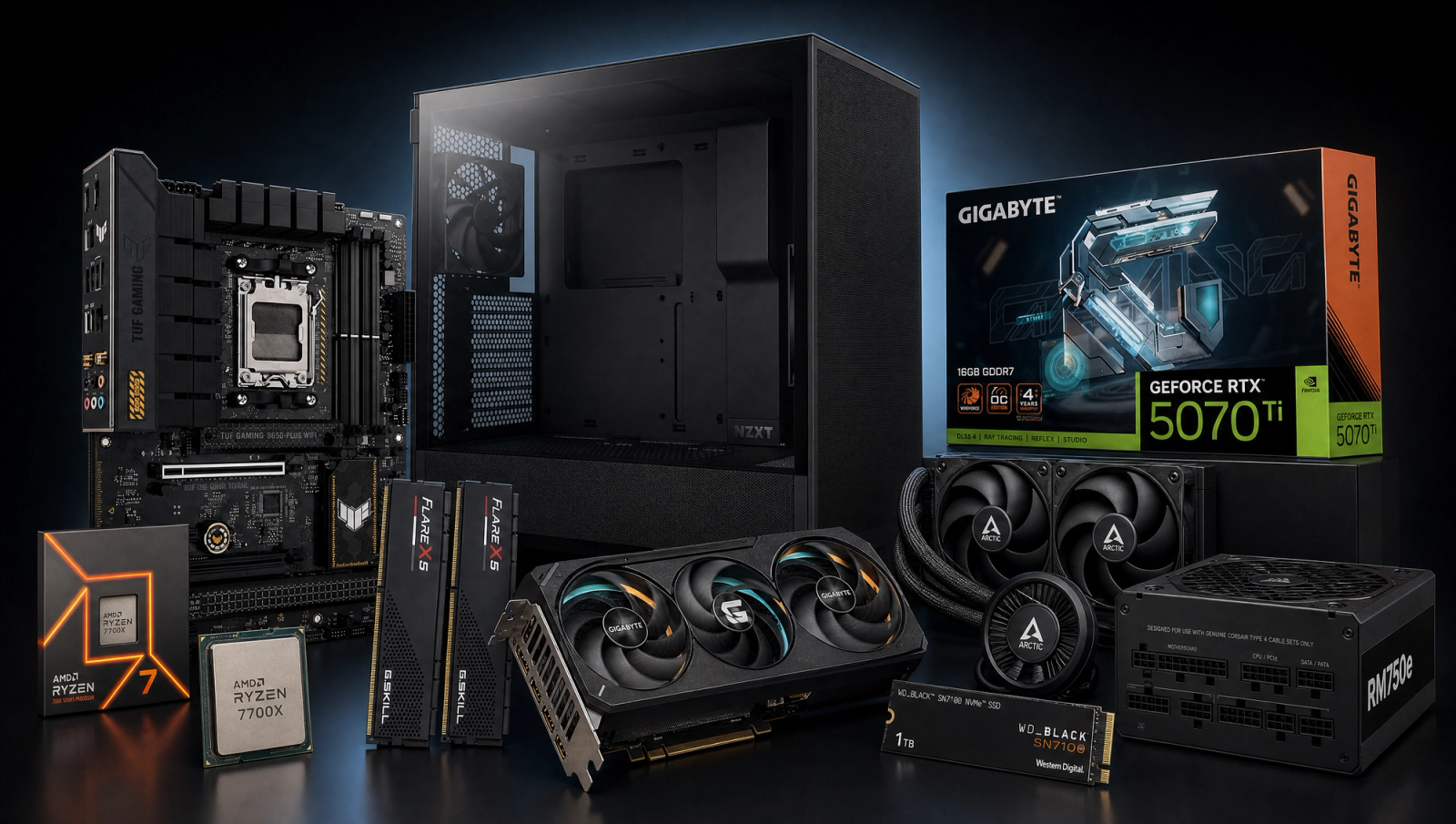
Components
- $309.00
- $749.00
- $180.00
- $110.00
- $70.00
- $100.00
- $130.00
- $85.00
Who This Build Is For
This is the credible floor for 4K gaming on current hardware. If you already own a 4K display, a gaming TV, or a 4K monitor, and you are willing to flip DLSS Quality on in the three or four most demanding titles, this build will deliver. It is not a 4K Ultra Pure-Native machine. Anyone shopping for that experience should jump up to an RTX 5080 or 5090 tier and budget closer to three grand.
The target buyer here is comfortable with the realities of modern 4K rendering. You understand DLSS Quality is not a compromise in most titles, it is a free 30-40 percent frametime gain that costs almost nothing visually at 4K. You are willing to drop Stalker 2 from Epic to High when you want a smoother feel, and you are not going to lose sleep over Wukong landing at 48 fps native instead of 60. If that sounds like you, the RTX 5070 Ti plus Ryzen 7 7700X pairing is the cleanest way to get into 4K without overspending on a card you will not fully use until you upgrade your panel anyway.
Build Overview
The RTX 5070 Ti is the smallest GPU that earns the 4K label honestly. The 16GB VRAM buffer covers texture-heavy modern titles at 4K, and the raw raster output is enough to clear 60 fps native in seven of the ten games we benchmark. The Ryzen 7 7700X is the right CPU partner because the 5070 Ti is fully GPU-bound at 4K, so there is no measurable benefit to spending more on an X3D chip when every dollar above this tier is better spent on the GPU.
Key Specs
CPU | AMD Ryzen 7 7700X (8c/16t, Zen 4) |
GPU | NVIDIA RTX 5070 Ti 16GB |
Motherboard | ASUS TUF B650-PLUS WiFi (AM5, ATX) |
Memory | 32GB DDR5-6000 CL30 (G.Skill Flare X5) |
Storage | WD_Black SN7100 1TB NVMe Gen4 |
Power Supply | Corsair RM750e 80+ Gold ATX 3.1 |
Case | NZXT H5 Flow Mid-Tower |
Cooling | Arctic Liquid Freezer III Pro 240 AIO |
CPU
AMD Ryzen 7 7700X (8c/16t, Zen 4)
GPU
NVIDIA RTX 5070 Ti 16GB
Motherboard
ASUS TUF B650-PLUS WiFi (AM5, ATX)
Memory
32GB DDR5-6000 CL30 (G.Skill Flare X5)
Storage
WD_Black SN7100 1TB NVMe Gen4
Power Supply
Corsair RM750e 80+ Gold ATX 3.1
Case
NZXT H5 Flow Mid-Tower
Cooling
Arctic Liquid Freezer III Pro 240 AIO
Here are the parts that make up this build, with links to current pricing on Amazon for each.
Performance Summary
Clears 60 fps native at 4K High in seven of ten current AAA titles. The remaining three (Cyberpunk 2077, Alan Wake 2, Stalker 2 Epic) need DLSS Quality to land comfortably above 60. 1440p High is fully saturated, 100-plus fps in most titles, and 1080p competitive shooters push well past 144 fps for high-refresh play on a secondary monitor.
Performance Expectations
Average FPS across the standard 10-game slate.
- Cyberpunk 2077145 FPS
- Alan Wake 2105 FPS
- Black Myth: Wukong115 FPS
- Stalker 282 FPS
- Marvel's Spider-Man 2155 FPS
- Starfield124 FPS
- Baldur's Gate 3130 FPS
- Helldivers 2130 FPS
- Hogwarts Legacy115 FPS
- Call of Duty: Black Ops 6165 FPS
Average FPS across ten current AAA titles at 4K, 1440p, and 1080p High native, no upscaling applied. Reviewer-sourced averages triangulated from RTX 5070 Ti launch coverage; expect plus or minus five fps depending on settings and scene. The 4K column is the one that matters for this build's positioning. Read it honestly: most titles clear 60, three do not.
Parts Breakdown
CPU

The Ryzen 7 7700X is eight Zen 4 cores at a price that does not bleed into the GPU budget. At 4K, the 5070 Ti is GPU-bound in every game on the slate, which means a 9800X3D would gain you a frame or two and cost an extra hundred and change. Save that money for a better monitor or a second SSD later. The trade-off versus the 7800X3D is real if you ever drop down to 1080p competitive titles where the X3D vertical cache pulls ahead, but for a 4K-primary build the 7700X is the smart spend.
AM5 socket means you can drop a Zen 5 X3D chip in two or three years if you do upgrade your display and shift toward 1440p high-refresh. The platform has runway.
GPU

The RTX 5070 Ti 16GB is the cheapest current-gen card that clears 60 fps native at 4K High in the majority of modern AAA titles. The 16GB VRAM buffer is the headline feature for this tier. Modern 4K textures eat VRAM, and the 12GB cards (5070, 4070 Super) cannot run Hogwarts Legacy or Spider-Man 2 Very-High textures at 4K without frametime stutter from VRAM spillover. The 5070 Ti has enough headroom.
The trade-off here is against the RX 9070 XT, which offers similar raster performance in non-RT titles for less money. The 5070 Ti pulls ahead in three specific places: DLSS image quality is still meaningfully better than FSR at the Quality preset, ray tracing performance is a clear win, and NVENC for streaming or recording is a non-negotiable for content creators. If you do not care about any of those, the 9070 XT is a fair alternative at this tier.
Motherboard

The ASUS TUF B650-PLUS WiFi is the right board for a 7700X build. Fourteen-stage VRM handles the chip's 105W TDP without thermal throttling under sustained loads, the WiFi 6 is built in so you skip a PCIe card, and the PCIe 5.0 x16 slot leaves the door open if you ever drop a Gen 5 GPU in later.
B650 versus X670 is the obvious trade-off. X670 doubles the chipset PCIe 4.0 lanes and adds a second chipset chip, which only matters if you are running multiple Gen 4 NVMe drives plus a capture card plus a 10Gb NIC. For a single-GPU gaming build with one or two SSDs, B650 is the correct choice and you keep the cost difference for a better cooler or PSU.
Memory (RAM)

The G.Skill Flare X5 32GB DDR5-6000 CL30 kit is the AM5 sweet-spot configuration. DDR5-6000 CL30 is the Infinity Fabric sync point for Zen 4, and going faster to 6400 or 6800 typically forces the memory controller out of 1:1 mode and gives back the gains. The AMD EXPO profile flips on with one BIOS toggle.
32GB is the right capacity for a 4K-focused build in 2026. Modern titles routinely allocate 12-16GB at 4K with high texture settings, and that leaves headroom for the OS, browser tabs, and a Discord call without paging to the SSD. 16GB still works for pure gaming, but tab-heavy workflows or any content creation push past it. The trade-off versus a 64GB kit is real only if you do video editing or run local LLMs, in which case bump up later.
Storage

The WD_Black SN7100 1TB is a PCIe Gen4 NVMe drive that hits 7,250 MB/s reads and is one of the more efficient drives in its class, which keeps thermals manageable in the M.2 slot under the motherboard heatsink. Plenty fast for game loads and asset streaming. Modern UE5 titles like Stalker 2 hammer the storage subsystem during traversal, and the SN7100 keeps up without stutter.
1TB fills up fast in 2026 (a single AAA install can run 150GB), so plan for a second drive within the first year. The B650-PLUS has two M.2 slots, so you can drop in a 2TB Gen4 secondary later without touching the boot drive.
Power Supply

The Corsair RM750e is 80+ Gold, ATX 3.1, and PCIe 5.1 ready, which means it ships with the native 12V-2x6 connector for the 5070 Ti and any future Blackwell card. 750W is comfortably above the 5070 Ti plus 7700X system draw (roughly 450-500W under full load), leaving headroom for transient spikes and any modest upgrade path. Fully modular cabling keeps the build clean.
The trade-off here is the RM850e. If you have any thought of stepping up to a 5080 in a future cycle without swapping the PSU, the extra hundred watts is worth the small upcharge. For this exact build, 750W is correct.
Case

The NZXT H5 Flow is a high-airflow mid-tower with a perforated front panel and a clean cable routing layout. It fits a 240mm AIO in the front or top without clearance issues, supports up to 365mm GPUs (the 5070 Ti slots in comfortably), and the included fan setup is enough to get started without an immediate aftermarket purchase.
The trade-off versus the H7 Flow is interior volume and fan support. The H7 takes a 360mm radiator and has more space for cable management, but the H5 Flow's thermals are excellent for this component set and the smaller footprint is friendlier on a desk. If you ever want to repurpose this case for a 5080-class build later, it has the GPU clearance and the airflow to handle it.
Cooling

The Arctic Liquid Freezer III Pro 240 is a 240mm AIO with a 38mm-thick radiator and a VRM fan on the pump head. The 7700X runs hot at stock (it boosts aggressively into the high 80s C on air), and an AIO keeps it comfortably in the 70s under sustained gaming loads. The VRM fan is the unsung feature, it doubles as airflow for the motherboard power stages and shaves a few degrees off VRM temps during long sessions.
A Peerless Assassin 120 would handle the 7700X on air for less money, but the difference in sustained boost clocks and acoustic profile under a Cinebench-style load is meaningful. For a build that is going to run AAA games for hours at a time, the AIO is the right call.
Final Thoughts
This is the credible floor for 4K gaming on current hardware. It will not run 4K Ultra Pure-Native in every modern AAA, and it is not trying to. The honest pitch is 4K High native in most titles, DLSS Quality in the three heaviest, and a clean 1440p high-refresh fallback for anything that wants more frames. If that matches the way you actually play games, this is the build. If you want to run every title at 4K Ultra with no upscaling and no compromise, step up to the 5080 tier and budget another five hundred dollars.
The upgrade path from here is clear. AM5 socket gives you a Zen 5 X3D drop-in two or three years out. The 750W PSU and H5 Flow case have room for a 5080-class GPU when you want to push further. The DDR5-6000 kit will carry over to whatever you build next. Nothing about this configuration locks you into a dead end.
FAQs
Can this build actually run 4K gaming?
Yes, with realistic expectations. Seven of ten current AAA titles clear 60 fps native at 4K High on this configuration. The three that do not (Cyberpunk 2077, Alan Wake 2, Stalker 2 Epic) need DLSS Quality enabled to hit 60 fps comfortably. If you are okay flipping DLSS Quality on in the heavy hitters, this build delivers 4K. If you want pure-native 4K Ultra everywhere with no upscaling, you need a 5080 or 5090.
Why not a Ryzen 7 9800X3D instead of the 7700X?
At 4K, the RTX 5070 Ti is GPU-bound in every game on the standard slate. The 9800X3D would gain you a frame or two and cost an extra hundred and change. That money is better spent on a future GPU upgrade or a better monitor. If your primary resolution were 1080p competitive titles where the X3D vertical cache pulls ahead, the calculation changes. For a 4K-primary build, the 7700X is the smart spend.
Why 16GB VRAM and not 12GB?
Modern 4K textures eat VRAM. The 12GB cards in this performance class (5070, 4070 Super) cannot run titles like Hogwarts Legacy or Spider-Man 2 Very-High textures at 4K without frametime stutter from VRAM spillover. The 5070 Ti's 16GB buffer is the practical floor for 4K gaming in 2026, and it gives you headroom as texture budgets continue to grow over the next few years.
Will the 750W PSU be enough?
Yes. The 5070 Ti plus 7700X system draws roughly 450-500W under full load, well within the 750W envelope. There is comfortable headroom for transient spikes and modest upgrades. If you think you might step up to an RTX 5080 in a future cycle without swapping the PSU, consider the RM850e instead. For this exact build, 750W is correct.
Do I need a 4K monitor to make this build worth it?
Yes. If you do not have a 4K display, the 5070 Ti is overkill for 1440p and you are paying for headroom you cannot use. Step down to the RTX 5070 12GB build at the ~1500 tier and pocket the difference. The pitch for this build is specifically for someone who already owns a 4K monitor or 4K gaming TV and wants a PC that drives it credibly.
Is 32GB of RAM overkill?
Not at 4K. Modern AAA titles routinely allocate 12-16GB of system memory at 4K with high texture settings, and that leaves limited headroom for the OS, browser tabs, and any other application running in the background. 32GB at DDR5-6000 CL30 is the AM5 sweet spot and keeps the system from paging to the SSD during long sessions. 16GB works for pure gaming but feels cramped the moment you alt-tab to anything else.
What is the upgrade path from here?
Three paths. First, AM5 socket means a Zen 5 X3D chip drops in cleanly in two or three years if you start chasing higher frame rates. Second, the 750W PSU and H5 Flow case have room for a 5080-class GPU when the next cycle is right. Third, the B650-PLUS has a second M.2 slot for a 2TB Gen4 secondary drive when the 1TB boot drive fills up. Nothing about this build is a dead end.