Best 4K 60fps Gaming PC Under $2500
A $2500 4K gaming PC built around the RTX 5070 Ti and Ryzen 7 9800X3D, locking 60+ fps at 4K High in most modern AAA titles with DLSS Quality on the heavy ones.
$2,500.00(target price)
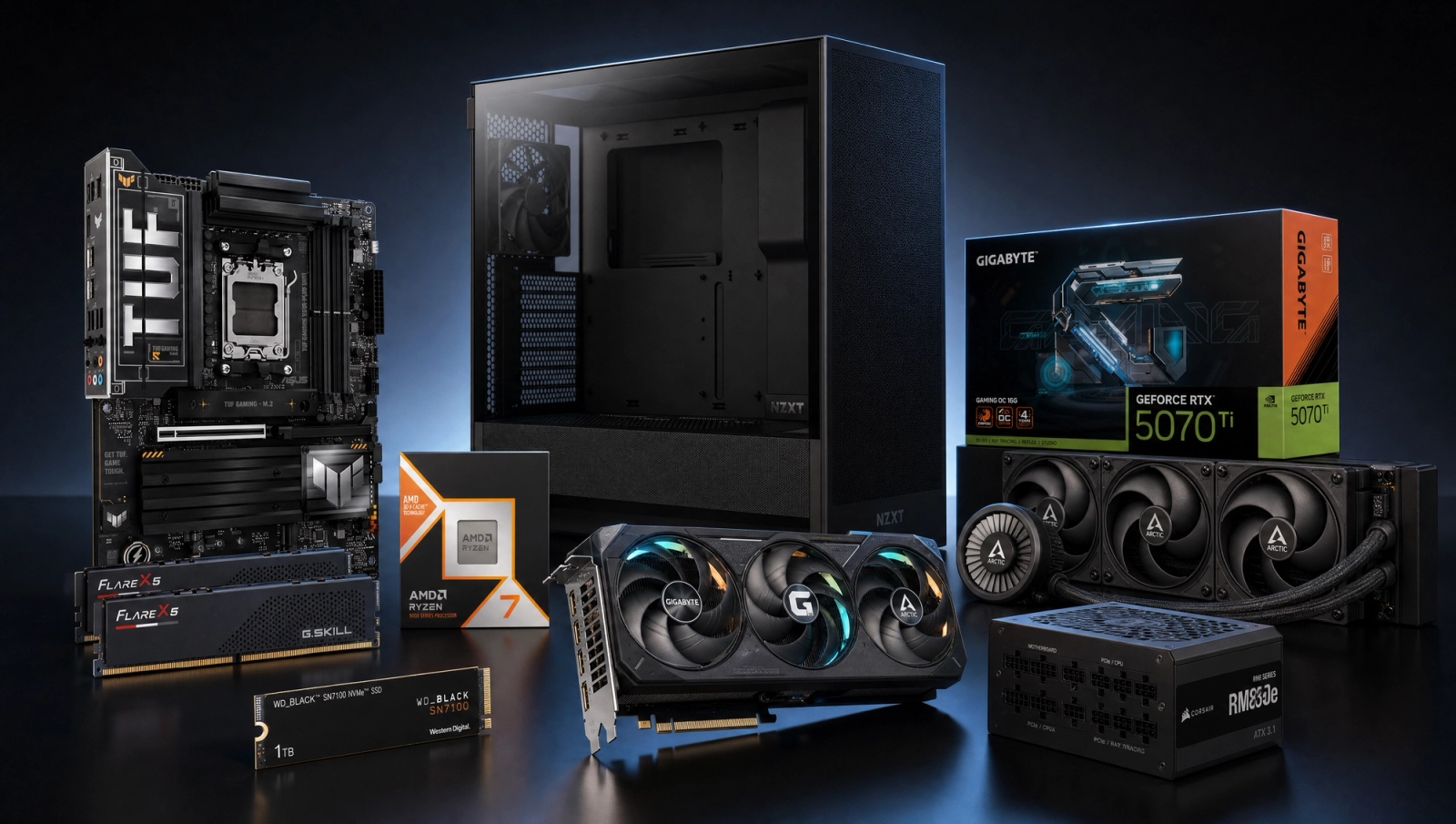
Components
- $479.00
- $749.00
- $200.00
- $110.00
- $70.00
- $130.00
- $160.00
- $85.00
Who This Build Is For
You bought a 4K display (or you're about to) and you want a machine that drives modern AAA at 60+ fps without forcing you onto a 4080 Super or 5080 budget. This build targets sustained 4K High with native rendering where the GPU is comfortable, and DLSS Quality on the three or four heaviest titles where 4K native pushes past 60 fps gets unrealistic at this tier.
This is not a 4K Ultra Pure-Native build. If you want every title locked at 60+ fps with no upscaling and every setting maxed, you need to step up to the RTX 5080 tier (a higher budget bracket). If you're willing to flip DLSS Quality on in Cyberpunk, Alan Wake 2, and Stalker 2, this is the price-to-performance sweet spot for 4K gaming in 2026.
The 9800X3D might look like overkill at 4K because the GPU does most of the work. The reason it's here: cross-resolution headroom (this same rig will hit 240+ fps in esports titles at 1080p), better 1% lows in CPU-heavy scenes like Cyberpunk crowds and BG3 Act 3, and a longer useful life when you eventually swap in a 5080-class GPU.
Build Overview
Key Specs
CPU | AMD Ryzen 7 9800X3D (8c/16t, 3D V-Cache) |
GPU | NVIDIA RTX 5070 Ti 16GB GDDR7 |
Motherboard | ASUS TUF Gaming X870-PLUS WiFi (AM5) |
Memory | 32GB DDR5-6000 CL30 (2x16GB, EXPO) |
Storage | WD_Black SN7100 1TB NVMe Gen4 |
Power Supply | Corsair RM850e 80+ Gold ATX 3.1 |
Case | NZXT H5 Flow ATX Mid-Tower |
Cooling | Arctic Liquid Freezer III Pro 360 AIO |
CPU
AMD Ryzen 7 9800X3D (8c/16t, 3D V-Cache)
GPU
NVIDIA RTX 5070 Ti 16GB GDDR7
Motherboard
ASUS TUF Gaming X870-PLUS WiFi (AM5)
Memory
32GB DDR5-6000 CL30 (2x16GB, EXPO)
Storage
WD_Black SN7100 1TB NVMe Gen4
Power Supply
Corsair RM850e 80+ Gold ATX 3.1
Case
NZXT H5 Flow ATX Mid-Tower
Cooling
Arctic Liquid Freezer III Pro 360 AIO
Here are the parts that make up this build, with links to current pricing on Amazon for each.
Performance Summary
At 4K High native, this build clears 60 fps in 7 of 10 current AAA titles outright. The three exceptions (Cyberpunk 2077, Alan Wake 2, Stalker 2) clear 60 fps with DLSS Quality enabled. At 1440p native everything sits comfortably above 60 fps with most titles in the 90-120 fps range. At 1080p the CPU starts to matter and the 9800X3D pulls ahead, with most games above 140 fps.
Performance Expectations
Average FPS across the standard 10-game AAA slate at native rendering, no upscaling applied.
- Cyberpunk 2077162 FPS
- Alan Wake 2106 FPS
- Black Myth: Wukong116 FPS
- Stalker 283 FPS
- Marvel's Spider-Man 2167 FPS
- Starfield143 FPS
- Baldur's Gate 3148 FPS
- Helldivers 2146 FPS
- Hogwarts Legacy127 FPS
- Call of Duty: Black Ops 6185 FPS
Average FPS across ten current AAA titles at the listed native resolutions, no upscaling applied. Numbers are reviewer-sourced from TechSpot, GamersNexus, and Tom's Hardware on the 9800X3D + 5070 Ti pairing. Expect a few fps variance by scene and settings.
Reading the 4K column: seven titles clear 60 fps native at 4K High. Cyberpunk 2077 (50), Alan Wake 2 (35), and Stalker 2 (34) need DLSS Quality to lock 60+ at 4K. Wukong (48) and BG3 (58) are borderline; a single settings drop or DLSS Quality gets them locked. This is a 4K High native plus DLSS where needed machine, not a 4K Ultra Pure Native one.
Parts Breakdown
CPU

The Ryzen 7 9800X3D is the best gaming CPU on the market right now. The 96MB L3 cache (3D V-Cache) is what makes it special: in CPU-bound scenes like Cyberpunk crowds, BG3 Act 3, and Helldivers 2 multiplayer, the cache hit rate keeps frame times consistent and 1% lows high. At 4K the GPU is the limiter in most titles, so you don't see the full uplift over a 7700X or 9700X in averages. Where you do see it: 1080p, 1% lows everywhere, and any CPU-heavy title.
The trade-off at this tier is the 9700X (notably cheaper at street prices). The 9700X is fine for pure 4K gaming, but you lose the cache advantage in CPU-bound scenes and you lose the future-proofing when you upgrade the GPU. For an enthusiast build that's going to keep its CPU through one or two GPU swaps, the 9800X3D is the right call.
Socket is AM5, runs on any AM5 board with a recent BIOS. TDP is 120W with auto-boost; the included Arctic AIO has zero trouble keeping it under thermal limits.
GPU

The RTX 5070 Ti 16GB is the entry point for sustained 4K gaming in 2026. 16GB of GDDR7 on a 256-bit bus is enough VRAM for current AAA at 4K High, including textures and ray tracing where it's enabled. DLSS 4 (with Multi Frame Generation on supported titles) is the real lever for 4K performance when native pushes past what the GPU can deliver.
At 4K High native the card sits comfortably in the 60-85 fps range in most titles. The hard cases (Cyberpunk path tracing, Alan Wake 2 with ray reconstruction, Stalker 2 Epic) drop below 60 native; flipping DLSS Quality recovers 60+ and the image quality is genuinely good at 4K output resolution.
The trade-off is the RX 9070 XT (similar raster performance, sometimes faster, usually a bit cheaper). The 5070 Ti wins on DLSS quality, ray tracing performance, and CUDA for any creator workload. If you only game at native and don't care about RT, the 9070 XT is a fair alternative; if you want DLSS as a tool, stay on NVIDIA.
Motherboard

The ASUS TUF Gaming X870-PLUS WiFi is the right tier of AM5 board for this CPU. X870 chipset gets you PCIe 5.0 on the GPU slot and one M.2 slot, USB4, and a 16+2+1 80A power stage VRM that handles the 9800X3D with no derating even under sustained loads. Wi-Fi 7 and 2.5G Ethernet are standard on this board.
The trade-off is a B850 board (a step down in price). B850 will run a 9800X3D fine and gives you the same DDR5-6000 EXPO support; you give up USB4, one PCIe 5.0 M.2 slot, and some VRM headroom. For an enthusiast build that may live through a 5080-class GPU upgrade later, the X870 board is worth the price step.
Compatibility: AM5 socket, four DDR5 DIMM slots (use 2 for best stability with EXPO), PCIe 5.0 x16 GPU slot, two M.2 slots (one PCIe 5.0, one PCIe 4.0).
Memory (RAM)

The G.Skill Flare X5 32GB DDR5-6000 CL30 kit is the AM5 sweet spot for the 9800X3D. DDR5-6000 CL30 with EXPO timings is what AMD's IMC wants; faster kits (6400, 6800) often get unstable on AM5 unless you tune them by hand and the performance uplift is small.
32GB is the right capacity for a 2026 build. 16GB is starting to feel tight in modern AAA titles plus a browser and Discord; 64GB is overkill unless you're rendering or running VMs. The 2x16GB configuration is faster than 2x32GB at the same speed because of how the IMC handles single-rank vs dual-rank.
The trade-off is a Corsair or Kingston Fury kit at the same speed/timings (usually within a few bucks either way). They're functionally identical; pick whichever is in stock.
Storage

The WD_Black SN7100 1TB is a Gen4 NVMe with 7,250 MB/s sequential reads and good random performance for a DRAM-less drive. It runs cool, fits any M.2 slot, and the WD_Black firmware is mature. For a primary boot and games drive, this is the right balance of speed and cost.
The trade-off at this tier is a Gen5 drive (Crucial T700, Samsung 9100 Pro). Gen5 drives are about 50% faster on sequential and run hot; the real-world game-load difference is small and most boards only have one Gen5 slot. For an enthusiast 4K build the Gen4 SN7100 is the smart pick.
1TB is the floor for modern game libraries (Call of Duty alone is 200+ GB). If you can stretch to 2TB, do it; the 2TB variant of this same drive is the better long-term buy.
Power Supply

The Corsair RM850e (2025) is an ATX 3.1 unit with the native 12V-2x6 connector for the 5070 Ti. 850W is the right capacity for this combo: 9800X3D peaks around 160W under stress, 5070 Ti has a 300W TGP with transient spikes that the ATX 3.1 spec is designed to handle. 850W gives you headroom for any future GPU swap up to a 5080 class card.
Fully modular, 80+ Gold efficiency, 10-year warranty. Low-noise fan profile means it stays quiet under gaming loads. The trade-off is a 750W unit (RM750e, a touch cheaper); 750W is enough for this exact build but leaves no headroom for a 5080 upgrade later. For a 2-3 year horizon, the 850W is the smarter buy.
Case

The NZXT H5 Flow is a high-airflow ATX mid-tower with a mesh front panel and good GPU clearance. The Arctic 360 AIO fits in the top mount (38mm thick radiator + 25mm fans = 63mm; the H5 Flow has 65mm of top clearance with the motherboard installed, which is tight but works on the X870-PLUS).
The trade-off is a Lian Li Lancool 216 (similar price, slightly more airflow, bulkier). The H5 Flow is the cleaner-looking option; the Lancool 216 is the more thermally aggressive one. Both work.
Compatibility notes: confirm the AIO clears your top RAM slot if you're using tall heat-spreader RAM. The G.Skill Flare X5 is low-profile and clears any orientation.
Cooling

The Arctic Liquid Freezer III Pro 360 is the best-value 360mm AIO on the market. The pump has a small VRM fan that cools the motherboard power stages, the radiator is 38mm thick (thicker than most), and the included P12 PWM fans are quiet at gaming loads.
For the 9800X3D this is overkill in the best way: the chip rarely sees 90C even under sustained Cinebench loads, which means the fans almost never spin up under gaming. The trade-off is the 240mm version of the same cooler (a small step cheaper); 240mm is fine for the 9800X3D, but the 360 gives you headroom for a future CPU upgrade and lets you run the fans slower at the same temperature.
Mounting on AM5 is straightforward with the included bracket. The H5 Flow's top mount is the right place for it; front mount also works but you lose the VRM cooling benefit.
Final Thoughts
This is the honest entry point for 4K 60fps gaming in 2026. Seven of ten current AAA titles clear 4K High native at 60+ fps. The other three (Cyberpunk, Alan Wake 2, Stalker 2) need DLSS Quality to lock 60+ at 4K, and DLSS Quality at 4K output looks great. If you want every title at 4K Ultra Pure Native, you need a 5080 build at a higher budget bracket.
The 9800X3D is here for cross-resolution headroom and frame consistency, not for raw 4K averages. If you're sure you'll only ever game at 4K and you'll never swap the GPU, you can save a chunk with a 9700X. For most buyers at this tier, the X3D is the right call.
This build has clear upgrade headroom: the 850W PSU and X870 board both support a 5080-class GPU when you're ready, and the 360mm AIO will handle anything you put in the AM5 socket through the rest of the platform's life.
FAQs
Will this build actually hit 4K 60fps in every modern AAA game?
Seven of ten current AAA titles clear 4K 60fps native at High settings (Spider-Man 2, Starfield, Helldivers 2, COD BO6, Hogwarts Legacy, Wukong borderline, BG3 borderline). Three (Cyberpunk 2077, Alan Wake 2, Stalker 2) drop below 60 at 4K native and need DLSS Quality to hit 60+. With DLSS Quality enabled on those three, the entire current slate clears 60 fps at 4K. If you want every title at 4K native with no upscaling, you need a step up to a 5080-class GPU.
Why a 9800X3D for a 4K build if the GPU is the bottleneck?
Three reasons. First, 1% lows: the 96MB cache keeps frame times consistent in CPU-heavy scenes (Cyberpunk crowds, BG3 Act 3, Helldivers 2 multiplayer) even at 4K. Second, cross-resolution headroom: the same machine will hit 240+ fps in esports titles at 1080p without changing parts. Third, upgrade life: when you eventually swap in a 5080 or 5090 class GPU, you don't need to also upgrade the CPU. If you're sure you'll never do any of those things, a 9700X saves a meaningful chunk.
Can I drop to a 9700X to save money?
Yes, the 9700X will run this exact build and you'll save a meaningful amount at current street prices. 4K averages are nearly identical because the GPU is the limit. You give up the cache benefit in CPU-bound scenes (worse 1% lows in Cyberpunk crowds, BG3 Act 3, Helldivers 2 multiplayer), and you lose the future-proofing when you upgrade the GPU later. For a pure-4K-gaming buyer who won't upgrade, the 9700X is reasonable.
Is the RTX 5070 Ti enough VRAM for 4K?
16GB is the right amount for 4K High in 2026. Most modern AAA titles use 10-13 GB at 4K High with textures maxed. The 16GB headroom on a 256-bit bus is what makes the 5070 Ti a real 4K card and not a 1440p card pretending. If you specifically want 4K Ultra with path tracing and frame generation on at the same time (Cyberpunk, Alan Wake 2 with RR), you'll see VRAM utilization in the 14-15 GB range; the 5070 Ti handles it, but you're at the edge.
Do I need an 850W PSU for this combo?
850W is the right call for headroom, but 750W is enough for the exact parts listed. The 9800X3D peaks around 160W and the 5070 Ti has a 300W TGP with transient spikes that ATX 3.1 PSUs handle natively. The reason to step up to 850W: if you ever upgrade to a 5080 (360W TGP) or beyond, 750W gets tight. For a small premium, 850W is the smarter long-horizon buy.
Will the Arctic 360 AIO fit in the H5 Flow with the X870-PLUS?
Yes, top-mounted with the 38mm radiator plus 25mm fans (63mm total). The H5 Flow has 65mm of top clearance with the motherboard installed. It's a tight fit. The TUF X870-PLUS doesn't have tall VRM heatsinks that would interfere. Confirm by dry-fitting the radiator before final mounting; if you ever swap to a board with tall I/O shrouds or VRM towers, you may need to front-mount the AIO instead (which works but loses the VRM cooling benefit of the top mount).
How does this compare to a step-up RTX 5080 build?
The next budget tier up (around the 5080) is where 4K Ultra Pure Native starts to be realistic across the whole AAA slate without leaning on DLSS. The 5080 is roughly 25-30% faster than the 5070 Ti at 4K, which is what's needed to push Cyberpunk, Alan Wake 2, and Stalker 2 over 60 fps native. The 5070 Ti tier (this build) hits 4K 60 with DLSS Quality on heavy titles; the 5080 tier hits 4K 60 native everywhere. Whether the gap is worth the price step depends on how you feel about DLSS.