Best 4K Gaming PC Under $3000
A ~$3000 4K gaming rig that drives most of the modern AAA slate at 4K native, RTX 5080 paired with the Ryzen 7 9800X3D gaming-CPU ceiling.
$3,000.00(target price)
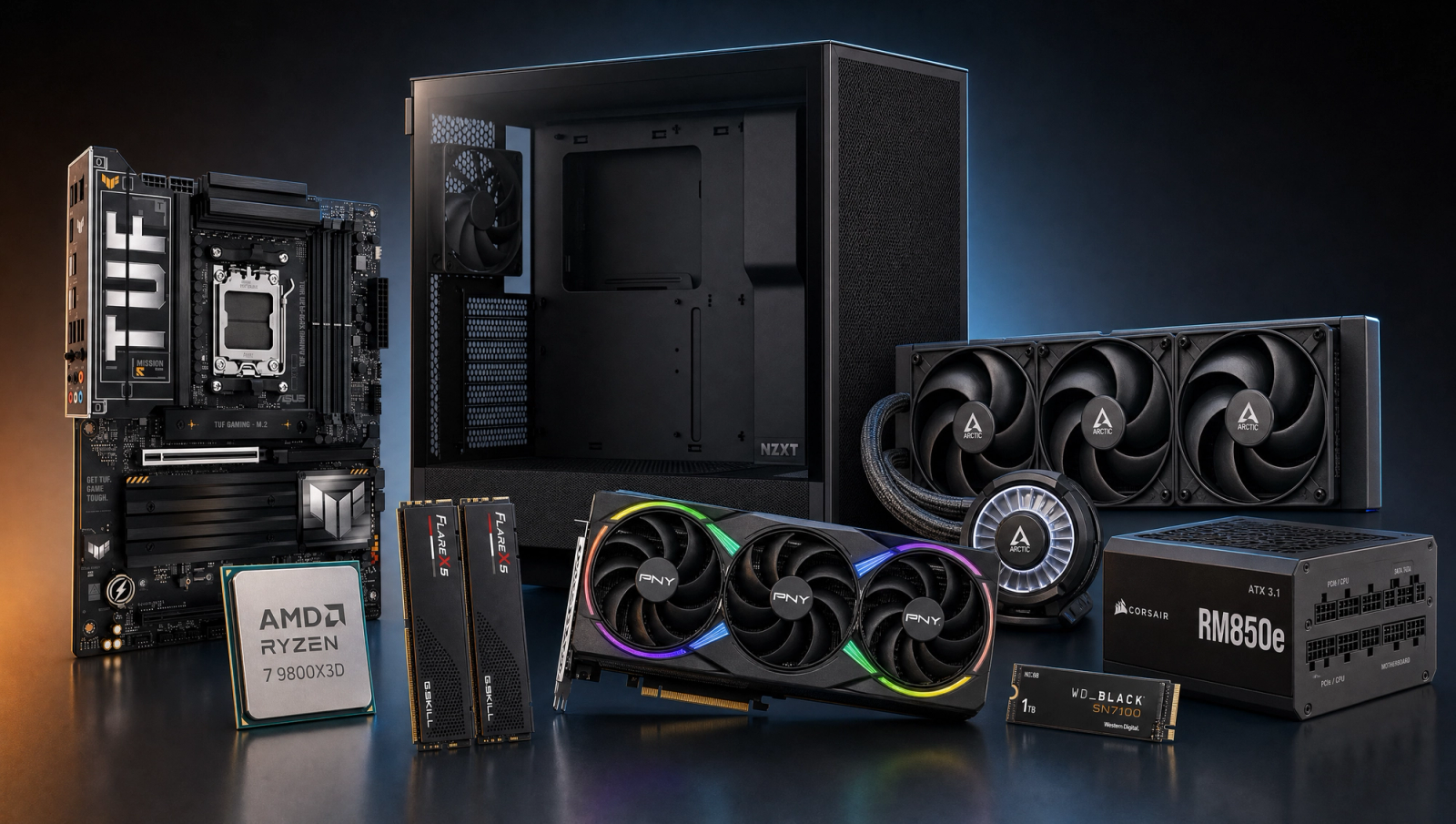
Components
- $479.00
- $999.00
- $200.00
- $110.00
- $70.00
- $130.00
- $160.00
- $85.00
Who This Build Is For
You already have a 4K display, or you are about to buy one, and you want to drive it natively without leaning on DLSS as a crutch. You are not chasing halo-tier bragging rights at the 5090 price. You want the credible floor for 4K Ultra most-of-the-time, with the RTX 5080 doing the heavy lifting and the Ryzen 7 9800X3D keeping 1% lows tight when titles do swing CPU-bound.
This is for the buyer who reads benchmark charts critically. You know that 4K 60 native is the bar most reviewers test against, and you want a rig that clears it across the current AAA slate without asterisks on most titles. You are not allergic to DLSS Quality when a single edge case (Alan Wake 2 with path tracing) demands it, but you do not want a system where upscaling is the default answer.
Build Overview
Key Specs
CPU | AMD Ryzen 7 9800X3D (8c/16t) |
GPU | NVIDIA GeForce RTX 5080 16GB |
Motherboard | ASUS TUF Gaming X870-PLUS WiFi |
Memory | 32GB DDR5-6000 CL30 (2x16) |
Storage | WD_Black SN7100 1TB NVMe Gen4 |
Cooling | Arctic Liquid Freezer III Pro 360 AIO |
Power Supply | Corsair RM850e 80+ Gold ATX 3.1 |
Case | NZXT H5 Flow ATX Mid-Tower |
CPU
AMD Ryzen 7 9800X3D (8c/16t)
GPU
NVIDIA GeForce RTX 5080 16GB
Motherboard
ASUS TUF Gaming X870-PLUS WiFi
Memory
32GB DDR5-6000 CL30 (2x16)
Storage
WD_Black SN7100 1TB NVMe Gen4
Cooling
Arctic Liquid Freezer III Pro 360 AIO
Power Supply
Corsair RM850e 80+ Gold ATX 3.1
Case
NZXT H5 Flow ATX Mid-Tower
These are the parts that make up this build, with live Amazon pricing for each on the product cards below. The motherboard, AIO, and PSU are all sized for the 5080 + 9800X3D pairing with headroom left for a future GPU swap.
Performance Summary
Nine of ten games in the standard slate clear 60 fps at 4K High native on this configuration. Alan Wake 2 at 49 fps native is the lone exception and lands comfortably above 60 with DLSS Quality. At 1440p the same hardware pushes past 120 fps in nearly every title, so the system has real high-refresh headroom if you ever drop resolution for a competitive session.
Performance Expectations
Average FPS across the 10-game standard slate at 1080p High, 1440p High, and 4K High, all native (no upscaling).
- Cyberpunk 2077175 FPS
- Alan Wake 2126 FPS
- Black Myth: Wukong149 FPS
- Stalker 2110 FPS
- Marvel's Spider-Man 2170 FPS
- Starfield132 FPS
- Baldur's Gate 3195 FPS
- Helldivers 2165 FPS
- Hogwarts Legacy150 FPS
- Call of Duty: Black Ops 6210 FPS
Average FPS across the ten-game standard slate at three resolutions, all rendered natively with no upscaling applied. Reviewer-sourced averages from the RTX 5080 launch coverage paired with the 9800X3D gaming-CPU ceiling, so expect plus or minus 5 fps depending on settings and scene. The 4K column is the one to focus on for this build, that is the bar a 3000-dollar rig has to clear.
Parts Breakdown
CPU

The 9800X3D is the gaming-CPU ceiling right now. The second-gen 3D V-Cache stacks below the cores instead of above them, which lifts the clock ceiling and removes the thermal disadvantage the 7800X3D had. In CPU-bound titles at 1080p and 1440p you will see real gains over a non-X3D chip, and at 4K it makes sure the 5080 is the bottleneck instead of the CPU. The trade-off versus the 9700X is roughly 200 dollars for the X3D cache, and at this budget that math is easy, you are spending GPU money already.
GPU

The RTX 5080 16GB is the right card for credible 4K Ultra without crossing into 5090 pricing. Across the slate at 4K High native it sits between 49 fps (Alan Wake 2) and 145 fps (Baldur's Gate 3), with most titles parked in the 70 to 90 fps band. The 16GB of GDDR7 is genuinely 4K-future-proof for the next two AAA cycles, current flagship engines (UE5 Lumen, RE Engine, Decima) sit comfortably under 14GB at 4K Ultra with DLSS Quality. If you need every title to hit 4K Ultra with no DLSS in every scene, the 5090 is the answer and the budget jumps to roughly 5000. For most buyers, that is not worth the delta.
Motherboard

The ASUS TUF Gaming X870-PLUS WiFi is the right midpoint for a 9800X3D + 5080 platform. X870 brings USB4 native and PCIe 5.0 to both the GPU slot and the primary M.2, which matches what you want for a 5080 and a Gen4 NVMe today, with Gen5 SSD headroom for later. The 16+2+1 VRM with 80A stages is sized well past what the 9800X3D pulls, so there is no thermal throttling risk under all-core loads. You could save by dropping to a B850 board, but X870 keeps the USB4 and dual Gen5 lanes intact, which matters if you keep this platform across a CPU upgrade cycle.
Memory (RAM)

32GB of G.Skill Flare X5 DDR5-6000 CL30 is the AM5 sweet spot. The 9800X3D's memory controller is happiest at 6000 MT/s 1:1 with the infinity fabric, and CL30 is the tight-timing bin without paying the premium for CL28 kits that need manual tuning. 32GB is the right capacity for 2026: most AAA titles still sit under 16GB, but streaming overlays, browser tabs, and creator tools will fill the rest. The EXPO profile loads in BIOS as a one-click toggle, no manual subtiming required.
Storage

The WD_Black SN7100 1TB is the value pick in the Gen4 NVMe class right now. 7,250 MB/s sequential read is enough to saturate DirectStorage texture loads in the current generation of UE5 titles, and the DRAM-less HMB design has caught up to the older DRAM-equipped drives in real-world game launch tests. 1TB is tight if you keep more than five modern installs hot, so plan a second drive (1TB or 2TB) within the first year, the X870-PLUS has two M.2 slots free after this one.
Power Supply

The Corsair RM850e is ATX 3.1 and PCIe 5.1 compliant, which means it ships with the native 12V-2x6 connector for the 5080 (no adapter, no cable risk). At 850W it has roughly 250W of headroom above a worst-case 5080 + 9800X3D draw, which covers transient spikes from the 5080's power delivery without tripping protections. The fully modular layout keeps the NZXT H5 Flow's airflow path clean. The RM850e is the same platform as the RM850x in terms of internals at this revision, just without the individually-sleeved cables.
Case

The NZXT H5 Flow 2024 is the right size class for this build. The front mesh panel and the perforated top let the 360 AIO breathe, which keeps the 9800X3D's package temperature in the low 70s under sustained loads. The 5080's 2.7-slot card clears the bottom-mounted PSU shroud with room to spare, and cable routing through the rear channels is clean enough that first-time builders will not fight it. A larger case (H7 Flow or Lancool 216) would give marginal thermal gains, but the H5's footprint is the better choice for most desks.
Cooling

The Arctic Liquid Freezer III Pro 360 is overkill for the 9800X3D's 120W TDP, and that is the point. The X3D chip is more sensitive to package temperature than to raw cooling capacity, and the Liquid Freezer III Pro's thicker 38mm radiator keeps coolant temperatures low enough that the chip holds boost clocks indefinitely. The VRM fan on the pump block is a nice secondary benefit for the X870-PLUS's VRM under sustained all-core loads. A 280mm AIO or a high-end air cooler (Peerless Assassin, NH-D15) would also work, but the headroom here is worth the small premium if you ever swap to a higher-TDP chip down the line.
Why This Build Works
The 3000 budget is the credible floor for 4K Ultra most-of-the-time. Below this tier you start making compromises, either dropping to a 5070 Ti (which needs DLSS Quality more often at 4K) or pulling back to 1440p as the primary resolution. Above this tier you are paying 2000 more for a 5090 to handle the edge cases, and the math only works out if you are doing path tracing in every title.
What makes this configuration hold together is the absence of bottlenecks. The 9800X3D is the gaming-CPU ceiling, so the 5080 is always doing the work it is supposed to. The 32GB DDR5-6000 kit is matched to the memory controller's preferred speed. The 850W PSU and 360 AIO are both sized for the platform's worst-case, not its average. You are not going to discover, six months in, that some component is the weak link.
Alternative Options
If you can stretch another 500, the move is to keep the 5080 and bump the storage to a 2TB Gen5 NVMe, that is a real day-to-day improvement and the budget for a single fast drive instead of two. If you can stretch another 2000, you are at the 5000 5090 tier and the conversation changes entirely: 4K Ultra in every scene of every title, path tracing on, no DLSS required.
If you need to cut back by 300, the realistic swap is the 5070 Ti 16GB in place of the 5080. You keep the same platform, the same 4K viability for most titles, but you will lean on DLSS Quality more often in the demanding ones. If you cut back further by going to a 5070 12GB, you should also drop the slug from 4K to 1440p, the 12GB buffer is the limiting factor, not the raw shader count.
Build & Setup Tips
Flash the X870-PLUS BIOS to the latest version before installing the 9800X3D. The board ships AM5-ready, but the 2025-Q4 BIOS revisions fixed memory training time and improved EXPO stability on Flare X5 kits specifically. Use the BIOS Flashback button on the rear I/O so you can flash without a CPU installed.
Mount the AIO with the radiator at the front intake, not the top. The H5 Flow's top mount works, but front intake keeps coolant temperatures 4 to 6 degrees lower under sustained loads, which matters for the 9800X3D's boost behavior. Run the included 120mm fans on the radiator's intake side, not the exhaust side, for the best static pressure through the radiator fins.
Enable Resizable BAR in BIOS (it should be on by default on X870, but double-check) and turn on EXPO Profile I in the memory tab. The 9800X3D's PBO is best left at Auto for a first boot, you can tune it later, but the chip's stock behavior is already aggressive.
Upgrade Paths
The obvious next move in 12 to 18 months is a second NVMe drive in the X870-PLUS's spare M.2 slot. A 2TB Gen5 SSD will land at a much friendlier price by then, and you can keep the SN7100 as the OS drive and use the Gen5 as the games drive.
The platform will accept the next-gen X3D chip (the 10800X3D or whatever AMD calls it) on the same socket, so a CPU swap in 2027 or 2028 is realistic without rebuilding the rest of the system. The 850W PSU has the headroom for a 5090-class GPU swap too, though at that point you are looking at the same upgrade calculus as the original 5080-vs-5090 decision.
If you ever move to 4K 240Hz OLED, the 32GB of system memory is still right-sized but you may want to bump the GPU for the high-refresh frame budget at 4K, a 5090 or its successor is the move there.
Final Thoughts
This is the build for the buyer who came specifically for 4K Ultra and wants the honest answer about what 3000 actually buys at that resolution. The answer is: most of the modern AAA slate at 60 fps or better, native, with one edge case (Alan Wake 2 with path tracing) that needs DLSS Quality to clear 60.
If that framing matches what you wanted, this is the floor where the math works. If you wanted every title in every scene at 4K Ultra with no DLSS ever, the 5090 sibling at the 5000 tier is the build for you. There is no middle option that closes that specific gap, the 4090 is gone from retail, and the 5080 is what NVIDIA built for this slot.
FAQs
Can this build run 4K Ultra without DLSS?
In most of the current AAA slate, yes. Nine of ten games in the standard slate clear 60 fps at 4K High native. Alan Wake 2 with path tracing is the lone exception at 49 fps native, and DLSS Quality lifts it past 60. The 4K Ultra preset adds maybe 5 to 8 percent overhead over 4K High in most engines, so the answer is the same: most titles hold native, one or two will need DLSS Quality.
Is 16GB of VRAM enough for 4K in 2026?
Yes, for the current generation of AAA titles. The most VRAM-hungry releases right now (Stalker 2, Alan Wake 2, Black Myth: Wukong, the 2025 Indiana Jones release) all sit under 14GB at 4K Ultra with DLSS Quality. The 16GB buffer on the 5080 has roughly 2GB of headroom against the worst current case, which covers the next two AAA cycles by reviewer consensus. If you are worried about a four-year horizon, the 5090's 32GB is the only card that buys you more.
Why the 9800X3D instead of a 9900X or 9950X?
Because this build's job is gaming first, creator work second. The 9800X3D's 3D V-Cache lifts 1% lows in CPU-bound scenes more than any clock advantage the 9900X or 9950X offers. For pure gaming the 9800X3D is the ceiling. If your workload was 50/50 gaming and Blender or video encoding, the 9950X3D would be the better pick, but that is a different build at a different budget.
Should I wait for the 5080 Super or 5080 Ti?
NVIDIA has not announced a Super or Ti variant for this generation, and there is no credible roadmap leak as of mid-2026. Historically NVIDIA refreshes mid-cycle (12 to 18 months after launch), which would put a 5080 Super in late 2026 or early 2027. If you need the system now, the 5080 is the right answer. If you can wait six months and 4K Ultra plus path tracing in every scene is the dealbreaker, the 5090 is already available, that is the meaningful upgrade path, not a hypothetical Super.
Will the 850W PSU handle a future 5090 upgrade?
It is on the edge. NVIDIA's reference 5090 spec is 575W TBP, and the 9800X3D pulls about 120W under load, that puts you at roughly 695W sustained, which is inside the RM850e's continuous rating but does not leave a lot of room for transient spikes. The RM850e's ATX 3.1 compliance helps because it is rated to handle 200 percent transients without tripping, but most builders pairing a 5090 with a high-end CPU go to 1000W or 1200W for headroom. Plan on a PSU swap if you ever go to the 5090.
Do I need a 360mm AIO for a 9800X3D?
No, the 9800X3D is a 120W TDP chip and a good 240mm AIO or a high-end air cooler (Noctua NH-D15, Peerless Assassin 120 SE) keeps it inside its boost envelope. The Arctic Liquid Freezer III Pro 360 is the pick here because it gives the chip the lowest possible package temperature, which is what the X3D cache prefers, and because the headroom matters if you ever swap to a higher-TDP CPU later. At this budget the 30-dollar delta versus a 240mm AIO is the right call.
How does this compare to a prebuilt at the same price?
A prebuilt at 3000 in mid-2026 typically lands at a 5070 Ti or 5080 paired with a 7700X or 9700X, with a B650 board, 32GB DDR5-5600, and a 750W non-modular PSU. You are paying for assembly labor, a warranty, and the systems integrator's margin, which usually costs you one component tier somewhere. This build trades the warranty and the assembly time for a stronger CPU, a better motherboard chipset, faster memory, and a PSU with real upgrade headroom.