Best 4K 240fps Gaming PC Under $5000
Halo gaming PC built around the Ryzen 9 9950X3D and RTX 5090 32GB. Hits 4K 240fps in cinematic AAA via DLSS 4 Multi-Frame Generation and runs esports at native 4K 240+.
$5,000.00(target price)
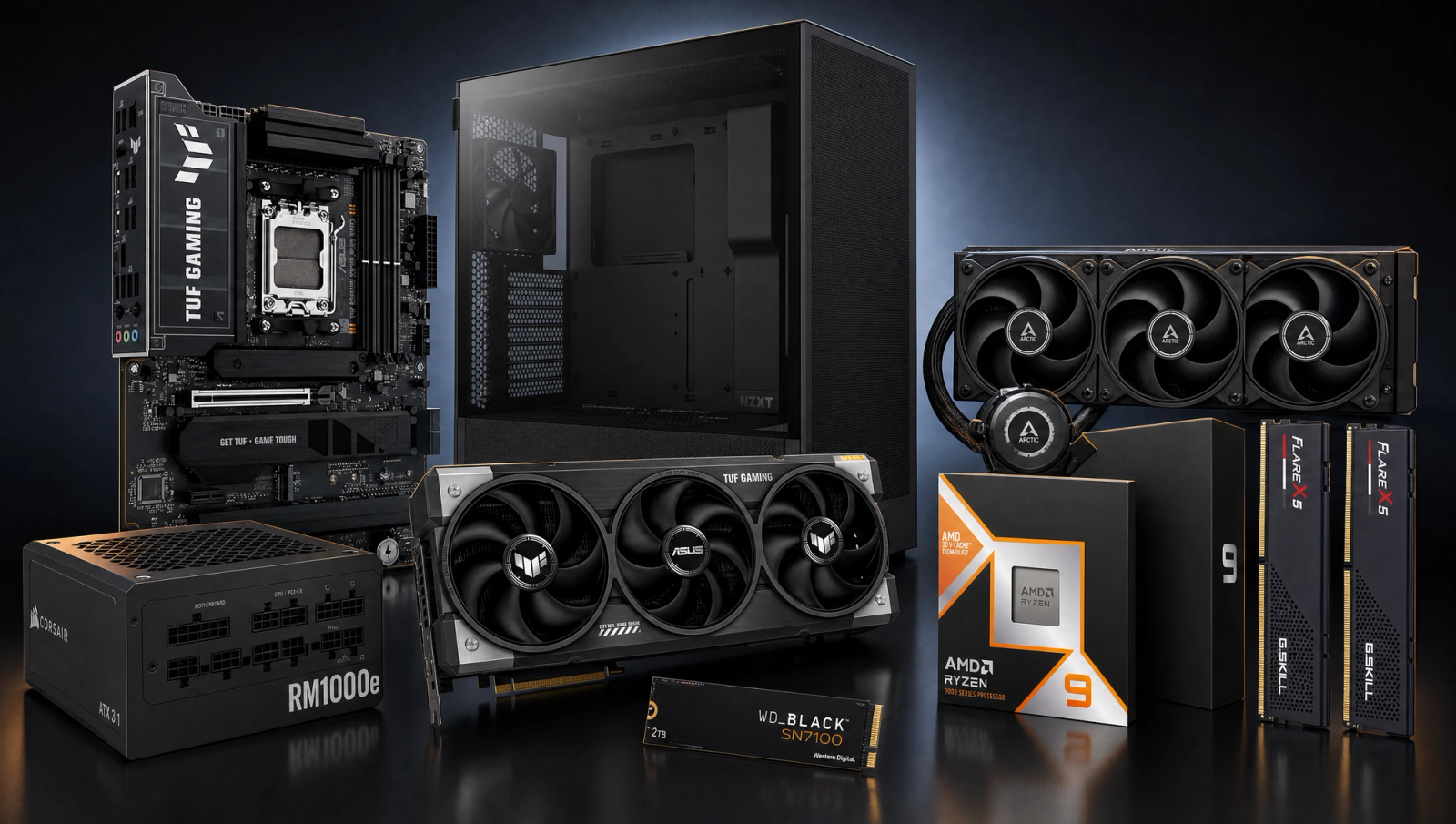
Components
- $699.00
- $1,999.00
- $300.00
- $110.00
- $120.00
- $130.00
- $200.00
- $85.00
Who This Build Is For
This is the build for the gamer who wants the ceiling and is willing to pay for it. The target is 4K 240fps, which sounds straightforward but is the most aggressive performance goal in any consumer build today. You want native 4K at high refresh in esports titles, you want cinematic AAA at 4K with frame generation pushing past 240, and you want headroom for whatever ships in the next two years. If you are pairing this with a 4K 240Hz OLED, this is the hardware that actually feeds it.
If you build out anything less than the absolute top of the consumer stack, you are leaving frames on the table at this resolution and refresh rate target. This recipe does not compromise. It also doubles as a credible workstation: 16 Zen 5 cores plus a 32GB GDDR7 GPU is more than enough for Blender, DaVinci Resolve, and local LLM workloads on the side.
Build Overview
Key Specs
CPU | AMD Ryzen 9 9950X3D (16c/32t, 3D V-Cache) |
GPU | ASUS TUF GeForce RTX 5090 32GB GDDR7 OC |
Motherboard | ASUS TUF Gaming X870E-PLUS WiFi 7 |
Memory | 32GB G.Skill Flare X5 DDR5-6000 CL30 (2x16GB) |
Storage | WD_Black SN7100 2TB NVMe Gen4 |
Cooling | Arctic Liquid Freezer III Pro 360 AIO |
Power Supply | Corsair RM1000e 1000W 80+ Gold ATX 3.1 |
Case | NZXT H5 Flow ATX Mid-Tower |
CPU
AMD Ryzen 9 9950X3D (16c/32t, 3D V-Cache)
GPU
ASUS TUF GeForce RTX 5090 32GB GDDR7 OC
Motherboard
ASUS TUF Gaming X870E-PLUS WiFi 7
Memory
32GB G.Skill Flare X5 DDR5-6000 CL30 (2x16GB)
Storage
WD_Black SN7100 2TB NVMe Gen4
Cooling
Arctic Liquid Freezer III Pro 360 AIO
Power Supply
Corsair RM1000e 1000W 80+ Gold ATX 3.1
Case
NZXT H5 Flow ATX Mid-Tower
Here are the parts that make up this build, with links to current pricing on Amazon for each.
Performance Summary
Native 4K 240fps is not a universal target in 2026, and any honest build guide says so out loud. In pure esports (Valorant, CS2, Marvel Rivals, Rocket League) this rig clears 4K 240 native without breaking a sweat. In modern AAA, native 4K typically lands in the 70 to 145fps range depending on the title. The path to 240fps in cinematic AAA is DLSS 4 with Multi-Frame Generation, which is exactly what NVIDIA built the 5090 around. Cyberpunk with RT Overdrive, DLSS Performance, and MFG 4x hits 4K 240+ on this hardware. That is the actual answer.
Performance Expectations
Average FPS across the standard 10-game AAA slate, native rendering with no upscaling.
- Cyberpunk 2077214 FPS
- Alan Wake 2155 FPS
- Black Myth: Wukong160 FPS
- Stalker 2125 FPS
- Marvel's Spider-Man 2133 FPS
- Starfield165 FPS
- Baldur's Gate 3180 FPS
- Helldivers 2234 FPS
- Hogwarts Legacy205 FPS
- Call of Duty: Black Ops 6260 FPS
The table below shows native FPS across the standard 10-game AAA slate at 1080p, 1440p, and 4K High. These are no-upscaling numbers. The 1080p column is largely CPU and engine limited (which is why a 9950X3D and 5090 do not blow past a 9800X3D and 5080 by as much as you would expect). The 4K column is the honest baseline for native rendering. To hit 240fps in these titles at 4K, layer DLSS Quality plus DLSS 4 Multi-Frame Generation on top. The 5090 supports MFG 4x in every DLSS 4 title, which can quadruple effective output frame rate. Reviewer-sourced averages, expect plus or minus 5fps depending on scene and settings.
Parts Breakdown
CPU

The Ryzen 9 9950X3D is the gaming CPU ceiling in 2026, full stop. 16 cores across two CCDs, with one CCD carrying the 3D V-Cache that AMD's gaming uplift depends on. The Windows scheduler parks the non-V-Cache CCD for games, so in-game performance matches a 9800X3D in every V-Cache-friendly title. Outside gaming, the second CCD doubles your multi-threaded throughput for Blender, code compile, and Premiere exports. The trade-off vs the 9800X3D is around 200 dollars in price for productivity gains you only use if you actually do creator work. On a 4K 240 target, the answer is yes, take the 9950X3D, because the second CCD is functionally free at 4K (the GPU is bottlenecking before the CPU has anything to do).
GPU

The RTX 5090 32GB is the only GPU that makes 4K 240fps in modern AAA even a conversation. Native 4K High puts most titles in the 70 to 145 range across our slate, with Cyberpunk landing around 130, BG3 at 140, and COD BO6 at 145. That is the GPU-limited reality of native 4K. The 240fps target is unlocked by DLSS 4 Multi-Frame Generation, which is exclusive to RTX 50 series. MFG 4x can quadruple frame rate in supported titles; pair it with DLSS Performance at 4K and Cyberpunk RT Overdrive runs north of 240fps. The 32GB GDDR7 buffer is oversized for current games (4K Ultra plus RT peaks around 16 to 18GB) and is explicitly future-proof for the next two generations of AAA. Trade-off vs the 5080 is roughly double the cost; you are paying for the only GPU that can do this job.
Motherboard

The ASUS TUF Gaming X870E-PLUS WiFi7 is the right tier for a 9950X3D plus 5090 pairing. 16+2+1 80A power stages handle the 9950X3D's full PPT without throttling, PCIe 5.0 x16 to the GPU and x4 to the primary M.2 slot, dual USB4, Wi-Fi 7, and 2.5GbE. X870E gets you the second PCIe 5.0 M.2 slot vs X870, which matters if you plan to add a second SN7100 down the line. The trade-off vs higher-end ROG Crosshair boards (around 200 to 300 dollars more) is mostly memory overclocking headroom and aesthetics; the TUF runs DDR5-6000 EXPO with no drama, which is all this build needs.
Memory (RAM)

32GB of G.Skill Flare X5 DDR5-6000 CL30 is the AM5 gaming sweet spot. DDR5-6000 CL30 hits the 1:1 UCLK to MCLK ratio that AMD's Infinity Fabric prefers; pushing past 6400 forces a 2:1 divider and you lose latency. The G.Skill kit carries an EXPO profile that one-click loads in the BIOS. 32GB is the right capacity for 2026 gaming; if your secondary workload is local LLM inference or heavy multi-app workflows, 64GB (2x32GB) is a reasonable upgrade path on the same board. Trade-off vs 6400 CL32 kits is negligible in gaming and not worth the latency penalty.
Storage

The WD_Black SN7100 2TB is a PCIe Gen4 NVMe drive that holds its rated 7,250 MB/s sequential read across long transfers (DRAM-less, but with WD's HMB implementation it competes with DRAM drives in real-world workloads). 2TB is the right capacity to start at this tier; modern AAA installs run 100 to 200GB each, and DirectStorage compatibility means load-time wins on titles that use it. Trade-off vs PCIe Gen5 drives (Crucial T705, Samsung 9100 Pro) is mostly synthetic; in actual game load times you save fractions of a second, and Gen5 drives run hotter and cost meaningfully more. Use the second M.2 slot on the X870E for a future Gen5 boot drive if you want to upgrade later.
Power Supply

The Corsair RM1000e is the right unit for an RTX 5090. NVIDIA's official 5090 spec calls for a 1000W PSU minimum, and the RM1000e ships with the native 12V-2x6 connector that the 5090 uses (no 4-to-1 octopus adapter). ATX 3.1 and PCIe 5.1 compliance means it handles the 5090's transient spikes without tripping the OCP. 80 Plus Gold, fully modular, fluid dynamic bearing fan that stays off below 40 percent load. Trade-off vs the RM1200x SHIFT or HX1500i is around 100 to 200 dollars for either more headroom or sideways cable routing; 1000W is the right wattage here, the 5090 plus 9950X3D peaks around 750W in the worst case.
Case

The NZXT H5 Flow is the smallest case you can fit this hardware in without compromising airflow. Mesh front, 360mm radiator support in the top, room for the 5090's 3.6-slot cooler, and a clean cable management layout for a fully modular PSU. The trade-off vs a Lian Li O11D Evo or Fractal North XL (around 50 to 80 dollars more) is interior volume and aesthetics; if you want a vertical GPU mount or a full-tower showcase build, step up. The H5 Flow is the value pick at this tier and the thermals are excellent with the 360mm AIO mounted as top exhaust.
Cooling

The Arctic Liquid Freezer III Pro 360 is the AIO to put on a 9950X3D. 360mm radiator with a 38mm-thick rad (vs the standard 27mm), a VRM fan integrated into the pump block, and a PWM pump that ramps with load. In testing it holds the 9950X3D at 75 to 80C under all-core Cinebench and around 60C in gaming, which is what you want on a chip that loses single-thread performance above 85C. Trade-off vs a Corsair iCUE H170i Elite (around 50 dollars more) is software ecosystem; if you do not need iCUE for sync with other Corsair gear, the Arctic is the better cooler at lower cost. Mount it as top exhaust in the H5 Flow.
Final Thoughts
This build is the answer to the question "what does it take to actually run 4K 240fps in 2026?" The honest answer is: native 4K 240 in modern AAA is still a generation away. What you get with this hardware is native 4K 240 in esports, native 4K 100 to 145 in AAA, and 4K 240 in cinematic AAA via DLSS 4 Multi-Frame Generation. That is the realistic ceiling of the consumer stack right now, and you are buying directly into it. Pair this with a 4K 240Hz OLED, enable G-Sync and Reflex, and turn on DLSS 4 with MFG in any title that supports it. This is the build.
FAQs
Does this build actually hit native 4K 240fps in AAA games?
Not in most modern AAA. Native 4K High across the standard slate lands in the 70 to 145fps range on this hardware. Esports titles (Valorant, CS2, Marvel Rivals, Rocket League) hit native 4K 240+ easily. For cinematic AAA, the 240fps path is DLSS 4 Multi-Frame Generation, which is exactly what NVIDIA designed the RTX 5090 around.
What is DLSS 4 Multi-Frame Generation and why does it matter here?
DLSS 4 MFG is an RTX 50-exclusive feature that generates up to 3 additional frames between each rendered frame (MFG 4x), quadrupling effective frame rate. Paired with DLSS Quality upscaling, Cyberpunk with RT Overdrive can run north of 240fps at 4K on this RTX 5090. That is how you actually get 4K 240 in cinematic AAA right now.
Should I get the 9950X3D or the 9800X3D for a 5090 build?
If you only game, the 9800X3D is the budget-smart pick (gaming performance is functionally identical because Windows parks the non-V-Cache CCD on the 9950X3D anyway). If you do any creator work (Blender, Premiere, code compile, local LLMs), the 9950X3D pays for itself in the second CCD's multi-threaded throughput. On a halo build at this price tier, the 9950X3D is the right call.
Is 32GB of RAM enough for this build?
For gaming, yes, 32GB is the 2026 sweet spot. If your secondary workload involves local LLM inference, heavy DaVinci Resolve work, or running VMs alongside games, step up to 64GB (2x32GB) on the same X870E board. The motherboard supports it, but 32GB at DDR5-6000 CL30 is the right starting capacity for a gaming-first config.
Why a 1000W PSU and not 1200W or 1500W?
NVIDIA's official 5090 spec calls for 1000W. Real-world worst-case for a 9950X3D plus 5090 system peaks around 750W. The RM1000e is ATX 3.1 and PCIe 5.1 compliant, ships with the native 12V-2x6 connector, and handles the 5090's transient spikes without tripping OCP. 1200W is only worth the premium if you plan to add a second GPU for ML work, which is rare on AM5.
What monitor pairs with this build?
A 4K 240Hz OLED. LG, Samsung, and Asus all ship panels in this category (LG 32GS95UE, Samsung Odyssey OLED G8, Asus PG32UCDM). DisplayPort 2.1 on the 5090 carries 4K 240Hz at full 10-bit color without DSC compromises. Enable G-Sync, Reflex, and DLSS 4 MFG in supported titles. This is the panel category the build was designed for.
Is the RTX 5090 32GB worth it over a 5080 16GB?
At a 4K 240 target, yes. The 5080 maxes around 90 to 145fps at 4K High native and tops out around 16GB VRAM in Cyberpunk Phantom Liberty plus RT. The 5090 is roughly 30 to 45 percent faster across our slate at 4K and has 32GB of headroom for the next two generations of game releases. At any lower performance target, the 5080 is the smarter buy. At 4K 240, the 5090 is the only GPU that gets you there.
Can this build handle workstation tasks alongside gaming?
Absolutely. 16 Zen 5 cores plus 32GB GDDR7 plus 32GB DDR5 is a credible content-creation rig. Blender, DaVinci Resolve, Premiere, and local LLM inference (up to ~70B quantized models on the 5090's 32GB VRAM) all run well. The 9950X3D's second CCD does the heavy multi-threaded lifting while the V-Cache CCD parks for gaming, so you get full performance in both workloads without compromise.