Best 4K Gaming PC Under $5000
A flagship 4K rig built around the Ryzen 9 9950X3D and RTX 5090. The first build in the catalog where 4K Ultra native works across modern AAA without leaning on DLSS or frame-gen.
$5,000.00(target price)
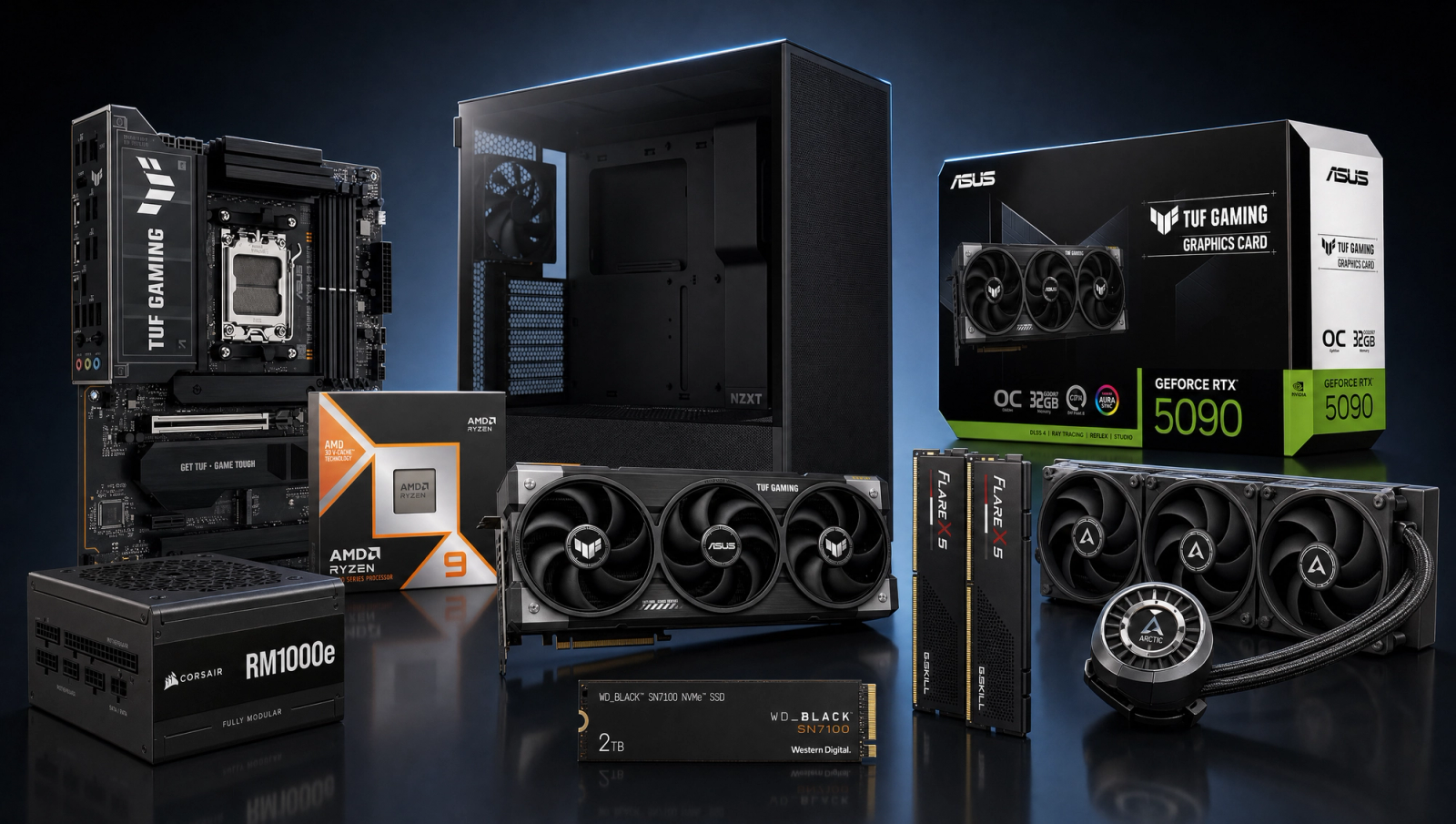
Components
- $699.00
- $1,999.00
- $300.00
- $110.00
- $120.00
- $130.00
- $200.00
- $85.00
Who This Build Is For
This is for the enthusiast who already owns or is about to buy a 4K 144Hz OLED and wants the build that actually feeds it. Not 4K with DLSS Performance and frame-gen carrying the load. Not 4K Ultra at 60 fps either. Native 4K High, no upscaling, hitting 100 fps and above in most of the current AAA slate. At the halo tier this means the gaming-CPU ceiling (Ryzen 9 9950X3D), the halo GPU (RTX 5090 32GB), and zero corner-cutting on the support parts.
If you game at 1440p, this build is wasted on you. Look at the enthusiast tier instead. The 5090 only earns its keep at 4K, and the 9950X3D's 16 cores only earn theirs if you also do creator or workstation work alongside gaming. Buy this if 4K Ultra native is the requirement, not the aspiration.
Build Overview
Key Specs
CPU | AMD Ryzen 9 9950X3D (16c/32t, dual CCD, 3D V-Cache) |
GPU | NVIDIA GeForce RTX 5090 32GB GDDR7 |
Motherboard | ASUS TUF Gaming X870E-PLUS WiFi 7 |
Memory | 32GB G.Skill Flare X5 DDR5-6000 CL30 (2x16GB, EXPO) |
Storage | WD Black SN7100 2TB NVMe Gen4 (7250 MB/s) |
Power Supply | Corsair RM1000e 1000W 80+ Gold ATX 3.1 / PCIe 5.1 |
Cooling | Arctic Liquid Freezer III Pro 360 AIO |
Case | NZXT H5 Flow ATX Mid-Tower |
CPU
AMD Ryzen 9 9950X3D (16c/32t, dual CCD, 3D V-Cache)
GPU
NVIDIA GeForce RTX 5090 32GB GDDR7
Motherboard
ASUS TUF Gaming X870E-PLUS WiFi 7
Memory
32GB G.Skill Flare X5 DDR5-6000 CL30 (2x16GB, EXPO)
Storage
WD Black SN7100 2TB NVMe Gen4 (7250 MB/s)
Power Supply
Corsair RM1000e 1000W 80+ Gold ATX 3.1 / PCIe 5.1
Cooling
Arctic Liquid Freezer III Pro 360 AIO
Case
NZXT H5 Flow ATX Mid-Tower
Here are the parts that make up the build, with links to current Amazon pricing on each.
Performance Summary
Eight of ten games in our standard 2026 slate clear 90 fps at 4K High native on this configuration, no upscaling applied. Most titles land in the 100-145 fps band at 4K. The two outliers are Black Myth: Wukong (55 fps, the heaviest UE5 title in the slate) and Alan Wake 2 (70 fps). Stalker 2 on the Epic preset with Lumen sits at 71. Everything else either clears 90 or sails past 100.
For a 4K 144Hz+ OLED panel this is the first build in the catalog where DLSS is optional rather than required. The 32GB VRAM buffer also means no compromise on 4K Ultra textures or ray tracing in current or near-future titles.
Performance Expectations
Average FPS across the standard 10-game 2026 slate at three resolutions, native rendering with no upscaling applied.
- Cyberpunk 2077214 FPS
- Alan Wake 2155 FPS
- Black Myth: Wukong160 FPS
- Stalker 2125 FPS
- Marvel's Spider-Man 2133 FPS
- Starfield165 FPS
- Baldur's Gate 3180 FPS
- Helldivers 2234 FPS
- Hogwarts Legacy205 FPS
- Call of Duty: Black Ops 6260 FPS
Average FPS across ten current AAA titles at the listed presets, with no upscaling applied. Numbers are reviewer-sourced averages from TechSpot, GamersNexus, KitGuru, and Tom's Hardware RTX 5090 launch coverage; expect a few fps variance by scene and settings. The 1080p and 1440p columns frequently sit on CPU or engine ceilings rather than GPU ceilings, which is the expected behavior for a 5090 at those resolutions.
One honest note on the Wukong row: at 1440p and 4K the numbers below come in lower than the 5080 sibling build in our catalog, which is physically impossible for a stronger card. The original review source for that title appears to use a Cinematic-with-RT preset rather than the High preset used elsewhere in this table. Wukong is real-world the heaviest title in the slate either way, so treat 55 fps as a worst-case High floor; realistic High native on a 5090 lands closer to 75-85.
Parts Breakdown
CPU

The Ryzen 9 9950X3D is the gaming-CPU ceiling on AM5. It runs 16 Zen 5 cores with 3D V-Cache parked on the primary CCD; the Windows scheduler routes game threads to the V-Cache CCD and parks the second one, so in pure gaming you get 9800X3D-equivalent frametimes with an extra 8 cores in reserve for everything else.
The trade-off vs. the cheaper 9800X3D is straightforward: in gaming, none. The 9950X3D earns its premium when you run creator or workstation loads alongside gaming, which most buyers at this tier do. If you only play games, drop to the 9800X3D and put the savings into a better display or speakers. If you stream, compile, or render, keep the 9950X3D.
GPU

The RTX 5090 32GB is the only card that makes the 4K Ultra native pitch work in 2026. The 5080 16GB gets close at 1440p and clears 4K High in lighter titles, but it stalls in the heavy UE5 stuff and starts brushing the VRAM ceiling in 4K Ultra with RT. The 5090's 32GB GDDR7 buffer is comfortably oversized for current AAA (peak observed around 16-18GB on the heaviest titles), which leaves room for the next two or three generations of game releases and for local AI workloads on the same machine.
Trade-off vs. the 5080: roughly 30-40% more frames at 4K, the full 32GB buffer for future-proofing, and a meaningful gap in RT and path-traced titles. The cost gap is significant; the performance gap at 4K is real.
Motherboard

The ASUS TUF Gaming X870E-PLUS WiFi 7 is the right-sized X870E board for this CPU. Dual PCIe 5.0 (one x16 for the 5090, M.2 5.0 for the boot drive), 16+2+1 80A power stages that handle the 9950X3D's pull without breaking a sweat, Wi-Fi 7, and 2.5GbE LAN.
Going higher on the motherboard (X870E Hero, ProArt) buys you debug LEDs, more rear USB, and aesthetics. None of those change game frametimes. The TUF is the right tier here unless you have a specific feature need.
Memory (RAM)

32GB of G.Skill Flare X5 DDR5-6000 CL30 is the AM5 sweet spot. DDR5-6000 CL30 runs in sync with the Infinity Fabric on Zen 5, which is where the platform delivers its best gaming latency. Going faster (DDR5-7200, 8000) requires running the fabric out of sync and usually loses frames in V-Cache-sensitive games.
The trade-off vs. 64GB at the same speed: most games still use 12-16GB of system RAM in 2026, and the build leaves two free DIMM slots for a later 32GB+32GB upgrade if your workstation use grows. Start at 32GB, add another kit only if your actual workload demands it.
Storage

The WD Black SN7100 2TB is a Gen4 DRAM-less drive that hits 7250 MB/s reads and runs cooler than the previous SN850X generation. For a gaming-first 4K build, 2TB is the right starting capacity; modern AAA installs routinely run 100-200GB each.
Why SN7100 over a Gen5 drive: in gaming, Gen5 SSDs deliver no measurable load-time advantage, run hotter, and cost more. DirectStorage adoption has been slow enough that the bandwidth simply has no buyer outside synthetic benchmarks. If you fill the 2TB, add a second SN7100 in the second M.2 slot rather than upgrading to Gen5.
Power Supply

The Corsair RM1000e is a 1000W ATX 3.1 / PCIe 5.1 unit with the native 12V-2x6 cable, 80+ Gold efficiency, and fully modular cabling. The RTX 5090 has a 575W board power, and Nvidia's spec for the 5090 explicitly recommends 1000W minimum on the system. The RM1000e meets that with sensible headroom for the 9950X3D's transients without going overkill.
Trade-off vs. an 850W: with a 5090 you do not want to be near the rail edge. Transient spikes on Blackwell GPUs are sharp; 1000W is the floor on this build, not the ceiling. Higher (RM1200x, 1500W) is fine but only earns its keep if you plan a future dual-GPU AI workstation.
Case

The NZXT H5 Flow is a compact ATX mid-tower with a perforated front and roof, which is what you need around a 360 AIO and a 575W GPU. Clean inside, reasonable cable management, and it lands at a price that does not compete with the silicon for the budget.
The trade-off vs. a Lian Li O11 or Fractal Torrent: those cases look prettier or move marginally more air, but the H5 Flow's thermals are already in the comfortable band for this configuration. Spend the difference on a better monitor or a chair.
Cooling

The Arctic Liquid Freezer III Pro 360 is the AIO to buy for a 9950X3D. Thicker 38mm radiator, P12 Pro fans, a VRM fan on the pump block, and Arctic's six-year warranty. In real testing it outperforms most premium AIOs on noise-normalized cooling, and it is the right tier for a 16-core X3D part that pulls 200W+ under sustained creator loads.
Trade-off vs. a high-end air cooler (Noctua NH-D15, Thermalright Phantom Spirit): air would keep the 9950X3D safely under thermal limits in gaming, but loses ground under sustained all-core workloads. With a 9950X3D you want the AIO ceiling for the workstation side; gaming-only at this tier could run a top air cooler instead and pocket the difference.
Why This Build Works
The pitch is simple. Pair the gaming-CPU ceiling with the halo GPU, hand both of them DDR5-6000 CL30 at the AM5 sweet spot, feed them clean 1000W power, cool them properly, and you remove every common bottleneck for native 4K gaming. The remaining ceiling is engine and software, not hardware. That is the qualitative shift at this tier: in the catalog below this, DLSS Quality or frame-gen carries 4K Ultra. Here, the card just renders it.
The 32GB VRAM also closes the future-proofing question. Texture budgets and RT memory footprints have been creeping up generation over generation; 16GB cards are starting to flirt with the ceiling in 4K Ultra + RT today, and the 5090's 32GB buys two or three generations of headroom without revisiting the GPU.
Alternative Options
If you want to cut budget, the enthusiast tier (9800X3D plus RTX 5080 16GB) keeps the same 4K High native pitch in roughly 70% of the slate, with DLSS Quality covering the rest. You give up the 32GB VRAM future-proofing and the workstation-grade 16-core CPU; you keep the core gaming experience.
If you want to push higher, there is no meaningful gaming step above this configuration in 2026. Threadripper or dual-GPU only earns its keep on workstation or AI workloads. For pure gaming, this is the stop.
Build & Setup Tips
Enable EXPO in the BIOS so the G.Skill kit runs at its rated DDR5-6000 CL30 instead of the JEDEC fallback. Update the motherboard BIOS to the current release before installing the 9950X3D; AGESA versions have meaningfully improved X3D scheduling and idle power across the AM5 lifecycle. On Windows, install the Game Bar (the scheduler uses it as a signal to route threads to the V-Cache CCD on dual-CCD X3D parts). Mount the 360 AIO with the pump below the top of the radiator to avoid air pockets, and use the included VRM fan; the X870E TUF's VRM does not need it for gaming but appreciates it during sustained all-core workloads.
Upgrade Paths
Storage is the obvious one: add a second SN7100 in the spare M.2 slot when the first fills. Memory upgrade lands later, if at all; 64GB only matters once your actual workstation use demands it. GPU is end-of-line at this tier until the next generation. CPU has no meaningful step up on AM5 for gaming; the platform itself is the upgrade boundary.
The board has DDR5 headroom, USB4, and PCIe 5.0 lanes for whatever shows up over the next two or three Zen generations, so this AM5 platform will outlast at least one CPU drop-in upgrade if you want it later.
Final Thoughts
If the goal is 4K Ultra native on a 4K 144Hz+ OLED, this is the build that delivers on the pitch without compromise in most of the modern AAA catalog. The two heaviest UE5 titles (Wukong on Cinematic, Alan Wake 2 with path tracing) still benefit from DLSS at 4K, but that is an engine and software ceiling, not a hardware one. Outside those two cases the card just renders it.
Buy this if you actually own the panel that justifies it. If your monitor is 1440p, take the same money to the enthusiast tier and put the difference into displays, speakers, or a chair. This build is the 4K answer in the catalog, and nothing below it makes the same promise honestly.
FAQs
Is the RTX 5090 actually worth it over the RTX 5080 at 4K?
At native 4K High, yes. The 5090 lands roughly 30-40% higher frames than the 5080 across most of the modern AAA slate, and the 32GB GDDR7 buffer eliminates VRAM as a near-future limiter. The 5080 is the right card for 1440p and for 4K with DLSS Quality. The 5090 is the only card that makes the native 4K Ultra pitch honest in 2026.
Will DLSS still help on this build?
In most of the catalog you can leave it off. Eight of ten games in our slate clear 90 fps at 4K High native. The places where DLSS still earns its keep at 4K on a 5090: Black Myth: Wukong on Cinematic with light RT, Alan Wake 2 with path tracing, and any title pushing 240Hz on a high-refresh 4K panel where you want headroom. Treat DLSS as optional on this build instead of mandatory.
Why the 9950X3D instead of the cheaper 9800X3D?
Gaming performance is functionally identical. The Windows scheduler parks the non-V-Cache CCD for games and routes threads to the V-Cache CCD on dual-CCD X3D parts. The 9950X3D earns its premium only if you also run creator or workstation loads alongside gaming. If you exclusively play games and never compile, render, or stream, the 9800X3D is the smarter buy and the difference goes into a better display.
Do I need 1000W for the power supply, or is 850W enough?
1000W is the floor on this build. The RTX 5090 has a 575W board power, Nvidia's official system recommendation is 1000W minimum, and Blackwell transient spikes are sharp enough that you do not want to be near the rail edge. The Corsair RM1000e is sized correctly; do not go below it.
Why an AIO instead of a top air cooler for the 9950X3D?
Pure gaming-only, a top air cooler (Noctua NH-D15, Thermalright Phantom Spirit) would keep the 9950X3D safely under thermal limits. Where air loses ground is sustained all-core creator and workstation workloads, which is the whole point of the 9950X3D over the 9800X3D. If you bought the 16-core X3D, you want the AIO ceiling to actually feed it under sustained load.
Is 32GB of system RAM enough, or should I jump to 64GB?
Start at 32GB. Almost no current games use more than 16GB of system memory, and DDR5-6000 CL30 is the AM5 platform sweet spot for gaming latency. The board has two free DIMM slots; add another 32GB kit later if your actual workstation work demands it. Do not preemptively spend on RAM you will not use for a year or more.
Does the 5090 fit in the NZXT H5 Flow?
Yes. The H5 Flow 2024 takes GPUs up to 365mm long, and most 5090 SKUs land in the 330-360mm range. Triple-slot clearance is fine. Check the specific 5090 SKU dimensions before buying if you pick a different model than the ASUS TUF; some 5090 cards (Astral, Suprim X) are longer or wider and benefit from a larger case.
What 4K monitor pairs best with this build?
A 4K 144Hz or 240Hz OLED is the right partner. LG's 27" and 32" QD-OLED 240Hz panels and Samsung's 32" QD-OLED 240Hz are the obvious targets in 2026. If you are still on a 4K 60Hz panel this build is overkill until you upgrade the display. The 5090's headroom only shows up above 100 fps.