Best $700 1080p 60fps Gaming PC Build for 2026
A ~$700 entry-tier 1080p 60fps build that comfortably clears the smooth-gaming bar in modern AAA titles and crushes esports at high refresh.
$700.00(target price)
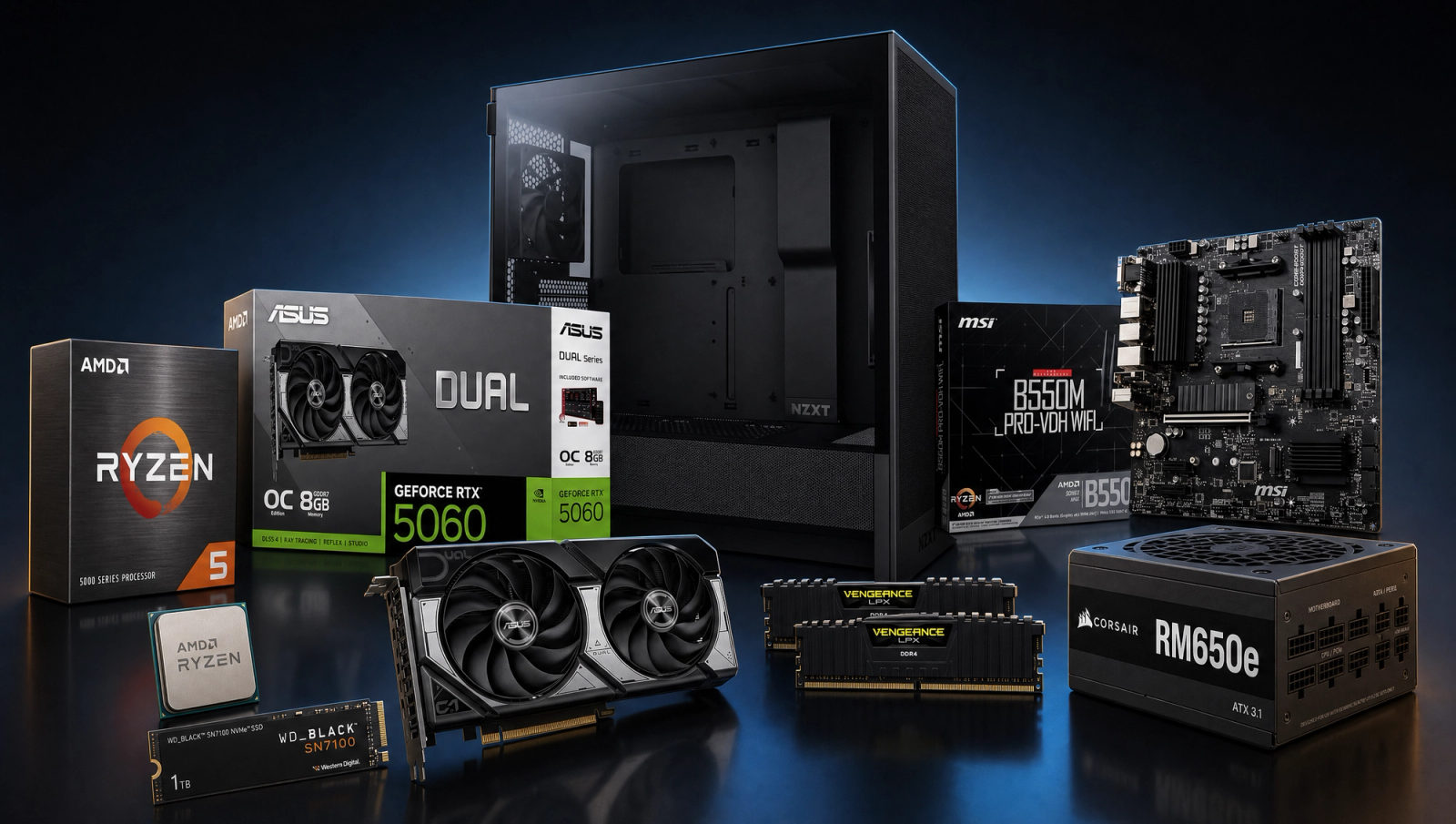
Components
- $99.00
- $300.00
- $100.00
- $50.00
- $70.00
- CoolerStock CoolerIncluded
- $100.00
- $85.00
Who This Build Is For
This one's for the buyer typing "1080p 60fps PC" into Google and bracing for the answer. Maybe it's a first PC. Maybe it's a hand-me-down replacement that finally aged out. Either way, the goal here is simple: a machine that runs modern games smoothly at 1080p, doesn't choke in popular esports titles, and lands at a credible entry-tier budget instead of pretending you need to spend more.
If you want to play Valorant, Counter-Strike 2, Fortnite, or Apex at high refresh on a 1080p monitor, this build absolutely does that with margin. If you want to play the latest single-player AAA titles at 1080p high settings around 60fps, this build does that too. What it isn't: a 1440p machine, a streaming workstation, or a content-creation rig. Stay honest about the target and this is the best value you can spend on an entry-tier gaming PC right now.
Build Overview
The shape of an entry-tier 1080p build hasn't moved much in 18 months: a strong six-core AM4 CPU, an 8GB current-gen GPU, fast DDR4, and parts around them that won't bottleneck or fail early. The trick is picking parts that don't cut corners on the stuff you'll actually feel (PSU, storage, airflow), because that's where cheap builds rot first.
Key Specs
CPU | AMD Ryzen 5 5600 (6c/12t, AM4) |
GPU | NVIDIA RTX 5060 8GB (DLSS 4, PCIe 5.0) |
Motherboard | MSI B550M PRO-VDH WiFi (Micro-ATX, DDR4) |
Memory | 16GB Corsair Vengeance LPX DDR4-3600 CL18 |
Storage | 1TB WD_Black SN7100 NVMe Gen4 |
Power Supply | Corsair RM650e 650W 80+ Gold ATX 3.1 |
Case | NZXT H5 Flow (ATX mid-tower) |
Cooling | AMD Wraith Stealth (included) |
CPU
AMD Ryzen 5 5600 (6c/12t, AM4)
GPU
NVIDIA RTX 5060 8GB (DLSS 4, PCIe 5.0)
Motherboard
MSI B550M PRO-VDH WiFi (Micro-ATX, DDR4)
Memory
16GB Corsair Vengeance LPX DDR4-3600 CL18
Storage
1TB WD_Black SN7100 NVMe Gen4
Power Supply
Corsair RM650e 650W 80+ Gold ATX 3.1
Case
NZXT H5 Flow (ATX mid-tower)
Cooling
AMD Wraith Stealth (included)
Here's the parts list at a glance. The rationale for each pick is in the Parts Breakdown below.
Performance Summary
At 1080p, expect 60fps with comfortable headroom in modern AAA titles on high settings, often well above 60 with DLSS 4 enabled on the RTX 5060. Esports titles like Valorant, CS2, Overwatch 2, and Fortnite run at 200fps or more on competitive settings. If you ever pair this with a 144Hz or 165Hz panel, you're already covered.
Performance Expectations
Average FPS at 1080p High native, no upscaling.
- Cyberpunk 2077100 FPS
- Black Myth: Wukong66 FPS
- Stalker 247 FPS
- Marvel's Spider-Man 264 FPS
- Starfield64 FPS
- Baldur's Gate 356 FPS
- Helldivers 2100 FPS
- Hogwarts Legacy101 FPS
- Call of Duty: Black Ops 668 FPS
Let's be specific about what "1080p 60fps" actually means with this hardware in 2026, because the floor has moved.
**Modern AAA at 1080p high:** Cyberpunk 2077, Black Myth: Wukong, Stalker 2, Spider-Man 2. All sit at 60fps or better with DLSS Quality on the RTX 5060. Heavy ray tracing is off the table at this tier; this card has the feature, not the raw throughput. Turn RT off, use DLSS, and you'll consistently land above the target.
**Esports at competitive settings:** 240fps or higher in Valorant and CS2, 200fps or higher in Fortnite performance mode, 150fps or higher in Apex. The Ryzen 5 5600 is still a very capable esports CPU, and the 5060 is wildly overkill for these workloads at 1080p.
**Older and indie titles:** essentially anything from the last decade runs at the refresh rate of your monitor. Hades, Hollow Knight, Stardew Valley, BG3 at lower settings. Non-issue.
What this build does not do well: 1440p at high refresh in current AAA, heavy ray tracing, 4K anything. If those matter, you're in a different price bracket.
Parts Breakdown
Walking through each part: what it is, why it's the right pick at this resolution and target frame rate, and what alternative you'd consider at the same tier. Quick lineup: AMD Ryzen 5 5600 6-Core, NVIDIA GeForce RTX 5060 8GB, MSI B550M PRO-VDH WiFi, Corsair Vengeance LPX 16GB DDR4-3600 CL18, WD_Black SN7100 1TB NVMe Gen4, Corsair RM650e 80+ Gold ATX 3.1 Modular, and the NZXT H5 Flow ATX Mid-Tower.
CPU

The Ryzen 5 5600 is the workhorse of the entry AM4 tier and has been for two generations now. Six Zen 3 cores, twelve threads, a Wraith Stealth cooler in the box, and just enough single-thread performance to not bottleneck a current-gen 1080p GPU. At this build's target, the only honest alternative is the 5500, which uses the older Zen 3 core variant with half the L3 cache, and you can feel that in 1% lows. The 5600 is the floor for a build you don't want to regret.
The stock Wraith Stealth handles this chip fine at 1080p gaming loads. No need to spend more on cooling here.
GPU

The RTX 5060 8GB is the lowest-tier current-gen NVIDIA card and it's the single most important part of this build. DLSS 4 is the reason. The 5060 leans on upscaling and frame generation to comfortably clear 60fps in modern AAA at 1080p, where the raw rasterization alone would be borderline.
The obvious alternative is an RX 7600 or used RTX 4060. The 7600 trades blows in raster but loses on upscaling quality (FSR vs. DLSS 4 is not close at 1080p). A used 4060 saves a bit but you lose warranty and DLSS 4 multi-frame-gen support. At this budget, the 5060 with warranty is the right call.
8GB of VRAM is the elephant in the room. At 1080p with sensible texture settings, you won't hit the wall in 2026. If you plan to upgrade the monitor to 1440p later, plan on a GPU swap too.
Motherboard

The MSI B550M PRO-VDH WiFi is the most boring, reliable AM4 motherboard you can buy, and that's a compliment. Micro-ATX, DDR4, PCIe 4.0, M.2, and Wi-Fi built in. Nothing you don't need, everything you do. B550 chipset means the Ryzen 5 5600 boots out of the box on current BIOS.
The alternative is an A520 board for a few dollars less, but you lose PCIe 4.0 support on the M.2 slot, which kneecaps the SN7100. Not worth saving the money. Skip A520; the B550M PRO-VDH is the floor.
Memory (RAM)

The Corsair Vengeance LPX 16GB DDR4-3600 CL18 kit hits the right speed for Zen 3. DDR4-3600 is where Infinity Fabric on Ryzen 5000 hits its 1:1 ratio, so you get measurably better frame timing than 3200 kits for almost the same money.
16GB is enough for 1080p gaming through 2026, full stop. Some open-world games will allocate more if you give them more, but you won't feel a difference in frame rate at this resolution. The honest alternative is a 32GB kit if you Chrome-tab heavily while gaming, but at this budget the rest of the build matters more. If you want to upgrade RAM later, this board takes another kit easily.
Storage

The WD_Black SN7100 1TB is overkill for the price tier, in the best way. Gen4 NVMe, 7,250 MB/s sequential reads, DRAM-less but with a large HMB buffer that performs close to DRAM-equipped drives in real workloads.
The alternative is a Crucial P3 Plus or similar Gen3 drive for a hair less, but the SN7100 has measurably better random-read performance, which is what game-load times actually depend on. At this price gap, take the SN7100.
1TB fills up faster than you think. Modern AAA installs are 80-150GB each. Plan on a second drive once you outgrow it.
Power Supply

The Corsair RM650e is 80+ Gold, fully modular, ATX 3.1, and PCIe 5.1 ready. 650W is more than enough for a 5600 and 5060 system (you'll see roughly 300W peak gaming load), and the headroom matters if you ever upgrade to a 5070 or similar.
The alternative at this tier is a 550W bronze unit for less money. Don't. PSU is where cheap builds fail first, and quietly. Degraded rails cause crashes that look like driver issues for months before you figure it out. The RM650e is the entry point for a PSU you can trust for the next 10 years.
Case

The NZXT H5 Flow is a compact ATX mid-tower with a perforated front panel. Translation: it breathes well, which is what an air-cooled build with a stock cooler needs. Two front intake fans included.
Alternatives are the Lian Li LANCOOL 216 (cheaper, larger, even better airflow) and the Fractal Pop Air. Any of them are fine. The H5 Flow looks cleaner and is the right size for a micro-ATX board without feeling cramped.
Cooling
Stock Wraith Stealth that ships with the Ryzen 5 5600. Adequate for this chip at gaming loads. It's not a 7700X. Don't overthink it; the air this case moves matters more than swapping the cooler at this tier.
If you ever drop in a Ryzen 5700X3D or 5800X3D later as an upgrade, plan on an ID-COOLING SE-224-XTS or similar budget tower cooler at that point.
Why This Build Works
It clears the 1080p 60fps bar in modern AAA with DLSS, runs esports at high refresh with plenty of headroom, uses parts that won't fail in 18 months, and lands at the entry-tier budget without lying about what it is. Every dollar is in a part you'll actually feel: the GPU, the PSU, the SSD, the case airflow. Nothing here is filler. That's the whole pitch.
Alternative Options
If you can stretch the budget by a hundred or so, the natural upgrade is a 32GB DDR4 kit and a slightly beefier case. Beyond that, the next meaningful step up is a completely different build (AM5 platform, RTX 5060 Ti or 5070, 32GB DDR5) which lands around the next budget tier up and unlocks 1080p high refresh and 1440p 60fps as real targets.
Going the other direction (cheaper) is rough. Below this floor, you're shopping used GPUs or compromising on the PSU, and both routes have bitten a lot of first-time builders. This price is the floor for a current-gen build that won't make you sad.
AMD-only alternative: swap the 5060 for an RX 7600. Slightly cheaper, slightly worse upscaling at 1080p. Defensible if you specifically want all-AMD.
Build & Setup Tips
A handful of small things that make a real difference once you're putting the build together. Most builders skip these and pay for it later.
- Update the B550 motherboard BIOS to the latest version on first boot. Newer BIOS handles Ryzen 5000 better and improves memory training reliability.
- Enable XMP or DOCP in BIOS to actually run the Vengeance kit at DDR4-3600. Out of the box it'll run at 2666, leaving free performance on the table.
- Install Windows 11 to the SN7100. The Gen4 boot speed is the difference you'll feel daily.
- Front intake, rear exhaust. The H5 Flow ships configured correctly, but verify before closing the side panel.
- Install GeForce Experience or the newer NVIDIA App to enable DLSS 4 features in supported games.
Upgrade Paths
This build has more headroom than its price suggests. Here's how to extend its life without throwing it away.
**Easy wins (next 6 to 12 months), small upgrades that pay back immediately:**
- Add a second NVMe or SATA SSD when the 1TB fills up. The B550M PRO-VDH has the slots.
- Bump to 32GB by adding a matching kit (or replace with a 2x16GB kit for cleanest results).
**Bigger swings (1 to 3 years), meaningful jumps once budgets or needs change:**
- Drop in a Ryzen 5700X3D or 5800X3D as an end-of-platform CPU upgrade. AM4 isn't getting new chips, but the X3D parts are still strong for years to come.
- Swap the GPU for a 5060 Ti, 5070, or whatever's competitive at the time. The RM650e has the headroom; the case has the clearance.
**Don't bother, money better spent elsewhere on this platform:**
- Don't upgrade the cooler unless you're swapping CPUs. The 5600 doesn't need it.
- Don't upgrade the PSU. 650W Gold ATX 3.1 is more than enough for any reasonable upgrade path.
Final Thoughts
This build is the honest answer to "what's the cheapest current-gen PC that actually plays modern games at 1080p 60fps?" Ryzen 5 5600, RTX 5060, parts that don't cut corners on the stuff that matters. It'll smoke esports for years and handle AAA for at least the next couple. When you eventually outgrow it, every part except the CPU and motherboard carries forward into a future build. That's about as good as this entry-tier budget gets in 2026.
FAQs
Can this entry-tier build really run modern games at 1080p 60fps?
Yes, comfortably. With DLSS 4 on the RTX 5060, modern AAA titles like Cyberpunk 2077, Black Myth: Wukong, and Stalker 2 sit at 60fps or above on high settings at 1080p. Heavy ray tracing is off the table at this tier, but standard high settings with DLSS Quality is the right balance. Esports titles run at 200fps or more.
Is the RTX 5060's 8GB of VRAM going to be a problem?
At 1080p with sensible texture settings, no. 8GB is enough for everything shipping in 2026 at this resolution. The asterisk: if you plan to upgrade to a 1440p monitor later, plan on a GPU upgrade at the same time. 8GB starts to bite at 1440p with max textures, not at 1080p.
Why DDR4 and AM4 in 2026 instead of AM5 and DDR5?
Pure budget math. AM5 plus DDR5 adds a meaningful premium to the build before you get any performance back for 1080p gaming. At this resolution and frame rate target, the Ryzen 5 5600 is not the bottleneck. The GPU is. AM4 lets every dollar land in the GPU and the parts that won't bottleneck this configuration.
Do I need an aftermarket CPU cooler?
Not for this chip. The Wraith Stealth that ships with the Ryzen 5 5600 keeps it in spec under gaming loads. The H5 Flow case moves enough air to make the stock cooler a non-issue. Save that cost for now and revisit only if you upgrade to a Ryzen 7 chip later.
Can I build this if I've never built a PC before?
Yes, and this is a good first build. Micro-ATX boards are easier to work in than full ATX, the H5 Flow has plenty of room, and the cable management situation is forgiving. Watch a current-year build tutorial on YouTube, take your time on cable management, and budget two to three hours for your first attempt.
What monitor should I pair with this build?
A 1080p 144Hz IPS panel is the right pairing. You get the smooth 60fps you came for in AAA, plus the high-refresh benefits in esports the 5060 can absolutely deliver. Pairing this build with a 1440p monitor is a mismatch; you'd be GPU-bound immediately.
How long will this build stay relevant?
Two to three years of comfortable 1080p AAA gaming, longer for esports. The first part that will feel old is the GPU. Call it three years before you're seriously considering a swap. The PSU, case, SSD, and storage will carry forward into your next build. The 5600 itself can be swapped for an end-of-platform 5700X3D or 5800X3D when prices drop, buying another year or two.