Best 1080p Gaming PC Under $700
An entry-tier 1080p esports build pairing the Ryzen 5 5600 with the RTX 5060. High-refresh competitive frames as the headline, AAA 1080p as the realistic ceiling with settings turned down.
$700.00(target price)
Components
- $99.00
- $300.00
- $100.00
- $50.00
- $70.00
- CoolerStock CoolerIncluded
- $100.00
- $85.00
Who This Build Is For
This is the cheapest credible current-gen 1080p gaming PC we'd recommend in 2026. It's built for the player whose monitor is 1080p, whose target is high-refresh esports, and who isn't going to pretend an entry-tier box plays Cyberpunk maxed out. If you mainly live in Valorant, CS2, Fortnite, Rocket League, Apex, Overwatch, or Marvel Rivals on a 144Hz panel, this is where the value lives.
It's also a sensible first build for someone graduating from a console or a five-year-old laptop. The platform (AM4, DDR4) is a deliberate choice: it's mature, affordable, and frees budget to put a real current-gen GPU in the case. The trade-off is that the upgrade road ends with what's already in the socket, since AM4 won't take a Zen 5 chip.
Who should look elsewhere: anyone who wants AAA 1080p at high settings with comfortable headroom, anyone planning to drive a 1440p panel, and anyone who needs CPU-heavy productivity (video export, large compiles). Step up to a 1080p-144 or 1440p-anchored build instead.
Build Overview
The headline is straightforward: pair a Ryzen 5 5600 with an RTX 5060 on AM4/DDR4, give it modern storage and a quality PSU, and let the GPU dollars do the work. At this budget tier, that combination is the floor for credible current-gen 1080p.
Nothing in this list is a flex part. Every line item is the cheapest version of "good enough" so the GPU can be the most expensive single component, which is exactly the right ratio for a 1080p build.
Key Specs
CPU | AMD Ryzen 5 5600 (6c/12t, Zen 3) |
GPU | NVIDIA GeForce RTX 5060 8GB (DLSS 4) |
Motherboard | MSI B550M PRO-VDH WiFi (Micro-ATX, AM4) |
Memory | Corsair Vengeance LPX 16GB DDR4-3600 CL18 (2x8GB) |
Storage | WD_Black SN7100 1TB NVMe Gen4 |
Power Supply | Corsair RM650e 80+ Gold ATX 3.1 |
Case | NZXT H5 Flow ATX Mid-Tower |
Cooling | Stock Wraith Stealth (bundled with 5600) |
CPU
AMD Ryzen 5 5600 (6c/12t, Zen 3)
GPU
NVIDIA GeForce RTX 5060 8GB (DLSS 4)
Motherboard
MSI B550M PRO-VDH WiFi (Micro-ATX, AM4)
Memory
Corsair Vengeance LPX 16GB DDR4-3600 CL18 (2x8GB)
Storage
WD_Black SN7100 1TB NVMe Gen4
Power Supply
Corsair RM650e 80+ Gold ATX 3.1
Case
NZXT H5 Flow ATX Mid-Tower
Cooling
Stock Wraith Stealth (bundled with 5600)
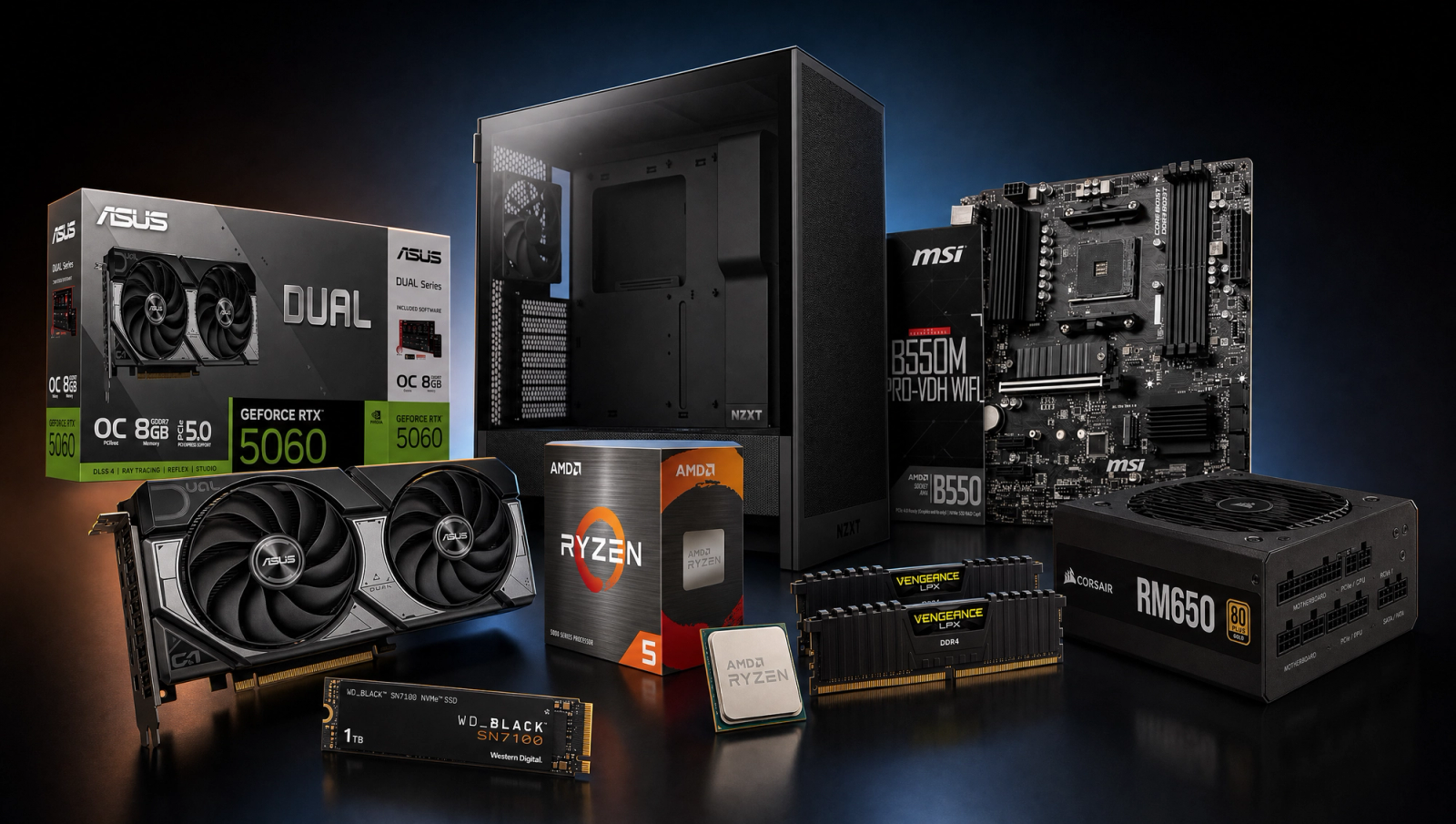
The full parts list for this AM4 entry-tier build at a glance.
Performance Summary
Esports titles at 1080p run extremely well. Expect well over 144fps in Valorant, CS2, Rocket League, Overwatch, and Fortnite (Performance mode), comfortably saturating a 144Hz panel and pushing toward 240Hz in the lightest titles. AAA games at 1080p are the realistic ceiling: most modern releases land in the 60-90fps range at Medium-to-High with DLSS Quality, and the most demanding titles (Cyberpunk 2077 with RT, Alan Wake 2, Black Myth: Wukong) need settings turned down further to stay smooth. The 8GB of VRAM on the 5060 is the part most likely to age first.
Performance Expectations
Average FPS at 1080p High, native rendering (no upscaling).
- Cyberpunk 2077100 FPS
- Black Myth: Wukong66 FPS
- Stalker 247 FPS
- Marvel's Spider-Man 264 FPS
- Starfield64 FPS
- Baldur's Gate 356 FPS
- Helldivers 2100 FPS
- Hogwarts Legacy101 FPS
- Call of Duty: Black Ops 668 FPS
High-refresh 1080p esports is the build's job, and it does that job well. Competitive titles run uncapped and uncontested; the limiter is usually the monitor.
AAA gaming at 1080p is the realistic ceiling, not the headline. Modern AAA titles play well at 1080p Medium/High with DLSS, but the picture changes with ray tracing on or path tracing enabled. Both will push frametimes outside playable range without aggressive upscaling. DLSS 4 helps a lot here, and it's the main reason the 5060 stays viable in 2026 releases that would have folded an older 8GB card.
The 8GB VRAM ceiling matters more than the raw silicon. A handful of texture-hungry titles (Indiana Jones, Hogwarts Legacy with the texture pack, recent Resident Evil entries) will push past 8GB at 1080p Ultra and force texture-pop or stutter. Drop to High textures and the issue mostly disappears. This is the single biggest reason this build is positioned as entry-tier rather than as a long-haul AAA machine.
This is not a 1440p build. The 5060 will technically render at 1440p, but you'll be running Medium settings in modern AAA to hold 60fps, at which point you've defeated the purpose of the higher resolution. Stay on 1080p.
Parts Breakdown
Every part below is chosen to put as much of the budget into the GPU as possible without compromising stability, longevity, or build experience. The Ryzen 5 5600, RTX 5060, MSI B550M PRO-VDH WiFi, Corsair Vengeance LPX 16GB DDR4-3600 CL18, WD_Black SN7100 1TB NVMe Gen4, Corsair RM650e, and NZXT H5 Flow each earn their spot here.
CPU

The Ryzen 5 5600 is the right CPU for this budget because at 1080p with an RTX 5060, the GPU is the bottleneck in nearly every modern game. Spending more on the CPU buys frames you can't actually see. The 5600's six Zen 3 cores hit comfortably above 4.4GHz boost, which is enough to feed the 5060 in everything except the most CPU-heavy esports edge cases.
The obvious trade-off versus a Ryzen 5 5700X3D or jumping to AM5 (Ryzen 5 7600) is 1% lows in CPU-bound esports titles. Valorant and CS2 push 400+fps on faster chips. If you live in those titles on a 240Hz+ monitor, the 5700X3D is the smarter spend. For everyone else at 144Hz on a mixed library, the 5600 is the value pick and frees the budget that goes into the GPU.
Compatibility note: the 5600 ships with the Wraith Stealth cooler, which is genuinely adequate at stock, so no AIO needed at this tier. Socket is AM4, which means this platform is end-of-life from an upgrade perspective. Plan around that.
GPU

The RTX 5060 is the cheapest current-gen GPU we'd actually put in a build right now, and it's the entire reason this PC exists at this price. DLSS 4 with multi-frame generation is the differentiator over anything previous-gen at the same dollar: it's what makes modern AAA titles playable at 1080p with reasonable settings, where a non-DLSS card of similar raw performance would struggle.
The honest trade-off is the 8GB VRAM buffer. A used RX 6800 or RX 7700 XT brings 12-16GB at similar money and ages better in texture-heavy titles, but loses DLSS 4 frame generation and runs hotter and louder. The 5060 is the right pick if you value driver maturity, low power draw (it'll happily run on a 500W PSU), and current-gen feature support over raw VRAM headroom. If you're certain you'll keep this GPU for four years, look hard at the RX 7700 XT instead.
The ASUS Dual RTX 5060 OC specifically is a compact 2.5-slot design that fits any reasonable mid-tower without clearance worries.
Motherboard

The MSI B550M PRO-VDH WiFi is the boring-but-correct pick for an AM4 entry build. B550 gives you PCIe 4.0 to both the GPU and the M.2 slot, integrated Wi-Fi, and enough VRM for the 5600 without thinking about it. Micro-ATX keeps the board affordable and fits a standard mid-tower with room to spare.
The trade-off versus a cheaper A520 board is BIOS flexibility and PCIe 4.0 NVMe. A520 is PCIe 3.0 only, which would kneecap the SN7100. The trade-off versus an X570 board is roughly one tier of features (more USB, beefier VRMs) you don't need for a non-overclocked 5600.
Compatibility note: this board ships ready for Ryzen 5000 out of the box on recent revisions, with no BIOS flash dance like the early B450 days. If you somehow get an older stock unit and run into a no-POST, MSI's Flash BIOS button works without a CPU installed.
Memory (RAM)

Corsair Vengeance LPX 16GB DDR4-3600 CL18 is the AM4 sweet spot. Zen 3 likes 1:1 FCLK at 1800MHz, which lines up with 3600MT/s memory. Anything faster is fighting the architecture. CL18 is the value bin; CL16 kits exist but the real-world fps delta is in the noise.
The trade-off is 16GB versus 32GB. For pure 1080p gaming in 2026, 16GB is still functional but tight. A Discord call, a browser with 30 tabs, and a modern AAA game will start touching the limit. We're keeping the build at 16GB to hold the budget anchor, but adding a second matched kit to push to 32GB is the obvious first upgrade. Don't mix kits if you can avoid it; buy a single 32GB kit when you upgrade.
Low-profile heatsinks (the LPX naming) mean zero clearance issues with any air cooler you'd realistically pair with a 5600.
Storage

A single WD_Black SN7100 1TB NVMe Gen4 is the right call here. It's DRAM-less but uses HMB, hits around 7,250 MB/s sequential reads, and runs cool enough that the motherboard's M.2 heatsink is plenty. Modern AAA games install at 70-150GB each. 1TB is the floor we'd accept in 2026.
The trade-off versus a DRAM-equipped drive (SN850X, Samsung 990 Pro) is sustained write performance under heavy workloads. Game installs and Steam shader compiles will be measurably slower on the SN7100 in synthetics, but invisible during actual gaming. For a pure gaming PC, the DRAM-less Gen4 tier is the value sweet spot.
Upgrade path: the B550M board has a second M.2 slot (PCIe 3.0 x4). Add a second drive later when your library outgrows 1TB rather than replacing this one.
Power Supply

The Corsair RM650e 80+ Gold ATX 3.1 is overkill for this build in the best way. The actual system pulls maybe 320W gaming, so 650W gives roughly two times the headroom. The reason to buy it is ATX 3.1 / PCIe 5.1 compliance: it has the proper 12V-2x6 connector and tolerates the transient power spikes that NVIDIA cards push, including future upgrades.
The trade-off versus a cheaper 550W Bronze unit is a small saving and the upgrade path. Drop to a 550W non-modular Bronze and the system runs fine today, but you've capped any future GPU upgrade at the 5060/9060 tier and you've got the cable-management mess of a non-modular unit. The RM650e is fully modular and quiet under gaming load.
A 10-year warranty means this PSU outlasts everything else in the case.
Case

The NZXT H5 Flow is a compact ATX mid-tower with a mesh front, three included intake fans (or comparable airflow setup), and a clean cable channel layout that makes a first-time build forgiving. Airflow-first cases matter more than people think on an entry build. The 5600's stock Wraith cooler is adequate but not generous, and good chassis airflow keeps temps from creeping into thermal-throttle territory in summer.
The trade-off versus a budget no-name mesh case is build quality, fit-and-finish, and the included fan count. Versus a tempered-glass-front design (looks pretty, breathes poorly), it's not a contest: pick the H5 Flow every time at this tier. GPU clearance is generous and PSU shroud routing is clean.
Micro-ATX motherboards fit comfortably with room for cable management.
Cooling
Stock cooling, the Wraith Stealth that ships in the box with the 5600, handles this CPU at stock clocks. Idle sits in the 30s, gaming load lands in the 60s to low 70s in a well-ventilated case. It's not silent, but it's not loud either.
The trade-off versus a cheap tower cooler (Thermalright Assassin X 120 R SE or similar) is roughly 8-12C lower load temps and meaningfully quieter operation. If acoustics matter to you, that's the single best small upgrade you can add to this build. If they don't, keep the stock cooler and put the money toward a 32GB RAM upgrade instead.
No AIO at this tier. The 5600 doesn't need it, and the cost-per-degree-removed is terrible compared to a tower cooler.
Why This Build Works
The math is the explanation. At this entry-tier budget, the only way to deliver credible current-gen 1080p is to spend the GPU budget aggressively and trim everything else to "good enough." Picking the 5060 over an older 6700 XT or 7600 buys DLSS 4, which is the single feature that makes modern AAA at 1080p playable on 8GB.
The AM4 / DDR4 platform is the other half of the trick. It's a mature, affordable socket where the BIOS works, the boards are budget-friendly, and DDR4 kits are commodity. Spending the platform savings on the GPU is what gets this build from "PS5 equivalent" to "PS5+" territory.
What we're explicitly not doing: chasing 1% lows with an X3D chip, overbuilding the motherboard, splurging on a CL16 RAM kit, or putting an AIO on a non-overclocked 6-core. Each of those would feel "better" on paper and would steal money from the GPU, which is the only component that materially changes the gameplay experience at this price.
Alternative Options
If esports is everything and you have a 240Hz monitor: swap the 5600 for a Ryzen 5 5700X3D and accept a smaller GPU (RTX 4060 instead of 5060). 1% lows in CS2 and Valorant will improve more than you'd think. This pushes the build into the next budget tier up.
If you want maximum VRAM for AAA longevity: replace the 5060 with an RX 7700 XT (12GB) or a used RX 6800 (16GB). You lose DLSS 4 frame generation, the GPU runs hotter, but Indiana Jones at 1080p Ultra stays in spec. Budget creeps modestly upward.
If you want platform upgrade headroom: move to AM5 with a Ryzen 5 7600 and a B650 board. DDR5 kits cost more, total budget pushes well above the anchor, but you can drop a Ryzen 9000-series chip in later. This is the right pick if you plan to keep this PC five years and upgrade the CPU mid-cycle.
If you want pure value over current-gen: a used Ryzen 5 5600 plus a used RX 6700 XT 12GB on the secondhand market can come in well under our budget anchor. You lose DLSS 4 and warranty coverage, but the FPS-per-dollar is unbeatable. Recommended only if you're comfortable with the used GPU market.
Build & Setup Tips
Update the motherboard BIOS to the latest stable before first boot. Newer B550 BIOS revisions improve memory training stability and reduce POST times noticeably. MSI's Flash BIOS button works without a CPU installed if you hit a no-POST.
Enable XMP (DOCP on AMD boards) in BIOS after first boot. Without it, the Corsair kit runs at 2400MHz JEDEC and you'll leave 10-15% of gaming performance on the table. Set the profile, save, reboot, and verify with Task Manager that DRAM is reporting 3600MT/s.
Install NVIDIA's latest Game Ready driver before launching anything. The 5060 needs current drivers for DLSS 4 frame generation to be available in every supported title.
Mount the SN7100 in the top M.2 slot (the one wired to the CPU) for full Gen4 speeds. The second slot is PCIe 3.0, which is fine for a second drive later.
Plug the GPU into the top PCIe x16 slot only. Plug the monitor into a DisplayPort on the GPU, not the motherboard. The 5600 has no integrated graphics, and motherboard outputs will not work.
Cable management: route everything behind the motherboard tray. The H5 Flow has generous cutouts and Velcro straps; use them. Clean airflow paths matter for keeping the stock Wraith cooler in its happy range.
Upgrade Paths
First upgrade, every time: bump RAM from 16GB to 32GB. Buy a single matched 32GB DDR4-3600 CL18 kit and swap, don't add. This is the cheapest QoL change you can make once modern AAA titles start swapping to disk.
Second upgrade: a tower air cooler (Thermalright Assassin X 120 R SE or Peerless Assassin 120) drops CPU temps by 10C+ and is meaningfully quieter than the Wraith Stealth under sustained load.
Third upgrade: a second NVMe drive in the bottom M.2 slot when the 1TB SN7100 fills up. Don't replace; add.
The CPU upgrade ceiling on this socket is the Ryzen 7 5800X3D or Ryzen 7 5700X3D. Both are dramatic gaming upgrades over the 5600 and are the last meaningful CPUs AM4 will ever see. If you stay on this platform for 3+ years, a 5700X3D drop-in late in life makes a lot of sense.
The GPU upgrade ceiling is whatever the 650W PSU can feed, comfortably an RTX 5070 or RX 9070 down the road. The case and PSU are built to support a meaningful GPU step up without replacing other parts.
Final Thoughts
This is the honest floor of credible current-gen 1080p in 2026. It's not a build that punches above its weight in AAA gaming, and we're not going to pretend it does. The 8GB VRAM ceiling is real, and demanding new releases will need settings turned down. What it does do is deliver high-refresh esports performance that comfortably saturates a 144Hz monitor, plus playable 1080p AAA when paired with DLSS 4 and reasonable settings.
The parts here are deliberately unsexy. That's the point. Every dollar that didn't go into a flashy motherboard, an AIO, or a CL16 RAM kit went into the GPU, which is the only component that changes how the games actually feel. If your budget is hard-capped at this level and you want to play at 1080p, this is the build. If you have meaningfully more headroom, look at the 1080p-144 or 1440p-anchored builds instead. The gap in actual game experience is real, and we'd rather steer you to the right tier than oversell this one.
FAQs
Will this PC run modern AAA games at 1080p?
Yes, but with realistic settings. Most 2025-2026 AAA releases will land in the 60-90fps range at 1080p Medium-to-High with DLSS Quality enabled. The most demanding titles (Cyberpunk 2077 with ray tracing, Alan Wake 2, Black Myth: Wukong with high RT) will need settings turned down further. The 8GB VRAM on the RTX 5060 is the part most likely to force compromises. Drop to High textures instead of Ultra if you see stutter or texture-pop.
Is this build good for 1440p gaming?
No. The RTX 5060 will technically render at 1440p, but you'll be running Medium settings in modern AAA to hold 60fps, which defeats the purpose of the higher resolution. Stay on 1080p with this build. If you want a credible 1440p PC, look at one of our 1440p-anchored builds. The GPU step-up is the part that matters.
Why AM4 and DDR4 instead of AM5 and DDR5?
Cost. At this entry-tier budget, the platform savings from AM4 + DDR4 (cheaper motherboard, cheaper memory kit, no BIOS-flash hassles on mature boards) directly buy a current-gen GPU instead of a previous-gen one. The trade-off is real: AM4 is end-of-life, so the last CPU upgrade this socket ever sees is the Ryzen 7 5800X3D or 5700X3D. If you want CPU upgrade headroom over 3+ years, step up to an AM5 / DDR5 build.
Do I need a CPU cooler upgrade?
Not strictly. The Wraith Stealth cooler that ships in the box with the Ryzen 5 5600 handles the chip at stock clocks. Gaming load sits in the 60s to low 70s in a well-ventilated case. It's not silent, though. If acoustics matter to you, a Thermalright Assassin X 120 R SE or Peerless Assassin 120 drops CPU temps by 10C+ and is dramatically quieter. That's the single best small upgrade you can add.
Is 16GB of RAM enough in 2026?
It's enough today but tight. A modern AAA game plus a browser with tabs plus Discord will start touching the 16GB limit, and a few titles already prefer 32GB for headroom. We held the build at 16GB to keep the budget honest. Adding a second matched 16GB kit (or replacing with a single 32GB kit) is the first upgrade we'd recommend once you have the budget for it. Don't mix kits if you can avoid it.
Can I add a graphics card upgrade later?
Yes, comfortably. The Corsair RM650e is ATX 3.1 / PCIe 5.1 compliant and rated for the transient power spikes NVIDIA cards push. It will feed up to an RTX 5070 or RX 9070-class GPU down the road without replacing the PSU. The case, motherboard, and PSU were chosen specifically to leave that headroom. The Ryzen 5 5600 will bottleneck a 5070-class card slightly at 1080p, so a CPU bump (5700X3D) at the same time makes sense.
Does this build come with Windows or peripherals?
No. The budget anchor is parts only: case, motherboard, CPU, GPU, RAM, storage, PSU, and the stock cooler. A Windows 11 license can be acquired cheaply on the gray market or free if you have a spare from an old PC. Monitor, keyboard, mouse, and headset are separate. Budget meaningfully more if you're starting from zero on peripherals.
What esports games will this run smoothly?
All of them, at 1080p, comfortably above 144fps. Valorant, CS2, Rocket League, Overwatch 2, Apex Legends, Fortnite (Performance mode), Marvel Rivals, and League of Legends all push well past 144fps on this hardware. Most are GPU- or monitor-limited, not CPU-limited. CS2 and Valorant specifically can push 250-400fps depending on the map. If you have a 240Hz panel and live in those two titles, consider stepping the CPU up to a Ryzen 5 5700X3D for better 1% lows.