Best Content Creation PC Under $2500
A capable hybrid creator and gaming PC pairing the Ryzen 7 9800X3D with the RTX 5070 Ti 16GB, 32GB DDR5-6000, and a 360mm AIO under a $2500 anchor.
$2,500.00(target price)
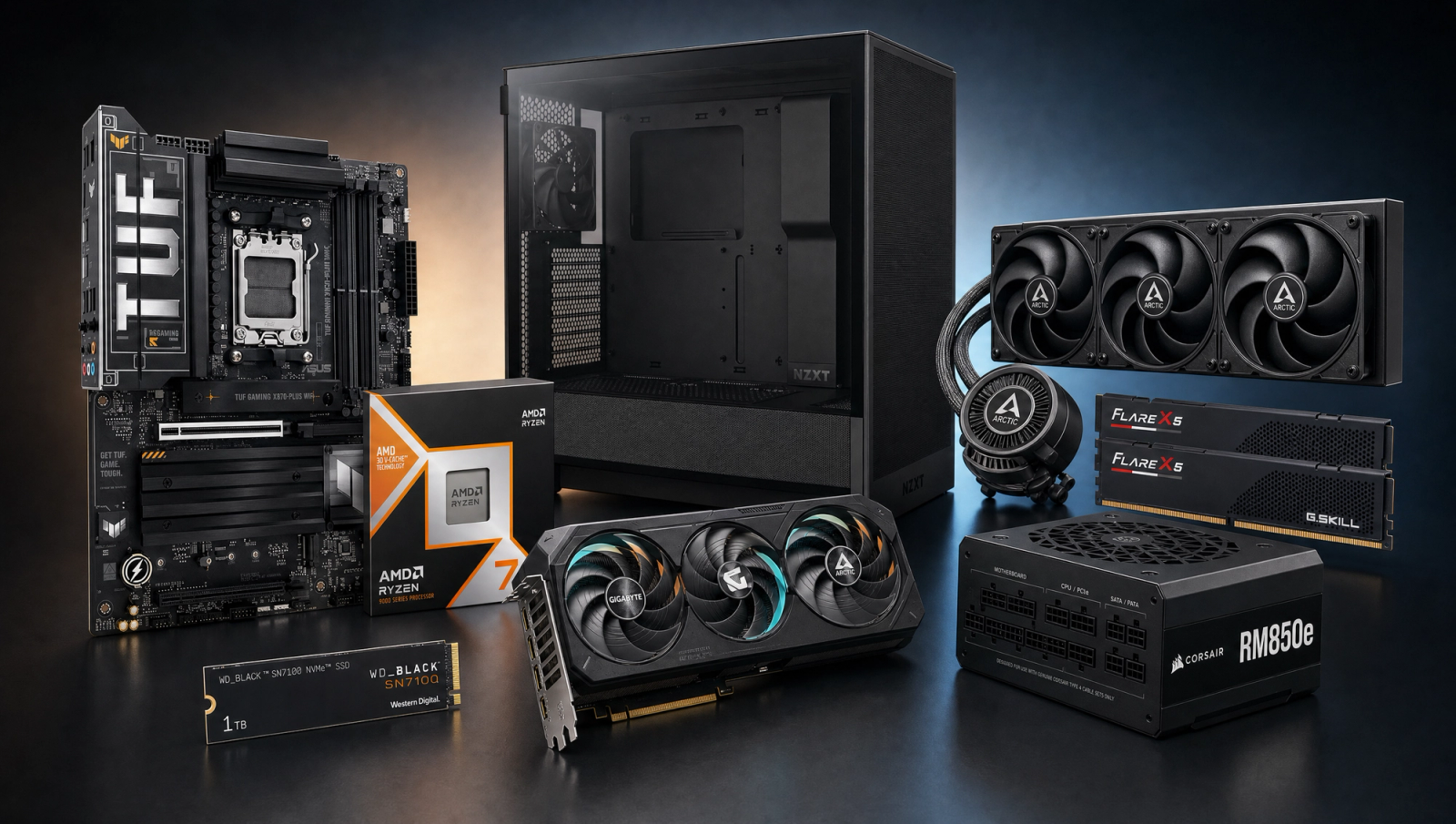
Components
- $479.00
- $749.00
- $200.00
- $110.00
- $70.00
- $130.00
- $160.00
- $85.00
Who This Build Is For
This build is for the creator who also games, or the gamer who has started doing real creative work on the side. Photo editing, 1080p and 1440p video timelines, OBS streaming, hobbyist Blender, music production with heavy plugin chains, and AAA gaming at 1440p Ultra all sit comfortably inside its envelope. It does not pretend to be a dedicated workstation. The Ryzen 7 9800X3D is a gaming-tuned chip with 8 cores and 16 threads, not a 16-core production CPU, and the 5070 Ti has 16GB of VRAM rather than the 24GB+ that serious AI or heavy 3D production needs. If your workload is 80 percent pure content creation with very little gaming, the workstation builds at the next tier up will serve you better. If you live in the middle, this is the sweet spot under the rounded budget anchor.
Build Overview
Key Specs
CPU | AMD Ryzen 7 9800X3D (8c/16t, Zen 5 X3D) |
GPU | NVIDIA GeForce RTX 5070 Ti 16GB GDDR7 |
Motherboard | ASUS TUF Gaming X870-PLUS WiFi |
Memory | 32GB G.Skill Flare X5 DDR5-6000 CL30 (EXPO) |
Storage | WD_Black SN7100 1TB NVMe Gen4 |
Power Supply | Corsair RM850e 80+ Gold ATX 3.1 Modular |
Case | NZXT H5 Flow ATX Mid-Tower |
Cooling | Arctic Liquid Freezer III Pro 360 AIO |
CPU
AMD Ryzen 7 9800X3D (8c/16t, Zen 5 X3D)
GPU
NVIDIA GeForce RTX 5070 Ti 16GB GDDR7
Motherboard
ASUS TUF Gaming X870-PLUS WiFi
Memory
32GB G.Skill Flare X5 DDR5-6000 CL30 (EXPO)
Storage
WD_Black SN7100 1TB NVMe Gen4
Power Supply
Corsair RM850e 80+ Gold ATX 3.1 Modular
Case
NZXT H5 Flow ATX Mid-Tower
Cooling
Arctic Liquid Freezer III Pro 360 AIO
Here are the parts that make up this build, with links to current pricing on Amazon for each.
Performance Summary
The 9800X3D and RTX 5070 Ti form a hybrid creator and gaming engine. The X3D V-Cache accelerates cache-friendly workloads like certain Premiere effects and modern game engines, while the 5070 Ti's 16GB GDDR7 framebuffer drives 1440p and 4K timelines, GPU-accelerated effects in Resolve, and AAA gaming at high refresh. NVENC on the GPU handles streaming and export passes without taxing the CPU. Sustained creator loads are kept in check by the 360mm Arctic AIO. The honest trade-off: eight cores is the modern minimum for serious video work, not the ceiling. Heavy 4K timelines and Blender CPU renders want more cores, and that conversation lives one tier up.
Performance Expectations
Average FPS across the standard 10-game slate at native rendering, with no upscaling applied.
- Cyberpunk 2077162 FPS
- Alan Wake 2106 FPS
- Black Myth: Wukong116 FPS
- Stalker 283 FPS
- Marvel's Spider-Man 2167 FPS
- Starfield143 FPS
- Baldur's Gate 3148 FPS
- Helldivers 2146 FPS
- Hogwarts Legacy127 FPS
- Call of Duty: Black Ops 6185 FPS
The ten-game slate below is the gaming-side performance reference for this hybrid box. It is not a creator benchmark. Numbers are reviewer-sourced averages at native rendering with no upscaling, and they show that the gaming half of the build does not compromise to make room for creator work. Expect a few fps variance by scene and settings.
Parts Breakdown
CPU

The Ryzen 7 9800X3D is eight Zen 5 cores with 16 threads and 96MB of stacked L3 V-Cache. For creators, the honest framing matters. Premiere Pro and Resolve timelines at 1080p and 1440p are fine on eight cores, especially with GPU-accelerated effects doing most of the heavy lifting. Photo work in Lightroom and Photoshop never asks for more. Where eight cores starts to hurt is sustained, CPU-bound work: long Blender CPU renders, heavy 4K multi-cam timelines, large code compiles, Cinebench-style multi-thread sweeps. A 9900X or 9950X with 12 to 16 cores would chew through those faster, but it would also give up a meaningful chunk of gaming performance at this resolution. The V-Cache helps a narrow slice of creator workloads where cache hit rate matters, and helps gaming everywhere. That is the deal you are making at this tier.
GPU

The RTX 5070 Ti with 16GB of GDDR7 is the creator-friendly half of the equation. For video work, NVENC accelerates H.264 and HEVC encodes on export and during OBS streaming, and CUDA drives the GPU-accelerated effects in DaVinci Resolve and Premiere. 16GB of VRAM is enough for plate-based VFX work, modest 4K proxy timelines, and small to mid-size 3D scenes in Blender's Cycles or Octane. On the gaming side, the 5070 Ti crushes 1440p Ultra and is fully capable at 4K with light upscaling. The 16GB framebuffer also future-proofs against the texture budgets in next-generation titles. The trade-off versus a 5080 is roughly 20 percent of raw GPU throughput and 4GB of additional VRAM for a notable price jump, and versus a workstation Pro card you give up driver-certified application support that most prosumers do not need.
Motherboard

The ASUS TUF Gaming X870-PLUS WiFi is a 16+2+1 phase X870 board with 80A power stages, more than enough for the 9800X3D under sustained creator loads. USB4 ports on the rear give you 40Gb/s for external Thunderbolt-style storage and capture devices, which matters more for creators than it does for pure gamers. PCIe 5.0 lanes on the primary M.2 and the GPU slot leave the door open for future storage and GPU upgrades. The trade-off versus a B850 is a small premium for the extra USB4 lanes and a beefier VRM, both of which earn their keep in a creator workflow.
Memory (RAM)

32GB of G.Skill Flare X5 DDR5-6000 CL30 is the modern minimum for serious creator work. Photo editing in Lightroom and Photoshop is happy with 32GB even on huge raw files. 1080p and 1440p video timelines fit fine. Where 32GB starts to feel tight is heavy 4K multi-cam editing with multiple effects stacks loaded and a browser full of references open in the background. The clean upgrade path is a second 32GB kit for 64GB total, which is worth considering up front if you know 4K video is in your near future. DDR5-6000 CL30 is the AM5 sweet spot for the Infinity Fabric, so going faster buys little; going slower costs measurable performance.
Storage

The WD_Black SN7100 1TB is a Gen4 NVMe drive hitting up to 7,250 MB/s read, with a DRAM-less HMB design that holds its sustained write speeds well for creator loads. 1TB is enough to hold the operating system, applications, and two or three active creative projects. The honest recommendation: add a secondary 2TB NVMe scratch drive sooner rather than later if you are doing video work. Active project files, render caches, and proxy media will eat through a single 1TB faster than expected. The X870-PLUS has multiple M.2 slots to make that drop-in trivial.
Power Supply

The Corsair RM850e is an 80+ Gold, fully modular ATX 3.1 unit with the native 12V-2x6 connector for the 5070 Ti. 850 watts is comfortable headroom for a 9800X3D plus 5070 Ti pairing under combined creator and gaming loads, and the ATX 3.1 spec means it tolerates the brief power excursions that modern GPUs generate without tripping. The trade-off versus the RM750e is roughly 100 watts of extra ceiling that becomes relevant only if you swap to a higher-tier GPU later. Going with the 850e up front saves you a PSU replacement during a future GPU upgrade.
Case

The NZXT H5 Flow is a compact ATX mid-tower with a perforated front panel built for airflow, which matters for sustained creator loads where the CPU and GPU are pulling power for hours at a time. It fits a 360mm radiator at the top, supports three 140mm intake fans at the bottom, and clears all current ATX motherboards and full-length GPUs. Cable management is straightforward thanks to a deep rear channel. The trade-off versus a larger Fractal North or Lian Li O11 is interior volume and the kind of expansive radiator support you do not need at this tier.
Cooling

The Arctic Liquid Freezer III Pro 360 is a 360mm AIO with a 38mm thick radiator and an integrated VRM fan on the pump block. The thicker radiator gives it real cooling capacity at sustained loads, which a creator box sees far more often than a gaming-only box. The 9800X3D runs cooler than a 9900X or 9950X, so the 360mm is overkill for the chip itself, but the headroom keeps fan noise low and gives you a quiet workstation when you are deep in a long export or render. The trade-off versus a 280mm AIO is roughly 5 to 7 degrees Celsius under sustained load and noticeably quieter idle and light-load operation.
Final Thoughts
This is a hybrid creator and gaming PC under the rounded budget anchor, and it earns that label by being honest about its limits. Photo editing, OBS streaming, 1080p and 1440p video timelines, hobbyist Blender, and AAA gaming at 1440p Ultra all sit inside its envelope. Heavy 4K editing, production-grade 3D rendering, and serious local AI inference live one or two tiers up, and that is fine. If you are spending 80 percent or more of your computer time on content creation, the workstation builds at the next tier up are the right call. If you are splitting your time between creator work and gaming, this is the build that does not force you to compromise on either side.
FAQs
Is the 9800X3D a good content creation CPU?
For hybrid creator and gaming use, yes. Photo editing, 1080p and 1440p video timelines, streaming, and hobbyist Blender all run fine on eight cores. For sustained multithreaded workloads like heavy 4K video editing or production 3D rendering, the 9900X or 9950X with 12 to 16 cores is a better fit and lives one tier up.
Is 16GB of VRAM enough for video editing and 3D work?
For 1080p and 1440p video editing, yes, with comfortable headroom for GPU-accelerated effects in Premiere and Resolve. For 4K timelines a proxy workflow is the standard approach. For 3D, 16GB handles hobbyist Blender scenes well. Serious production 3D and local AI inference want 24GB+, which puts you on a 5090 or a workstation Pro card.
Can this build replace a dedicated workstation?
No, and it is not trying to. The 9800X3D is gaming-tuned, not creator-tuned, and the V-Cache helps a narrow slice of creator workloads. If your day is 80 percent or more pure content creation with minimal gaming, a 9950X or Threadripper system at the next tier up is the right machine. This build is for the middle of the Venn diagram.
Why a 360mm AIO on a chip that does not need it?
Two reasons. First, creator workloads sustain CPU loads for far longer than gaming does, so cooling headroom matters more here. Second, the 360mm runs quieter than a 240mm or 280mm at the same heat output, which keeps the box quiet during long exports and renders. The 9800X3D itself would be happy on a 240mm AIO.
Should I upgrade to 64GB of RAM at purchase?
Only if you know 4K video editing or heavy 3D work is in your near future. 32GB is fine for photo editing, 1080p and 1440p video timelines, streaming, and most Blender work. The X870-PLUS has four DIMM slots and the kit supports EXPO at DDR5-6000, so adding a second 32GB kit later is straightforward.
Is 1TB of storage enough for a creator?
It will fit the operating system, applications, and two or three active projects. A secondary 2TB NVMe scratch drive is the recommended next step for active project files, render caches, and proxy media, particularly if you are doing video work. The X870-PLUS has multiple M.2 slots to make that drop-in trivial.
How well does this build stream while gaming?
Very well. NVENC on the 5070 Ti handles OBS encoding without touching the CPU, and the 9800X3D has cores to spare for the game itself. This is the same story as a dedicated streaming build at a lower tier, just with a flagship CPU and a better GPU underneath.