Best Gaming/Streaming PC Under $1500
A single-PC gaming + streaming build around the Ryzen 7 7700X and RTX 5070. Eight CPU cores keep games smooth while NVENC handles the encode.
$1,500.00(target price)
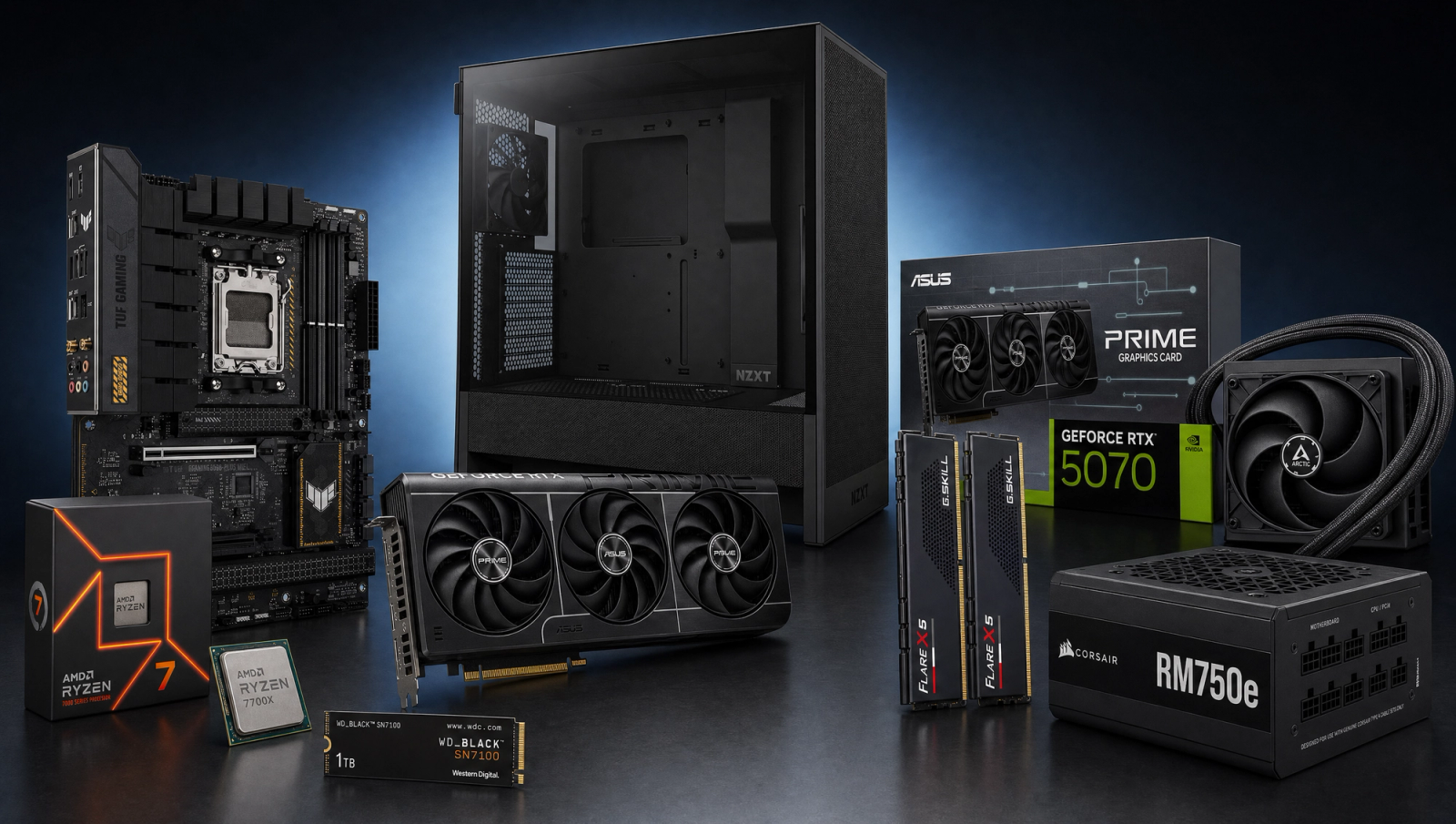
Components
- $309.00
- $549.00
- $180.00
- $110.00
- $70.00
- $100.00
- $130.00
- $85.00
Who This Build Is For
You're streaming on the same PC you game on. A small Twitch or YouTube channel, a Discord stream for friends, or a creator who edits and games on one machine. You want gameplay smoothness and stream quality without juggling a second box, a capture card, and two sets of audio routing.
This build is sized for that single-PC reality. Eight CPU cores and sixteen threads give the game thread room to breathe while OBS, a browser stack, and chat tools eat memory in the background. The RTX 5070's NVENC encoder takes the actual stream encode off the CPU, so your AAA frametimes don't fall apart the moment you hit "Start Streaming."
If you only game and have no plans to stream, the budget here is overkill on the CPU side. Look at a 6-core 7600 paired with a similar GPU and put the savings elsewhere. This build only earns its 7700X by being asked to do two demanding things at once.
Build Overview
Key Specs
CPU | AMD Ryzen 7 7700X (8c/16t) |
GPU | NVIDIA RTX 5070 12GB |
Motherboard | ASUS TUF Gaming B650-PLUS WiFi |
Memory | 32GB DDR5-6000 CL30 (G.Skill Flare X5) |
Storage | WD_Black SN7100 1TB NVMe Gen4 |
Cooler | Arctic Liquid Freezer III Pro 240 AIO |
Power Supply | Corsair RM750e 80+ Gold ATX 3.1 |
Case | NZXT H5 Flow ATX Mid-Tower |
CPU
AMD Ryzen 7 7700X (8c/16t)
GPU
NVIDIA RTX 5070 12GB
Motherboard
ASUS TUF Gaming B650-PLUS WiFi
Memory
32GB DDR5-6000 CL30 (G.Skill Flare X5)
Storage
WD_Black SN7100 1TB NVMe Gen4
Cooler
Arctic Liquid Freezer III Pro 240 AIO
Power Supply
Corsair RM750e 80+ Gold ATX 3.1
Case
NZXT H5 Flow ATX Mid-Tower
Here are the parts that make up this build, with links to current pricing on Amazon for each.
Performance Summary
At 1440p High native, the RTX 5070 clears 90 fps in most current AAA titles and pushes well past 130 fps in esports and lighter loads, while the Ryzen 7 7700X stays GPU-bound across the slate. When you flip on OBS with NVENC HEVC at 8000 kbps, in-game FPS impact is typically inside the margin of run-to-run variance because the encode happens on a dedicated slice of the GPU. CPU headroom keeps Chrome, Discord, and chat overlays from clawing into the game thread.
Performance Expectations
Average FPS across the standard 10-game slate.
- Cyberpunk 2077138 FPS
- Alan Wake 295 FPS
- Black Myth: Wukong105 FPS
- Stalker 278 FPS
- Marvel's Spider-Man 2148 FPS
- Starfield115 FPS
- Baldur's Gate 3142 FPS
- Helldivers 2130 FPS
- Hogwarts Legacy132 FPS
- Call of Duty: Black Ops 6175 FPS
These numbers are reviewer-triangulated averages at three native resolutions for the standard 10-game slate. Expect plus or minus 5 fps depending on scene, settings tweaks, and CPU pairing. Stalker 2, Black Myth: Wukong, and Alan Wake 2 are the demanding UE5 titles at the top of the slate; everything else hits comfortable high-refresh figures at 1440p.
Parts Breakdown
CPU

The Ryzen 7 7700X is the load-bearing component for the streaming half of this build. Single-PC OBS sessions eat threads: the game runs on a handful of cores, the audio pipeline takes one, Chrome tabs for stream dashboards and alerts take more, and any CPU-side encode (x264) would compete with all of it. Eight cores and sixteen threads give you a real cushion. You can run x264 medium as a fallback encoder in a pinch, but for day-to-day streaming the NVENC path on the GPU is the right answer, leaving these cores free for the game and the background stack.
The nearest alternative at this tier is the Ryzen 5 7600. It saves real money and is a fantastic gaming chip, but with 6 cores and 12 threads it leaves no headroom for a creator workload on top of gameplay. If you ever plan to record and edit on the same machine, the 7700X earns its slot back during the export pass.
GPU

The RTX 5070 does double duty here. For gameplay, 12GB of GDDR7 handles current AAA at 1440p High native with high-refresh headroom, and DLSS Quality opens up Ultra and 4K-curious settings in the lighter titles. For streaming, NVENC HEVC at common Twitch and YouTube bitrates is functionally indistinguishable from x264 medium at the same bitrate, while costing the game effectively zero frames.
An RX 9070 (non-XT) is the AMD cross-shop. AMD's AMF encoder has closed most of the gap with NVENC in recent driver updates, but NVENC's tooling, OBS integration, and codec preset maturity are still ahead. For a streamer, that matters more than the raster delta either way.
Motherboard

The ASUS TUF B650-PLUS WiFi is the right amount of board for the 7700X. The 14-stage VRM holds the chip's 105W PPT through long sustained loads without thermal throttling on the VRM side, which matters when you're encoding and gaming for hours. PCIe 5.0 on the GPU slot and an M.2 5.0 lane give you headroom for a future GPU upgrade and a faster boot drive.
A B850 board would add native USB4 and a slightly fresher feature set. For this build the cost delta doesn't earn its keep; B650 platform support for 7000-series chips is mature and BIOS updates have stabilized.
Memory (RAM)

32GB of G.Skill Flare X5 DDR5-6000 CL30 is the floor for a streaming PC, not the luxury option. Open OBS, a browser with stream dashboard and chat tabs, Discord, the game itself, and a music client, and 16GB is already shoulder-deep. 32GB gives you room to also run a stream-deck companion, run replay buffers in OBS, and keep the OS file cache populated so loading screens don't feel sluggish.
DDR5-6000 at CL30 is the AM5 sweet spot. EXPO clicks the kit straight to spec in BIOS. A faster DDR5-7200 kit costs more and frequently won't post on a 2-DIMM 7000-series board at 1:1, so it's not worth the chase.
Storage

The WD_Black SN7100 1TB is a Gen4 NVMe drive with 7250 MB/s reads. For a streamer that translates to fast game loads, painless asset swaps when you're switching titles for a viewer request, and enough write bandwidth to dump OBS replay buffers and clips without stuttering.
1TB fills up fast on a streaming rig. Plan to add a 2TB secondary drive within the first month if you keep large game installs around, or expect to triage installs every few weeks. If you record full sessions locally for editing, double that and treat the second NVMe as a non-negotiable.
Power Supply

The Corsair RM750e is 80+ Gold, ATX 3.1, and fully modular. The 5070's typical peak board power lands around 250W; the 7700X adds another 140W under all-core load; everything else is single-digit watts. 750W gives you transient spike headroom for the PCIe 5.1-spec 12V-2x6 connector and quiet operation at typical gaming load, since the fan stays off under about 40% utilization.
Don't go smaller. A 650W unit would technically run this build, but on a streaming PC the worst-case condition is full GPU load plus 100% CPU load plus PCIe spikes, and you want that headroom. 850W is fine if you find one on sale but is real money for capacity you won't use.
Case

The NZXT H5 Flow gives you a mesh front and a clean cable shroud in an ATX mid-tower footprint. Front-to-back airflow is the right pattern for a 240mm AIO mounted in the top exhaust position. The included fans are adequate for the GPU; add intake fans if you plan to push the 7700X harder with PBO.
If you want a quieter build, a Fractal North or Lian Li Lancool 216 are sidegrades worth a look. Both run a touch cooler under sustained load at the cost of a busier front panel.
Cooling

The Arctic Liquid Freezer III Pro 240 is the right cooler for an X-suffix Zen 4 chip that's being asked to sustain encoding load on top of gaming. The 38mm-thick radiator gives you real thermal headroom over budget 240mm AIOs, and the VRM fan on the pump head is a small but real bonus for sustained loads on a B650 board.
A solid 240mm air cooler like the Peerless Assassin 120 SE would also hold the 7700X under gaming-only loads. The AIO earns its place when you stack a streaming workload on top, because sustained CPU encode (or just an aggressive PBO profile) keeps the chip in its higher boost bins for longer stretches and an AIO removes that heat faster than a tower can.
Final Thoughts
The value of this build is that you don't pick between gaming performance and stream quality. The 7700X gives the OS, Chrome, and the game what they need; the RTX 5070's NVENC encoder handles the stream encode without taxing the CPU; 32GB of fast RAM keeps the background app stack from causing hitches; the AIO holds thermals through long sessions. It's a working single-PC creator setup with no compromises baked into the wrong place.
For peripherals, a decent USB condenser or dynamic mic plus a closed-back monitoring headphone are the next two purchases. We cover specific picks in our peripherals guide. Webcam matters less than lighting; if you can only buy one, buy a lamp.
If streaming is core to what you do and you ever outgrow this rig, the upgrade path is to move x264 medium offload to a dedicated stream PC and let this machine focus on gameplay. That's a year-or-two-down-the-road decision, not a day-one one.
FAQs
Is a single PC enough for streaming, or do I need a second machine?
For most small-to-mid Twitch and YouTube channels, single PC with NVENC is enough. The 5070's encoder handles the encode in dedicated silicon, so it doesn't fight the game for GPU time, and the 7700X has the cores to absorb OBS plus a browser stack. You only outgrow this setup when you're doing high-bitrate dual-platform streaming with overlays that have heavy CPU work, or when you start adding capture cards for console gameplay.
Should I use NVENC or x264 for encoding?
Use NVENC HEVC or AV1 if your platform supports it. At common Twitch and YouTube bitrates (6000 to 8000 kbps), NVENC is essentially indistinguishable from x264 medium in quality while using almost no CPU. x264 medium is only the right answer when your viewers are constrained to a platform that doesn't accept HEVC and you specifically need the very-low-bitrate compression edge, and even then it's a smaller gap than it used to be.
Do I really need 32GB of RAM?
Yes, for a streaming PC. OBS itself isn't huge, but you'll be running Chrome with multiple dashboard and chat tabs, Discord, the game, and probably a music app and a stream-deck companion. 16GB will work but you'll hit the wall fast, especially with modern AAA games eating 12 to 14GB on their own. 32GB is the comfortable floor and 64GB only makes sense if you also edit video on this rig.
Can I record locally while streaming?
Yes. OBS can encode a second output to the 1TB SN7100. The drive's write speed easily handles 50 Mbps recording while you stream at 8000 kbps. The catch is that an hour of high-bitrate local recording fills around 25GB; budget a second drive if you record full sessions for editing.
Why the X-chip instead of the non-X 7700?
The non-X 7700 is a fine chip and is the better pick if you only game. For a streaming workload, the X variant's higher all-core boost stays in the higher boost bins for longer under sustained mixed load, which matters when you're holding game logic plus background apps for two-hour streams. The AIO in this build is sized to keep that boost behavior consistent.
What about adding a capture card for console streaming later?
Easy add. An internal Elgato 4K X or similar PCIe capture card drops into the second PCIe slot on the TUF B650-PLUS. The 5070 doesn't care about losing a few PCIe lanes from the secondary slot. USB external capture cards are also fine; the 7700X has plenty of headroom to handle them.