Best RTX 5070 Gaming PC Build
A component-anchored RTX 5070 gaming PC build with the Ryzen 7 7700X, 32GB DDR5-6000, and a 240mm AIO. Tuned for 1440p high-refresh with 4K headroom.
$1,500.00(target price)
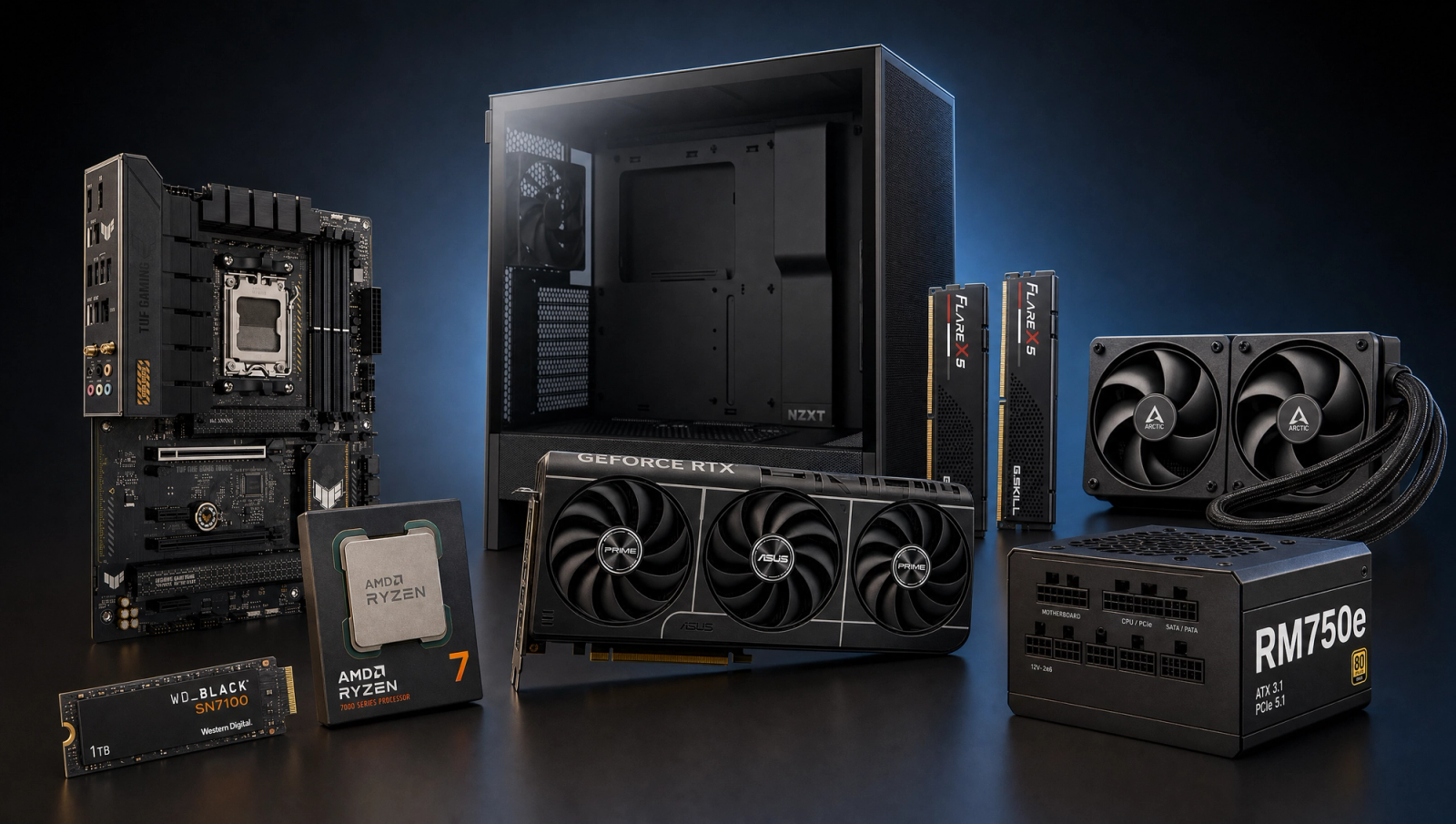
Components
- $309.00
- $549.00
- $180.00
- $110.00
- $70.00
- $100.00
- $130.00
- $85.00
Who This Build Is For
You already decided on the RTX 5070. Now you want a sane build around it: a CPU that does not bottleneck the card, a board that will not throttle the 105W chip, and enough PSU headroom to step up a GPU tier later without a full rebuild. That is what this is.
The target is 1440p high-refresh in current AAA titles at native settings, with the option to pull DLSS Quality and push frame rates higher. 1080p competitive shooters land well above 144 fps. 4K High is playable in lighter titles and gets there in heavier ones once you turn on DLSS. Total spend lands in the mainstream-step-up tier, well under the budget most 5070 buyers come in with.
If you are still cross-shopping the 5070 against the 9070 XT, this article assumes the decision is made. If you want a cheaper card with similar 1080p performance, look at the 5060 Ti 16GB tier instead.
Build Overview
Key Specs
CPU | AMD Ryzen 7 7700X (Zen 4, 8c/16t, 105W) |
GPU | NVIDIA RTX 5070 12GB GDDR7 |
Motherboard | ASUS TUF Gaming B650-PLUS WiFi (AM5, PCIe 5.0) |
Memory | 32GB G.Skill Flare X5 DDR5-6000 CL30 (EXPO) |
Storage | WD_Black SN7100 1TB NVMe Gen4 |
Cooler | Arctic Liquid Freezer III Pro 240mm AIO |
Power Supply | Corsair RM750e 750W 80+ Gold (ATX 3.1) |
Case | NZXT H5 Flow 2024 ATX Mid-Tower |
CPU
AMD Ryzen 7 7700X (Zen 4, 8c/16t, 105W)
GPU
NVIDIA RTX 5070 12GB GDDR7
Motherboard
ASUS TUF Gaming B650-PLUS WiFi (AM5, PCIe 5.0)
Memory
32GB G.Skill Flare X5 DDR5-6000 CL30 (EXPO)
Storage
WD_Black SN7100 1TB NVMe Gen4
Cooler
Arctic Liquid Freezer III Pro 240mm AIO
Power Supply
Corsair RM750e 750W 80+ Gold (ATX 3.1)
Case
NZXT H5 Flow 2024 ATX Mid-Tower
Everything in one glance:
Performance Summary
1440p High native is the sweet spot. Across the standard 10-game slate the RTX 5070 averages roughly 95 fps at 1440p native and 132 fps at 1080p native, with lighter titles like Call of Duty Black Ops 6 and Marvel's Spider-Man 2 clearing 110 fps even at 1440p. Heavier UE5 titles such as Stalker 2 and Black Myth Wukong drop into the mid-50s to low-70s at 1440p native, which is exactly where DLSS 4 earns its keep.
4K native is honest about its limits: lighter titles hold 50-80 fps, demanding UE5 games need DLSS Quality to feel smooth. The card has 12GB of GDDR7, which is fine for 1440p today but is the reason this build does not get sold as a 4K rig.
Performance Expectations
Average FPS across the standard 10-game slate.
- Cyberpunk 2077138 FPS
- Alan Wake 295 FPS
- Black Myth: Wukong105 FPS
- Stalker 278 FPS
- Marvel's Spider-Man 2148 FPS
- Starfield115 FPS
- Baldur's Gate 3142 FPS
- Helldivers 2130 FPS
- Hogwarts Legacy132 FPS
- Call of Duty: Black Ops 6175 FPS
Reviewer-sourced averages across the standard 10-game slate, native rendering at each resolution. Expect plus or minus 5 fps depending on settings, drivers, and CPU. Numbers are triangulated from RTX 5070 launch reviews (TechSpot, Tom's Hardware, Gamers Nexus, TechPowerUp).
Parts Breakdown
CPU

The Ryzen 7 7700X is the right CPU partner for the RTX 5070. Zen 4, 8 cores, 16 threads, 4.5 GHz base and 5.4 GHz boost, 105W TDP. It clears the CPU bottleneck in heavy-thread titles like Cyberpunk 2077 Phantom Liberty and Baldur's Gate 3 Act 3 that the 6-core 7600 starts to choke on, and it sits a clear tier below the 7800X3D in spend.
The trade-off versus the 7800X3D is gaming-only frame rate in a handful of CPU-bound titles. A 7800X3D is 10 to 20 percent faster in 1080p competitive scenarios, but most of that gap closes at 1440p where the 5070 is the bottleneck anyway. For an RTX 5070 build at 1440p, you are paying X3D-tier money for performance you cannot see. Spend it on the AIO and the better PSU instead.
Compatibility: AM5 socket, requires a DDR5 board, no integrated cooler in the box.
GPU

The RTX 5070 is the entire reason this build exists. 12GB of GDDR7, 250W TGP, DLSS 4 with Multi Frame Generation, and the Blackwell ray tracing engine. Performance lands roughly between the 4070 Super and the 4070 Ti at raster, with a sizeable lead anywhere DLSS 4 Frame Generation is supported.
The trade-off at this tier is VRAM. The Radeon 9070 XT ships with 16GB and beats the 5070 in pure raster, but you give up DLSS 4 and a more mature ray tracing stack. If you mostly play UE5 titles with heavy ray tracing or you want path tracing in Cyberpunk and Alan Wake 2, the 5070 is the better card. If you mostly play competitive raster titles at 1440p, the 9070 XT is a legitimate alternative.
The linked card is the ASUS Prime RTX 5070 OC. Triple-fan, dual BIOS, 2.5-slot, fits the H5 Flow without issue.
Motherboard

The ASUS TUF Gaming B650-PLUS WiFi is the right board for a 7700X. 14+2 power stages handle the 105W TDP without thermal throttling, PCIe 5.0 x16 for the GPU, PCIe 5.0 NVMe slot for the boot drive, WiFi 6, 2.5GbE, and four DDR5 DIMM slots that hit 6000+ MT/s on EXPO.
B650 versus X670E is a real question at this tier. X670E adds a second PCIe 5.0 NVMe slot, more rear USB ports, and better top-end memory overclocking. Unless you have specific use for a second Gen 5 SSD or you are running a workstation memory profile, B650 keeps a clear chunk of budget in your pocket with no performance hit on this CPU and this GPU.
Compatibility: AM5 socket, DDR5 only, AM4 coolers do not fit without an adapter bracket (the Arctic AIO below ships with both).
Memory (RAM)

G.Skill Flare X5 32GB DDR5-6000 CL30, 2x16GB, AMD EXPO. DDR5-6000 CL30 is the sweet spot for AM5: it runs the Infinity Fabric at the optimal 2000 MHz, and CL30 is the tightest mainstream timing in this speed grade. Enable EXPO in BIOS and you are done.
The trade-off is 32GB versus 16GB. Most current titles still fit comfortably in 16GB, but Stalker 2, Cyberpunk with mods, and any modded Bethesda title will start swapping at 16GB. 32GB is also future insurance for the GPU step-up path: a 5080 or 5070 Ti in this same case will appreciate the headroom.
Do not chase DDR5-7200 kits on a 7700X. The IMC tops out around 6400 for daily-stable 1:1 mode, and 6000 CL30 beats 6400 CL32 in real-world frame times.
Storage

The WD_Black SN7100 1TB NVMe Gen4 is the value pick for a single-drive boot setup. PCIe 4.0 x4, up to 7,250 MB/s sequential read, DRAM-less but with a fast HMB cache that performs like a low-end DRAM drive in gaming workloads.
The trade-off versus a Samsung 990 Pro or WD SN850X is sustained writes on big file moves. For game install and load workloads they are within a few percent of each other, and the SN7100 runs cooler under sustained load (it does not need a beefy heatsink on the board's bare M.2 slot).
1TB is the floor in 2026. Modern AAA installs push 100 to 200GB each. If your library is bigger than 6 to 7 titles at a time, plan on a 2TB SN7100 or a second drive in the board's Gen 4 slot later.
Power Supply

The Corsair RM750e is 750W, 80 Plus Gold, fully modular, ATX 3.1 and PCIe 5.1 native with a 12V-2x6 connector for the GPU. The 7700X plus 5070 system pulls roughly 425 to 475W from the wall under a stress workload, which leaves 750W with comfortable headroom and lets the fan stay off during light load.
The reason this build runs 750W instead of the 650W the current draw would justify: GPU step-up headroom. A 5070 Ti pulls 300W and a 5080 pulls 360W. With 750W, both fit without a PSU swap. With 650W, the 5080 path is closed.
ATX 3.1 also matters here. The 12V-2x6 connector is the revised, safer revision of the 12VHPWR cable that caused the 4090 melting headlines. Any new Blackwell GPU build in 2026 should be ATX 3.1.
Case

The NZXT H5 Flow 2024 is a compact ATX mid-tower with a perforated front panel and a clean cable management layout behind the motherboard tray. Supports a 240mm radiator in the front for the Arctic AIO without fighting the GPU, fits any 3.5-slot card up to 365mm long, and ships with two 120mm intake fans plus one 120mm exhaust at the rear.
The trade-off versus a Fractal North or Lian Li Lancool 216 is RGB and material flash. The H5 Flow is purely functional: airflow first, looks second. If you want a wood-paneled showcase build, the Fractal North is the better aesthetic choice at a slight thermal cost.
Compatibility note: the front radiator mount fits 240mm but not 280mm. If you plan to upgrade to a 280mm AIO later, pick a different case now.
Cooling

The Arctic Liquid Freezer III Pro 240 is the smart pick for a 7700X. 240mm radiator, 38mm thick, PWM pump, VRM fan on the pump block, and AM5 and AM4 mounting in the box. Holds the 7700X at 80 to 85C under full all-core load with the stock fan curve.
A tower air cooler like the Thermalright Phantom Spirit 120 SE will also handle a 7700X, but the chip runs noticeably hotter (mid-90s under load) and the fan ramps more under sustained load. For a 105W CPU in a compact case, a 240mm AIO is the right call. The Arctic also has the longest warranty and lowest noise floor in this price range.
Do not bother with a 360mm AIO on a 7700X in this case. There is no front-panel space for it, and the chip does not pull enough heat to need it.
Why This Build Works
Every part is sized for the RTX 5070, not the other way around. The 7700X clears the CPU bottleneck without paying the X3D tax. The B650 board has Gen 5 NVMe and clean VRMs without the X670E premium. The 240mm AIO matches the 105W TDP. The 750W ATX 3.1 PSU leaves room for a one-tier GPU step-up. The H5 Flow gets air through the radiator without making the build look like a gamer billboard.
Nothing here is the most expensive option in its category. Nothing here is so cheap it caps the GPU. That is the point.
Alternative Options
If you want a quieter build with a slight 1080p performance bump, swap the 7700X for the 7800X3D. Same socket, same board, same cooler. You will pay a chunk more for 5 to 15 percent better 1080p frame rate in CPU-bound titles. At 1440p the gap closes hard.
If you want a higher-VRAM alternative to the 5070, the Radeon 9070 XT ships with 16GB of GDDR6 and matches or beats the 5070 in pure raster. You give up DLSS 4 Frame Generation and a more mature ray tracing stack. For UE5 titles and ray-traced AAA, stay on the 5070. For competitive raster at 1440p, the 9070 XT is worth a look.
If you want a quieter case, the Fractal North fits the same internals with a wood front panel. Slightly worse airflow, slightly better looking on a desk.
Build & Setup Tips
Mount the AIO radiator in the front of the H5 Flow as intake. Top mounting works but pulls hot GPU air through the radiator and runs the CPU 5 to 8C hotter.
Enable EXPO in BIOS on first boot. The G.Skill kit runs at JEDEC 4800 by default; you bought it for 6000 CL30.
Update the B650 board BIOS to the latest stable revision before you do anything else. AGESA updates over the past 18 months meaningfully improved AM5 memory training and boot times.
Leave the GPU at stock. The Blackwell boost algorithm already runs the 5070 close to its thermal headroom. Manual overclocking gains under 5 percent and trades it for fan noise.
Clean cable management is easier in the H5 Flow than most cases at this price. The Velcro straps behind the tray are positioned well. Spend 20 minutes on it.
Upgrade Paths
GPU is the obvious step-up. A 5070 Ti drops in at 300W (fits the 750W PSU) and adds 15 to 25 percent at 1440p with better 4K headroom. A 5080 pushes 360W (still fits) and turns this into a 4K-capable rig.
Storage is the easy second add. The board has a second Gen 4 NVMe slot. Drop in a 2TB Gen 4 drive when your library outgrows 1TB.
Memory is already 32GB at 6000 CL30. There is no realistic upgrade here on AM5 without rebuilding the kit.
CPU upgrade path on AM5 is real but distant. The 9800X3D drops in with a BIOS update for a noticeable 1080p uplift if you start chasing higher refresh rates later. Save it for when the 5070 is the next thing being replaced.
Final Thoughts
This is the build you buy if the RTX 5070 was already locked in. Nothing in the parts list is there to pad the spec sheet. The 7700X is fast enough to feed the GPU at 1440p without paying for X3D performance the 5070 cannot show. The board, PSU, and cooler are sized for the CPU's TDP and the GPU's step-up path. The case gets air across the radiator without trying to be a centerpiece.
If you wanted the cheapest 5070 build possible, you could pull a solid chunk out of this list (drop to a 7600, a B650 non-WiFi, a 650W PSU, and a tower air cooler). It would still work. It would just feel like a build that grew around a 5070 rather than a build that was designed for one.
FAQs
Is the Ryzen 7 7700X enough CPU for the RTX 5070?
Yes, at 1440p the 5070 is the bottleneck across nearly every title. The 7700X (Zen 4, 8c/16t) feeds the card without choking on heavy-thread titles like Cyberpunk and Baldur's Gate 3. The 7800X3D is faster at 1080p in CPU-bound scenarios, but the gap closes hard at 1440p, which is where this build lives.
Will the 750W PSU be enough for a future GPU upgrade?
Yes. The Corsair RM750e is ATX 3.1 with a native 12V-2x6 connector, sized for a one-tier GPU step-up. A 5070 Ti (300W) or 5080 (360W) drops in without a PSU swap. If you ever step to a 5090 (575W), you will need to upgrade to 1000W.
Do I really need a 240mm AIO for the 7700X?
You do not strictly need an AIO, but you want one. The 7700X is a 105W TDP chip that runs hot under sustained load. A 240mm AIO holds it in the 80-85C range with low fan noise. A good tower air cooler like the Thermalright Phantom Spirit 120 SE will also work, but the chip runs mid-90s under load and the fan ramps audibly.
Is 12GB of VRAM enough at 1440p?
For 1440p in 2026 yes, with caveats. Current AAA titles fit in 12GB at High settings. Some texture-heavy outliers (Indiana Jones Path Tracing, Hogwarts Legacy at Ultra textures, modded games) brush against the limit and force a setting drop. For pure 1440p gaming this build is fine. For 4K Ultra in 2027 and beyond, 16GB cards age better.
Should I get the RTX 5070 or the Radeon 9070 XT?
Pick the 5070 if you care about DLSS 4 Frame Generation, path tracing in Cyberpunk and Alan Wake 2, or NVIDIA's mature ray tracing stack. Pick the 9070 XT if you want 16GB of VRAM and slightly better raster performance at 1440p without ray tracing. Both are valid; this build assumes you already picked the 5070.
Can this build do 4K gaming?
It can play at 4K in lighter titles natively (Call of Duty Black Ops 6, Spider-Man 2, Baldur's Gate 3 all clear 60 fps at 4K High). Heavier UE5 titles like Stalker 2, Black Myth Wukong, and Alan Wake 2 need DLSS Quality at 4K to feel smooth. If 4K is the primary target, look at an RTX 5070 Ti or 5080 build instead.
Why B650 instead of X670E?
B650 keeps a chunk of budget in your pocket compared to X670E with no performance hit on this CPU and GPU pairing. X670E adds a second PCIe 5.0 NVMe slot, more rear USB, and better top-end memory overclocking. None of that helps a single-SSD gaming rig with a DDR5-6000 EXPO kit. Save the money for the AIO and PSU upgrade.
Is 32GB of RAM overkill?
It is no longer overkill in 2026. Stalker 2, Cyberpunk with mods, modded Bethesda games, and many open-world titles will swap to disk on 16GB. The price gap between a quality 16GB kit and 32GB at DDR5-6000 CL30 is small. For a build you plan to keep three to five years, take the 32GB.