Best Workstation PC Under $3000
A dedicated workstation build: 16-core Ryzen 9 9950X, RTX 5080, 32GB DDR5-6000, 2TB SN7100, 360 AIO, 850W Gold modular. Built for Blender, Premiere, code compile, and 3D render. Plays AAA games as a bonus.
$3,000.00(target price)
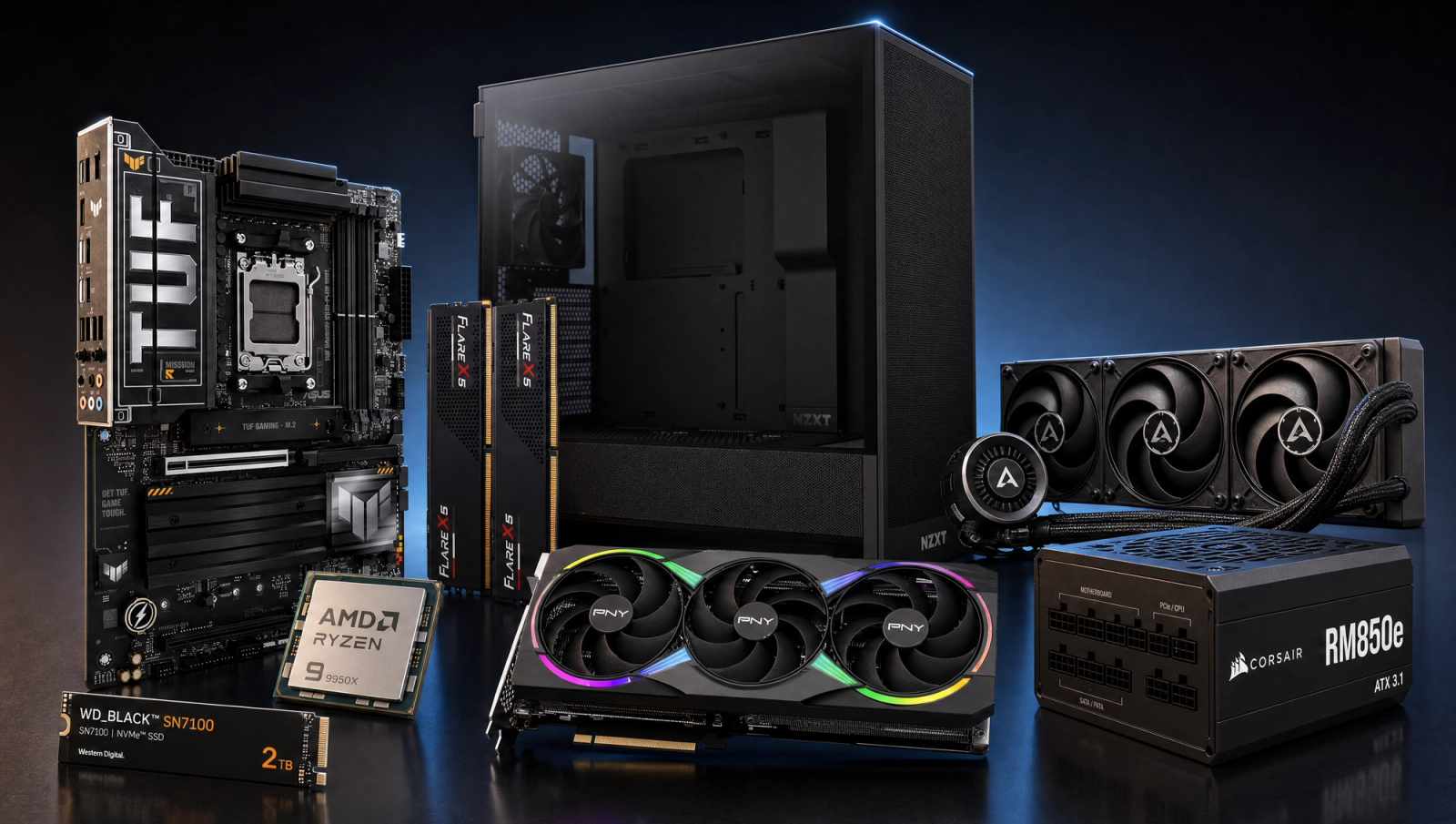
Components
- $649.00
- $999.00
- $200.00
- $110.00
- $120.00
- $130.00
- $160.00
- $85.00
Who This Build Is For
This is a workstation, not a gaming PC that happens to render. Pick this build if Blender, Premiere, DaVinci Resolve, code compile, 3D render, or any sustained multi-threaded job is your daily driver, and gaming is the bonus you get back at the end of the day. The Ryzen 9 9950X brings 16 Zen 5 cores and 32 threads, which is exactly twice the core count of the 9800X3D gaming flagship at the same price tier. That doubles your Cinebench multi-thread, halves your Blender BMW render, and chops a 4K timeline export in roughly the same proportion.
The trade-off is named up front: you give up a single-digit-percent 1080p gaming FPS deficit in V-Cache-sensitive titles versus the 9800X3D. At 1440p and 4K the GPU saturates first and the two CPUs land at the same frame rate. If gaming is your priority and productivity is the bonus, get the 9800X3D sibling at this same budget. If you compile code, render, or color-grade more hours per week than you game, this is your build.
Build Overview
Key Specs
CPU | AMD Ryzen 9 9950X (16c/32t, Zen 5) |
GPU | NVIDIA GeForce RTX 5080 16GB |
Motherboard | ASUS TUF Gaming X870-PLUS WiFi |
Memory | 32GB DDR5-6000 CL30 EXPO |
Storage | WD_Black SN7100 2TB NVMe Gen4 |
Cooling | Arctic Liquid Freezer III Pro 360 AIO |
Power Supply | Corsair RM850e 80+ Gold ATX 3.1 Modular |
Case | NZXT H5 Flow ATX Mid-Tower |
CPU
AMD Ryzen 9 9950X (16c/32t, Zen 5)
GPU
NVIDIA GeForce RTX 5080 16GB
Motherboard
ASUS TUF Gaming X870-PLUS WiFi
Memory
32GB DDR5-6000 CL30 EXPO
Storage
WD_Black SN7100 2TB NVMe Gen4
Cooling
Arctic Liquid Freezer III Pro 360 AIO
Power Supply
Corsair RM850e 80+ Gold ATX 3.1 Modular
Case
NZXT H5 Flow ATX Mid-Tower
Here are the parts that make up this build, with links to current pricing on Amazon for each.
Performance Summary
Multi-threaded throughput is the headline. Cinebench R23 multi clears 35,000 points, Blender BMW scene finishes in roughly half the time of an 8-core gaming chip, and a Linux kernel compile runs about 2x faster. Gaming holds up too: ~158 fps in Cyberpunk at 1080p High, ~131 fps at 1440p, and ~75 fps at 4K. AAA at 1440p and 4K is identical to a 9800X3D paired with the same RTX 5080.
Performance Expectations
Gaming-side reference numbers; this build's primary workloads are productivity (Blender, Premiere, code compile, 3D render).
- Cyberpunk 2077158 FPS
- Alan Wake 2126 FPS
- Black Myth: Wukong146 FPS
- Stalker 2107 FPS
- Marvel's Spider-Man 2150 FPS
- Starfield121 FPS
- Baldur's Gate 3176 FPS
- Helldivers 2149 FPS
- Hogwarts Legacy132 FPS
- Call of Duty: Black Ops 6179 FPS
Average FPS across ten current AAA titles at the listed presets, no upscaling applied. CPU-derated for the 9950X at 1080p where V-Cache-sensitive titles trail the 9800X3D by 8 to 15 percent. 1440p and 4K columns inherit from the 9800X3D + RTX 5080 recipe because the GPU is the limiter at those resolutions. Reviewer-sourced averages, expect a few fps variance depending on scene and settings.
Parts Breakdown
CPU

The Ryzen 9 9950X is the workstation pick at this tier. 16 Zen 5 cores, 32 threads, 170W TDP, no V-Cache. Cinebench R23 multi lands in the 35,000-40,000 range, which is roughly double an 8-core 9800X3D. Blender BMW and Classroom scenes finish in nearly half the time, a 4K Premiere or DaVinci Resolve timeline export scales the same way, and a full Linux kernel compile runs about 2x faster. The trade-off is the gaming-cache deficit: in V-Cache-sensitive 1080p titles like Cyberpunk crowds, BG3 Act 3, Hogwarts Hogsmeade, and COD MP, you lose 8 to 15 percent versus the 9800X3D. At 1440p and 4K that deficit collapses to zero because the GPU saturates first. If gaming is your priority, the 9800X3D sibling at this same budget is the better pick. If you spend more time in Blender, Premiere, a compiler, or a 3D viewport than in a game, the doubled core count earns its place every working day.
GPU

The RTX 5080 16GB covers both jobs. For creator work, 16GB of VRAM is enough for DaVinci Resolve color, Premiere proxy workflows, Blender OptiX viewport and final renders on most production scenes, and Stable Diffusion XL at 1024x1024. For gaming, it pushes 4K at high refresh in the standard slate. The honest cap: 16GB is not enough for 30B+ parameter local LLM inference (you want 24GB+), and heavy 3D production with multiple 4K texture sets starts swapping. If your workflow is local AI inference at scale or feature-film-grade 3D, the RTX 5090 24GB or a Pro-tier card is the next step. For the rest of the creator workload spectrum, the 5080 is the right choice at this budget.
Motherboard

The ASUS TUF X870-PLUS WiFi is the right board for a sustained-load 9950X. X870 brings native USB 4 and PCIe 5.0 to both the GPU slot and the primary M.2, which matters when you are moving large project files between fast NVMe drives. The TUF VRM is rated for 16+2+1 phases at 80A SPS, which holds the 170W 9950X at sustained all-core boost without thermal-throttling the regulator during a multi-hour render. DDR5 EXPO support is one click in BIOS. A cheaper B850 board would work for a lighter chip, but the X870 VRM headroom is the difference between hitting boost clocks for ten minutes and holding them for a four-hour Blender job.
Memory (RAM)

32GB of G.Skill Flare X5 DDR5-6000 CL30 is the modern minimum for a creator workstation. AM5 hits its sweet spot at DDR5-6000 with CL30 timings on EXPO, and any faster typically requires going to a 1:2 memory controller ratio that nets less. For most workflows, 32GB covers a 4K Premiere timeline, a mid-complexity Blender scene, a few VS Code windows, and a browser without paging. Heavier work pushes past this fast: 8K timelines, Blender scenes with multiple 4K textures, large LLM inference, or running multiple containers all want 64GB. Plan for the upgrade. This kit leaves both DIMM slots free on a 4-slot board, so a second matched 2x16GB kit takes you to 64GB without replacing anything. For the deepest workloads, jump straight to a 2x48GB or 2x64GB DDR5-6000 EXPO kit and skip the intermediate step.
Storage

The WD_Black SN7100 2TB is a PCIe Gen4 NVMe drive that hits 7,250 MB/s sequential read at half the power draw of older Gen4 controllers, which keeps it cool under sustained writes without a chunky heatsink. 2TB is the right starting point for a workstation: holds Windows, your DCC apps, browser caches, a handful of game installs, and four to six active project folders. Pro workflows eat storage fast (one hour of 4K ProRes is roughly 100GB, a single mid-complexity Blender scene with textures can clear 20GB), so plan on a secondary 4TB scratch drive for sustained pro use. The second M.2 slot on the X870 board makes that a 10-minute upgrade later. The 1TB SN7100 in the gaming sibling at this tier is fine for a games-first build; for a creator daily driver, 2TB is the floor.
Power Supply

The Corsair RM850e 80+ Gold is the right ATX 3.1 modular unit for sustained creator load. The 9950X draws up to 200W under all-core boost, the RTX 5080 pulls around 360W under gaming or OptiX render, and the rest of the system adds another 60-80W. That puts peak system draw in the 600-650W range, which is exactly where 80+ Gold efficiency peaks. The native 12V-2x6 cable feeds the 5080 directly with no adapter pigtail. 850W gives you headroom for a future 5090 swap or a second NVMe pulling 8-9W of its own. ATX 3.1 compliance handles the transient power spikes that current-gen GPUs throw, which a cheaper non-compliant 750W unit can mishandle and trip the OCP under sustained load.
Case

The NZXT H5 Flow is a compact ATX mid-tower with a mesh front, two pre-installed 120mm intake fans, and clearance for a 360mm front-mounted radiator. That last point matters most here: the 360 AIO mounts at the front as intake, which gives the radiator unrestricted access to ambient air and is the configuration that holds the 9950X coolest under sustained load. The case takes ATX, EATX up to 272mm, and GPUs up to 410mm, which covers every 5080 partner card. The build feels open inside, cable management is genuinely good with the integrated channel system, and front airflow is unrestricted. A Lian Li O11 Dynamic Evo is the upgrade if you want dual-radiator support; the H5 Flow is the right compact pick when one 360mm AIO is enough.
Cooling

The Arctic Liquid Freezer III Pro 360 earns its place on a 170W 9950X. A 360mm AIO is overkill for a gaming chip, but a workstation CPU sees sustained 100% all-core load for hours at a time during a render or compile, and that is exactly the workload where a 240mm or air tower starts to throttle. The Pro 360 has a thicker 38mm radiator than a standard Liquid Freezer III, a VRM fan on the pump block that keeps motherboard regulator temps in check, and PWM control across all fans for low-noise idle. Expect package temps in the high 70s to low 80s during a sustained Cinebench R23 multi run at full boost, which is exactly where you want a 170W chip living. A high-end air cooler like the Peerless Assassin 120 SE works for gaming-only loads on this chip, but it will not hold the same clocks under a four-hour Blender job. For a workstation, the AIO is the right call.
Final Thoughts
This is the most differentiated build in the catalog at this price. Same GPU, same cooler, same case, same PSU as the gaming flagship at the same budget, but with twice the CPU cores and twice the storage. The math is honest in both directions: you pay a small 1080p gaming penalty that disappears at higher resolutions, and in exchange you get roughly 2x throughput on every multi-threaded job you run. Pick this build if your creator or compile time outweighs your gaming time. Pick the 9800X3D sibling if it does not. Either way, the rest of the parts list holds up for both jobs.
FAQs
Should I get the 9950X or the 9800X3D at this budget?
It depends on what you do more of. The 9950X gives you 16 cores for productivity and pays a 8 to 15 percent 1080p gaming deficit in V-Cache-sensitive titles. The 9800X3D has 8 cores and is the gaming-CPU ceiling, but it renders, compiles, and exports timelines in roughly double the time. If you spend more weekly hours in Blender, Premiere, Resolve, a compiler, or a 3D viewport than in a game, take the 9950X. If gaming is the priority, take the 9800X3D sibling at this same budget.
Is 32GB of RAM enough for a workstation?
For a 4K Premiere or DaVinci timeline, a mid-complexity Blender scene, a few VS Code windows, and a browser, yes. For 8K timelines, Blender scenes with multiple 4K texture sets, large local LLM inference, or running multiple Docker containers in parallel, plan to go to 64GB. The board has two free DIMM slots, so a second matched 2x16GB kit takes you to 64GB without replacing anything. For the heaviest workflows, jump to a 2x48GB or 2x64GB DDR5-6000 EXPO kit and do it once.
Is the RTX 5080 enough for AI workloads?
It is enough for Stable Diffusion XL at 1024x1024, ComfyUI workflows, LoRA training on small datasets, and 7B to 13B parameter LLM inference at reasonable quantization. It is not enough for 30B+ parameter LLM inference at usable speeds, which wants 24GB of VRAM minimum. If local LLM inference at scale is your main workload, the RTX 5090 24GB or a Pro-tier card is the right step up.
Do I really need a 360mm AIO?
On a 170W 9950X running sustained creator workloads, yes. A 240mm AIO or a high-end air cooler will hold the chip during gaming, but they start to throttle during a multi-hour Blender render or a long Cinebench R23 multi run. The 360mm gives you the thermal headroom to hold all-core boost clocks for the full duration of the job, which is the difference between a render finishing in three hours versus three hours and twenty minutes.
Why 2TB of storage instead of 1TB?
Pro creator workflows eat storage fast. One hour of 4K ProRes footage is about 100GB. A single mid-complexity Blender scene with textures and caches can clear 20GB. Windows plus your DCC apps plus a few game installs takes a 1TB drive past half-full before you have opened your first project. 2TB holds four to six active project folders with breathing room. For sustained pro use, plan on a secondary 4TB scratch drive in the second M.2 slot.
Can I game on this build?
Yes. At 1440p and 4K, gaming performance matches the 9800X3D + RTX 5080 sibling exactly because the GPU is the limiter. At 1080p, you trail the 9800X3D by 8 to 15 percent in V-Cache-sensitive titles like Cyberpunk crowds, BG3 Act 3, Hogwarts Hogsmeade, and COD MP, which still lands at 158 fps, 176 fps, 132 fps, and 179 fps respectively. It is excellent gaming performance, just not the gaming-CPU ceiling.
What is the upgrade path?
RAM goes from 32GB to 64GB or 96GB with a second matched kit in the free DIMM slots. Storage goes from 2TB to 6TB by adding a 4TB scratch drive in the second M.2 slot. GPU swaps to a 5090 24GB if you need more VRAM for AI or 3D production work, which the 850W PSU is sized for. The CPU stays put: the 9950X is the AM5 productivity ceiling until Zen 6 lands.