Affiliate Disclosure: As an Amazon Associate we earn from qualifying purchases. Some links may earn us a commission at no cost to you.

Best B860 Motherboards for Core Ultra 200 Series (2026)
Intel's LGA1851 platform has two chipsets worth talking about: Z890 for builders who need CPU overclocking or dual PCIe 5.0 M.2 slots, and B860 for everyone else. That second category is larger than the reviews suggest.
B860 gives you a PCIe 5.0 x16 GPU slot, at least one Gen5 M.2 slot, DDR5 with XMP support up to 7200+ MT/s on most boards, Wi-Fi 7 on the mid-tier options, and full support for every Core Ultra 200 Series chip, including the Core Ultra 9 285K. What it does not give you is unlocked CPU multiplier overclocking and the second PCIe 5.0 M.2 slot that Z890 boards carry. For gaming builds running any Core Ultra chip at stock, neither of those omissions matters.
The real B860 buying problem is not the chipset. It is that the market spans from thin-heatsink boards that will throttle a 265K under sustained load to fully specced boards that cost as much as entry Z890. This guide cuts through the lineup by VRM tier, feature set, and form factor. Six picks, with an honest B860 vs Z890 breakdown and a VRM floor callout for builders pairing a high-TDP chip.
Quick picks
Board | Form | VRM | Wi-Fi | M.2 Slots | Buy |
|---|---|---|---|---|---|
ATX | 12+1+1 | Wi-Fi 7 | 3 (1xGen5) | ||
ATX | 8+1+1+1 | Wi-Fi 6E | 2 (1xGen5) | ||
ATX | 12+1+2+1 | Wi-Fi 7 | 3 (1xGen5) | ||
ATX | 16+1+2 | Wi-Fi 7 | 3 (1xGen5) | ||
ATX | 14+1+1+1+1 | Wi-Fi 6E | 4 (1xGen5) | ||
mATX | 12+1+2+1 | Wi-Fi 7 | 3 (1xGen5) |
- Form
ATX
- VRM
12+1+1
- Wi-Fi
Wi-Fi 7
- M.2 Slots
3 (1xGen5)
- Buy
- Form
ATX
- VRM
8+1+1+1
- Wi-Fi
Wi-Fi 6E
- M.2 Slots
2 (1xGen5)
- Buy
- Form
ATX
- VRM
12+1+2+1
- Wi-Fi
Wi-Fi 7
- M.2 Slots
3 (1xGen5)
- Buy
- Form
ATX
- VRM
16+1+2
- Wi-Fi
Wi-Fi 7
- M.2 Slots
3 (1xGen5)
- Buy
- Form
ATX
- VRM
14+1+1+1+1
- Wi-Fi
Wi-Fi 6E
- M.2 Slots
4 (1xGen5)
- Buy
- Form
mATX
- VRM
12+1+2+1
- Wi-Fi
Wi-Fi 7
- M.2 Slots
3 (1xGen5)
- Buy
B860 vs Z890: What You're Actually Giving Up
The DMI interface difference is the one that matters most in practice. Z890 connects to the CPU via DMI 8x4.0, eight PCIe 4.0 lanes, while B860 uses DMI 4x4.0, half the bandwidth. For most builds that means nothing: you are running one GPU, one NVMe drive, maybe a second NVMe. The DMI ceiling only becomes relevant when you are saturating multiple PCIe devices simultaneously.
The other real difference is CPU multiplier overclocking. B860 locks the CPU multiplier. If you bought a 265K because the K suffix means overclockable and you plan to actually push it past factory clocks, B860 is not your board. That said, most 265K buyers running at stock will never notice: the chip boosts to its full advertised clocks regardless of chipset.
What about RAM speed? B860 supports XMP/XMP-I profiles and can run DDR5 above 6000 MT/s. Budget boards stabilize around 6800 MT/s; better boards hit 7600-8600+ MT/s. Z890 boards have slightly more mature memory trace topologies on the higher-end models, but for a gaming build targeting 6000-6400 MT/s CL30, any B860 pick here handles it without issue.
When Z890 is actually worth it:
- Two PCIe 5.0 M.2 slots for video editing with simultaneous Gen5 drive use.
- CPU multiplier overclocking beyond Intel's factory boost clocks.
- 10GbE on-board or specific Thunderbolt 5 requirements.
- Enterprise PCIe bifurcation scenarios with multiple high-bandwidth devices saturating simultaneously.
For a gaming build, even a flagship 285K gaming build, B860 handles the job cleanly.
Best Overall: MSI MAG B860 Tomahawk WiFi

The B860 Tomahawk is what you get when MSI takes its proven Tomahawk formula and applies it to the new chipset. The 12+1+1 power stage design is the right spec: enough headroom for a 265K or 285K at stock with thermal margin to spare, tested at 64 degrees Celsius MOS temperature under sustained 100% CPU load.
The connectivity tells the real story. Wi-Fi 7 and 5GbE LAN on a B860 board is punching above its weight class. Most B860 boards ship with 2.5GbE. Thunderbolt 4 on the rear I/O is another step up, useful for anyone with an external SSD, audio interface, or display daisy-chain setup.
One Gen5 M.2 slot plus two Gen4 M.2 slots covers every storage configuration a gaming build needs. The Gen5 slot handles a flagship NVMe if you want maximum sequential performance; the two Gen4 slots cover secondary storage without compromise.
Where it falls short: no BIOS Flashback in the base configuration, and the VRM heatsink is a solid aluminum block without heatpipes. That thermal design is adequate, testing confirms it, but it is not the overengineered solution you find on Z890 Tomahawks. Reviewers universally call this the reference point for B860 value. That consensus is earned.
Specs
Spec | Detail |
|---|---|
Form factor | ATX |
VRM | 12+1+1 |
Wi-Fi | Wi-Fi 7 |
LAN | 5GbE |
M.2 slots | 3 (1xGen5) |
Thunderbolt 4 | Yes |
Form factor
- Detail
ATX
VRM
- Detail
12+1+1
Wi-Fi
- Detail
Wi-Fi 7
LAN
- Detail
5GbE
M.2 slots
- Detail
3 (1xGen5)
Thunderbolt 4
- Detail
Yes
Best Budget ATX: ASUS Prime B860-Plus WiFi

The Prime is ASUS's entry-level ATX B860, and it threads the needle between cost and capability better than most boards at this tier. The 8+1+1+1 power stage configuration reads conservatively, but each stage runs 80A Stream DrMOS. Eight VCore stages at 80A each is 640A total capacity, which comfortably feeds any Core Ultra 200 chip at rated TDP.
Two M.2 slots is the honest compromise: one Gen5, one Gen4. Builders running a single high-performance NVMe plus a secondary drive will never feel the gap. Builders who want to run three NVMe drives need to step up to the TUF.
Wi-Fi 6E instead of Wi-Fi 7 is the other real trade-off. If you are wired, and you should be for gaming, this is irrelevant. If you are on wireless, Wi-Fi 6E covers the bandwidth needs of any current residential connection comfortably.
The Prime does not try to do more than it should. Clean ATX layout, solid ASUS BIOS experience, USB 20Gbps Type-C on the rear I/O, and DisplayPort plus HDMI for integrated graphics passthrough. For a builder whose priority is CPU and GPU budget over motherboard extras, this is the board that does not give up anything that matters.
Specs
Spec | Detail |
|---|---|
Form factor | ATX |
VRM | 8+1+1+1 |
Wi-Fi | Wi-Fi 6E |
LAN | 2.5GbE |
M.2 slots | 2 (1xGen5) |
Thunderbolt 4 | No |
Form factor
- Detail
ATX
VRM
- Detail
8+1+1+1
Wi-Fi
- Detail
Wi-Fi 6E
LAN
- Detail
2.5GbE
M.2 slots
- Detail
2 (1xGen5)
Thunderbolt 4
- Detail
No
Best Step-Up: ASUS TUF B860-Plus WiFi

The TUF B860-Plus is the B860 board for builders who want the full feature set without crossing into Z890. Three M.2 slots (one Gen5, two Gen4) is the practical upgrade over the Prime. The 12+1+2+1 power stage array with 80A DrMOS matches the Tomahawk on stage count. ASUS TUF build quality is visible on the board: reinforced DRAM slots, metal-reinforced PCIe SafeSlot, military-spec capacitors rated for extended thermal cycling.
Wi-Fi 7 is on board. 2.5GbE LAN is the only connectivity step-back vs the Tomahawk's 5GbE, and for most home networks that is a non-issue. USB 20Gbps Type-C with DisplayPort Alt Mode on the rear I/O is a genuinely useful port.
Where it loses to the Tomahawk: 2.5GbE vs 5GbE, and the TUF typically prices slightly higher. The TUF wins on storage slots, VRM topology, and long-term build quality. The Tomahawk wins on LAN tier and consensus reviews. Both are excellent boards; the choice comes down to whether you want three M.2 slots or 5GbE.
Specs
Spec | Detail |
|---|---|
Form factor | ATX |
VRM | 12+1+2+1 |
Wi-Fi | Wi-Fi 7 |
LAN | 2.5GbE |
M.2 slots | 3 (1xGen5) |
Thunderbolt 4 | No |
Form factor
- Detail
ATX
VRM
- Detail
12+1+2+1
Wi-Fi
- Detail
Wi-Fi 7
LAN
- Detail
2.5GbE
M.2 slots
- Detail
3 (1xGen5)
Thunderbolt 4
- Detail
No
Best Gigabyte Option: Gigabyte B860 Aorus Elite WiFi7
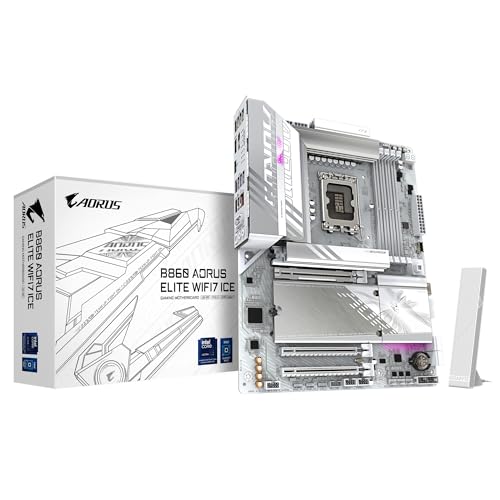
Gigabyte's Aorus Elite has been the reliable mid-tier choice on every recent platform, AM4, AM5, Z690, and the B860 version continues the pattern. The 16+1+2 phase VRM is the highest stage count in this roundup. The heatsink coverage is solid and no reviewer has flagged VRM throttling concerns.
Three M.2 slots with one Gen5 and two Gen4 covers the full storage stack. Wi-Fi 7 and 2.5GbE are standard. The EZ-Latch quick-release mechanism for M.2 SSDs and the GPU PCIe slot is the kind of toolless quality-of-life feature that matters when you are pulling drives in a tight case.
The ICE colorway, white with silver accents, is the cleanest white board in the B860 lineup at this tier. Builders doing a white-and-silver theme have limited high-quality white board options; the Aorus Elite ICE fills that gap well.
The honest caveat: Gigabyte BIOS usability still runs behind ASUS and MSI in most user feedback. The fundamental features are there, but the interface flow and automatic XMP profile behavior have more friction than competitors. Builders who have used ASUS or MSI boards before may notice the difference; first-time builders probably will not.
Specs
Spec | Detail |
|---|---|
Form factor | ATX |
VRM | 16+1+2 |
Wi-Fi | Wi-Fi 7 |
LAN | 2.5GbE |
M.2 slots | 3 (1xGen5) |
Thunderbolt 4 | No |
Form factor
- Detail
ATX
VRM
- Detail
16+1+2
Wi-Fi
- Detail
Wi-Fi 7
LAN
- Detail
2.5GbE
M.2 slots
- Detail
3 (1xGen5)
Thunderbolt 4
- Detail
No
VRM Overachiever: ASRock B860 Steel Legend WiFi

ASRock's Steel Legend is the under-discussed pick for builders who want maximum VRM headroom on B860. The 14+1+1+1+1 power stage count with 80A Dr.MOS per VCore stage means the board is running cooler VRM thermals than almost anything else in this roundup under sustained load. If you are running memory OC aggressively, chasing 7600+ MT/s with tight timings, or if you are in a case with restricted airflow and want every thermal margin on the power delivery side, this is the board.
Four M.2 slots is exceptional for B860: one Gen5, two Gen4x4, and one Gen4x2 (shared bandwidth). The practical effect is a board that can run a Gen5 boot drive, two Gen4 data drives, and still have an M.2 slot for expansion. Useful for creators with large raw footage workflows.
BIOS Flashback is a genuine build-day convenience. Installing a new platform without needing to find a compatible CPU just to update BIOS is the kind of detail that matters when your 265K arrives and the board is on an older firmware revision. Thunderbolt 4 on a B860 board at this price is rare. If you have a Thunderbolt-dependent device in your workflow, the Steel Legend is the obvious B860 choice.
Where it falls back: Wi-Fi 6E instead of 7, and ASRock BIOS quality still requires patience if you are coming from ASUS or MSI. The Steel Legend aesthetic, gray with diagonal accent lines, is polarizing.
Specs
Spec | Detail |
|---|---|
Form factor | ATX |
VRM | 14+1+1+1+1 |
Wi-Fi | Wi-Fi 6E |
LAN | 2.5GbE |
M.2 slots | 4 (1xGen5) |
Thunderbolt 4 | Yes |
Form factor
- Detail
ATX
VRM
- Detail
14+1+1+1+1
Wi-Fi
- Detail
Wi-Fi 6E
LAN
- Detail
2.5GbE
M.2 slots
- Detail
4 (1xGen5)
Thunderbolt 4
- Detail
Yes
Best mATX: ASUS TUF B860M-Plus WiFi
The TUF mATX is the pick for Micro-ATX builds where you need a B860 board that does not compromise on power delivery. The 12+1+2+1 VRM is identical to the ATX version. ASUS did not shrink the power delivery to fit the smaller PCB, which is the right call. Every other pick in this roundup is ATX; if your case is mATX or you want a smaller footprint, this is the direct equivalent.
Three M.2 slots on a Micro-ATX board is better than most mATX options on any recent platform. Wi-Fi 7 is included. The layout is compact but not cramped, with enough clearance between the PCIe slot and M.2 slots that a tall GPU cooler does not block M.2 access.
The tradeoff specific to mATX: the second PCIe x16 slot runs at x4 bandwidth, fine for capture cards or Wi-Fi cards but not for a second GPU. Rear I/O has fewer USB ports than the ATX version. Case compatibility opens up significantly. For SFF-adjacent builds that need a real LGA1851 board with serious VRM and do not want to go ITX, the TUF B860M-Plus is the correct answer.
Specs
Spec | Detail |
|---|---|
Form factor | mATX |
VRM | 12+1+2+1 |
Wi-Fi | Wi-Fi 7 |
LAN | 2.5GbE |
M.2 slots | 3 (1xGen5) |
Thunderbolt 4 | No |
Form factor
- Detail
mATX
VRM
- Detail
12+1+2+1
Wi-Fi
- Detail
Wi-Fi 7
LAN
- Detail
2.5GbE
M.2 slots
- Detail
3 (1xGen5)
Thunderbolt 4
- Detail
No
Specs at a glance
Board | Form | VRM Stages | Wi-Fi | LAN | M.2 | TB4 |
|---|---|---|---|---|---|---|
ATX | 12+1+1 | Wi-Fi 7 | 5GbE | 3 (1xGen5) | Yes | |
ATX | 8+1+1+1 | Wi-Fi 6E | 2.5GbE | 2 (1xGen5) | No | |
ATX | 12+1+2+1 | Wi-Fi 7 | 2.5GbE | 3 (1xGen5) | No | |
ATX | 16+1+2 | Wi-Fi 7 | 2.5GbE | 3 (1xGen5) | No | |
ATX | 14+1+1+1+1 | Wi-Fi 6E | 2.5GbE | 4 (1xGen5) | Yes | |
mATX | 12+1+2+1 | Wi-Fi 7 | 2.5GbE | 3 (1xGen5) | No |
- Form
ATX
- VRM Stages
12+1+1
- Wi-Fi
Wi-Fi 7
- LAN
5GbE
- M.2
3 (1xGen5)
- TB4
Yes
- Form
ATX
- VRM Stages
8+1+1+1
- Wi-Fi
Wi-Fi 6E
- LAN
2.5GbE
- M.2
2 (1xGen5)
- TB4
No
- Form
ATX
- VRM Stages
12+1+2+1
- Wi-Fi
Wi-Fi 7
- LAN
2.5GbE
- M.2
3 (1xGen5)
- TB4
No
- Form
ATX
- VRM Stages
16+1+2
- Wi-Fi
Wi-Fi 7
- LAN
2.5GbE
- M.2
3 (1xGen5)
- TB4
No
- Form
ATX
- VRM Stages
14+1+1+1+1
- Wi-Fi
Wi-Fi 6E
- LAN
2.5GbE
- M.2
4 (1xGen5)
- TB4
Yes
- Form
mATX
- VRM Stages
12+1+2+1
- Wi-Fi
Wi-Fi 7
- LAN
2.5GbE
- M.2
3 (1xGen5)
- TB4
No
What to Know Before Buying
VRM floor for 265K and 285K at stock: Every board in this roundup handles the Core Ultra 7 265K and Core Ultra 9 285K at their stock TDP configurations. The 265K pulls around 125W base with 200-250W transient under boost, and all of these boards handle that cleanly. The distinction matters at the lower end of the B860 market, where boards with 6+2 VRM stages and thin aluminum heatsinks start showing thermal throttle under sustained all-core load on high-TDP chips. None of these picks have that problem. If the 285K specifically is your chip, our full verdict on running a Core Ultra 9 285K on a B860 motherboard covers the two gates that matter and which boards clear them.
BIOS update before first boot: Intel platform BIOS revisions have been meaningful since Arrow Lake's launch. Every board here shipped within the past year, so out-of-box firmware is Arrow Lake-ready, but still worth updating to the latest revision before you install the OS. The ASRock Steel Legend's BIOS Flashback means you can do this without a CPU installed. Other boards need a compatible CPU in place, which for LGA1851 means any Core Ultra 200 chip.
DDR5 XMP vs EXPO: These boards speak XMP, Intel's standard, and most also support XMP-I, the interoperability profile AMD and Intel jointly validated. If your DDR5 kit has an EXPO profile (AMD's equivalent), check the board's QVL list. Most B860 boards load XMP profiles by default, and some require the XMP-I profile to run AMD-spec kits at rated speed.
PCIe lane note for multi-drive users: B860's DMI 4x4.0 connection limits total chipset-sourced bandwidth. Running three NVMe drives under sustained sequential load can approach the DMI ceiling in synthetic tests. In practice this affects workstation content-creation workflows with multiple 4K streams. Gaming builds will not notice.
Bottom Line
For most Core Ultra 200 Series builds, B860 is the right chipset. Z890 earns its premium in specific scenarios: active CPU overclocking, dual Gen5 M.2 workstation workflows. Those scenarios do not describe most gaming builds, even high-end ones. Still choosing the chip that goes in the socket? Our best Intel CPUs for gaming ranks the Core Ultra 200 options these boards are built for.
If you want one board that does everything and reviews consistently support it, get the MSI MAG B860 Tomahawk WiFi. If you want the most feature-complete board at a step-up price, the ASUS TUF B860-Plus WiFi is the call. If you are watching budget and want to redirect money to GPU, the ASUS Prime B860-Plus WiFi does not give up anything that matters at stock. If your build calls for a smaller footprint, our best LGA1851 Mini-ITX motherboards covers the compact Arrow Lake boards instead.
Every pick here has the VRM to feed a 265K or 285K at stock. No surprises after the build.
FAQ
Can I use a B860 motherboard with the Core Ultra 7 265K?
Yes. B860 is fully compatible with every Core Ultra 200 Series chip, including the 265K and 285K. The only limitation is CPU multiplier overclocking: B860 locks the CPU multiplier, so you cannot push the 265K above its advertised boost clocks. For stock and near-stock operation, B860 is the correct platform choice and costs significantly less than Z890.
What's the difference between B860 and Z890 for gaming?
For gaming, the difference is small enough to be invisible in benchmarks. Z890 adds unlocked CPU multiplier overclocking, a second PCIe 5.0 M.2 slot, and a wider DMI bus. None of those matter for a GPU-bound gaming workload. The Z890 premium makes sense if you are actively overclocking or need the extra M.2 bandwidth for workstation tasks. For gaming-only builds, B860 is the correct chipset.
Does B860 support DDR5 overclocking?
Yes, with limits. B860 supports XMP profiles and can run DDR5 at speeds above 6000 MT/s. Most boards here reach 7200-9200+ MT/s with the right kits. CPU multiplier and BCLK overclocking are locked, but memory speed overclocking via XMP works normally. For gaming, 6000-6400 MT/s CL30 is the sweet spot and every B860 board here handles it without issue.
Is B860 good enough for the Core Ultra 9 285K?
For gaming, yes. The 285K pulls more sustained power than the 265K under all-core load, but every pick in this guide has the VRM headroom to feed it at stock. What B860 gives up is the ability to push the 285K beyond its factory boost clocks. If stock-spec gaming is the use case, B860 is fine. If you are chasing manual CPU overclocking, Z890 is required.
Do B860 motherboards support PCIe 5.0?
Yes. Every B860 board has a PCIe 5.0 x16 slot for the GPU and at least one PCIe 5.0 M.2 slot. The difference from Z890 is that B860 typically has only one Gen5 M.2 slot vs two on Z890. For a single high-performance NVMe boot drive, the B860 Gen5 slot is all you need.
What's the best B860 board for a budget LGA1851 build?
The ASUS Prime B860-Plus WiFi is the entry point that does not compromise where it matters: 8+1+1+1 80A DrMOS power stages, one Gen5 M.2 slot, Wi-Fi 6E, and a clean ASUS BIOS experience. The board handles any Core Ultra 200 chip at stock without thermal concerns and leaves real budget for GPU and CPU.
Related Articles

How to Choose a CPU and Motherboard
The buyer's framework for picking a CPU and motherboard pair: use case first, socket second, chip tier third, then the board class that matches.
May 17, 2026

Best B650 Motherboards for Ryzen 9000 (2026): Mid-Tier AM5 Picks
B650 is the AM5 value lane for Ryzen 9000. We pick 5 boards by build profile, with a BIOS-update buying framework built in.
May 18, 2026

Best AM5 Mini-ITX Motherboards (2026): SFF Picks by Tier
Five AM5 mini-ITX motherboards picked by build tier: flagship X870-I, mainstream B850I, premium creator, value B650I, and the honest A620I call.
May 19, 2026

How Much RAM for Star Citizen? 32GB Is the 2026 Floor
How much RAM for Star Citizen? 32GB is the real floor in 2026, not the comfort tier. CIG still lists 16GB. Here is when 64GB pays, and the SSD half of it.
Aug 29, 2026

Best Gaming Mouse 2026: 5 Picks by Grip and Hand Size
The best gaming mouse for your grip and hand size: 5 tested picks, from 49g FPS flagships to MMO side-button rigs, with every spec compared side by side.
Aug 29, 2026