Affiliate Disclosure: As an Amazon Associate we earn from qualifying purchases. Some links may earn us a commission at no cost to you.

Best DDR5 RAM for Core Ultra 7 265K: 5 Picks for 2026
For a Core Ultra 7 265K, buy a DDR5-6400 CL32 kit. That is the fastest speed Intel officially supports on this chip with standard UDIMM modules, and it is the tier every pick below lands on or deliberately sits under.
The reason the number matters more here than on other platforms: Arrow Lake moved the memory controller onto its own tile, and it keeps scaling with bandwidth past the point where earlier Intel generations stopped caring. DDR5-6000 CL30 is the safe default answer on AM5. On a 265K it leaves measurable performance unused.
Our top pick: G.Skill Trident Z5 RGB DDR5-6400
The Trident Z5 hits the 265K's DDR5-6400 native ceiling with XMP 3.0 reliability that loads cleanly on 95% of Z890 and B860 boards on the first try.
Quick picks
Pick | Kit | Speed | Where to buy |
|---|---|---|---|
Best Overall | DDR5-6400 CL32 | ||
Best Value | DDR5-6000 CL30 | ||
Best Premium | DDR5-6400 CL32 | ||
Best Budget | DDR5-6400 CL32 | ||
Editor's Pick | DDR5-6400 CL32 |
Best Overall
- Kit
- Speed
DDR5-6400 CL32
- Where to buy
Best Value
- Kit
- Speed
DDR5-6000 CL30
- Where to buy
Best Premium
- Kit
- Speed
DDR5-6400 CL32
- Where to buy
Best Budget
- Kit
- Speed
DDR5-6400 CL32
- Where to buy
Editor's Pick
- Kit
- Speed
DDR5-6400 CL32
- Where to buy
Specs at a glance
Pick | Kit | Speed / Timings | Capacity | XMP/EXPO |
|---|---|---|---|---|
Best Overall | DDR5-6400 CL32-39-39-102 @ 1.40V | 32GB (2x16GB) | XMP 3.0 | |
Best Value | DDR5-6000 CL30-36-36-76 @ 1.40V | 32GB (2x16GB) | XMP 3.0 + EXPO | |
Best Premium | DDR5-6400 CL32 @ 1.40V | 32GB (2x16GB) | XMP 3.0 | |
Best Budget | DDR5-6400 CL32 | 32GB (2x16GB) | XMP 3.0 | |
Editor's Pick | DDR5-6400 CL32-39-39-102 @ 1.40V | 32GB (2x16GB) | XMP 3.0 |
Best Overall
- Kit
- Speed / Timings
DDR5-6400 CL32-39-39-102 @ 1.40V
- Capacity
32GB (2x16GB)
- XMP/EXPO
XMP 3.0
Best Value
- Kit
- Speed / Timings
DDR5-6000 CL30-36-36-76 @ 1.40V
- Capacity
32GB (2x16GB)
- XMP/EXPO
XMP 3.0 + EXPO
Best Premium
- Kit
- Speed / Timings
DDR5-6400 CL32 @ 1.40V
- Capacity
32GB (2x16GB)
- XMP/EXPO
XMP 3.0
Best Budget
- Kit
- Speed / Timings
DDR5-6400 CL32
- Capacity
32GB (2x16GB)
- XMP/EXPO
XMP 3.0
Editor's Pick
- Kit
- Speed / Timings
DDR5-6400 CL32-39-39-102 @ 1.40V
- Capacity
32GB (2x16GB)
- XMP/EXPO
XMP 3.0
Arrow Lake DDR5 sweet spot: why 265K speed matters
Arrow Lake is the first mainstream Intel platform to natively support DDR5-6400 on standard UDIMM modules. On 12th and 13th gen, the practical ceiling for standard DDR5 XMP was around DDR5-5600 before signal integrity became a problem on most boards. The 265K's memory controller was redesigned around a higher bandwidth target, and it shows in real-world testing.
TechteamGB's dedicated 265K memory testing showed DDR5-6400 leading DDR5-5600 by up to 6.4% in bandwidth-sensitive games like Counter-Strike 2. That delta is narrow in absolute FPS terms at high frame rates, but on a platform where the memory controller explicitly scales with bandwidth, leaving 6400 on the table is a real cost. The gap between DDR5-6000 and DDR5-6400 is smaller, roughly 1-5% in most gaming workloads, but it's consistent.
Intel also introduced CUDIMM support with Arrow Lake. CUDIMM modules carry a small clock driver chip on the module itself, which improves signal integrity enough to push reliably past DDR5-6400. If your Z890 or B860 board supports CUDIMM and you're chasing DDR5-6800 or higher, that pathway exists. All five picks in this article are standard UDIMM modules, which max out at DDR5-6400 on the 265K platform. For most gaming builds, DDR5-6400 standard UDIMM is the correct answer; CUDIMM is for enthusiast overclocking builds that want to push past that ceiling.
One platform note before you buy: Arrow Lake performs a memory training pass on first boot with a new XMP profile enabled. This shows up as 2-3 extra POST cycles the first time you enable XMP 3.0. It is not a defect. The board is mapping the memory channels and this is normal behavior for the platform. If your B860 board also needs a BIOS update to train DDR5-6400 cleanly, download the latest BIOS before installing the kit.
There is a second lever worth knowing about. Because the memory controller sits on its own tile, the fabric clocks around it (NGU, D2D and the ring) have their own effect on latency. Testing on a 265K found that raising those internal clocks cut idle latency from 88.6 ns to 77.0 ns at an unchanged DDR5-7800 memory speed, while measured bandwidth barely moved. If you tune this platform, the fabric is often what is holding you back, not the DRAM frequency.
Going past DDR5-6400 on the Core Ultra 7 265K
DDR5-6400 is where Intel official support for the 265K stops. Kits sold at DDR5-7200, DDR5-7800 or DDR5-8000 will run on a Z890 board, but loading those XMP profiles is memory overclocking on this chip rather than a supported configuration. That is not dangerous, it just means stability becomes your problem instead of Intel's.
The gains past 6400 are real and modest. Independent testing on a 265K measured memory bandwidth climbing from roughly 76 GB/s at DDR5-5600 to about 118 GB/s at DDR5-7800, with idle latency falling from 106.7 ns to 88.6 ns. In games the translation is thinner: DDR5-6400 to DDR5-8200 has been measured at roughly 5% in Cyberpunk 2077 and about 10% in Baldur's Gate 3 at 1080p, where the CPU carries the most load. At 1440p and above, most of that gap closes on its own.
CUDIMM is the honest route if you want those frequencies. The clock driver on the module holds signal integrity together where a standard UDIMM starts failing its training pass, which is why most DDR5-7200 and faster kits worth owning are CUDIMMs. Every pick here is a standard UDIMM at or below the 6400 ceiling, because that is the setup that trains on the first attempt across Z890 and B860 with no tuning. For the broader question of how much frequency actually buys you, see does RAM speed matter for gaming.
How we picked these DDR5 kits for the 265K
The 265K is a component-specific platform. Every kit here was selected on four criteria.
First, speed tier. DDR5-6400 CL32 is the native ceiling for the 265K's standard UDIMM support, and four of five picks land here. The Best Value pick at DDR5-6000 CL30 is a deliberate choice for buyers where the small performance gap doesn't justify the premium, or who want EXPO compatibility for a possible future AMD platform move. The same ceiling applies one rung down the Arrow Lake stack, so our DDR5 picks for the Core Ultra 5 245K work through the identical speed question on the cheaper chip.
Second, timing quality at that speed. DDR5-6400 CL32 is meaningfully tighter than DDR5-6400 CL40, which exists and costs less. CL32 is the timing floor we'd recommend for this platform; looser timings at the same frequency trade latency for bandwidth without the 265K benefiting much.
Third, XMP 3.0 compatibility on Arrow Lake boards. We excluded kits with spotty XMP training track records on Z890 and B860 specifically. The picks here all have documented good profiles across the mainstream chipset stack.
Capacity is 32GB (2x16GB) across the board. For a 265K gaming build that's the right amount. If you're also doing video editing or running VMs alongside gaming, look at the 64GB variants of these same kits. For the graphics card in the same build, see our best GPU for Core Ultra 7 265K picks by resolution.
If any of the timing or voltage numbers below are unfamiliar, our guide on how to read a RAM spec sheet explains what each field on a kit actually controls.
Best Overall: G.Skill Trident Z5 RGB DDR5-6400
Specs
Speed | DDR5-6400 |
Timings | CL32-39-39-102 |
Voltage | 1.40V |
Capacity | 32GB (2x16GB) |
Profile | Intel XMP 3.0 |
Platforms | Z890, B860, Z790, B760 |
Heatspreader | Matte black aluminum, addressable RGB |
Speed
DDR5-6400
Timings
CL32-39-39-102
Voltage
1.40V
Capacity
32GB (2x16GB)
Profile
Intel XMP 3.0
Platforms
Z890, B860, Z790, B760
Heatspreader
Matte black aluminum, addressable RGB
What it does well
The G.Skill Trident Z5 runs at the 265K's DDR5-6400 native ceiling and does it without drama. Enable XMP 3.0 in BIOS and the kit loads the 6400 profile cleanly on the first training pass on virtually every current Z890 and B860 board. G.Skill's bin selection at this speed tier is consistent; you're not gambling on whether the specific unit you receive will actually train at the rated speed.
CL32 at DDR5-6400 is the tightest timing available on a standard UDIMM at this frequency. The secondary timings at 39-39-102 are what they are for DDR5-6400, but the primary CAS latency of 32 keeps read latency competitive. The RGB implementation is solid, ARGB header-compatible, and works with major motherboard lighting ecosystems.
This is the kit for buyers who want to maximize the 265K's memory bandwidth without any manual tuning.
What you give up
This is a standard UDIMM. If you want to push past DDR5-6400 toward DDR5-6800 or DDR5-7200, you'd need a CUDIMM module to maintain signal integrity at those speeds. The Z5 will not overclock to those frequencies stably on standard UDIMM traces.
There is no AMD EXPO profile on this kit. It will train at JEDEC spec on AMD boards but won't XMP-load the 6400 profile. If there's any chance you're building a dual-platform machine or moving this kit to an AM5 board later, note the EXPO omission.
Who it's for
The Core Ultra 7 265K builder who wants a reliable DDR5-6400 kit, no overclocking, no EXPO needed. Works for both 1080p high-refresh esports builds and 1440p mixed gaming where the full 6400 bandwidth benefits the 265K's memory controller.
Best Value: Corsair Vengeance DDR5-6000 CL30
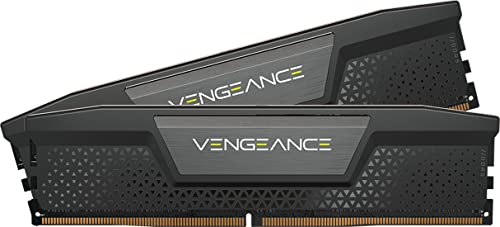
Specs
Speed | DDR5-6000 |
Timings | CL30-36-36-76 |
Voltage | 1.40V |
Capacity | 32GB (2x16GB) |
Profiles | Intel XMP 3.0 and AMD EXPO |
Software | iCUE-compatible |
Heatspreader | Black, no RGB |
Speed
DDR5-6000
Timings
CL30-36-36-76
Voltage
1.40V
Capacity
32GB (2x16GB)
Profiles
Intel XMP 3.0 and AMD EXPO
Software
iCUE-compatible
Heatspreader
Black, no RGB
What it does well
DDR5-6000 CL30 sits one tier below the 265K's 6400 ceiling, but the performance gap is narrower than the frequency delta suggests. Testing across multiple reviewers consistently shows DDR5-6000 CL30 at 95-99% of DDR5-6400 CL32 performance in most gaming workloads. In titles that aren't heavily memory-bandwidth-constrained, the difference is within margin of error.
The CL30 primary timing is genuinely tight. The Vengeance's bandwidth-to-latency tradeoff at 6000 is well-balanced: you give up raw bandwidth vs. 6400 kits but partially recover it through the lower primary latency. This kit also dual-certifies with both Intel XMP 3.0 and AMD EXPO, which means it's genuinely functional on both platforms.
Corsair's iCUE integration is a real feature if you're already running iCUE for other components. Temperature monitoring, fan curves, and lighting sync all flow through the same software stack.
What you give up
You're leaving some bandwidth on the table compared to DDR5-6400 CL32. On the 265K specifically, where the memory controller scales farther with bandwidth than prior Intel platforms, that gap has slightly more meaning than it would on a 12th or 13th gen build. Reviewers measuring the 265K's memory sensitivity consistently show DDR5-6400 pulling ahead in bandwidth-heavy scenarios.
The secondary timings are loose at 36-36-76. The CL30 headline timing is the number Corsair markets; the full timing string at 6000 MT/s isn't exceptionally tight on the secondary columns.
Who it's for
The 265K builder who wants validated DDR5 performance at a slight step below the 6400 ceiling. Also the right pick for dual-platform builds, builds where iCUE integration matters, or any system where the budget gap between 6000 and 6400 is better spent elsewhere, including a paired B860 motherboard or storage.
Best Premium: Corsair Dominator Titanium DDR5-6400

Specs
Speed | DDR5-6400 |
Timings | CL32 |
Voltage | 1.40V |
Capacity | 32GB (2x16GB) |
Profile | Intel XMP 3.0 |
Cooling | Forged aluminum DHX |
RGB | 11-zone iCUE-addressable |
Speed
DDR5-6400
Timings
CL32
Voltage
1.40V
Capacity
32GB (2x16GB)
Profile
Intel XMP 3.0
Cooling
Forged aluminum DHX
RGB
11-zone iCUE-addressable
What it does well
The Corsair Dominator Titanium pairs a DDR5-6400 CL32 spec with forged aluminum housing and Corsair's best RGB implementation. The aluminum cooling construction is a meaningful step up from the plastic fin heatspreaders most DDR5 kits use, and it keeps module temperatures lower under sustained memory-intensive workloads. Corsair's 11-zone RGB is the most feature-complete on any kit in this article: per-zone addressability, iCUE SDK integration, and synchronization across Corsair ecosystem components.
Performance at stock is equivalent to the G.Skill Z5. Same DDR5-6400 CL32 spec, same 265K bandwidth ceiling, same XMP 3.0 reliability. The premium doesn't buy you more frames; it buys hardware quality and ecosystem integration.
What you give up
The price premium is substantial for identical gaming performance at stock. If you don't care about the aesthetics or the iCUE integration, there's no measurable reason to spend the extra over the G.Skill Z5 or Kingston Fury Beast.
The forged aluminum fins are tall. Reports from buyers suggest conflicts with large tower coolers: the DeepCool AK620, Noctua NH-D15 G2, and Thermalright Phantom Spirit 120 SE all have documented clearance issues with full-height Dominator modules. Check your cooler's RAM slot clearance spec before ordering.
Who it's for
The Core Ultra 7 265K builder putting together a showcase system: glass-panel case, iCUE ecosystem, build photos or display purposes. Also appropriate for builds where the Corsair ecosystem is already established and unifying the lighting system has real value.
Best Budget: Kingston Fury Beast DDR5-6400

Specs
Speed | DDR5-6400 |
Timings | CL32 |
Capacity | 32GB (2x16GB) |
Profile | Intel XMP 3.0 |
ECC | On-die |
Heatspreader | Black low-profile, no RGB |
Speed
DDR5-6400
Timings
CL32
Capacity
32GB (2x16GB)
Profile
Intel XMP 3.0
ECC
On-die
Heatspreader
Black low-profile, no RGB
What it does well
The Kingston Fury Beast delivers the full DDR5-6400 CL32 specification at the lowest cost of any kit in this article. That's the entire pitch: DDR5-6400 CL32, XMP 3.0, no RGB tax, no brand premium.
Kingston's on-die ECC is a small but real stability feature at DDR5-6400. At high memory frequencies, on-die error correction catches single-bit errors that can otherwise cause intermittent instability in sustained workloads. The low-profile heatspreader clears every air cooler on the market without checking dimensions first.
No RGB means no RGB controller driver overhead, no software to install, and no LEDs to disable in the BIOS for maximum stability.
What you give up
The heatspreader is basic. It's functional but it won't impress anyone looking through a glass panel. Kingston's budget bin selection means slightly more unit-to-unit variation in how cleanly the XMP 3.0 profile trains at DDR5-6400 compared to the G.Skill Z5 or Corsair Dominator Titanium.
Who it's for
Budget-conscious 265K builders who want the platform's full DDR5-6400 speed without paying a brand premium for features they don't need. Also the definitive choice for opaque-panel cases, workstation-adjacent rigs, or any system where the case interior will never be seen.
Editor's Pick: G.Skill Trident Z5 DDR5-6400 (No RGB)

Specs
Speed | DDR5-6400 |
Timings | CL32-39-39-102 |
Voltage | 1.40V |
Capacity | 32GB (2x16GB) |
Profile | Intel XMP 3.0 |
Heatspreader | Matte black, no RGB |
Speed
DDR5-6400
Timings
CL32-39-39-102
Voltage
1.40V
Capacity
32GB (2x16GB)
Profile
Intel XMP 3.0
Heatspreader
Matte black, no RGB
What it does well
This is the G.Skill Trident Z5 at its most utilitarian: the same DDR5-6400 CL32-39-39-102 spec, the same bin quality, the same XMP 3.0 reliability, and no RGB lighting. If the Z5's production consistency is what you're after and RGB is not part of the equation, this variant delivers it without the LED premium.
Worth knowing: the RGB and non-RGB Trident Z5 variants sometimes land within a few dollars of each other in price. Check both ASINs before ordering. If the price gap is small, the RGB variant adds resale value for minimal cost. If it's meaningful, this is the one to buy.
What you give up
No RGB means no retrofit path. If you later decide you want addressable lighting on the kit, you'd need to swap it. The non-RGB version also has slightly lower resale value.
Who it's for
Clean-build 265K systems where RGB is unwanted or irrelevant: opaque-panel cases, workstation-adjacent gaming rigs, builds optimizing for minimal software footprint, and any system where the visual difference between the RGB and non-RGB variant isn't worth the price delta.
Bottom line: the best DDR5 RAM for the Core Ultra 7 265K
For a Core Ultra 7 265K build, DDR5-6400 CL32 is the target. The platform rewards it more than prior Intel generations. If you want the most reliable kit at that spec with clean XMP 3.0 training across Z890 and B860 boards, the G.Skill Trident Z5 RGB DDR5-6400 is the pick. If aesthetics and iCUE integration matter more than price, the Corsair Dominator Titanium DDR5-6400 covers that tier. If you're watching the budget and the small performance gap between 6000 and 6400 doesn't justify the premium for your build, the Corsair Vengeance DDR5-6000 CL30 is a solid landing spot. For the lowest cost DDR5-6400 that still clears the spec, the Kingston Fury Beast DDR5-6400 gets it done. Stepping up to the Core Ultra 9 285K changes the answer: the flagship's controller opens a CUDIMM tier the 265K never reaches, and the best RAM for the Core Ultra 9 285K sorts five kits by workload on that platform.
Whatever you pick: enable XMP 3.0 in BIOS, let the board run its first-boot memory training pass, and check that your B860 board has the latest BIOS before installing. See our memory and storage guide for the broader platform context.
FAQ
Is DDR5-6400 really worth it for the Core Ultra 7 265K?
Yes, more than on most Intel platforms. The 265K's memory controller was designed around higher DDR5 bandwidth targets than 12th and 13th gen Intel, and testing shows a consistent 1-6% performance advantage for DDR5-6400 CL32 over DDR5-6000 CL30 in gaming workloads. That gap is narrower than going from DDR4 to DDR5, but it's real. For a platform specifically tuned to benefit from bandwidth, stopping at DDR5-6000 when DDR5-6400 kits are available at minimal premium doesn't make sense.
What is CUDIMM and do I need it for Arrow Lake?
CUDIMM stands for Clocked UDIMM. These modules carry a small clock driver chip on the module itself, which improves signal integrity at high memory speeds. Arrow Lake supports CUDIMM natively, enabling stable operation above DDR5-6400 up to DDR5-8000 and beyond on compatible Z890 and B860 boards. The standard UDIMM modules in this article max out at DDR5-6400 on the 265K. For most gaming builds DDR5-6400 standard UDIMM is the right call. CUDIMM is for builders who specifically want to push toward DDR5-6800 or higher and have a board with confirmed CUDIMM support.
Does the Core Ultra 7 265K work with DDR4?
No. Arrow Lake uses the LGA1851 socket and Z890 or B860 chipset motherboards, all of which require DDR5. There is no DDR4 compatibility on this platform. If you're migrating from a 12th or 13th gen Intel build, your existing DDR4 kits won't carry over.
How much RAM do I need for a 265K gaming build?
32GB is the right capacity for a 265K gaming build in 2026. Modern AAA titles frequently require 16GB or more at high settings, and running a browser and Discord alongside a game eats into a 16GB kit faster than most buyers expect. All five picks in this article are 32GB (2x16GB) kits. If you're also doing video editing or running virtual machines alongside gaming, look at the 64GB variants of these same kits, available at the same speed tiers.
Will DDR5-6000 CL30 work on a Core Ultra 7 265K or do I need something faster?
DDR5-6000 CL30 works on the 265K platform and is a legitimate choice. XMP 3.0 will load the profile cleanly on Z890 and B860 boards. The performance difference vs. DDR5-6400 CL32 is approximately 1-5% in gaming workloads. If the price gap between 6000 and 6400 kits is significant in your budget, DDR5-6000 CL30 is a defensible landing spot. The Corsair Vengeance DDR5-6000 CL30 in this article is the Best Value pick for exactly that reason.
Related Articles

Best Low-Profile DDR5 RAM for Air Coolers (2026): 5 Kits
Five low-profile DDR5 kits, 31 to 34 mm tall, that clear the NH-D15 G2, Peerless Assassin, and AK620 front fans. Cooler-height table first, picks by tier.
Aug 27, 2026

Core Ultra 7 265K vs Ryzen 7 9800X3D: Which CPU Wins?
Core Ultra 7 265K vs Ryzen 7 9800X3D compared across pure gaming, streaming, and productivity scenarios. See which CPU belongs in your next gaming build.
May 29, 2026

Best 32GB DDR5 RAM for Gaming (2026): 5 AM5 & Intel Picks
The best 32GB DDR5 RAM for gaming: 5 picks, matched to your CPU. AM5 wants EXPO 6000 CL30, LGA 1851 wants XMP 6400 CL32. Pick by platform, not spec sheet.
Sep 7, 2026

Best 64GB DDR5 RAM 2026: 5 Kits for Creators (2x32GB)
The best 64GB DDR5 RAM kits for 4K editing, 3D, and local AI: five 2x32GB DDR5-6000 EXPO and XMP picks ranked by workload, plus why two sticks beat four on AM5.
Aug 19, 2026

Best Monitor for RTX 4060 (2026): 1080p and 1440p Picks
The best monitor for an RTX 4060 is a 1080p 180Hz panel for most games, with 1440p only if you run DLSS. Five picks matched to what the 8GB card drives.
Oct 13, 2026