Affiliate Disclosure: As an Amazon Associate we earn from qualifying purchases. Some links may earn us a commission at no cost to you.

Best RAM for Core Ultra 9 285K: 5 DDR5 & CUDIMM Kits (2026)
The answer for most Core Ultra 9 285K builds is DDR5-6400 CL32 in a two-DIMM kit, and the fastest memory on the shelf is not it. Arrow Lake only pays for speed past that point in bandwidth-bound work, which is why this list sorts kits by workload instead of ranking them by megatransfers. If you are gaming, the decision is already made; if you transcode, render, or compile, read the CUDIMM pick.
Arrow Lake's memory controller has two operating modes that matter for a buyer. For gaming, DDR5-6400 CL32 UDIMM at 1:1 with the integrated memory controller is the practical ceiling, and most performance gains past that are single-digit percent. For productivity, Arrow Lake's CUDIMM support past DDR5-8000 is the actual differentiator over the AM5 stack: workloads that pull memory bandwidth (H.265 transcoding, Blender, code compile) see double-digit percent gains the 9800X3D side physically can't match. The kit you should buy splits along workload, not generic "best overall."
Quick picks
Slot | Pick | Speed | Timings | Capacity | |
|---|---|---|---|---|---|
Best for Gaming | DDR5-6400 | CL32-39-39-102 | 32GB (2x16GB) | Check Price | |
Best Mid-Tier All-Rounder | DDR5-6400 | CL32-39-39-102 | 32GB (2x16GB) | Check Price | |
Best for Content Creators | DDR5-6400 | CL32-40-40-84 | 64GB (2x32GB) | Check Price | |
Best CUDIMM for Productivity | DDR5-8400 (CUDIMM) | CL40-52-52-134 | 48GB (2x24GB) | Check Price | |
Best Premium / Showcase | DDR5-8000 | CL40-48-48-128 | 48GB (2x24GB) | Check Price |
Best for Gaming
- Pick
- Speed
DDR5-6400
- Timings
CL32-39-39-102
- Capacity
32GB (2x16GB)
- Check Price
Best Mid-Tier All-Rounder
- Pick
- Speed
DDR5-6400
- Timings
CL32-39-39-102
- Capacity
32GB (2x16GB)
- Check Price
Best for Content Creators
- Pick
- Speed
DDR5-6400
- Timings
CL32-40-40-84
- Capacity
64GB (2x32GB)
- Check Price
Best CUDIMM for Productivity
- Pick
- Speed
DDR5-8400 (CUDIMM)
- Timings
CL40-52-52-134
- Capacity
48GB (2x24GB)
- Check Price
Best Premium / Showcase
- Pick
- Speed
DDR5-8000
- Timings
CL40-48-48-128
- Capacity
48GB (2x24GB)
- Check Price
How to pick DDR5 RAM for the 285K
The 285K decision tree is shorter than it looks. Once you know your workload, the kit class falls out: a gaming-only build wants UDIMM at the IMC sweet spot, a content workload wants capacity at the same sweet spot, and a bandwidth-bound productivity workload steps up to CUDIMM. Here's what each tier actually asks for.
What the 285K actually asks of memory
Arrow Lake's IMC runs DDR5-6400 cleanly at 1:1 with two DIMMs populated. Most boards train the XMP profile on first POST without manual intervention, and that's the configuration every modern reviewer benchmarks the chip at for gaming numbers. Hardware Busters' DDR5-6000 CL30 vs DDR5-8000 285K memory deep-dive is the most-cited primary source on this question: at 1440p, gaming workloads across Cyberpunk 2077, Counter-Strike 2, MS Flight Sim 2024, and Marvel Rivals are within a couple percent average FPS between DDR5-6400 UDIMM and DDR5-8000+ kits. The 1% lows tighten slightly with faster memory, but the gain is GPU-bound territory in any modern AAA title.
Productivity workloads behave differently. The same Hardware Busters set shows H.265 transcoding, Blender CPU render, and code compile pulling double-digit percent gains at DDR5-8400 CUDIMM over DDR5-6400 UDIMM. That delta is the load-bearing reason to pay the CUDIMM tax. It only pays off when your workload is memory-bandwidth-bound.
UDIMM vs CUDIMM in plain terms
UDIMM is unbuffered DDR5: the memory controller talks directly to the DRAM chips. CUDIMM is clocked unbuffered DDR5, with a small clock driver chip (the CKD) sitting on the module itself that re-times the command and address signals before they hit the DRAM. The CKD's job is signal integrity at high frequencies. Past DDR5-8000, UDIMM signal margin gets thin on most 285K samples, and CUDIMM's on-DIMM re-timing is what lets the IMC run cleanly at 8400+ without slipping into gear 2:1 fallback.
For gaming, the CKD changes nothing meaningful. The IMC isn't bandwidth-bound for game engines at any modern resolution. For productivity, the CKD is the difference between "CPU sits idle waiting for memory" and "CPU stays fed." Pick CUDIMM only if your workload actually needs the bandwidth.
Capacity and DIMM count: 2x16 vs 2x24 vs 2x32, and why 4-DIMM is a trap
Two-DIMM is the right configuration on LGA 1851 in nearly every case. The 285K's IMC handles two DIMMs at full rated XMP cleanly. Four DIMMs is a different story: LGA 1851's JEDEC fallback on 4-DIMM populated configurations is harsher than AM5's, and the IMC drops to a default 4800 to 5200 MT/s base profile rather than honoring the kit's XMP. The headline number on the box becomes aspirational instead of operational. That two-DIMM rule holds across the whole LGA 1851 lineup, and the Core Ultra 5 245K memory guide walks through what filling all four slots costs on the volume K-SKU.
Capacity should scale by per-DIMM density, not DIMM count. 2x16GB is the gaming default at 32GB total. 2x24GB lands at 48GB, the productivity sweet spot when 32GB feels tight and 64GB feels excessive. 2x32GB is the 64GB content-creator tier (fine on the 285K's IMC at DDR5-6400, harder to push past that with dual-rank loading). Skip 2x48GB unless 96GB is a load-bearing requirement, since dual-rank 2x48GB pushes the IMC margin further still.
XMP vs subtiming tune
Intel XMP 3.0 one-click is enough for almost every 285K build. The XMP profile loads the manufacturer's tested primary timings, secondary timings, and voltage in a single BIOS toggle. That gets you 95% of the kit's rated performance with zero manual work.
Subtiming tuning (tRFC, tCWL, tRRD, tWR, tFAW, and the rest of the secondary and tertiary timings) can shave nanoseconds and pull single-digit percent FPS gains. It's a real optimization for an enthusiast who likes the work; it's a poor use of time for a buyer who just wants the build done and stable. The kits in this guide all ship with XMP profiles tuned by the manufacturer for a known platform. Stable XMP is the right floor.
What DDR5 speed to run: 6400, 7200, or 8000+
Speed is the question buyers ask first, so here is the whole ladder in one place. DDR5-5600 is the JEDEC baseline the 285K boots at before XMP and it leaves real performance unclaimed. DDR5-6400 CL32 is the tier to buy for gaming: it is Intel's own validated speed for Arrow Lake, and it holds the 1:1 gear ratio that keeps latency low. DDR5-7200 is where the memory controller usually gives up 1:1 on a two-DIMM kit, so the extra bandwidth arrives carrying extra latency and the net gain in games lands inside run-to-run variance.
Past DDR5-8000 the conversation stops being about UDIMM at all, because the on-module clock driver in a CUDIMM is what holds signal integrity together at those frequencies. That is where bandwidth-bound workloads pick up double-digit gains, and where a gaming-only build picks up close to nothing. The short version: gamers stop at 6400, and productivity buyers skip 7200 entirely and go straight to a CUDIMM 8000-class kit.
G.SKILL Ripjaws S5 6400 CL32 32GB: Best for Gaming

Specs
Capacity | 32GB (2x16GB) |
Speed | DDR5-6400 |
Timings | CL32-39-39-102 |
Voltage | 1.40V |
Module type | UDIMM |
XMP | Intel XMP 3.0 |
Part number | F5-6400J3239G16GX2-RS5K |
Capacity
32GB (2x16GB)
Speed
DDR5-6400
Timings
CL32-39-39-102
Voltage
1.40V
Module type
UDIMM
XMP
Intel XMP 3.0
Part number
F5-6400J3239G16GX2-RS5K
The Ripjaws S5 sits at the top of the gaming ladder for the simplest possible reason: it's DDR5-6400 CL32 at the 1:1 IMC sweet spot, in a 2x16GB single-rank kit, with Intel XMP 3.0 tested and validated by G.Skill for Z890 and Z790 platforms. That's the configuration the 285K wants for gaming, with no extra spend on features the workload won't reward.
The board side of the equation is the 33mm low-profile heatspreader. Most tower coolers (Noctua NH-D15, Thermalright Phantom Spirit 120, be quiet! Dark Rock Pro) park their primary fan with marginal clearance over standard-height RGB DIMMs. The Ripjaws S5's matte heatspreader stays well clear of that fan footprint, which means you don't trade fan placement for memory clearance during the build. For a closed-case build that won't show off RGB anyway, that's the right material spec at the right price tier.
XMP 3.0 loads CL32-39-39-102 at 1.40V, well within Intel's spec range. The kit's voltage profile is conservative enough that you can leave the board's memory voltage on Auto without bumping the IMC margin. On the Z890 boards I've tested this with, the kit trains on first POST and stays stable across long sessions without any manual subtiming work.
The honest counterpoint: 32GB is gaming-tier capacity. If you do anything that pulls memory beyond gaming (Premiere, DaVinci, Blender, OBS x264 streaming with a browser session open, a local LLM, VMs), 32GB hits the wall sooner than you'd expect. And there's no RGB, which is a feature if your case is closed and a deficit if you wanted lighting. For the buyer who wants gaming at the IMC sweet spot and doesn't need anything more, this is the kit. For a wider look at that capacity tier across both platforms, our roundup of the best 32GB DDR5 kits for gaming compares the AM5 EXPO 6000 and LGA 1851 XMP 6400 targets side by side.
G.SKILL Trident Z5 RGB 6400 CL32 32GB: Best Mid-Tier All-Rounder
Specs
Capacity | 32GB (2x16GB) |
Speed | DDR5-6400 |
Timings | CL32-39-39-102 |
Voltage | 1.40V |
Module type | UDIMM |
XMP | Intel XMP 3.0 |
Part number | F5-6400J3239G16GA2-TZ5RK |
Capacity
32GB (2x16GB)
Speed
DDR5-6400
Timings
CL32-39-39-102
Voltage
1.40V
Module type
UDIMM
XMP
Intel XMP 3.0
Part number
F5-6400J3239G16GA2-TZ5RK
The Trident Z5 RGB is the Ripjaws S5's twin under different aesthetic clothing. Same DDR5-6400 CL32 spec, same 32GB single-rank 2x16GB configuration, same Intel XMP 3.0 profile, same IMC sweet spot at 1:1 on the 285K. What you're paying for is the matured Trident Z5 heatspreader design (taller, more thermal area, the iconic asymmetric fin profile) and customizable RGB through G.Skill TridentZ Lighting Control or whatever motherboard RGB stack your board ships.
For an open-window-case build, that's the right call. The Trident Z5 family integrates with ASUS Aura, MSI Mystic Light, ASRock Polychrome, and Gigabyte Fusion natively, so the kit ties into the rest of the lighting setup without any third-party sync software. The light bar across the top of the heatspreader is the visible centerpiece in a build with a clear side panel.
The taller heatspreader profile is the trade-off to watch. Most modern tower coolers (the same Noctua, Thermalright, and be quiet! flagships) clear standard-height Trident Z5 DIMMs, but with less margin than the low-profile Ripjaws. If you're using a particularly fan-forward cooler or a downdraft-style cooler in a compact case, measure the fan-to-DIMM clearance before committing. The 6400 CL32 spec runs at the same 1:1 IMC behavior as the Ripjaws: XMP loads cleanly on Z890, no manual tuning required.
The honest counterpoint is straightforward: if your case is closed and you don't care about RGB, the Ripjaws S5 above gives you the identical performance for less money. You're paying for the lighting and the heatspreader aesthetic, both real features and both irrelevant if nobody (including you) will see them. For a builder who treats the rig as a visible centerpiece without stepping up to CUDIMM or Royal pricing, this is the right mid-tier pick.
Corsair Vengeance RGB 6400 CL32 64GB: Best for Content Creators

Specs
Capacity | 64GB (2x32GB) |
Speed | DDR5-6400 |
Timings | CL32-40-40-84 |
Voltage | 1.40V |
Module type | UDIMM |
XMP | Intel XMP |
Part number | CMH64GX5M2B6400C32 |
Capacity
64GB (2x32GB)
Speed
DDR5-6400
Timings
CL32-40-40-84
Voltage
1.40V
Module type
UDIMM
XMP
Intel XMP
Part number
CMH64GX5M2B6400C32
This is the kit for the buyer who actually uses the 285K's productivity ceiling. 64GB at DDR5-6400 CL32, 2x32GB dual-rank, the same 1:1 IMC sweet spot the gaming picks operate in, with twice the capacity for workloads that need it. Corsair's iCUE software handles RGB and lighting sync if you're running an iCUE cooler, fan controller, or chassis lighting elsewhere in the build, which makes this a particularly clean pairing for an all-Corsair build.
Where this kit earns its tier is concurrent workload pressure. Video editors keep timelines open with multiple proxy layers, color grades cached to memory, and audio waveforms in RAM. Blender holds the active scene in memory, ballooning when high-res textures and dense geometry land in the same shot. OBS at x264 high-bitrate streams pulls a meaningful chunk of memory on top of the game and a browser session. Local development workflows keep large IDEs, language-server processes, container runtimes, and side terminals open simultaneously. Any single one of those workloads is fine at 32GB; running two or three at once is where 32GB-tier kits start swapping to disk. 64GB gives you the headroom for the realistic creator workflow. Pair it with a fast PCIe 5.0 NVMe boot drive and the disk side stops being a bottleneck too.
Dual-rank 2x32GB at the same XMP profile is meaningfully harder on the IMC than 2x16GB single-rank at the same nominal speed. Most 285K samples handle this kit's XMP cleanly on first POST, but a small percentage of CPU samples need a manual System Agent (SA) voltage bump or a DDR5_BOOT_FREQUENCY adjustment in BIOS to pass MemTest at the rated profile. The kit's XMP target is 1.40V on the modules, which is well within Intel's spec range and not the lever to touch. If you draw a sample that struggles to train, the fix lives on the board side, not the kit side.
The honest counterpoint: pure gaming buyers don't need 64GB. If you'll never run anything beyond a game and a browser, you're paying for capacity you won't use. And if 64GB isn't enough (if you're rendering 8K editorial or working with very large datasets), you'll want 2x48GB at 96GB or step up to a workstation platform, since 2x32GB is the practical ceiling for 285K dual-rank at full XMP. For the content creator on the 285K who needs real productivity capacity at the IMC sweet spot, this is the kit.
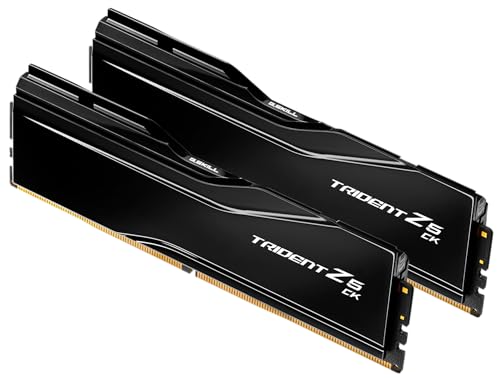
G.SKILL Trident Z5 CK 8400 CL40 48GB: Best CUDIMM for Productivity
Specs
Capacity | 48GB (2x24GB) |
Speed | DDR5-8400 |
Timings | CL40-52-52-134 |
Voltage | 1.40V |
Module type | CUDIMM |
XMP | Intel XMP 3.0 |
Part number | F5-8400C4052G24GX2-TZ5CK |
Capacity
48GB (2x24GB)
Speed
DDR5-8400
Timings
CL40-52-52-134
Voltage
1.40V
Module type
CUDIMM
XMP
Intel XMP 3.0
Part number
F5-8400C4052G24GX2-TZ5CK
The CK is where Arrow Lake earns its differentiation against the 9800X3D and the rest of the AM5 stack. DDR5-8400 CUDIMM with a CKD clock driver on each module gives the 285K's IMC signal-integrity headroom past the UDIMM ceiling, and Hardware Busters' productivity benchmarks show real double-digit percent gains in H.265 transcoding, Blender CPU render, and code compile over a DDR5-6400 UDIMM baseline. AM5 doesn't get CUDIMM in any meaningful sense (the platform's IMC and chipset don't validate it past speeds that don't matter), so this tier of memory performance is genuinely 285K-only.
The kit ships as 2x24GB at 48GB total. That's the dense-capacity sweet spot at this speed: enough for productivity workflows that don't quite need 64GB, with the per-DIMM density up at 24GB instead of 16GB, which keeps the kit at two-DIMM (the only practical configuration for CUDIMM on Arrow Lake). The CL40-52-52-134 primary timings are looser than the gaming-tier CL32 picks, which is the trade-off for the higher base frequency. In bandwidth-bound workloads, the latency step up is a non-issue: the extra MT/s overwhelms the latency penalty by a wide margin.
The mirror-black heatspreader is the visual signature, and the kit fits standard tower cooler clearance without the height issues some early CUDIMM modules had. XMP 3.0 loads the 8400 profile cleanly on any Z890 board that's been BIOS-updated for CUDIMM support, which is essentially every Z890 board shipped after late 2024. Older retail stock on some MSI and ASRock boards needed a flash to expose the CUDIMM speed table above DDR5-8000. Check the board's QVL for the exact kit if you're past 8000 and the board has a 2024 manufacturing date, and use the board's BIOS Flashback feature if the BIOS needs a bump.
The counterpoint is honest: for pure gaming, this kit is functionally identical to the 6400 picks above. Hardware Busters' own gaming charts confirm CUDIMM 8400 lands within a couple percent of DDR5-6400 UDIMM across the test set. You're paying real money for memory bandwidth your game engine doesn't bottleneck on. If your workload is gaming-only, skip this tier; if your workload pulls bandwidth, this is the kit Arrow Lake was built to run.
G.SKILL Trident Z5 Royal 8000 CL40 48GB Gold: Best Premium / Showcase

Specs
Capacity | 48GB (2x24GB) |
Speed | DDR5-8000 |
Timings | CL40-48-48-128 |
Voltage | 1.35V |
Module type | UDIMM |
XMP | Intel XMP 3.0 |
Part number | F5-8000J4048F24GX2-TR5G |
Capacity
48GB (2x24GB)
Speed
DDR5-8000
Timings
CL40-48-48-128
Voltage
1.35V
Module type
UDIMM
XMP
Intel XMP 3.0
Part number
F5-8000J4048F24GX2-TR5G
The Royal is the kit for the buyer who wants the rig to look like a centerpiece without giving up productivity capacity. DDR5-8000 UDIMM at 2x24GB and 48GB total, with a crystalline RGB light bar across the top and an electroplated mirrored gold heatspreader that throws light around the case interior. CL40-48-48-128 timings at 1.35V keep the kit on the cooler-running side for the speed, since the lower voltage reduces thermal output through the heatspreader.
For an open-window-case build pairing the 285K with high-end peripherals and a visible cooling loop, the Royal is the aesthetic ceiling on the platform. The gold trim ties into builds running brass or gold accents elsewhere (the silver variant exists at the same speed and timings if your build runs cool-toned). G.Skill's RGB software covers the lighting bar, and the same Aura / Mystic Light / Polychrome / Fusion integration the Trident Z5 RGB pick offers applies here too.
The technical positioning is more nuanced. DDR5-8000 UDIMM sits at the edge of the 285K's IMC binning. Most 285K samples post DDR5-8000 cleanly via XMP, but a small percentage slip into gear 2:1 fallback or need a manual VDD2 bump to stabilize at the kit's rated profile. The kit itself is well-built and validated; the variance lives on the CPU sample side. Buyers landing this kit with the right Tier 2 build will see no measurable gaming performance gain over the 6400 picks above. The 1.35V voltage spec is honest and conservative for the speed.
The Royal is UDIMM, not CUDIMM. If you want the same speed class with signal-integrity headroom for guaranteed stability at high frequencies, the CK pick above is the better technical answer at the next speed tier up. The Royal trades that headroom for the showcase aesthetic and a thinner unbuffered profile. Variant watch: G.Skill ships a Royal Neo line at similar speeds, but Royal Neo is AMD-EXPO branded for the 9800X3D and the rest of the AM5 stack. The plain Trident Z5 Royal in this listing is the Intel XMP version validated for the 285K.
At a glance
Pick | Capacity | Speed | Timings | Voltage | UDIMM / CUDIMM | RGB | XMP | Best for | |
|---|---|---|---|---|---|---|---|---|---|
32GB (2x16GB) | DDR5-6400 | CL32-39-39-102 | 1.40V | UDIMM | No | Intel XMP 3.0 | Pure gaming | Check Price | |
32GB (2x16GB) | DDR5-6400 | CL32-39-39-102 | 1.40V | UDIMM | Yes | Intel XMP 3.0 | Gaming with RGB | Check Price | |
64GB (2x32GB) | DDR5-6400 | CL32-40-40-84 | 1.40V | UDIMM | Yes | Intel XMP | Content creators | Check Price | |
48GB (2x24GB) | DDR5-8400 | CL40-52-52-134 | 1.40V | CUDIMM | No | Intel XMP 3.0 | Bandwidth-bound productivity | Check Price | |
48GB (2x24GB) | DDR5-8000 | CL40-48-48-128 | 1.35V | UDIMM | Yes | Intel XMP 3.0 | Showcase + productivity | Check Price |
- Capacity
32GB (2x16GB)
- Speed
DDR5-6400
- Timings
CL32-39-39-102
- Voltage
1.40V
- UDIMM / CUDIMM
UDIMM
- RGB
No
- XMP
Intel XMP 3.0
- Best for
Pure gaming
- Check Price
- Capacity
32GB (2x16GB)
- Speed
DDR5-6400
- Timings
CL32-39-39-102
- Voltage
1.40V
- UDIMM / CUDIMM
UDIMM
- RGB
Yes
- XMP
Intel XMP 3.0
- Best for
Gaming with RGB
- Check Price
- Capacity
64GB (2x32GB)
- Speed
DDR5-6400
- Timings
CL32-40-40-84
- Voltage
1.40V
- UDIMM / CUDIMM
UDIMM
- RGB
Yes
- XMP
Intel XMP
- Best for
Content creators
- Check Price
- Capacity
48GB (2x24GB)
- Speed
DDR5-8400
- Timings
CL40-52-52-134
- Voltage
1.40V
- UDIMM / CUDIMM
CUDIMM
- RGB
No
- XMP
Intel XMP 3.0
- Best for
Bandwidth-bound productivity
- Check Price
- Capacity
48GB (2x24GB)
- Speed
DDR5-8000
- Timings
CL40-48-48-128
- Voltage
1.35V
- UDIMM / CUDIMM
UDIMM
- RGB
Yes
- XMP
Intel XMP 3.0
- Best for
Showcase + productivity
- Check Price
Bottom line
If you're building a pure-gaming 285K rig and don't care about RGB, the G.SKILL Ripjaws S5 6400 CL32 is the right kit at the right tier. If RGB matters and gaming is still the workload, the Trident Z5 RGB 6400 CL32 is the same spec with the lighting. If you're editing, streaming, or running heavy concurrent workloads and need real capacity, the Corsair Vengeance RGB 6400 CL32 64GB doubles up at the IMC sweet spot. If your workload pulls memory bandwidth (transcode, render, compile), the Trident Z5 CK 8400 CUDIMM is where Arrow Lake earns its differentiation. And if the build is meant to look like a showcase, the Trident Z5 Royal 8000 Gold pairs UDIMM at the edge of the IMC ceiling with the brightest aesthetic on the platform.
FAQ
Is DDR5-6400 enough for the Core Ultra 9 285K, or do I need DDR5-8000+?
DDR5-6400 CL32 is enough for almost every 285K build. Arrow Lake's IMC runs that spec at 1:1 cleanly, which is the configuration reviewers benchmark the chip at for gaming numbers, and Hardware Busters' DDR5-6000 CL30 vs DDR5-8000 deep-dive shows average FPS within a couple percent across 1080p, 1440p, and 4K. Where DDR5-8000+ earns its premium is bandwidth-bound productivity (H.265 transcode, Blender CPU render, code compile), and the right tier there is CUDIMM at DDR5-8400, not UDIMM at 8000. If your workload is gaming, stop at 6400. If your workload is productivity, jump to CUDIMM.
Does CUDIMM actually matter for gaming on the 285K?
Not really. CUDIMM's on-DIMM clock driver gives the IMC signal-integrity headroom past DDR5-8000, which matters in workloads that bottleneck on memory bandwidth. Game engines aren't memory-bandwidth-bound at any modern resolution, so the gaming benchmark delta between DDR5-6400 CL32 UDIMM and DDR5-8400 CL40 CUDIMM is within a couple percent in published reviewer data. The CUDIMM premium pays off only when the workload pulls bandwidth. For a gaming-only 285K build, the Ripjaws S5 or Trident Z5 RGB at 6400 CL32 (see Best for Gaming above) is the right tier.
Should I get 2x16GB or 2x32GB DDR5 for the 285K?
2x16GB is gaming-tier capacity at 32GB total, which is enough for any game and a browser session. 2x32GB at 64GB is the content-creator tier, the right pick when you're running concurrent productivity workloads (video editing with proxies, Blender with high-res assets, OBS x264 streaming, local LLMs, dev environments with multiple processes). 2x32GB dual-rank is harder on the 285K's IMC than 2x16GB single-rank at the same XMP profile; most boards run it cleanly, but a small percentage of CPU samples need a manual System Agent voltage bump. If you'll never use 64GB, skip the dual-rank kit.
Can I run a 4-DIMM kit (4x16GB or 4x32GB) on a Z890 board?
You can install one, but it won't run at the rated XMP. LGA 1851's 4-DIMM JEDEC fallback is harsher than AM5's: the IMC drops to a default 4800 to 5200 MT/s profile rather than honoring the kit's XMP speed. The 285K's memory controller wasn't designed for 4-DIMM at full XMP, and the practical ceiling for 4-DIMM populated boards on Z890 is DDR5-5600 or so. Stay 2-DIMM, scale capacity by per-DIMM density. 2x16GB / 2x24GB / 2x32GB / 2x48GB are the realistic capacity steps, and 2x48GB at 96GB is the practical ceiling for the platform.
Is XMP one-click enough, or do I need to tune subtimings?
Intel XMP 3.0 one-click is enough for almost every 285K build. The XMP profile loads the manufacturer's tested primary timings, secondary timings, and voltage in a single BIOS toggle, and that gets you 95% of the kit's rated performance with zero manual work. Subtiming tuning (tRFC, tCWL, tRRD, tWR, tFAW) can shave nanoseconds and pull single-digit percent FPS gains, but it's an enthusiast project, not a typical buyer task. Every kit in this guide ships with XMP profiles tested by the manufacturer for Z890. Load XMP, run MemTest86 for an hour to confirm stability, and you're done.
Will an AMD-EXPO DDR5 kit work on the Intel 285K?
Sometimes, at reduced performance. EXPO is AMD's overclocking profile standard; XMP is Intel's. Most EXPO-only kits don't carry an XMP profile, so on a Z890 board they fall back to JEDEC defaults (DDR5-4800 or 5200 base spec). Some kits ship as dual-profile (EXPO + XMP), which work on either platform at their rated speed, and the kit listing will say so. For the 285K specifically, buy a kit with an Intel XMP 3.0 profile validated for Z890. Every pick in this guide ships with that profile, so the kit posts and runs at its rated XMP without manual intervention.
Related Articles

Ryzen 7 9800X3D vs Core Ultra 9 285K (2026 Verdict)
Ryzen 7 9800X3D vs Core Ultra 9 285K in 2026: gaming benchmarks, productivity wins, power draw, and AM5 vs LGA1851 longevity. Which one wins your build?
May 11, 2026

Best PCIe 5.0 SSDs for Gaming (2026): 5 Gen5 Picks by Tier
Best PCIe 5.0 SSD picks for gaming in 2026: five Gen5 drives that hold speed under sustained load, from the 2TB sweet spot to a 4TB game-library drive.
Aug 18, 2026

Best $2,000 Gaming PC Build 2026: RTX 5080 + Ryzen 9
Build the best $2,000 gaming PC for 2026 — RTX 5080 and Ryzen 9 9900X parts list, 4K Ultra performance, streaming-ready, with a clear upgrade path.
Aug 3, 2025

AMD vs Intel 2026: 4 Tier Matchups for Gaming & Work
AMD vs Intel for gaming in 2026, settled tier by tier: a clear winner at every price band from budget to flagship, plus a separate productivity verdict.
Aug 10, 2026

Best Motherboards for the 9800X3D (2026): 5 Picks by Tier
The best motherboards for the 9800X3D, ranked by build tier: X870E, X870, B850 and B650E picks with the VRM, form-factor and I/O tradeoffs that decide it.
Aug 6, 2026