Affiliate Disclosure: As an Amazon Associate we earn from qualifying purchases. Some links may earn us a commission at no cost to you.

Best Gaming Microphones 2026: 5 USB and XLR Streaming Picks
For most people asking this question the answer is the Blue Yeti X: a USB mic with four polar patterns that sounds clean on Discord and on stream, with no audio interface and no preamp to buy. The rest of this list is what changes that answer, depending on how loud your room is and how much of a signal chain you want to own.
The split that decides it is USB against XLR. If you're streaming to Twitch, gaming on Discord, or recording a podcast at home, USB is almost certainly right: it's plug-and-play, needs no extra hardware, and modern USB mics hit a quality level that streaming compression flattens anyway. XLR is for streamers ready to build a proper signal chain who want the warmth that dynamic capsules produce.
The picks below cover both sides of that split, along with the right budget entry point if you're making a first upgrade from a headset mic.
Our top pick: Blue Yeti X
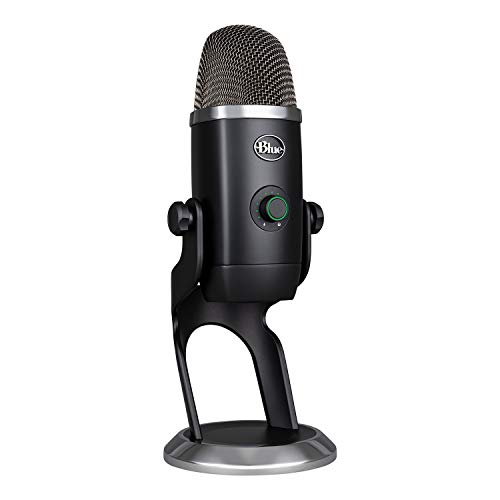
The Blue Yeti X gives you more flexibility than any other USB mic in its tier. Four polar patterns handle solo streaming, guest interviews, and ambient capture without buying anything extra.
Quick picks
Pick | Microphone | Connection | Best For | Buy |
|---|---|---|---|---|
Best Overall | USB-A | Multi-purpose streaming and podcasting | Check Price | |
Best Value | USB-C | Console and PC streamers upgrading from headset | Check Price | |
Best Premium | XLR | Semi-pro signal chain, broadcast vocal quality | Check Price | |
Best Budget | USB-A | First-time streamers on a tight budget | Check Price | |
Editor's Pick | USB-A | Elgato ecosystem, clip-protection priority | Check Price |
Best Overall
- Microphone
- Connection
USB-A
- Best For
Multi-purpose streaming and podcasting
- Buy
- Check Price
Best Value
- Microphone
- Connection
USB-C
- Best For
Console and PC streamers upgrading from headset
- Buy
- Check Price
Best Premium
- Microphone
- Connection
XLR
- Best For
Semi-pro signal chain, broadcast vocal quality
- Buy
- Check Price
Best Budget
- Microphone
- Connection
USB-A
- Best For
First-time streamers on a tight budget
- Buy
- Check Price
Editor's Pick
- Microphone
- Connection
USB-A
- Best For
Elgato ecosystem, clip-protection priority
- Buy
- Check Price
Specs at a glance
Microphone | Polar Pattern | Connection | Sample Rate | Key Feature |
|---|---|---|---|---|
4 patterns | USB-A | 24-bit/48kHz | LED metering + Blue Voice effects | |
Cardioid | USB-C | 24-bit/96kHz | Included shock mount, PS4/PS5 compatible | |
Cardioid (dynamic) | XLR | N/A (analog) | Built-in preamp +18/+28dB, no Cloudlifter needed | |
Cardioid | USB-A | 16-bit/48kHz | Pop filter + stand included, RGB | |
Cardioid | USB-A | 24-bit/96kHz | Clipguard anti-distortion, Wave Link software |
- Polar Pattern
4 patterns
- Connection
USB-A
- Sample Rate
24-bit/48kHz
- Key Feature
LED metering + Blue Voice effects
- Polar Pattern
Cardioid
- Connection
USB-C
- Sample Rate
24-bit/96kHz
- Key Feature
Included shock mount, PS4/PS5 compatible
- Polar Pattern
Cardioid (dynamic)
- Connection
XLR
- Sample Rate
N/A (analog)
- Key Feature
Built-in preamp +18/+28dB, no Cloudlifter needed
- Polar Pattern
Cardioid
- Connection
USB-A
- Sample Rate
16-bit/48kHz
- Key Feature
Pop filter + stand included, RGB
- Polar Pattern
Cardioid
- Connection
USB-A
- Sample Rate
24-bit/96kHz
- Key Feature
Clipguard anti-distortion, Wave Link software
How we picked
The starting point is always signal chain. USB microphones are plug-and-play condensers with built-in audio interfaces: you connect a cable and they work. XLR microphones are separate audio sources that need an external interface (a box with an XLR input, preamp, and A/D converter) to connect to a computer. For most streamers and Discord users, USB is the right call. For someone building a dedicated home studio who already owns an audio interface, XLR expands what's possible.
The second variable is capsule type. Condenser microphones are more sensitive and pick up more detail, which sounds great in a quiet, acoustically treated room. In a typical gaming setup with a mechanical keyboard, PC fans, and bare walls, a condenser also picks up all of that. Dynamic microphones are less sensitive, reject background noise more aggressively, and produce the warm, broadcast-heavy sound you associate with professional podcasts. They work better in noisy environments but need to be closer to your mouth. Logitech now sells both sides of that split under one name, and our Yeti 2 vs Yeti GX comparison walks through which capsule suits which room.
The third consideration is what you actually need. A solo streamer on Discord doesn't need four polar patterns. Someone doing podcast interviews needs bi-directional or a second mic. A screamer who gets loud in competitive games needs hardware clip protection. These picks split those use cases cleanly. If you're pairing this with a headset for gaming audio, our wireless gaming headsets guide covers the listening side of the setup.
Finally, avoid chasing sample rate specs. The difference between 48kHz and 96kHz is inaudible over any streaming platform. They all compress your audio to 128kbps or lower. 96kHz matters only if you're doing post-production audio work. For streaming, it's a marketing number.
Best Overall: Blue Yeti X
Specs
Connection | USB-A |
Polar patterns | Four: cardioid, omni, bi-directional, stereo |
Resolution | 24-bit/48kHz |
Metering | 11-segment LED output metering |
Software | Blue Voice vocal effects via Logitech G HUB |
Monitoring | 3.5mm headphone jack with zero-latency output |
Controls | Tap-to-mute button |
Connection
USB-A
Polar patterns
Four: cardioid, omni, bi-directional, stereo
Resolution
24-bit/48kHz
Metering
11-segment LED output metering
Software
Blue Voice vocal effects via Logitech G HUB
Monitoring
3.5mm headphone jack with zero-latency output
Controls
Tap-to-mute button
What it does well
The four genuine polar patterns are what separate the Yeti X from most gaming mics that offer cardioid only. Cardioid handles solo streaming with the mic pointed at you. Bi-directional places two people across from each other for a podcast-style setup. Omni works for roundtable captures. Most buyers only ever use cardioid, but the option to switch without buying a second mic has real value when you eventually need it.
The 11-segment LED output meter is a feature that sounds gimmicky until you've watched your recording peak in post and wished you had visual feedback during capture. It's a genuine utility addition for someone who's never managed microphone levels before.
Blue Voice via Logitech G HUB adds broadcast-style processing chains: high-pass filters, noise gates, compressors, de-essers, and preset vocal effects. The stock voice without any processing is already clean, but the software gives you a way to dial in a broadcast character without learning a DAW. The processing runs on the host computer and adds zero latency to the monitoring output.
What you give up
The Yeti X is physically large. On a cramped desk where the monitor, keyboard, and mouse are already competing for space, the footprint is real. The included stand works but adds to the height, and most buyers end up wanting a boom arm, which is an additional purchase not included in the box.
The USB-A connector is the practical friction point in 2026. If your laptop or USB hub is all USB-C, you need a USB-A to USB-C adapter. This usually costs very little, but it's the kind of thing buyers discover after the unboxing and find annoying. An adapter works fine electrically, but it's one more cable in the chain.
The cardioid polar pattern is a standard condenser, not a tightly rejecting dynamic. A mechanical keyboard sitting 15cm from the mic base will show up in a recording. The onboard processing can reduce this with a noise gate, but in a genuinely noisy setup, a dynamic mic like the SM7dB handles it better at a hardware level.
Who it's for
The Yeti X is for streamers who want a single USB mic that covers multiple use cases today and won't need replacing when the use cases change. If you stream solo, do occasional podcast episodes, and sometimes want to capture room audio or a second voice, this is the mic that handles all of it without another purchase. Buyers who are streaming to Twitch or YouTube and want an easy way to add vocal processing character without a DAW will also get meaningful use from Blue Voice.
Best Value: HyperX QuadCast 2

Specs
Connection | USB-C |
Polar pattern | Cardioid |
Resolution | 24-bit/96kHz |
Controls | Tap-to-mute sensor; on-board multi-function knob for gain, playback volume, monitoring level, and polar pattern |
In the box | Built-in shock mount and desktop stand |
Lighting | LED with on/off mode |
Monitoring | 3.5mm headphone jack |
Compatibility | PC, Mac, PS4, PS5 |
Connection
USB-C
Polar pattern
Cardioid
Resolution
24-bit/96kHz
Controls
Tap-to-mute sensor; on-board multi-function knob for gain, playback volume, monitoring level, and polar pattern
In the box
Built-in shock mount and desktop stand
Lighting
LED with on/off mode
Monitoring
3.5mm headphone jack
Compatibility
PC, Mac, PS4, PS5
What it does well
The QuadCast 2 addresses the annoyances of its predecessor directly. USB-C is a meaningful upgrade for anyone running a 2024 or newer laptop where USB-A to USB-C adapter friction was the previous generation's daily tax. The included shock mount absorbs desk vibrations and impact noise without a separate purchase. On competing mics in this tier, a standalone shock mount is a separate purchase that often costs a meaningful fraction of the mic price.
The 96kHz sample rate is overkill for streaming but gives the QuadCast 2 a practical advantage if you ever want to record music, voice-overs, or anything you'll edit in post. At streaming resolution, you won't hear the difference, but the headroom is there.
PS4 and PS5 compatibility is a genuine differentiator for console streamers who want a USB mic without a USB audio adapter. Most USB mics only advertise PC/Mac support; the QuadCast 2 works across platforms, which matters if your streaming setup splits time between a PC and a console.
The tap-to-mute sensor responds naturally to a quick tap on the top of the mic body. It's faster than reaching for a software mute and more reliable than keyboard shortcuts during a moment of unexpected background noise.
What you give up
Cardioid only, with no option to switch to omni or bi-directional. If you need to capture two voices across a table, you need two mics or a different model.
The LED lighting on the QuadCast 2 is prominent and defaults to on. In a dark room during a night stream, it adds a red ambient glow that some streamers find distracting and some find aesthetically useful. Reports suggest that disabling the LED entirely on some firmware versions requires the NGENUITY software app rather than a hardware toggle, which is a minor gate if you want a dark studio look without the app running.
The voicing has a slight mid-range presence boost compared to a flat condenser. Most listeners find it flattering for vocal clarity, but it's not the most neutral reproduction of natural voice. For streaming, that bias toward intelligibility is fine. For music recording, you'd want something more neutral.
Who it's for
PC and console streamers who are upgrading from their headset mic for the first time and want a proper desk setup without buying accessories. The included stand and shock mount mean the QuadCast 2 is genuinely complete out of the box. USB-C compatibility means it doesn't need an adapter on any modern laptop. This is the pick for someone who wants to stop thinking about their mic and start focusing on content.
Best Premium: Shure SM7dB

Specs
Connection | XLR output with built-in active preamp |
Onboard gain | Selectable +18dB or +28dB |
Capsule | Cardioid dynamic |
Frequency response | 50-20,000Hz |
EQ | Rear-panel switches for bass roll-off and mid-range presence boost |
In the box | Detachable foam windscreen |
Also needed | An XLR audio interface |
Connection
XLR output with built-in active preamp
Onboard gain
Selectable +18dB or +28dB
Capsule
Cardioid dynamic
Frequency response
50-20,000Hz
EQ
Rear-panel switches for bass roll-off and mid-range presence boost
In the box
Detachable foam windscreen
Also needed
An XLR audio interface
What it does well
The SM7dB solves the practical problem that held back XLR dynamic mics for streamers for years. Dynamic capsules (like the original SM7B) output a low signal level that requires high-gain preamps to drive cleanly. Budget audio interfaces often don't have enough clean gain, which pushes buyers toward an inline booster (the Cloudlifter, or similar), adding cost and complexity. The SM7dB's built-in preamp (selectable +18dB or +28dB) means a straightforward Focusrite Scarlett Solo provides enough clean gain on its own. The interface requirement doesn't go away, but it gets cheaper and simpler.
The dynamic capsule is the core advantage over everything else in this article. Dynamic mics are less sensitive than condensers. They don't pick up the keyboard clicks, PC fans, and room reflections that condenser mics capture faithfully. In a typical gaming environment without acoustic treatment, the difference is audible from the first recording. The SM7dB produces the warm, thick, broadcast-style vocal sound that streaming audiences associate with professional content. No USB mic at any price fully replicates that character.
The rear-panel EQ gives you two hardware switches: a bass roll-off that reduces low-frequency room rumble and a mid-range presence boost that adds vocal intelligibility. Both are useful for a streaming setup and require no software, no DAW, and no real-time processing on the host machine.
What you give up
You still need an XLR audio interface. The SM7dB is not plug-and-play. Setup requires the mic body, an XLR cable, an audio interface with XLR input and sufficient gain, and a boom arm (the mic is heavy enough that a desktop stand won't hold it well over extended sessions). Buyers who have never used XLR equipment before should expect to spend time understanding signal chain basics before everything sounds right.
The SM7dB doesn't have USB connectivity as a fallback. If you travel to LAN events or want to use the mic with a laptop that you left your interface at home, it doesn't work. This is a desk mic in the full sense.
Reports suggest that the built-in preamp can interact with phantom power on some budget interfaces, producing a ground-loop hum. The Focusrite Scarlett Solo is the tested-safe pairing at the budget end of the interface range. Higher-end interfaces from Universal Audio, MOTU, or RME have cleaner, better-regulated power supplies that avoid the issue entirely.
Who it's for
Streamers who have decided that audio quality is part of their brand and are ready to invest in a proper signal chain. The typical buyer already owns or is buying a Focusrite Scarlett Solo or similar budget interface and wants the broadcast vocal warmth that no USB condenser can match. If you're doing five or more hours of streaming per week and have an untreated room that would make a condenser mic sound amateur, the SM7dB is the technical answer to that problem.
Best Budget: Fifine Ampligame A8

Specs
Connection | USB-A |
Capsule | Cardioid condenser |
Resolution | 16-bit/48kHz |
Controls | Tap-to-mute, gain knob |
Lighting | RGB with on/off/mode button |
In the box | Pop filter and desktop stand |
Monitoring | 3.5mm headphone jack |
Compatibility | PC and Mac plug-and-play |
Connection
USB-A
Capsule
Cardioid condenser
Resolution
16-bit/48kHz
Controls
Tap-to-mute, gain knob
Lighting
RGB with on/off/mode button
In the box
Pop filter and desktop stand
Monitoring
3.5mm headphone jack
Compatibility
PC and Mac plug-and-play
What it does well
The Ampligame A8 includes everything you need to start streaming in one box: the mic body, a desktop stand, a pop filter to reduce plosive sounds, and a headphone monitoring jack. Competing mics at this price often include only the mic and a cable, leaving the buyer to either use a bare-desk setup or buy a stand separately. The complete kit makes the A8 the correct recommendation for someone who has never bought a standalone microphone before and needs zero friction to get started.
The headphone monitoring jack is genuinely uncommon at this price point. It lets you hear your own voice alongside game and Discord audio while you stream, which helps you catch issues (mic muted, cable unplugged, gain too low) before your audience does. For a first-time streamer, this is a practical tool.
The tap-to-mute and RGB controls are on-device without requiring software. You can mute, adjust gain, and cycle through RGB modes without alt-tabbing out of a game.
What you give up
The condenser capsule is the main limitation. Condenser mics are sensitive by design, and the A8 doesn't have the sophisticated internal processing or capsule design that more expensive condensers use to manage noise floor and polar pattern accuracy. In practice, this means a mechanical keyboard sitting close to the mic base will appear in your recordings. Buyers in an untreated room with fans, keyboard noise, or outside traffic will notice background noise in their recordings.
16-bit/48kHz is the floor of acceptable quality. For streaming platforms (which compress audio significantly) it's undetectable. For anything you'd want to edit or reuse in post-production, the quality ceiling is lower than other options in this article.
The desktop stand is functional but compact. For a mic arm setup that reduces keyboard vibration transmission from the desk to the mic, you'd need a boom arm, which is an additional purchase that the A8's price tier doesn't include.
Fifine's brand support infrastructure is thinner than Logitech or HyperX. If something fails out of warranty, options are limited compared to the established gaming peripheral brands.
Who it's for
A first-time streamer or Discord user who needs to upgrade from a headset microphone right now with as little financial commitment as possible. The Ampligame A8 is the right answer for someone who doesn't know whether streaming is a long-term thing yet and wants to get a better sound without the investment of a proper setup. It works, sounds noticeably better than a headset mic, and costs less than a single month's stream setup subscription for many platforms. If a standalone mic is still a step too far, our budget gaming headset picks graded on mic clarity cover the wired tier where the capsule, not the drivers, decides whether you get asked to repeat yourself.
Editor's Pick: Elgato Wave:3

Specs
Connection | USB-A |
Capsule | Cardioid condenser |
Resolution | 24-bit/96kHz |
Clip protection | Clipguard anti-distortion (dual-capsule overload protection) |
Software | Wave Link routes up to 8 audio sources into independent mixer channels |
Controls | Capacitive mute button |
In the box | Built-in pop filter in the mic body |
Monitoring | 3.5mm headphone jack |
Connection
USB-A
Capsule
Cardioid condenser
Resolution
24-bit/96kHz
Clip protection
Clipguard anti-distortion (dual-capsule overload protection)
Software
Wave Link routes up to 8 audio sources into independent mixer channels
Controls
Capacitive mute button
In the box
Built-in pop filter in the mic body
Monitoring
3.5mm headphone jack
What it does well
Clipguard is the hardware differentiator. Most USB condenser mics distort when a sudden loud sound overloads the capsule: a shout, a cough, a competitive outburst. The Wave:3 uses two capsules simultaneously: one for normal recording and one monitoring at a lower gain threshold. When the primary capsule clips, the Wave:3 switches transparently to the secondary signal. The result is that sudden loud moments in a recording don't produce an audible distortion artifact. For competitive game streamers who react loudly, this is the practical answer to a problem most mics can't solve in hardware.
Wave Link is the software ecosystem argument for this mic. Rather than routing all audio through an operating-system mixer or a per-app solution, Wave Link creates virtual mix channels for each audio source (mic, Discord, game, music, browser) and lets you control both what goes out to your stream and what you hear in your headphones as a separate mix. This mirrors what a hardware mixing board does in a professional broadcast setup. For a streamer who wants their audience to hear the game clearly while they themselves hear more of their own voice, Wave Link makes the adjustment straightforward without needing a separate hardware mixer.
The Wave:3's form factor is compact compared to the Yeti X, which matters on a desk where monitor, keyboard, and mouse already consume most of the space.
What you give up
The Wave:3 uses USB-A. Elgato released the Wave:3 MK.2 with USB-C in late 2025. If USB-C connectivity is important to your setup, the original Wave:3 requires the same USB-A-to-USB-C adapter friction as the Yeti X.
The Wave Link software ecosystem is deeply integrated with the Elgato product line. If you're not using a Stream Deck or other Elgato hardware, Wave Link still works as a standalone app, but its design assumes you're building within that ecosystem. Buyers who use different streaming control hardware may find Wave Link to be more app complexity than their workflow needs.
Cardioid only, with no polar pattern switching. Single-voice capture is the sole recording geometry.
The condenser capsule picks up room noise like any condenser in this tier. The Clipguard protection addresses sudden loud input, not ambient background noise. For a persistently noisy recording environment, the SM7dB's dynamic capsule is the correct tool.
Who it's for
Streamers who are already in the Elgato ecosystem and want audio that integrates with the same software controlling their stream scenes, transitions, and alerts. Also the correct choice for any streamer who reacts loudly during competitive play and wants to eliminate the distorted peak artifacts that hardware clip protection prevents. The Wave:3 costs more than the QuadCast 2 and does one thing the QuadCast 2 doesn't: it handles sudden loud input without producing distortion.
Bottom line
For most streamers, the Blue Yeti X is the right answer. Four polar patterns, Blue Voice processing, and solid build quality cover the full range of what a home streamer needs from a USB mic. If USB-C connectivity is a priority, the HyperX QuadCast 2 is the upgrade with a better connector and an included shock mount.
If you're ready to invest in a proper signal chain and want broadcast-quality vocal warmth, the Shure SM7dB is the technical step change that USB condensers don't close. You need an interface, but the results are audibly different.
Budget-first? The Fifine Ampligame A8 gets you streaming quality immediately with nothing else to buy. It's not perfect, but it's a meaningful improvement over a headset mic and the most complete out-of-box kit at its price. And if you're in the Elgato ecosystem or need hardware clip protection, the Elgato Wave:3 handles sudden loud moments that other mics turn into distortion artifacts. If you're also looking at the audio side of a full streaming rig, see our streaming and gaming PC builds guide for component picks that pair with these mics.
FAQ
Do I need an audio interface for a gaming microphone?
Not for USB mics. They're plug-and-play. USB mics like the Blue Yeti X and HyperX QuadCast 2 have the interface circuitry built in, so the only connection is a USB cable to your computer. XLR mics like the Shure SM7dB require a separate XLR audio interface (for example, a Focusrite Scarlett Solo) between the microphone and your computer. The SM7dB's built-in preamp reduces the gain requirement, making a budget interface sufficient, but the interface itself is still required.
What's the difference between a condenser and a dynamic microphone for gaming?
Condenser microphones are more sensitive and capture more detail, which sounds great in a quiet room. In a typical gaming setup with a mechanical keyboard, PC fans, or ambient room noise, that sensitivity also captures all of that background sound. Dynamic microphones are less sensitive by design, rejecting background noise more aggressively and producing the warm, thick sound associated with professional broadcasting. If your recording environment is quiet and treated, a condenser is fine. If your room has noise you can't control, a dynamic mic handles it better at a hardware level.
Is a USB or XLR microphone better for streaming?
For most streamers, USB is the correct choice. It's plug-and-play, requires no additional hardware, and modern USB mics record at quality that streaming platforms compress well below the mic's capability anyway. XLR makes sense if you already own an audio interface, want access to specific dynamic capsules like the SM7dB, or are building a multi-source professional setup. The quality gap between USB and XLR is real at the highest levels, but most streaming audiences can't hear the difference when both are set up correctly.
Why does my gaming microphone pick up so much background noise?
Most gaming mics use condenser capsules, which are inherently sensitive to all sound in the room, not just your voice. The most effective fixes are: switching to a dynamic microphone like the Shure SM7dB, which rejects background noise at the hardware level; moving the mic closer to your mouth so your voice is louder relative to the noise; or enabling software-based noise suppression such as NVIDIA RTX Voice or Krisp, which are available on many gaming setups and can significantly reduce keyboard and fan noise in real time.
What polar pattern is best for solo gaming and streaming?
Cardioid is the right pattern for solo gaming and streaming. Cardioid mics capture sound from the front (where your voice is) and reject sound from the sides and rear (where your keyboard, speakers, and room are). Omnidirectional patterns capture equally in all directions, which is useful for group roundtables but counterproductive for solo streaming. Stereo patterns capture a left-right spread that works for instruments or ambient recording but not for focused voice capture. Unless you're doing something specific that requires another pattern, cardioid is the default and the correct one.
Do these gaming microphones work on PS5 or Xbox?
PS5 does. Plug a Blue Yeti X, HyperX QuadCast 2, or Fifine Ampligame A8 into a USB port and the console treats it the way a PC would, party chat included. Xbox Series X and S do not officially support standalone USB microphones, and the ones that connect at all tend to come back with crackle, feedback, or garbled voice, so on Xbox the practical route is running the mic on your PC and using party chat from there. An XLR mic like the Shure SM7dB needs an interface on any platform, which makes it a PC-first choice either way.
Related Articles

5 Best Wireless Gaming Headsets With 3D Audio (2026)
Wireless gaming headsets with 3D audio, ranked: 5 picks compared on Tempest 3D, THX Spatial and DTS Headphone:X, with real battery and latency numbers.
Aug 20, 2026

Best PC Builds for Streaming, Gaming & Creators (2026)
The best custom PC builds for streaming, gaming, and content creation in 2026 — upgradeable setups across every budget, with live US pricing.
Aug 3, 2025

Is 240Hz Enough or Do You Need 500Hz? The 400 FPS Bar (2026)
Is 240Hz enough, or do you need 500Hz? Only if your rig holds 400+ fps at 1440p. See the frame time math, per-game fps bars, and the monitor to buy either way.
Oct 19, 2026

Best GPU for God of War Ragnarok PC (2026): 5 Picks by Tier
The best GPU for God of War Ragnarok PC is a raster call, not a ray tracing one. Five picks from 1080p to 4K and ultrawide, with measured FPS and VRAM advice.
Oct 21, 2026

Best GPU for Spider-Man 2 PC (2026): 5 Picks, RT On or Off
The best GPU for Spider-Man 2 PC depends on ray tracing. Five picks from 1080p to 4K, with measured FPS, the VRAM floor, and the CPU and SSD the port wants.
Oct 20, 2026