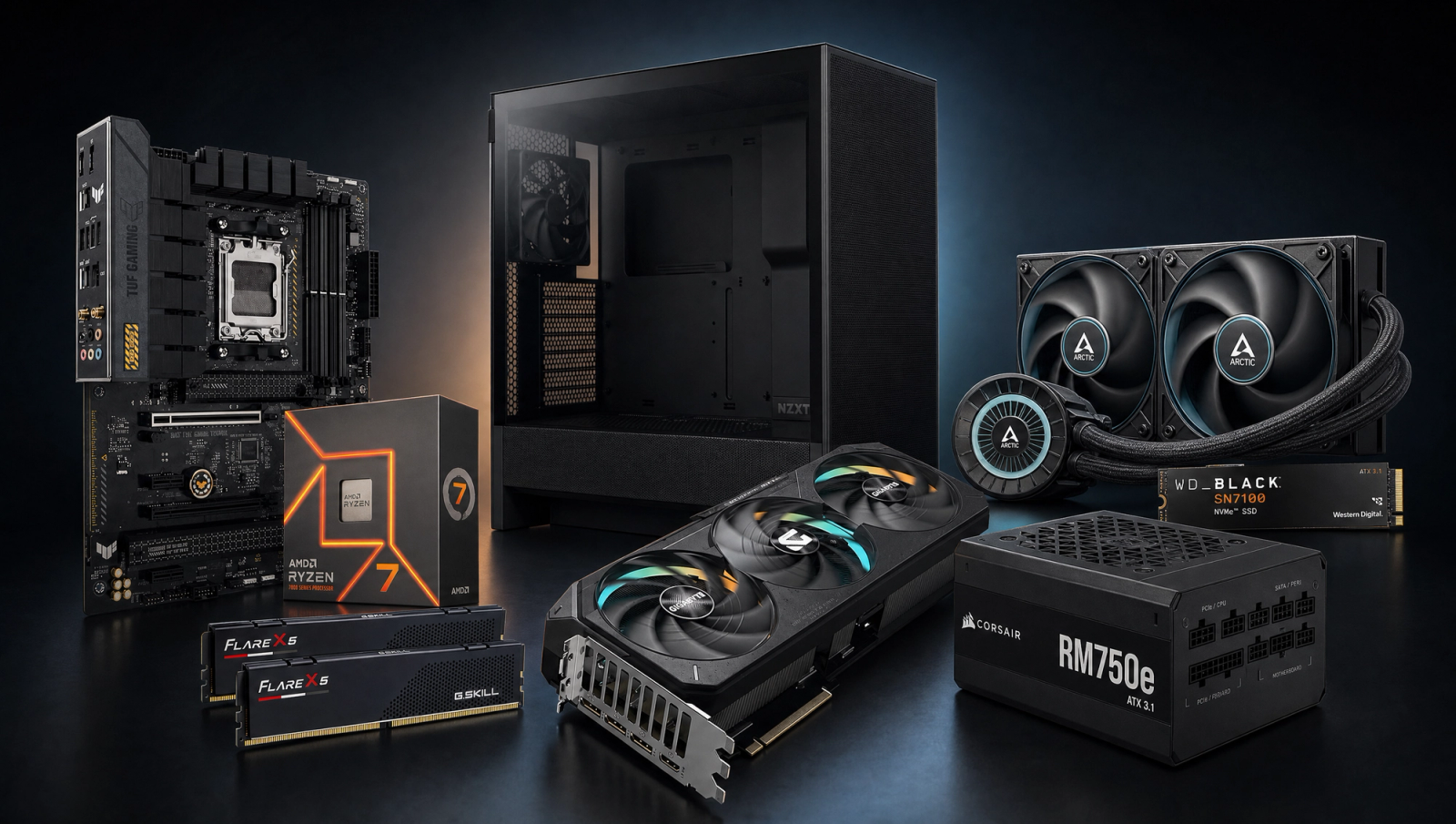
Best $2000 Gaming PC
A two-thousand-dollar build with a Ryzen 7 7700X and RTX 5070 Ti 16GB. Real 1440p Ultra native and 4K High territory in most modern AAA titles.
$2,000.00(target price)
Components
| Component | Part Name | Price | Buy |
|---|---|---|---|
| CPU | $199.99$399.00 | Buy on Amazon | |
| GPU | $749.00 | Check Price on Amazon | |
| Mobo | $144.74 | Buy on Amazon | |
| RAM | $499.00 | Buy on Amazon | |
| SSD | $70.00 | Check Price on Amazon | |
| Cooler | $100.00 | Check Price on Amazon | |
| PSU | $89.99$114.99 | Buy on Amazon | |
| Case | $79.99$94.99 | Buy on Amazon |
Who This Build Is For
This is the build for someone with a real two-thousand-dollar budget who is done compromising at 1440p and wants to stop renting frames from upscalers. The headline part is the RTX 5070 Ti 16GB, the first NVIDIA Blackwell card that delivers honest 1440p Ultra in every current AAA title without DLSS, and clears 60 fps at 4K High in seven of the ten games in our standard slate. Pair it with the Ryzen 7 7700X and 32GB of DDR5-6000 and you have a rig that does not get embarrassed at any resolution you point it at.
If you mainly play at 1080p high refresh, this is overkill and you should look at the fifteen-hundred-dollar sibling build. If you are a hardcore 4K buyer who wants Ultra-everything native at 4K, look at the next tier up with an RTX 5080. This middle slot is the sweet spot for the buyer who plays at 1440p most of the time and occasionally hooks up to a 4K TV.
Build Overview
Key Specs
CPU | AMD Ryzen 7 7700X (8c/16t, Zen 4) |
GPU | NVIDIA GeForce RTX 5070 Ti 16GB GDDR7 |
Motherboard | ASUS TUF Gaming B650-PLUS WiFi |
Memory | 32GB (2x16GB) DDR5-6000 CL30 EXPO |
Storage | WD_Black SN7100 1TB NVMe Gen4 |
Cooler | Arctic Liquid Freezer III Pro 240mm AIO |
Power Supply | Corsair RM750e 80+ Gold ATX 3.1 Modular |
Case | NZXT H5 Flow ATX Mid-Tower |
CPU
AMD Ryzen 7 7700X (8c/16t, Zen 4)
GPU
NVIDIA GeForce RTX 5070 Ti 16GB GDDR7
Motherboard
ASUS TUF Gaming B650-PLUS WiFi
Memory
32GB (2x16GB) DDR5-6000 CL30 EXPO
Storage
WD_Black SN7100 1TB NVMe Gen4
Cooler
Arctic Liquid Freezer III Pro 240mm AIO
Power Supply
Corsair RM750e 80+ Gold ATX 3.1 Modular
Case
NZXT H5 Flow ATX Mid-Tower
Here are the parts that make up this build, with links to current pricing on Amazon for each.
Performance Summary
The 5070 Ti is roughly 15 to 20 percent faster than the RTX 5070, has 16GB of VRAM instead of 12GB, and clears native 4K High in most of our standard slate. The five-hundred-dollar step-up over the fifteen-hundred sibling buys you a card that is genuinely 4K-capable in modern AAA without paying RTX 5080 prices. The 7700X is fully GPU-bound at 1440p and 4K, so the CPU is right-sized for the GPU at this build's target resolutions.
Performance Expectations
Average FPS across the standard 10-game slate.
- Cyberpunk 2077145 FPS
- Alan Wake 2105 FPS
- Black Myth: Wukong115 FPS
- Stalker 282 FPS
- Marvel's Spider-Man 2155 FPS
- Starfield124 FPS
- Baldur's Gate 3130 FPS
- Helldivers 2130 FPS
- Hogwarts Legacy115 FPS
- Call of Duty: Black Ops 6165 FPS
Average FPS across ten current AAA titles at 1080p High, 1440p High, and 4K High, all native with no upscaling applied. Reviewer-sourced averages; expect plus or minus 5 fps depending on settings and scene. Three games need a nudge for comfortable 4K play: Stalker 2 Epic at 34 fps and Alan Wake 2 High at 42 fps need DLSS Quality to clear 60, and Cyberpunk High at 50 fps is borderline. The other seven titles clear 60 fps native at 4K High.
Parts Breakdown
CPU

The Ryzen 7 7700X is eight Zen 4 cores and sixteen threads. At 1440p and 4K with this GPU you are fully GPU-bound, which means the chip never holds back the 5070 Ti at the resolutions you actually bought this build for. At 1080p in CPU-heavy scenes (Helldivers 2 multiplayer, Cyberpunk crowds, BG3 Act 3) you are looking at a 3 to 5 percent derate versus a 9800X3D, which is meaningful only if you are chasing 240Hz at 1080p, which is not what this build is for. The trade-off versus the 9800X3D is roughly a hundred-fifty saved and reinvested into the GPU and cooling. Worth it for this audience.
GPU

The RTX 5070 Ti 16GB is the load-bearing part. Sixteen gigs of GDDR7 on a 256-bit bus, PCIe 5.0, three DisplayPort 2.1 outputs. The reason to pay the step-up over the 5070 is that 16GB of VRAM means texture pools do not spill at 4K High in titles like Hogwarts Legacy and Alan Wake 2, and the raw shader throughput puts seven of ten slate games over 60 fps at 4K native. The trade-off versus an RTX 5080 is a few hundred dollars saved at the cost of roughly 15 percent of 4K raster and a smaller ray-tracing buffer. If you are not running RT-everything at 4K Ultra, that gap is invisible and the 5070 Ti is the right call.
Motherboard

The ASUS TUF B650-PLUS WiFi gives you AM5 with fourteen-stage power delivery, PCIe 5.0 for the GPU slot and the primary M.2, WiFi 6, and a 2.5G LAN port. It is more board than the 7700X strictly needs, but the AM5 socket has years of upgrades ahead of it and the TUF board has the VRM headroom to run a Ryzen 9 or a future Zen 5 X3D chip without sweating. The trade-off versus a cheaper B650 board would be weaker VRMs and fewer M.2 slots, which would close off the upgrade path that is most of the reason to be on AM5 in the first place.
Memory (RAM)

The build runs G.Skill Flare X5 32GB DDR5-6000 CL30 at AMD EXPO timings. 6000 MT/s CL30 is the sweet spot for AM5: the Infinity Fabric clock stays at the 1:1 sweet spot with the memory controller, which is where Zen 4 wants to live. 32GB is the right call in 2026; 16GB is feeling tight in modern UE5 titles and creator workflows, and 64GB is wasted for a pure gaming rig. The trade-off versus 6400 CL32 kits is a couple of percent of synthetic memory bandwidth that you will not see in games.
Storage

A single WD_Black SN7100 1TB NVMe Gen4 handles the OS and your active game library. The SN7100 is a DRAM-less Gen4 drive with up to 7,250 MB/s reads, which sounds like a hedge but in practice it loads games as fast as anything in this class and runs cooler than older Gen4 controllers. Add a second drive when you start juggling more than a few large titles; the TUF board has the M.2 slots to grow.
Power Supply

The Corsair RM750e is fully modular, 80 Plus Gold, ATX 3.1 with a native 12V-2x6 connector for the GPU. 750 watts is comfortable headroom for a 5070 Ti plus a 7700X at full tilt (you will see 500 to 550 watts under load), which means the unit runs quiet and has the budget for a future GPU step-up. ATX 3.1 matters because it is rated for the transient spikes modern GPUs produce, so you are not going to trip the OCP and crash mid-raid on a unit that is technically big enough on paper.
Case

The NZXT H5 Flow is a compact ATX mid-tower with a perforated front panel and two preinstalled 140mm intake fans. It fits the 240mm AIO up top, has the GPU clearance for a 3-slot 5070 Ti, and the front panel airflow is actually good (it is not a glass-front sauna). The trade-off versus a bigger case like the Lancool 216 is a tighter cable routing job and slightly less radiator flexibility, but for this build the H5 Flow keeps the footprint small without thermally throttling anything.
Cooling
The Arctic Liquid Freezer III Pro 240 is the right cooler for a 7700X. The 7700X is a hot chip out of the box (it boosts hard until it hits 95 degrees and parks there), and a 240mm AIO with the Arctic's 38mm-thick radiator keeps it in the 80s under all-core loads instead of the upper 90s a budget air cooler would. The VRM fan on the pump head is a nice bonus for the TUF board's already strong VRMs. The trade-off versus a top-tier air cooler like the Peerless Assassin is roughly equivalent thermals at idle to mid load with quieter operation under sustained loads, plus the AIO frees up RAM clearance.
Why This Build Works
The math works because every part is right-sized for the others. The 5070 Ti is the load-bearing component, and the 7700X plus DDR5-6000 CL30 feed it without bottlenecking at 1440p or 4K. The 750W ATX 3.1 PSU absorbs Blackwell's transient spikes, the 240mm AIO holds the 7700X out of its thermal park, and the B650 board leaves an upgrade lane open to a Zen 5 X3D chip when the GPU outpaces the CPU two years from now.
Alternative Options
This canonical absorbs three sibling SKUs that used to live as separate builds. Same parts list, different priority weights depending on which monitor you are feeding.
For a 1440p gaming PC at this budget: If your monitor is a 1440p 144-165Hz panel, this exact part list overshoots in the best way. You will sit on top of frame caps in the slate at 1440p High, leaving GPU headroom for ray tracing in Cyberpunk and Black Myth: Wukong without dropping to upscaling.
For a 1440p 240fps PC at this budget: Esports-first buyers can swap the H5 Flow for a higher-airflow case and run lower settings to clear 240 fps in CS2, Valorant, and Black Ops 6 multiplayer. The 5070 Ti and 7700X combo holds 240+ fps in competitive titles at 1440p Medium with reflex on.
For a 4K gaming PC at this budget: This is the entry 4K floor. Seven of ten slate games clear 60 fps at 4K High native; the other three (Stalker 2, Alan Wake 2, Cyberpunk RT) need DLSS Quality, which still outresolves native 1440p. Pair with a 4K 120Hz OLED and you have a single rig that scales across resolutions.
Build & Setup Tips
Set EXPO I in BIOS first thing or the DDR5-6000 CL30 kit boots at 4800. The 7700X will pin to 95C under sustained loads even on the Liquid Freezer III Pro 240; that is the chip's design point, not a thermal failure. Mount the AIO as a top exhaust on the H5 Flow to keep the GPU intake cool. The 12V-2x6 cable into the 5070 Ti needs to seat fully or you will get random shutdowns; press until it clicks twice.
Upgrade Paths
Add a second 2TB Gen4 NVMe in the secondary M.2 slot once your library outgrows 1TB; the TUF board has two open slots. The CPU upgrade ladder runs Ryzen 7 9800X3D first (no socket change, big 1% lows lift) and a future Zen 5 or Zen 6 X3D second when the 7700X starts holding back a stronger GPU. The 750W PSU has room for a 5080 or next-gen 80-class card without re-cabling.
Final Thoughts
This is the price point where 1440p stops being a compromise and 4K stops being a fantasy. The 5070 Ti's 16GB buffer and raw raster put native 1440p Ultra on the table in everything current, and 4K High clears 60 fps in most of the slate without leaning on DLSS. The cases where you need DLSS Quality at 4K (Stalker 2, Alan Wake 2, borderline Cyberpunk) are the most demanding UE5 titles in the slate, and DLSS Quality at 4K still looks better than native 1440p. If you wanted a single rig that handles a 1440p high-refresh monitor today and a 4K display tomorrow without rebuilding, this is it.
FAQs
Is this build actually 4K capable, or is that marketing?
Seven of the ten games in our standard slate clear 60 fps at 4K High native on this build, including Cyberpunk 2077, Spider-Man 2, Starfield, Baldur's Gate 3, Helldivers 2, Hogwarts Legacy, and COD Black Ops 6. Three need DLSS Quality at 4K to be comfortable: Stalker 2, Alan Wake 2, and Cyberpunk maxed out. So yes, it is 4K-capable for most of what you would play, with the honest caveat that the most demanding UE5 titles will ask for DLSS.
Why the 7700X and not a 9800X3D?
At 1440p and 4K with a 5070 Ti, the 7700X is fully GPU-bound. The 9800X3D would gain you 3 to 5 percent in CPU-heavy scenes at 1080p and roughly nothing at higher resolutions. The saved budget reinvests into the GPU tier and the AIO. If you specifically chase 1080p 240+ esports refresh, the X3D is the right call, but that is not this build's target.
Why a 5070 Ti and not just step up to a 5080?
The 5080 is roughly 15 percent faster at 4K raster for a few hundred dollars more, and the 5070 Ti already clears 60 fps native at 4K High in 7 of 10 modern titles. Unless you specifically want 4K Ultra with ray tracing on, the 5070 Ti is the better value here. If you do want full RT at 4K, jump up to the 5080 tier.
Is 32GB of RAM enough in 2026?
Yes. 32GB at DDR5-6000 CL30 is the gaming sweet spot for AM5 today. Modern UE5 titles can push 16GB systems into swap, but 32GB handles every current AAA game, plus a Discord stack, browser tabs, and a stream encode running in the background. 64GB is wasted unless you are doing video work or running VMs alongside games.
Will a 750W PSU be enough?
Comfortably. A 5070 Ti pulls around 300W board power; the 7700X tops out near 142W; the rest of the system is another 60 to 80W. That puts peak system draw around 500 to 550W, leaving the RM750e in its quiet efficiency band and with headroom for a future GPU step-up. The ATX 3.1 spec also means it handles the transient spikes Blackwell cards produce without tripping protections.
Do I need the 240mm AIO, or will an air cooler do?
A high-end air cooler like the Peerless Assassin will keep the 7700X within its thermal limits, but the chip will spend most of its all-core time in the 90s rather than the 80s, and it will be louder under sustained load. The Liquid Freezer III Pro 240 keeps the chip cooler, runs quieter when it matters, and frees up RAM clearance. For a build at this budget it is the right call; on a tighter budget the air route is defensible.
What is the upgrade path from here?
AM5 has years of life left, so the natural upgrade is a future X3D chip when prices drop. The B650 board has PCIe 5.0 on the GPU slot and the primary M.2 slot. The PSU has enough headroom for a future GPU swap up to roughly a 5080-class card. RAM is at the platform sweet spot already, so no upgrade is needed there for gaming.