Affiliate Disclosure: As an Amazon Associate we earn from qualifying purchases. Some links may earn us a commission at no cost to you.
Best $3000 Gaming PC
A ~$3000 gaming PC built on the GeForce RTX 5080 and Ryzen 7 9800X3D for high-refresh 1440p and strong native 4K.
$3,000.00(target price)
Components
| Component | Part Name | Price | Buy |
|---|---|---|---|
| GPU | $1,829.97 | Buy on Amazon | |
| CPU | $443.00$479.00 | Buy on Amazon | |
| Mobo | $99.99 | Check Price on Amazon | |
| RAM | $569.99$639.99 | Buy on Amazon | |
| SSD | $319.99 | Buy on Amazon | |
| Cooler | $31.41$34.90 | Buy on Amazon | |
| PSU | $89.99$114.99 | Buy on Amazon | |
| Case | $79.99 | Buy on Amazon |
Who This Build Is For
This build is for the player who wants near the top of the stack without paying flagship prices, and who games at 1440p high-refresh or 4K. The GeForce RTX 5080 and Ryzen 7 9800X3D pairing drives a high-refresh 1440p monitor with ease and plays current games at native 4K, while leaving DLSS in reserve for the heaviest titles. It is the tier where you stop turning settings down.
It also suits someone who wants a machine that stays near the front for years. The 9800X3D is the fastest gaming processor made, so it will keep feeding graphics cards long after this GPU is replaced, and the 5080's memory and horsepower cover the demands of current releases at high resolutions. This is a build for maxed settings and high frame rates, not compromises.
Build Overview
Key Specs
CPU | AMD Ryzen 7 9800X3D (8c/16t, Zen 5) |
GPU | GeForce RTX 5080 16GB |
Memory | 32GB DDR5-6000 CL30 |
Storage | WD Black SN7100 2TB NVMe Gen4 |
Motherboard | ASRock B650M-HDV/M.2 (AM5) |
Power Supply | Corsair RM750e 750W 80+ Gold |
Case | Montech AIR 903 MAX |
Cooling | Thermalright Peerless Assassin 120 SE |
CPU
AMD Ryzen 7 9800X3D (8c/16t, Zen 5)
GPU
GeForce RTX 5080 16GB
Memory
32GB DDR5-6000 CL30
Storage
WD Black SN7100 2TB NVMe Gen4
Motherboard
ASRock B650M-HDV/M.2 (AM5)
Power Supply
Corsair RM750e 750W 80+ Gold
Case
Montech AIR 903 MAX
Cooling
Thermalright Peerless Assassin 120 SE
Here are the parts that make up this build, with links to current pricing on Amazon for each one.
Performance Summary
At 1440p this machine runs high-refresh in essentially everything, clearing well over 100 frames in most current games at high settings and far higher in lighter titles. At native 4K it holds a smooth, playable frame rate in demanding single-player releases and pushes higher with a quality upscaler in the heaviest ones. The 9800X3D keeps minimums high and frame pacing tight, so fast games feel as smooth as the averages suggest.
Performance Expectations
Average FPS across the standard slate, native (no upscaling).
- Cyberpunk 2077143 FPS
- Alan Wake 2106 FPS
- Stalker 291 FPS
- Starfield111 FPS
- Baldur's Gate 3187 FPS
- Hogwarts Legacy112 FPS
Average FPS across the standard slate at the presets listed, native, with no upscaling applied, at 1440p and 4K. Numbers are read from reviewer charts for the GeForce RTX 5080 tested on the same Ryzen 7 9800X3D used in this build, so no adjustment is needed.
Parts Breakdown
CPU

The Ryzen 7 9800X3D is the fastest gaming processor available, and it is the right partner for a card this fast. Its stacked cache feeds the GPU better than anything else in games, and its eight Zen 5 cores handle streaming and creation on the side. The alternative is a higher-core-count chip aimed at production work, but for gaming it would actually give up frames in cache-sensitive titles. The 9800X3D is the pick, and it needs an aftermarket cooler, which this build includes.
GPU

The RTX 5080 is a near-flagship card that plays current games at native 4K and drives high-refresh 1440p without breaking a sweat. It also brings NVIDIA's strong ray tracing and DLSS, which matter in the heaviest path-traced titles. The step up from here is the 5090, which costs dramatically more for its extra performance, and the step down is the 5070 Ti, which trades some 4K headroom for a lower price. The 5080 is the sweet spot for maxed 1440p and strong 4K without flagship pricing.
Motherboard

The ASRock B650M-HDV/M.2 runs the 9800X3D at full clocks on a current AM5 socket with DDR5 and a Gen4 M.2 slot. The 9800X3D is efficient, so it does not require a heavy VRM board to hit its rated performance. A B850 board is the upgrade if you want extra M.2 slots and more rear connectivity, and at this build's price it is a reasonable option, but it is not required for full performance from these parts.
Memory (RAM)

This build runs 32GB of Corsair Vengeance DDR5-6000 at CL30, the latency AMD's platform favors. Thirty-two gigabytes is the right amount for high-resolution gaming with streaming or heavy apps open, and it is where most builders land at this tier. A 64GB kit is only worth it for serious content work. DDR5-6000 remains the stable sweet spot on AM5, so paying more for faster kits does not pay off.
Storage
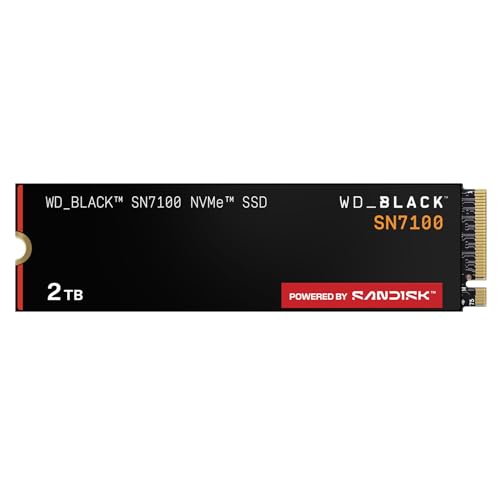
The WD Black SN7100 2TB is a fast, efficient Gen4 drive with room for a proper library of large modern games. It installs directly into the board's M.2 slot with no cables. A PCIe 5.0 drive is the alternative, but the real-world loading difference in games is small and the price premium is not, so Gen4 is the sensible choice here. Two terabytes is the capacity most builders stop worrying about.
Power Supply

The Corsair RM750e is a 750-watt, 80 Plus Gold, fully modular unit with the modern ATX 3.1 connector, which covers this card and CPU with sensible headroom. It runs quiet under load and handles the transient behavior of a modern high-end GPU. If you plan to jump to a flagship 5090 later, a 1000-watt unit is the step up to plan for, but for this build the 750-watt unit is correctly sized.
Case

The Montech AIR 903 MAX ships with a full set of fans and a mesh front that feeds this card cool air, which keeps clocks high and noise down without buying extras. It fits the board and a full-length graphics card with room to spare. A more premium case buys you a nicer finish and quieter panels, but few move this much air for the money, which is what a hot card wants.
Cooling

The Thermalright Peerless Assassin 120 SE is a dual-tower air cooler that keeps the efficient 9800X3D cool and quiet, which is all this chip needs. It performs close to coolers costing several times more. A 240mm or larger liquid cooler is the alternative for a specific look or a little extra headroom, but for stock performance this air cooler is the value pick with no downside here.
Why This Build Works
The money goes to the two parts you notice most: a near-flagship graphics card and the fastest gaming processor made. Everything else is sized to keep those two running cool and quiet and to hold the build's budget without cutting a corner that matters. The 9800X3D means the CPU will never be the bottleneck, and the 5080 covers native 4K today, so nothing here holds back what you see on screen.
That is the difference between a considered high-end build and one that overspends on a single headline part while starving the rest. This machine is fast everywhere, and it stays that way.
Alternative Options
If you want the absolute top and native 4K in the very heaviest titles, the RTX 5090 is the step up, though it costs far more for its lead. If you want to trim cost, the RTX 5070 Ti keeps most of the experience for less while giving up some 4K headroom. And if your work leans on heavy rendering or simulation, a 64GB memory kit on this same platform is the natural addition. The 9800X3D is worth keeping in every one of these variations.
Build & Setup Tips
Enable the memory's EXPO profile in the BIOS on first boot so the kit runs at DDR5-6000. Update the motherboard BIOS before installing Windows so it fully supports the Zen 5 chip. Mount the cooler with even pressure and a thin, even layer of paste. Seat the graphics card's power cable fully at both ends, since a high-end card draws real current. Set the case fans to a temperature curve so the system stays quiet at idle, and install the current NVIDIA driver before benchmarking.
Upgrade Paths
The graphics card is the only part likely to be worth upgrading for a long time, and if you move to a flagship 5090 later, plan on a 1000-watt power supply to go with it. Memory can double to 64GB in the open slots for heavy content work. Storage grows by adding a second M.2 drive rather than replacing the first. The 9800X3D needs no upgrade for years, since it already tops the gaming charts.
Final Thoughts
This is a near-flagship build with no weak link for high-refresh 1440p and native 4K. A top-tier graphics card is paired with the fastest gaming processor made, and every supporting part is chosen to keep them cool, quiet, and ready for a future upgrade. For a player who wants maxed settings and high frame rates without paying flagship prices, this is the build to beat.
FAQs
Can this build play games at native 4K?
Yes. The RTX 5080 runs current games at native 4K with a smooth, playable frame rate in demanding titles and pushes higher with a quality upscaler in the heaviest ones. At 1440p it clears high-refresh in essentially everything.
Is the RTX 5080 or 5090 the better value here?
The 5080 is the sweet spot for maxed 1440p and strong 4K without flagship pricing. The 5090 is meaningfully faster but costs dramatically more for that lead, so it only makes sense if native 4K in the very heaviest titles is your specific goal.
Is the 750W power supply enough?
Yes, it is correctly sized for the RTX 5080 and 9800X3D with sensible headroom and handles the card's transient behavior. If you later move to a flagship 5090, plan on a 1000-watt unit to go with it.
Do I need a liquid cooler for the 9800X3D?
No. The included dual-tower air cooler keeps this efficient chip cool and quiet at stock. A liquid cooler is a fine alternative for the look or a little extra overclocking margin, but it is not needed for full performance.
Is 32GB of RAM enough at this tier?
Yes. Thirty-two gigabytes is the right amount for high-resolution gaming with streaming or background apps, and it is where most builders land here. A 64GB kit only pays off for serious content creation, and the board has open slots to add it later.