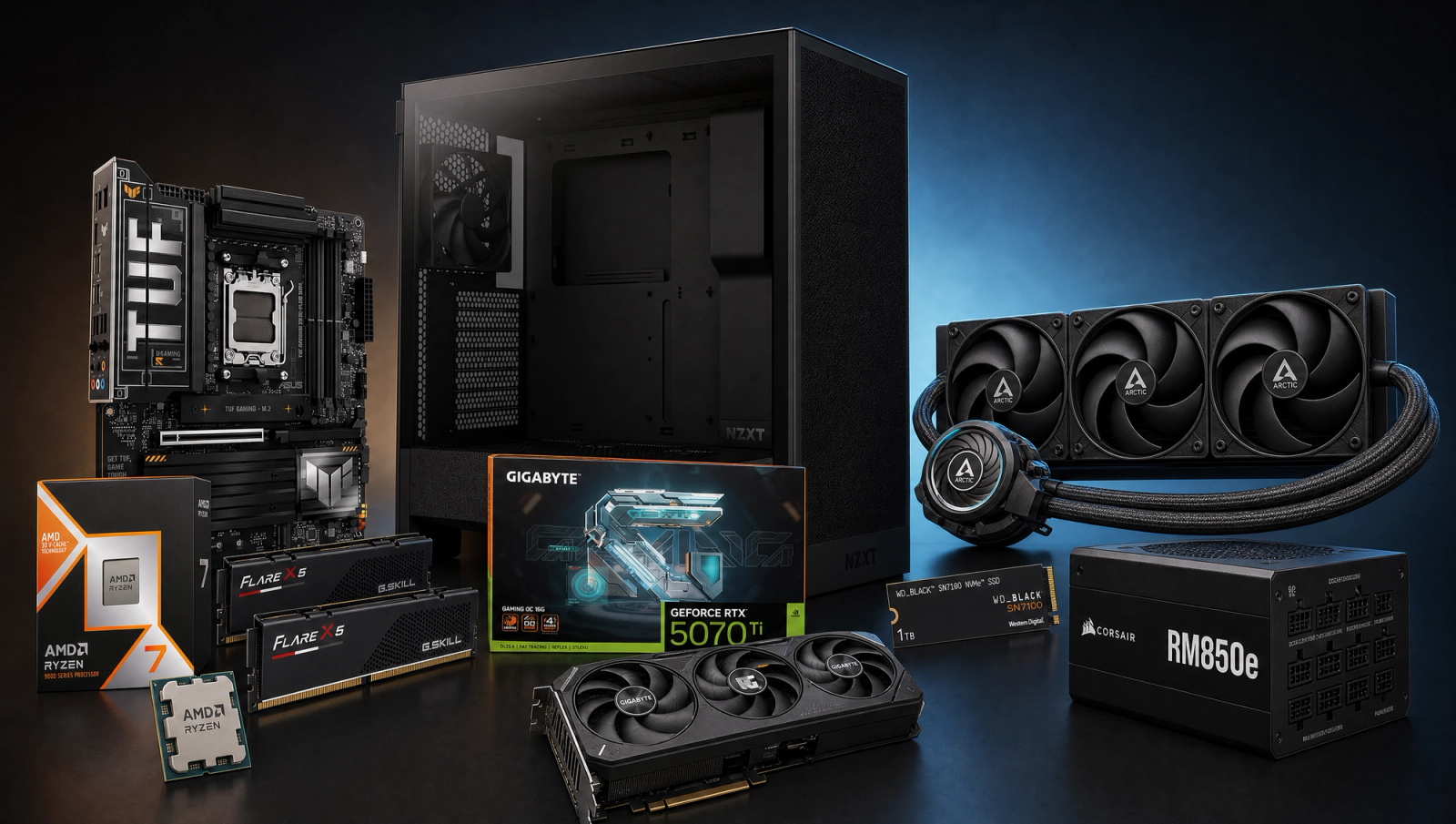
Best $2500 Gaming PC
A $2500 gaming PC built around the Ryzen 7 9800X3D and RTX 5070 Ti. Same GPU as the $2000 sibling; the extra $500 buys the gaming-flagship CPU, a 360mm AIO, and an 850W ATX 3.1 PSU.
$2,500.00(target price)
Components
| Component | Part Name | Price | Buy |
|---|---|---|---|
| CPU | $449.00$479.00 | Buy on Amazon | |
| GPU | $749.00 | Check Price on Amazon | |
| Mobo | $237.00$279.99 | Buy on Amazon | |
| RAM | $499.00 | Buy on Amazon | |
| SSD | $199.99$374.99 | Buy on Amazon | |
| Cooler | $83.99$124.99 | Buy on Amazon | |
| PSU | $109.99$144.99 | Buy on Amazon | |
| Case | $79.99$94.99 | Buy on Amazon |
Who This Build Is For
This is a build for someone at the ~2500 tier who wants the best gaming-CPU experience available without paying RTX 5080 prices. The headline part is the Ryzen 7 9800X3D, the de facto gaming flagship in 2026 thanks to its second-gen 3D V-Cache. Pair it with an RTX 5070 Ti 16GB and you get a rig that locks high-refresh 1080p in CPU-heavy titles and stays GPU-bound at 1440p and 4K, exactly where you want a build at this budget to land.
Be honest with yourself before you order parts. At 1440p and 4K, performance here is effectively identical to the ~2000 sibling that uses the 7700X with the same 5070 Ti, because both setups are GPU-bound at those resolutions. If you only game at 1440p Ultra or 4K, the ~2000 build gives you the same frames. The ~2500 tier earns its premium at 1080p competitive, in CPU-bound scenes inside otherwise GPU-bound games (BG3 Act 3, Hogwarts Hogsmeade, COD lobbies), and as a long-term gaming CPU you won't want to swap for years.
If you bought ~2500 of parts mostly for content creation work like Premiere timelines, DaVinci grades, or 3D rendering, the 9800X3D is still fine for editing but a 12-core part like the 9900X is the better pick for sustained multi-thread loads. There's a dedicated content-creation build at this price point for that buyer. This one is tuned for gamers.
Build Overview
Key Specs
CPU | AMD Ryzen 7 9800X3D (8c/16t, 96MB V-Cache) |
GPU | NVIDIA RTX 5070 Ti 16GB |
Motherboard | ASUS TUF Gaming X870-PLUS WiFi |
Memory | 32GB DDR5-6000 CL30 |
Storage | WD_Black SN7100 1TB NVMe Gen4 |
Power Supply | Corsair RM850e 80+ Gold ATX 3.1 |
Case | NZXT H5 Flow ATX Mid-Tower |
Cooler | Arctic Liquid Freezer III Pro 360 AIO |
CPU
AMD Ryzen 7 9800X3D (8c/16t, 96MB V-Cache)
GPU
NVIDIA RTX 5070 Ti 16GB
Motherboard
ASUS TUF Gaming X870-PLUS WiFi
Memory
32GB DDR5-6000 CL30
Storage
WD_Black SN7100 1TB NVMe Gen4
Power Supply
Corsair RM850e 80+ Gold ATX 3.1
Case
NZXT H5 Flow ATX Mid-Tower
Cooler
Arctic Liquid Freezer III Pro 360 AIO
Here are the parts that make up this build, with links to current pricing on Amazon for each.
Performance Summary
Expect locked 1440p high-refresh native in every title on the 10-game slate, and 60+ fps at 4K High native in 7 of 10. The two demanding UE5 titles (Alan Wake 2 and Stalker 2) dip below 60 at native 4K and want DLSS Quality to clear that bar cleanly; Cyberpunk 4K native sits right at 50 fps and clears 60 with DLSS Quality. At 1080p High the 9800X3D pushes every CPU-bound title into 120+ fps territory, with Spider-Man 2 and COD BO6 cresting 165 fps for high-refresh competitive play.
Performance Expectations
Average FPS across the standard 10-game slate at the listed presets.
- Cyberpunk 2077162 FPS
- Alan Wake 2106 FPS
- Black Myth: Wukong116 FPS
- Stalker 283 FPS
- Marvel's Spider-Man 2167 FPS
- Starfield143 FPS
- Baldur's Gate 3148 FPS
- Helldivers 2146 FPS
- Hogwarts Legacy127 FPS
- Call of Duty: Black Ops 6185 FPS
Average FPS across ten current AAA titles at the listed presets, with no upscaling applied. The 1080p column shows where this CPU earns its money; the 1440p and 4K columns are GPU-bound and match the 7700X + 5070 Ti recipe nearly fps-for-fps.
Parts Breakdown
CPU

The Ryzen 7 9800X3D is the reason this build exists at the ~2500 tier. It packs 8 Zen 5 cores, 16 threads, and 96MB of L3 V-Cache, and unlike the previous-gen 7800X3D it's no longer clock-limited so it actually scales well in cache-friendly games. Versus a 7700X at the same GPU, CPU-bound titles gain 8 to 15 percent at 1080p (Cyberpunk plus 12, Starfield plus 15, BG3 plus 14, COD MP plus 12). The trade-off vs an Intel Core Ultra 7 265K is power efficiency and uncontested gaming peak; you give up some heavy multi-threaded workstation perf in exchange. Drops straight into the X870 board with no microcode dance.
GPU

The RTX 5070 Ti 16GB is the same card as the ~2000 sibling. That is the deliberate call. The 5070 Ti clears native 1440p Ultra in all 10 slate titles with margin and lands 7 of 10 above 60 fps at 4K High native, which is the right ceiling for the price band. The trade-off against a 5080 is roughly 30 percent more frames at 4K for roughly 50 percent more money; against a 9070 XT you pay a small premium for DLSS 4 frame-gen and CUDA productivity. 16GB of GDDR7 keeps you clear of the VRAM walls that hit the 8GB cards at 1440p Ultra in Hogwarts, Stalker 2, and Spider-Man 2.
Motherboard

The ASUS TUF Gaming X870-PLUS WiFi is an X870 board with a 16+2+1 VRM at 80A SPS, which is overkill for the 9800X3D and exactly what you want for headroom. X870 over the cheaper B850 buys you USB4 (40 Gbps) out of the box, PCIe 5.0 on the primary M.2 in addition to the GPU slot, and Wi-Fi 7. The trade-off vs a B650E board at this tier is a modest price step, and you get features the X3D part will not strictly need. Worth it for a long-tenure board. Ships with current AGESA so the 9800X3D posts on first boot.
Memory (RAM)

32GB of G.Skill Flare X5 DDR5-6000 CL30 at 1.35V is the AM5 sweet spot for the 9800X3D. AMD validates DDR5-6000 as the optimal Infinity Fabric ratio (1:1 UCLK to MEMCLK), and CL30 is the lowest first-party timing you can get without paying a hand-binned premium. Versus 16GB you get headroom for modern AAA + Discord + browser tabs + a recording overlay; versus 64GB you save money you do not need to spend on a gaming-first build. Enable EXPO in BIOS on first boot or you will run at 4800.
Storage

The WD_Black SN7100 1TB is a DRAM-less Gen4 drive that hits 7250 MB/s read and 6900 MB/s write using HMB, which is plenty fast for game loads and DirectStorage. The trade-off vs a DRAM cache drive like the SN850X is sustained write performance under heavy file transfers; for game installs and OS work you will not feel the difference. 1TB fills up faster than people expect in 2026 (Cyberpunk plus Call of Duty plus one big UE5 title is already 350GB+), so plan to add a second NVMe drive in the secondary M.2 slot within a year.
Power Supply

The Corsair RM850e is 850W, 80+ Gold, fully modular, ATX 3.1 with a native 12V-2x6 cable. Why 850W on a build with a 250W rated GPU and a 120W CPU? Two reasons. First, the 5070 Ti has documented transient spikes north of its rated draw; ATX 3.1 ratings handle that natively but you still want a comfortable margin. Second, this gives you a clean upgrade path to a 5080 (360W rated) without swapping the PSU. The trade-off vs a 750W RM750e is a small price step. Worth it for the headroom.
Case

The NZXT H5 Flow is a compact ATX mid-tower with a perforated front panel and a side mount that fits a 360mm radiator without conflict. Two front intakes and one rear exhaust ship in the box, which is enough for this hardware but you can add two top exhausts later. The trade-off vs a Fractal North or Lian Li 215 is aesthetic and acoustic, not performance; pick what you like looking at. Confirm before you order that the case clears your GPU length (it does, 365mm GPU clearance vs the 5070 Ti at 305mm).
Cooling

The Arctic Liquid Freezer III Pro 360 is the step-up over the 240mm in the ~2000 sibling, and it earns its keep here. The 9800X3D does not draw a ton of power (sub-140W in gaming) but it is heat-dense due to the V-Cache stacked under the CCD, so surface area matters more than radiator volume. The 360mm AIO holds the 9800X3D under 70C in sustained gaming loads and gives you headroom for a future Zen 6 X3D drop-in. The 38mm-thick radiator is the differentiator vs slimmer 360s; it pushes more air per pass at lower fan RPM, which means a quieter rig at the same temps.
Why This Build Works
The thesis is balance, not bragging rights. The 9800X3D feeds the 5070 Ti without ever becoming the bottleneck, so 1080p high-refresh and CPU-heavy 1440p scenes both run flat instead of stuttering. The 360mm AIO keeps the X3D heat-dense package cool enough to hold boost clocks under hours-long sessions, and the 850W ATX 3.1 PSU absorbs Blackwell transient spikes that wreck cheaper units. DDR5-6000 CL30 hits the 1:1 fabric ratio, X870 gives you USB4 and PCIe 5.0 storage. Every part earns its slot.
Alternative Options
Same budget, different priorities. Here are the credible re-spins of this build for buyers landing on adjacent searches.
For a 4K 60fps PC native, no upscaling: The build as written already clears that bar in 7 of 10 slate titles at 4K High native, and the two UE5 outliers (Alan Wake 2, Stalker 2) hit 60 with DLSS Quality. If you want pure native 4K 60 as the floor, swap the 9800X3D for a Ryzen 7 9700X and put the savings toward an RTX 5070 Ti SUPER or a 5080. CPU-bound 1080p frames take a step back, but native 4K 60 holds across the entire slate.
For a content creation PC at this budget: Swap the 9800X3D for a Ryzen 9 9900X (12 cores, 24 threads) and bump RAM to 64GB DDR5-6000. The 9900X gives you double the cores for Premiere exports, DaVinci Resolve grades, Blender renders, and code compiles, at a similar street price to the X3D. Add a second 2TB NVMe in the X870 board's PCIe 5.0 M.2 slot for scratch + project storage. The 5070 Ti's 16GB of GDDR7 and CUDA cores handle GPU-accelerated effects and AI workflows comfortably.
Stretch to an RTX 5080: If 4K Ultra with margin is the goal and you can flex ~500 above this budget, keep the 9800X3D and step up to a 5080. The 850W RM850e already covers it. You gain roughly 30 percent at 4K and pick up DLSS 4 multi-frame-gen headroom for the next round of UE5 releases. Skip the swap if 1440p is your main panel; the 5070 Ti is not the bottleneck at 1440p with this CPU.
Build & Setup Tips
Flash the X870 board to the latest AGESA before installing the 9800X3D if it has been on a shelf since release; first-boot stability fixes are still landing. Enable EXPO in BIOS or your DDR5-6000 kit runs at 4800 JEDEC and you eat the L3 latency tax. Mount the Liquid Freezer III Pro 360 in the H5 Flow's side bracket with the tubes oriented down so the pump never sits above the radiator high point (prevents air-in-pump rattle). Plug the GPU into the native 12V-2x6 cable, not a daisy-chain. Update the BIOS once after the build is stable, then leave it alone.
Upgrade Paths
Storage is the first thing you will outgrow: a second 2TB NVMe in the X870 board's PCIe 5.0 M.2 slot is the cheapest meaningful upgrade and slots in alongside the SN7100 without any drama. GPU is the next lever; the RM850e already handles a 5080 swap when one is ready to drop in, and the 5070 Ti retains strong resale into a 1080p high-refresh second rig. CPU has the longest runway: AM5 is committed through 2027+, so the 9800X3D socket is also a clean drop-in for the next Zen 6 X3D part when it lands.
Final Thoughts
This build buys you the gaming CPU you will not want to upgrade for the life of AM5, paired with a GPU that comfortably handles 1440p high-refresh and credible 4K. Skip it if you only ever game at 4K Ultra and never run a CPU-heavy title; the ~2000 sibling gets you the same frames there. Pick it if you play CPU-heavy games, run high-refresh 1080p, want to push the GPU two or three generations on the same CPU socket, or simply want the platform that ages most gracefully into Zen 6.
FAQs
Is the 9800X3D worth the upcharge over the 7700X at this budget?
If you game primarily at 1440p Ultra or 4K with this GPU, the on-paper gap is small because both CPUs are GPU-bound at those resolutions. The 9800X3D pulls ahead at 1080p in CPU-bound titles (8 to 15 percent) and in CPU-bound scenes within otherwise GPU-bound games (BG3 Act 3, Hogwarts Hogsmeade, COD multiplayer lobbies). The bigger reason most buyers pick this build is longevity: the 9800X3D is the gaming CPU you will hold for years and pair with a future GPU upgrade.
How does this compare to the ~2000 build?
Same GPU, same 32GB RAM, same SSD. The ~2500 build swaps in the 9800X3D (vs 7700X), bumps the AIO from 240mm to 360mm, moves to an 850W ATX 3.1 PSU (vs 750W), and uses an X870 board (vs B650E). At 1440p and 4K performance is effectively identical; at 1080p the 9800X3D pulls a meaningful lead in CPU-bound titles.
Why X870 instead of B650E or B850?
X870 ships with USB4 (40 Gbps) mandatory, PCIe 5.0 on the primary M.2, and Wi-Fi 7. B850 is cheaper and fine if you do not need USB4 or PCIe 5 storage. B650E is a budget option but you give up some I/O. On a build at this tier, the modest premium for X870 is the right call.
Can I run 4K Ultra on this build?
Most current AAA titles, yes, with DLSS Quality. Native 4K High clears 60 fps in 7 of 10 slate titles. The demanding UE5 titles (Alan Wake 2 and Stalker 2) need DLSS Quality at 4K to clear 60 fps; Cyberpunk 2077 sits right at 50 fps native and clears comfortably with DLSS. If 4K Ultra native everywhere is non-negotiable, look at a 5080 or 5090.
Do I need the 850W PSU or can I drop to 750W?
750W is technically adequate for this hardware (rated draw is well under 500W combined). The 850W call is for two reasons: ATX 3.1 transient spike handling on the 5070 Ti, and a clean upgrade path to a 5080 without swapping the PSU. If you have no plans to upgrade the GPU, an RM750e saves you a small amount of money and works fine.
Why a 360mm AIO instead of a big air cooler?
Two reasons. First, the 9800X3D is heat-dense (the V-Cache cache die sits under the compute die in second-gen X3D), so spreading heat over more radiator surface area is more effective than volume. Second, the 360 AIO is quieter at the same temperatures because the fans spin slower. A top-tier air cooler like the Peerless Assassin 120 SE is still fine for this CPU and saves you a chunk; the 360 AIO is the polish move on a build at this tier.
Will this last me five years?
The CPU and platform will. AM5 is supported through 2027+, and the 9800X3D will still be a top-tier gaming chip three years from now. The GPU is the typical upgrade point at year three or four; the 850W ATX 3.1 PSU is sized so you can drop in a 5080 or future-gen card without rebuilding. RAM and SSD are easy upgrades. The case and AIO are fine for a 5+ year window.