Affiliate Disclosure: As an Amazon Associate we earn from qualifying purchases. Some links may earn us a commission at no cost to you.

RTX 5070 vs 5070 Ti (2026): 12 GB or 16 GB, Which Wins?
If your monitor is 1440p at 165 Hz and your library leans competitive shooters or AAA on high, the RTX 5070 and its 12 GB are the right buy, and the Ti's extra silicon never reaches your screen. If you run a 1440p 240 Hz panel, keep ray tracing on in modern AAA, or expect to push 4K, the RTX 5070 Ti earns the step up, and its 16 GB pool is the reason why.
The Ti has 46% more CUDA cores, 33% more VRAM on a wider bus, and a higher power envelope to feed it. Aggregate score sites collapse all of that into a single percentage, which is the one number that cannot answer a buying question: the gap swings from negligible to decisive depending on the panel in front of the card and what the GPU is being asked to do. The matrix below sorts the call by use case so you can point at the row that matches your build.
At a glance
Spec | ||
|---|---|---|
Chip family | Blackwell GB205 | Blackwell GB203 |
CUDA cores | 6,144 | 8,960 (+46%) |
RT cores (4th-gen) | 48 | 70 |
Tensor cores (5th-gen) | 192 | 280 |
VRAM | 12 GB GDDR7 | 16 GB GDDR7 (+33%) |
Memory bus | 192-bit | 256-bit |
Bandwidth | ~672 GB/s | ~896 GB/s |
Board power | ~250W TDP | ~300W TDP |
PSU floor | 650W (trusted unit) | 750W (trusted unit) |
Sweet spot | 1440p AAA high, 1440p competitive | 1440p ultra-RT, 4K AAA with DLSS |
Buy | Check Price | Check Price |
Chip family
- MSI Ventus 3X RTX 5070 OC
Blackwell GB205
- MSI Ventus 3X RTX 5070 Ti OC
Blackwell GB203
CUDA cores
- MSI Ventus 3X RTX 5070 OC
6,144
- MSI Ventus 3X RTX 5070 Ti OC
8,960 (+46%)
RT cores (4th-gen)
- MSI Ventus 3X RTX 5070 OC
48
- MSI Ventus 3X RTX 5070 Ti OC
70
Tensor cores (5th-gen)
- MSI Ventus 3X RTX 5070 OC
192
- MSI Ventus 3X RTX 5070 Ti OC
280
VRAM
- MSI Ventus 3X RTX 5070 OC
12 GB GDDR7
- MSI Ventus 3X RTX 5070 Ti OC
16 GB GDDR7 (+33%)
Memory bus
- MSI Ventus 3X RTX 5070 OC
192-bit
- MSI Ventus 3X RTX 5070 Ti OC
256-bit
Bandwidth
- MSI Ventus 3X RTX 5070 OC
~672 GB/s
- MSI Ventus 3X RTX 5070 Ti OC
~896 GB/s
Board power
- MSI Ventus 3X RTX 5070 OC
~250W TDP
- MSI Ventus 3X RTX 5070 Ti OC
~300W TDP
PSU floor
- MSI Ventus 3X RTX 5070 OC
650W (trusted unit)
- MSI Ventus 3X RTX 5070 Ti OC
750W (trusted unit)
Sweet spot
- MSI Ventus 3X RTX 5070 OC
1440p AAA high, 1440p competitive
- MSI Ventus 3X RTX 5070 Ti OC
1440p ultra-RT, 4K AAA with DLSS
Buy
- MSI Ventus 3X RTX 5070 OC
- Check Price
- MSI Ventus 3X RTX 5070 Ti OC
- Check Price
Where each one wins
Scenario | Winner | Why | Buy |
|---|---|---|---|
1440p competitive 165 to 240 Hz (CS2, Marvel Rivals, Valorant, Apex) | CUDA-core count is overkill for the workload. Both cards cap on the monitor refresh rate, so the +45% spend has nowhere to land. | Buy on Amazon | |
1440p AAA at high settings (Cyberpunk, AC Shadows, Wukong on balanced presets) | 12 GB still holds at high settings. The cleaner spend when ultra plus RT isn't the bar. | Buy on Amazon | |
1440p AAA at ultra plus RT (Cyberpunk supreme, Alan Wake 2, Black Myth: Wukong) | The Ti's 70 RT cores and 16 GB pool open real headroom. With DLSS 4 plus MFG, supreme presets play smoothly where the 5070 hovers under the 60 fps floor. | Buy on Amazon | |
4K AAA at 60 to 120 Hz (with DLSS Quality or Balanced) | 16 GB and the 256-bit bus carry DLSS Quality cleanly. The 5070 needs DLSS Performance to hold the same frame floor and pays in image quality. | Buy on Amazon | |
Texture-heavy modded 1440p (heavy CP77 mods, Skyrim ENB packs, MS Flight Sim 2024) | 12 GB is the first thing to give under VRAM-heavy workloads. The Ti's 16 GB pool keeps texture streaming smooth where the 5070 starts to stutter. | Buy on Amazon | |
Native path tracing at 1440p (DLSS allowed, MFG allowed) | The Ti's RT-core throughput is the practical wedge for path-traced titles. The 5070 runs the preset but lives close to the 60 fps floor. | Buy on Amazon | |
Hybrid gaming plus creator workload (Blender, DaVinci, Premiere alongside play) | 8,960 CUDA cores and a 16 GB pool keep creator scenes off the VRAM ceiling. The 5070's 12 GB caps render sizes on bigger projects. | Buy on Amazon |
1440p competitive 165 to 240 Hz (CS2, Marvel Rivals, Valorant, Apex)
- Winner
- Why
CUDA-core count is overkill for the workload. Both cards cap on the monitor refresh rate, so the +45% spend has nowhere to land.
- Buy
- Buy on Amazon
1440p AAA at high settings (Cyberpunk, AC Shadows, Wukong on balanced presets)
- Winner
- Why
12 GB still holds at high settings. The cleaner spend when ultra plus RT isn't the bar.
- Buy
- Buy on Amazon
1440p AAA at ultra plus RT (Cyberpunk supreme, Alan Wake 2, Black Myth: Wukong)
- Winner
- Why
The Ti's 70 RT cores and 16 GB pool open real headroom. With DLSS 4 plus MFG, supreme presets play smoothly where the 5070 hovers under the 60 fps floor.
- Buy
- Buy on Amazon
4K AAA at 60 to 120 Hz (with DLSS Quality or Balanced)
- Winner
- Why
16 GB and the 256-bit bus carry DLSS Quality cleanly. The 5070 needs DLSS Performance to hold the same frame floor and pays in image quality.
- Buy
- Buy on Amazon
Texture-heavy modded 1440p (heavy CP77 mods, Skyrim ENB packs, MS Flight Sim 2024)
- Winner
- Why
12 GB is the first thing to give under VRAM-heavy workloads. The Ti's 16 GB pool keeps texture streaming smooth where the 5070 starts to stutter.
- Buy
- Buy on Amazon
Native path tracing at 1440p (DLSS allowed, MFG allowed)
- Winner
- Why
The Ti's RT-core throughput is the practical wedge for path-traced titles. The 5070 runs the preset but lives close to the 60 fps floor.
- Buy
- Buy on Amazon
Hybrid gaming plus creator workload (Blender, DaVinci, Premiere alongside play)
- Winner
- Why
8,960 CUDA cores and a 16 GB pool keep creator scenes off the VRAM ceiling. The 5070's 12 GB caps render sizes on bigger projects.
- Buy
- Buy on Amazon
Benchmarks
The numbers below pair the RTX 5070 against the RTX 5070 Ti across the same eight-game basket we benchmark all current GPUs through. Both cards were tested at 1440p in their representative settings tier so the deltas reflect real-world gameplay decisions, not synthetic ceiling tests. Reviewer averages aggregated from Hardware Unboxed, Digital Foundry, TechPowerUp, and Tom's Hardware in the 2026-04 review cycle.
The Ti opens about a third of a frame lead at this preset.
- RTX 507078 FPS
- RTX 5070 Ti104 FPS
The Ti opens about a third of a frame lead at this preset, which lands cleanly above the 90 fps threshold most readers describe as smooth on an OLED panel. The 5070 holds the 60 fps floor with DLSS Quality on. Supreme and path-traced presets are where the gap widens further.
Mesh-shader heavy; 1% lows sit closer on the Ti.
- RTX 507072 FPS
- RTX 5070 Ti97 FPS
Alan Wake 2 is mesh-shader-heavy and stays mostly GPU-bound on both cards. 1% lows sit closer on the Ti under sustained RT load, which is where the in-fight smoothness shows up. The 5070 keeps the preset playable but trades headroom for it.
Monitor-cap territory at 144 Hz; Ti has 240 Hz headroom.
- RTX 5070158 FPS
- RTX 5070 Ti192 FPS
Both cards monitor-cap on a 144 Hz panel and run into UE5's traversal-stutter floor on long matches. The Ti gives you headroom for a 240 Hz refresh push; the 5070 is the right call if your panel caps at 165.
CPU-bound; both cards saturate.
- RTX 5070412 FPS
- RTX 5070 Ti440 FPS
CS2 is CPU-bound long before either GPU breaks a sweat. The 7% delta here is monitor-cap territory on any panel below 480 Hz. If your library lives in titles like this, the 5070 is the obvious answer.
UE5; VRAM pressure shows on the 5070.
- RTX 507084 FPS
- RTX 5070 Ti112 FPS
UE5 again, and the texture and shader load is high enough that VRAM pressure shows up in 1% lows on the 5070. The Ti's 16 GB pool keeps frame pacing smoother across the more demanding biomes. Both are playable; the Ti reads as more comfortable on a 144 Hz target.
Dense metro flights; 12 GB starts to feel tight.
- RTX 507062 FPS
- RTX 5070 Ti78 FPS
Dense metro flights at 1440p push VRAM hard. The 5070 starts feeling tight here; the Ti has roughly 25% more headroom and the 1% lows stop drifting downward as the cache fills. If MSFS is a primary title, the Ti is the safer four-year call.
Anvil engine raster scales with CUDA count.
- RTX 507091 FPS
- RTX 5070 Ti118 FPS
Anvil engine raster scales cleanly with CUDA-core count. The Ti shows roughly 30% more frames here, which on a 165 Hz panel translates to comfortable headroom for the inevitable settings drift on a long playthrough.
Monitor-cap; both cards saturate.
- RTX 5070285 FPS
- RTX 5070 Ti305 FPS
Source engine and a competitive preset means both cards monitor-cap on anything short of a 360 Hz panel. Same answer as CS2: the 5070 is sufficient.
MSI Ventus 3X RTX 5070 OC
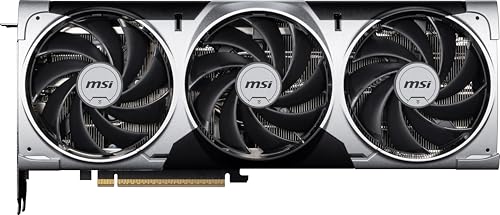
Specs
Spec | Value |
|---|---|
CUDA cores | 6,144 |
RT cores | 48 (4th-gen) |
Tensor cores | 192 (5th-gen) |
Memory | 12 GB GDDR7 |
Memory bus | 192-bit |
Memory bandwidth | ~672 GB/s |
Interface | PCIe 5.0 x16 |
Power connector | Single 16-pin 12V-2x6 |
Board power | ~250W |
Cooler | 2.5-slot triple-fan Ventus |
Display outputs | 3x DisplayPort 2.1a, 1x HDMI 2.1b |
Recommended PSU | 650W |
CUDA cores
- Value
6,144
RT cores
- Value
48 (4th-gen)
Tensor cores
- Value
192 (5th-gen)
Memory
- Value
12 GB GDDR7
Memory bus
- Value
192-bit
Memory bandwidth
- Value
~672 GB/s
Interface
- Value
PCIe 5.0 x16
Power connector
- Value
Single 16-pin 12V-2x6
Board power
- Value
~250W
Cooler
- Value
2.5-slot triple-fan Ventus
Display outputs
- Value
3x DisplayPort 2.1a, 1x HDMI 2.1b
Recommended PSU
- Value
650W
What it does well
The 5070 hits the volume target for 50-series. At 1440p high settings across modern AAA, it lands in the 70 to 120 fps range, which is comfortable on a 144 Hz to 165 Hz panel without much settings hunting. DLSS 4 Multi-Frame Gen pushes that to triple-digit territory in cache-heavy titles when paired with an X3D CPU, and the latency cost is small enough that it's a real option for competitive AAA play, not just single-player atmosphere.
For 1440p competitive workloads, the card is overkill in the friendliest way. CS2, Apex, Marvel Rivals, and Valorant all live on the monitor's refresh cap at 1440p, and the 5070's CUDA-core count keeps 1% lows tight under the bursty CPU patterns those engines produce. The Ventus 3X cooler runs quiet under the 250W envelope and the cards in this listing report stable boost behavior across the run-of-the-mill silicon lottery.
Around the build, the 250W envelope means a 650W to 750W PSU lands comfortably with one card and one CPU, and the 2.5-slot form factor fits even compact mid-towers without the case-airflow drama bigger cards bring. DisplayPort 2.1a across three outputs covers the panel refresh cycle for the next several years.
What you give up
12 GB on a 192-bit bus is the first thing to give. At 1440p ultra-RT in newer AAA titles, the pool fills under load and frame pacing softens. Texture-heavy modded games are the clearest example here. Skyrim ENB packs, large Cyberpunk mod stacks, and dense MSFS 2024 metro areas push past the 12 GB ceiling and trigger texture pop or stutter, even when the raw compute would otherwise be sufficient. That 12 GB pool is also the reason the tier below is worth a look: RTX 5060 Ti vs RTX 5070 weighs the 5060 Ti’s 16 GB against the 5070’s extra speed.
4K AAA at native max settings is not the play. DLSS Quality holds a 60 fps floor in cache-light titles, but the 1% lows are softer than on the Ti, and DLSS Performance is the practical fallback on anything more demanding. The image-quality cost is visible on a 32-inch panel even at the higher render distance, which matters if 4K is the actual target rather than a future upgrade.
Native path tracing at 1440p runs but isn't comfortable. The supreme and path-traced presets work with DLSS Performance plus MFG, but the raw RT-core throughput trails the Ti enough that the experience reads as marketing rather than gameplay. Reports suggest the 5070 is fine for path-traced content as a sometimes-feature, not a primary use case.
The card also doesn't leave headroom for a creator workload running alongside gaming. Blender scenes past roughly 8 GB of geometry plus textures push the pool, and DaVinci timelines with multiple 4K streams hit the ceiling faster than 12 GB buyers tend to expect.
Who it's for
The 1440p 165 Hz mainstream player whose library skews competitive and AAA-on-high, on a 1500-class build, with no 4K panel in the immediate plan and no creator workload on the side. Most readers in the 50-series mid-tier are buying this card, and most of them are right to.
MSI Ventus 3X RTX 5070 Ti OC

Specs
Spec | Value |
|---|---|
CUDA cores | 8,960 |
RT cores | 70 (4th-gen) |
Tensor cores | 280 (5th-gen) |
Memory | 16 GB GDDR7 |
Memory bus | 256-bit |
Memory bandwidth | ~896 GB/s |
Interface | PCIe 5.0 x16 |
Power connector | Single 16-pin 12V-2x6 |
Board power | ~300W |
Cooler | 2.5-slot triple-fan Ventus |
Display outputs | 3x DisplayPort 2.1a, 1x HDMI 2.1b |
Recommended PSU | 750W |
CUDA cores
- Value
8,960
RT cores
- Value
70 (4th-gen)
Tensor cores
- Value
280 (5th-gen)
Memory
- Value
16 GB GDDR7
Memory bus
- Value
256-bit
Memory bandwidth
- Value
~896 GB/s
Interface
- Value
PCIe 5.0 x16
Power connector
- Value
Single 16-pin 12V-2x6
Board power
- Value
~300W
Cooler
- Value
2.5-slot triple-fan Ventus
Display outputs
- Value
3x DisplayPort 2.1a, 1x HDMI 2.1b
Recommended PSU
- Value
750W
What it does well
The Ti is the high-mainstream sweet spot, and the wedge over the 5070 is concentrated where it matters most. At 1440p ultra plus RT, the card lands 90 to 120 fps in Cyberpunk, Alan Wake 2, and Wukong with DLSS 4 Multi-Frame Gen on, where the 5070 sits in the 60 to 80 range with worse 1% lows. Supreme and path-traced presets become practically playable rather than technically supported, which is the difference between using RT and enjoying it.
The 16 GB pool changes the math on any VRAM-pressured workload. Texture-heavy modded 1440p, dense MSFS 2024 metro flights, and the long playthroughs where settings tend to drift up over a campaign all sit comfortably on the Ti's wider bus. The 256-bit memory bandwidth feeds the chip fast enough that the per-frame variance on demanding titles stays tight even under sustained load.
4K AAA on a 60 to 120 Hz panel is where the Ti really pulls away from its cheaper sibling. A 32-inch LG C2 or Alienware AW3225QF running with DLSS Quality holds frametimes consistent at high to ultra settings in cache-light titles like Wukong and Shadows, and that's a real category of buyer the 5070 can't comfortably serve. The Ti also gives gaming-plus-creator hybrid use cases a clear lane: Blender and DaVinci both benefit from the 8,960 CUDA cores and the 16 GB pool, and neither chokes the gaming side of the workload.
What you give up
About 45% more spend, and at 1440p 165 Hz competitive that delta does nothing for you. CS2, Apex, Valorant, and Rivals all cap on the monitor refresh on both cards, and the upgrade tax buys frames you can't display. If your library is competitive-first at 1440p, the Ti's extra cores and VRAM evaporate against the panel's frame cap.
The thermal envelope wants more case airflow than the 5070 does. 300W under sustained load needs front intake and a decent exhaust path; a mid-tower handles it comfortably, but a compact ATX case gets tight and an ITX build is the wrong call for this card. PSU sizing pushes up too, with 750W as the comfortable floor and 650W only with a unit you genuinely trust on transient behavior. The 12V-2x6 connector advice applies harder here than on the 5070, where the higher peak draw amplifies the cost of a bad connection or an adapter chain.
Finally, this isn't a 4K-at-144-Hz-and-above card. The Ti is the right call up to 4K 120 Hz with DLSS, but if your panel is an OLED 4K 240 or a QD-OLED 4K 144, the actual question on the table is 5080 vs 5070 Ti, not 5070 vs 5070 Ti, and the answer changes. If the Ti still feels short of your panel, our RTX 5070 Ti vs RTX 5080 comparison covers the next rung up the stack.
Who it's for
The 1440p 240 Hz QD-OLED player on a 2000-class build, the buyer whose library leans AAA-with-RT-on, the 4K AAA-at-60-to-120-Hz player who wants more than DLSS Performance can deliver, and the hybrid gamer-plus-creator who wants both halves comfortable on one card. The Ti is the right call when the monitor or the workload can display the extra headroom.
Which one should you buy?
The decision splits by panel and workload, not by abstract value.
If you're the 1440p 165 Hz mainstream gamer playing CS2, Marvel Rivals, Cyberpunk on high, and Apex, buy the 5070. The Ti's headroom never shows up on your panel and the 45% premium lands as wasted spend.
If you're the 1440p 240 Hz QD-OLED player on AAA-with-RT-on (Alan Wake 2, Wukong, Cyberpunk supreme), buy the 5070 Ti. The RT cores and VRAM are the wedge, and supreme presets play here.
If you're the 4K AAA at 60 to 120 Hz player on an LG C2/C3 or Alienware AW3225QF, buy the 5070 Ti. DLSS Quality holds where the 5070 needs Performance, and that's a real image-quality upgrade at the same frame floor.
If you're the modded-game enthusiast running heavy texture mods or MSFS 2024 as a primary title, buy the 5070 Ti. The 16 GB pool keeps streaming smooth past the 12 GB workloads that bog down the 5070.
If you're the hybrid gamer-plus-creator running Blender, DaVinci, or Premiere alongside play, buy the 5070 Ti. CUDA-core count and VRAM keep creator scenes off the ceiling, and both halves stay comfortable on one card.
If you're the SFF or ITX builder, buy the 5070. The 250W envelope and the 2.5-slot cooler fit compact builds without thermal drama. The Ti's 300W envelope and case-airflow demands aren't the right call for the form factor.
Bottom line
This isn't a benchmark question, it's a panel-and-workload question. The 5070 is the cleaner spend when the monitor is 1440p 165 Hz and the library leans competitive or AAA-on-high. The 5070 Ti earns its keep when the panel is 1440p 240 Hz, the library is RT-heavy AAA, or the use case stretches to 4K AAA at 60 to 120 Hz, modded VRAM-hungry titles, or a creator workload sitting alongside gaming. Find the row in the scenario matrix that matches your build, then buy the winner.
FAQ
Is the RTX 5070 Ti worth the +45% over the 5070 at 1440p?
It depends on the preset you're running. At 1440p high settings or 1440p competitive, both cards monitor-cap and the extra spend doesn't land on screen. At 1440p ultra plus RT or 1440p supreme on modern AAA, the Ti opens roughly 25 to 35% more frames with smoother 1% lows, which translates to playable supreme presets rather than technically supported ones. Buy by your preset, not by aggregate benchmark averages.
Does the 5070's 12 GB VRAM hold up at 4K AAA with DLSS?
It holds the 60 fps floor in most cache-light titles with DLSS Quality, but DLSS Performance is the practical fallback on demanding games like Wukong or Alan Wake 2. The image-quality cost at 4K is visible on a 32-inch panel, and 1% lows are noticeably softer than on the Ti. If 4K AAA is the actual target rather than an aspiration, the Ti is the safer pick.
How much faster is the 5070 Ti at native path tracing?
In path-traced workloads at 1440p, the Ti's 70 RT cores and 16 GB pool deliver roughly 30 to 40% more frames than the 5070 in titles like Cyberpunk supreme and Alan Wake 2 path-traced, depending on the DLSS and MFG settings used. The 5070 runs the preset but hovers near the 60 fps floor. The Ti makes path tracing a primary feature; the 5070 makes it a sometimes-feature.
Will the 5070 bottleneck a 9800X3D or 7800X3D?
No. The 9800X3D and 7800X3D pair cleanly with the 5070 at 1440p, and DLSS 4 Multi-Frame Gen takes advantage of the X3D L3 cache in cache-heavy AAA titles. If anything, the 5070 plus an X3D CPU is the sweet-spot pairing for a 1500-class build, and the Ti opens the option to push to 4K or RT-heavy presets without changing the CPU.
What PSU wattage do I need for the 5070 vs the 5070 Ti?
NVIDIA recommends 650W as the floor for the 5070 and 750W for the Ti, both on a quality unit. The transient-spike behavior matters more than the nameplate wattage here; an 850W ATX 3.1 unit is the conservative call for the Ti, and a trusted 650W unit handles the 5070 comfortably. The 12V-2x6 connector advice applies on both cards: fully seated, native cable, no adapter chains.
Is the 5070 Ti future-proof for a 4 to 5 year hold at 1440p?
For a 1440p 144 to 240 Hz hold, the Ti is well-positioned. 16 GB of GDDR7 on a 256-bit bus has the headroom for ongoing VRAM pressure increases, and the 70 RT cores keep RT-heavy AAA in range for the next several years. At 4K AAA, the four-year hold is more conditional. The Ti is comfortable at 4K 60 to 120 Hz today, but the 4K 144 Hz+ ceiling is the 5080's territory rather than the Ti's. Buy by your panel today, not by the panel you might buy later.
Related Articles

RTX 5070 Ti vs RTX 5080 (2026): Which GPU Wins?
RTX 5070 Ti vs RTX 5080: which Blackwell card earns the upgrade tax, decided by panel tier, RT workload, and creator workload alongside gaming.
May 9, 2026

RTX 5070 vs RX 9070 XT (2026): 12GB DLSS 4 vs 16GB Raster
RTX 5070 vs RX 9070 XT at 1440p in 2026: the 9070 XT leads raster with 16GB, the 5070 wins ray tracing with DLSS 4 on 12GB. Pick by the games you actually play.
Sep 15, 2026

RTX 5070 Ti vs RX 9070 XT (2026): 5% Raster, 15% RT Gap
RTX 5070 Ti vs RX 9070 XT: the 9070 XT is 5% behind at 1440p raster for far less money, the 5070 Ti wins ray tracing by 15%. Which one you should buy.
Sep 3, 2026

Best GPU for 1440p Gaming 2026: 5 16GB Picks, 144-240Hz
The best GPU for 1440p gaming in 2026: five 16GB picks matched to 144 and 240 Hz targets, the 8GB cards to skip, and the benchmarks behind every call.
Sep 26, 2026

Best $1,500 Gaming PC Build 2026: RTX 5070 + 7800X3D
Create a powerful $1500 gaming PC in 2026 using the Ryzen 7 7800X3D and RTX 5070 to dominate 1440p Ultra, enjoy smoother 4K, and stay set for future upgrades.
Aug 3, 2025