Affiliate Disclosure: As an Amazon Associate we earn from qualifying purchases. Some links may earn us a commission at no cost to you.

ATX vs Micro-ATX vs Mini-ITX (2026): Pick Your Form Factor
Form factor is the first decision that locks in every other one: how many drives you can add, how much airflow you get, and how much desk space the build eats. Most comparisons stop at the definitions. The real question is narrower: what are you optimizing for, expansion room, cost, or physical size?
If you need the short version: ATX gives you the most room to grow, Micro-ATX gets you most of that room for less money and less desk space, and Mini-ITX trades expansion for the smallest possible footprint. The picks and the tradeoffs below tell you which one fits your build.
Quick picks by form factor
Form factor | Pick | Best for | Buy |
|---|---|---|---|
ATX | Maximum expansion, airflow, and future upgrade room | ||
Micro-ATX | Most of ATX's cooling and GPU headroom in a smaller, cheaper case | ||
Mini-ITX | Desk space or portability, without giving up a full-length GPU |
ATX
- Pick
- Best for
Maximum expansion, airflow, and future upgrade room
- Buy
Micro-ATX
- Pick
- Best for
Most of ATX's cooling and GPU headroom in a smaller, cheaper case
- Buy
Mini-ITX
- Pick
- Best for
Desk space or portability, without giving up a full-length GPU
- Buy
ATX vs Micro-ATX vs Mini-ITX at a glance
Size | RAM + M.2 + PCIe | VRM headroom | Cost impact | Best for |
|---|---|---|---|---|
ATX | 4 DIMM slots, 2-4 M.2, 2-3 usable PCIe slots | Strongest on average, more room for high-end VRM designs | Highest case cost, widest motherboard price range | Multi-drive builds, future add-in cards, no compromises |
Micro-ATX | Usually 4 DIMM slots on higher tiers, 2 on budget boards; 2 M.2; 1-2 PCIe slots | Mid-range, thinner than ATX siblings from the same product line | Meaningfully cheaper case and board than ATX | Builders who want ATX-like performance without the ATX footprint or price |
Mini-ITX | 2 DIMM slots, 1-2 M.2, 1 PCIe slot (the GPU slot) | Most compressed; premium ITX boards close the gap at a price | Board and PSU (SFX/SFX-L) both cost more than their ATX equivalents | Desk space, portability, LAN builds |
ATX
- RAM + M.2 + PCIe
4 DIMM slots, 2-4 M.2, 2-3 usable PCIe slots
- VRM headroom
Strongest on average, more room for high-end VRM designs
- Cost impact
Highest case cost, widest motherboard price range
- Best for
Multi-drive builds, future add-in cards, no compromises
Micro-ATX
- RAM + M.2 + PCIe
Usually 4 DIMM slots on higher tiers, 2 on budget boards; 2 M.2; 1-2 PCIe slots
- VRM headroom
Mid-range, thinner than ATX siblings from the same product line
- Cost impact
Meaningfully cheaper case and board than ATX
- Best for
Builders who want ATX-like performance without the ATX footprint or price
Mini-ITX
- RAM + M.2 + PCIe
2 DIMM slots, 1-2 M.2, 1 PCIe slot (the GPU slot)
- VRM headroom
Most compressed; premium ITX boards close the gap at a price
- Cost impact
Board and PSU (SFX/SFX-L) both cost more than their ATX equivalents
- Best for
Desk space, portability, LAN builds
What each size costs you
Going Micro-ATX
Stepping down from ATX to Micro-ATX costs you one motherboard expansion slot and, on budget boards, two of your four RAM slots. Reports suggest this is the tradeoff that catches the most buyers off guard: they plan for the smaller case but not for the two-DIMM motherboard that comes with the cheaper end of the mATX lineup. If you're running 32GB or more, check the specific board's DIMM count before you buy, not just the case.
VRM headroom on Micro-ATX boards is usually a step below the same brand's ATX flagship, but it's rarely the bottleneck it sounds like. Mid-range mATX boards handle mainstream CPUs at stock and mild all-core boost without issue; the gap only matters if you're chasing sustained all-core overclocks on a high-TDP chip.
Going Mini-ITX
Mini-ITX boards are single-PCIe-slot by definition, which means the GPU is the only add-in card the board will ever hold. Buyers moving down from ATX are frequently surprised there's no room for a second NVMe drive without an M.2-to-PCIe riser, since most ITX boards ship with one M.2 slot on the front and a second, harder-to-cool slot on the back.
The other line-item cost is the power supply. Mini-ITX cases are built around SFX or SFX-L PSUs, not standard ATX units, and buyers have flagged the SFX price premium as a surprise when budgeting a first ITX build. Factor an extra cost into the PSU line before you compare total build price against a Micro-ATX or ATX equivalent.
How to decide
Three questions, in priority order, settle the decision for most builders.
1. How much do you plan to expand? If you know you'll add a second storage drive, a capture card, or more RAM down the line, that alone rules out Mini-ITX and leans you toward ATX.
2. What's your hard budget ceiling? Micro-ATX consistently lands cheaper than ATX for comparable cooling and GPU clearance, since you're paying less for both the case and the board.
3. Does your desk, room, or transport situation genuinely constrain size? If you're not physically limited, don't pay the Mini-ITX premium (smaller boards, SFX PSUs) for a footprint benefit you won't use.
Best ATX case: Fractal Design North

Specs
Form Factor | ATX Mid Tower |
Motherboard Support | ATX / Micro-ATX / Mini-ITX |
Max GPU Length | 355mm (300mm with a 360mm front radiator installed) |
Radiator Support | 360mm/280mm front, 240mm top, 120mm rear |
Included Fans | 2x 140mm Aspect PWM |
Dimensions | 447 x 215 x 469mm |
Front I/O | USB-C, 2x USB-A, headphone/mic |
Drive Bays | 4x 2.5 inch, 2x 3.5 inch |
Form Factor
ATX Mid Tower
Motherboard Support
ATX / Micro-ATX / Mini-ITX
Max GPU Length
355mm (300mm with a 360mm front radiator installed)
Radiator Support
360mm/280mm front, 240mm top, 120mm rear
Included Fans
2x 140mm Aspect PWM
Dimensions
447 x 215 x 469mm
Front I/O
USB-C, 2x USB-A, headphone/mic
Drive Bays
4x 2.5 inch, 2x 3.5 inch
What it does well
The North's mesh front panel is the reason it shows up on airflow shortlists: full 360mm radiator support up front, a 240mm option on top, and enough depth for 355mm GPUs without touching the front fans.
It also supports every motherboard size down to Mini-ITX, so if your plans change mid-build you're not locked into ATX boards only. That flexibility is rare at this price point.
What you give up
This is the largest case of the three by a wide margin, and it's not a subtle build on a desk. If floor or desk space is tight, the North's footprint alone may rule it out before you even get to specs.
The walnut wood front panel that makes it stand out visually also runs a premium over a plain mesh panel from the same product tier, so you're paying partly for aesthetics you may not need.
Who it's for
Builders who know they'll add a second GPU-adjacent card, multiple storage drives, or just don't want to revisit clearance questions for the next several years.
Best Micro-ATX case: Lian Li Lancool 205M Mesh
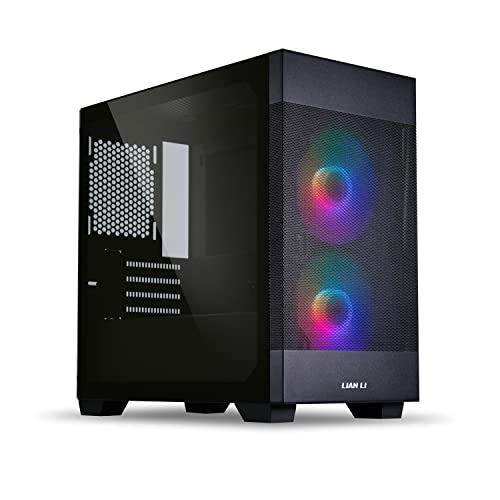
Specs
Form Factor | Micro-ATX Mid Tower |
Motherboard Support | Micro-ATX / Mini-ITX |
Max GPU Length | 350mm |
Radiator Support | 240mm front, 240mm top |
Included Fans | 2x 140mm ARGB PWM (pre-installed) |
Dimensions | 210 x 402.5 x 400mm |
Fan Positions | 5 total |
Front I/O | USB-C, 2x USB-A |
Form Factor
Micro-ATX Mid Tower
Motherboard Support
Micro-ATX / Mini-ITX
Max GPU Length
350mm
Radiator Support
240mm front, 240mm top
Included Fans
2x 140mm ARGB PWM (pre-installed)
Dimensions
210 x 402.5 x 400mm
Fan Positions
5 total
Front I/O
USB-C, 2x USB-A
What it does well
350mm of GPU clearance and 240mm radiator support on both the front and top put the Lancool 205M Mesh within reach of full ATX cooling capacity, at a noticeably lower price and a smaller footprint.
Five total fan positions mean the airflow layout isn't a compromise just because the case is compact; you can still build a positive-pressure setup without hunting for mounting points.
What you give up
The motherboards that fit this case top out at a Micro-ATX or Mini-ITX form factor, so you're giving up ATX's extra PCIe slot and, on budget mATX boards, two of your four DIMM slots.
There's no 360mm radiator option here. If you're planning a large AIO for a high-TDP chip, that ceiling is worth checking against your cooler choice before you buy.
Who it's for
Builders who want most of ATX's cooling and GPU headroom without ATX's desk footprint or price, and who don't need more than two M.2 drives or a second full-length expansion card.
Best Mini-ITX case: Cooler Master NR200P V2

Specs
Form Factor | Mini-ITX SFF |
Motherboard Support | Mini-ITX only |
Max GPU Length | 357.6mm (triple-slot, up to 160mm height) |
PSU Support | SFX / SFX-L, up to 130mm |
Radiator Support | 120/140/240/280mm (top) |
Max Air Cooler Height | 155mm (67mm with the vertical GPU riser installed) |
GPU Mount | Vertical or horizontal |
Front I/O | USB-C, USB-A |
Form Factor
Mini-ITX SFF
Motherboard Support
Mini-ITX only
Max GPU Length
357.6mm (triple-slot, up to 160mm height)
PSU Support
SFX / SFX-L, up to 130mm
Radiator Support
120/140/240/280mm (top)
Max Air Cooler Height
155mm (67mm with the vertical GPU riser installed)
GPU Mount
Vertical or horizontal
Front I/O
USB-C, USB-A
What it does well
357.6mm of GPU clearance is flagship territory, not the usual small-form-factor compromise; the NR200P V2 fits triple-slot cards that plenty of larger cases can't handle cleanly.
A 280mm AIO fits on top, and the vertical GPU mount option lets you show off the card instead of burying it against the side panel. Few SFF cases at this price manage both.
What you give up
This case only ever holds a Mini-ITX board. There's no upgrade path to Micro-ATX or ATX later without a full case swap, so the form factor decision here is permanent for the life of the case.
The SFX/SFX-L PSU requirement adds cost over a standard ATX power supply, and if you install the vertical GPU bracket, your air-cooler height ceiling drops from 155mm down to 67mm, which rules out most tower coolers.
Buyers have flagged that vertical GPU mounts in compact ITX cases like this one can starve the card of intake air if the side panel doesn't have enough mesh or clearance, so check your specific panel choice before you commit to running the GPU vertical instead of flat. Run the card flat and the bottom slots feed it directly, which is where our guide to the best fans for NR200 builds recommends slim 15mm fans for thick cards.
Who it's for
Builders optimizing for desk space or portability, LAN attendees, and dorm or shared-room setups who still want a real GPU rather than a compromise SFF card.
Want more options? Go deeper by size
The picks above are one solid option per size, not a ranked list. If you're set on ATX and want a full lineup to compare, our ATX mid-tower airflow roundup covers more cases at every price point.
Committing to Micro-ATX and still choosing a motherboard? our Micro-ATX AM5 motherboard picks breaks down VRM and DIMM tradeoffs across the current lineup.
Going Mini-ITX, our compact ITX case roundup has more options if the NR200P's layout isn't the right fit for your desk.
On the board side, see our AM5 Mini-ITX motherboard picks or LGA1851 Mini-ITX motherboard picks depending on your platform.
Bottom line
If you don't have a specific reason to go smaller, Micro-ATX is the practical default: near-ATX GPU and radiator clearance, a real price break, and a smaller footprint, with the tradeoff mostly limited to one PCIe slot and sometimes two RAM slots. Go ATX if you already know you'll add drives or cards later and don't want to think about clearance again. Go Mini-ITX only if desk space or portability is a real constraint, not a preference, since you're paying for that footprint in PSU cost and a permanent motherboard-size ceiling.
FAQ
Does form factor affect gaming performance?
Not directly. An ATX, Micro-ATX, or Mini-ITX build with the same CPU and GPU performs the same in games; form factor governs expansion room and cooling headroom, not frame rates.
Where it can matter is thermals: a cramped case with fewer fan positions can force a GPU or CPU to run warmer under sustained load, which occasionally shows up as more aggressive clock throttling.
Can you fit a full-size GPU in a Mini-ITX case?
Yes, but you have to check the specific case. The NR200P V2 above fits triple-slot cards up to 357.6mm, which covers most flagship GPUs, while plenty of smaller SFF cases cap out well under 300mm.
Always check a Mini-ITX case's GPU length and height limits against the exact card you're buying rather than assuming small cases mean small GPUs.
How many RAM slots do you lose going from ATX to Micro-ATX?
It depends on the specific board. Higher-tier Micro-ATX boards keep all 4 DIMM slots; budget mATX boards frequently drop to 2. Check the board's spec sheet, not just the case, before assuming you'll have room for 4 sticks.
Is Mini-ITX worth the extra cost over Micro-ATX?
Only if desk space or portability is a real requirement. Mini-ITX boards and SFX/SFX-L power supplies both cost more than their Micro-ATX and ATX equivalents, and you give up the ability to add a second expansion card or, in most cases, a second M.2 drive.
Can you upgrade from Micro-ATX to ATX later without a full rebuild?
Rarely cleanly. A Micro-ATX case that also fits ATX boards is uncommon, so upgrading typically means a new case and a new motherboard, not just a board swap. If you think you might want ATX later, it's usually cheaper to start there.
What's the easiest form factor to build in for a first-time builder?
ATX. The extra interior room means more clearance around the motherboard standoffs, cable routing channels, and CPU cooler, which makes a first build noticeably less fiddly than a Micro-ATX or especially a Mini-ITX case.
Related Articles

Best Mini-ITX Cases 2026: Compact Gaming PC Builds
Best Mini-ITX cases 2026 for compact gaming builds: five small form factor picks ranked for cooling, GPU clearance, aesthetics, and quiet, easy assembly.
Jul 8, 2026

Best Micro-ATX AM5 Motherboards (2026): 5 mATX Picks
Best micro-ATX AM5 motherboards for 2026: five mATX picks by build tier, from budget B650M to Ryzen 9-ready B850M, plus the VRM floor that actually matters.
Jul 22, 2026

Best AM5 Mini-ITX Motherboards (2026): SFF Picks by Tier
Five AM5 mini-ITX motherboards picked by build tier: flagship X870-I, mainstream B850I, premium creator, value B650I, and the honest A620I call.
May 19, 2026

Best LGA 1851 Mini-ITX Motherboards for Compact Intel Builds
The best LGA 1851 Mini-ITX motherboards for compact Arrow Lake builds, from sub-budget B860I boards to full-featured Z890I picks for demanding builders.
Jun 1, 2026

Best Airflow ATX Mid-Tower Cases 2026: 5 Picks by Budget
Best ATX mid-tower cases for airflow in 2026: five picks that keep a hot GPU and a 360mm AIO cool, from the budget Phanteks G400A to the five-fan Torrent.
Oct 21, 2026