Affiliate Disclosure: As an Amazon Associate we earn from qualifying purchases. Some links may earn us a commission at no cost to you.

Best AIO Coolers With a Screen (2026): 5 LCD Pump Picks
A pump-mounted screen is the one AIO feature that does nothing for your temperatures. It is also the reason you are here, so the useful question is not whether screens are worth it in the abstract. It is which display pump gives you a panel you can read at a glance, software that does not fight you, and a cooler underneath that still holds a 250W chip.
Panel specs in this category run from a 1.54-inch telemetry readout to a 5-inch second monitor. The software behind them runs from polished to barely finished. Those two gaps matter more than the price gap does.
Our top pick: Thermalright Grand Vision 360 ARGB
The Grand Vision 360 puts 3.4 inches of 480 x 480 IPS on top of a cooler that reviewers place at the front of the 360mm class. That is the combination the rest of this category keeps splitting apart.

Quick picks
Pick | Cooler | Screen | Best for | Buy |
|---|---|---|---|---|
Best Overall | 3.4 in, 480 x 480 | Readable panel without the premium price | ||
Best Value | 2.88 in, 480 x 480 | Quietest 360 with a full-resolution panel | ||
Best Premium | 2.7 in, 640 x 640 | Sharpest panel, best software | ||
Best Budget | 1.54 in, 240 x 240 | 240mm cases and mid-range chips | ||
Editor's Pick | 5 in, 720 x 1280 | A real second display in the case |
Best Overall
- Cooler
- Screen
3.4 in, 480 x 480
- Best for
Readable panel without the premium price
- Buy
Best Value
- Cooler
- Screen
2.88 in, 480 x 480
- Best for
Quietest 360 with a full-resolution panel
- Buy
Best Premium
- Cooler
- Screen
2.7 in, 640 x 640
- Best for
Sharpest panel, best software
- Buy
Best Budget
- Cooler
- Screen
1.54 in, 240 x 240
- Best for
240mm cases and mid-range chips
- Buy
Editor's Pick
- Cooler
- Screen
5 in, 720 x 1280
- Best for
A real second display in the case
- Buy
Specs at a glance
Cooler | Screen | Resolution | Radiator | Fans | Software | Warranty |
|---|---|---|---|---|---|---|
3.4 in IPS | 480 x 480 | 403 x 120 x 27 mm | 3x TL-H12B-X28-S, 2150 RPM | TRCC | 5 years | |
2.88 in IPS | 480 x 480 | 397 x 120 x 27 mm | 3x TL-P12-S, 2000 RPM | TRCC | 5 years | |
2.7 in IPS, 60 Hz | 640 x 640 | 401 x 120 x 27 mm | F360 RGB Core array, 2400 RPM | NZXT CAM | 6 years | |
1.54 in, 30 Hz | 240 x 240 | 275 x 121 x 27 mm | 2x F120P, 2000 RPM | NZXT CAM | 6 years | |
5 in IPS, 60 Hz | 720 x 1280 | 360 mm | 3x RX120 II RGB | Corsair iCUE | Not listed |
- Screen
3.4 in IPS
- Resolution
480 x 480
- Radiator
403 x 120 x 27 mm
- Fans
3x TL-H12B-X28-S, 2150 RPM
- Software
TRCC
- Warranty
5 years
- Screen
2.88 in IPS
- Resolution
480 x 480
- Radiator
397 x 120 x 27 mm
- Fans
3x TL-P12-S, 2000 RPM
- Software
TRCC
- Warranty
5 years
- Screen
2.7 in IPS, 60 Hz
- Resolution
640 x 640
- Radiator
401 x 120 x 27 mm
- Fans
F360 RGB Core array, 2400 RPM
- Software
NZXT CAM
- Warranty
6 years
- Screen
1.54 in, 30 Hz
- Resolution
240 x 240
- Radiator
275 x 121 x 27 mm
- Fans
2x F120P, 2000 RPM
- Software
NZXT CAM
- Warranty
6 years
- Screen
5 in IPS, 60 Hz
- Resolution
720 x 1280
- Radiator
360 mm
- Fans
3x RX120 II RGB
- Software
Corsair iCUE
- Warranty
Not listed
What the screen actually costs you
Start with the part vendors leave off the box. At the same radiator size, an LCD pump lands within a degree or two of its screenless sibling. The display sits above the pump as an information surface. It does not change cold plate contact, coolant flow, or radiator area, and those are the three things that move heat.
What it does change is the price, and the change is not small. A display tier routinely costs double what an equivalent screenless cooler does. The Arctic Liquid Freezer III is the honest reference point: no screen, front of the 360mm field, and noise-normalized testing at GamersNexus had it matching coolers running meaningfully louder. If a cold CPU is your only goal, buy that and put the difference into storage.
The screen also costs you a header and a dependency. Every cooler here wants a spare internal USB 2.0 header for the display, and plenty of boards ship exactly one. A case front panel or a fan controller may already own it. Buyers report a cheap internal splitter solves it, but count your headers before the parts arrive. The panel also brings firmware and a vendor utility running in the background.
None of that makes a display pump a bad buy. It makes it a buy with a reason attached, and wanting to look at it is a legitimate reason for a part sitting behind glass on your desk. Just do not let anyone sell you the screen as cooling. Our screenless 360mm picks cover the other side of that trade.
How we picked
Three axes, in this order: the panel, the software, and whether the cooling under the screen survived the budget.
Panel means diagonal and resolution together, not one or the other. A 1.54-inch 240 x 240 square and a 5-inch 720 x 1280 IPS are not the same product at different prices. The first is a gauge that shows a temperature. The second is a display Windows can address. Brightness matters more than the spec sheet suggests too: a 300-nit panel washes out in a lit room and a 690-nit one does not.
Software is the axis nobody ranks on and the one you live with. NZXT CAM and Corsair iCUE are the mature stacks, with per-sensor layouts, sane fan-curve editors, and update cadences you can predict. Thermalright's TRCC works and carries a deep preset library, but it looks unfinished and its release notes are thin. Buyers have flagged the same pattern across several newer entrants: good panel, rough utility.
Then the cooler itself. Our position on liquid has not moved. It earns its place when the chip pulls 250W or more sustained, when the case cannot take a tower cooler, or when you want the look and accept that a pump can fail in year four and dump warm coolant onto your graphics card. A display pump is the third case, which is fine as long as the screen was not paid for out of the radiator budget. Every pick here has a real cooler under the panel. Our full cooler selection guide covers the rest of that decision.
Two of the five are Thermalright. That is what the market looks like right now rather than a shortcut on our end: Thermalright owns the tier below the premium brands, and the two picks do different jobs. One is the biggest legible panel at a mid-tier price. The other is the quietest cooler here with the same pixel count.
Best Overall: Thermalright Grand Vision 360 ARGB
Specs
Screen | 3.4 in IPS LCD, 480 x 480 |
Radiator | 403 x 120 x 27 mm aluminum |
Fans | 3x TL-H12B-X28-S, up to 2150 RPM |
Fan noise | 29.4 dBA max |
Pump speed | up to 6400 RPM |
Sockets | AM4, AM5, LGA1700, LGA1851 |
Software | TRCC |
Warranty | 5 years |
Screen
3.4 in IPS LCD, 480 x 480
Radiator
403 x 120 x 27 mm aluminum
Fans
3x TL-H12B-X28-S, up to 2150 RPM
Fan noise
29.4 dBA max
Pump speed
up to 6400 RPM
Sockets
AM4, AM5, LGA1700, LGA1851
Software
TRCC
Warranty
5 years
What it does well
Three and a half inches sounds like a small step up from a 2.7-inch panel. In practice it is the line between reading four sensor values from your chair and squinting at two. There is room here for a full telemetry layout, or a static image that still reads as an image rather than an icon.
The cooler underneath is why this is the top pick and not just the biggest screen in its price band. A 403mm radiator, three TL-H12B-X28-S fans rated to 2150 RPM, and a pump rated to 6400 RPM put it at the front of the 360mm field in Tom's Hardware testing. That is not a display bolted onto last year's loop.
Socket coverage still includes AM4, which the FW360 Ultra drops. TRCC also carries a deeper preset library than most first-party cooler utilities.
What you give up
TRCC is functional and ugly. It does the job, but it does not feel like software a hardware company is proud of, and Thermalright ships firmware on its own schedule with thin release notes. If a polished always-on app matters to you, the NZXT Kraken Elite 360 RGB is the pick, and you will pay for it.
The fans are rated at 29.4 dBA at maximum, the highest of the three 360mm coolers here. Pinned at full load this is the loudest of the trio by a clear margin. The warranty is five years against NZXT's six.
Who it's for
Buy this if you want the screen to be genuinely readable and refuse to pay premium-tier money for the privilege. It suits a 9800X3D, a 9950X, or a 285K. Measure first: this is one of the longer radiators here, and our cases that take a 360mm radiator list covers the clearance question.
Best Value: Thermalright FW360 Ultra ARGB
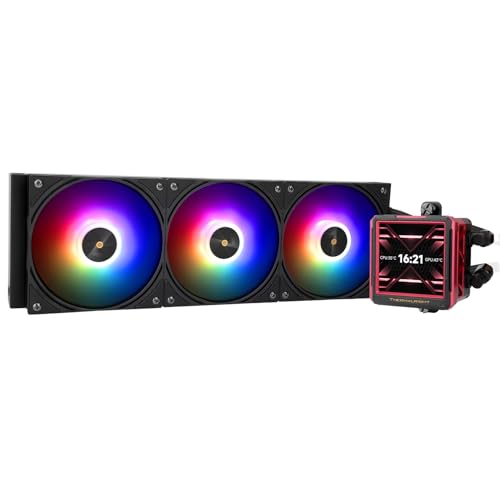
Specs
Screen | 2.88 in IPS LCD, 480 x 480, magnet-mounted |
Radiator | 397 x 120 x 27 mm aluminum |
Fans | 3x TL-P12-S, up to 2000 RPM |
Fan noise | 22.1 dBA max |
Pump speed | up to 3000 RPM |
Sockets | AM5, LGA1700, LGA1851 |
Software | TRCC |
Warranty | 5 years |
Screen
2.88 in IPS LCD, 480 x 480, magnet-mounted
Radiator
397 x 120 x 27 mm aluminum
Fans
3x TL-P12-S, up to 2000 RPM
Fan noise
22.1 dBA max
Pump speed
up to 3000 RPM
Sockets
AM5, LGA1700, LGA1851
Software
TRCC
Warranty
5 years
What it does well
Same pixel count as the Grand Vision in a slightly smaller frame, so the pixels are denser and small text stays sharp instead of turning blocky. For a multi-sensor telemetry layout that is arguably the better trade.
The acoustics are the real argument. Fans rated at 22.1 dBA and a pump rated to 3000 RPM make this the quietest cooler in the lineup on paper, by a wide margin. If you are going liquid because a 250W chip lives in the room where you also work, that gap is worth more than a couple of degrees.
The screen module is magnet-mounted and lifts off. That sounds trivial until you have fought a fixed pump cap to get a display upright after routing tubes down and to the right. Front-mount and top-mount installs face the panel differently, and this is the pick that makes fixing it a thirty second job.
What you give up
The calmer fans and slower pump mean less thermal headroom than the Grand Vision when a chip sits pinned for hours. In games the gap does not show up. On an unlocked 9950X rendering all afternoon it does, and the Grand Vision is the better buy there.
The listing calls out AM5 plus Intel LGA1700 and LGA1851 only. Anyone still on a 5800X3D should confirm bracket support before ordering rather than assuming it is in the box. Same TRCC software as the Grand Vision, with the same caveats.
Who it's for
The builder who wants a legible screen and a quiet machine, running a 9800X3D, a 9700X, or a 14700K, and who would rather put the difference into a larger SSD or a better monitor. If you are still weighing whether liquid is the right call at all, our air against liquid comparison covers the threshold.
Best Premium: NZXT Kraken Elite 360 RGB

Specs
Screen | 2.7 in IPS LCD, 640 x 640, 60 Hz |
Screen brightness | 690 cd/m2 |
Radiator | 401 x 120 x 27 mm aluminum |
Fans | F360 RGB Core array, 500 to 2400 RPM |
Pump | NZXT Turbine, 1200 to 2800 RPM |
Sockets | AM5, AM4, LGA1851, LGA1700, LGA1200/115x |
Software | NZXT CAM |
Warranty | 6 years |
Screen
2.7 in IPS LCD, 640 x 640, 60 Hz
Screen brightness
690 cd/m2
Radiator
401 x 120 x 27 mm aluminum
Fans
F360 RGB Core array, 500 to 2400 RPM
Pump
NZXT Turbine, 1200 to 2800 RPM
Sockets
AM5, AM4, LGA1851, LGA1700, LGA1200/115x
Software
NZXT CAM
Warranty
6 years
What it does well
640 x 640 across 2.7 inches is the highest pixel density in this group, and at 690 cd/m2 the panel stays readable with the lights on. The 300-nit screens here do not. Sixty hertz means animated content animates instead of stepping, which matters if you plan to run a looping graphic rather than a static gauge.
CAM is the reference implementation for the whole category. Per-sensor layouts, web integrations, and a fan curve editor that reads liquid temperature rather than CPU package temperature, which is the correct input for a liquid loop and something several competitors still get wrong.
The F360 RGB Core array puts three fans in one frame, which removes two cables and two seams from the radiator run. Six-year warranty, and the widest socket list of any pick here.
What you give up
Price, mostly. This costs roughly double the Grand Vision and more than double the FW360 Ultra, and independent testing puts its thermals in competitive territory rather than out front. The premium buys the panel, the software, and the fan array. It does not buy lower temperatures, and our Liquid Freezer III against the Kraken Elite comparison walks through that trade.
The screen is also physically the second-smallest here, so all that resolution is spent on sharpness rather than area and a dense layout still reads small. CAM wants to launch at startup and gates some features behind an account, which buyers have flagged as the most common complaint on this cooler.
Who it's for
The showcase builder who will look at this panel every day, already runs NZXT hardware, and wants both the screen and the app to feel finished. If the case has a glass front and the machine sits on the desk rather than under it, this is where the money goes.
Best Budget: NZXT Kraken Plus 240

Specs
Screen | 1.54 in square LCD, 240 x 240, 30 Hz |
Radiator | 275 x 121 x 27 mm aluminum |
Fans | 2x F120P, up to 2000 RPM |
Fan noise | 30 dBA max |
Pump | NZXT Turbine, up to 2800 RPM |
Sockets | AM5, AM4, LGA1851, LGA1700, LGA1200/115x |
Software | NZXT CAM |
Warranty | 6 years |
Screen
1.54 in square LCD, 240 x 240, 30 Hz
Radiator
275 x 121 x 27 mm aluminum
Fans
2x F120P, up to 2000 RPM
Fan noise
30 dBA max
Pump
NZXT Turbine, up to 2800 RPM
Sockets
AM5, AM4, LGA1851, LGA1700, LGA1200/115x
Software
NZXT CAM
Warranty
6 years
What it does well
This is the cheapest door into CAM, and it comes attached to a 275mm radiator that fits cases a 360mm loop will never see the inside of. Most compact ATX cases and every mATX case worth buying take a 240mm radiator front or top.
The pump comes from the same Turbine family as the Kraken Elite and the warranty is the same six years. For a 9600X, a 7600, or a 14600K, 240mm of radiator is enough cooler.
What you give up
The panel. An inch and a half at 240 x 240 and 300 nits is a gauge, not a display. It will show a coolant temperature, a clock, and a small looping image, and in person it is noticeably smaller than the product renders suggest. Anyone buying a screen AIO to look at artwork should skip this one.
Two fans instead of three also means less radiator area. This is not the cooler for a chip that pulls 250W sustained, and pairing it with a 9950X would be a mistake. The fans are rated at 30 dBA, joint loudest here.
Who it's for
The builder with a case capped at 240mm and a mid-range CPU who wants a live temperature readout on the pump without the display becoming the centerpiece. If the screen is not really the goal, our radiator size guide will save you money.
Editor's Pick: Corsair iCUE Link Titan II 360 RX LCD
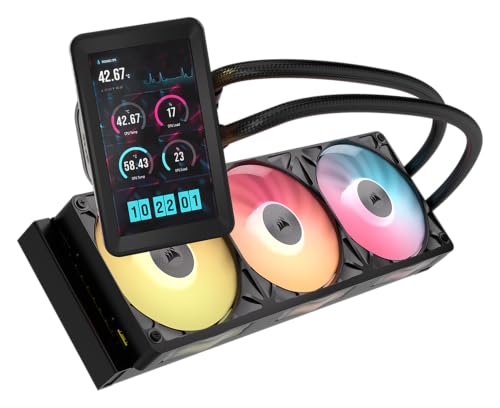
Specs
Screen | 5 in IPS LCD, 720 x 1280, 60 Hz |
Screen brightness | 500 cd/m2, 24-bit color |
Screen input | DisplayPort, appears as a second Windows display |
Radiator | 360 mm aluminum |
Fans | 3x RX120 II RGB |
Pump | FlowDrive 2 |
Sockets | AM5, AM4, LGA1851, LGA1700 |
Software | Corsair iCUE with iCUE LINK hub |
Screen
5 in IPS LCD, 720 x 1280, 60 Hz
Screen brightness
500 cd/m2, 24-bit color
Screen input
DisplayPort, appears as a second Windows display
Radiator
360 mm aluminum
Fans
3x RX120 II RGB
Pump
FlowDrive 2
Sockets
AM5, AM4, LGA1851, LGA1700
Software
Corsair iCUE with iCUE LINK hub
What it does well
Five inches at 720 x 1280 is a different product category from everything else on this page. The panel takes a DisplayPort feed and Windows sees it as a display, so it can host a real monitoring application, a chat window, or a now-playing panel instead of a vendor-curated widget. Nothing else here does that.
iCUE is the most complete stack for whole-system control, and the iCUE LINK hub collapses fan power and lighting into a single daisy chain, which produces the tidiest cable result of any cooler in this group. Underneath, FlowDrive 2 and the RX120 II fans are current-generation parts rather than a screen fitted to an older loop.
What you give up
It consumes a DisplayPort output on your graphics card. On a card with three outputs already driving two monitors, that is the whole story, and it is the spec buyers miss most often. Count your outputs before you order.
It is the most expensive pick here by a wide margin, and iCUE LINK is an ecosystem commitment rather than a component purchase. Despite the daisy chain, the hub plus the DisplayPort run plus the USB connection makes this the most cable-intensive install of the five, and reviewers have consistently flagged the setup as fiddly.
Who it's for
The builder already running iCUE LINK fans who wants a genuine auxiliary display inside the case, has a spare DisplayPort output, and has decided the screen is the point rather than a bonus.
Bottom line
If you want the best balance of readable panel and real cooling, buy the Thermalright Grand Vision 360 ARGB. If you want the same pixel count in a quieter machine, buy the Thermalright FW360 Ultra ARGB. If both the screen and the software have to feel finished, buy the NZXT Kraken Elite 360 RGB. If your case caps out at 240mm, buy the NZXT Kraken Plus 240. If you want an actual second monitor on the pump and have a DisplayPort output to spare, buy the Corsair iCUE Link Titan II 360 RX LCD. And if none of this is really about the screen, buy a screenless cooler and read our PSU, cooler and case guide instead.
FAQ
Are AIO coolers with a screen worth it?
They are worth it when you want the panel, and not otherwise. The screen adds nothing to heat transfer, so it cannot be justified on cooling grounds. What it buys is a live readout on the pump instead of an overlay on your monitor, plus a visual centerpiece in a case with a window. If your build sits under a desk behind a solid panel, that money does more good in a screenless cooler of the same radiator size.
Does the LCD screen hurt an AIO cooler's performance?
No. The display sits above the pump as a separate information surface and does not touch cold plate contact, coolant flow, or radiator area. At the same radiator size, an LCD model and its screenless sibling land within roughly a degree or two of each other, which is inside normal mounting variance. Where display models lose is on value: you pay a large premium over a screenless cooler that performs the same or better.
What size screen do you actually need on an AIO pump?
It depends on the job. If you only want a temperature and a clock, a 1.54-inch panel is enough and you can stop there. If you want a multi-sensor layout you can read from your chair, look for 2.7 inches or more at 480 x 480 or better. If you want to run an actual application on it, only a full 5-inch panel with a video input will do, and that is a much smaller field.
Do LCD AIO coolers need a USB header?
Almost always. The display talks to the vendor software over an internal USB 2.0 header, separate from the fan and pump power connections. Plenty of motherboards ship a single USB 2.0 header, and a case front panel or fan controller may already be using it. Count your headers before you buy. Internal splitters are cheap and solve it, but that is a better discovery to make before the build than during it.
Can an AIO cooler screen show your Windows desktop?
Only on models that take a real video input. The Corsair iCUE Link Titan II 360 RX LCD connects over DisplayPort and appears to Windows as a second display, so it can show anything you can put in a window. Every other cooler here renders through vendor software, so you choose from layouts the app supports rather than mirroring a desktop. The video-input approach costs a graphics card output in exchange.
Which AIO screen software is the best?
NZXT CAM and Corsair iCUE are the two mature options. Both give you per-sensor layouts, predictable updates, and fan curves that read liquid temperature rather than CPU package temperature. Thermalright's TRCC is the value alternative: a deep preset library that works, wrapped in an interface that looks unfinished. Buyers have flagged rough utilities across several newer entrants, so treat the software as part of the purchase.
Related Articles

Best AIO Cooler 2026: 5 Picks, 240mm vs 280mm vs 360mm
Best AIO cooler picks for 2026: match a 240mm, 280mm, or 360mm radiator to your case and CPU TDP in minutes, plus five tested picks and when air still wins.
Aug 18, 2026

Best 360mm AIO Coolers 2026: Five Picks by Build Tier
Best 360mm AIO coolers for 2026 high-TDP gaming builds. Five picks segmented by chip pairing, case clearance, acoustic floor, LCD support, and budget tier.
May 12, 2026

Arctic Liquid Freezer III vs NZXT Kraken Elite (2026)
Arctic Liquid Freezer III vs NZXT Kraken Elite: the value 360 vs the premium LCD 360, what the Kraken premium actually buys, and which one you should buy.
Jul 4, 2026

Best PC Cases for a 360mm AIO (2026): 5 Picks by Mount
The best PC case for a 360mm AIO comes down to mount location and top clearance. Five picks with radiator positions, clearance in mm, and GPU length costs.
Aug 22, 2026

How to Choose a PSU, Cooler, and Case
A builder's framework for the chassis side of a PC: size the PSU with sane headroom, match the cooler to the chip, and pick a case that fits and breathes.
Jun 29, 2026