Affiliate Disclosure: As an Amazon Associate we earn from qualifying purchases. Some links may earn us a commission at no cost to you.

Best CPUs for 1080p Gaming (2026): 7 Picks, AMD and Intel
At 1080p the CPU question is not which chip benchmarks highest at 4K on a test bench. It is which chip matches your refresh target, your GPU tier, and the kind of games you actually play. A 240Hz competitive build and a 60Hz budget build want different answers, and the gap between them is wider than the spec sheets suggest.
Buy the GPU tier first. The CPU is the second decision, and at this resolution it is often the cheaper one.
Seven picks below, spanning both platforms and running from an entry-level AM4 chip to the current gaming flagship. There is a section on matching the pick to your refresh target, because that single question settles most of this decision.
Our top pick: AMD Ryzen 7 9800X3D
The 9800X3D’s 96 MB of 3D V-Cache combined with Zen 5 IPC makes it the ceiling for 1080p gaming performance right now. In the titles where CPU delivery is the constraint, no retail chip currently beats it.

Quick picks
Pick | CPU | Refresh-tier target | Where to buy |
|---|---|---|---|
Best Overall | 240Hz+ competitive / high-refresh sim | ||
Best Premium | 144Hz-240Hz, V-Cache at lower price | ||
Best Value | 144Hz mainstream | ||
Best Intel | 144Hz mainstream, mixed gaming and productivity | ||
Best AM5 Starting Point | 60-144Hz on a current platform | ||
Best Budget | 60-100Hz entry builds on AM4 | ||
Editor's Pick (APU Path) | 1080p 60Hz without a dGPU |
Best Overall
- CPU
- Refresh-tier target
240Hz+ competitive / high-refresh sim
- Where to buy
Best Premium
- CPU
- Refresh-tier target
144Hz-240Hz, V-Cache at lower price
- Where to buy
Best Value
- CPU
- Refresh-tier target
144Hz mainstream
- Where to buy
Best Intel
- CPU
- Refresh-tier target
144Hz mainstream, mixed gaming and productivity
- Where to buy
Best AM5 Starting Point
- CPU
- Refresh-tier target
60-144Hz on a current platform
- Where to buy
Best Budget
- CPU
- Refresh-tier target
60-100Hz entry builds on AM4
- Where to buy
Editor's Pick (APU Path)
- CPU
- Refresh-tier target
1080p 60Hz without a dGPU
- Where to buy
Scenario matrix
Which CPU you need depends on your refresh target and GPU pairing. This matrix gives the short answer; each pick section below goes deeper.
Scenario | Recommended CPU | Why it wins | Buy |
|---|---|---|---|
1080p 60Hz entry build, older GPU or RTX 5050 class | Cheapest chip that does not cap a budget GPU at this refresh target | ||
1080p 60Hz to 144Hz on a current platform, RTX 5060 / RX 9060 XT | GPU-bottlenecked at this tier; AM5 leaves an upgrade path open | ||
1080p 144Hz mid-range, RTX 5060 Ti / RX 9070 pairing | Zen 5 IPC headroom, 65W, leaves budget for a better GPU | ||
1080p 144Hz plus streaming, editing or compiling on the same box | Many-core layout handles background encode load without touching game frame time | ||
1080p 240Hz competitive, RTX 5070 / RX 9070 XT pairing | V-Cache and Zen 5 win at the frame ceiling in CS2, Valorant and MSFS | ||
1080p 240Hz V-Cache at lower price, RTX 5070 pairing | Delivers X3D cache benefits without the flagship premium | ||
1080p APU-only, no discrete GPU on launch day | Best iGPU on any mainstream desktop CPU; real 60Hz gaming today |
1080p 60Hz entry build, older GPU or RTX 5050 class
- Recommended CPU
- Why it wins
Cheapest chip that does not cap a budget GPU at this refresh target
- Buy
1080p 60Hz to 144Hz on a current platform, RTX 5060 / RX 9060 XT
- Recommended CPU
- Why it wins
GPU-bottlenecked at this tier; AM5 leaves an upgrade path open
- Buy
1080p 144Hz mid-range, RTX 5060 Ti / RX 9070 pairing
- Recommended CPU
- Why it wins
Zen 5 IPC headroom, 65W, leaves budget for a better GPU
- Buy
1080p 144Hz plus streaming, editing or compiling on the same box
- Recommended CPU
- Why it wins
Many-core layout handles background encode load without touching game frame time
- Buy
1080p 240Hz competitive, RTX 5070 / RX 9070 XT pairing
- Recommended CPU
- Why it wins
V-Cache and Zen 5 win at the frame ceiling in CS2, Valorant and MSFS
- Buy
1080p 240Hz V-Cache at lower price, RTX 5070 pairing
- Recommended CPU
- Why it wins
Delivers X3D cache benefits without the flagship premium
- Buy
1080p APU-only, no discrete GPU on launch day
- Recommended CPU
- Why it wins
Best iGPU on any mainstream desktop CPU; real 60Hz gaming today
- Buy
Specs at a glance
Pick | CPU | Cores | Boost | Cache | TDP | Socket |
|---|---|---|---|---|---|---|
Best Overall | 8C/16T | 5.2 GHz | 96 MB | 120W | AM5 | |
Best Premium | 8C/16T | 5.0 GHz | 96 MB | 120W | AM5 | |
Best Value | 6C/12T | 5.4 GHz | 32 MB | 65W | AM5 | |
Best Intel | 18C (6P + 12E) | Turbo Boost 3.0 | Intel Smart Cache | 159W | LGA 1851 | |
Best AM5 Starting Point | 6C/12T | 5.1 GHz | 32 MB | 65W | AM5 | |
Best Budget | 6C/12T | 4.2 GHz | 16 MB | 65W | AM4 | |
Editor's Pick | 8C/16T | 5.1 GHz | 16 MB + iGPU | 65W | AM5 |
Best Overall
- CPU
- Cores
8C/16T
- Boost
5.2 GHz
- Cache
96 MB
- TDP
120W
- Socket
AM5
Best Premium
- CPU
- Cores
8C/16T
- Boost
5.0 GHz
- Cache
96 MB
- TDP
120W
- Socket
AM5
Best Value
- CPU
- Cores
6C/12T
- Boost
5.4 GHz
- Cache
32 MB
- TDP
65W
- Socket
AM5
Best Intel
- CPU
- Cores
18C (6P + 12E)
- Boost
Turbo Boost 3.0
- Cache
Intel Smart Cache
- TDP
159W
- Socket
LGA 1851
Best AM5 Starting Point
- CPU
- Cores
6C/12T
- Boost
5.1 GHz
- Cache
32 MB
- TDP
65W
- Socket
AM5
Best Budget
- CPU
- Cores
6C/12T
- Boost
4.2 GHz
- Cache
16 MB
- TDP
65W
- Socket
AM4
Editor's Pick
- CPU
- Cores
8C/16T
- Boost
5.1 GHz
- Cache
16 MB + iGPU
- TDP
65W
- Socket
AM5
Best CPU for 1080p by refresh target: 60Hz, 144Hz, 240Hz
Refresh target is the single question that settles most of this decision, because it sets how much of the frame budget the CPU is responsible for. At 60Hz almost any modern six-core chip is irrelevant to your frame rate. At 240Hz the CPU is frequently the thing holding you back.
60Hz. The GPU is the ceiling and the CPU simply needs to stay out of the way. A six-core Zen 3 part clears 60 FPS in essentially everything at 1080p, which is why the budget pick here is an AM4 chip rather than a current-platform one. Spending more on the CPU at this target buys you nothing you can see; put the money into the GPU or into an SSD.
144Hz. This is where CPU choice starts to matter and where most builds land. You want current-generation IPC and six modern cores. The 9600X is the cleanest answer on AM5, and the Core Ultra 5 250K Plus is the Intel equivalent with far more background headroom. Cache-sensitive titles start to separate here, but not dramatically.
240Hz. The CPU becomes the primary constraint, and 3D V-Cache stops being a luxury. In CS2, Valorant and the sim titles, the gap between a V-Cache chip and a non-V-Cache chip at the same core count is the difference between hitting the refresh ceiling and sitting well under it. If 240Hz is the goal, budget for a 7800X3D or a 9800X3D and pair it with an RTX 5070 class GPU or better.
One caveat that cuts across all three tiers: your GPU has to be able to feed the target first. A 9800X3D behind an entry-level card will not produce 240 FPS. Set the refresh target, pick the GPU that reaches it, then pick the CPU that does not hold it back. Our guide to CPUs for gaming across every budget covers the same ladder without the 1080p constraint.
Benchmarks at 1080p
Cache-sensitive title where 3D V-Cache shows its widest margin at 1080p. Data from Tom's Hardware and Hardware Unboxed, RTX 4090 reference GPU. Partial data.
- Ryzen 5 9600X327 FPS
- Ryzen 7 8700G119 FPS
CPU demand spikes in dense combat. V-Cache advantage visible. Data from Tom's Hardware review, RTX 4090 reference GPU. Partial data.
- Ryzen 7 9800X3D175 FPS
- Ryzen 7 8700G49 FPS
How we picked
At 1080p, GPU bottleneck is the dominant variable. A mid-range GPU like the RTX 5060 Ti renders at roughly the same frame rate whether it is paired with a 7600 or a 9800X3D. The CPU only becomes the ceiling when the GPU is fast enough to push past what the CPU can dispatch. The same holds one card over: our CPU picks for the RX 9060 XT run that argument through for AMD's mainstream RDNA 4 card.
That is why the GPU tier determines which CPU tier actually moves the needle, and why buying a premium CPU behind a budget GPU is a poor allocation. Set the GPU first. The volume card in the Blackwell stack makes the point plainly: we break down which CPU tier actually makes sense behind an RTX 5060 in a separate guide.
Both platforms are represented here. AMD's X3D lineup holds the lead in the cache-sensitive titles that decide the frame ceiling at 240Hz, and AM5 has the longer upgrade runway. Intel's Core Ultra 200S Plus parts answer at the 144Hz tier with a many-core layout that is better at absorbing background work. Which one wins depends on your refresh target and whether the machine does anything besides game. For the wider platform comparison, see our Intel vs AMD guide.
3D V-Cache earns its premium only in specific conditions. Cache-sensitive titles (CS2 at competitive low, MSFS, Total War Warhammer 3 late-game) are where the X3D chips produce frame delivery that genuinely separates them from non-X3D chips. In GPU-bound scenarios or titles that don’t thrash L3 cache (most open-world games at 1080p with an RTX 5060 Ti pairing), an X3D chip and a 9600X trade nearly identically. The tax is worth paying when you’re chasing the frame ceiling in a specific cache-sensitive title or running a high-refresh sim setup. If that doesn’t describe your library, the 9600X and the 7600 give back the savings for a better GPU. The extreme case is a Unity shooter with a huge working set, which is why the best CPUs for Escape from Tarkov are almost entirely V-Cache parts.
The APU path (8700G) exists for a real segment: builders who need to game on day one without a discrete GPU, on a tight total budget. The 8700G’s Radeon 780M iGPU can run modern titles at 1080p low-to-medium with reasonable frame rates, which is genuinely useful for a phased build. The catch is fast dual-channel DDR5 RAM: single-channel or slow memory cuts iGPU performance by 30 to 40 percent. Plan the RAM configuration before committing to this path.
DDR5-6000 CL30 RAM on AM5 matters more than CPU tier at the budget end. The Infinity Fabric sweet spot at 6000 MT/s gives a genuine 5 to 8 percent uplift across the board, which is more than the performance delta between the 7600 and the 9600X in most 1080p titles. If you’re deciding between spending money on a faster CPU vs better RAM kit, the RAM wins at this tier.
Best Overall: AMD Ryzen 7 9800X3D
Specs
Cores / Threads | 8C / 16T |
Boost Clock | 5.2 GHz |
Architecture | Zen 5 + 3D V-Cache |
L3 Cache | 96 MB (3D V-Cache) |
TDP | 120W |
Socket | AM5 |
Memory | DDR5 |
Cores / Threads
8C / 16T
Boost Clock
5.2 GHz
Architecture
Zen 5 + 3D V-Cache
L3 Cache
96 MB (3D V-Cache)
TDP
120W
Socket
AM5
Memory
DDR5
What it does well
The 9800X3D’s 96 MB of L3 cache combined with Zen 5’s improved IPC produces the highest sustained frame rates available in cache-sensitive 1080p titles. In CS2 at competitive-low settings, the chip routinely delivers 1% lows that stay well above 200 FPS even when the game’s AI pathing is thrashing the cache. In MSFS 2024, where world streaming and physics calculations are heavily cache-bandwidth dependent, the 9800X3D is the first mainstream CPU that stops being the bottleneck before the GPU does. The delta over the 9600X in those scenarios is real and measurable, not a spec-sheet abstraction.
Streaming and gaming simultaneously is a genuine strength here. The eight Zen 5 cores handle encoder load without pulling frame time from the game thread. Builders running OBS or XSplit on a second monitor will see the 9800X3D maintain performance under load where a 6-core chip starts to stutter. The AM5 platform also gives future-proofing: AM5 is confirmed through 2027 in AMD’s public roadmap, and a future CPU upgrade won’t require a new motherboard.
For a look at how the 9800X3D compares against its predecessor, see our Ryzen 7 7800X3D vs 9800X3D comparison.
What you give up
The premium over the 9600X is significant. In GPU-bound scenarios at 1080p, specifically when paired with a mid-tier GPU like an RTX 5060 Ti, the 9800X3D and the 9600X deliver near-identical average frame rates. The cache advantage shows up in 1% lows in cache-sensitive titles, not in every game in your library. If your GPU is below the RTX 5070 tier, the 9800X3D’s V-Cache is idle most of the time.
TDP is 120W. The chip runs fine on a quality 240mm AIO or a high-end air cooler (Noctua NH-D15 class), but it’s not a low-power option. Budget build, small form factor builds, or cramped cases should run the thermal math before committing.
Who it’s for
The 1080p 240Hz competitive player who has (or is buying) an RTX 5070-tier GPU or better. MSFS pilots, sim racers, and CS2 players chasing the frame ceiling. Any builder running a streaming + gaming setup on a single machine where the CPU needs to carry both workloads without compromise.
Best Premium: AMD Ryzen 7 7800X3D

Specs
Cores / Threads | 8C / 16T |
Boost Clock | 5.0 GHz |
Architecture | Zen 4 + 3D V-Cache |
L3 Cache | 96 MB (3D V-Cache) |
TDP | 120W |
Socket | AM5 |
Memory | DDR5 |
Cores / Threads
8C / 16T
Boost Clock
5.0 GHz
Architecture
Zen 4 + 3D V-Cache
L3 Cache
96 MB (3D V-Cache)
TDP
120W
Socket
AM5
Memory
DDR5
What it does well
The 7800X3D held the best-gaming-CPU title for over a year and it still delivers outstanding 1080p performance. TechSpot testing puts the 9800X3D ahead by roughly 8 percent on average across a broad multi-game suite. In GPU-bound 1080p scenarios with a mainstream GPU pairing, the two chips trade identically. That 8 percent gap only materializes in CPU-bound titles at extreme frame rates, primarily in the cache-sensitive list.
The 96 MB of V-Cache still shows up in the titles where it counts. CS2, MSFS, and Total War Warhammer 3 all reward the cache bandwidth the 7800X3D carries, and the gap to a non-X3D chip in those scenarios is as wide as it is on the 9800X3D. For most gaming libraries at 1080p, the 7800X3D and the 9800X3D are interchangeable, with the 7800X3D’s lower price freeing budget for a slightly better GPU tier.
Eight Zen 4 cores handle streaming without breaking a sweat. This is a workstation-capable chip for a gamer who occasionally renders or compiles.
What you give up
The Zen 4 to Zen 5 IPC delta is around 16 percent in CPU-bound workloads. In the titles where the CPU is the bottleneck and the benchmark is running at 360Hz-target frame rates in CS2 or MSFS, the 9800X3D’s Zen 5 cores do pull ahead. If you’re specifically chasing the maximum possible frame ceiling in cache-sensitive esports, the 9800X3D is the correct call. For anything else at 1080p, the 7800X3D doesn’t lose.
The 5.0 GHz boost clock trails the 9800X3D’s 5.2 GHz in lightly threaded workloads (AdobePS, light video editing) where cache isn’t the axis. AMD's 2026 refresh lifts that ceiling to 5.6 GHz, and whether the 9850X3D is worth it over the 9800X3D turns on how little the extra clock buys at 1080p.
Buyers have flagged that boards manufactured before late 2024 may need a BIOS update before the 7800X3D installs cleanly. Most boards now ship with compatible firmware, but older stock in the channel sometimes doesn’t. Check the board’s QVL page before purchasing.
Who it’s for
The 1080p 240Hz builder who wants V-Cache performance without the flagship premium. Anyone running an RTX 5070-tier or RX 9070 XT-tier GPU who wants the X3D cache advantage and can redirect the price delta to the GPU or cooling setup. Also the right call for a buyer coming off a 5800X3D looking for a DDR5 upgrade. Wondering if the 7800X3D is still worth buying given the 9800X3D and the upcoming 7700X3D? See our in-depth 2026 verdict.
Best Value: AMD Ryzen 5 9600X

Specs
Cores / Threads | 6C / 12T |
Boost Clock | 5.4 GHz |
Architecture | Zen 5 |
L3 Cache | 32 MB |
TDP | 65W |
Socket | AM5 |
Memory | DDR5 |
Cores / Threads
6C / 12T
Boost Clock
5.4 GHz
Architecture
Zen 5
L3 Cache
32 MB
TDP
65W
Socket
AM5
Memory
DDR5
What it does well
The 9600X is the strongest argument for “leave money for the GPU.” Zen 5’s IPC bump over Zen 4 is a genuine architectural leap, and at 1080p with a mainstream GPU pairing the 9600X is not the bottleneck for the vast majority of game titles. Tom’s Hardware’s testing showed the 9600X averaging around 163 FPS at 1080p with an RTX 4090 reference card. In CS2 at competitive settings, the chip can push over 300 FPS, more than enough headroom for a 240Hz monitor on a mid-range GPU. The same reasoning drives our i5-12400F upgrade verdict, where the GPU tier decides whether a new processor buys anything at all.
The 65W TDP is the other headline: the chip runs cool on a quality 120mm air cooler, fits easily into smaller ATX cases, and doesn’t stress a B650 board’s VRM. For a 1080p 144Hz mainstream build where the GPU is an RTX 5060 Ti or RX 9070, the 9600X is the correct pick. The savings over the 9800X3D go toward the GPU tier, which is where they’ll produce more frames in a wider range of titles.
The 9600X is a clean upgrade path for anyone still on a Ryzen 5600 or 5600X. Drop-in on most AM5 boards after a BIOS update.
What you give up
No 3D V-Cache. In the titles that punish cache-sensitive workloads (CS2 at very high frame rates, MSFS, Total War late-game), the 9600X runs 80 to 100 FPS behind the 9800X3D in average frame rate. The 1% low gap is wider. If your primary games are from that cache-sensitive list and you’re running a 240Hz or 360Hz monitor, the 9800X3D earns its premium. That gap is resolution-dependent, and our CPU pairing guide for the RX 9070 XT shows where it closes once the card becomes the limiter.
Six cores means heavy-streaming builds will feel the ceiling. OBS on a second monitor at 1080p 60fps is manageable, but encoding while playing at 1440p will start to bite. If streaming is a regular part of the setup, consider the 7800X3D’s eight cores at a similar price range.
Who it’s for
The 1080p 144Hz mainstream buyer pairing with an RTX 5060 Ti or RX 9070. Anyone whose gaming library doesn’t skew cache-sensitive and wants the best cost-per-frame at this price tier. Also the right pick for a clean AM5 upgrade from a Zen 3 board if the prior CPU is still on a 500-series board.
For a broader look at CPUs across all budgets and resolutions, see our best CPUs for gaming guide.
Best Intel: Intel Core Ultra 5 250K Plus

The 250K Plus is the Intel answer at the 144Hz tier, and the reason this guide is no longer AMD-only. It pairs a mainstream gaming core count with an efficiency-core cluster that gives it far more background headroom than any six-core AM5 chip at a similar price.
Specs
Cores / Threads | 18 cores (6 P-cores + 12 E-cores) |
|---|---|
Architecture | Arrow Lake refresh (Core Ultra 200S Plus) |
Boost | Intel Turbo Boost Max 3.0 |
Cache | Intel Smart Cache |
TDP | 159W |
Socket | LGA 1851 |
Memory | DDR5 |
Architecture
- 18 cores (6 P-cores + 12 E-cores)
Arrow Lake refresh (Core Ultra 200S Plus)
Boost
- 18 cores (6 P-cores + 12 E-cores)
Intel Turbo Boost Max 3.0
Cache
- 18 cores (6 P-cores + 12 E-cores)
Intel Smart Cache
TDP
- 18 cores (6 P-cores + 12 E-cores)
159W
Socket
- 18 cores (6 P-cores + 12 E-cores)
LGA 1851
Memory
- 18 cores (6 P-cores + 12 E-cores)
DDR5
What it does well
The core layout is the story. Six performance cores handle the game thread while twelve efficiency cores absorb everything else: OBS encoding, a browser with thirty tabs, Discord, a compile running in the background. On a six-core AM5 chip that background load competes with the game for cores and shows up as frame-time inconsistency. Here it mostly does not.
At 1080p the practical gaming gap between Core Ultra tiers is small, because this resolution is GPU-bound more often than not. That works in the 250K Plus's favour: you get most of the gaming performance of the more expensive parts in the line while spending closer to a mid-tier price.
It is also the natural pick if you are already on an Intel platform or you want a board ecosystem with wider retail availability than AM5 at the budget end.
What you give up
No 3D V-Cache equivalent. In the cache-sensitive titles where X3D chips pull away (CS2 at competitive settings, MSFS, Total War late-game), this chip will trail a 7800X3D at the same frame ceiling. If your library is dominated by those titles and 240Hz is the target, the X3D parts remain the better buy.
The 159W TDP is real. This is not a stock-cooler chip. Budget for a decent tower air cooler or a 240mm AIO, and note that the board and cooling premium eats into the price advantage over the 9600X.
LGA 1851 also has a shorter runway than AM5. AMD has committed to AM5 well past this generation; the Intel socket's upgrade path is less certain, which matters if you plan to drop in a new CPU in a few years rather than rebuild.
Who it's for
The 1080p 144Hz builder who does more than game on the same machine. If you stream, edit, compile, or just keep a heavy background load running while you play, the efficiency-core cluster is worth more day to day than a cache advantage you would only see at 240Hz.
Best AM5 Starting Point: AMD Ryzen 5 7600
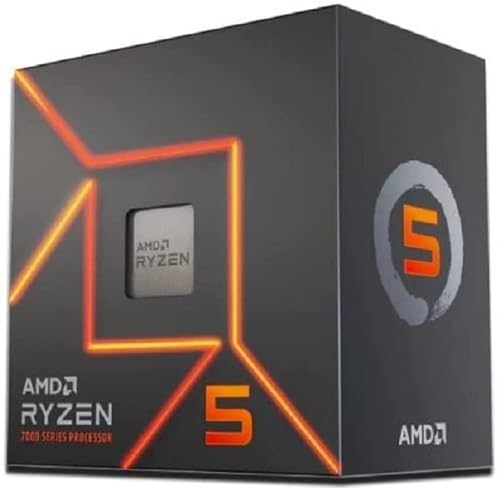
Specs
Cores / Threads | 6C / 12T |
Boost Clock | 5.1 GHz |
Architecture | Zen 4 |
L3 Cache | 32 MB |
TDP | 65W |
Socket | AM5 |
Memory | DDR5 |
Cores / Threads
6C / 12T
Boost Clock
5.1 GHz
Architecture
Zen 4
L3 Cache
32 MB
TDP
65W
Socket
AM5
Memory
DDR5
What it does well
The 7600 is the “budget your money toward the GPU” argument in its cleanest form. At 1080p paired with an RTX 5060 or RX 9060 XT, the GPU is the ceiling, not the CPU. The 7600 doesn’t bottleneck either card in typical game titles. On a budget build where every dollar spent on CPU is a dollar not spent on GPU, the 7600 is the correct call. If the card in that build is the step up, our CPU picks for the RTX 5060 Ti work through the same trade against that card's PCIe 5.0 x8 link.
The 65W TDP runs on the stock cooler or any 120mm air cooler. It fits in budget mATX cases, draws nothing from a 550W PSU budget, and doesn’t demand a beefy B650 board. The platform is AM5 with DDR5 and PCIe 5.0 support, which keeps the upgrade path open.
A key detail specific to AM5 budget builds: DDR5-6000 CL30 RAM gives this chip a 5 to 8 percent gaming uplift over slower kits, because at that speed the Infinity Fabric runs at its optimal 1:1 ratio. That memory speed delta produces more additional frames than the price difference between the 7600 and the 9600X. If budget is the constraint, buy the faster RAM kit over the faster CPU.
What you give up
No 3D V-Cache, and Zen 4 architecture trails Zen 5 (9600X) by around 5 to 10 percent in IPC. At 1080p 240Hz in CS2 or Valorant, the 9600X will deliver meaningfully better 1% lows. The 7600 is not the right choice for a 240Hz competitive build, a sim-heavy library, or a streaming setup.
Six cores is also a constraint for heavy multi-core workloads. This is a gaming CPU. Sustained rendering, video encoding, or running a development environment alongside games will run into the core-count ceiling faster than the 9600X would.
Who it’s for
The builder whose primary constraint is total system budget and who is pairing with an RTX 5060 or RX 9060 XT for 1080p 60 to 144Hz gaming. The first-build or budget upgrade where the GPU tier matters more than the CPU tier. Anyone who has read the DDR5 memory advice above and is planning to pair with a fast dual-channel kit.
For a broader look at 1080p CPU choices by GPU pairing and use case, the best CPUs for 1440p gaming guide covers how these chips scale up when paired with faster graphics cards.
Best Budget: AMD Ryzen 5 5500

The 5500 is the genuine entry point to this list and roughly a third of what the AM5 picks cost. It is a Zen 3 six-core on the mature AM4 platform, and at 1080p 60Hz it is not the thing limiting your frame rate.
Specs
Cores / Threads | 6C / 12T |
|---|---|
Boost Clock | 4.2 GHz |
Architecture | Zen 3 (Cezanne die) |
L3 Cache | 16 MB |
TDP | 65W |
Socket | AM4 |
Memory | DDR4 |
Boost Clock
- 6C / 12T
4.2 GHz
Architecture
- 6C / 12T
Zen 3 (Cezanne die)
L3 Cache
- 6C / 12T
16 MB
TDP
- 6C / 12T
65W
Socket
- 6C / 12T
AM4
Memory
- 6C / 12T
DDR4
What it does well
It makes a complete build cheap in a way no AM5 chip can. AM4 boards and DDR4 kits are both at end-of-life pricing, so the platform saving compounds well beyond the chip itself. For a first build, a spare-parts rebuild, or a machine for a younger sibling, that total-cost difference is the whole argument. If the AM4 board on the shelf already holds a Ryzen 5 3600, the bigger 1080p jump is a chip swap rather than a rebuild, and our Ryzen 5 3600 to 5700X3D upgrade verdict shows how much frame rate that buys.
Six Zen 3 cores with SMT still clear 60 FPS at 1080p in essentially every current title when the GPU can feed them. It ships with a Wraith cooler that is adequate at 65W, so there is no hidden cooling cost.
What you give up
PCIe 3.0, and this is the one that catches people out. The 5500 is built on the Cezanne APU die with the integrated graphics disabled, which means its x16 slot runs at PCIe 3.0 rather than 4.0. With most GPUs at 1080p the practical cost is small, but on cards with a narrow x8 interface it is measurable. Check the lane width of the GPU you plan to pair before committing.
Half the L3 cache of a 5600 (16 MB against 32 MB), which shows up in exactly the cache-sensitive titles discussed above. It also has no integrated graphics, so you cannot boot it without a GPU for troubleshooting.
And AM4 is a dead-end socket. What you buy is what you keep. If you expect to upgrade the CPU rather than the whole machine within a few years, spend the extra on the 7600 and land on AM5 instead. Whether that dead end is worth accepting comes down to arithmetic, andthe full AM4 against AM5 verdict for 2026 names the budget where the answer flips.
Who it's for
The builder whose constraint is total system cost, targeting 1080p 60Hz with a budget GPU. Also the right call for a rebuild where an AM4 board and DDR4 are already sitting on the shelf, where the chip is close to a pure upgrade for very little money. If that shelf-bound AM4 board is feeding a last-generation card, our CPU picks for the RTX 3060 walk the same decision through with the graphics card held fixed.
Editor's Pick (APU Path): AMD Ryzen 7 8700G

Specs
Cores / Threads | 8C / 16T |
Boost Clock | 5.1 GHz |
Architecture | Zen 4 + RDNA 3 iGPU |
Integrated GPU | Radeon 780M (12 CUs) |
TDP | 65W |
Socket | AM5 |
Memory | DDR5 (dual-channel fast RAM critical) |
Cores / Threads
8C / 16T
Boost Clock
5.1 GHz
Architecture
Zen 4 + RDNA 3 iGPU
Integrated GPU
Radeon 780M (12 CUs)
TDP
65W
Socket
AM5
Memory
DDR5 (dual-channel fast RAM critical)
What it does well
The 8700G carries the Radeon 780M, which is the strongest integrated GPU AMD has shipped on a mainstream desktop chip. It can run real games at 1080p today without a discrete GPU. CS2 at 1080p competitive settings averages around 119 FPS on the 780M iGPU. Baldur’s Gate 3 runs at around 49 FPS at 1080p medium settings. Cyberpunk 2077 at 1080p with FSR quality mode enabled sits around 45 FPS. These are real, playable frame rates on a chip with no discrete GPU in the slot.
The value of the 8700G is the phased-build path. Buy the chip, the board, and fast DDR5 RAM now. Game at 1080p 60Hz on the integrated graphics. When GPU prices normalize or a sale hits, drop in a discrete GPU and the 8700G’s eight Zen 4 cores won’t bottleneck an RTX 5060 Ti or RX 9070 at 1080p. The CPU investment survives the GPU upgrade.
Fast dual-channel DDR5 RAM is mandatory. The iGPU shares system memory bandwidth, and single-channel or slow DDR5 cuts performance by 30 to 40 percent. Plan the build around at least DDR5-5600 in dual-channel configuration; DDR5-6400 is the iGPU sweet spot. Buy the RAM slots right the first time. A single DIMM installed in the wrong slot, or slow DDR5-4800, will cut iGPU performance more than the difference between the 8700G and a faster APU.
What you give up
The iGPU is a 60Hz experience, not a 144Hz one. In competitive titles (Valorant, CS2) you can push toward 100 FPS at 1080p with reduced settings, but the 780M cannot maintain 144Hz in most titles and cannot run demanding new releases at their intended visual targets. Alan Wake 2, Stalker 2, and VRAM-heavy titles will either refuse to run or require heavy FSR upscaling at lower resolutions.
CPU gaming performance lags behind the non-APU picks at this TDP. No V-Cache means cache-sensitive titles run noticeably slower than a 7800X3D. The 8700G is not the right pick for a CS2 main who wants to upgrade to 240Hz later, because the discrete GPU will be the investment and a 9600X should have been the CPU from the start.
Who it’s for
Builders on a constrained launch budget who need to game at 1080p 60Hz without buying a discrete GPU on day one. Small-form-factor builds where the discrete GPU is planned but the launch-day budget doesn’t cover it. Also valid for a media PC or home theater build where occasional light gaming is part of the workload and a GPU is overkill.
Do not buy the 8700G if you need 144Hz on day one, or if your primary library is competitive esports. The iGPU will not deliver that experience.
Bottom line
If you’re building for 1080p 240Hz competitive or running a sim-heavy library (MSFS, Total War, sim racing), the AMD Ryzen 7 9800X3D is the right chip. Nothing else at 1080p matches its 1% low numbers in cache-sensitive titles. For 1080p 144Hz mainstream builds with an RTX 5060 Ti pairing, the AMD Ryzen 5 9600X gives you Zen 5 performance at a significantly lower price and leaves real budget for the GPU. If total system cost is the primary constraint and you’re pairing with an RTX 5060, the AMD Ryzen 5 7600 is the honest call. The GPU is the bottleneck, not the CPU, and the savings belong on the GPU tier.
The AMD Ryzen 7 7800X3D sits between those two cases: V-Cache performance at a lower price than the 9800X3D, for builders who want the cache advantage but don’t need the latest Zen 5 cores. The AMD Ryzen 7 8700G is the only chip here for builders who need to game without a discrete GPU on day one.
If you game at 1080p 144Hz and the same machine also streams, edits or compiles, the Intel Core Ultra 5 250K Plus is the better-balanced buy than a six-core AM5 chip at a similar price. The efficiency cores absorb the background work that would otherwise cost you frame time.
If total system cost is the binding constraint and 60Hz is the target, the AMD Ryzen 5 5500 on AM4 is the honest floor. Accept PCIe 3.0 and a dead-end socket in exchange for a build that costs meaningfully less all-in.
Whichever pick you choose, run DDR5-6000 CL30 in dual-channel configuration on AM5. The memory speed matters more than the CPU tier delta at the budget end, and it matters for the iGPU if you’re going the APU route.
FAQ
Do I need a Ryzen 9800X3D for 1080p gaming, or is a 9600X enough?
For most 1080p 144Hz builds, the Ryzen 5 9600X is enough. The 9800X3D’s V-Cache advantage shows up specifically in cache-sensitive titles (CS2, MSFS, Total War) at very high frame rates and with a fast GPU in the build. With an RTX 5060 Ti or RX 9070 pairing, the 9800X3D and 9600X trade nearly identical average frame rates in most game titles. The 9800X3D earns its premium when you’re chasing the absolute 1% low ceiling in competitive esports or you’re running a 240Hz monitor with an RTX 5070-tier GPU.
What's the best CPU for 1080p 240Hz gaming in 2026?
The AMD Ryzen 7 9800X3D. At 240Hz, the GPU and CPU both need to deliver at the frame ceiling, and the 9800X3D’s 96 MB V-Cache keeps L3 cache latency low enough that it stops being the bottleneck in cache-sensitive titles like CS2 and Valorant. Pair it with an RTX 5070 or better to make the V-Cache advantage meaningful. With a slower GPU, the 9600X or 7800X3D will produce identical average frame rates at lower cost.
Can the Ryzen 7 8700G actually play games without a graphics card?
Yes, at 1080p with reduced settings. The Radeon 780M iGPU averages around 119 FPS in CS2 at competitive settings, around 49 FPS in Baldur’s Gate 3 at medium, and around 45 FPS in Cyberpunk 2077 with FSR quality mode. These are real playable frame rates for a 60Hz monitor. Fast dual-channel DDR5 RAM is non-negotiable for this to work: DDR5-6400 is the sweet spot, and single-channel or slow DDR5 will cut iGPU performance by 30 to 40 percent.
Is it worth upgrading from a Ryzen 7 7800X3D to the 9800X3D for 1080p?
For most users at 1080p: no. The 9800X3D leads by roughly 8 percent on average across a multi-game suite, and in GPU-bound scenarios with a mainstream GPU the two chips trade identically. The upgrade pays off only if you’re running a 240Hz+ monitor in cache-sensitive competitive titles and you’re paired with a GPU fast enough that the CPU becomes the ceiling. If your GPU is below the RTX 5070 tier, the delta is invisible most of the time. Hold the 7800X3D until an AM5 chip delivers a more meaningful jump, or put the upgrade money into a better GPU.
What CPU should I pair with an RTX 5060 for 1080p gaming?
The AMD Ryzen 5 7600. At 1080p with an RTX 5060, the GPU is almost always the bottleneck. The 7600 doesn’t hold the 5060 back in any meaningful way for mainstream gaming at 60 to 144Hz, and the savings over a 9600X or 9800X3D belong toward the GPU or a faster DDR5 RAM kit. Run DDR5-6000 CL30 with the 7600 to extract the Infinity Fabric sweet spot: that memory upgrade adds more performance than stepping up from the 7600 to the 9600X.
Is Intel or AMD better for 1080p gaming in 2026?
For pure gaming at 240Hz, AMD's 3D V-Cache chips still win: the 7800X3D and 9800X3D lead in the cache-sensitive titles that define the frame ceiling. For 1080p 144Hz on a machine that also streams or does creative work, Intel's Core Ultra 5 250K Plus is the better-balanced buy, because its twelve efficiency cores absorb background load that would cost a six-core AMD chip frame-time consistency. Pick by workload, not by brand.
What is the cheapest CPU that still handles 1080p 60Hz gaming?
The Ryzen 5 5500 on AM4. Six Zen 3 cores clear 60 FPS at 1080p in current titles when the GPU can feed them, and AM4 boards with DDR4 are at end-of-life pricing, so the whole platform is cheap rather than just the chip. The trade-offs are PCIe 3.0 instead of 4.0, 16 MB of L3 rather than 32 MB, and a socket with no upgrade path. If you want to upgrade the CPU later rather than rebuild, step up to the Ryzen 5 7600 on AM5.
Do I need a 3D V-Cache CPU for 1080p gaming?
Only if you are targeting 240Hz or your library leans on cache-sensitive titles like CS2, Microsoft Flight Simulator or Total War. At 60Hz and 144Hz the GPU is the ceiling far more often than the CPU, and the money is better spent on the graphics card. V-Cache earns its premium at the frame ceiling, not across the board.
Related Articles

Best CPUs for Gaming in 2026: Top Picks for Every Budget
The best gaming CPUs for 2026 across every budget, from the Ryzen 5 7600X to the Ryzen 9 9950X3D, with full specs and clear buying advice for every tier.
Jul 8, 2026

Best CPU for 1440p Gaming (2026): 5 Picks by GPU Tier
The best CPU for 1440p gaming in 2026 depends on your GPU. Match a chip to a 5070, 9070 XT or 5080, and see when the 9800X3D is overkill and the 9700X wins.
Oct 2, 2026

9800X3D vs 7800X3D (2026): 11% Average, 25% Where It Counts
9800X3D vs 7800X3D in 2026: an 11% average uplift, 25% in cache-heavy games, and which of four buyer profiles should actually pay the upgrade premium.
Sep 13, 2026

AMD vs Intel 2026: 4 Tier Matchups for Gaming & Work
AMD vs Intel for gaming in 2026, settled tier by tier: a clear winner at every price band from budget to flagship, plus a separate productivity verdict.
Aug 10, 2026

Best SSD for PS5 (2026): 5 Heatsink Drives That Actually Fit
Best SSD for PS5 in 2026: five heatsink drives that clear Sony's 5,500 MB/s and 11.25mm rules, each with the exact part number so you never buy the bare twin.
Oct 8, 2026