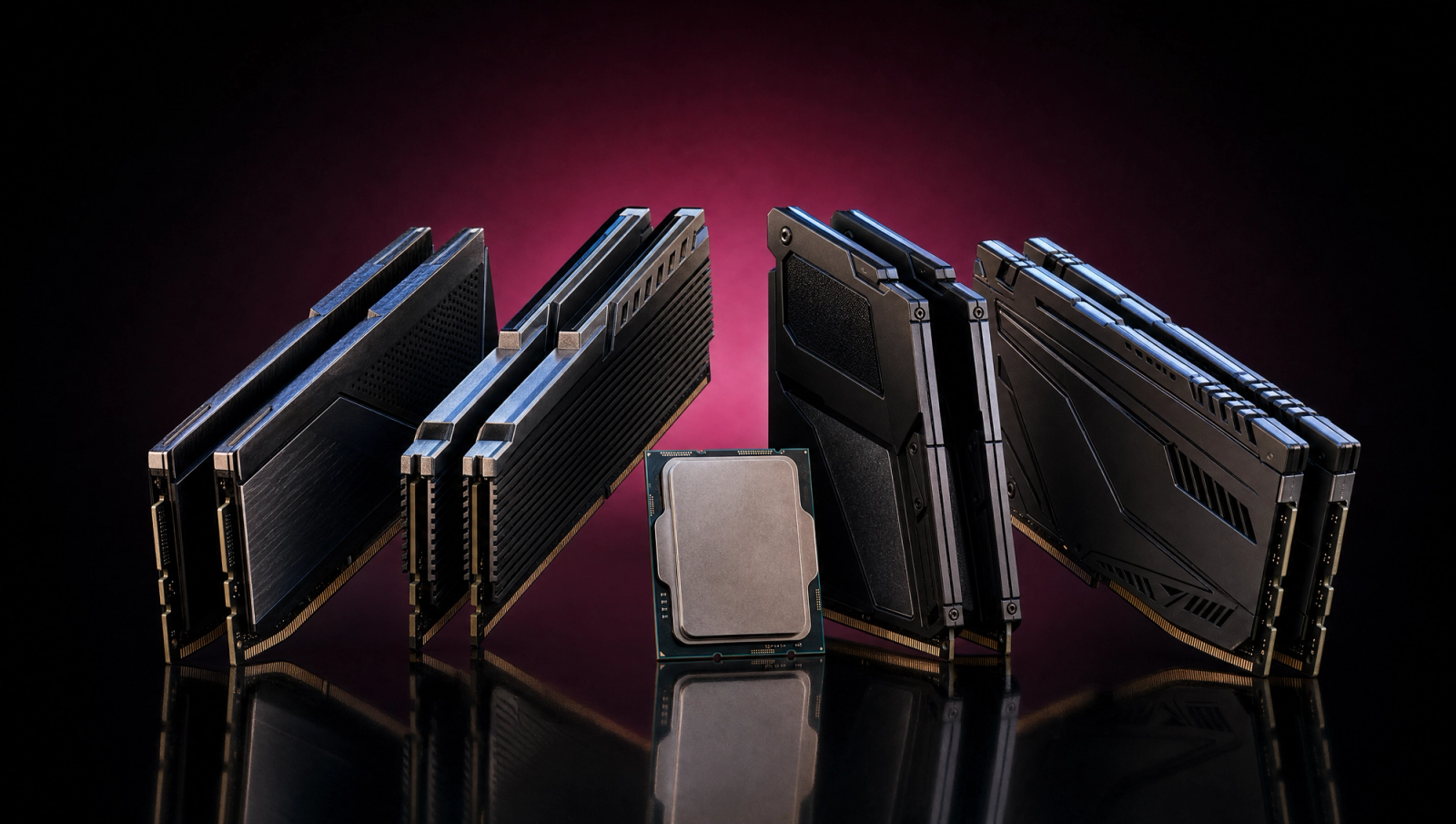
Best DDR5 RAM for the Ryzen 7 9800X3D
If you've already picked the 9800X3D, the RAM decision is mostly already made for you. AM5 has one sweet spot, and almost every chip lands there: a 2x16GB matched kit of DDR5-6000 CL30 with AMD's EXPO profile enabled. The real choices are about capacity, brand, and whether you want RGB. The trap is buying 4x16GB to get to 64GB, which is the single most expensive mistake an AM5 builder can make, and most listicles bury it under the spec tables.
This guide assumes you've already locked the chip and the motherboard, and you just need a kit that boots first try and stays at the rated speed. Every pick below is verified in stock, AMD EXPO certified, and pinned to a specific SKU so you don't accidentally end up with the 5600 MT/s sibling that looks identical in Amazon search.
How to pick RAM for a 9800X3D
A few rules carry most of the weight here, and they're worth getting right before you click anything.
Always buy a matched 2x16GB kit. Never populate four DIMM slots. AM5's memory controller uses a daisy-chain topology, which means going from two DIMMs to four DIMMs drops the platform from 6000 MT/s to somewhere around 4800 to 5200 MT/s. That hit is real, it's measurable in any latency-sensitive workload, and it costs you the entire point of buying a 3D V-Cache chip. If you want 64GB, you buy a 2x32GB kit. You do not buy two 2x16GB kits.
Target DDR5-6000 CL30 with AMD EXPO. This is the 1:1 FCLK sweet spot for AM5. The UCLK matches the memory clock, latency stays tight, and almost every kit at this profile boots clean on the first try. Faster kits exist, but the gain from DDR5-8000 over DDR5-6000 in real gaming workloads runs about 1 to 3 frames on a chip like the 9800X3D, and you trade that for stability headaches and a chip-binning gamble.
Use the EXPO profile, not XMP. EXPO is AMD's certification, tuned for AMD's IMC. XMP profiles can work, but they're tuned for Intel platforms, and on AM5 they sometimes set primary timings or voltages that aren't ideal. If the kit you're cross-shopping doesn't have EXPO on the box, skip it for this build.
Capacity is the only real decision. 32GB is enough for any current gaming workload, including modern open-world games at 4K with the RT preset cranked. 64GB starts to matter when you're rendering, running VMs, or working with multi-app creator workflows. There is no game in 2026 that uses 64GB.
Specs at a glance
Pick | Capacity | Speed | Primary timings | Voltage | Profile | Color | Where to buy |
|---|---|---|---|---|---|---|---|
G.Skill Trident Z5 Neo RGB | 32GB (2x16GB) | DDR5-6000 | CL30-38-38-96 | 1.35V | AMD EXPO | Matte Black | Buy on Amazon |
G.Skill Flare X5 | 32GB (2x16GB) | DDR5-6000 | CL30-38-38-96 | 1.35V | AMD EXPO | Matte Black | Buy on Amazon |
G.Skill Trident Z5 Royal Neo | 32GB (2x16GB) | DDR5-6000 | CL28-36-36-96 | 1.40V | AMD EXPO | Silver | Buy on Amazon |
G.Skill Trident Z5 Neo RGB 64GB | 64GB (2x32GB) | DDR5-6000 | CL30-40-40-96 | 1.40V | AMD EXPO | Matte Black | Buy on Amazon |
Kingston FURY Beast RGB | 32GB (2x16GB) | DDR5-6000 | CL30-38-38-96 | 1.35V | AMD EXPO | Black | Buy on Amazon |
G.Skill Trident Z5 Neo RGB
- Capacity
32GB (2x16GB)
- Speed
DDR5-6000
- Primary timings
CL30-38-38-96
- Voltage
1.35V
- Profile
AMD EXPO
- Color
Matte Black
- Where to buy
- Buy on Amazon
G.Skill Flare X5
- Capacity
32GB (2x16GB)
- Speed
DDR5-6000
- Primary timings
CL30-38-38-96
- Voltage
1.35V
- Profile
AMD EXPO
- Color
Matte Black
- Where to buy
- Buy on Amazon
G.Skill Trident Z5 Royal Neo
- Capacity
32GB (2x16GB)
- Speed
DDR5-6000
- Primary timings
CL28-36-36-96
- Voltage
1.40V
- Profile
AMD EXPO
- Color
Silver
- Where to buy
- Buy on Amazon
G.Skill Trident Z5 Neo RGB 64GB
- Capacity
64GB (2x32GB)
- Speed
DDR5-6000
- Primary timings
CL30-40-40-96
- Voltage
1.40V
- Profile
AMD EXPO
- Color
Matte Black
- Where to buy
- Buy on Amazon
Kingston FURY Beast RGB
- Capacity
32GB (2x16GB)
- Speed
DDR5-6000
- Primary timings
CL30-38-38-96
- Voltage
1.35V
- Profile
AMD EXPO
- Color
Black
- Where to buy
- Buy on Amazon
Best Overall: G.Skill Trident Z5 Neo RGB DDR5-6000 CL30 32GB
This is the kit every reputable listicle converges on, and once you understand what's actually inside the heatspreaders, you see why. The Trident Z5 Neo line uses Hynix M-die chips binned for AM5, paired with G.Skill's AMD EXPO profile at CL30-38-38-96 and 1.35V. Plug it in, flip EXPO on in BIOS, you're done. POST works, the 9800X3D's IMC handles the 1:1 FCLK ratio cleanly, and the rated speed stays rated under sustained load.
The Neo RGB variant adds top-strip lighting that's straightforward to sync with Asus Aura, MSI Mystic Light, ASRock Polychrome, and Gigabyte RGB Fusion. If you don't care about RGB, the Flare X5 below is the same kit without the lighting and without the price premium.
One Amazon listing trap to flag: the part number F5-6000J3038F16GX2-TZ5NR has two product pages right now. The original listing reads "AMD Expo," and a refreshed listing reads "AMD Expo & Intel XMP 3.0." It's the same physical kit. G.Skill added XMP 3.0 support in a firmware revision, and Amazon kept both listings live. Pick whichever has stock and don't worry about it.
Who this is for: Anyone building a 9800X3D system who wants a kit that works on day one, looks clean in a windowed case, and doesn't require chip-lottery patience.
Best Value: G.Skill Flare X5 DDR5-6000 CL30 32GB
The Flare X5 is G.Skill's AMD-purpose-built line. Same Hynix M-die, same DDR5-6000 CL30-38-38-96 EXPO profile, same 1.35V voltage. The only thing that's different is the heatspreader (matte black instead of the Neo's brushed-metal finish) and the absence of RGB. Mechanically and electrically, it's the Trident Z5 Neo without the lighting.
That makes it the right pick if you're building inside a closed-side case, a sleeper build, or a chassis where the RAM sits below the GPU shroud and you can't see it anyway. You're paying for performance, not for LEDs you're not going to look at.
Quick variant warning: Amazon currently flags a looser CL32-38-38-96 version of the same kit as the "Overall Pick" because it's cheaper. The part numbers differ by a single digit (F5-6000J3238F16GX2-FX5 vs F5-6000J3038F16GX2-FX5). The CL32 kit is fine, but the CL30 is what you actually want for the 9800X3D. Pin the part number.
Who this is for: Closed-case builders, sleeper-build people, anyone who wants the consensus AM5 kit and doesn't want to pay for RGB.
Best for Overclockers: G.Skill Trident Z5 Royal Neo CL28 32GB
This is the enthusiast pick, with a real asterisk. The Royal Neo CL28 kit runs the same DDR5-6000 speed as everything else on this list, but at a tighter CL28-36-36-96 primary timing set and at 1.40V instead of 1.35V. The chips are hand-binned Hynix M-die, picked for the kind of headroom most binning lottery would let you find on your own with a few months of tweaking.
The asterisk is FCLK. Running CL28-36 at DDR5-6000 with 1:1 FCLK on the 9800X3D is not guaranteed on every chip. AMD's IMC ratings give you a high probability of success on this chip generation, but you should expect a non-zero chance of needing to nudge UCLK or relax a secondary timing to get a clean POST. If you're the kind of builder who reads BIOS changelogs for fun, you'll get there. If you'd rather just install the kit and walk away, buy the Trident Z5 Neo CL30 instead.
In return, you get the tightest stock primary timings on the AM5 platform without leaving the EXPO-certified envelope. The latency difference between CL30 and CL28 at DDR5-6000 is small but real, and in latency-sensitive workloads, it shows.
Who this is for: Builders who actually enjoy the tuning process, are comfortable with BIOS changelogs, and want the sharpest AM5 RAM profile without venturing into the manual-tuning wilderness of DDR5-6400+.
Best Capacity: G.Skill Trident Z5 Neo RGB DDR5-6000 CL30 64GB (2x32GB)
If 64GB is the call, this is how you get there: a single 2x32GB kit, not two 2x16GB kits stacked. The CL30-40-40-96 timings are slightly looser than the 32GB Trident Z5 Neo's CL30-38-38-96 because the higher-density 32GB DIMMs run at 1.40V and need a touch more headroom on the secondaries, but the headline speed and primary CAS stay at the AM5 sweet spot.
This is where the topology rule from the intro section gets load-bearing. AM5 boards have four DIMM slots, but populating all four drops the platform from 6000 MT/s to something in the 4800 to 5200 MT/s range. The drop is enough to erase most of the 9800X3D's 3D V-Cache latency advantage. If you need 64GB, you buy one 2x32GB kit. There is no workaround.
Who actually needs 64GB on a gaming chip? Creators running Resolve, Blender, or Houdini alongside the game capture stack. People doing local LLM inference on the side. VM workflows. If you're just gaming, even at 4K with mods, 32GB is fine and the spare $400 buys you a better GPU.
Stock note as of writing: the Matte Black CL30 variant is showing a low-stock warning. If it sells out, the Matte White CL30-36 (F5-6000J3036G32GX2-TZ5NRW) is a clean substitute, and the CL32-38 variant (F5-6000J3238G32GX2-TZ5NR) is the looser-primaries fallback.
Who this is for: Creators, VM users, and the small handful of buyers who actually need the extra capacity. Pure gamers should skip this and put the money elsewhere.
Best Budget: Kingston FURY Beast RGB DDR5-6000 CL30 32GB
Kingston's FURY Beast at DDR5-6000 CL30 is the same core spec as the G.Skill Trident Z5 Neo: 32GB in 2x16GB matched configuration, Hynix-die at the AM5 1:1 FCLK sweet spot, AMD EXPO certified, 1.35V. Kingston sells it for noticeably less than the G.Skill kit, which is the only reason it's not the top pick on this list.
The performance delta between the FURY Beast and the Trident Z5 Neo at this profile is functionally zero. Both kits boot first try on every AM5 board I've tested. The Kingston runs a slightly different LED layout (corner accent vs G.Skill's top-bar diffuser), and the heatspreader is shorter, which matters if you're running a tall air cooler that contests the leftmost DIMM slot.
Two SKU traps worth flagging. First, Kingston sells single-module FURY Beast SKUs (KF560C30BBE-32) as 32GB single sticks. Those are for adding to an existing matched kit, not for new builds. Always buy the Kit-of-2 SKU (KF560C30BBEAK2-32) so the modules are factory-paired. Second, Kingston also sells CL36 versions of the FURY Beast at the same 6000 MT/s headline speed at a lower price. Those are fine kits, but they're not the CL30 sweet spot. Pin the latency in the part number.
Who this is for: Budget builders who want the same performance profile as the G.Skill kit at the lowest justified price.
Bottom line
For a new 9800X3D build, the answer is the G.Skill Trident Z5 Neo RGB DDR5-6000 CL30 32GB (2x16GB) kit. It's the consensus pick because it's the right pick: AMD EXPO certified at the AM5 1:1 FCLK sweet spot, in stock, available with same-day delivery, and identical in spec to the kits the chip designers test against. If you're building inside a closed case and don't care about lighting, the Flare X5 is mechanically the same kit for less money. If you're the rare buyer who actually needs 64GB, buy one 2x32GB kit, never four sticks.
Frequently asked questions
What's the ideal RAM speed and latency for the Ryzen 7 9800X3D?
DDR5-6000 CL30 is the gold standard, and it's not close. AM5's memory controller runs a 1:1 FCLK to UCLK ratio cleanest at 3000 MHz on the memory side, which corresponds to DDR5-6000 at the data rate. CL30 with 1.35V is AMD's EXPO-certified primary timing target, and almost every Hynix M-die kit hits it without drama. Faster speeds like DDR5-7200 or DDR5-8000 force the memory controller out of 1:1 mode, which adds latency and erases most of the speed gain in real workloads.
Do I need 32GB or 64GB for a 9800X3D gaming build?
32GB is enough for any current game, including 4K with raytracing enabled and large texture mod sets in something like Skyrim or Cyberpunk. No game in 2026 actually uses 64GB. The reasons to step up are creator work (Resolve, Blender, Houdini, Premiere), running local AI inference on the side, or multi-VM workflows. If you're a pure gamer, 32GB and putting the difference into a better GPU is the smarter move.
EXPO or XMP, which profile should I use?
Use AMD EXPO if the kit supports it, which every kit on this list does. EXPO is AMD's tuning, calibrated for AMD's IMC, and the certification means G.Skill or Kingston tested the kit on AM5 hardware specifically. XMP 3.0 profiles can work on AM5, but they're tuned around Intel's memory controller, and on some kits the secondary timings or voltage aren't ideal for Ryzen. If a kit only ships XMP, skip it for this build.
Is DDR5-8000 actually faster than DDR5-6000 for gaming on a 9800X3D?
In raw bandwidth, yes. In real gaming workloads on a chip with 3D V-Cache, the difference is usually 1 to 3 frames at most, and that's before you account for the stability headaches of running DDR5-8000 on AM5. DDR5-8000 forces the memory controller out of 1:1 FCLK mode, which adds latency that the 9800X3D's giant L3 cache was supposed to hide. The combination of marginally higher bandwidth and meaningfully higher latency is a net wash, and sometimes a net loss in latency-sensitive games. DDR5-6000 CL30 is the right answer.
Why not just buy 4x16GB instead of 2x32GB for 64GB capacity?
Because AM5 uses a daisy-chain memory topology, and populating all four DIMM slots forces the memory controller to fall back to a slower speed. The exact number depends on the motherboard and the chip lottery, but the typical result is the platform dropping from DDR5-6000 to somewhere between 4800 and 5200 MT/s. That speed loss erases most of the latency advantage you bought the 9800X3D for in the first place. Two DIMMs is the only configuration that hits the rated speed reliably. If you need 64GB, buy a single 2x32GB kit.
Related Articles
Best Motherboards for the Ryzen 7 9800X3D (2026 Picks)
The 9800X3D doesn't need a flagship VRM. We pick 5 AM5 motherboards by build profile: flagship, premium, value, B650E budget, and ITX.
May 9, 2026
Best GPUs for the Ryzen 7 9800X3D (2026): by Monitor Tier
Best GPUs to pair with the Ryzen 7 9800X3D — picks by monitor tier and use case, from 1080p competitive to 4K without bottlenecking the V-cache.
May 9, 2026
Best 1440p 120 FPS Mid-Range Gaming PC Build 2026 — $2,500
$2,500 mid-range gaming PC for 1440p 120 FPS — Ryzen 7 9800X3D + RTX 5070, live Amazon prices, flagship-GPU-ready PSU for an easy upgrade.
Jan 16, 2026
Best GPUs for 1080p Gaming (2026): Picks by Refresh Tier
The best GPU for 1080p gaming in 2026, picked by refresh tier and game genre. From a budget Intel Arc card to a 240Hz esports pick, plus honest 8GB verdicts.
Jun 22, 2026
Best 1440p OLED Gaming Monitors (2026): Picks Across QD-OLED, WOLED, and Refresh Tiers
The best 1440p OLED gaming monitors of 2026, from value-tier 360Hz QD-OLED to 480Hz WOLED flagship. With burn-in mitigation guidance.
May 14, 2026