Affiliate Disclosure: As an Amazon Associate we earn from qualifying purchases. Some links may earn us a commission at no cost to you.

Best GPUs for Gears of War: E-Day (2026): 5 Tiered Picks
Gears of War: E-Day lands on PC on October 6, day one alongside console, and The Coalition has already published the PC requirements. The minimum line is an RTX 2060 class card. The recommended line is an RTX 5060, an RX 9060 XT, or an Arc B580.
Read that recommended line as a floor. E-Day is built on Unreal Engine 5 with Lumen lighting and Nanite geometry, so those cards target 1080p and 1440p with upscaling, not native 1440p ultra. The five picks below are sorted by the settings target each one holds.
Our top pick: Sapphire Pulse RX 9070 XT (16 GB)
The Sapphire Pulse RX 9070 XT clears the recommended tier by a wide margin and carries 16 GB of memory on a 256-bit bus, which is exactly what a Nanite title wants once geometry streaming ramps up.

Quick picks
Pick | GPU | Target it holds | Buy |
|---|---|---|---|
Best Overall | 1440p ultra with FSR 4 Quality | ||
Best Value | 1440p high, comfortable 1080p ultra | ||
Best Premium | 4K with DLSS 4 Quality, or 1440p ultra with RT on | ||
Best Budget | 1080p high, the cheapest honest way to clear the recommended line | ||
Editor's Pick | 1440p high with DLSS 4 Quality, RT presets usable |
Best Overall
- GPU
- Target it holds
1440p ultra with FSR 4 Quality
- Buy
Best Value
- GPU
- Target it holds
1440p high, comfortable 1080p ultra
- Buy
Best Premium
- GPU
- Target it holds
4K with DLSS 4 Quality, or 1440p ultra with RT on
- Buy
Best Budget
- GPU
- Target it holds
1080p high, the cheapest honest way to clear the recommended line
- Buy
Editor's Pick
- GPU
- Target it holds
1440p high with DLSS 4 Quality, RT presets usable
- Buy
Specs at a glance
GPU | VRAM | Memory bus | Board power | Upscaling |
|---|---|---|---|---|
16 GB GDDR6 | 256-bit | 304 W | FSR 4 | |
16 GB GDDR6 | 128-bit | 160 W | FSR 4 | |
16 GB GDDR7 | 256-bit | 300 W | DLSS 4 + MFG | |
12 GB GDDR6 | 192-bit | 190 W | XeSS 2 | |
16 GB GDDR7 | 128-bit | 180 W | DLSS 4 + MFG |
- VRAM
16 GB GDDR6
- Memory bus
256-bit
- Board power
304 W
- Upscaling
FSR 4
- VRAM
16 GB GDDR6
- Memory bus
128-bit
- Board power
160 W
- Upscaling
FSR 4
- VRAM
16 GB GDDR7
- Memory bus
256-bit
- Board power
300 W
- Upscaling
DLSS 4 + MFG
- VRAM
12 GB GDDR6
- Memory bus
192-bit
- Board power
190 W
- Upscaling
XeSS 2
- VRAM
16 GB GDDR7
- Memory bus
128-bit
- Board power
180 W
- Upscaling
DLSS 4 + MFG
How we picked
Start with what The Coalition published. Minimum is an RTX 2060, an RX 6600, or an Arc A580 with a six-core CPU and 12 GB of system memory. Recommended moves to an RTX 5060, an RTX 3060 Ti, an RX 6700 XT, an RX 9060 XT, or an Arc B580, paired with a Ryzen 5 5600 class chip and 16 GB of memory. Neither line names a resolution or a preset, and that omission matters. A recommended spec without a target is a spec that clears something, and in a Lumen title that something is usually 1080p or 1440p with upscaling on.
VRAM does more work than raw shader count in this decision. Unreal Engine 5 streams Nanite geometry and Lumen probe data continuously, and it does not slow down gracefully when a card runs out of memory. It stutters, then it fails. Twelve gigabytes is the floor that keeps a 1080p build honest, and sixteen is what a 1440p build should have. Every card below carries 12 GB or more, and that is not an accident. The longer version of that argument is in our piece on why 8 GB stopped being enough.
Upscaling is a legitimate lever here, up to a point. DLSS 4 at Quality and FSR 4 at Quality both hold up at 1440p and above, and E-Day supports DLSS, FSR and XeSS. Frame generation is a separate conversation. It was switched off for the open beta, so the figures that circulated are base frame rates. Frame generation multiplies smoothness once a card already produces 60 or more. It does not rescue a card producing 35. Judge these picks on base output first, then add frame generation on top.
4K deserves a blunt note. Beta coverage put an RTX 5090 at roughly 67 FPS at 4K on the Ultra preset with DLSS on Quality, and under 30 FPS running the top Ludicrous preset natively. That preset exists for frame generation, not for standalone play. A 4K target in E-Day means a card in the 5070 Ti class, Quality-mode upscaling, and leaving Ludicrous alone. Our dedicated 4K picks cover the wider market if this game is not the only reason you are shopping.
Two purchases ride along with the graphics card. E-Day wants 130 GB of SSD space and has dropped hard drive support outright, so a mechanical drive is no longer somewhere to park it. NAND pricing has moved the wrong way this year, which makes that a real line item rather than a footnote, and a Gen4 drive that clears the 130 GB floor is the cheap version of the fix. The second is system memory: minimum asks for 12 GB, recommended asks for 16 GB, and a 16 GB kit is the version worth owning.
Best Overall: Sapphire Pulse RX 9070 XT (16 GB)
Specs
Chip | Navi 48 (RDNA 4) |
VRAM | 16 GB GDDR6 |
Memory bus | 256-bit |
Board power | 304 W |
Power connectors | 2x 8-pin |
Slot width | 2.5-slot |
Interface | PCIe 5.0 x16 |
Upscaling | FSR 4 |
Chip
Navi 48 (RDNA 4)
VRAM
16 GB GDDR6
Memory bus
256-bit
Board power
304 W
Power connectors
2x 8-pin
Slot width
2.5-slot
Interface
PCIe 5.0 x16
Upscaling
FSR 4
What it does well
This card clears the recommended tier by a margin that changes what the settings menu looks like. Where the recommended cards are choosing between high settings and upscaling, the 9070 XT runs 1440p high natively and takes ultra with FSR 4 on Quality. That is the difference between managing a frame rate and forgetting about it.
The memory setup is why it holds up in this specific game. Sixteen gigabytes on a 256-bit bus gives Nanite geometry and Lumen probe data somewhere to sit and the bandwidth to move it around. Cards with the same capacity on a narrower bus start to feel it at ultra, and cards with less capacity are not really in the conversation.
FSR 4 is the other change worth naming. On RDNA 4 it closed most of the gap to DLSS at Quality, which makes upscaling a setting rather than a concession on an AMD card for the first time in a while. Two 8-pin connectors and a widely stocked partner board keep the rest of the build simple.
What you give up
Ray tracing. E-Day's Lumen implementation has a hardware path, and hardware RT is exactly where RDNA 4 still trails Blackwell. If you plan to run the RT presets rather than the software Lumen default, this is the wrong card at this money and the premium pick below is the answer.
Board power sits at 304 W, which is real heat in a compact case and a real number for an older power supply. Pulse boards also run around 320 mm long, so measure before ordering. Stock on 9070 XT cards has been thin since launch, and a listing that looks right today may not be there next week.
Who it's for
The 1440p high-refresh buyer with a mostly raster library who wants to leave the settings slider alone. If you are shopping the wider market rather than this one game, our 1440p picks across the whole market run the same tiering.
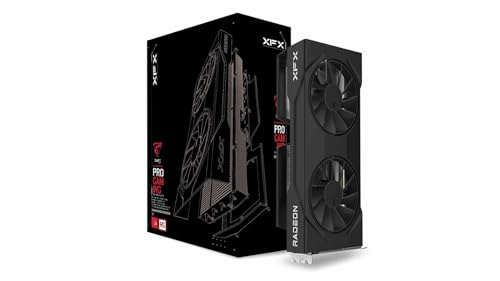
Best Value: XFX Swift RX 9060 XT OC (16 GB)
Specs
Chip | Navi 44 (RDNA 4) |
VRAM | 16 GB GDDR6 |
Memory bus | 128-bit |
Board power | 160 W |
Power connector | 1x 8-pin |
Slot width | 2.5-slot |
Interface | PCIe 5.0 x8 |
Upscaling | FSR 4 |
Chip
Navi 44 (RDNA 4)
VRAM
16 GB GDDR6
Memory bus
128-bit
Board power
160 W
Power connector
1x 8-pin
Slot width
2.5-slot
Interface
PCIe 5.0 x8
Upscaling
FSR 4
What it does well
This is the chip The Coalition put on the recommended line, so it clears a target the developer designed around rather than one we reverse engineered. In a pre-launch article that counts for something. It means 1080p ultra and 1440p high are supported outcomes, not optimistic ones.
Take it in the 16 GB form. The 8 GB version of this same chip exists and it is the wrong purchase for a Nanite title, where running out of memory produces stutter and crashes rather than a softer frame rate. The capacity here is what buys the card a second and a third year.
The rest of it is easy to live with. Around 160 W of board power means a modest supply and a quiet card, a single 8-pin covers it, and FSR 4 support stretches the useful 1440p window well past launch.
What you give up
A 128-bit bus and a PCIe 5.0 x8 link. At 1440p with Lumen working hard, bandwidth runs out before capacity does, so ultra presets will want FSR on Quality rather than clearing natively. The 16 GB keeps the card from falling over; the bus is what stops it climbing.
Ray tracing is weak enough that the RT presets are not why you buy this one. And on an older PCIe 4.0 board the x8 link costs a little more than it does on a current platform, which is worth knowing if this is dropping into a five-year-old machine.
Who it's for
The reader upgrading a mid-tier build who wants E-Day at 1440p high without rebuilding everything around a 300 W card. If the rest of the machine is modest, this is the pick that does not force a second purchase.
Best Premium: ASUS TUF RTX 5070 Ti OC (16 GB)

Specs
Chip | GB203 (Blackwell) |
VRAM | 16 GB GDDR7 |
Memory bus | 256-bit |
Board power | 300 W |
Power connector | 1x 16-pin (12V-2x6) |
Slot width | 3.1-slot |
Interface | PCIe 5.0 x16 |
Upscaling | DLSS 4 with Multi Frame Generation |
Chip
GB203 (Blackwell)
VRAM
16 GB GDDR7
Memory bus
256-bit
Board power
300 W
Power connector
1x 16-pin (12V-2x6)
Slot width
3.1-slot
Interface
PCIe 5.0 x16
Upscaling
DLSS 4 with Multi Frame Generation
What it does well
This is the only pick here that makes a 4K panel and E-Day's hardware Lumen path work at the same time. GDDR7 on a 256-bit bus with 16 GB of capacity is the combination the heaviest presets want, and nothing cheaper offers it.
DLSS 4's transformer model is the practical argument. At 4K on Quality it reads as a resolution choice rather than a concession, and Multi Frame Generation turns a solid base into something a 120 Hz panel can use once the retail build enables it. Beta coverage put this card around 40 FPS at 4K on the top preset with heavy upscaling, which tells you where the ceiling sits.
Hardware ray tracing is materially stronger than anything AMD ships this generation. In a Lumen title with an RT path, that is a setting you can leave switched on rather than a checkbox you turn off on day one.
What you give up
Price, plainly. This is a long step up from the top pick for a gap that only opens at 4K and under ray tracing. At 1440p raster the two cards sit closer together than the price difference suggests.
The 16-pin connector wants a native cable from the power supply rather than the bundled adapter. TUF boards run over three slots thick, which rules out a lot of compact cases. And treat 4K on Ludicrous as a stretch rather than a promise: beta figures put a 5090 under 30 FPS running it natively, so the preset exists for frame generation, not for standalone play.
Who it's for
The 4K buyer, or the 1440p buyer who wants ray tracing on and would rather not revisit this decision when the next Unreal Engine 5 title arrives.
Best Budget: ASRock Arc B580 Challenger OC (12 GB)

Specs
Chip | BMG-G21 (Battlemage) |
VRAM | 12 GB GDDR6 |
Memory bus | 192-bit |
Board power | 190 W |
Power connector | 1x 8-pin |
Slot width | 2-slot |
Interface | PCIe 4.0 x8 |
Upscaling | XeSS 2 |
Chip
BMG-G21 (Battlemage)
VRAM
12 GB GDDR6
Memory bus
192-bit
Board power
190 W
Power connector
1x 8-pin
Slot width
2-slot
Interface
PCIe 4.0 x8
Upscaling
XeSS 2
What it does well
Twelve gigabytes on a 192-bit bus is the reason this card belongs in an Unreal Engine 5 conversation at all. The cards at similar money carrying 8 GB are the ones that break first when texture and geometry streaming ramps, and E-Day ramps.
Intel put the B580 on the recommended line itself, so 1080p high is a supported target here rather than a hopeful one. XeSS 2 runs on Intel's own XMX path on this hardware, which is where it looks its best rather than the fallback path it uses on other vendors' cards.
A single 8-pin and a two-slot cooler drop it into almost any existing case and onto almost any existing supply. For a reader whose plan is play at launch and upgrade later, that matters more than a benchmark chart does.
What you give up
Headroom. This card clears the recommended bar and very little past it, so 1440p means dropping presets and leaning on XeSS rather than choosing between them. It is a 1080p card that can visit 1440p, not a 1440p card.
Driver maturity is far better than the Alchemist era, but older DX11 titles in a back catalogue can still surprise you. Availability at a sensible price has been the recurring problem with this SKU since launch. And Resizable BAR has to be enabled in BIOS or Arc performance falls off sharply, which reports suggest still catches buyers out.
Who it's for
The reader sitting on an aging 8 GB card and a 1080p monitor who wants to play on October 6 without rebuilding the machine first.
Editor's Pick: ASUS Dual RTX 5060 Ti OC (16 GB)

Specs
Chip | GB206 (Blackwell) |
VRAM | 16 GB GDDR7 |
Memory bus | 128-bit |
Board power | 180 W |
Power connector | 1x 8-pin |
Slot width | 2.5-slot |
Interface | PCIe 5.0 x8 |
Upscaling | DLSS 4 with Multi Frame Generation |
Chip
GB206 (Blackwell)
VRAM
16 GB GDDR7
Memory bus
128-bit
Board power
180 W
Power connector
1x 8-pin
Slot width
2.5-slot
Interface
PCIe 5.0 x8
Upscaling
DLSS 4 with Multi Frame Generation
What it does well
Sixteen gigabytes of GDDR7 at 180 W is an unusually easy card to fit into a machine that already exists. No new power supply, no case measuring, no 300 W heat problem. The capacity keeps it honest in a Nanite title while the low board power leaves the rest of the build alone.
DLSS 4 at Quality is the strongest upscaler in this group by a clear margin, and at this tier that is the difference between 1440p high with upscaling and 1440p high with compromises. Those are not the same outcome.
The RT cores are competent enough that E-Day's hardware Lumen path is a setting you can leave on. Among the mainstream picks here, this is the one that does not make you choose between ray tracing and a playable frame rate.
What you give up
Raw raster. The 128-bit bus puts it well below the top pick, and at 1440p ultra it wants DLSS on Quality to hold a comfortable frame rate rather than clearing it natively. You are paying for the feature set, not the throughput. We ran the head-to-head between these two if the choice is close.
The 8 GB version of this card exists at a lower price and shares an almost identical listing title. In a UE5 game it is the wrong purchase, so confirm the part number before checkout. PCIe 5.0 x8 again costs a little on an older board.
Who it's for
The buyer already inside the Nvidia feature set, streaming with NVENC or doing occasional CUDA work, who wants DLSS 4 and a working RT path without a 300 W card.
Bottom line
If you play at 1440p and mostly care about raster, buy the Sapphire Pulse RX 9070 XT. If you are on a mid-tier build and want the recommended tier done properly, buy the XFX Swift RX 9060 XT in its 16 GB form. If you want 4K or ray tracing switched on, buy the ASUS TUF RTX 5070 Ti. If you are on 1080p and upgrading later, the ASRock Arc B580 clears the line for the least money. If you want DLSS 4 in a low-power card, the ASUS Dual RTX 5060 Ti is the one.
Whatever you pick, budget for the SSD and the memory step alongside it. We ran the same tiering across our ARC Raiders picks, and the framework behind all of it sits in how to choose a GPU and a monitor that matches.
FAQ
Can my PC run Gears of War: E-Day?
If your graphics card is an RTX 2060, an RX 6600 or an Arc A580 or better, and you have a six-core CPU with 12 GB of system memory, you clear the minimum. The bigger blocker for most people is storage: the game needs 130 GB on an SSD, and hard drive support has been dropped entirely. Check that before you check the GPU. Running at the recommended tier instead means an RTX 5060, an RX 9060 XT or an Arc B580 with 16 GB of memory.
Is the RTX 5060 really enough for Gears of War: E-Day?
It is enough in the sense the requirements mean it: it will run the game at 1080p with sensible settings. It is not a 1440p ultra card in an Unreal Engine 5 title with Lumen and Nanite both switched on. The bigger caveat is memory, because UE5 does not degrade gently when VRAM runs out. If you are shopping that tier, the 16 GB RTX 5060 Ti or the RX 9060 XT 16 GB is the version to own.
What GPU do you need for Gears of War: E-Day at 1440p?
For 1440p high, an RX 9060 XT 16 GB or an RTX 5060 Ti 16 GB gets you there with Quality-mode upscaling. For 1440p ultra without leaning on upscaling, step up to the RX 9070 XT. The pattern in this game is that 1440p is less about shader throughput and more about carrying 16 GB with enough bandwidth to keep Nanite geometry streaming. A 12 GB card will run it; a 16 GB card stops you thinking about it.
Do you need 16 GB of RAM for Gears of War: E-Day?
The minimum spec asks for 12 GB and the recommended spec asks for 16 GB, so 16 GB is the number to build around. Twelve is an unusual figure that generally means two 8 GB sticks with headroom eaten by Windows. It will run, but with less room for anything in the background. If you are buying memory alongside the graphics card, a 16 GB kit is the version worth owning, and 32 GB is not wasted if the rest of the build justifies it.
Does Gears of War: E-Day require an SSD?
Yes. The requirements list 130 GB of SSD storage and hard drive support has been dropped, so a mechanical drive is not a supported place to install it. In an Unreal Engine 5 title that streams Nanite geometry continuously, that is a technical requirement rather than a preference. If your only spare space sits on a hard drive, a Gen4 NVMe drive is part of this purchase, and it is usually the cheapest part of it.
Can you play Gears of War: E-Day at 4K?
Yes, with the right card and Quality-mode upscaling. Open-beta coverage put an RTX 5090 at roughly 67 FPS at 4K on the Ultra preset with DLSS on Quality. Native 4K on the top Ludicrous preset fell under 30 FPS even on that card, so treat Ludicrous as a preset built for frame generation rather than standalone play. In practice, 4K here means an RTX 5070 Ti or better, Quality upscaling, and leaving the top preset alone.
Related Articles

Best GPUs for 1440p Gaming (2026): 5 16GB Picks, 60-240Hz
The best GPUs for 1440p gaming in 2026: five 16GB picks matched to 60, 144, and 240 Hz targets, with real benchmarks, trade-offs, and who each card fits.
Aug 8, 2026

Best GPUs for ARC Raiders (2026): Picks by Refresh Target, Not by Preset
Pick a GPU for ARC Raiders by your refresh target, not by Epic preset. Tier-by-tier picks for 1080p 240Hz, 1440p 144Hz, and 4K Epic with RTGI.
May 22, 2026

Is 8GB VRAM Enough for Gaming in 2026, or Do You Need 16GB?
Is 8GB VRAM enough for gaming in 2026? It holds at 1080p, cracks at 1440p, and fails at 4K. Here is when 8GB works, when you need 16GB, and what to buy.
Jul 23, 2026

Best GPUs for 4K Gaming (2026): Picks by Refresh Target
Five GPUs for 4K gaming in 2026, segmented by refresh target and workload: the 5080 buy zone, the AMD-vs-Nvidia call by tier, why the 5090 is usually wrong.
May 21, 2026

How to Choose a GPU (and a Monitor That Matches)
A buyer's framework for picking a GPU and the monitor that pairs with it. Start with the panel and work the card back.
May 17, 2026