Affiliate Disclosure: As an Amazon Associate we earn from qualifying purchases. Some links may earn us a commission at no cost to you.

Best GPUs Under $400 for 1440p Gaming (2026): 3 Picks
Under $400 is the busiest price point in the 2026 GPU market, and at 1440p it comes down to one question: how much VRAM does your money buy? The tier sorts into a clean ladder. A 16GB card, a 12GB card, an 8GB card, each at a different rung, each making a different promise about how long it lasts.
The three picks below sit on that ladder. The 16GB card sits at the top of the budget. The 12GB card is the genuine value play with real headroom under the cap. The 8GB card is the cheapest way in, and the one that needs the most honesty about what it can and can't do at 1440p. If you can stretch past this budget, our best GPUs under $500 for 1440p guide opens up the next rung.
Our top pick: Sapphire Pulse RX 9060 XT (16 GB)
For 1440p where you want the card to age well, the Sapphire Pulse RX 9060 XT 16GB is the strongest pick in this bracket. RDNA 4 raster handles 1440p comfortably, and the 16GB pool is the future-proofing nothing else here can match. The honest catch is street pricing, which has pushed it to the very top of a $400 budget.

Quick picks
Slot | Card | VRAM | 1440p tier | Buy |
|---|---|---|---|---|
Best Overall | 16 GB GDDR6 | future-proofed 1440p | ||
Best Value | 12 GB GDDR6 | mainstream 1440p | ||
Best Budget | 8 GB GDDR7 | 1080p-first, 1440p with DLSS |
Best Overall
- Card
- VRAM
16 GB GDDR6
- 1440p tier
future-proofed 1440p
- Buy
Best Value
- Card
- VRAM
12 GB GDDR6
- 1440p tier
mainstream 1440p
- Buy
Best Budget
- Card
- VRAM
8 GB GDDR7
- 1440p tier
1080p-first, 1440p with DLSS
- Buy
Specs at a glance
Slot | Card | Chip | VRAM | Memory bus | Boost clock | Power | Upscaler |
|---|---|---|---|---|---|---|---|
Best Overall | RDNA 4 | 16 GB GDDR6 | 128-bit | ~3.29 GHz | 182 W | FSR 4 | |
Best Value | Battlemage Xe2 | 12 GB GDDR6 | 192-bit | ~2.76 GHz | 190 W | XeSS 2 (XMX) | |
Best Budget | Blackwell | 8 GB GDDR7 | 128-bit | ~2.54 GHz | 145 W | DLSS 4 MFG |
Best Overall
- Card
- Chip
RDNA 4
- VRAM
16 GB GDDR6
- Memory bus
128-bit
- Boost clock
~3.29 GHz
- Power
182 W
- Upscaler
FSR 4
Best Value
- Card
- Chip
Battlemage Xe2
- VRAM
12 GB GDDR6
- Memory bus
192-bit
- Boost clock
~2.76 GHz
- Power
190 W
- Upscaler
XeSS 2 (XMX)
Best Budget
- Card
- Chip
Blackwell
- VRAM
8 GB GDDR7
- Memory bus
128-bit
- Boost clock
~2.54 GHz
- Power
145 W
- Upscaler
DLSS 4 MFG
Benchmarks
How the three picks separate when you put real games at the resolution and settings you'd actually use. Numbers are average framerates from reviewer benchmarks, rounded to the nearest whole frame. Where a card-and-game combination didn't surface cleanly in reviewer coverage at 1440p, that chart is left out rather than filled with a guess.
- RX 9060 XT65 FPS
- Arc B58048 FPS
- RTX 506052 FPS
- RX 9060 XT90 FPS
- Arc B58065 FPS
- RTX 506072 FPS
How we picked
Three things to settle before you click buy. The first one is the whole article.
Is 8GB enough for 1440p in 2026?
Not really, and it's worth being specific about why. Modern AAA at 1440p high allocates somewhere between 9GB and 11GB of VRAM in titles like Hogwarts Legacy, Black Myth: Wukong, and the recent wave of Unreal Engine 5 releases. An 8GB card doesn't run out of raw compute first. It runs out of memory, the texture-streaming pipeline stalls, the 1% lows collapse, and the felt experience drops below whatever the average framerate on the chart says.
That doesn't make an 8GB card useless. It makes it a 1080p-first card that you stretch to 1440p with DLSS upscaling, rendering at a lower internal resolution so the memory budget holds. That's a real, usable path. It's just not the same thing as native 1440p, and the article treats it that way.
Reading the VRAM ladder: 16 vs 12 vs 8 GB
Think of the three picks as rungs, not as a flat list. The 16GB RX 9060 XT runs native 1440p with textures cranked and has headroom for the next two years of texture budgets. The 12GB Arc B580 clears the 8GB wall, runs current-cycle 1440p cleanly, and leaves real money in your pocket. The 8GB RTX 5060 is the entry rung, leaning on DLSS to make 1440p comfortable and topping out sooner.
Pick the rung that matches how long you want the card to last and how much you're willing to lean on upscaling. More VRAM buys more time before the next upgrade.
Street pricing and why the 16GB card sits at the ceiling
The catch with this tier in 2026 is that the best card for the job has crept up against the budget. AI and ML demand is competing with gamers for GDDR6 and GDDR7 inventory, and that keeps street pricing above MSRP across the board. The 16GB RX 9060 XT, which launched as the mainstream sweet spot, now sits at the very top of a $400 budget and sometimes just past it.
That's why the value pick and the budget pick both land below it on the ladder, and both are genuinely under the cap. This article doesn't quote dollar amounts in the pick prose; the affiliate links carry the live price. What stays stable is the order the picks land in by tier.
AMD vs Nvidia vs Intel at this price
AMD wins the 1440p raster value crown here with the 9060 XT 16GB, as long as ray tracing isn't load-bearing in your library. Nvidia's reason to exist at this tier is DLSS 4, RT acceleration, and NVENC AV1 for streaming, which is exactly what the 8GB RTX 5060 brings at the lowest price. Intel's Battlemage B580 splits the difference: 12GB and a wide memory bus at a price neither competitor matches, with a driver story that's matured enough to trust for modern AAA and esports.
Best Overall: Sapphire Pulse RX 9060 XT (16 GB)
Specs
Chip | RDNA 4 (Navi 44) |
VRAM | 16 GB GDDR6 |
Memory bus | 128-bit |
Boost clock | 3290 MHz |
Interface | PCIe 5.0 x16 |
Power | 182 W (1x 8-pin) |
Outputs | 2x HDMI 2.1, 1x DisplayPort |
Chip
RDNA 4 (Navi 44)
VRAM
16 GB GDDR6
Memory bus
128-bit
Boost clock
3290 MHz
Interface
PCIe 5.0 x16
Power
182 W (1x 8-pin)
Outputs
2x HDMI 2.1, 1x DisplayPort
What it does well
This is the only card in the bracket with a future-proof VRAM pool, and that's the whole reason it leads. The 16GB of GDDR6 means the texture-heavy 1440p workloads where 8GB cards cliff hardest run cleanly. Cyberpunk 2077 at 1440p high without ray tracing lands around 65fps average, and Hogwarts Legacy at 1440p ultra raster pushes into the high 70s. Raster across modern AAA and esports is comfortable at the resolution.
FSR 4 quality on RDNA 4 has closed the perceptual gap to DLSS 4 quality at 1440p, so the upscaler is now a real lever rather than a fallback. The Pulse runs cool and quiet, owners report mid-to-high 50s Celsius under load, and the 182W board power keeps PSU demands modest. Sapphire ships it with Honeywell PTM7950 thermal compound from the factory and a full PCIe 5.0 x16 interface, so older platforms with limited PCIe lanes still get the full bus. If you're weighing this against the Nvidia option specifically, our RTX 5060 Ti vs RX 9060 XT head-to-head goes deeper on the per-title split.
What you give up
Ray tracing trails the Nvidia side. RDNA 4's mid-stack RT engine handles light RT but loses ground in titles where ray tracing is load-bearing, so an RT-heavy library is the wrong fit for this card. You also give up NVENC AV1 encoding for streaming and the CUDA ecosystem for creative and AI work.
The other honest catch is price. At current street this is the most expensive card on the list and it pushes against, sometimes past, the top of a $400 budget. The value story here is best card in the tier, not cheapest card in the tier. If the budget is firm and the street price has drifted over the line, the B580 one rung down is the answer.
Who it's for
1440p mainstream gamers with a raster-leaning library: open-world AAA without forced RT, sims, MMOs, and esports. Buyers who want 16GB and refuse to pay the premium Nvidia charges for matching memory. Anyone who can stretch to the top of a $400 budget and wants the card that ages the best.
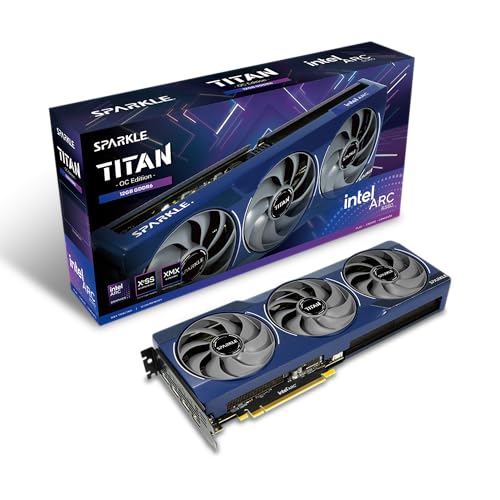
Best Value: Sparkle Arc B580 Titan OC (12 GB)
Specs
Chip | Intel Battlemage Xe2 |
VRAM | 12 GB GDDR6 |
Memory bus | 192-bit |
Boost clock | 2760 MHz (Titan OC) |
Interface | PCIe 4.0 x8 |
Cooling | Triple axial (TORN 2.0) |
Outputs | HDMI 2.1a, DisplayPort 2.1 |
Chip
Intel Battlemage Xe2
VRAM
12 GB GDDR6
Memory bus
192-bit
Boost clock
2760 MHz (Titan OC)
Interface
PCIe 4.0 x8
Cooling
Triple axial (TORN 2.0)
Outputs
HDMI 2.1a, DisplayPort 2.1
What it does well
This is the genuine sub-$400 value play and the middle rung of the ladder. The 12GB of GDDR6 clears the memory wall that hampers same-money 8GB cards, and it rides a 192-bit bus that's actually wider than the 9060 XT's 128-bit. That bus width helps in bandwidth-heavy 1440p workloads. Marvel Rivals at 1440p high lands around 65fps, and modern AAA at tuned settings holds up at the resolution.
XeSS 2 on the native XMX path is competitive with FSR 4, and AV1 encode is on board. Driver maturity is dramatically better than the first-generation Alchemist cards, to the point where modern AAA and esports, Battlemage's strongest territory, run cleanly. Sparkle bundles a GPU sag bracket in the box, which is a nice touch on a card this physically long. For the resolution tier below this one, the best GPUs under $300 for 1080p guide covers the entry market.
What you give up
Intel's software stack still has rough edges, and you should buy with eyes open. VR is not currently supported. Reports suggest the AV1 encode path can be flaky on some driver revisions, and buyers have flagged the occasional legacy DX9 or DX11 title surfacing a driver gotcha. The listing carries a frequently-returned flag, which usually traces to driver and firmware setup friction rather than dead hardware, but it's worth knowing going in.
There's also a documented history of some boards enumerating Intel B-series cards at a reduced PCIe link width on first boot. Reports suggest a BIOS update typically resolves it. None of this is a dealbreaker for a patient builder, but it's the reason the B580 sits at best value rather than best overall. Link width is worth checking on any older platform, and our guide to the best GPUs for the Ryzen 5 5600X works through what a PCIe 4.0 board costs the x8 cards in this bracket.
Who it's for
Sub-$1,000 builders capped on GPU spend who still want current-cycle 1440p. First-time builders with a modern-AAA and esports library, where Battlemage is at its strongest. Buyers who want maximum VRAM and bus width per dollar and will tolerate a driver story that's still maturing. If the Sparkle Titan is out of stock, the ASRock Challenger Arc B580 is a clean substitute on the same chip.
Best Budget: MSI Ventus 2X RTX 5060 (8 GB)

Specs
Chip | NVIDIA Blackwell |
VRAM | 8 GB GDDR7 (28 Gbps) |
Memory bus | 128-bit |
Boost clock | 2535 MHz (Ventus OC) |
Interface | PCIe 5.0 |
Cooling | Dual TORX Fan 5.0 (Zero Frozr) |
Outputs | 3x DisplayPort 2.1a, 1x HDMI 2.1b |
Chip
NVIDIA Blackwell
VRAM
8 GB GDDR7 (28 Gbps)
Memory bus
128-bit
Boost clock
2535 MHz (Ventus OC)
Interface
PCIe 5.0
Cooling
Dual TORX Fan 5.0 (Zero Frozr)
Outputs
3x DisplayPort 2.1a, 1x HDMI 2.1b
What it does well
This is the cheapest way onto Blackwell, and it brings the full Nvidia feature set with it. DLSS 4 including Multi-Frame Generation, full RT acceleration, and NVENC AV1 for streaming, all at the lowest price on this list. The GDDR7 memory is fast and the PCIe 5.0 interface is current. The Ventus cooler is efficient and quiet, with Zero Frozr stopping the fans entirely at idle.
Owner reports consistently land it as a clean 1080p high-refresh card that comfortably clears 120fps in most titles, and it doubles as a capable light creative and CAD card thanks to the Nvidia software stack. For the buyer who plays mostly esports and well-optimized titles, or who leans on DLSS, it punches above its price.
What you give up
The 8GB of VRAM is the constraint, and it's the load-bearing one. At native 1440p with high textures it will hit the memory wall in newer Unreal Engine 5 titles, exactly where the 12GB and 16GB picks keep climbing. The way you make 1440p comfortable on this card is DLSS upscaling, which renders at a lower internal resolution to keep the memory budget in check. That works, but it's a different experience than running native, and it leaves no headroom for the next two years of texture growth. Shader packs push the same limit even harder, which is why our GPU picks for Minecraft shaders start at 16 GB.
Treat this as the entry rung, not a stealth 1440p champion. It's the reason the 12GB B580 exists one step up the ladder.
Who it's for
Buyers at the bottom of this budget who play mostly esports and older or well-optimized titles. Anyone running a 1080p panel now who wants DLSS 4 and RT on the cheap, with a plan to lean on upscaling when they move to a 1440p monitor later. The I'll-upgrade-the-monitor-down-the-road builder who wants the Nvidia feature set today.
Bottom line
If you want the 1440p card that ages best and you can stretch to the top of the budget, buy the Sapphire Pulse RX 9060 XT 16GB. If you want a genuine value pick that stays comfortably under $400 and clears the 8GB wall, the Sparkle Arc B580 Titan OC 12GB is the one. If your budget is firm at the bottom and you play mostly esports or run a 1080p panel today, the MSI Ventus 2X RTX 5060 8GB gets you onto Blackwell with DLSS 4 for the least money. The ladder is the decision: more VRAM buys more time. Pick the rung that matches how long you want the card to last.
FAQ
Is 8GB enough for 1440p gaming in 2026?
For native 1440p in modern AAA, no. Recent titles allocate 9GB to 11GB of VRAM at high settings, and an 8GB card hits the memory wall before it runs out of raw speed, which shows up as texture pop-in and collapsing 1% lows. An 8GB card like the RTX 5060 still works at 1440p if you lean on DLSS upscaling to render at a lower internal resolution, but it's a 1080p-first card stretched up rather than a true 1440p card. For native 1440p, step up to the 12GB or 16GB rung.
Can you really get a good 1440p GPU for under $400 right now?
Yes, with one honest caveat. The 12GB Intel Arc B580 and the 8GB RTX 5060 both sit comfortably under $400 and both play 1440p, the B580 natively and the 5060 with upscaling. The catch is the best card in the tier, the 16GB RX 9060 XT, has crept up to the very top of the budget and sometimes just past it on street pricing. So you can absolutely buy a capable 1440p card under $400; whether you get 16GB of VRAM for that money depends on the week.
RX 9060 XT 16GB vs Intel Arc B580 12GB, which is the better 1440p value under $400?
The B580 is the better value if your budget is firm under $400, since it stays clearly below the cap with 12GB and a wide 192-bit bus. The 9060 XT 16GB is the better card if you can stretch to the top of the budget, with stronger raster, mature FSR 4, and 4GB more VRAM for longevity. Put simply: B580 for the best card that's safely under budget, 9060 XT for the best card you can get near the ceiling.
Will the Intel Arc B580 actually handle 1440p, or is it a 1080p card?
It's a genuine 1440p card for mainstream and esports titles, not just a 1080p part. The 12GB of VRAM and 192-bit bus give it the headroom to run modern AAA at 1440p with tuned settings, and Battlemage drivers have matured enough that the games most buyers play run cleanly. The honest caveats are around Intel's software: no VR support today, occasional legacy DX9 or DX11 quirks, and a driver path that's still improving. For modern 1440p gaming on a budget, it holds up.
Should I buy now or wait for prices to drop on the 16GB cards?
There's no clear price relief on the horizon. The reason the 16GB cards sit at the top of this budget is AI and ML demand competing with gamers for GDDR6 and GDDR7 inventory, and that pressure isn't expected to ease before the next generation refresh. If you need a card now, buy at the rung your budget supports rather than waiting for a drop that may not come. If you can comfortably stretch past $400, the best GPUs under $500 for 1440p tier opens up more 16GB options.
Do I need to upgrade my power supply for any of these cards?
Probably not. All three are efficient: the RX 9060 XT draws around 182W, the Arc B580 around 190W, and the RTX 5060 around 145W. A quality 550W to 650W power supply with a single 8-pin PCIe connector handles any of them with headroom, which covers most existing mainstream builds. As always, the figure that matters is the quality and rating of the unit, not just the wattage on the box.
Related Articles

RTX 5060 Ti vs RX 9060 XT: 8GB vs 16GB Verdict for 2026
RTX 5060 Ti vs RX 9060 XT: we call the winner at 1080p and at 1440p, and say when the 8GB SKUs are a trap. Straight buy advice for 2026, no spec-sheet filler.
Sep 8, 2026

Best GPUs Under $500 for 1440p Gaming (2026): 5 Picks by VRAM
Five sub-$500 GPUs for 1440p, segmented by monitor pairing and VRAM ceiling. Honest street pricing, the 8GB-versus-16GB call, and which card matches your library.
May 19, 2026

Best GPUs Under $300 for 1080p Gaming (2026): 5 Picks by Tier
Best budget GPUs under $300 for 1080p gaming in 2026. Intel Arc B580 anchors the tier, with honest 8 GB warnings and clearance picks.
May 20, 2026

Best GPUs for 1440p Gaming (2026): 5 16GB Picks, 60-240Hz
The best GPUs for 1440p gaming in 2026: five 16GB picks matched to 60, 144, and 240 Hz targets, with real benchmarks, trade-offs, and who each card fits.
Aug 8, 2026

How to Choose a GPU (and a Monitor That Matches)
A buyer's framework for picking a GPU and the monitor that pairs with it. Start with the panel and work the card back.
May 17, 2026