Affiliate Disclosure: As an Amazon Associate we earn from qualifying purchases. Some links may earn us a commission at no cost to you.

Best Mid-Range GPUs (2026): 5 Picks for 1080p and 1440p
The mid-range is where most graphics cards get bought, and in 2026 the decision comes down to two things: how much VRAM you get and which feature set you need. Sixteen gigabytes is the floor at this tier now, because the 8GB versions of these same chips run out of memory in modern games before they run out of raw speed.
So we sorted these five by what you run, not by a spec ladder. AMD owns the raster-per-dollar bands, Nvidia earns its premium once ray tracing or creative work is on the table, and Intel holds the budget floor. Find your lane below.
Our top pick: Sapphire Pulse RX 9070 XT (16 GB)
For a 1440p machine that plays games above all else, the Sapphire Pulse RX 9070 XT gives you the most frames per dollar in the band on a full 16GB of memory. It is the card most mid-range buyers should start with.

Quick picks
Pick | Card | Best for | Where to buy |
|---|---|---|---|
Best Overall | 1440p high-refresh raster gaming | ||
Best Value | 1080p-high / 1440p-medium on a budget | ||
Best Premium | 1440p ray tracing and creative work | ||
Best Budget | tightest-budget 1080p-high builds | ||
Editor's Pick | 1440p mainstream with the Nvidia stack |
Best Overall
- Card
- Best for
1440p high-refresh raster gaming
- Where to buy
Best Value
- Card
- Best for
1080p-high / 1440p-medium on a budget
- Where to buy
Best Premium
- Card
- Best for
1440p ray tracing and creative work
- Where to buy
Best Budget
- Card
- Best for
tightest-budget 1080p-high builds
- Where to buy
Editor's Pick
- Card
- Best for
1440p mainstream with the Nvidia stack
- Where to buy
Specs at a glance
Card | VRAM | Bus | Board power | Best resolution |
|---|---|---|---|---|
16 GB GDDR6 | 256-bit | ~304 W | 1440p high | |
16 GB GDDR6 | 128-bit | ~160 W | 1080p high / 1440p medium | |
16 GB GDDR7 | 256-bit | ~300 W | 1440p ultra / entry 4K | |
12 GB GDDR6 | 192-bit | ~190 W | 1080p high | |
16 GB GDDR7 | 128-bit | ~180 W | 1440p quality |
- VRAM
16 GB GDDR6
- Bus
256-bit
- Board power
~304 W
- Best resolution
1440p high
- VRAM
16 GB GDDR6
- Bus
128-bit
- Board power
~160 W
- Best resolution
1080p high / 1440p medium
- VRAM
16 GB GDDR7
- Bus
256-bit
- Board power
~300 W
- Best resolution
1440p ultra / entry 4K
- VRAM
12 GB GDDR6
- Bus
192-bit
- Board power
~190 W
- Best resolution
1080p high
- VRAM
16 GB GDDR7
- Bus
128-bit
- Board power
~180 W
- Best resolution
1440p quality
Benchmarks
Reviewer numbers vary by test rig and driver, so treat these as the band each card lands in rather than exact figures. The headline pattern holds across sources: the 9070 XT and 5070 Ti trade the top of the band, the 9060 XT and 5060 Ti anchor the mainstream, and the B580 holds the budget floor.
Approximate average FPS at 1440p with ray tracing off, drawn from reviewer testing.
- 125 FPS
- 125 FPS
- RTX 5060 Ti 16GB78 FPS
- RX 9060 XT 16GB74 FPS
- Arc B58062 FPS
Approximate average FPS with ray tracing enabled and quality-mode upscaling, where the Nvidia cards pull ahead.
- RTX 5070 Ti98 FPS
- RX 9070 XT82 FPS
- RTX 5060 Ti 16GB58 FPS
- RX 9060 XT 16GB49 FPS
- Arc B58041 FPS
How we picked
We start with VRAM because it is the spec that decides how long a card stays usable. At 1440p in 2026, an 8GB card can post a fine average frame rate and still stutter when a game tries to load textures it has no room for. Sixteen gigabytes is the floor for every card here except the Intel pick, which gets 12GB at a price where nothing else offers more.
From there it is raster-per-dollar against features. AMD's RDNA 4 cards lead on frames per dollar in raster, so they anchor the value lanes. Nvidia earns its premium only when you need ray tracing, DLSS 4, NVENC encoding, or CUDA for creative and AI work. If none of that is on your list, you are paying for features you will not use. If it is, the premium is real. For the deeper version of that trade, see our RTX 5060 Ti vs RX 9060 XT comparison.
One more rule worth stating plainly: frame generation is a smoothness multiplier, not a performance level. It turns 60 frames into 120 beautifully, but it never turns 30 into 120 without latency and artifacts showing up. We judged every card on its native and quality-mode-upscaled frames first, then treated frame gen as a bonus on top.
If you want the wider framework behind these calls, our guide to choosing a GPU and a matching monitor walks through the resolution-and-refresh math in more depth.
Which card for your resolution
Buyer type sorts the picks above, but most people arrive here with a monitor already on the desk. Here is the same five mapped onto the panel you are driving.
For 1080p at high refresh, the Sparkle Arc B580 Titan OC and the Sapphire Pulse RX 9060 XT 16GB are the two that make sense. The B580 holds the floor and its 12GB keeps texture settings honest at a price where the alternatives ship 8GB. The 9060 XT costs more and gives you headroom to turn settings up now and to move to a 1440p panel later without replacing the card.
For 1440p, which is where this tier earns its keep, the Sapphire Pulse RX 9070 XT is the default. It carries the most raster frames per dollar in the band on a full 16GB, and it does not run short of memory when a game leans on high-resolution textures. The MSI Ventus RTX 5060 Ti 16G OC is the Nvidia answer a tier below it, holding 1440p at medium-to-high with DLSS 4 doing real work on the frame budget. If Marvel Rivals is the game driving the upgrade, our best GPUs for Marvel Rivals guide splits the same tier by resolution and refresh target.
For 1440p pushed toward 4K, or 1440p with ray tracing switched on, the GIGABYTE RTX 5070 Ti AERO OC is the only pick here with the bandwidth and the RT hardware to stay comfortable. Nothing else in this list is a 4K card. Treating one as though it were is the most common way buyers end up disappointed at this budget.
RX 9070 XT vs RTX 5070 Ti: the mid-range cross-shop
Two cards on this list get cross-shopped against each other more than any other pair in the band, and the question deserves an answer on its own terms rather than one line in a FAQ.
In raster they are close. Across broad game suites at 1440p the RTX 5070 Ti holds a small single-digit lead on average, and in plenty of individual titles the RX 9070 XT is the faster card. If your library is mostly rasterized, the two deliver the same experience on the same monitor, and the Radeon has consistently sold for less at retail than the GeForce has.
The gap opens where Nvidia's stack does the work. Heavy ray tracing and path tracing favor the 5070 Ti clearly, DLSS 4's transformer upscaling is the better image at the same performance target, and NVENC AV1 plus CUDA matter if you stream or run creative and AI workloads alongside games. None of that is a small advantage for the people who use it.
So the call is not about which card is faster. Buy the RX 9070 XT if you play mostly rasterized games at 1440p and want every frame you paid for. Buy the RTX 5070 Ti if ray tracing is switched on in the titles you care about, if you stream, or if the machine does creative work between game sessions. If neither of those describes you, the price difference is the whole argument, and it points at the Radeon.
Best Overall: Sapphire Pulse RX 9070 XT (16 GB)
Specs
Chip | RX 9070 XT (RDNA 4) |
VRAM | 16 GB GDDR6 |
Boost clock | up to ~2.97 GHz |
Memory bus | 256-bit |
Board power | ~304 W |
Outputs | 2x HDMI 2.1, 2x DisplayPort 2.1 |
Slots | 2.5-slot triple-fan |
Chip
RX 9070 XT (RDNA 4)
VRAM
16 GB GDDR6
Boost clock
up to ~2.97 GHz
Memory bus
256-bit
Board power
~304 W
Outputs
2x HDMI 2.1, 2x DisplayPort 2.1
Slots
2.5-slot triple-fan
What it does well
The Pulse RX 9070 XT sits at the top of the mid-range and posts the strongest raster numbers per dollar in the band. In Cyberpunk 2077 at 1440p it lands around the same frame rate as the more expensive RTX 5070 Ti with ray tracing off, and a later driver pushed it ahead at that resolution in some reviewer testing. The 16GB of GDDR6 on a 256-bit bus means high-texture settings at 1440p come with headroom, not warnings.
FSR 4 closed most of the upscaling gap on RDNA 4, so quality-mode upscaling is now a fair lever rather than a compromise. The Pulse cooler is quiet and keeps clocks stable, and the 1% lows hold up in demanding modern AAA, which is what makes gameplay feel smooth.
What you give up
Ray tracing still lands behind a same-price Nvidia card, so if your library leans on heavy path tracing this is not where you want to be. There is no CUDA, which takes Blender, Premiere acceleration, and Stable Diffusion off the table. Street stock on the 9070 XT has been thinner than the Nvidia side, and the Pulse SKU specifically has come and gone, so buy it when you see it in stock.
Streamers who rely on NVENC AV1 will miss it here too; AMD's encoder is fine but it is not the Nvidia path many streaming setups assume.
Who it's for
This is the card for the 1440p 144Hz-and-up raster gamer with a mostly non-RT library and no creative workload. If you want the most frames per dollar at 1440p and refuse to drop to 8GB, start here.
Best Value: Sapphire Pulse RX 9060 XT (16 GB)

Specs
Chip | RX 9060 XT (RDNA 4) |
VRAM | 16 GB GDDR6 |
Boost clock | up to ~3.13 GHz |
Memory bus | 128-bit |
Board power | ~160 W |
Outputs | 2x HDMI 2.1, 2x DisplayPort 2.1 |
Slots | 2.5-slot dual-fan |
Chip
RX 9060 XT (RDNA 4)
VRAM
16 GB GDDR6
Boost clock
up to ~3.13 GHz
Memory bus
128-bit
Board power
~160 W
Outputs
2x HDMI 2.1, 2x DisplayPort 2.1
Slots
2.5-slot dual-fan
What it does well
The Pulse RX 9060 XT 16GB is the mainstream sweet spot. It delivers clean 1080p-high and very capable 1440p-medium-to-high frames, and it does it on a full 16GB at a price where the Nvidia side asks meaningfully more for the same memory. Board power is low enough that it drops into a modest power supply and a small case without any drama.
For the buyer who wants a card that ages gracefully rather than one that wins a launch-day chart, this is the honest pick. The 16GB buffer is the reason it will still be comfortable two graphics generations from now.
What you give up
The 128-bit memory bus caps bandwidth, so it scales worse than the 9070 XT as you push resolution and settings up. Ray tracing is entry-level, and this is not a 4K card. The OC model's gains over a reference 9060 XT are modest, so do not pay a large premium for the overclock alone.
There is an 8GB version of this exact chip at a lower price. Reviews are consistent that it is a trap at 1440p, where the smaller buffer chokes before the core does. The 16GB SKU is the one that matters.
Who it's for
Build a 1080p-high or 1440p-medium machine around this if you refuse to pay the 16GB tax on the Nvidia side. It is the value buyer's default, and a smart way to spend the savings on a better monitor or more storage.
Best Premium: GIGABYTE RTX 5070 Ti AERO OC

Specs
Chip | RTX 5070 Ti (Blackwell) |
VRAM | 16 GB GDDR7 |
Boost clock | up to ~2.61 GHz |
Memory bus | 256-bit |
Board power | ~300 W |
Outputs | HDMI 2.1, 3x DisplayPort 2.1 |
Slots | ~3.5-slot triple-fan (WINDFORCE) |
Chip
RTX 5070 Ti (Blackwell)
VRAM
16 GB GDDR7
Boost clock
up to ~2.61 GHz
Memory bus
256-bit
Board power
~300 W
Outputs
HDMI 2.1, 3x DisplayPort 2.1
Slots
~3.5-slot triple-fan (WINDFORCE)
What it does well
The GIGABYTE RTX 5070 Ti AERO OC is quietly the best-value card in Nvidia's 50-series, and it is the pick the moment ray tracing or creative work enters the conversation. GDDR7 on a 256-bit bus delivers serious 1440p ultra and credible entry-4K performance with DLSS Quality. In Cyberpunk at 1440p it leads the band clearly once ray tracing is on.
DLSS 4's transformer-model upscaling is genuinely load-bearing at 1440p and above, often looking as clean as native. CUDA unlocks Blender, Premiere acceleration, and Stable Diffusion, and NVENC AV1 is there for streamers. If your machine does double duty as a workstation, this is the card that earns its keep.
What you give up
It costs noticeably more than the AMD raster picks, and on a non-RT library those raster gains do not justify the gap. The AERO OC is a thick triple-slot WINDFORCE card, so check your case clearance and the slots below it before buying. You are paying a premium for a feature set a pure-raster gamer will never touch.
Stock on specific 5070 Ti AIBs rotates, so the exact model on the shelf shifts week to week even when the chip is available.
Who it's for
This is for the 1440p-into-4K buyer who plays heavy ray-traced titles, or anyone doing creative or AI work alongside gaming who needs CUDA. If you live in Cyberpunk-tier RT or open Blender on the weekend, the premium is worth it.
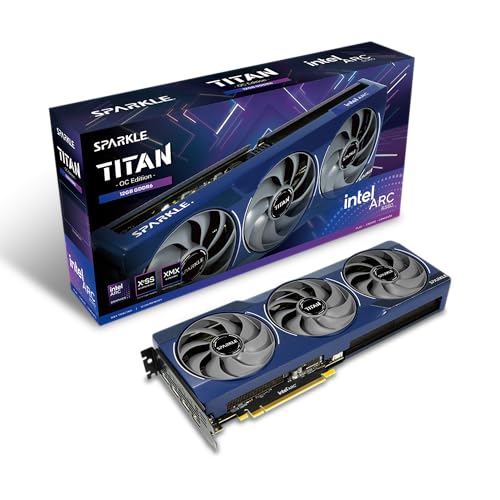
Best Budget: Sparkle Arc B580 Titan OC
Specs
Chip | Intel Arc B580 (Battlemage) |
VRAM | 12 GB GDDR6 |
Boost clock | up to ~2.74 GHz |
Memory bus | 192-bit |
Board power | ~190 W |
Outputs | HDMI 2.1, 3x DisplayPort 2.1 |
Slots | 2-slot dual-fan |
Chip
Intel Arc B580 (Battlemage)
VRAM
12 GB GDDR6
Boost clock
up to ~2.74 GHz
Memory bus
192-bit
Board power
~190 W
Outputs
HDMI 2.1, 3x DisplayPort 2.1
Slots
2-slot dual-fan
What it does well
The Sparkle Arc B580 Titan OC is the genuine budget standout when it is in stock near its intended price. Twelve gigabytes of memory at this price floor is unusual, and it makes the B580 a real 1080p-high and entry-1440p card rather than a stopgap. XeSS 2 on Intel's own XMX path is solid, and modern-API performance is clean.
Intel's driver story is far more mature than the first-generation Arc cards, which makes this a much safer budget recommendation than it would have been a generation ago.
What you give up
Reviews note that legacy DX9 and DX11 titles can still surface the occasional driver quirk, so if your library is full of older games, test the specific ones you care about. The performance ceiling is real, so this is not a sustained 1440p-ultra card. Resizable BAR is effectively mandatory for it to perform, so an older platform without it will hobble the card. Availability swings with scarcity.
If you are choosing between this and an 8GB card at a similar price, the extra VRAM here is the tie-breaker for anyone planning to keep the card more than a year.
Who it's for
This is for the tightest-budget 1080p-high buyer on a modern platform with resizable BAR enabled, who plays mostly current titles and wants more memory than the 8GB cards offer at this price.
Editor's Pick: MSI Ventus RTX 5060 Ti 16G OC

Specs
Chip | RTX 5060 Ti (Blackwell) |
VRAM | 16 GB GDDR7 |
Boost clock | up to ~2.57 GHz |
Memory bus | 128-bit |
Board power | ~180 W |
Outputs | HDMI 2.1b, 3x DisplayPort 2.1b |
Slots | 2-slot dual-fan |
Chip
RTX 5060 Ti (Blackwell)
VRAM
16 GB GDDR7
Boost clock
up to ~2.57 GHz
Memory bus
128-bit
Board power
~180 W
Outputs
HDMI 2.1b, 3x DisplayPort 2.1b
Slots
2-slot dual-fan
What it does well
The MSI Ventus RTX 5060 Ti 16G OC is the legitimate mainstream Nvidia pick, and the right call for a buyer who specifically wants the Nvidia feature set without paying 5070 Ti money. GDDR7 plus DLSS 4 makes it a clean 1440p-quality card with frame generation on a high-refresh monitor, and the 16GB buffer clears the VRAM bar its 8GB sibling fails. NVENC and CUDA are there for streaming and light creative work, and the dual-fan Ventus is quiet and compact.
For a small or quiet build that wants the Nvidia stack, this drops in on low power and stays cool.
What you give up
The 128-bit bus limits bandwidth, so it scales worse than the AMD picks above it as settings climb, and its raster-per-dollar trails the 9060 XT 16GB. Ray tracing is real but modest at this tier. And as with the 9060 XT, the 8GB version of this exact card exists at a lower price and should be avoided; the 16GB SKU is the only one worth buying.
Who it's for
Pick this if you want Nvidia's feature stack, DLSS 4, NVENC AV1, and CUDA, in a quiet compact card, and you are willing to pay a little over the AMD value picks to get it.
Bottom line
If you mostly play games at 1440p and want the most frames per dollar, buy the Sapphire Pulse RX 9070 XT. If your budget is tighter, the Sapphire Pulse RX 9060 XT 16GB is the value play that ages well. If you need ray tracing or do creative work, the GIGABYTE RTX 5070 Ti AERO OC earns its premium. On the tightest budget, the Sparkle Arc B580 Titan OC gives you 12GB nothing else matches at the price. And if you want the Nvidia feature stack without the 5070 Ti spend, the MSI Ventus RTX 5060 Ti 16G is the one to get.
Whatever you pick, get the 16GB version. The 8GB cards at this tier are a false economy. If you want the same value lens applied across a wider budget range, our guide to the best GPU for the money across every price tier ranks a pick at each rung from budget to enthusiast. If you are moving up from an older card, our guide to the best GPU upgrade from an RTX 3060 sorts the current field by the real uplift you get per tier.
FAQ
Is 8GB of VRAM still enough for 1440p gaming in 2026?
Not reliably. At 1440p, modern games routinely ask for more than 8GB of texture memory, and when a card runs out it stutters and drops textures even if its raw speed looks fine on a chart. Every primary pick here except the budget Intel card carries 16GB for exactly this reason, and the Intel pick gets 12GB. Treat 16GB as the floor unless you are strictly playing older or esports titles.
Should I buy AMD or Nvidia in the mid-range right now?
It depends on what you run. AMD's RX 9060 XT and RX 9070 XT lead on raster frames per dollar, so if you mostly play games without heavy ray tracing, AMD is the value. Nvidia earns its premium when you need ray tracing, DLSS 4, NVENC encoding for streaming, or CUDA for creative and AI work. Pick by your library and your side projects, not by the badge.
Is the RX 9070 XT good enough for 4K gaming?
It can play at 4K, but it is happiest at 1440p. With quality-mode upscaling it handles many 4K titles at playable frame rates, and in lighter games it manages native 4K. For a card built around 4K as the primary target, you want to step up a tier. As a 1440p card that occasionally stretches to 4K, the 9070 XT is excellent.
How much VRAM do I actually need for 1440p?
Sixteen gigabytes is the comfortable target for 1440p in 2026 and gives you headroom for the next couple of years. Twelve gigabytes, as on the Intel B580, is workable today at 1080p-high and entry-1440p. Eight gigabytes is where you start hitting texture limits in modern games at 1440p, which is why we steer away from the 8GB versions of these chips.
Is the RTX 5070 Ti worth the extra money over the RX 9070 XT?
Only if you need what it adds. In pure raster the two trade blows, and the 9070 XT costs less, so for a raster-first gamer the AMD card is the better value. The 5070 Ti pulls ahead in ray tracing, brings DLSS 4 and NVENC AV1, and adds CUDA for creative and AI work. If you play heavy ray-traced titles or do real workstation tasks, the premium is justified. If not, save the money.
Do I need a new power supply for a mid-range GPU?
Usually not, if your existing supply is a quality unit with the right wattage. The lower-power picks here, like the RX 9060 XT and the RTX 5060 Ti, draw little and run on modest supplies. The higher-power cards, like the RX 9070 XT and RTX 5070 Ti, want a solid 750W-class unit. Check your supply's wattage and that it has the right power connectors before you buy.
Related Articles

Best GPUs for 1440p Gaming (2026): 5 16GB Picks, 60-240Hz
The best GPUs for 1440p gaming in 2026: five 16GB picks matched to 60, 144, and 240 Hz targets, with real benchmarks, trade-offs, and who each card fits.
Aug 8, 2026

RTX 5060 Ti vs RX 9060 XT: 8GB vs 16GB Verdict for 2026
RTX 5060 Ti vs RX 9060 XT: we call the winner at 1080p and at 1440p, and say when the 8GB SKUs are a trap. Straight buy advice for 2026, no spec-sheet filler.
Sep 8, 2026

Best GPUs Under $500 for 1440p Gaming (2026): 5 Picks by VRAM
Five sub-$500 GPUs for 1440p, segmented by monitor pairing and VRAM ceiling. Honest street pricing, the 8GB-versus-16GB call, and which card matches your library.
May 19, 2026

Should You Wait for Nova Lake or Buy Intel Now? (2026)
Should you wait for Nova Lake or buy an Intel CPU now? LGA 1851 is a dead-end socket, so here is the buy-now pick, the hold case, and the revisit date.
Sep 24, 2026

Best Monitors for Marvel Rivals (2026): 5 Picks, 165-360Hz
The best monitors for Marvel Rivals, matched to your GPU: 5 picks from a 280Hz 1080p esports panel up to a 4K 240Hz OLED, plus honest OLED burn-in verdicts.
Sep 25, 2026