Affiliate Disclosure: As an Amazon Associate we earn from qualifying purchases. Some links may earn us a commission at no cost to you.

Best Prebuilt Gaming PC for Streaming 2026: 5 NVENC Picks
The best prebuilt gaming PC for streaming in 2026 is the Skytech Azure 3, a 9800X3D paired with an RTX 5080. It carries two NVENC encoders, which is what lets you broadcast live and keep a clean local recording running at the same time without either one costing you frames.
Every streaming prebuilt gets sold to you on core count, and that is the wrong number to shop on. The encode runs on the GPU now, so the cores you paid extra for sit idle while your stream comes from dedicated silicon. The number that decides what you can actually do is how many hardware encoders the card has: one to three across the RTX 50-series, and nobody prints it on a spec sheet. Here are five prebuilts sorted by that number, plus the floor worth holding to at any budget: one NVENC unit minimum, eight strong cores, and 32 GB of memory.
Our top pick: Skytech Azure 3 9800X3D RTX 5080
Two NVENC encoders and the best gaming CPU on the market. You can stream live and keep a clean local recording running at the same time, and the 9800X3D means neither one costs you frames.

You do not need two PCs anymore
The two-PC streaming rig existed for one reason: x264 encoding ran on the processor, and it ate the processor. Running OBS on the x264 medium preset can pull eighteen to twenty-five percent of a modern CPU. That is the difference between a smooth 144 FPS and visible frame drops the moment a fight starts, which is exactly when your viewers are watching.
NVENC moves that work onto dedicated silicon on the graphics card. The same stream costs one to two percent of the CPU instead. On RTX 40-series and 50-series cards the output at normal streaming bitrates is close enough to x264 medium that telling them apart takes paused side-by-side frames and a trained eye. The second machine stopped earning its keep.
So the streaming spec that matters moved. It is no longer cores, it is encoders. An RTX 5090 carries three NVENC units, the RTX 5080 and RTX 5070 Ti carry two, and the RTX 5070 carries one. One encoder means you stream or you record locally. Two means you do both at once. Three means you can simulcast to two platforms and still keep an archive. If you want the CPU side of this argument in more depth, we went through it in our streaming CPU guide.
Quick picks
Pick | Machine | Encoders | Best for | Where to buy |
|---|---|---|---|---|
Best Overall | 2x NVENC | Stream plus local recording, no compromise | ||
Best Value | 2x NVENC | The same dual-encoder workflow for less | ||
Best Premium | 3x NVENC | Simulcasting to two platforms plus archive | ||
Best Budget | 1x NVENC | Going live at 1080p60 to one platform | ||
Editor's Pick | 2x NVENC + Quick Sync | Streamers who also edit and export |
Best Overall
- Machine
- Encoders
2x NVENC
- Best for
Stream plus local recording, no compromise
- Where to buy
Best Value
- Machine
- Encoders
2x NVENC
- Best for
The same dual-encoder workflow for less
- Where to buy
Best Premium
- Machine
- Encoders
3x NVENC
- Best for
Simulcasting to two platforms plus archive
- Where to buy
Best Budget
- Machine
- Encoders
1x NVENC
- Best for
Going live at 1080p60 to one platform
- Where to buy
Editor's Pick
- Machine
- Encoders
2x NVENC + Quick Sync
- Best for
Streamers who also edit and export
- Where to buy
Which streamer are you?
What you do on stream | Encoders you need | The machine | Get it |
|---|---|---|---|
Go live at 1080p60 to one platform, no VOD editing | One is enough | Skytech O11 Vision RTX 5070 | |
Stream and keep a local high-bitrate recording to clip later | Two | iBUYPOWER Element Pro RTX 5070 Ti | |
Stream, record, and play at 1440p high refresh | Two, plus frames to spare | Skytech Azure 3 9800X3D RTX 5080 | |
Simulcast to Twitch and YouTube with an archive running | Three | ZOTAC MEK 9800X3D RTX 5090 | |
Stream, then cut and export the VOD between broadcasts | Two, plus cores and a spare encoder | Acer Predator Orion 6000 RTX 5080 |
Go live at 1080p60 to one platform, no VOD editing
- Encoders you need
One is enough
- The machine
Skytech O11 Vision RTX 5070
- Get it
Stream and keep a local high-bitrate recording to clip later
- Encoders you need
Two
- The machine
iBUYPOWER Element Pro RTX 5070 Ti
- Get it
Stream, record, and play at 1440p high refresh
- Encoders you need
Two, plus frames to spare
- The machine
Skytech Azure 3 9800X3D RTX 5080
- Get it
Simulcast to Twitch and YouTube with an archive running
- Encoders you need
Three
- The machine
ZOTAC MEK 9800X3D RTX 5090
- Get it
Stream, then cut and export the VOD between broadcasts
- Encoders you need
Two, plus cores and a spare encoder
- The machine
Acer Predator Orion 6000 RTX 5080
- Get it
Specs at a glance
Machine | CPU | GPU | Encoders | RAM | Storage |
|---|---|---|---|---|---|
Ryzen 7 9800X3D | RTX 5080 16 GB | 2x NVENC | 32 GB DDR5-6000 | 2 TB NVMe | |
Ryzen 7 9800X3D | RTX 5070 Ti 16 GB | 2x NVENC | 32 GB DDR5-5200 | 2 TB SSD | |
Ryzen 7 9800X3D | RTX 5090 32 GB | 3x NVENC | 32 GB DDR5 | 2 TB NVMe | |
Ryzen 7 7700X | RTX 5070 12 GB | 1x NVENC | 32 GB DDR5-5600 | 1 TB Gen4 NVMe | |
Core Ultra 9 285K | RTX 5080 16 GB | 2x NVENC + Quick Sync | 32 GB DDR5 | 1 TB Gen4 |
- CPU
Ryzen 7 9800X3D
- GPU
RTX 5080 16 GB
- Encoders
2x NVENC
- RAM
32 GB DDR5-6000
- Storage
2 TB NVMe
- CPU
Ryzen 7 9800X3D
- GPU
RTX 5070 Ti 16 GB
- Encoders
2x NVENC
- RAM
32 GB DDR5-5200
- Storage
2 TB SSD
- CPU
Ryzen 7 9800X3D
- GPU
RTX 5090 32 GB
- Encoders
3x NVENC
- RAM
32 GB DDR5
- Storage
2 TB NVMe
- CPU
Ryzen 7 7700X
- GPU
RTX 5070 12 GB
- Encoders
1x NVENC
- RAM
32 GB DDR5-5600
- Storage
1 TB Gen4 NVMe
- CPU
Core Ultra 9 285K
- GPU
RTX 5080 16 GB
- Encoders
2x NVENC + Quick Sync
- RAM
32 GB DDR5
- Storage
1 TB Gen4
Benchmarks
Geometric mean across an 11-game raster suite, tested on a Ryzen 7 9800X3D bench.
- 167.3 FPS
- 128.3 FPS
- 116.8 FPS
- 96.4 FPS
Geometric mean across an 8-title ray-tracing suite on the same bench.
- 100.8 FPS
- 74 FPS
- 66.2 FPS
- 51.5 FPS
Two of the picks share an RTX 5080, so they land on the same GPU line. The numbers are native, with no upscaling and no frame generation, which is the honest way to read them: your stream goes out as real rendered frames, and generated ones do not always survive the encode cleanly.
What to look for in a streaming prebuilt
We started from the encoder count and worked backward, because that is the spec that decides what the machine can do rather than how fast it does it. Every pick here has at least one NVENC unit, which means the stream never touches the processor. Anything that forces you back onto x264 was out before we started.
From there the CPU question answers itself. If the encode is on the GPU, the processor's only job is running the game while OBS, a browser full of chat and alerts, and Discord sit in the background. Eight strong cores clear that comfortably. Sixteen weaker ones do not clear it better, they just cost more, and in cache-sensitive games they hand back the 1% lows that keep a stream from looking choppy. That is why three of these five machines run the same eight-core 9800X3D.
Then we checked the parts prebuilt makers quietly economize on. Memory capacity is the first: 32 GB is the floor for a machine running a game and an encoder and a browser at once, and every pick here clears it. Power supply is the second, and it is the one we will not compromise on. Storage is the third, and it is where two of these picks fall short, which we say plainly in their sections rather than burying it.
Finally, every machine had to be a real listing that was in stock when we checked it, not a configurator page. If you want the wider view across budgets rather than the streaming-specific cut, our prebuilt gaming PC hub covers the whole range, and the tier one step down overlaps heavily with what a new streamer should be looking at.
Best Overall: Skytech Azure 3 9800X3D RTX 5080
Specs
CPU | Ryzen 7 9800X3D (8 cores / 16 threads, up to 5.2 GHz) |
GPU | GeForce RTX 5080 16 GB |
Hardware encoders | 2x NVENC (9th gen, AV1) |
Memory | 32 GB DDR5-6000 |
Storage | 2 TB NVMe SSD |
PSU | 850 W 80+ Gold, ATX 3.0 |
Cooling | 360 mm ARGB AIO |
OS / networking | Windows 11, Wi-Fi |
CPU
Ryzen 7 9800X3D (8 cores / 16 threads, up to 5.2 GHz)
GPU
GeForce RTX 5080 16 GB
Hardware encoders
2x NVENC (9th gen, AV1)
Memory
32 GB DDR5-6000
Storage
2 TB NVMe SSD
PSU
850 W 80+ Gold, ATX 3.0
Cooling
360 mm ARGB AIO
OS / networking
Windows 11, Wi-Fi
What it does well
The 9800X3D is the CPU every reviewer benchmarks GPUs on, and that is not an accident. Its 3D V-Cache keeps 1% lows steady in exactly the CPU-bound situations streaming creates: OBS, a browser full of chat and alerts, Discord, and a game all competing for the same cores. NVENC handles the encode, so those eight cores stay free for the work that needs them.
The RTX 5080 carries two NVENC encoders, and that is the spec that matters most here. One feeds the live stream, the second feeds a local high-bitrate recording for clipping. On a single-encoder card you choose. The 850 W Gold unit and the 360 mm AIO mean the chip is not throttling into a five-hour stream. At 1440p ultra the 5080 averages 128.3 FPS across an 11-game raster suite, native.
What you give up
You are paying 5080 money for a card roughly 10 percent ahead of the 5070 Ti in raster, and the 5070 Ti carries the same two NVENC encoders. If your stream is 1080p60, the step up buys frames, not stream quality.
The 32 GB of DDR5 is right for a streaming box, but a heavy editing timeline running alongside the stream will start swapping. Eight cores is what you would outgrow first if you ever moved back to x264.
Who it's for
The streamer who plays the game they stream, on a 1440p high-refresh panel, and wants one machine that does live output plus a local recording without thinking about it. If you go live three nights a week and clip the VOD afterward, this is the box.
Best Value: iBUYPOWER Element Pro RTX 5070 Ti

Specs
CPU | Ryzen 7 9800X3D (8 cores / 16 threads) |
GPU | GeForce RTX 5070 Ti 16 GB |
Hardware encoders | 2x NVENC (9th gen, AV1) |
Memory | 32 GB DDR5-5200 |
Storage | 2 TB SSD |
Included | Keyboard and mouse |
OS | Windows 11 Home |
Model | EPWA7N57T01 |
CPU
Ryzen 7 9800X3D (8 cores / 16 threads)
GPU
GeForce RTX 5070 Ti 16 GB
Hardware encoders
2x NVENC (9th gen, AV1)
Memory
32 GB DDR5-5200
Storage
2 TB SSD
Included
Keyboard and mouse
OS
Windows 11 Home
Model
EPWA7N57T01
What it does well
This is the pick that makes the whole article's argument. The RTX 5070 Ti is the least expensive Blackwell card with a second NVENC encoder, and the encoder count, not the raster tier, is what changes what you can do while live. Drop one rung to a 5070 and you lose the ability to run a clean local recording alongside the stream.
Stay here and you keep it. Pairing that GPU with the 9800X3D is the other half: you get the same cache-fed 1% lows as the top pick, so the frames you are broadcasting are the frames you are playing. Tom's Hardware measures the 5070 Ti at 116.8 FPS average at 1440p ultra native across its 11-game raster suite, about 9 percent behind the 5080. For a stream that is going out at 1080p60 anyway, that gap is nearly invisible to your viewers and very visible to your wallet.
What you give up
The DDR5 here runs at 5200 rather than the 6000 the top pick ships with, which costs a little in the memory-sensitive corners where an X3D chip is otherwise strong. The listing does not state the PSU, and on a prebuilt that is the component most likely to be the place the builder saved money, so treat it as an unknown rather than a strength.
The bundled keyboard and mouse are the usual SI throw-ins and should not factor into the decision. Stock on this configuration has been thin.
Who it's for
The streamer who wants the full dual-encoder workflow and the best gaming CPU available, and who has correctly worked out that the 5080's extra raster does not reach the viewer. If your stream is 1080p60 on Twitch and you record VODs locally, this is the efficient answer.
Best Premium: ZOTAC MEK 9800X3D RTX 5090

Specs
CPU | Ryzen 7 9800X3D (8 cores / 16 threads, up to 5.2 GHz) |
GPU | GeForce RTX 5090 32 GB GDDR7 |
Hardware encoders | 3x NVENC (9th gen, AV1) |
Memory | 32 GB DDR5 |
Storage | 2 TB NVMe M.2 SSD |
PSU | 1200 W 80+ Gold |
Networking | Wi-Fi 6E |
OS | Windows 11 Pro |
CPU
Ryzen 7 9800X3D (8 cores / 16 threads, up to 5.2 GHz)
GPU
GeForce RTX 5090 32 GB GDDR7
Hardware encoders
3x NVENC (9th gen, AV1)
Memory
32 GB DDR5
Storage
2 TB NVMe M.2 SSD
PSU
1200 W 80+ Gold
Networking
Wi-Fi 6E
OS
Windows 11 Pro
What it does well
The 5090 is the only consumer card with three NVENC encoders, and that is the entire reason it appears in a streaming article rather than a raw-FPS one. Multi-platform streamers running Twitch and YouTube simultaneously, plus a local high-bitrate capture for editing, are asking for three concurrent encode sessions. Every other card on this page makes you drop one.
The 32 GB of GDDR7 also stops mattering as a gaming number and starts mattering as a workload number the moment you are running a game, an encoder, and a preview composite in OBS with a stack of browser sources. The 1200 W Gold unit is the correct call rather than an upsell; a 5090 under sustained load is not a place to be optimistic about power. Raster performance is the best available, at 167.3 FPS average at 1440p ultra native.
What you give up
As a gaming purchase this is bad value and we have said so before. You are paying creator-card pricing for a card whose frame advantage at 1440p your monitor probably cannot show you.
The justification has to come from the encoders and the VRAM, which means it has to come from simulcasting or editing. If you stream to one platform and do not edit, you are buying two encoders you will never light up. The CPU is also still an eight-core part, so if your bottleneck was ever cores, this does not fix it.
Who it's for
The multi-platform streamer who is live on two services at once, or the streamer-editor who wants a local ProRes-grade capture running while the stream goes out. Buy it for the encode pipeline, not for the frames.
Best Budget: Skytech O11 Vision RTX 5070

Specs
CPU | Ryzen 7 7700X (8 cores / 16 threads, 4.5 GHz) |
GPU | GeForce RTX 5070 12 GB |
Hardware encoders | 1x NVENC (9th gen, AV1) |
Motherboard | X670 |
Memory | 32 GB DDR5-5600 |
Storage | 1 TB Gen4 NVMe SSD |
PSU | 850 W 80+ Gold, ATX 3.0 |
Cooling | 360 mm ARGB AIO |
CPU
Ryzen 7 7700X (8 cores / 16 threads, 4.5 GHz)
GPU
GeForce RTX 5070 12 GB
Hardware encoders
1x NVENC (9th gen, AV1)
Motherboard
X670
Memory
32 GB DDR5-5600
Storage
1 TB Gen4 NVMe SSD
PSU
850 W 80+ Gold, ATX 3.0
Cooling
360 mm ARGB AIO
What it does well
Eight cores and one NVENC encoder is the actual minimum viable streaming machine, and this box has both. NVENC uses one to two percent of the CPU where x264 medium would eat eighteen to twenty-five, so the 7700X is never the thing that drops your frames when you go live.
Thirty-two gigabytes of RAM is the right amount and the one place budget prebuilts most often cut, so seeing it here matters. The 850 W Gold ATX 3.0 unit and the 360 mm AIO are the same parts Skytech puts in the top pick, which is unusual at this tier and is the strongest argument for the box. The RTX 5070 averages 96.4 FPS at 1440p ultra native, which is a real 1440p card, and comfortably more than that at the 1080p most streams output at.
What you give up
One encoder. That is the whole limitation and it is a real one: you can stream, or you can record locally at quality, but running both puts them in contention. If clipping and VOD editing are part of your workflow, this is the pick that will frustrate you first.
The 7700X is also last-generation and not an X3D part, so 1% lows in cache-sensitive titles sit below the 9800X3D boxes above. The single 1 TB drive is thin for anyone saving recordings, and it is the first upgrade to plan for. The 12 GB frame buffer is the other ceiling worth naming.
Who it's for
The new streamer going live at 1080p60 to one platform, who plays at 1440p, and who does not yet edit VODs. It is the cheapest honest way in.
Editor's Pick: Acer Predator Orion 6000 RTX 5080
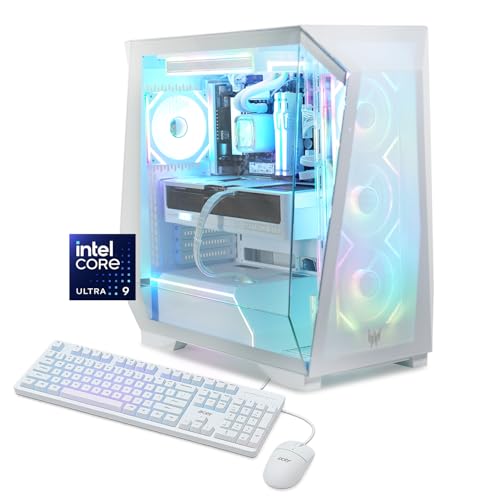
Specs
CPU | Intel Core Ultra 9 285K (24 cores: 8P + 16E) |
GPU | GeForce RTX 5080 16 GB |
Hardware encoders | 2x NVENC plus Intel Quick Sync |
Memory | 32 GB DDR5 |
Storage | 1 TB Gen4 SSD |
Networking | Wi-Fi 7 |
OS | Windows 11 Home |
Model | PO6-605-UR18W |
CPU
Intel Core Ultra 9 285K (24 cores: 8P + 16E)
GPU
GeForce RTX 5080 16 GB
Hardware encoders
2x NVENC plus Intel Quick Sync
Memory
32 GB DDR5
Storage
1 TB Gen4 SSD
Networking
Wi-Fi 7
OS
Windows 11 Home
Model
PO6-605-UR18W
What it does well
This is the pick for people whose streaming is one half of a job. The Core Ultra 9 285K brings 24 cores, which is genuinely useful the moment your workflow includes exporting a video between streams rather than just broadcasting one.
More interestingly for streaming specifically, Intel's integrated Quick Sync gives you a hardware encoder that is entirely independent of the GPU's two NVENC units. That is a third concurrent encode path on a machine that is not a 5090: stream on NVENC, record on the second NVENC, and hand a background export to Quick Sync, and none of the three are fighting each other. Wi-Fi 7 and a 5080 round it out, and the 5080 is the same 128.3 FPS 1440p card as the top pick.
What you give up
The 285K is not the gaming CPU the 9800X3D is, and in cache-sensitive titles the 1% lows sit behind the X3D boxes above. If gaming is the only thing this machine does, the core count is dead weight and you are giving up frames for it.
The 1 TB drive is genuinely undersized for a machine sold on the strength of doing editing work, and it is the first thing to fix. Quick Sync is also the weakest of the three encoders in output quality, so treat it as the background-export path rather than as the one your viewers watch.
Who it's for
The streamer who edits: someone cutting VODs into shorts, exporting between broadcasts, or running production work alongside the channel. The cores and the third encoder earn their keep only if you actually use them.
What to skip
Skip the second PC. A dedicated capture machine plus a capture card solves a problem that hardware encoding already solved, and it costs you a second license, a second power draw, and a pile of cabling to fix nothing. The exception is genuinely professional multi-camera production, and if that is you, you already knew that.
Skip buying cores for the encode. A sixteen-core chip does not make NVENC faster, because NVENC is not running on it. Buy cores when you edit, which is a real reason and the one the Editor's Pick exists for. If your workflow really is production-heavy, our streaming and content-creation build guide goes further than a prebuilt sensibly can. And once the machine is sorted, the thing that most improves how your stream is received is not the tower at all, it is the microphone.
Bottom line
If you stream and record and want the frames to stay high while you do both, buy the Skytech Azure 3 9800X3D RTX 5080. If you want that same dual-encoder workflow for less and can live with slower memory, buy the iBUYPOWER Element Pro RTX 5070 Ti. If you are new and going live at 1080p60 to one platform, the Skytech O11 Vision RTX 5070 is the honest floor and its single encoder is the only real thing you give up.
If you simulcast to two platforms while archiving locally, the ZOTAC MEK 9800X3D RTX 5090 is the only machine here that does it without contention, and that, not the frame rate, is what you are paying for. If you cut and export VODs between broadcasts, the Acer Predator Orion 6000 RTX 5080 gives you the cores and a third encode path in Quick Sync. Everyone else should stop shopping on core count.
FAQ
Do you still need two PCs to stream in 2026?
No. The two-PC setup existed because x264 software encoding ran on the processor and could consume a quarter of it, which cost you frames in the game you were broadcasting. NVENC moves that work to dedicated hardware on the GPU and uses one to two percent of the CPU instead. A single machine with a modern NVIDIA card handles the game and the stream at once. The only remaining case for a second machine is professional multi-camera production.
How many CPU cores do you need for streaming and gaming at the same time?
Six is the working minimum with NVENC, and eight gives you real headroom for the game, OBS, a browser full of chat and alerts, and Discord all at once. Sixteen cores only earn their keep if you are still encoding in x264 or doing serious video editing between streams. For a hardware-encoded single-PC setup, a fast eight-core chip beats a slow sixteen-core one, because the cores were never the constraint.
Is NVENC good enough compared to x264 for Twitch?
Yes, for essentially everyone. On RTX 40-series and 50-series cards, NVENC output at typical streaming bitrates is close to the x264 medium preset in quality, and separating them takes paused side-by-side frames. Meanwhile x264 medium costs you eighteen to twenty-five percent of your CPU and NVENC costs you one to two. You are trading an invisible quality difference for a very visible frame-rate one.
Which RTX 50-series GPUs have two NVENC encoders?
The RTX 5080 and the RTX 5070 Ti both carry two encoders. The RTX 5090 carries three, and the RTX 5070 carries one. This matters because a second encoder is what lets you run a live stream and a clean local recording at the same time without them contending. The 5070 Ti is the cheapest card in the range that gives you that.
Is 32GB of RAM enough to stream and game at once?
Yes. A game, OBS with a preview composite, a browser with chat and alerts, and Discord fit inside 32 GB with room left. Every pick here ships with it, and it is the specification budget prebuilts most often cut, so it is worth confirming before you buy. You would only want 64 GB if you were running a heavy editing timeline alongside the stream rather than after it.
Is a prebuilt good enough for streaming, or should you build one yourself?
A prebuilt is fine, provided you check the same three things a builder would: the encoder count on the GPU, at least 32 GB of memory, and a power supply that is honestly rated. Those are the places prebuilt makers economize. Every machine here clears the first two. Building yourself saves money and gets you exactly the parts you chose, but it is no longer a performance argument for streaming.
Related Articles

Best Prebuilt Gaming PCs (2026): 5 Picks, Warranty First
The best prebuilt gaming PCs in 2026: 5 picks from a 1080p budget box up to a 4K rig, judged on warranty and RMA support first, then build quality and VRAM.
Aug 18, 2026

Best CPUs for Streaming and Gaming (2026): 5 NVENC Picks
Best CPUs for streaming and gaming in 2026: 5 picks from 6 to 16 cores. Your GPU handles NVENC encoding, so eight good cores beat a 16-core flagship CPU.
Aug 24, 2026

Best PC Builds for Streaming, Gaming & Creators (2026)
The best custom PC builds for streaming, gaming, and content creation in 2026 — upgradeable setups across every budget, with live US pricing.
Aug 3, 2025

Best Prebuilt Gaming PCs Under $2,000 in 2026
The five best prebuilt gaming PCs under $2,000 in 2026, all running RTX 5070 + DLSS 4. Tested picks from Skytech, Alienware, and iBUYPOWER with real buyer context.
May 27, 2026

Best Gaming Microphones 2026: 5 USB and XLR Streaming Picks
Best gaming microphones for 2026: 5 USB and XLR picks that keep keyboard clatter and fan noise off your Discord calls and Twitch streams, from budget to pro.
Sep 19, 2026