Affiliate Disclosure: As an Amazon Associate we earn from qualifying purchases. Some links may earn us a commission at no cost to you.

Gaming Laptop vs Desktop 2026: Value Math and 4 Picks
For the same money, a gaming desktop gives you roughly 30 to 40 percent more frames per dollar than a gaming laptop, and it holds that lead for years because you can swap the graphics card when it starts to age. A gaming laptop pays that difference back in the one thing a tower can never do. It moves.
So the real question is not which is better on paper. It is whether you need to carry your gaming machine, and how often. Answer that honestly and the rest of this decision falls into place.
The tradeoff at a glance
What matters | Desktop | Laptop |
|---|---|---|
Performance per dollar | About 30 to 40 percent more frames per dollar | Pays a portability tax, roughly 20 to 30 percent at the same GPU tier |
Peak performance ceiling | Higher, full desktop cards and cooling | Capped by the mobile chip and thermals |
Upgrades later | Swap the GPU, RAM, storage, even the CPU | RAM and storage only, the GPU is fixed |
Portability | Stays on the desk | Goes anywhere, screen and battery included |
Thermals and longevity | Cooler, quieter, longer component life | Hotter, louder, more throttling over time |
What is in the box | Tower only, add a monitor | A complete computer, screen and keyboard included |
Repairability | Standard parts, easy fixes | Proprietary parts, harder and pricier repairs |
Performance per dollar
- Desktop
About 30 to 40 percent more frames per dollar
- Laptop
Pays a portability tax, roughly 20 to 30 percent at the same GPU tier
Peak performance ceiling
- Desktop
Higher, full desktop cards and cooling
- Laptop
Capped by the mobile chip and thermals
Upgrades later
- Desktop
Swap the GPU, RAM, storage, even the CPU
- Laptop
RAM and storage only, the GPU is fixed
Portability
- Desktop
Stays on the desk
- Laptop
Goes anywhere, screen and battery included
Thermals and longevity
- Desktop
Cooler, quieter, longer component life
- Laptop
Hotter, louder, more throttling over time
What is in the box
- Desktop
Tower only, add a monitor
- Laptop
A complete computer, screen and keyboard included
Repairability
- Desktop
Standard parts, easy fixes
- Laptop
Proprietary parts, harder and pricier repairs
Who should buy which
Your situation | Buy this | Why |
|---|---|---|
Home at a fixed desk, want the most frames | Desktop | Most performance per dollar, and you can upgrade later |
Student moving between home and campus | Laptop | The whole machine travels with you |
Small apartment or no room for a desk | Laptop | Footprint and cable clutter matter more than raw value |
Travel or commute often, still game seriously | Step-up laptop | One capable machine that fits in a backpack |
Want it to last five years or more | Desktop | A graphics card swap resets the clock a laptop cannot |
One budget for the tower and a screen | Desktop | The money you save buys a real monitor |
Need one machine for work and play that leaves home | Laptop | You avoid buying and maintaining two computers |
Home at a fixed desk, want the most frames
- Buy this
Desktop
- Why
Most performance per dollar, and you can upgrade later
Student moving between home and campus
- Buy this
Laptop
- Why
The whole machine travels with you
Small apartment or no room for a desk
- Buy this
Laptop
- Why
Footprint and cable clutter matter more than raw value
Travel or commute often, still game seriously
- Buy this
Step-up laptop
- Why
One capable machine that fits in a backpack
Want it to last five years or more
- Buy this
Desktop
- Why
A graphics card swap resets the clock a laptop cannot
One budget for the tower and a screen
- Buy this
Desktop
- Why
The money you save buys a real monitor
Need one machine for work and play that leaves home
- Buy this
Laptop
- Why
You avoid buying and maintaining two computers
How we think about the choice
Start with the value math, because it frames everything else. At the same total spend, a desktop lands roughly 30 to 40 percent more frames per dollar than a laptop, and the gap widens at the top of the range where mobile chips run out of thermal headroom. Put it the other way around and matching a given desktop's frame rate in a laptop usually costs another 20 to 30 percent at the same GPU tier. That premium is not a bad deal on its own. It buys a screen, a keyboard, a battery and a machine that fits in a bag, which is exactly the trade some buyers should make.
We lock the graphics card first on any build, because it sets the resolution and frame rate you live with for the next few years. That is where a desktop pulls ahead. A desktop card of a given name runs faster and cooler than the laptop chip that shares its name, so a desktop and a laptop labeled with the same GPU are not the same machine. Read the mobile part on its own terms.
Video memory is the spec that ages worst, and it is where the tiers on this page split. For 1080p you want at least 8GB, and 12GB is more comfortable. For 1440p you want 12GB and prefer 16GB. The value desktop here carries 16GB because that headroom is cheap on a tower and expensive to add later. The value laptop sticks to 8GB, which is fine at 1080p today but leaves less room to grow.
The display is the part you stare at every day, and on the desktop side it is the easiest place to spend badly. A tower paired with a cheap panel wastes the machine. If your budget covers a desktop plus a screen, defend the monitor line before almost anything else. A laptop sidesteps this by bringing its own panel, which is part of why the all-in-one convenience is worth a premium to the right buyer.
Longevity really comes down to the graphics card. In three years, a desktop owner drops in a newer card and keeps the rest, which stretches the machine well past what a sealed laptop can manage. That is the quiet reason desktops win on cost over time, even when the two look close on the day you buy.
The money move most people miss
Here is the play that changes the math for a lot of buyers. Instead of stretching for one premium gaming laptop, put most of the budget into a mid-range desktop and add a modest, light laptop for the times you travel. You end up with a stronger machine at home and something genuinely portable on the road, usually for a similar total.
It only works if you spend real time in both places. If you game almost entirely at one desk, the desktop alone is the better buy. If you are constantly on the move and rarely sit down at a desk, a single strong laptop is simpler. But for the student, the hybrid worker, or the traveler who still wants a real rig at home, splitting the budget beats forcing one device to do everything. Whichever way you lean, current part pricing is worth a look before you commit. Our take on whether is 2026 a bad year to build a PC covers the timing question directly.
Where to start
Pick | Best for | Buy |
|---|---|---|
Most frames per dollar at a desk | ||
A 1440p desktop that lasts | ||
Value all-in-one that travels | ||
The strongest portable pick |
- Best for
Most frames per dollar at a desk
- Buy
- Best for
A 1440p desktop that lasts
- Buy
- Best for
Value all-in-one that travels
- Buy
- Best for
The strongest portable pick
- Buy
If you want desktop value: Skytech Nebula RTX 5060 Ti

Specs
CPU | Ryzen 7 5700 (8C/16T) |
GPU | RTX 5060 Ti 16GB |
Memory | 32GB DDR4-3200 |
Storage | 1TB Gen4 NVMe SSD |
Power supply | 650W 80+ Gold |
OS | Windows 11 |
CPU
Ryzen 7 5700 (8C/16T)
GPU
RTX 5060 Ti 16GB
Memory
32GB DDR4-3200
Storage
1TB Gen4 NVMe SSD
Power supply
650W 80+ Gold
OS
Windows 11
What it does well
This is the most gaming machine on the page for the least money. The 16GB RTX 5060 Ti clears the video memory floor for 1080p and handles 1440p comfortably in most titles, and because it is a tower you can drop in a bigger card in a few years without touching anything else.
It also ships the way a machine should. You get 32GB of memory and a 1TB Gen4 drive, so you are not immediately paying to add space or fighting to keep more than a handful of big games installed.
What you give up
The Ryzen 7 5700 is a last-generation part on a platform without much runway, so treat this as a buy-it-complete machine you enjoy now and extend with a graphics card swap later, not a build you keep re-speccing. It does not move, and it does not include a monitor, so leave room in the budget for a screen.
Who it's for
The desk-bound player who wants the most frames per dollar at 1080p or 1440p, and would rather put the savings toward a good monitor than pay for portability they will not use.
If you want a desktop that lasts: iBUYPOWER Element RTX 5070

Specs
CPU | Core i7-14700F (20 cores) |
GPU | RTX 5070 12GB |
Memory | 32GB DDR5 |
Storage | 1TB NVMe SSD |
OS | Windows 11 Home |
Included | Keyboard and mouse |
CPU
Core i7-14700F (20 cores)
GPU
RTX 5070 12GB
Memory
32GB DDR5
Storage
1TB NVMe SSD
OS
Windows 11 Home
Included
Keyboard and mouse
What it does well
This is a modern machine built for 1440p high refresh. The RTX 5070 is a real 1440p card, the Core i7-14700F keeps up with it at that resolution, and the DDR5 platform is current rather than winding down. The same upgrade runway applies, so the card can step forward when you are ready.
It arrives with a keyboard and mouse, which means the only thing left to buy is a screen. Pair it with a legitimate 1440p high-refresh monitor and it feels like a complete setup.
What you give up
The 12GB memory pool is fine at 1440p today but is the spec most likely to feel tight at higher settings a few years out, so it may be the part you step past at your next graphics card swap. As with any tower, it stays on the desk and does not include a display.
Who it's for
The player who wants a 1440p experience that holds up, has a fixed place to game, and treats the ability to upgrade later as a real feature rather than a someday.
If you want laptop value: Lenovo LOQ RTX 5060
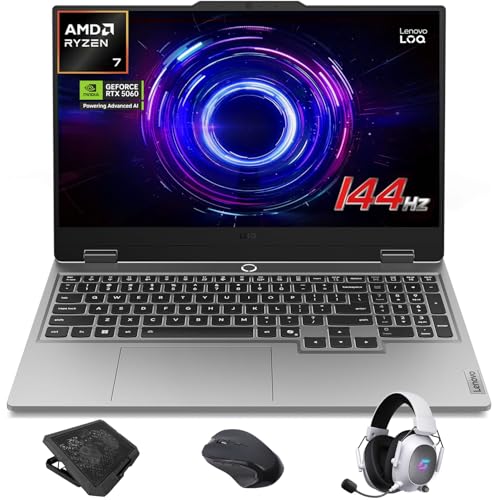
Specs
CPU | Ryzen 7 250 |
GPU | RTX 5060 Laptop GPU |
Display | 15.6-inch FHD 144Hz G-Sync |
Memory | 32GB DDR5 |
Storage | 1TB SSD |
OS | Windows 11 Home |
CPU
Ryzen 7 250
GPU
RTX 5060 Laptop GPU
Display
15.6-inch FHD 144Hz G-Sync
Memory
32GB DDR5
Storage
1TB SSD
OS
Windows 11 Home
What it does well
This is a genuinely well-balanced value laptop. It brings the screen, keyboard, and battery in one carry-anywhere package, and the 144Hz FHD panel matches what the RTX 5060 can comfortably push. Lenovo also shipped it with 32GB of memory and a 1TB drive, so you are not upgrading either on day one.
As a first real gaming machine that has to travel, it hits the important notes without draining the budget.
What you give up
A laptop RTX 5060 is meaningfully slower than a desktop card of the same name, and the FHD panel plus mobile thermals cap how far you can push settings. You also cannot upgrade the graphics card, ever. You are paying a portability tax measured in raw frames per dollar. How much slower depends on the wattage the chassis allows, which ranges from 85W to 115W across shipping machines, so our best RTX 5060 gaming laptops ranking sorts them by that number rather than by the badge.
Who it's for
The student or renter who moves between home, campus, or the couch and needs the whole computer to travel, and who is happy targeting 1080p in exchange for never being tied to a desk. If the laptop still spends most evenings at a desk, the best docking stations for gaming laptops turn it into a single-cable desktop setup without giving up high refresh.
If you want the strongest portable: Acer Nitro V 16 RTX 5070

Specs
CPU | Core 9 270H |
GPU | RTX 5070 Laptop GPU |
Display | 16-inch WUXGA IPS 180Hz |
Memory | 32GB DDR5 |
Storage | 1TB Gen4 SSD |
OS | Windows 11 |
CPU
Core 9 270H
GPU
RTX 5070 Laptop GPU
Display
16-inch WUXGA IPS 180Hz
Memory
32GB DDR5
Storage
1TB Gen4 SSD
OS
Windows 11
What it does well
This is the strongest portable pick here. The larger 16-inch 180Hz display is a nicer canvas than the value tier, the RTX 5070 laptop chip has real headroom for high-refresh 1080p and lighter 1440p, and it still ships with 32GB and a fast 1TB Gen4 drive. Buyers who treat the screen as the deciding factor on the laptop side should compare this against the best OLED gaming laptops, where panel spec is the ranking criterion rather than a footnote.
If you need one machine that both travels and games seriously, this is the one to reach for.
What you give up
You are paying premium laptop pricing that would buy a clearly stronger desktop, and the mobile RTX 5070 still trails its desktop namesake. Under sustained load the fans get loud and the chassis gets warm, and there is no graphics card upgrade path.
Who it's for
The traveler or hybrid worker who games seriously but genuinely cannot keep a tower, and wants the most capable single machine that fits in a backpack.
Bottom line
If you game at a desk and want the most machine for the money, buy the iBUYPOWER Element RTX 5070. If you are on a tighter budget but still desk-bound, the Skytech Nebula RTX 5060 Ti gets you there for less. If you need everything in one bag, start with the Lenovo LOQ RTX 5060, and step up to the Acer Nitro V 16 RTX 5070 if you game seriously on the road. And if you split your time between home and the road, the smartest move is a desktop plus a cheap travel laptop, not one premium laptop trying to cover both. If the laptop side wins but the budget is tighter than these picks, the best gaming laptops under $1,200 cover the tier where total graphics power, not the GPU name, decides what you actually get.
FAQ
Is a gaming laptop or gaming desktop better for the money?
A desktop is the better value, full stop. For the same budget you get a faster graphics card and better cooling, and you can upgrade the card later instead of replacing the whole machine. A laptop charges a premium for putting the same class of parts into something you can carry, along with its own screen and battery. If value is your only priority and the machine can live on a desk, buy the desktop. The laptop earns its higher cost only when you genuinely need it to move.
Do gaming laptops last as long as gaming desktops?
In practice, no. Both can run for years, but a desktop stays useful longer because you can drop in a new graphics card when games outgrow the old one and keep everything else. A laptop's GPU is soldered in, so when it falls behind, your only real option is a new laptop. Laptops also run hotter in a tight chassis, which is harder on parts over time. Plan on a desktop stretching further with a mid-life upgrade, and a laptop being a buy-it-complete machine you eventually replace whole.
Can you upgrade a gaming laptop like a desktop?
Only partly. Most gaming laptops let you add memory and storage, and that is worth doing. What you cannot change is the graphics card or, usually, the processor, because they are soldered to the board. On a desktop, every major part comes out: the graphics card, the CPU, memory, storage, even the power supply. That difference is the whole reason a desktop ages better. If upgrading over time matters to you, that alone points to a tower.
Is a gaming laptop good enough for 1440p gaming?
A stronger one can be. A laptop with an RTX 5070 class chip, like the step-up pick here, handles high-refresh 1080p easily and manages 1440p in many titles with sensible settings. A value laptop with an RTX 5060 and an 8GB memory pool is happier targeting 1080p. Just remember that a laptop GPU runs slower than the desktop card of the same name, so set your resolution expectations against the mobile part, not against desktop benchmarks you may have seen.
Should a student buy a gaming laptop or a desktop?
For most students, a laptop. If you move between a dorm, the library, and home, the whole machine needs to travel, and a laptop brings its own screen and battery. The value pick here covers that without draining the budget. The exception is a student with a fixed desk who rarely moves the machine, who gets far more for the money from a desktop and a good monitor. Decide by how often the computer leaves the room.
Do gaming laptops run hotter than desktops?
Yes. A laptop packs strong parts into a thin case with small fans, so under load it runs warmer and louder, and it will throttle performance to protect itself when things heat up. A desktop has room for large coolers and better airflow, so it stays cooler and quieter doing the same work, and that airflow also extends component life. It is one more reason a desktop tends to hold up better over the years.
Related Articles

How to Choose a GPU (and a Monitor That Matches)
A buyer's framework for picking a GPU and the monitor that pairs with it. Start with the panel and work the card back.
May 17, 2026

Best Prebuilt Gaming PCs (2026): 5 Picks, Warranty First
The best prebuilt gaming PCs in 2026: 5 picks from a 1080p budget box up to a 4K rig, judged on warranty and RMA support first, then build quality and VRAM.
Aug 18, 2026

Best Compact Keyboards 2026: 5 Hall Effect & 60%/75% Picks
The best compact keyboards of 2026: a wireless 75% Hall effect pick for work and ranked, a 60% Rapid Trigger board for FPS, plus typing and low-profile picks.
Oct 16, 2026

Ryzen 9 9900X3D vs 9950X3D: Close in Games, 27% Gap in Work
Ryzen 9 9900X3D vs 9950X3D: close at 1440p and 4K, about 27% apart in threaded work. Match the X3D chip to your workload, or skip both for the 9800X3D in 2026.
Oct 17, 2026

Best Monitor for RX 7800 XT (2026): 5 Picks by Resolution
The best monitor for the RX 7800 XT is a 1440p 165Hz to 180Hz panel. Five picks matched to its real frame rates, plus the ultrawide, OLED and 4K trade-offs.
Oct 16, 2026