Affiliate Disclosure: As an Amazon Associate we earn from qualifying purchases. Some links may earn us a commission at no cost to you.

What Gear Do CS2 Pros Use? 933 Pro Setups Ranked (2026)
What gear do CS2 pros use? Across the 933 professional players tracked in the August 2026 prosettings.net pool the answer is remarkably concentrated: a Logitech G PRO X Superlight 2 on the mouse, a Wooting 80HE on the keyboard, a Zowie XL2566K on the monitor, an Artisan cloth pad underneath, and a HyperX Cloud II on the head. Four of those five are the single most-used product in their category. The headset is a close second.
This is the Amazon-buyable five-piece kit, framed by what each spec actually does for CS2: counter-strafing precision on the keyboard, spray-transfer tracking on the mouse, motion clarity on the monitor, stopping power on the pad, and footstep separation in the headset. Every pro-share figure below comes from the 933-player August 2026 snapshot.
Quick picks
Pick | Category | Pro-share | Where to buy |
|---|---|---|---|
Mouse | 171 pros / 18.3% (line with V1: ~26%) | Check Price | |
Keyboard | 252 pros / ~27% | Check Price | |
Monitor | 250 pros / 26.8% | Check Price | |
Mousepad | brand-leading; variant-fragmented | Check Price | |
Headset | 143 pros / 15.3% (#2 product, #1 brand) | Check Price |
- Category
Mouse
- Pro-share
171 pros / 18.3% (line with V1: ~26%)
- Where to buy
- Check Price
- Category
Keyboard
- Pro-share
252 pros / ~27%
- Where to buy
- Check Price
- Category
Monitor
- Pro-share
250 pros / 26.8%
- Where to buy
- Check Price
- Category
Mousepad
- Pro-share
brand-leading; variant-fragmented
- Where to buy
- Check Price
- Category
Headset
- Pro-share
143 pros / 15.3% (#2 product, #1 brand)
- Where to buy
- Check Price
Product names link to Amazon. Check Price cells are in-cell affiliate buttons.
How we picked these five
Four decisions, in order.
Read the pro-share data descriptively, not prescriptively. The 933-player prosettings.net snapshot tells you what the top of the ladder is using, not what you should buy. The two are usually close, but pros optimize for venue noise, LAN cabling rules, sponsor obligations, and decade-deep muscle memory. Copy the category-leading product and tune sensitivity, DPI, and actuation to your hand.
Wired versus wireless splits by category. Mice go wireless because modern 8 kHz wireless is latency-indistinguishable from wired for esports. Keyboards stay wired because wireless keyboard polling still caps lower than wired and battery is a match variable pros refuse to add. Monitors are always wired. Headsets split: 2.4 GHz at home for comfort, wired or IEMs at LAN for zero-latency and venue isolation.
The counter-strafing edge is what the Wooting buys you. Magnetic switches with per-key adjustable actuation (Wooting's Lekker V2 family lets you set 0.1 mm on movement keys) plus Rapid Trigger reset on release means the A-to-D direction reversal registers as soon as you start lifting your finger, not after the switch clears full travel. That 50 to 100 ms gap is the gap between a clean peek-and-shoot and a sloppy one. Hall-Effect is the technical ceiling; optical analog covers most of the same ground for buyers who don't want the Wooting premium.
Fast TN at 360 Hz still beats OLED for CS2 esports. Pixel response on Fast TN is faster than the panel-refresh window itself, so motion clarity stays sharp on heavy spray transfers. DyAc⁺ backlight strobing on the Zowie XL2566K eliminates the hold-type blur OLED still has at 60 to 240 Hz refresh. Pros run 24.5 inch / 1080p intentionally: peripheral awareness without sacrificing crosshair micro-correction, and no GPU bottleneck at the framerates competitive settings produce.
Settings matter as much as hardware here, and the two sections after the picks cover the pro settings worth copying and whether Rapid Trigger is actually legal in CS2.
Best Mouse for CS2: Logitech G PRO X Superlight 2

Specs
Weight | 60 g, symmetric body |
Sensor | HERO 2 optical, up to 44,000 DPI |
Switches | LIGHTFORCE hybrid optical-mechanical |
Polling | 8 kHz |
Battery | 95 hours, USB-C charging |
Buttons | 5 programmable |
Colours | Black and White, same spec |
Weight
60 g, symmetric body
Sensor
HERO 2 optical, up to 44,000 DPI
Switches
LIGHTFORCE hybrid optical-mechanical
Polling
8 kHz
Battery
95 hours, USB-C charging
Buttons
5 programmable
Colours
Black and White, same spec
What it does well
The Superlight 2 is the CS2 mouse, and the pro-share data is unambiguous. 171 of the 933 surveyed CS2 pros run the V2 specifically, 18.3%, the largest single share of any mouse. Add the V1 still in heavy use at the top of the ladder and the Superlight line reaches roughly 26%. Logitech G holds 37.8% of the pool against Razer's 30.6%. The closest single rivals are the Razer DeathAdder V4 Pro at 11.2% and Logitech's own G Pro X2 SUPERSTRIKE at 9.7%. m0NESY runs the Superlight 2 on G2's AWP; most of NAVI, FaZe, and Vitality run it across rifles and entry slots.
The technical story behind the pro-share is simpler than the marketing suggests. The 60 g weight sits at the meta floor: light enough for wrist-flick aim transfers, heavy enough that the shell doesn't flex under aggressive claw-grip pressure the way some sub-50 g mice now do. The HERO 2 sensor tracks cleanly past competitive sensitivities. LIGHTFORCE hybrid switches combine optical actuation speed with the mechanical click feel pros want for clear button feedback under stress.
The 8 kHz polling is real and matters specifically at 360 Hz. At 1 kHz polling, input arrives every 1 ms; at 360 Hz refresh, that's a worst-case 2.8 ms input-to-frame delay. At 8 kHz polling, that worst-case drops to roughly 0.125 ms, which is measurable in the input pipeline and detectable in spray-transfer micro-corrections.
For the broader lightweight-mouse category outside the Superlight line, see the lightweight mice roundup.
What you give up
Symmetric body means right-hand-palm ergonomic-grip players don't get the contour they're used to. If you've been on a DeathAdder for years, the Superlight feels small and flat. There are no side buttons on the left for southpaws (the mouse is reversible-skate symmetric, not actually ambidextrous in button layout). PowerPlay wireless charging requires Logitech's separate charging pad. Without PowerPlay, you plug into USB-C roughly every four days at heavy use.
Who it's for
Claw, fingertip, and ambidextrous-grip players. Anyone without a strong DeathAdder-shape preference. The pro-default pick.
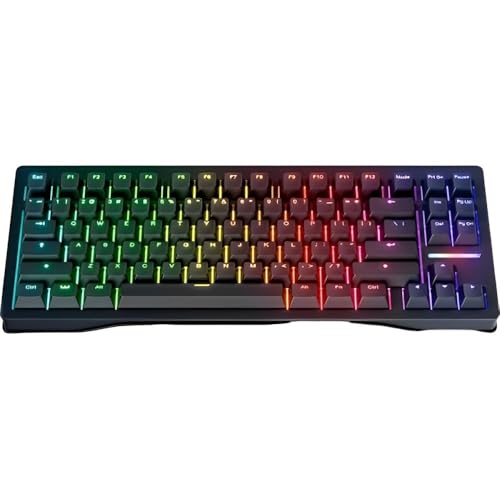
Best Keyboard for CS2: Wooting 80HE
Specs
Layout | 80%, function row and arrows kept, numpad dropped |
Switches | Magnetic Lekker V2, hot-swappable |
Actuation | 0.1 to 4.0 mm, adjustable per key |
Rapid Trigger | Yes, resets on release |
Polling | 8 kHz |
Connection | Wired USB-C only |
Chassis | Aluminium |
Keycaps | ANSI Linear60 v2 |
Layout
80%, function row and arrows kept, numpad dropped
Switches
Magnetic Lekker V2, hot-swappable
Actuation
0.1 to 4.0 mm, adjustable per key
Rapid Trigger
Yes, resets on release
Polling
8 kHz
Connection
Wired USB-C only
Chassis
Aluminium
Keycaps
ANSI Linear60 v2
What it does well
The Wooting 80HE is the CS2 keyboard story for 2026, and it has only grown since. Counting every colourway, the 80HE sits at roughly 252 users, about 27% of the 933-player pool and the clear #1 individual CS2 keyboard. The Razer Huntsman V3 Pro TKL is the nearest challenger at roughly 160. Wooting leads Razer and Logitech on brand share, a complete inversion of the mechanical-board market from two years ago. The Hall-Effect takeover started mid-2024 and accelerated through 2025 as the counter-strafing math became impossible to ignore at the elite level.
The mechanic that matters is per-key actuation depth combined with Rapid Trigger reset behaviour. On a standard mechanical switch the keypress registers at a fixed travel point, typically 2.0 mm down, and resets at a fixed travel point on the way back up. On a magnetic switch you set the actuation point yourself: 0.1 mm on movement keys for the shallowest possible trigger, deeper on modifier keys to avoid accidental presses.
Rapid Trigger does not reset at a fixed travel point at all. It resets the moment you start lifting your finger. The result for counter-strafing is that an A-then-D direction reversal registers as a clean swap rather than a stuttery double-press. That is the measurable edge that put Wooting at the top of the pro pool.
The 80% layout is the right call for CS2 specifically. Arrow keys come up during menu navigation and demos more than during matches; pros want them at hand without the function-row gap a 60% creates. The aluminum chassis adds typing solidity that the plastic 60% Wooting variants don't have. NiKo is the headline counter-example: he runs the Razer Huntsman V3 Pro TKL 8KHz as part of his Razer signature partnership, and the Razer optical analog platform gets you close to most of what the Wooting does on the actuation side.
For the general-purpose mechanical-keyboard category outside Hall-Effect, see the mechanical keyboards guide.
What you give up
Wooting's direct-to-consumer pricing carries through to the Amazon listing at a premium. The keyboard's configuration runs through wootility.io, Wooting's browser-based launcher, which has no native app and a real learning curve if you're coming off a standard mechanical with no per-key configuration at all. There's no wireless option; competitive Wooting use is wired-only. Amazon stock fragility has been flagged historically; if the Amazon listing is unavailable, wooting.io is the canonical direct channel, and the Razer Huntsman V3 Pro 60% or Razer Huntsman V3 Pro TKL 8KHz are the pre-approved Amazon fallbacks for buyers who want a stock-stable optical-analog equivalent.
Who it's for
Anyone playing CS2 or Valorant seriously and ready to invest in the counter-strafing edge. Not for buyers focused primarily on typing comfort or wireless flexibility.
Best Monitor for CS2: Zowie XL2566K

Specs
Panel | 24.5 inch Fast TN |
Resolution | 1920 x 1080 |
Refresh | 360 Hz |
Motion handling | DyAc+ backlight strobing |
Response | 0.5 ms |
Stand | Height-adjustable, shielding hood |
Inputs | DisplayPort and HDMI |
Not included | No HDR, no USB-C, no speakers |
Panel
24.5 inch Fast TN
Resolution
1920 x 1080
Refresh
360 Hz
Motion handling
DyAc+ backlight strobing
Response
0.5 ms
Stand
Height-adjustable, shielding hood
Inputs
DisplayPort and HDMI
Not included
No HDR, no USB-C, no speakers
What it does well
The XL2566K is the CS2 monitor, and Zowie is very nearly the only monitor brand in the pro pool at 88.4% of it. 250 of the 933 surveyed pros are on the XL2566K specifically, 26.8%, the largest share of any single display. The refresh split is closer than the marketing suggests: the 360 Hz XL2566K leads, but the 240 Hz XL2546K sits right behind it at 25.0%, so plenty of the ladder is still winning at 240 Hz. The XL2566K is the canonical 360 Hz Fast TN panel that defined the category in 2022 and remains the Major-tier standard in 2026.
The Fast TN choice over OLED is intentional. OLED has perfect 0 ms pixel response, but it has hold-type display behavior: each frame stays lit until the next refresh, which produces perceived motion blur even at 240 Hz on fast camera pans and spray transfers. DyAc⁺ on the XL2566K is Zowie's backlight strobing technology. The backlight cycles on and off in sync with the refresh rate, which reduces the hold-type window and produces crisper motion clarity than OLED can on identical content. For a competitive shooter where you're tracking targets through spray and watching for the one-pixel head silhouette behind a wall, motion clarity matters more than perfect response time.
The 24.5 inch / 1080p combination is also deliberate. 24.5 inches keeps peripheral awareness without forcing eye movement to track edge-of-screen action. 1080p resolution keeps GPU load low enough that even a mid-tier card sustains 360+ FPS at competitive settings, and pixel density at 24.5 inches is appropriate for the fixed sit-back distance pros use. donk runs the newer Zowie XL2586X+ (540 Hz) at LAN, and a small but growing tier of top pros are following him there, but the XL2566K is the buy-it-now standard for everyone else.
What you give up
TN panel viewing angles are narrower than IPS or OLED. Off-axis color shift is real but doesn't matter for a 24.5 inch panel viewed dead-center at competitive sitting distance. 1080p looks low alongside a 1440p OLED secondary monitor if you have one; most competitive setups treat the XL2566K as a dedicated esports panel paired with a separate productivity display. No HDR, no USB-C, no speakers. The XL2586X+ at 540 Hz is the open upgrade path if you want to future-proof, but it's not necessary for the broad pro standard.
Who it's for
Committed CS2 players whose system can sustain 240+ FPS at competitive settings. Secondary monitor users with a separate productivity display. Not the right pick as your only monitor if you also do creative work.
For the OLED counter-reference, see the 1440p OLED monitor roundup.
Best Mousepad for CS2: Artisan FX Hien XSOFT
Specs
Surface | FX Hien woven cloth |
Base | XSOFT hardness |
Sizes | S, M, L, XL, XXL |
Thickness | 4 mm |
Sourcing | Japan import, third-party Amazon fulfilment |
Colours | Black, Wine Red, Orange |
Surface
FX Hien woven cloth
Base
XSOFT hardness
Sizes
S, M, L, XL, XXL
Thickness
4 mm
Sourcing
Japan import, third-party Amazon fulfilment
Colours
Black, Wine Red, Orange
What it does well
Mousepad is the most personal of the five peripheral categories. Pros range across Artisan Zero, Hien, Hayate Otsu, and Raiden Otsu plus SteelSeries QcK variants and Pulsar ParaControl, and the right pad depends as much on grip pressure and ambient humidity as it does on raw surface speed. The brand-level pro-share data is clear: Artisan dominates among CS2 pros, and within the Artisan lineup the Hien XSOFT is one of the two most-used variants.
The reason the Hien XSOFT specifically lands at the top of the recommendation is the combination of surface texture and base hardness. The FX Hien woven surface is rougher than Zero, which means slightly slower initial glide and more controllable mid-swipe. That matters when you are running 800 DPI at low sensitivity, increasingly the CS2 norm, and your spray-transfer micro-corrections are physical wrist movements rather than fine flicks.
The XSOFT base is the highest-stopping-power option in the Artisan range. Combined with the textured surface, the pad stops the mouse the moment you intend it to, even when sweat and humidity build up over a long match. donk plays on the SteelSeries QcK+ instead, which is the broadly available and substantially cheaper alternative for buyers who would rather not chase Japan-import pricing.
What you give up
The Hien XSOFT is steep at XL even on the Amazon listing. Japan-import shipping and relatively low order volume push the price well above mainstream cloth pads. The rougher surface texture wears down PTFE mouse feet faster than slicker pads, so expect to swap mouse skates more often. Amazon stock for Artisan is inconsistent; the manufacturer-direct channel at artisan-jp.com is more reliable but ships from Japan with longer lead time. Pads are personal: if your sensitivity is high and your grip is light, the Zero or Hayate Otsu might suit you better than the Hien.
Who it's for
Committed CS2 players running 800 DPI at low sensitivity who care about micro-correction stopping power on spray transfers. SteelSeries QcK Heavy is the broadly available and significantly cheaper alternative when Artisan availability is the blocker.
Best Headset for CS2: HyperX Cloud II Wireless

Specs
Drivers | 53 mm dynamic |
Wireless | 2.4 GHz adapter, PC and PS5/PS4 |
Battery | 30 hours, USB-C charging |
Microphone | Detachable noise-cancelling boom, Discord and TeamSpeak certified |
Ear cups | Closed-back, memory foam pads |
Frame | Aluminium suspension |
Drivers
53 mm dynamic
Wireless
2.4 GHz adapter, PC and PS5/PS4
Battery
30 hours, USB-C charging
Microphone
Detachable noise-cancelling boom, Discord and TeamSpeak certified
Ear cups
Closed-back, memory foam pads
Frame
Aluminium suspension
What it does well
The Cloud II has been the CS2 headset for two generations, and it is still the model most pros reach for, but it no longer leads outright. 143 of the 933 surveyed pros are on it, 15.3%, which now places it second behind the Razer BlackShark V3 Pro at 16.5%. HyperX remains the #1 headset brand in CS2 at 34.0% of the pool, ahead of Razer at 27.4%, and the Cloud II is the model carrying most of that. donk runs the Cloud II at home and switches to Shure SE215 Clear IEMs at LAN events, which is the standard pro pattern: in-ear monitors handle venue noise rejection better than any over-ear headset.
The audio tuning is what keeps the Cloud II at the top of the pro pool. 53 mm dynamic drivers produce enough bass response to give grenade impacts and bullet hits a directional feel without muddying the mid-frequency range where footsteps and weapon-swap sounds live. Footstep separation is the audio cue CS2 lives or dies by; the Cloud II's mid-range clarity is the reason it stayed dominant across multiple generations of newer competitor headsets. Closed-back ear cups isolate venue and home noise. The memory foam plus aluminum suspension frame is the comfort floor for 4+ hour matches, and the detachable boom microphone is broadcast-grade enough that pros use it without an external IEM-rig boom for non-LAN play.
The 2.4 GHz wireless adapter delivers sub-30 ms latency, indistinguishable from wired for esports use. The 30-hour battery is enough for a full match day plus practice, and USB-C charging means you can top off during halftime without unplugging cables you didn't intend to touch.
What you give up
The wireless variant has a small latency penalty versus the true wired Cloud II that is still in the pro pool. Most readers will not notice it, and LAN-tier pros switch to IEMs anyway. The sound profile is V-shaped, a slight bass and treble lift rather than flat, which is right for FPS but wrong if you want one headset for both gaming and audiophile listening.
The 30-hour battery is shorter than some current Logitech G Pro headsets manage, at the cost of a heavier earcup. HyperX Cloud III is the current generation, and the Cloud II remains the higher-pro-share product specifically because pros stayed with the proven tuning. That is a feature, not a bug. The wired Cloud II is the alt-mention for buyers who want zero-latency competitive use.
Who it's for
Buyers who want the CS2 pro-standard headset for home and online competitive play. LAN-bound players should consider IEMs in addition to the Cloud II, not instead.
CS2 pro settings that matter more than the gear
Gear is the visible half of a pro setup. Settings are the half that costs nothing to copy, and on most setups they move your aim further than a new mouse would.
Start with resolution. The CS2 pro pool leans heavily on stretched 4:3, and 1280x960 is the most common single choice by a wide margin. The reasoning is model width: stretching a 4:3 render across a 16:9 panel makes player models fractionally wider, and the lower pixel count keeps framerates far above the refresh ceiling. The counter-argument is real too, since 16:9 gives you more horizontal information and a native image, and a meaningful minority of pros run it. Try both for a week before you commit.
Sensitivity clusters tighter than resolution does. Most of the pool sits near 800 eDPI, typically 800 DPI at a sensitivity around 1.0, or 400 DPI at roughly double that. The number itself is not the point; your cm/360 is, meaning the distance your hand travels to turn the camera all the way around. Somewhere near 25 to 35 cm is the competitive band, low enough that a full turn is a deliberate arm movement rather than a wrist flick.
Polling rate is the last one worth setting deliberately. 1000 Hz is the floor every pro runs, and the 8 kHz modes on the Superlight 2 and the 80HE are worth enabling if your CPU has headroom for the extra interrupts. Above that the returns get hard to feel.
Is Rapid Trigger legal in CS2?
Yes. Rapid Trigger, adjustable actuation, and Continuous Rapid Trigger are all allowed on Valve's official servers and across every major circuit, including ESL Pro League, BLAST, IEM, and FACEIT. Wooting's own 2026 guidance says the same. If the 80HE is on your shortlist and the legality question is what has been holding you back, it should not be.
The line Valve does draw is around null-binding features, the ones marketed as Snappy Tappy or Rappy Snappy. Those resolve a simultaneous A and D press into a single clean direction automatically, which removes an input decision the player is supposed to make. Those modes are prohibited on Valve servers, and boards that ship them expect you to leave them off for CS2.
The practical read for a buyer: everything that makes a Hall-Effect board faster at counter-strafing is legal, and the one category that got banned is the category that was doing the counter-strafing for you. Buy the board for the adjustable actuation and the reset behaviour, then leave the null-bind toggles alone.
Bottom line
If you only buy one upgrade, make it the mouse. The Logitech G PRO X Superlight 2 is the highest-pro-share single product in this article and the broadest reader fit. If your keyboard is still a standard mechanical, the Wooting 80HE is the second-priority upgrade: the counter-strafing edge is real and the math works at every skill level, not just the pro tier.
If you are still on a 144 Hz or 240 Hz IPS panel for CS2, the Zowie XL2566K changes how the game looks at high framerates, though the pro pool says 240 Hz is far from a handicap. The Artisan FX Hien XSOFT is the perfectionist's pad once you have committed to 800 DPI at low sensitivity, and the HyperX Cloud II Wireless is the audio default that still carries the largest brand share in the pro pool.
For the CS2 buyer cluster at the system level, see the CS2 GPU guide, CS2 CPU guide, and CS2 mouse roundup. For the Valorant gear-breakdown sister with overlap on the Hall-Effect keyboard tier, see the Valorant gear breakdown, and for Fortnite see the Fortnite gear breakdown.
FAQ
Should I copy a pro's exact setup?
No, and the reason is that pros optimize their gear for venue and LAN constraints, their specific grip style, and their specific sensitivity preferences. The right approach is to copy the category-leading product (the most-used SKU in each pro-share dataset) and tune sensitivity, DPI, actuation depth, and mousepad surface to your hand. Pros disagree on sensitivity by a 2x range: donk runs 800 DPI at 1.25 sensitivity, s1mple runs 400 DPI at 3.09 sensitivity, and both land at similar effective cm-per-360 values via different setups.
Does 360 Hz matter at 1440p for CS2?
It only matters if your system consistently hits 300+ FPS at your resolution. The XL2566K is intentionally 1080p because CS2 pros run 1080p for visibility, frame consistency, and lower GPU load at competitive settings. If you're committed to 1440p, a 1440p OLED at 240 Hz (higher pixel density combined with high refresh) is the closer answer than a 1440p 360 Hz IPS, but it's not the pro-standard answer. 360 Hz Fast TN at 1080p remains the elite-tier choice.
Is the Wooting worth it for non-pros?
Yes if you specifically play counter-strafing-dependent games like CS2 or Valorant. The magnetic switches plus adjustable actuation plus Rapid Trigger combination gives a measurable 50 to 100 ms direction-reversal edge that helps players at every skill level land more precise counter-strafe shots. If you primarily play games that don't reward counter-strafing precision (MOBAs, RTS, anything turn-based), the Wooting premium isn't justified. A standard mechanical with Rapid Trigger via Razer or Keychron is the cheaper functional equivalent.
Wired or wireless mouse for competitive CS2?
Wireless at 8 kHz (Razer HyperSpeed Gen-2, Logitech LIGHTSPEED with 8 kHz dongle) is indistinguishable from wired for esports use, and pros run wireless without compromise. The historical "wired is faster" claim was true at 1 kHz polling on older wireless tech (roughly a 5 ms latency penalty); modern flagships have closed that gap. Keyboards stay wired in pro use because wireless keyboard polling caps lower than wired in most current designs, and battery dependency adds a variable pros don't want during a match.
What sensitivity and DPI should I run for CS2?
The pro-standard range is 400 to 800 DPI multiplied by a sensitivity that gives you roughly 25 to 35 cm of mouse movement for a 360-degree turn (cm/360). 400 DPI at 1.5 to 2.5 sensitivity or 800 DPI at 0.75 to 1.25 sensitivity both land in the same effective sensitivity range. The variable that matters is your cm/360 figure: use prosettings.net's converter to calculate it, find a range that lets you do a 180-degree spray transfer in one comfortable hand swipe, and tune from there.
Related Articles

What Gear Do Fortnite Pros Use? 2026 Setup Breakdown
What gear Fortnite pros use in 2026: the monitors, mice, keyboards, and headsets behind Peterbot and Queasy, with real usage data and buyer-ready picks.
Jun 8, 2026

What Gear Do Valorant Pros Use? 2026 Setup Breakdown
What gear Valorant pros use in 2026: the mice, monitors, keyboards, and audio behind aspas and Zekken, with VCT usage data and buyer-ready picks for ranked.
Jun 8, 2026

Best Mouse for CS2 in 2026: 5 Pro Picks and DPI Settings
Best mouse for CS2 in 2026: 5 pro-used picks matched to your grip and hand size, plus the DPI, eDPI, and polling settings that keep your crosshair steady.
Aug 9, 2026

Best CPUs for Counter-Strike 2 (2026): Five Picks by Tier
Best CPUs for Counter-Strike 2 in 2026: five picks across competitive tiers from 144 Hz to 480 Hz OLED, with X3D cache analysis and 1% lows benchmarks.
May 12, 2026

Best GPUs for Counter-Strike 2 (2026): Picks by Monitor Refresh Tier
Pick a GPU for CS2 by your monitor's refresh target. Tier-by-tier picks from a 1080p 240Hz floor through a 4K 480Hz OLED flagship.
May 15, 2026