Affiliate Disclosure: As an Amazon Associate we earn from qualifying purchases. Some links may earn us a commission at no cost to you.

Best PC Cases for a 280mm AIO (2026): 5 Picks That Fit
A 280mm radiator needs two 140mm mounting points. That sounds like a footnote until you start reading case spec sheets and notice how many are drilled around 120mm holes, which accommodates 240 and 360 while leaving 280 stranded.
So the question is not whether a case supports a 280mm AIO. It is where it supports one, and what that position costs you in graphics card length, memory height, or radiator thickness. Every pick below is filed by the mount position that works, with the clearance figure and the condition attached to it.
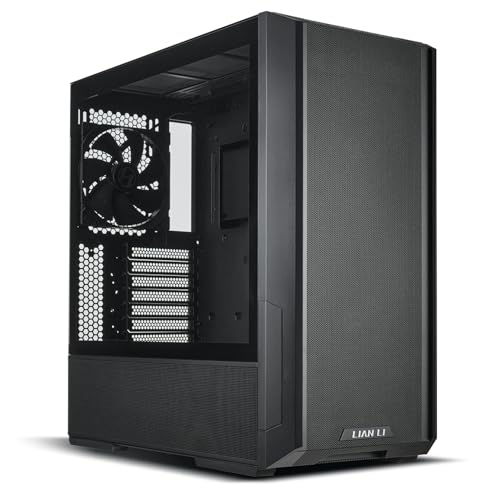
Our top pick: Lian Li Lancool 216
The Lancool 216 is the only case here that takes a 280mm radiator in both the front and the roof, which means the airflow plan stays open until the parts are on the desk.
Quick picks
Pick | Case | Where the 280mm mounts | Buy |
|---|---|---|---|
Best Overall | Front or top | ||
Best Value | Top | ||
Best Premium | Front or bottom | ||
Best Budget | Front | ||
Editor's Pick | Top |
Best Overall
- Case
- Where the 280mm mounts
Front or top
- Buy
Best Value
- Case
- Where the 280mm mounts
Top
- Buy
Best Premium
- Case
- Where the 280mm mounts
Front or bottom
- Buy
Best Budget
- Case
- Where the 280mm mounts
Front
- Buy
Editor's Pick
- Case
- Where the 280mm mounts
Top
- Buy
Specs at a glance
Case | Form factor | 280mm mount | Thickness budget | Max GPU | Included fans |
|---|---|---|---|---|---|
ATX mid tower | Front or top | 55mm top | 392mm | 3 | |
E-ATX mid tower | Top | Not published | 400mm | 4 | |
ATX / E-ATX | Front or bottom | Not published | 470mm | 3 | |
Micro-ATX | Front | Not published | 377mm | 1 | |
Compact ATX | Top | 60mm top | 410mm | 4 |
- Form factor
ATX mid tower
- 280mm mount
Front or top
- Thickness budget
55mm top
- Max GPU
392mm
- Included fans
3
- Form factor
E-ATX mid tower
- 280mm mount
Top
- Thickness budget
Not published
- Max GPU
400mm
- Included fans
4
- Form factor
ATX / E-ATX
- 280mm mount
Front or bottom
- Thickness budget
Not published
- Max GPU
470mm
- Included fans
3
- Form factor
Micro-ATX
- 280mm mount
Front
- Thickness budget
Not published
- Max GPU
377mm
- Included fans
1
- Form factor
Compact ATX
- 280mm mount
Top
- Thickness budget
60mm top
- Max GPU
410mm
- Included fans
4
How we picked
Start with the number no case publishes. A 280mm radiator is roughly 27mm thick on its own. Add 25mm fans and the assembly intrudes about 52 to 55mm into the chassis. That is the measurement that collides with a VRM heatsink or the top of a memory module, and it is why a roof rated for 280mm can still refuse the radiator you bought. Community fit guidance lands near 63mm of clear space at the mount surface as the safe planning figure.
Then read the condition attached to the claim. Corsair rates the roof of the 4000D Airflow for a 280mm radiator with low-profile memory, and 240mm with everything else. Both halves of that sentence are true. Only the first half tends to survive the trip to a product page, which is how a buyer ends up holding a radiator that will not clear their RAM.
Position matters more than size. Reviewers testing radiator placement found that moving a 360mm from the roof to the front cost 4 to 6 degrees C, which is more than the gap between a 360mm and a 280mm in the first place. Heat rises. A top-mounted 280mm works with that.
Worth saying plainly if you arrived from the 280mm AIO roundup: 280mm is not the consolation size. Measured against a 360mm under sustained load the gap averages 3 to 5 degrees C, and two 140mm fans move a given volume of air at lower RPM than three 120mm fans do.
So the five below were chosen on four things. A mount position the manufacturer rates for 280mm by name. A published thickness or clearance figure where one exists. An honest accounting of what that mount costs elsewhere in the build. And fans in the box, because a case shipping one rear exhaust is not the cheap option once you have ordered intakes.
Best Overall: Lian Li Lancool 216
Specs
Form factor | ATX mid tower |
280mm mounts | Front and top |
Top radiator limit | Up to 360mm, under 55mm thick |
Front radiator | 240 / 280 / 360mm |
Included fans | 2x 160mm front PWM, 1x 140mm rear PWM |
Max GPU length | 392mm |
Cooler clearance | 180mm rated |
Form factor
ATX mid tower
280mm mounts
Front and top
Top radiator limit
Up to 360mm, under 55mm thick
Front radiator
240 / 280 / 360mm
Included fans
2x 160mm front PWM, 1x 140mm rear PWM
Max GPU length
392mm
Cooler clearance
180mm rated
What it does well
Both mount points are real, and that is rarer than it sounds. The front accepts 240, 280, or 360 once the two 160mm intakes come out and the side brackets shift over. The roof is a removable tray, which is the difference between a twenty minute install and an hour of scraped knuckles reaching past an installed motherboard.
The stock fans are the other reason this one leads. Two 160mm intakes move more air per revolution than the 120mm trios most cases at this tier ship with, so the chassis is quiet before you have touched a fan curve. The front is full mesh, not a solid panel with decorative slots pretending to be ventilation. It sits on our list of airflow-first mid towers for the same reason.
What you give up
The roof caps at 55mm of total thickness. Run the arithmetic: a 27mm radiator plus 25mm fans is 52mm, so a standard 280mm slides in with 3mm to spare and a 30mm thick radiator does not go in at all. If push-pull up top was the plan, the plan is now the front.
Cooler clearance is the other soft number. Lian Li rates it at 180mm, but builders have flagged that the practical ceiling drops once the side panel and taller fan tops are accounted for. That only matters if you are hedging between air and liquid, and it is the same measurement optimism the rest of this article is about.
Who it's for
The builder who has not committed to front intake or top exhaust yet. Buy this one and the decision stays open until the radiator is in your hands.
Best Value: Montech Air 903 Max

Specs
Form factor | E-ATX mid tower |
280mm mounts | Top |
Top radiator | 120 / 140 / 240 / 280 / 360mm |
Front radiator | Up to 360mm |
Included fans | 4 pre-installed |
Max GPU length | 400mm |
Front panel | Full mesh |
Form factor
E-ATX mid tower
280mm mounts
Top
Top radiator
120 / 140 / 240 / 280 / 360mm
Front radiator
Up to 360mm
Included fans
4 pre-installed
Max GPU length
400mm
Front panel
Full mesh
What it does well
The manual lists 280mm roof support outright, alongside 120, 140, 240, and 360. Specific sizes, written down, tied to the position they apply to. That is the baseline this article is asking for, and a surprising number of cases at this price do not clear it.
Four fans arrive in the box. That matters more than any argument about fan quality, because a case shipping a single rear exhaust is really a case plus an intake order, and the second number rarely reaches the comparison. The chassis is also generous in the directions that stop a build from working: E-ATX board support, 400mm of graphics card room, full mesh front.
What you give up
The front is specified for 360mm, not 280mm. That is a design decision rather than an oversight, but it leaves the 280mm plan with exactly one home. If the roof turns out to be crowded by a tall VRM heatsink or a memory kit you already own, there is no second position to fall back on.
Included fans at this tier are also included fans. They work, they are balanced well enough, and they are not fans anyone chose after reading a review.
Who it's for
The builder on a fixed budget who has already decided the radiator goes up top, and who would rather put the fan money into storage.
Best Premium: Fractal Design Define 7

Specs
Form factor | ATX / E-ATX mid tower |
280mm mounts | Front and bottom |
Top radiator | 360 / 420mm only |
Front radiator | Up to 360mm, 280mm supported |
Included fans | 3x Dynamic X2 GP-14 |
Panels | Sound-dampened steel |
Layout | Open or storage, modular |
Form factor
ATX / E-ATX mid tower
280mm mounts
Front and bottom
Top radiator
360 / 420mm only
Front radiator
Up to 360mm, 280mm supported
Included fans
3x Dynamic X2 GP-14
Panels
Sound-dampened steel
Layout
Open or storage, modular
What it does well
Sound dampening on the panels, a modular interior that converts between an open layout and a storage layout, and a front rated for 280 or 360. This is the case for a reader who chose 280mm because two 140mm fans are quieter at a given airflow, not because it was all that fit.
The bottom mount is a genuine second position rather than a spec-sheet footnote, rated for 240 and 280, which gives a quiet build somewhere to put the radiator without fighting the front intake path. Build quality is why this chassis has stayed on shortlists for years. It is also the sleeper office pick: it looks like a server tower, hides any lighting you install, and sits beside a desk without announcing itself.
What you give up
Here is the part that catches people. The roof is rated for 360 and 420, not 280. On a case at this tier the assumption is that everything fits everywhere, and the assumption is wrong. Your 280mm goes in the front or the floor.
The solid front also trades raw intake for the quiet. Air arrives through side channels rather than straight through a mesh panel, which is the entire point of a sound-dampened chassis and still a real thermal cost against the mesh-front picks above. If noise is not a stated requirement, one of those is the better buy, and cases built for a 360mm radiator is the better list.
Who it's for
The builder who works next to the machine eight hours a day, or records near it, and chose 280mm specifically for the noise floor.
Best Budget: NZXT H3 Flow

Specs
Form factor | Micro-ATX |
280mm mounts | Front |
Top radiator | 240mm max |
Fan support | 2x 140mm front, 2x 140mm top, 2x 120mm bottom, 1x 120mm rear |
Included fans | 1x 120mm rear |
Max GPU length | 377mm bare, 317mm with front radiator |
Extras | Back-connect motherboard support |
Form factor
Micro-ATX
280mm mounts
Front
Top radiator
240mm max
Fan support
2x 140mm front, 2x 140mm top, 2x 120mm bottom, 1x 120mm rear
Included fans
1x 120mm rear
Max GPU length
377mm bare, 317mm with front radiator
Extras
Back-connect motherboard support
What it does well
A full 280mm in the front, on a micro-ATX footprint. That is the combination the 2x140mm mount rarity usually rules out, and it is why this one is here instead of a cheaper mid tower. Seven fan positions on a chassis this size is generous: two 140mm front, two 140mm top, two 120mm bottom, one 120mm rear.
NZXT also publishes three graphics card clearance figures instead of one. 377mm bare, 352mm with front fans, 317mm with a front radiator and fans installed. Three numbers for three real configurations is exactly the measurement discipline this article is asking for, and almost nobody does it.
What you give up
One fan in the box. Add intakes to the price before calling this the cheap option, because a single rear exhaust pulling against a front radiator is not a cooling plan.
Then read that third clearance figure again. A front-mounted 280mm costs 60mm of card length and drops the ceiling to 317mm, which rules out a number of current flagship cards. The roof caps at 240mm, so relocating the radiator is not the escape hatch. If the graphics card is already chosen and it is long, measure before you commit. More small-board options sit on our micro-ATX gaming cases list.
One more thing at checkout. NZXT has shipped near-identically-named Flow and Elite variants across its lineup, where the Elite carries a solid front panel and the Flow carries mesh. Buyers pick the wrong listing constantly. Mesh is the one you want.
Who it's for
The micro-ATX builder, or anyone who wants a real 280mm front mount and would rather put the savings into the cooler itself. Going smaller still? We measured whether a 280mm clears an NR200P on its own.
Editor's Pick: Lian Li Lancool 207

Specs
Form factor | Compact ATX |
280mm mounts | Top |
Top stack clearance | Up to 60mm radiator plus fans |
Top radiator sizes | 240 / 280 / 360mm |
Included fans | 4 pre-installed |
Max GPU length | 410mm |
Layout | Bottom-mounted GPU intake fans |
Form factor
Compact ATX
280mm mounts
Top
Top stack clearance
Up to 60mm radiator plus fans
Top radiator sizes
240 / 280 / 360mm
Included fans
4 pre-installed
Max GPU length
410mm
Layout
Bottom-mounted GPU intake fans
What it does well
Lian Li rates the roof for 60mm of combined radiator and fan thickness. Not radiator thickness, not fan thickness, the stack. That is the number that decides whether the side panel closes, and it is the number almost nobody publishes. Eight extra millimetres over the 216's ceiling reads as trivial until you are holding a 30mm radiator.
Four fans are included, and the two on the floor point up at the graphics card rather than sideways at a drive cage. On a compact ATX chassis that layout choice is what keeps a hot card from recirculating its own exhaust. Card room runs to 410mm, more than plenty of full-size mid towers offer.
What you give up
Top only. GamersNexus noted that Lian Li claims no formal radiator support anywhere except the roof, and that a front mount would depend on the hole placement lining up by luck. Treat the front as a fan position and nothing more.
The compact footprint also costs cable room compared with the 216. It is workable rather than comfortable, and a non-modular power supply will make it less so.
Who it's for
The builder running a thick radiator, a push-pull stack, or a high-TDP chip where those last 8mm decide whether the panel closes. If your radiator is a standard 27mm, the 216 is the easier build.
Bottom line
If the radiator is not bought yet, buy the Lian Li Lancool 216, because two working mount positions means the case never becomes the constraint. If the roof is where it is going and the budget is fixed, the Montech Air 903 Max does that job with four fans already installed. If noise is a stated requirement, take the Fractal Design Define 7 and put the radiator in the front, because the roof will not take it. If the build is micro-ATX, the NZXT H3 Flow is the only pick here with a real front 280mm mount, so measure your graphics card first. And if your radiator is thicker than standard, the Lian Li Lancool 207 publishes the stack clearance nobody else does.
Still choosing the cooler itself? Our AIO cooler guide covers that half of the decision.
FAQ
Does a 280mm AIO fit in most mid-tower cases?
Usually, but the position is not guaranteed. A 280mm radiator needs two 140mm mounting points, and plenty of mid towers are drilled for 120mm holes, which accommodates 240 and 360 while leaving 280 stranded. Check the spec sheet's radiator support section, which lists supported sizes per position rather than as one number. If 280 appears under only one position, that position is your only option.
Should a 280mm radiator go in the top or the front?
Top, when the case allows it. Heat rises, so a roof-mounted radiator exhausts in the direction the air was already moving. Reviewers measuring radiator placement found that shifting a 360mm from the roof to the front cost 4 to 6 degrees C, which is larger than the gap between a 360mm and a 280mm. Front mounting brings cooler air across the radiator, but it dumps that heat inside for the graphics card to deal with.
How much clearance does a 280mm radiator actually need?
Plan for roughly 63mm of clear space at the mount surface. The radiator alone is near 27mm, fans add another 25mm, and the assembly intrudes about 52 to 55mm. The margin covers screw heads, the barb housing where the tubes exit, and the fact that published case figures run optimistic. Where a case publishes a combined radiator-plus-fan number, as the Lancool 207 does at 60mm, trust that over the radiator size list.
Will a 280mm AIO fit in a micro-ATX case?
Some, not most. The 2x140mm mount is already less common than 2x120mm, and shrinking the chassis removes the panel space that hosts it. The NZXT H3 Flow takes a 280mm in the front and caps the roof at 240mm, which is a typical micro-ATX shape. Expect a trade, since a front radiator in a small case usually costs card length. On the H3 Flow it drops the ceiling from 377mm to 317mm.
Does tall RAM stop a top-mounted 280mm radiator?
It can, and this is where most top-mount plans fail. Corsair rates the roof of the 4000D Airflow for 280mm with low-profile memory and 240mm with taller modules, which is an unusually direct way of stating a limit most manufacturers leave unwritten. If your memory has tall heat spreaders or a lighting diffuser, measure from the motherboard tray to the roof panel and subtract the 52 to 55mm the radiator assembly needs.
Is a 280mm AIO enough, or should I get a 360mm?
For most builds a 280mm is enough. Under sustained load the measured gap to a 360mm averages 3 to 5 degrees C, and two 140mm fans reach a given airflow at lower RPM than three 120mm fans, so the smaller radiator is often the quieter one. A 360mm earns its place on a high-TDP chip under long all-core work. If your case mounts both properly, size up. If it only mounts one properly, take that one.
Related Articles

Best 280mm AIO Coolers (2026): Five Picks by Build Tier
Best 280mm AIO coolers for 2026: five liquid CPU cooler picks by build tier, with an honest take on whether 280mm is the right radiator for your chip.
May 27, 2026

Best PC Cases for a 360mm AIO (2026): 5 Picks by Mount
The best PC case for a 360mm AIO comes down to mount location and top clearance. Five picks with radiator positions, clearance in mm, and GPU length costs.
Aug 22, 2026

Will a 280mm AIO Fit in a Cooler Master NR200P? (2026)
Yes, a 280mm AIO fits in the NR200P, but only on the left side, which kills the vertical GPU mount. The full clearance matrix and three coolers that fit.
Sep 3, 2026

Best AIO Cooler 2026: 5 Picks, 240mm vs 280mm vs 360mm
Best AIO cooler picks for 2026: match a 240mm, 280mm, or 360mm radiator to your case and CPU TDP in minutes, plus five tested picks and when air still wins.
Aug 18, 2026

Best Prebuilt Gaming PCs for WoW Forever (2026): 5 Picks
The best prebuilt gaming PC for WoW Forever pairs an X3D CPU with a 1440p GPU for raid nights. Five towers ranked, from an RTX 5060 budget box to a 5070 Ti rig.
Nov 1, 2026