Affiliate Disclosure: As an Amazon Associate we earn from qualifying purchases. Some links may earn us a commission at no cost to you.

Best Gaming Laptop for Phantom Blade Zero (2026): 5 Picks
The best gaming laptop for Phantom Blade Zero has an RTX 5070 or faster at full wattage, 32 GB of RAM and room on the SSD for a 145 GB install. NVIDIA names the RTX 5070 Laptop GPU as the floor for path tracing at 1080p and the RTX 5080 Laptop GPU for 1440p, and S-GAME's own spec sheet assumes upscaling at every tier.
If you came over from the PS5 and do not own a gaming PC yet, a laptop is the simplest way in. Each pick below is mapped to the settings it holds.
Our top pick: ASUS ROG Strix G16 RTX 5070 Ti
The Strix G16 pairs a 140 W RTX 5070 Ti with 12 GB of VRAM and 32 GB of RAM, which covers both memory pools Phantom Blade Zero fills with path tracing on.

Quick picks
Pick | Laptop | Phantom Blade Zero target | Buy |
|---|---|---|---|
Best Overall | 1600p High with path tracing, DLSS on | ||
Best Value | 1080p High with path tracing, DLSS on | ||
Best Premium | 1440p and up with path tracing maxed | ||
Best Budget | 1080p Medium to High with ray tracing, DLSS on | ||
Editor's Pick | 1600p High with path tracing, after a RAM upgrade |
Best Overall
- Laptop
- Phantom Blade Zero target
1600p High with path tracing, DLSS on
- Buy
Best Value
- Laptop
- Phantom Blade Zero target
1080p High with path tracing, DLSS on
- Buy
Best Premium
- Laptop
- Phantom Blade Zero target
1440p and up with path tracing maxed
- Buy
Best Budget
- Laptop
- Phantom Blade Zero target
1080p Medium to High with ray tracing, DLSS on
- Buy
Editor's Pick
- Laptop
- Phantom Blade Zero target
1600p High with path tracing, after a RAM upgrade
- Buy
Specs at a glance
Laptop | GPU and VRAM | Max graphics power | RAM | SSD | Display |
|---|---|---|---|---|---|
GeForce RTX 5070 Ti Laptop, 12 GB GDDR7 | 140 W | 32 GB DDR5-5600 | 1 TB PCIe Gen 4 SSD | 16in 2.5K (2560 x 1600), 240 Hz, 3 ms | |
GeForce RTX 5070 Laptop, 8 GB GDDR7 | 115 W | 32 GB DDR5 | 1 TB NVMe SSD | 15.6in QHD+ (2560 x 1600), 165 Hz | |
GeForce RTX 5080 Laptop, 16 GB GDDR7 | 175 W | 32 GB DDR5 | 2 TB NVMe SSD | 16in QHD+ (2560 x 1600), 240 Hz | |
GeForce RTX 5060 Laptop, 8 GB GDDR7 | 85 W | 32 GB DDR5 | 1 TB PCIe Gen 4 SSD | 16in WUXGA (1920 x 1200), 180 Hz | |
GeForce RTX 5070 Ti Laptop, 12 GB GDDR7 | 140 W | 16 GB DDR5 | 1 TB PCIe Gen 4 SSD | 16in WQXGA (2560 x 1600), 240 Hz, G-SYNC |
- GPU and VRAM
GeForce RTX 5070 Ti Laptop, 12 GB GDDR7
- Max graphics power
140 W
- RAM
32 GB DDR5-5600
- SSD
1 TB PCIe Gen 4 SSD
- Display
16in 2.5K (2560 x 1600), 240 Hz, 3 ms
- GPU and VRAM
GeForce RTX 5070 Laptop, 8 GB GDDR7
- Max graphics power
115 W
- RAM
32 GB DDR5
- SSD
1 TB NVMe SSD
- Display
15.6in QHD+ (2560 x 1600), 165 Hz
- GPU and VRAM
GeForce RTX 5080 Laptop, 16 GB GDDR7
- Max graphics power
175 W
- RAM
32 GB DDR5
- SSD
2 TB NVMe SSD
- Display
16in QHD+ (2560 x 1600), 240 Hz
- GPU and VRAM
GeForce RTX 5060 Laptop, 8 GB GDDR7
- Max graphics power
85 W
- RAM
32 GB DDR5
- SSD
1 TB PCIe Gen 4 SSD
- Display
16in WUXGA (1920 x 1200), 180 Hz
- GPU and VRAM
GeForce RTX 5070 Ti Laptop, 12 GB GDDR7
- Max graphics power
140 W
- RAM
16 GB DDR5
- SSD
1 TB PCIe Gen 4 SSD
- Display
16in WQXGA (2560 x 1600), 240 Hz, G-SYNC
How we picked a gaming laptop for Phantom Blade Zero
Settings tier | Official or NVIDIA target | Laptop GPU that gets there | Our pick |
|---|---|---|---|
1080p, 30 fps (minimum) | GTX 1660 or RX 5500 XT, 16 GB RAM, SSD | Any RTX 50 laptop | |
1080p, 60 fps with ray tracing | Desktop RTX 5060, upscaling on | RTX 5060 Laptop at Medium to High | |
1080p with path tracing | RTX 5070 Laptop GPU (NVIDIA) | RTX 5070 Laptop at 115 W | |
1440p to 1600p with path tracing | RTX 5080 Laptop GPU for maxed settings (NVIDIA) | RTX 5070 Ti Laptop with DLSS, or RTX 5080 Laptop | |
4K with path tracing | Desktop RTX 5080, 16 GB, upscaling on | RTX 5080 Laptop on an external 4K screen |
1080p, 30 fps (minimum)
- Official or NVIDIA target
GTX 1660 or RX 5500 XT, 16 GB RAM, SSD
- Laptop GPU that gets there
Any RTX 50 laptop
- Our pick
1080p, 60 fps with ray tracing
- Official or NVIDIA target
Desktop RTX 5060, upscaling on
- Laptop GPU that gets there
RTX 5060 Laptop at Medium to High
- Our pick
1080p with path tracing
- Official or NVIDIA target
RTX 5070 Laptop GPU (NVIDIA)
- Laptop GPU that gets there
RTX 5070 Laptop at 115 W
- Our pick
1440p to 1600p with path tracing
- Official or NVIDIA target
RTX 5080 Laptop GPU for maxed settings (NVIDIA)
- Laptop GPU that gets there
RTX 5070 Ti Laptop with DLSS, or RTX 5080 Laptop
- Our pick
4K with path tracing
- Official or NVIDIA target
Desktop RTX 5080, 16 GB, upscaling on
- Laptop GPU that gets there
RTX 5080 Laptop on an external 4K screen
- Our pick
Start with the floor. Phantom Blade Zero is an Unreal Engine 5 game that S-GAME rates at 1080p and 30 fps on a GTX 1660 with 16 GB of RAM, and an SSD is mandatory. Every RTX 50 laptop clears that line. The real question is which of the game's three lighting modes you want: standard rasterized lighting, ray tracing, or full path tracing with DLSS 4.5 Ray Reconstruction.
Path tracing is where laptops split. PC Games Hardware measured frame rates nearly halving when you switch from rasterized lighting to ray or path tracing, which is why NVIDIA points laptop players at an RTX 5070 for 1080p and an RTX 5080 for 1440p. Multi Frame Generation can then multiply what the chip renders, but it needs a steady base frame rate underneath it to feel right in a parry-heavy action game.
Memory is the part most laptops skimp on. GameGPU recorded roughly 8 GB of video memory in use at 1080p with path tracing at Ultra, 9 GB at 1440p and 11 GB at 4K, so 8 GB chips belong at 1080p and 12 GB is the comfortable start for a 1600p panel. The same tests logged 19 to 22 GB of system RAM, which makes 32 GB the real target even though the spec sheet says 16.
Finally, budget the storage. GameGPU lists 145 GB of free SSD space, which eats more than a quarter of a 512 GB drive once Windows is installed. Every pick here ships with at least 1 TB. If you are weighing a desktop card instead, our GPU guide for Phantom Blade Zero covers the same tiers for towers.
How we weighed graphics power
Higher sustained wattage means more of the chip's performance survives inside a laptop chassis.
- 175 W
- 140 W
- 140 W
- 115 W
- 85 W
We have no measured Phantom Blade Zero frame rates for RTX 50 laptops from a reviewer we trust, and calculator sites that estimate them are not data. Wattage is the next best signal. The same RTX 5060 chip can ship at 85 W in one chassis and 115 W in another, and the lower figure costs real frames in a game this heavy on the GPU.
Read the chart alongside the VRAM column above. The two RTX 5070 Ti machines share a wattage, so their RAM and processor decide which one fits you, and the RTX 5080 pick leads on both power and memory.
Best Overall: ASUS ROG Strix G16 RTX 5070 Ti
Specs
CPU | AMD Ryzen 9 9955HX3D (16 cores) |
GPU | GeForce RTX 5070 Ti Laptop, 12 GB GDDR7 |
Max graphics power | 140 W |
RAM | 32 GB DDR5-5600 |
Storage | 1 TB PCIe Gen 4 SSD |
Display | 16in 2.5K (2560 x 1600), 240 Hz, 3 ms |
CPU
AMD Ryzen 9 9955HX3D (16 cores)
GPU
GeForce RTX 5070 Ti Laptop, 12 GB GDDR7
Max graphics power
140 W
RAM
32 GB DDR5-5600
Storage
1 TB PCIe Gen 4 SSD
Display
16in 2.5K (2560 x 1600), 240 Hz, 3 ms
What it does well
The RTX 5070 Ti here runs at 140 W and carries 12 GB of GDDR7. That clears the 9 GB GameGPU logged at 1440p with path tracing on, with headroom left for the 16:10 2.5K panel's extra pixels. Pair path tracing with DLSS Quality or Balanced and Ray Reconstruction, and this is the tier NVIDIA's guidance puts between its 1080p and 1440p laptop picks.
The 32 GB of DDR5 is the quiet win. Phantom Blade Zero used 19 to 22 GB of system RAM at max settings in GameGPU's runs, so the 16 GB most laptops at this tier ship with would push the game into swapping. The Ryzen 9 9955HX3D adds a large 3D V-Cache pool, which helps steady frame pacing in the busy multi-enemy fights.
What you give up
It costs well above the Editor's Pick, which runs the same graphics chip at the same wattage. You pay for the RAM and the X3D processor, and those gains show up as smoother frame times rather than a higher average.
The X3D chip and a 140 W GPU make for a hot, loud machine under combined load, and the 1 TB drive fills fast once the 145 GB install joins a few other big games. Plan on a second SSD if your library is large.
Who it's for
The player who wants path tracing on at 1600p with DLSS and does not want to open the laptop to add memory. It is also the safest pick for a first gaming machine, since nothing about it needs an upgrade to run this game the way it was shown.
Best Value: MSI Katana 15 HX RTX 5070

Specs
CPU | Intel Core i9-14900HX (24 cores) |
GPU | GeForce RTX 5070 Laptop, 8 GB GDDR7 |
Max graphics power | 115 W |
RAM | 32 GB DDR5 |
Storage | 1 TB NVMe SSD |
Display | 15.6in QHD+ (2560 x 1600), 165 Hz |
CPU
Intel Core i9-14900HX (24 cores)
GPU
GeForce RTX 5070 Laptop, 8 GB GDDR7
Max graphics power
115 W
RAM
32 GB DDR5
Storage
1 TB NVMe SSD
Display
15.6in QHD+ (2560 x 1600), 165 Hz
What it does well
This is the chip NVIDIA names for 1080p path tracing, and the Katana runs it at 115 W, the full rating for the RTX 5070 Laptop. Some RTX 5070 laptops ship well below that, so the wattage here is the reason this specific model earns the slot.
MSI also ships it with 32 GB of RAM, which matches what the game uses at max settings, and a 24-core Core i9-14900HX that keeps the processor out of the way. Our RTX 5070 laptop roundup compares it with the other machines built on this chip.
What you give up
The 8 GB of VRAM is the ceiling. GameGPU logged about 8 GB in use at 1080p with path tracing at Ultra, so on the 2560 x 1600 panel you will run DLSS Performance or drop textures a notch to keep path tracing on. At native 1600p with everything maxed, the memory runs out before the chip does.
The build is plastic and plain, and the 14900HX runs hot when the CPU and GPU are both loaded, so expect loud fans during long sessions.
Who it's for
The player who wants path tracing at 1080p, or High at 1600p with DLSS, and the full 32 GB of RAM without paying for an RTX 5070 Ti.
Best Premium: MSI Raider A16 HX RTX 5080
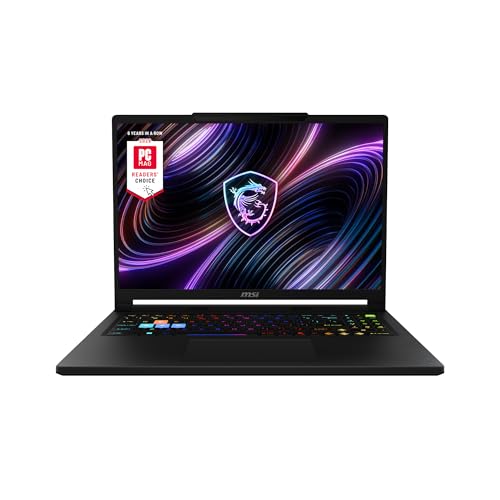
Specs
CPU | AMD Ryzen 9 8940HX (16 cores) |
GPU | GeForce RTX 5080 Laptop, 16 GB GDDR7 |
Max graphics power | 175 W |
RAM | 32 GB DDR5 |
Storage | 2 TB NVMe SSD |
Display | 16in QHD+ (2560 x 1600), 240 Hz |
CPU
AMD Ryzen 9 8940HX (16 cores)
GPU
GeForce RTX 5080 Laptop, 16 GB GDDR7
Max graphics power
175 W
RAM
32 GB DDR5
Storage
2 TB NVMe SSD
Display
16in QHD+ (2560 x 1600), 240 Hz
What it does well
The RTX 5080 Laptop is NVIDIA's pick for 1440p path tracing, and the Raider A16 HX feeds it 175 W with Dynamic Boost. It is the only chip in this lineup with 16 GB of VRAM, which covers the 11 GB GameGPU measured at 4K with path tracing on.
Around it, MSI fits 32 GB of DDR5 and a 2 TB SSD, so the 145 GB install barely dents the drive. If 4K on a TV or external monitor is the goal, this is the laptop that gets closest, and our RTX 5080 laptop guide covers the rest of this tier.
What you give up
Cost, weight and heat. A 175 W GPU and a 16-core Ryzen 9 8940HX need a thick chassis and loud fans, and battery life during play is short. This is a desk machine you can move, not a laptop you game on from the couch unplugged.
The 8940HX is an older Zen 4 design, and PC Games Hardware found the processor matters more once ray tracing is on. The traversal stutter it recorded with path tracing is a game-side issue that more GPU power does not remove.
Who it's for
The player who wants path tracing maxed at 1440p and above, plans to plug into a 4K screen, and wants a machine that will still carry the next big Unreal Engine 5 release.
Best Budget: Acer Nitro V 16S RTX 5060

Specs
CPU | AMD Ryzen 7 260 (8 cores) |
GPU | GeForce RTX 5060 Laptop, 8 GB GDDR7 |
Max graphics power | 85 W |
RAM | 32 GB DDR5 |
Storage | 1 TB PCIe Gen 4 SSD |
Display | 16in WUXGA (1920 x 1200), 180 Hz |
CPU
AMD Ryzen 7 260 (8 cores)
GPU
GeForce RTX 5060 Laptop, 8 GB GDDR7
Max graphics power
85 W
RAM
32 GB DDR5
Storage
1 TB PCIe Gen 4 SSD
Display
16in WUXGA (1920 x 1200), 180 Hz
What it does well
The Nitro V 16S pairs an RTX 5060 with 32 GB of RAM and a 1 TB SSD, which is rare at this tier. S-GAME's ray tracing row names the desktop RTX 5060 for 1080p at 60 fps with upscaling, and this laptop gets you that lighting mode on the 1920 x 1200 panel at Medium to High with DLSS on.
The memory is the reason it beats cheaper RTX 5060 machines. Most of them ship with 16 GB and a 512 GB drive, and Phantom Blade Zero wants more of both. Our RTX 5060 laptop guide lists the full-wattage alternatives if you can spend a little more.
What you give up
Acer runs the RTX 5060 at 85 W, well under the 115 W the chip is rated for. Tom's Hardware and CNET both found it trails full-wattage RTX 5060 laptops in games, so treat path tracing as off the table here and ray tracing as a 1080p setting with DLSS on.
The 8 GB of VRAM and the 8-core Ryzen 7 260 are both at the edge of what this game asks for, so this is the pick to buy for today's settings, not for headroom.
Who it's for
The PS5 player on a tight budget who wants Phantom Blade Zero on PC at 1080p with ray tracing, and who values 32 GB of RAM over a faster chip at lower wattage.
Editor's Pick: Acer Predator Helios Neo 16 RTX 5070 Ti

Specs
CPU | Intel Core Ultra 9 275HX (24 cores) |
GPU | GeForce RTX 5070 Ti Laptop, 12 GB GDDR7 |
Max graphics power | 140 W |
RAM | 16 GB DDR5 |
Storage | 1 TB PCIe Gen 4 SSD |
Display | 16in WQXGA (2560 x 1600), 240 Hz, G-SYNC |
CPU
Intel Core Ultra 9 275HX (24 cores)
GPU
GeForce RTX 5070 Ti Laptop, 12 GB GDDR7
Max graphics power
140 W
RAM
16 GB DDR5
Storage
1 TB PCIe Gen 4 SSD
Display
16in WQXGA (2560 x 1600), 240 Hz, G-SYNC
What it does well
The Helios Neo 16 runs the same 12 GB RTX 5070 Ti at the same 140 W as our top pick, and it costs less. On the GPU side it holds the same settings: path tracing at 1600p with DLSS, or High without path tracing at the panel's native resolution.
The 24-core Core Ultra 9 275HX keeps up in the crowded fights, and the 240 Hz G-SYNC panel suits a fast action game. Our RTX 5070 Ti laptop guide covers the other chassis built on this chip.
What you give up
It ships with 16 GB of RAM, short of the 19 to 22 GB the game used at max settings. Reports suggest this chassis has two SO-DIMM slots, so a 32 GB kit is the upgrade path, but confirm the slot layout for this exact model before you buy the kit.
This PHN16-73-92B8 configuration is the IPS panel, not the OLED some Helios Neo listings carry, and the display finish is reflective under room lights.
Who it's for
The player comfortable opening a laptop who wants top-pick graphics performance for less, and plans to add 16 GB of memory on day one.
Bottom line
If you want path tracing at 1600p without upgrading anything, buy the ASUS ROG Strix G16 RTX 5070 Ti.
If you want NVIDIA's 1080p path tracing chip with 32 GB of RAM for less, buy the MSI Katana 15 HX RTX 5070.
If you want path tracing maxed at 1440p or a 4K screen, buy the MSI Raider A16 HX RTX 5080.
If budget comes first, buy the Acer Nitro V 16S RTX 5060 and play at 1080p with ray tracing. If you will add RAM yourself, the Acer Predator Helios Neo 16 RTX 5070 Ti gets you the top pick's graphics chip for less.
FAQ
Can a gaming laptop run Phantom Blade Zero?
Yes. S-GAME's minimum is a GTX 1660 or RX 5500 XT with 16 GB of RAM and an SSD for 1080p at 30 fps, so any RTX 50 gaming laptop clears it. For 1080p at 60 fps with ray tracing, aim for an RTX 5060 or better with DLSS on. For path tracing, NVIDIA recommends at least an RTX 5070 Laptop GPU at 1080p. Plan on 32 GB of RAM and 145 GB of free SSD space.
What laptop GPU do I need for path tracing in Phantom Blade Zero?
NVIDIA recommends an RTX 5070 Laptop GPU for path tracing at 1080p and an RTX 5080 Laptop GPU at 1440p, both with DLSS 4.5 on. Wattage matters as much as the chip name, so look for an RTX 5070 at 115 W like the MSI Katana 15 HX. A 12 GB RTX 5070 Ti, as in the ASUS ROG Strix G16, is the sweet spot for 1600p panels.
Is 16 GB of RAM enough for Phantom Blade Zero?
It meets the official spec, but it is tight. GameGPU recorded 19 to 22 GB of system memory in use with path tracing at Ultra, so a 16 GB laptop will page to the SSD in heavy scenes. Four of our five picks ship with 32 GB. The Acer Predator Helios Neo 16 ships with 16 GB, and adding a second memory module is the fix if the slots allow it.
How much storage does Phantom Blade Zero need?
GameGPU lists 145 GB of free space, and S-GAME makes an SSD mandatory, so a hard drive will not do. On a 512 GB laptop that is more than a quarter of the drive after Windows. Every pick here ships with at least 1 TB, and the MSI Raider A16 HX carries 2 TB. Leave extra room for patches, since big launches tend to grow after release.
Is a gaming laptop better than a PS5 for Phantom Blade Zero?
A PS5 is the cheaper way to play. A gaming laptop is the way to get path tracing, DLSS 4.5 frame generation and a 165 to 240 Hz panel, none of which the console offers. If you want the best-looking version of the game, the ASUS ROG Strix G16 runs path tracing at 1600p with DLSS. A laptop also doubles as a PC for other games and work, which a console does not.
Related Articles

Best GPUs for Phantom Blade Zero (2026): Picks by Resolution Tier
Phantom Blade Zero launches September 9, 2026 on UE5 with Lumen, Nanite, hardware RT, and DLSS 4 confirmed. Here are the GPUs that hit 60fps+ at 1440p and 4K Quality, picked before the crowd figures it out.
May 25, 2026

Best RTX 5070 Gaming Laptops (2026): TGP-Ranked Picks
The best RTX 5070 gaming laptops in 2026, ranked by the TGP each chassis actually sustains. Five picks from budget to 18-inch, plus the 8GB VRAM catch.
Jul 21, 2026

Best RTX 5080 Gaming Laptops (2026): 5 TGP-Ranked Picks
The best RTX 5080 gaming laptops in 2026, ranked by the GPU power each chassis can sustain. Five picks from 16-inch OLED to 18-inch, plus the 5080 Ti myth.
Oct 8, 2026

Best RTX 5070 Ti Gaming Laptops (2026): TGP-Ranked Picks
The best RTX 5070 Ti gaming laptops of 2026, ranked by the GPU power each chassis sustains. Five picks from 14 to 16 inches, plus the 32GB RAM call to make.
Oct 30, 2026

Best RTX 5060 Gaming Laptops (2026): 5 TGP-Ranked Picks
The best RTX 5060 gaming laptop is the one with the highest TGP. We rank five picks by sustained wattage, from a 115W ASUS TUF F16 down to an 85W Acer Nitro.
Sep 7, 2026