Affiliate Disclosure: As an Amazon Associate we earn from qualifying purchases. Some links may earn us a commission at no cost to you.

Best RTX 5060 Gaming Laptops (2026): 5 TGP-Ranked Picks
NVIDIA configures the RTX 5060 Laptop GPU between 45W and 100W, then lets manufacturers add up to 25W of Dynamic Boost on top. Two laptops can carry the same GPU badge and land roughly a fifth apart on frame rate.
So the badge is not the spec. The wattage is. Every pick below is slotted by the power ceiling the chassis gives the GPU, then by what you pay for it, and the ladder runs from 115W down to 85W.
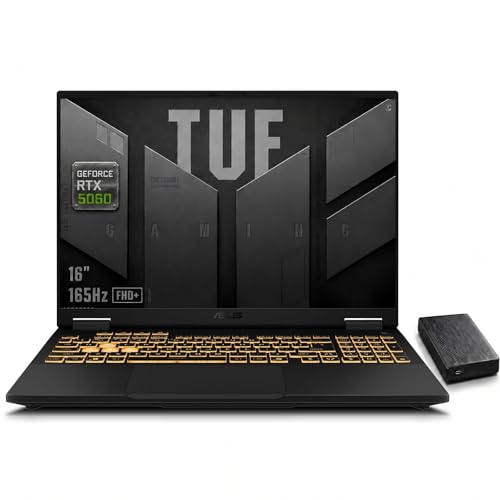
Our top pick: ASUS TUF Gaming F16
The ASUS TUF Gaming F16 runs its RTX 5060 at a 115W ceiling and prints that number on the listing itself, which is rarer than it should be. Nothing else in this price band gives the GPU more room to work.
Quick picks
Pick | Laptop | Max TGP | Best for | Buy |
|---|---|---|---|---|
Best Overall | 115W | Most frames per dollar at 1080p | ||
Best Value | 115W | Full power behind a QHD panel | ||
Best Premium | 115W | Work and games on one machine | ||
Best Budget | 100W | Cheapest full-effort RTX 5060 | ||
Editor's Pick | 85W | Quiet 1080p gaming |
Best Overall
- Laptop
- Max TGP
115W
- Best for
Most frames per dollar at 1080p
- Buy
Best Value
- Laptop
- Max TGP
115W
- Best for
Full power behind a QHD panel
- Buy
Best Premium
- Laptop
- Max TGP
115W
- Best for
Work and games on one machine
- Buy
Best Budget
- Laptop
- Max TGP
100W
- Best for
Cheapest full-effort RTX 5060
- Buy
Editor's Pick
- Laptop
- Max TGP
85W
- Best for
Quiet 1080p gaming
- Buy
Specs at a glance
Laptop | Max TGP | Panel | CPU | Memory | Storage |
|---|---|---|---|---|---|
115W | 16-inch 1920x1200, 165Hz | Core i7-14650HX | 16 GB DDR5 | 1 TB NVMe | |
115W | 15.6-inch 2560x1440, 165Hz | Core i7-14650HX | 16 GB DDR5 | 1 TB NVMe | |
115W | 16-inch 2560x1600 | Core Ultra 9 275HX | 32 GB | 1 TB PCIe | |
100W | 15.6-inch 1920x1080, 144Hz | Ryzen 7 250 | 16 GB | 512 GB NVMe | |
85W | 16-inch 1920x1200, 180Hz | Ryzen AI 5 340 | 16 GB DDR5 | 512 GB Gen 4 |
- Max TGP
115W
- Panel
16-inch 1920x1200, 165Hz
- CPU
Core i7-14650HX
- Memory
16 GB DDR5
- Storage
1 TB NVMe
- Max TGP
115W
- Panel
15.6-inch 2560x1440, 165Hz
- CPU
Core i7-14650HX
- Memory
16 GB DDR5
- Storage
1 TB NVMe
- Max TGP
115W
- Panel
16-inch 2560x1600
- CPU
Core Ultra 9 275HX
- Memory
32 GB
- Storage
1 TB PCIe
- Max TGP
100W
- Panel
15.6-inch 1920x1080, 144Hz
- CPU
Ryzen 7 250
- Memory
16 GB
- Storage
512 GB NVMe
- Max TGP
85W
- Panel
16-inch 1920x1200, 180Hz
- CPU
Ryzen AI 5 340
- Memory
16 GB DDR5
- Storage
512 GB Gen 4
Benchmarks
Reviewers benchmark the RTX 5060 Laptop GPU at a stated power ceiling rather than per retail SKU, so these charts show what was measured at named wattages instead of a made-up number per laptop. Read them as the shape of the power curve, not as a scoreboard.
Measured on an MSI Stealth A16 with the GPU capped at 95W, upscaling disabled.
- 89.9 FPS
- 55.5 FPS
Same 95W test machine. A lighter renderer than Cyberpunk, and it shows at 1440p.
- 105.5 FPS
- 72.1 FPS
What a full-power 115W configuration produces in a review environment.
- 95 FPS
- 65.6 FPS
Top of the boost range at each end of NVIDIA's configurable power window.
- 1455 MHz
- 2310 MHz
How we picked
Wattage first. The RTX 5060 Laptop is one silicon part with a wide configuration window, and clocks track the setting almost directly: Notebookcheck lists a 952 to 1455 MHz range at 45W against 1950 to 2310 MHz at 100W. Same chip, same 3328 CUDA cores, same 8 GB of GDDR7, very different machine. If you are weighing the generation gap rather than the wattage gap, our comparison of the RTX 5060 and the RTX 4060 covers that side.
Panel second. A 115W ceiling buys frames, and frames are only worth what the display can show. A 165Hz 1080p panel turns extra wattage into visible smoothness. A 1600p panel spends it on pixel count instead, which is a fair trade if you want the desktop space, but it is a trade. For Call of Duty in particular, our guide to the best gaming laptop for Modern Warfare 4 maps these wattage tiers to the game's official spec.
Memory third, and it is the ceiling nobody advertises. Eight gigabytes was comfortable at 1080p two years ago. At 1440p in current open-world titles it is tight, and the failure mode is ugly: textures load at lower quality rather than the frame rate collapsing, so the counter stays high while the game looks worse. Upscaling helps, since it renders at a lower internal resolution, but it does not add memory.
What we skipped: configurations where the vendor caps the GPU well below 100W and still charges more than a full-power machine. A quiet 85W laptop earns its place on this list. An 80W laptop priced above a 115W one does not, and one popular chassis came off the shortlist for exactly that reason. Readers cross-shopping a tower instead should start with our desktop mid-range GPU picks.
Best Overall: ASUS TUF Gaming F16
Specs
Max GPU power (TGP) | 115W (100W base plus Dynamic Boost) |
GPU | GeForce RTX 5060 Laptop, 8 GB GDDR7 |
CPU | Intel Core i7-14650HX |
Display | 16-inch 1920x1200, 165Hz |
Memory | 16 GB DDR5 |
Storage | 1 TB NVMe SSD |
Cooling | Dual-fan ASUS Intelligent Cooling |
Max GPU power (TGP)
115W (100W base plus Dynamic Boost)
GPU
GeForce RTX 5060 Laptop, 8 GB GDDR7
CPU
Intel Core i7-14650HX
Display
16-inch 1920x1200, 165Hz
Memory
16 GB DDR5
Storage
1 TB NVMe SSD
Cooling
Dual-fan ASUS Intelligent Cooling
What it does well
The ceiling is the point. ASUS gives this chassis a 115W budget for the GPU, which is 100W of base power plus Dynamic Boost, and it publishes that figure in the product listing. Most vendors leave you guessing.
Tom's Hardware measured 95 fps in Shadow of the Tomb Raider at 1080p on the Highest preset and 65.6 fps in Metro Exodus on its ray tracing preset. That is the shape a full-power RTX 5060 should produce.
The panel matches the silicon. Sixteen inches, 1920x1200, 165Hz. That resolution keeps an 8 GB frame buffer comfortable and gives 115W enough headroom to keep the refresh rate busy in most current titles. The sixteen-core Core i7-14650HX never becomes the limiting part.
What you give up
Noise. Turbo mode moves enough air that the fan becomes the loudest thing in the room, because 115W has to go somewhere. Headphones fix it. An open-plan office does not.
Tom's Hardware also flagged short battery life and a stingy base SSD. Neither is surprising at this power level and both are fixable, though the battery only within reason.
The FHD+ panel is the honest trade for the wattage. Two other picks here have more desktop area or a sharper image, and both cost more.
Who it's for
You game at 1080p or 1200p, you want the refresh rate saturated rather than the pixel count raised, and you use headphones. This is the most frames the RTX 5060 will give you in this price band.
Best Value: MSI Katana 15 HX

Specs
Max GPU power (TGP) | 115W |
GPU | GeForce RTX 5060 Laptop, 8 GB GDDR7 |
CPU | Intel Core i7-14650HX |
Display | 15.6-inch 2560x1440, 165Hz |
Memory | 16 GB DDR5 |
Storage | 1 TB NVMe SSD |
Networking | Wi-Fi 6E |
Max GPU power (TGP)
115W
GPU
GeForce RTX 5060 Laptop, 8 GB GDDR7
CPU
Intel Core i7-14650HX
Display
15.6-inch 2560x1440, 165Hz
Memory
16 GB DDR5
Storage
1 TB NVMe SSD
Networking
Wi-Fi 6E
What it does well
Same ceiling, sharper screen. The Katana 15 HX runs its RTX 5060 at 115W, the figure Tom's Hardware cites when it ranks the Katana against lower-power machines, and it puts a 2560x1440 165Hz panel in front of it. Against the TUF you are trading physical size for pixel density at an identical power budget.
The rest of the configuration is unusually complete for the tier. A 1 TB NVMe drive and Wi-Fi 6E come standard rather than as a configure-to-order upgrade, and the i7-14650HX is the same chip driving the TUF, so the CPU side is a wash.
For esports the QHD panel is close to free. Counter-Strike 2, Valorant and Rocket League all run well above the refresh rate at this power level, so the extra pixels cost nothing you were using.
What you give up
QHD plus 8 GB is the tightest pairing on this list. Modern open-world games at native 1440p hit the frame buffer before they hit the GPU, and the symptom is degraded textures rather than a frame rate cliff. DLSS answers it well, but it becomes a default setting instead of an option.
A 15.6-inch chassis has less surface area to shed 115W than a 16-inch one. Sustained load runs warmer here and the fan curve reflects it.
The build is plain. Plastics, an unremarkable hinge, and an RGB keyboard doing most of the visual work.
Who it's for
You want the sharper panel, you already run upscaling in every game you play, and you would rather spend the budget on resolution than on chassis materials.
Best Premium: Lenovo Legion 5i 16

Specs
Max GPU power (TGP) | 115W |
GPU | GeForce RTX 5060 Laptop, 8 GB GDDR7 |
CPU | Intel Core Ultra 9 275HX |
Display | 16-inch 2560x1600 WQXGA |
Memory | 32 GB |
Storage | 1 TB PCIe SSD |
Chassis | Legion dual-fan cooling, 16:10 |
Max GPU power (TGP)
115W
GPU
GeForce RTX 5060 Laptop, 8 GB GDDR7
CPU
Intel Core Ultra 9 275HX
Display
16-inch 2560x1600 WQXGA
Memory
32 GB
Storage
1 TB PCIe SSD
Chassis
Legion dual-fan cooling, 16:10
What it does well
Legion chassis, full power, and enough of everything else. The RTX 5060 runs at 115W here, the figure Tom's Hardware uses when it ranks the Legion 5i against 85W competitors, and Lenovo's cooling holds it deep into a session instead of for the first ten minutes. Sustained power is what separates a good 115W laptop from a nominal one.
The 2560x1600 panel is the reason to pay up. Sixteen by ten gives real vertical space for code, spreadsheets and timelines, and it turns the machine into something you can work on without a second display. Thirty-two gigabytes of memory backs that up.
The Core Ultra 9 275HX is well past what the GPU needs in a game, which matters if compile times or exports are part of your week. If it lives on a desk most days, our guide to docking a gaming laptop covers what the port selection gets you.
What you give up
You are paying flagship-CPU money for a mid-tier GPU. The 275HX has headroom the RTX 5060 will never use while gaming, and a large share of the price sits in that imbalance.
Eight gigabytes of video memory against a 1600p panel is the sharpest mismatch in this lineup. Native resolution in a demanding title asks the frame buffer for more than it has, so this is a DLSS machine by design rather than by choice.
It is also the heaviest option here, and the charger matches.
Who it's for
You want one machine for work and games, you value screen area and memory over raw frames, and you would rather not carry a second laptop.
Best Budget: Lenovo LOQ 15

Specs
Max GPU power (TGP) | 100W |
GPU | GeForce RTX 5060 Laptop, 8 GB GDDR7 |
CPU | AMD Ryzen 7 250 |
Display | 15.6-inch 1920x1080 IPS, 144Hz |
Memory | 16 GB |
Storage | 512 GB NVMe SSD |
Sustained load | 99W at 2626 MHz, 77C core (LaptopMedia) |
Max GPU power (TGP)
100W
GPU
GeForce RTX 5060 Laptop, 8 GB GDDR7
CPU
AMD Ryzen 7 250
Display
15.6-inch 1920x1080 IPS, 144Hz
Memory
16 GB
Storage
512 GB NVMe SSD
Sustained load
99W at 2626 MHz, 77C core (LaptopMedia)
What it does well
One hundred watts, and it holds them. LaptopMedia ran an hour-long gaming simulation on this configuration and measured the GPU sustaining 99W at an average 2626 MHz with the core at 77C. The number on the spec sheet and the number you get are the same, which not every laptop at this tier can claim.
That puts the LOQ one step below the 115W group and a long way ahead of the low-wattage configurations sharing the badge. Against the 85W tier it is comfortably faster; against 115W it gives up a modest slice.
The 15.6-inch 1080p 144Hz panel is well matched to 100W, and both memory and storage are user-accessible, so the two obvious shortfalls are also the two easiest to fix. Coming from an older card, our look at upgrading from a GTX 1660 Super frames the size of the jump.
What you give up
LaptopMedia flagged single-channel memory on the base configuration. That is a real tax on frame rate in CPU-sensitive titles, stacked on top of the wattage gap, and it is the first thing to fix after purchase. A second matching stick is cheap and the machine takes one.
The 512 GB drive fills faster than you expect. Two current open-world installs and most of it is gone.
Panel response trails the rest of this list, and it shows in fast-motion scenes.
Who it's for
This is a first gaming laptop for a 1080p player who wants the cheapest RTX 5060 that is not quietly running at half power. Budget for a second memory stick on day one.
Editor's Pick: Acer Nitro V 16

Specs
Max GPU power (TGP) | 85W |
GPU | GeForce RTX 5060 Laptop, 8 GB GDDR7 |
CPU | AMD Ryzen AI 5 340 |
Display | 16-inch 1920x1200 IPS, 180Hz |
Memory | 16 GB DDR5 |
Storage | 512 GB Gen 4 SSD |
Networking | Wi-Fi 6E |
Max GPU power (TGP)
85W
GPU
GeForce RTX 5060 Laptop, 8 GB GDDR7
CPU
AMD Ryzen AI 5 340
Display
16-inch 1920x1200 IPS, 180Hz
Memory
16 GB DDR5
Storage
512 GB Gen 4 SSD
Networking
Wi-Fi 6E
What it does well
Eighty-five watts on purpose. Acer capped the RTX 5060 here, a decision both Tom's Hardware and PC Gamer noted in their reviews, and the payoff is a machine that stays cool and stays quiet. Under sustained load the fans are present rather than intrusive, which is the difference between gaming in a shared room and gaming with the door shut.
The panel is the fastest in this article. Sixteen inches, 1920x1200, 180Hz, and 85W is enough to keep a competitive shooter above that refresh rate. For esports the wattage gap barely registers.
The Ryzen AI 5 340 is efficient rather than quick, and it pairs sensibly with a lower-power GPU. Battery life benefits, and so does lap temperature.
What you give up
Frames. Tom's Hardware placed this machine behind both the Katana 15 HX and the Legion 5i, each running 115W, and that ordering holds in demanding titles. In AAA games at high settings the gap is visible rather than academic.
The 512 GB drive is small for the tier, and there is no second drive bay on every configuration.
The quiet is a preference, not a free upgrade. If you already play with headphones on, you are paying for something you will never hear.
Who it's for
You play at 1080p or 1200p, mostly competitive titles, in a room where other people are. You want a gaming laptop that does not announce itself.
Bottom line
If you want the most frames per dollar, buy the ASUS TUF Gaming F16 and use headphones. If you want a sharper panel at the same wattage, buy the MSI Katana 15 HX. If the laptop has to work as well as it plays, the Lenovo Legion 5i 16 is the one. If the budget is fixed, the Lenovo LOQ 15 at 100W is the cheapest honest version of this GPU. If the room matters more than the frame rate, take the 85W Acer Nitro V 16. And if none of that lands, a desktop at the same budget buys a lot more GPU.
FAQ
How many watts should an RTX 5060 laptop have?
Aim for 115W and treat 100W as the floor worth paying for. NVIDIA configures the RTX 5060 Laptop GPU between 45W and 100W, and vendors can add up to 25W of Dynamic Boost on top, so shipping configurations run from roughly 55W to 115W. Testing across that band shows a spread of about 15 to 25 percent. Below 85W you are buying the badge rather than the part.
Is 8 GB of VRAM enough on an RTX 5060 laptop?
At 1080p, yes, in nearly everything. At 1440p it is the part of the machine that runs out first. Current open-world titles at high settings can ask for ten to twelve gigabytes, and when the frame buffer is short the game quietly loads lower-quality textures instead of dropping frames. That makes the shortfall hard to spot on a frame counter and easy to spot on screen. Upscaling lowers the internal render resolution and helps, but it does not add memory.
Is an RTX 5060 laptop good for 1440p gaming?
For esports and lighter titles, comfortably. Notebookcheck measured 72.1 fps in Baldur's Gate 3 at 1440p Ultra on a 95W machine. Demanding AAA games are a different answer: the same test put Cyberpunk 2077 at 55.5 fps at 1440p Ultra with upscaling off. You can clear 60 with DLSS and a settings pass, and most people will. If native 1440p in heavy games is the requirement, a 16 GB card is the better buy.
Is an RTX 5070 laptop worth it over an RTX 5060?
Only when the wattage is equal. The RTX 5070 Laptop shares the same 45W to 100W configurable range as the 5060, and Notebookcheck found the two within roughly 5 percent at 1080p at matched power. A 115W RTX 5060 will beat a low-wattage RTX 5070 in most titles despite the lower tier, so check the wattage on both machines before comparing badges. The 5070 pulls clearly ahead at 1440p and in ray-traced titles, and only when both laptops sit near their ceiling.
What is Dynamic Boost and does it count toward TGP?
Dynamic Boost lets a laptop shift part of its power budget from the CPU to the GPU when the GPU is the busy part. On the RTX 5060 that is worth up to 25W on top of a 100W base, which is how a 115W figure appears on a GPU rated to 100W. The number is real and it is also conditional: in a CPU-heavy game the budget moves the other way. Treat a quoted maximum as a ceiling rather than a constant.
How do you find a laptop's RTX 5060 TGP before you buy?
Start with the manufacturer's own product page, which usually lists total graphics power in the fine print even when the retail listing does not. ASUS publishes it on the listing itself. Where it is absent, a review that measures sustained wattage under load is the reliable source, since a rated ceiling and a sustained figure are not the same number. Match the exact SKU code rather than the model name: the same model can ship at different wattages by configuration and region.
Related Articles

Gaming Laptop vs Desktop 2026: Value Math and 4 Picks
Gaming laptop vs desktop in 2026: desktops deliver about 30-40% more frames per dollar, laptops deliver portability. See which fits you, plus 4 picks.
Sep 2, 2026

RTX 5060 vs RTX 4060 (2026): 25% Faster, Worth the Upgrade?
RTX 5060 vs RTX 4060: the 5060 runs about 25% faster at 1080p and adds DLSS 4 MFG. See when a 4060 owner should upgrade, keep the card, or go 16GB instead.
Sep 26, 2026

Dock vs Hub vs Thunderbolt: What Gaming Laptops Need 2026
Docking station vs USB hub vs Thunderbolt: pick the right one for a gaming laptop in minutes. Power draw, display bandwidth, and the traps that waste money.
Sep 6, 2026

Best GPU for Horizon Forbidden West (2026): 5 Picks by VRAM
The best GPU for Horizon Forbidden West is a 16GB card, since 8GB cards stumble at 1440p. Five picks for 1080p, 1440p and 4K, with measured fps and trade-offs.
Oct 22, 2026

Best Mid-Range GPUs for Ray Tracing (2026): DLSS 4 vs FSR 4
The best mid-range GPU for ray tracing in 2026 is the RX 9070 for 1440p value or the RTX 5070 for path tracing. Plus 1080p picks and DLSS 4 vs FSR 4 explained.
Oct 21, 2026