Affiliate Disclosure: As an Amazon Associate we earn from qualifying purchases. Some links may earn us a commission at no cost to you.

Best GPU Support Brackets (2026): 5 Anti-Sag Picks
A current flagship graphics card is a three-slot object that can weigh over three kilograms, and it hangs from exactly two anchor points: the plastic PCIe latch and two screws through the I/O bracket. Everything between those points is unsupported circuit board.
That is the whole mechanism behind GPU sag, and it is why a support bracket is a real part on a heavy build rather than a decoration. The catch is fitment. Most brackets fail because they cannot reach, or because they have nowhere to stand. These five are organized by mount type, since mount type is what decides whether one fits your case at all.
Our top pick: Lian Li GB-002 Anti-Sag Bracket
It is the one pick whose support height does not depend on the floor of your case. The GB-002 bolts to the motherboard tray standoffs, so a bottom-mounted radiator or a tall power supply shroud cannot take it out of play.

Quick picks
Pick | Bracket | Mount type | Best for | Buy |
|---|---|---|---|---|
Best Overall | Motherboard-anchored brace | Bottom radiator or tall shroud in the way | ||
Best Value | Floor-standing adjustable post, magnetic base | Short gaps over a steel shroud | ||
Best Premium | Floor-standing adjustable post, toolless | Widest travel, set the height once | ||
Best Budget | Floor-standing adjustable post | The mechanism and nothing else | ||
Editor's Pick | Vertical mount with riser | When a post has nowhere to stand |
Best Overall
- Bracket
- Mount type
Motherboard-anchored brace
- Best for
Bottom radiator or tall shroud in the way
- Buy
Best Value
- Bracket
- Mount type
Floor-standing adjustable post, magnetic base
- Best for
Short gaps over a steel shroud
- Buy
Best Premium
- Bracket
- Mount type
Floor-standing adjustable post, toolless
- Best for
Widest travel, set the height once
- Buy
Best Budget
- Bracket
- Mount type
Floor-standing adjustable post
- Best for
The mechanism and nothing else
- Buy
Editor's Pick
- Bracket
- Mount type
Vertical mount with riser
- Best for
When a post has nowhere to stand
- Buy
Specs at a glance
Bracket | Mount type | Height range | Material | Lighting |
|---|---|---|---|---|
Motherboard-anchored brace | Board-relative, not floor-relative | Steel | None | |
Floor-standing adjustable post, magnetic base | 67 to 106 mm | Aluminum | 5V 3-pin ARGB | |
Floor-standing adjustable post, toolless | 72 to 128 mm | Zinc alloy | Aura Sync RGB | |
Floor-standing adjustable post | 70 to 120 mm | Metal and plastic | None | |
Vertical mount with riser | Not applicable, 165 mm riser | ABS and steel | None |
- Mount type
Motherboard-anchored brace
- Height range
Board-relative, not floor-relative
- Material
Steel
- Lighting
None
- Mount type
Floor-standing adjustable post, magnetic base
- Height range
67 to 106 mm
- Material
Aluminum
- Lighting
5V 3-pin ARGB
- Mount type
Floor-standing adjustable post, toolless
- Height range
72 to 128 mm
- Material
Zinc alloy
- Lighting
Aura Sync RGB
- Mount type
Floor-standing adjustable post
- Height range
70 to 120 mm
- Material
Metal and plastic
- Lighting
None
- Mount type
Vertical mount with riser
- Height range
Not applicable, 165 mm riser
- Material
ABS and steel
- Lighting
None
How much your card weighs
Sag scales with mass and with how far that mass sits from the slot. The figures below are measured board weights from teardown reviews, not spec-sheet estimates. Past roughly 1,800 grams a bracket stops being cosmetic. Below about 1,200 grams most cards sit flat enough to leave alone.
Board weight as measured in teardown reviews. Heavier cards load the same two anchor points.
- 3040 g
- 2200 g
- 1887 g
- 1585 g
How we picked
Mount type came first. A floor-standing post needs a flat surface under the far end of the card. If the bottom of your case is a 360mm radiator, or the shroud has a cutout exactly where the post wants to sit, the post has nowhere to go and the mount type is already wrong. Our roundup of cases built for 380mm cards covers which chassis leave that space free.
Height range came second, and the low end of the range matters as much as the high end. A post that starts at 72 mm will not compress into a 60 mm gap over a tall shroud. A post that tops out at 106 mm will not reach across an open case floor. The published range is the one honest spec in this category, so we used it as the sorting key.
Material came third, and it settles less than the listings suggest. Steel, zinc, and aluminum all carry a three-kilogram card without flexing. Material buys base weight and finish, not load capacity.
One failure mode nobody warns about: over-supporting. Crank a post far enough and the card sits above flat, which bows the board the other way. Level is the target, not high.
Best Overall: Lian Li GB-002 Anti-Sag Bracket
Every other bracket here starts by asking what is underneath the card. This one does not. It bolts to the motherboard tray standoffs and carries the load back through the board, which is why it is the pick that survives contact with an awkward case.
Specs
Mount type | Motherboard standoff brace |
Material | Steel |
Adjustment | Vertical and horizontal |
Board support | ATX and E-ATX |
Contact | Stackable adhesive pads |
Lighting | None |
Mount type
Motherboard standoff brace
Material
Steel
Adjustment
Vertical and horizontal
Board support
ATX and E-ATX
Contact
Stackable adhesive pads
Lighting
None
What it does well
Anchors to the board, not the floor. Horizontal adjustment puts the contact point out near the far end of the card, where the bending moment is largest. Steel, so it does not flex under a three-kilogram card. The adhesive pads stack, so contact height trims in small steps rather than whole thread turns.
The trade is compatibility. The mounting slots key off standard ATX and E-ATX standoff positions, so a micro-ATX or mini-ITX build has no anchor to use.
What you give up
ATX and E-ATX only, so micro-ATX and mini-ITX builds are out. The pad stack is fiddly on the first attempt. No lighting, and it reads as a bar across the board rather than a designed accessory.
Who it's for
A standard ATX tower where the bottom of the case is already occupied by a radiator, a shroud cutout, or cabling, and a floor-standing post has nowhere flat to sit.
Pair it with the clearance math in our low-profile cooler height chart if the build is tight in more than one direction.
Best Value: EZDIY-FAB ARGB GPU Support Bracket

The short end of its 67 to 106 mm range is the one that matters. Most posts start at 70 mm or higher, which is exactly the height that fails on a case with a tall PSU shroud.
Specs
Mount type | Floor-standing post |
Height range | 67 to 106 mm |
Material | Aluminum alloy |
Base | Hidden magnet |
Lighting | 5V 3-pin addressable RGB |
Control | Motherboard ARGB header |
Mount type
Floor-standing post
Height range
67 to 106 mm
Material
Aluminum alloy
Base
Hidden magnet
Lighting
5V 3-pin addressable RGB
Control
Motherboard ARGB header
What it does well
It starts lower than most adjustable posts, so it still reaches on shroud-mounted placements where a taller post cannot compress far enough. The aluminum body stays stiff without adding mass, and the lighting runs off a standard 5V 3-pin header rather than a proprietary controller.
The magnet is a build-time convenience rather than a load-bearing feature. It keeps the post from tipping while the case is on its side and the panel is off, which is the moment most people knock a bracket over.
What you give up
The 106 mm ceiling is low. If the card sags over an open floor section rather than over the shroud, this one runs out of travel. The magnet needs a ferrous surface, so it does nothing on an aluminum or glass floor.
If you are still deciding between a tower cooler and an all-in-one, that choice changes what the floor of your case looks like, and with it which bracket heights are still on the table.
Who it's for
A standard ATX build where the card sags directly over a steel PSU shroud and the buyer wants the support to disappear into the build.
Best Premium: ASUS ROG Herculx Anti-Sag Holder
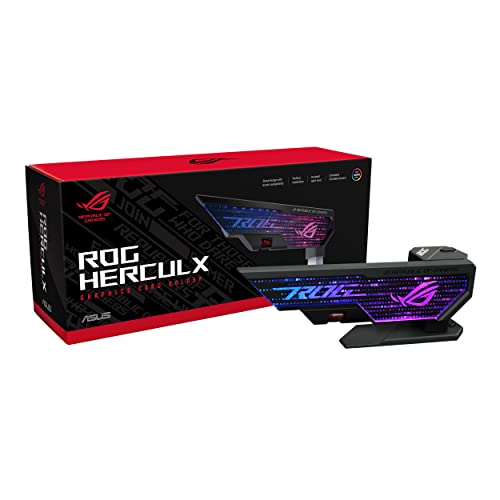
The widest travel in this set and the only one that ships with a way to check the result. The spirit level turns a visual guess into a number.
Specs
Mount type | Floor-standing post |
Height range | 72 to 128 mm |
Material | Zinc alloy |
Installation | Toolless |
Extras | Integrated spirit level |
Lighting | Aura Sync RGB |
Warranty | 2 years |
Mount type
Floor-standing post
Height range
72 to 128 mm
Material
Zinc alloy
Installation
Toolless
Extras
Integrated spirit level
Lighting
Aura Sync RGB
Warranty
2 years
What it does well
72 to 128 mm covers nearly every ATX floor-to-card gap, including cases with no shroud where the post stands on the case floor. Zinc alloy is heavy enough that the base stays planted without adhesive, and toolless adjustment means the card can be re-supported after a cooler swap without pulling the bracket.
The spirit level is the part worth paying for. Everything else in this category asks you to judge level by eye through a side panel, and the eye is generous.
What you give up
It costs several times what a working bracket costs, and the mechanism underneath is the same mechanism. The zinc body is bulky and eats floor space in a case that already has cables there. Aura Sync is an ASUS-ecosystem convenience.
Who it's for
Buyers hanging a three-slot flagship in a showcase case where the bracket is visible, and anyone who wants the height set once, correctly, then left alone.
Best Budget: upHere GPU Support Bracket (L)

The mechanism that carries the load is a threaded post and a cradle. This has both, in the 70 to 120 mm band that fits most ATX builds, and nothing else.
Specs
Mount type | Floor-standing post |
Height range | 70 to 120 mm |
Size class | L |
Material | Metal post, plastic cap |
Lighting | None |
Contact | Flat cradle |
Mount type
Floor-standing post
Height range
70 to 120 mm
Size class
L
Material
Metal post, plastic cap
Lighting
None
Contact
Flat cradle
What it does well
It covers the common case, and that is the whole pitch. A threaded post under the far end of the card removes the bending load regardless of what the post cost. The 70 to 120 mm band lands where most ATX builds need it, which is the only spec that decides whether this works for you.
Buy the L size class deliberately. The listing family shares a product page, and the shorter variants top out below where a modern three-slot card sits.
What you give up
Build quality is what the price implies. The plastic cap is the wear point and the finish will not match a premium case. No level, no magnet, no fine adjustment, so setting height is eyeballing it and re-checking after the panel goes on.
Who it's for
A buyer who wants the sag gone and does not care whether the fix is visible, or anyone bracing a second card after the first bracket used the budget.
Editor's Pick: Cooler Master Vertical GPU Holder Kit V3

The honest alternative when a bracket is the wrong tool. Rotating the card ninety degrees removes the cantilever instead of propping it up, and it works when the case floor has nowhere to stand a post.
Specs
Mount type | Vertical bracket and riser |
Riser length | 165 mm |
Signalling | PCIe 4.0 and 5.0 rated |
Case support | E-ATX, ATX, micro-ATX |
Casing | ABS |
Adjustment | Modular slot position |
Mount type
Vertical bracket and riser
Riser length
165 mm
Signalling
PCIe 4.0 and 5.0 rated
Case support
E-ATX, ATX, micro-ATX
Casing
ABS
Adjustment
Modular slot position
What it does well
It removes the load path that causes sag rather than counteracting it, so there is no height to dial in. It is rated for Gen 5 signalling, which matters because a Gen 3 riser on a Gen 5 board is where link-speed drops and bus errors come from.
Confirm your case supports vertical mounting before ordering. Some chassis have vertical slots cut into the rear panel, some need a separate mounting plate, and a few cannot do it at all. If it does not, a full bracket kit adds one, and our roundup of vertical GPU mount kits and PCIe 5.0 risers sorts the options by slot span and cable length.
What you give up
Thermals, and cost. A vertically mounted card sits close to the side panel, and reviewer testing puts the penalty at roughly five to fifteen degrees on a card that already runs hot. It costs many times what a working bracket costs, needs a case with vertical slots or a compatible plate, and blocks the lower expansion slots.
Who it's for
Showcase builds with a glass side panel and real clearance behind it, and anyone whose case floor is a radiator with no flat surface for a post.
Give it room and plan the intake around it, because our case fan picks by mount matter more once the card is breathing against glass.
Bottom line
If you have a three-slot flagship in a case with a bottom radiator, buy the Lian Li GB-002. If the card sags over a steel shroud and the gap is tight, buy the EZDIY-FAB. If you want the height set once and checked with a level, buy the ROG Herculx. If you only want the sag gone, the upHere L does the job. And if your case floor has nowhere to stand a post, the Cooler Master vertical kit is the fix, thermal penalty accepted.
Whichever way you go, measure the gap before you order. The rest of the chassis decisions around it live in our PSU, cooler, and case guide.
FAQ
Does GPU sag actually damage anything?
Usually not right away, and sometimes never. The risk is cumulative. A sagging card puts a sustained bending load on the board and pulls the gold fingers unevenly against the slot contacts, and reviewers have tied that pattern to intermittent drop-outs, PCIe bus errors, and cards negotiating a lower link speed than the board supports. Under about 1,200 grams the load is small enough to ignore. On a three-kilogram flagship it is cheap insurance.
Should the bracket touch the card's shroud or its PCB?
The shroud. Support the frame that runs the length of the card, never the bare board and never a component. The shroud is a stiff member that spreads the load back toward the slot; the board is the thing you are trying to stop bending. Put the contact point out near the far end of the card, where the lever arm is longest, and keep it clear of the power connectors.
Do cases with a built-in GPU support make a bracket redundant?
Often yes. A growing number of mid-range and high-end chassis ship an anti-sag bar on the motherboard tray or a slotted support that rides on the shroud. If yours has one, use it first: it is already positioned for that case and it costs nothing. Check the accessory box rather than the spec page, since these parts are frequently bagged with the screws and never listed.
How do I know which height bracket to buy?
Measure before you order. With the card installed, measure the vertical gap from whatever the post would stand on, case floor or power supply shroud, up to the underside of the card near its far end. Then buy a bracket whose published range brackets that number with room on both sides. If the measurement lands at the extreme end of a range, move to a different size class.
Is a vertical mount better than a support bracket?
It solves the problem more completely and creates a new one. Rotating the card removes the cantilever entirely, so there is no height to dial in. The cost is airflow: a vertically mounted card sits close to the side panel, and testing puts the penalty at roughly five to fifteen degrees on a card that already runs hot. Unless your case leaves real clearance behind the mount, a bracket is the cheaper and cooler answer.
Related Articles

Best PC Cases for RTX 5090 and 5080 (2026): 5 380mm+ Picks
The best PC case for an RTX 5090 or 5080 build needs 380mm of clearance. We rank 5 cases that fit a 575W card plus a 360mm AIO, with airflow to spare.
Aug 8, 2026

Best PC Case Fans 2026: 5 Picks for 120mm and 140mm
The best PC case fans for 2026: five 120mm and 140mm picks by mount position, so you know exactly which fan to buy for intake, exhaust and a radiator.
Aug 17, 2026

Best Low-Profile CPU Coolers 2026: 5 Picks + Height Chart
The best low-profile CPU coolers for SFF and ITX builds in 2026. Five picks from 37mm to 77mm, with a height chart matching each to your case clearance.
Aug 8, 2026

How to Choose a PSU, Cooler, and Case
A builder's framework for the chassis side of a PC: size the PSU with sane headroom, match the cooler to the chip, and pick a case that fits and breathes.
Jun 29, 2026

Is the 9850X3D Worth It Over the 9800X3D? 2026 Verdict
Is the 9850X3D worth it over the 9800X3D? The 2026 refresh buys about 3 percent more frames for more heat and power. When to upgrade, when to keep yours.
Sep 23, 2026