Affiliate Disclosure: As an Amazon Associate we earn from qualifying purchases. Some links may earn us a commission at no cost to you.

Best GPUs for Esports at 1080p 144Hz: Top 2026 Picks
At 1080p, esports is the easy part for any modern graphics card. Counter-Strike 2, Valorant, Apex, Fortnite, and Overwatch 2 are built to run fast, and every current-gen GPU clears 144 frames per second in them with room to spare. So the real question is not which card hits the number. It is which card hits it most consistently, encodes your stream without stealing frames, and still has the memory to last. If Fortnite is your main, our best GPUs for Fortnite guide breaks the picks down by Performance mode versus maxed DirectX 12. Apex players can jump straight to the best GPUs for Apex Legends roundup for cards tuned to its high-refresh target.
These five picks sort that out by how you actually play, from the tightest budget to a stream-while-you-game build. The frames are a given. What separates them is everything around the frames.
Our top pick: Sapphire Pulse RX 9060 XT (16 GB)
The Sapphire Pulse RX 9060 XT pushes hundreds of frames in every competitive title at 1080p, carries 16GB so texture streaming never stutters it, and sips power. It does the competitive job now and the 1440p job later.

Quick picks
Pick | Card | Why it makes the list | Where to buy |
|---|---|---|---|
Best Overall | 16GB, high stable frames, upgrade-ready | ||
Best Value | Cheapest sensible path to 144+ FPS | ||
Best Premium | Dual NVENC AV1 for stream-while-you-play | ||
Best Budget | Cheapest current-gen Nvidia for esports | ||
Editor's Pick | Same 16GB performance, compact SFF board |
Best Overall
- Card
- Why it makes the list
16GB, high stable frames, upgrade-ready
- Where to buy
Best Value
- Card
- Why it makes the list
Cheapest sensible path to 144+ FPS
- Where to buy
Best Premium
- Card
- Why it makes the list
Dual NVENC AV1 for stream-while-you-play
- Where to buy
Best Budget
- Card
- Why it makes the list
Cheapest current-gen Nvidia for esports
- Where to buy
Editor's Pick
- Card
- Why it makes the list
Same 16GB performance, compact SFF board
- Where to buy
Specs at a glance
Card | Chip | VRAM | Memory bus / speed | Board power |
|---|---|---|---|---|
RX 9060 XT | 16 GB GDDR6 | 128-bit | ~160 W | |
Arc B580 | 12 GB GDDR6 | 192-bit | ~190 W | |
RTX 5060 Ti | 16 GB GDDR7 | 28 Gbps (128-bit) | ~180 W | |
RTX 5060 | 8 GB GDDR7 | 128-bit | ~115 W | |
RX 9060 XT | 16 GB GDDR6 | 128-bit | ~160 W |
- Chip
RX 9060 XT
- VRAM
16 GB GDDR6
- Memory bus / speed
128-bit
- Board power
~160 W
- Chip
Arc B580
- VRAM
12 GB GDDR6
- Memory bus / speed
192-bit
- Board power
~190 W
- Chip
RTX 5060 Ti
- VRAM
16 GB GDDR7
- Memory bus / speed
28 Gbps (128-bit)
- Board power
~180 W
- Chip
RTX 5060
- VRAM
8 GB GDDR7
- Memory bus / speed
128-bit
- Board power
~115 W
- Chip
RX 9060 XT
- VRAM
16 GB GDDR6
- Memory bus / speed
128-bit
- Board power
~160 W
Benchmarks
Here is the thing these charts make obvious: at 1080p competitive settings, every pick runs far past 144 FPS in these titles. A 144Hz panel is saturated several times over, and even a 1080p 240Hz panel is comfortable. The averages below are approximate, drawn from reviewer testing, and the spread between cards barely matters when the monitor caps first. What matters more is frame consistency, which is where the per-card notes later in this guide earn their keep.
Average FPS at 1080p competitive settings. CS2 is CPU-bound at this resolution, so a fast CPU matters as much as the card.
- 280 FPS
- 200 FPS
- 300 FPS
- 250 FPS
Average FPS at 1080p competitive. Every card here runs into the hundreds; the engine, not the GPU, sets the ceiling.
- 600 FPS
- 430 FPS
- 640 FPS
- 560 FPS
Average FPS at 1080p competitive. Apex caps at 300 FPS, and these cards live near that cap.
- 250 FPS
- 190 FPS
- 270 FPS
- 230 FPS
Average FPS at 1080p in Performance mode, the competitive default. DirectX 12 epic settings would lower these but few competitive players use them.
- 200 FPS
- 150 FPS
- 210 FPS
- 180 FPS
Average FPS at 1080p competitive. Overwatch 2 favors high refresh and every pick clears it easily.
- 360 FPS
- 280 FPS
- 380 FPS
- 330 FPS
How we picked
We started from how the frames actually feel, not the average on a chart. At 1080p in esports titles, the average FPS is a solved problem for every current-gen card, so we leaned on the things that still vary: the 1% lows that decide whether your aim feels locked or rubbery, the encoder for the large share of competitive players who also stream or clip, and the VRAM that determines whether the card is still fine in two years.
We ranked by buyer, not by raw tier. The 16GB AMD card anchors the list because it does everything an esports player needs and ages into 1440p. The Intel card earns the value slot when its stock and price line up. The 16GB Nvidia card is here for the streamer who wants NVENC AV1 and Reflex in one box. The 8GB Nvidia card is the honest budget exception, because esports titles are light enough on memory that 8GB holds firm at 1080p. And the compact AMD card covers the small-form-factor build that still wants 16GB.
Every pick is a real Amazon listing we checked for stock and the exact variant. We avoided the 8GB versions of cards that get used for heavier games, called out the one real driver caveat on the Intel card, and kept prices out of the prose because they move week to week. The buy buttons carry the live price.
Best Overall: Sapphire Pulse RX 9060 XT (16 GB)
Specs
Chip | RX 9060 XT (RDNA 4) |
VRAM | 16 GB GDDR6 |
Boost clock | up to ~3.13 GHz |
Memory bus | 128-bit |
Board power | ~160 W |
Outputs | 2x HDMI 2.1, 2x DisplayPort 2.1 |
Slots | 2.5-slot dual-fan |
Chip
RX 9060 XT (RDNA 4)
VRAM
16 GB GDDR6
Boost clock
up to ~3.13 GHz
Memory bus
128-bit
Board power
~160 W
Outputs
2x HDMI 2.1, 2x DisplayPort 2.1
Slots
2.5-slot dual-fan
What it does well
The Sapphire Pulse clears 144 FPS by a wide margin in CS2, Valorant, Apex, Fortnite, and Overwatch 2 at 1080p competitive. On a 144Hz or 165Hz panel you are leaving frames on the table that the monitor cannot even show, which is exactly what you want from an esports card.
The 16GB of memory is the quiet hero. At 1080p it removes any VRAM ceiling today, and it leaves real headroom for the day you move to a 1440p panel without buying another card. RDNA 4's FSR 4 is now a fair quality lever if you ever drift into a heavier single-player library.
It runs on modest power and a clean, quiet Pulse cooler, so it drops into a small case and a smaller power supply without drama.
What you give up
The trade is bandwidth. The 128-bit bus caps memory throughput, so this card scales worse than bigger boards once you climb past 1080p into high-refresh 1440p. Ray tracing is entry-level, and there is no NVENC AV1, so a dedicated streamer who wants the lowest-bitrate encode leans toward the Nvidia pick.
AMD street stock has historically been thinner than Nvidia's, so the exact SKU can come and go.
Who it's for
The competitive player on a 1080p 144Hz or 165Hz panel who wants high, stable frames now and a clean path to 1440p later, without paying the 16GB tax on the Nvidia side.
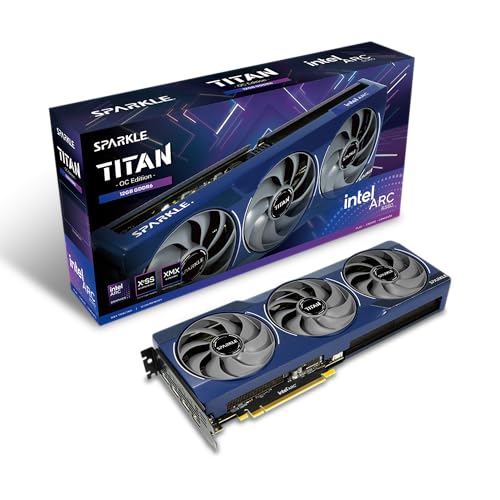
Best Value: Sparkle Arc B580 Titan OC (12 GB)
Specs
Chip | Intel Arc B580 (Xe2 Battlemage) |
VRAM | 12 GB GDDR6 |
Boost clock | ~2,800 MHz (OC) |
Memory bus | 192-bit |
Board power | ~190 W |
Outputs | 3x DisplayPort 2.1, 1x HDMI 2.1 |
Slots | 2-slot dual-fan |
Chip
Intel Arc B580 (Xe2 Battlemage)
VRAM
12 GB GDDR6
Boost clock
~2,800 MHz (OC)
Memory bus
192-bit
Board power
~190 W
Outputs
3x DisplayPort 2.1, 1x HDMI 2.1
Slots
2-slot dual-fan
What it does well
When stock and pricing cooperate, the Arc B580 is the cheapest sensible way onto a high-refresh 1080p panel. It clears 144 FPS comfortably in Valorant, Fortnite, and Overwatch 2, and 12GB on a 192-bit bus gives it more memory and bandwidth headroom than the 8GB cards it competes with on price.
Intel's XeSS 2 runs on the card's own hardware path, so it is a real upscaling lever rather than a fallback. For a budget-first competitive build that lives in the popular free-to-play titles, this card stretches the fewest dollars the furthest.
What you give up
The honest asterisk is Counter-Strike 2. Buyers and the Intel community have flagged worse frame-time variance and weaker 1% lows on Battlemage in CS2 than on equivalent Nvidia or AMD cards, and Intel's driver overhead still bites in older DirectX 9 and DirectX 11 titles. Drivers matured a lot through 2025, but if CS2 is your main game, weigh that carefully.
It also leans on a strong CPU more than its rivals to reach its ceiling, and its street price swings, which can erase the value gap. There is no CUDA and no NVENC AV1.
Who it's for
The budget-first competitive player whose main games are Valorant, Fortnite, Apex, or Overwatch 2 rather than CS2, and who is happy to do basic driver hygiene to get the lowest price per frame.
Best Premium: MSI Ventus RTX 5060 Ti 16G OC Plus

Specs
Chip | RTX 5060 Ti (Blackwell) |
VRAM | 16 GB GDDR7 |
Memory speed | 28 Gbps (128-bit) |
Board power | ~180 W |
Encoder | 9th-gen NVENC, dual encoder, AV1 |
Outputs | 1x HDMI 2.1b, 3x DisplayPort 2.1b |
Slots | 2-slot dual-fan |
Chip
RTX 5060 Ti (Blackwell)
VRAM
16 GB GDDR7
Memory speed
28 Gbps (128-bit)
Board power
~180 W
Encoder
9th-gen NVENC, dual encoder, AV1
Outputs
1x HDMI 2.1b, 3x DisplayPort 2.1b
Slots
2-slot dual-fan
What it does well
The reason to pay up here is the encoder. The 50-series brings a dual NVENC block with AV1, so you can run a live stream and a high-bitrate local recording at the same time with almost no hit to your in-game frames. Pair that with Reflex to trim system latency in the exact titles that care, and this is the stream-while-you-play pick.
The frames themselves are high and stable in every esports title, and 16GB of GDDR7 means no memory worry now or when you push to 1440p. DLSS 4 is a genuine quality win if you dip into heavier single-player games between matches.
What you give up
It costs the most of the five, and for pure competitive play at 1080p the extra frames over the cheaper 16GB cards are invisible because the monitor caps first. The 128-bit bus is the same bandwidth limiter the cheaper cards have.
There is an 8GB version of this exact chip at a lower price. For anyone who streams or keeps a card more than a year, the 16GB SKU is the one worth buying.
Who it's for
The stream-while-you-play competitor on a 1080p 144Hz-plus panel who wants NVENC AV1, Reflex, and DLSS 4 in one card and is fine paying for the encoder.
Best Budget: MSI Ventus 2X RTX 5060 (8 GB)

Specs
Chip | RTX 5060 (Blackwell) |
VRAM | 8 GB GDDR7 |
Boost clock | ~2,535 MHz (OC) |
Memory bus | 128-bit |
Board power | ~115 W |
Encoder | 9th-gen NVENC, AV1 |
Outputs | 3x DisplayPort 2.1a, 1x HDMI 2.1b |
Slots | 2-slot dual-fan |
Chip
RTX 5060 (Blackwell)
VRAM
8 GB GDDR7
Boost clock
~2,535 MHz (OC)
Memory bus
128-bit
Board power
~115 W
Encoder
9th-gen NVENC, AV1
Outputs
3x DisplayPort 2.1a, 1x HDMI 2.1b
Slots
2-slot dual-fan
What it does well
This is the cheapest current-gen Nvidia path to 144-plus FPS in esports, and it is the honest exception to the usual 8GB warning. Esports titles are light enough on memory that 8GB holds firm at 1080p competitive, where this card frequently pegs the frame caps in Apex, Valorant, Fortnite, and Overwatch 2.
It still brings Reflex and NVENC AV1 despite the budget price, so low-latency play and casual streaming are both covered, and it draws little enough power to run on a modest supply.
What you give up
8GB is the ceiling, full stop. The moment you stray into texture-heavy single-player games or move to 1440p, this card runs short, so treat it as a 1080p-esports card and little else. There is no real ray-tracing headroom, and the 128-bit bus limits how far it scales.
For only a little more, the 16GB cards above age far better. Buy this one knowing it is a focused single-purpose tool.
Who it's for
The pure 1080p competitive player on the tightest budget who lives in free-to-play esports titles and has no plans to push past 1080p or into heavy single-player games.
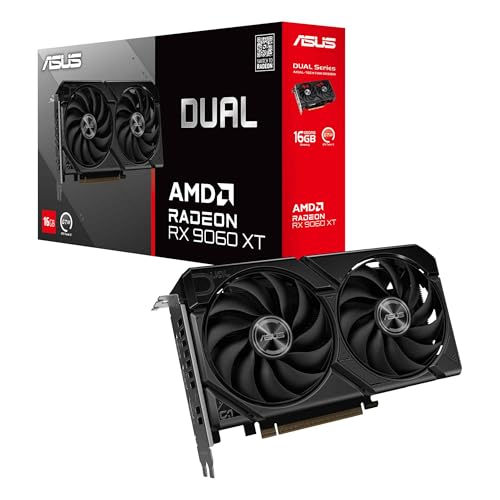
Editor's Pick: ASUS Dual RX 9060 XT (16 GB)
Specs
Chip | RX 9060 XT (RDNA 4) |
VRAM | 16 GB GDDR6 |
Memory bus | 128-bit |
Board power | ~160 W |
Cooling | Axial-tech dual-fan, 0dB idle |
Outputs | 1x HDMI 2.1b, 3x DisplayPort 2.1a |
Slots | 2.5-slot, compact length |
Chip
RX 9060 XT (RDNA 4)
VRAM
16 GB GDDR6
Memory bus
128-bit
Board power
~160 W
Cooling
Axial-tech dual-fan, 0dB idle
Outputs
1x HDMI 2.1b, 3x DisplayPort 2.1a
Slots
2.5-slot, compact length
What it does well
This is the same 16GB RX 9060 XT performance as our Best Overall, packed onto a shorter dual-fan board built for compact and mini-ITX cases. You get the identical strong 1080p esports frames and the same 16GB longevity in a card that physically fits the small builds a triple-fan board does not.
ASUS's 0dB idle keeps a desk-side small-form-factor rig silent between matches, and the low board power suits the smaller supplies common in compact builds.
What you give up
The compact dual-fan cooler runs a touch warmer and louder than a full triple-fan board under sustained load, and it shares the same 128-bit bandwidth limit as every 9060 XT. There is no NVENC AV1.
In a roomy mid-tower, the Best Overall is simply the better-cooled choice. This board earns its place only when case size is the constraint.
Who it's for
The small-form-factor or mini-ITX competitive builder who wants 16GB, quiet idle, and a board that physically fits a compact case. Whichever board you land on, check the security gate before launch day, because the official Modern Warfare 4 system requirements make TPM 2.0 and Secure Boot mandatory on top of the hardware.
Bottom line
If you want one card that handles esports today and 1440p tomorrow, buy the Sapphire Pulse RX 9060 XT (16 GB). If you are counting every dollar and CS2 is not your main game, the Sparkle Arc B580 Titan OC (12 GB) stretches the budget furthest when its price holds.
If you stream or clip while you play, the MSI Ventus RTX 5060 Ti 16G OC Plus and its dual NVENC AV1 encoder is worth the premium. If you only need 1080p esports on the tightest budget, the MSI Ventus 2X RTX 5060 (8 GB) pegs the frame caps and nothing more. And if your build is small, the ASUS Dual RX 9060 XT (16 GB) gives you the same 16GB performance in a board that fits.
FAQ
Do I really need a new GPU to hit 144 FPS at 1080p in esports games?
Only if your current card is genuinely old. Any current-gen GPU in this guide clears 144 FPS in CS2, Valorant, Apex, Fortnite, and Overwatch 2 at 1080p competitive settings, usually by a wide margin. If you are already past 144 in the games you play, a new card buys you frame consistency and headroom rather than a higher number. If you are stuck below your monitor's refresh, any of these five fixes it.
Is 8GB of VRAM enough for esports at 1080p in 2026?
For esports specifically, yes. Competitive titles are deliberately light on memory, so the Best Budget pick's 8GB holds firm at 1080p. The catch is that 8GB is the ceiling everywhere else. The moment you load a texture-heavy single-player game or move to 1440p, it runs short. If esports is genuinely all you play, 8GB is fine here. If there is any chance you branch out, the 16GB cards age far better for a small step up.
Which of these is best specifically for CS2?
The Sapphire Pulse RX 9060 XT or the MSI RTX 5060 Ti, not the Arc B580. CS2 is CPU-bound at 1080p and rewards consistent frame times, and buyers plus the Intel community have flagged worse frame-time variance and weaker 1% lows on the B580 in CS2 specifically. The two 16GB cards deliver steadier lows. Whichever you pick, a strong CPU matters as much as the GPU for CS2 frames.
Should I get the RX 9060 XT or the RTX 5060 Ti for streaming while I play?
Get the RTX 5060 Ti if streaming is a real part of how you play. Its 50-series dual NVENC encoder with AV1 lets you run a live stream and a clean local recording at once with almost no hit to your in-game frames, which the AMD card cannot match. If you only stream occasionally or not at all, the RX 9060 XT gives you the same esports frames and 16GB for less, and you keep the budget for a better monitor.
Will any of these bottleneck a 1080p 240Hz monitor?
In esports titles, no. All five run well past 240 FPS in the lighter competitive games, so a 1080p 240Hz panel is comfortable. The bigger factor at 240Hz is your CPU, since games like CS2 and Valorant lean on the processor at this resolution. Pair any of these cards with a capable CPU and the monitor, not the GPU, will be your limit in esports.
Do I need frame generation for esports at 1080p 144Hz?
No, and you should leave it off for competitive play. Frame generation adds system latency, and in esports that latency is the opposite of what you want. These cards already produce hundreds of native frames at 1080p in competitive titles, so there is nothing to generate up to. Save frame generation for heavy single-player games where the base frame rate is lower and the latency matters less.
Related Articles

Best GPUs for 1080p Gaming (2026): Picks by Refresh Tier
The best GPU for 1080p gaming in 2026, picked by refresh tier and game genre. From a budget Intel Arc card to a 240Hz esports pick, plus honest 8GB verdicts.
Jun 22, 2026

Best 1080p 240Hz Gaming Monitors 2026: 5 Picks + GPU Guide
The best 1080p 240Hz gaming monitors for 2026, from the budget Fast IPS floor to the 540Hz halo, plus which GPU actually drives 240Hz in CS2 and Valorant.
Sep 10, 2026

Modern Warfare 4 System Requirements: Official 2026 Specs
Modern Warfare 4 system requirements are official: GTX 1060 min, RTX 3060 Ti recommended. Plus the GPU tier for 1440p high refresh and the TPM 2.0 gate.
Sep 25, 2026

RTX 5070 vs 5070 Ti (2026): 12 GB or 16 GB, Which Wins?
RTX 5070 vs RTX 5070 Ti: does 16 GB and 46% more cores reach your screen at 1440p or 4K? The up-tier call, answered row by row instead of by one average.
Sep 25, 2026

Best Monitors for Marvel Rivals (2026): 5 Picks, 165-360Hz
The best monitors for Marvel Rivals, matched to your GPU: 5 picks from a 280Hz 1080p esports panel up to a 4K 240Hz OLED, plus honest OLED burn-in verdicts.
Sep 25, 2026