Affiliate Disclosure: As an Amazon Associate we earn from qualifying purchases. Some links may earn us a commission at no cost to you.

Best High-End Graphics Cards 2026: 5 Picks, Honestly Ranked
The high-end tier is where buyers most often overpay. It is easy to read "flagship" as "buy the biggest number," reach for the 5090, and spend halo money on silicon a gaming build will never fully use.
This guide ranks the high-end graphics cards that belong in a 2026 build and maps each one to what you play and create. The honest headline: you almost never want the 5090. The real buy zone runs through the 5080, 5070 Ti, 9070 XT, and 7900 XTX, and most buyers should stop well short of the top.
Our top pick: ASUS TUF RTX 5080 OC
For most high-end gaming buyers the 5080 is the honest flagship: real 4K 120 with DLSS Quality, the full Nvidia stack, and no AMD answer at its price.

Quick picks
Pick | Card | Best for | Where to buy |
|---|---|---|---|
Best Overall | 4K 120 gaming + light creative | ||
Best Value | 1440p enthusiast + entry 4K | ||
Best Premium | 4K halo, no compromise | ||
Best Budget | Raster-first 1440p/4K, no RT | ||
Editor's Pick | Raster purist + max VRAM per dollar |
Best Overall
- Card
- Best for
4K 120 gaming + light creative
- Where to buy
Best Value
- Card
- Best for
1440p enthusiast + entry 4K
- Where to buy
Best Premium
- Card
- Best for
4K halo, no compromise
- Where to buy
Best Budget
- Card
- Best for
Raster-first 1440p/4K, no RT
- Where to buy
Editor's Pick
- Card
- Best for
Raster purist + max VRAM per dollar
- Where to buy
Specs at a glance
Card | VRAM | TGP | Architecture |
|---|---|---|---|
16 GB GDDR7 | 360 W | Blackwell | |
16 GB GDDR7 | 300 W | Blackwell | |
32 GB GDDR7 | 575 W | Blackwell | |
16 GB GDDR6 | 304 W | RDNA 4 | |
24 GB GDDR6 | 355 W | RDNA 3 |
- VRAM
16 GB GDDR7
- TGP
360 W
- Architecture
Blackwell
- VRAM
16 GB GDDR7
- TGP
300 W
- Architecture
Blackwell
- VRAM
32 GB GDDR7
- TGP
575 W
- Architecture
Blackwell
- VRAM
16 GB GDDR6
- TGP
304 W
- Architecture
RDNA 4
- VRAM
24 GB GDDR6
- TGP
355 W
- Architecture
RDNA 3
How to think about the high-end tier
Spending more at the top only pays off when the workload uses it. Match the card to your resolution and what you do, not to the price ceiling.
Use case | Best fit | VRAM ceiling | Why |
|---|---|---|---|
4K halo, no compromise | 32 GB | Only no-compromise GPU, justified mainly by productivity | |
4K 120 gaming plus light creative | 16 GB | Real 4K, no AMD answer at this price | |
1440p enthusiast plus entry 4K | 16 GB | Best-value entry to the tier, same VRAM as the 5080 | |
Raster-first 1440p or 4K, no RT | 16 GB | Flagship raster value, no Nvidia tax | |
Raster purist plus max VRAM per dollar | 24 GB | Most VRAM in the buy zone, raw raster over upscaling |
4K halo, no compromise
- Best fit
- VRAM ceiling
32 GB
- Why
Only no-compromise GPU, justified mainly by productivity
4K 120 gaming plus light creative
- Best fit
- VRAM ceiling
16 GB
- Why
Real 4K, no AMD answer at this price
1440p enthusiast plus entry 4K
- Best fit
- VRAM ceiling
16 GB
- Why
Best-value entry to the tier, same VRAM as the 5080
Raster-first 1440p or 4K, no RT
- Best fit
- VRAM ceiling
16 GB
- Why
Flagship raster value, no Nvidia tax
Raster purist plus max VRAM per dollar
- Best fit
- VRAM ceiling
24 GB
- Why
Most VRAM in the buy zone, raw raster over upscaling
Supply matters as much as spec at this tier. Memory shortages through 2026 have kept high-end street prices well above where these cards launched, and the gap widens the further up the stack you go. That skews the value math in one direction only: the closer a card sits to the top, the more you pay over its launch positioning for the same silicon. Check what a card actually sells for today before you treat its launch tier as its value.
How they stack up by workload
Raw framerates shift dramatically with the test you run, so the ordering matters more than any single number. Three scenarios separate these cards cleanly.
In ray-tracing-heavy 4K titles, the 5090 leads, the 5080 sits a clear step back, and the 5070 Ti and 9070 XT land close together once FSR 4 and DLSS Quality are in play. The 7900 XTX falls to the back of the group here, since ray tracing is RDNA 3's weakest area. Worth saying plainly: even a 5090 cannot brute-force native 4K path tracing at high framerates, so every card in this tier leans on upscaling for the heaviest ray-traced games.
Switch to pure raster at 4K and the order shuffles. The 7900 XTX and its 24 GB pool climb on the 9070 XT, the 5070 Ti and 9070 XT stay neck and neck, and the gap between the 5080 and the cards below it narrows. This is the test that flatters AMD and the previous-gen flagship.
Run a CPU-bound esports title like Counter-Strike 2 at 1080p and the whole tier crowds the same high-refresh ceiling. The spend stops scaling. If competitive shooters are your main library, none of these cards is a bad answer, and the cheaper ones are the smart answer.
How we picked
The GPU dominates the budget at every tier, so we size the card to the resolution and the workload, not to the price ceiling. A 4K 120 panel earns a 4K card. A 1440p panel does not need one, and the savings buy a better monitor or a faster CPU. If you are still settling on a resolution, our 4K GPU guide and the 1440p companion are the right next reads.
We separate gaming-only buyers from creative and AI buyers on purpose, because the CUDA tax and the VRAM ceiling flip the recommendation. A buyer who renders or trains models wants Nvidia or the 24 GB AMD card. A pure-raster gamer with a non-RT library often wants the cheaper AMD flagship. The VRAM you need is the question that decides several of these picks.
We refuse to sell the halo card as a default. Upscaling counts as a buying lever only at the resolution where Quality mode is the realistic play, and frame generation is a smoothness multiplier on an already-good base. It turns 60 into 120. It never turns 30 into 120, and we do not recommend a weaker card on the assumption that it will.
Best Overall: ASUS TUF RTX 5080 OC
Specs
Chip | GeForce RTX 5080 (Blackwell) |
VRAM | 16 GB GDDR7 |
Boost clock | 2.7 GHz (OC mode) |
Slots | 3.6 |
TGP | 360 W |
Length | 348 mm |
Chip
GeForce RTX 5080 (Blackwell)
VRAM
16 GB GDDR7
Boost clock
2.7 GHz (OC mode)
Slots
3.6
TGP
360 W
Length
348 mm
What it does well
The 5080 is the honest top of the gaming stack. It runs native 1440p in everything and reaches a real 4K 120 in most titles with DLSS Quality, which is the resolution where the upscaler is genuinely indistinguishable from native to most eyes. DLSS 4 transformer upscaling and Multi-Frame Gen are real buying levers at 4K, not marketing, as long as the base framerate is already healthy.
It also carries the full Nvidia stack, so the buyer who does a little Blender, Premiere, or Stable Diffusion on the side gets CUDA acceleration the AMD cards cannot match. The 16 GB GDDR7 pool is enough headroom for 4K textures today, and there is no AMD card at this price to argue with.
What you give up
The catch is that 16 GB is the same pool the cheaper 5070 Ti carries, so the 5080 is a raw-throughput step up, not a VRAM one. If your only goal is more memory, this is not the card that delivers it.
The gap up to the 5090 is large, and the gap down to the 5070 Ti is smaller than the price difference implies. Street pricing has also sat above MSRP for much of this generation, so the real cost is higher than the sticker.
Who it's for
This is the 4K 120 gaming buyer who wants the best single-GPU experience without halo pricing, with light creative work in the mix. If you have a 4K 120 Hz panel and you do not run productivity that needs 32 GB, the 5080 is where the high-end conversation should start and usually end.
Best Value: ASUS TUF RTX 5070 Ti OC

Specs
Chip | GeForce RTX 5070 Ti (Blackwell) |
VRAM | 16 GB GDDR7 |
Boost clock | 2.6 GHz (OC mode) |
Slots | 3.125 |
TGP | 300 W |
Length | 330 mm |
Chip
GeForce RTX 5070 Ti (Blackwell)
VRAM
16 GB GDDR7
Boost clock
2.6 GHz (OC mode)
Slots
3.125
TGP
300 W
Length
330 mm
What it does well
The 5070 Ti is quietly the best-value card in the 50-series, and it is the floor of the high-end tier rather than a step below it. It maxes 1440p high-refresh, does entry 4K with DLSS Quality, and carries the same 16 GB GDDR7 pool as the 5080 for meaningfully less money.
It also clears the 12 GB trap that sinks the regular 5070. That extra memory is what keeps this card relevant for years instead of months, and it brings the full Nvidia stack along for the ride, DLSS 4, MFG, NVENC AV1 for streamers, and CUDA for creators.
What you give up
It is marketed as 4K-capable, and it is, with caveats. In practice it is a 1440p ultra card that reaches 4K by leaning on DLSS, not a native-4K card. A buyer who genuinely targets 4K 120 should step up to the 5080 rather than expect this card to brute-force it.
Stock has been steadier than AMD's flagship, but pricing still sits above MSRP, so it is not the bargain the MSRP suggests on paper.
Who it's for
This is the 1440p 165 Hz enthusiast who wants years of headroom and the occasional 4K session. It is also the lowest sensible entry for anyone who needs the Nvidia stack for creative or streaming work but does not want to pay 5080 money to get it.
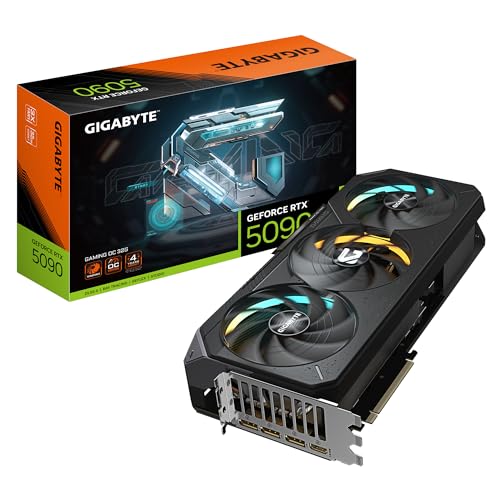
Best Premium: GIGABYTE RTX 5090 Gaming OC
Specs
Chip | GeForce RTX 5090 (Blackwell) |
VRAM | 32 GB GDDR7 |
Boost clock | 2.55 GHz (OC mode) |
Slots | 3.5+ |
TGP | 575 W |
Length | 340 mm |
Chip
GeForce RTX 5090 (Blackwell)
VRAM
32 GB GDDR7
Boost clock
2.55 GHz (OC mode)
Slots
3.5+
TGP
575 W
Length
340 mm
What it does well
The 5090 is the only no-compromise single GPU in 2026. It delivers a real 4K 120-plus in everything, and its 32 GB GDDR7 pool is the reason to buy, not the framerate. That memory is where LLM inference, SDXL fine-tuning, and heavy Blender or DaVinci neural work stop being a struggle.
For the buyer whose workload fills 32 GB, nothing else in the lineup competes. AI and high-end content work are where this card earns its price, and where the gap to the 5080 becomes a chasm rather than a bump.
What you give up
Price, mostly. Street pricing runs well above an already-high MSRP because AI demand competes with gamers for every card, so the real cost is steep. For gaming alone, the uplift over a 5080 does not justify the spend, and the honest call is to put that money into a better monitor instead.
The 575 W draw is its own tax. This card needs a 1,000 to 1,200 W Tier-A PSU and a proper 12V-2x6 cable rather than the bundled Y-adapter, plus a case with real airflow. If you are reaching for the 5090, you are buying a supporting cast, not just a card. Our RTX 5090 PSU guide covers the wattage and connector side.
Who it's for
This is the no-compromise enthusiast who runs productivity that genuinely uses the 32 GB pool, or the buyer who has budgeted the full supporting cast and wants the best, period. For a gaming-only build, almost everyone is better served one tier down.
Best Budget: Sapphire Pulse RX 9070 XT

Specs
Chip | Radeon RX 9070 XT (RDNA 4) |
VRAM | 16 GB GDDR6 |
Boost clock | 2.97 GHz |
Slots | 2.5 |
TGP | 304 W |
Length | 320 mm |
Chip
Radeon RX 9070 XT (RDNA 4)
VRAM
16 GB GDDR6
Boost clock
2.97 GHz
Slots
2.5
TGP
304 W
Length
320 mm
What it does well
The 9070 XT is the clearest AMD value win in years and the entry point to flagship-class raster. It beats the 5070 outright in raster and trades blows with the 5070 Ti in raster while losing in ray tracing, all for less money. The 16 GB GDDR6 pool matches the Nvidia cards a tier up.
FSR 4 finally closed most of the upscaling gap on RDNA 4, so Quality mode at 1440p and up is a fair lever now in a way it was not a generation ago. For a buyer with a mostly non-RT library, this is the best raster-per-dollar in the entire high-end conversation.
What you give up
Ray tracing still trails Nvidia at the same raster tier, and there is no CUDA, so creative and local-AI workflows that lean on it are off the table. If your library is heavy on Cyberpunk or Alan Wake 2, or you do any creative work, the Nvidia tax is worth paying.
Stock has been genuinely thin all generation. Buyers have flagged the 9070 XT as hard to find at sensible pricing for long stretches, so availability, not performance, is often the real obstacle here.
Who it's for
This is the raster-first 1440p high-refresh or 4K buyer with a mostly non-RT library and no creative workload. If you want flagship-class frames without flagship pricing and you do not need the Nvidia feature stack, this is the pick, stock permitting.
Editor's Pick: Sapphire Nitro+ RX 7900 XTX

Specs
Chip | Radeon RX 7900 XTX (RDNA 3) |
VRAM | 24 GB GDDR6 |
Boost clock | 2.6 GHz (Nitro+ OC) |
Slots | 3.5 |
TGP | 355 W |
Length | 320 mm |
Chip
Radeon RX 7900 XTX (RDNA 3)
VRAM
24 GB GDDR6
Boost clock
2.6 GHz (Nitro+ OC)
Slots
3.5
TGP
355 W
Length
320 mm
What it does well
The 7900 XTX is the raster-and-VRAM escape hatch. Its 24 GB of GDDR6 is the most memory in the buy zone outside the 5090, and its raw raster sits above the 9070 XT. At last-gen clearance positioning, the value is real for the buyer who knows exactly what they want.
That big memory pool makes it a genuine option for high-res texture work or local-AI tinkering on a budget, where the 24 GB matters more than the newest upscaling. For a raster purist, it is a lot of card.
What you give up
It is an RDNA 3 card, so it misses FSR 4 and stays on FSR 3, its ray tracing is the weakest of the buy zone, and power draw is high. The feature runway is shorter than the 9070 XT's because it is previous-generation silicon, and there is no DLSS or CUDA.
This is the pick you make on purpose, not by default. If you are not specifically chasing the 24 GB pool or raw raster, the newer 9070 XT is the more sensible AMD buy.
Who it's for
This is the raster purist who wants maximum VRAM per dollar, the high-res-texture or local-AI tinkerer on a budget, and anyone who values raw raster and a 24 GB pool over the newest upscaling. Everyone else in AMD's lineup should look at the 9070 XT first.
Bottom line
If you game at 4K 120 and want the best card without halo pricing, buy the ASUS TUF RTX 5080 OC. If you game at 1440p with the occasional 4K session, the 5070 Ti is the smarter spend and the floor of this tier.
If your raster library skips heavy ray tracing, the Sapphire Pulse RX 9070 XT matches the experience for less, stock allowing. If you want maximum VRAM per dollar for textures or local AI, the 7900 XTX and its 24 GB pool are the play. Buy the 5090 only when 32 GB of VRAM does real work, not because it sits at the top of the list. If your workload leans on rendering, video editing, or local AI rather than frames, our guide to the best GPUs for creator workloads maps the same cards to CUDA and VRAM needs instead of gaming tiers.
FAQ
Is the RTX 5090 worth it for gaming in 2026?
For gaming alone, usually not. The 5090 is the fastest card available, but the uplift over a 5080 at 4K does not justify its premium pricing for most players, and the savings buy a better monitor. It earns its price when you run productivity that genuinely uses its 32 GB of VRAM, such as LLM inference, SDXL fine-tuning, or heavy neural video work.
Is 16 GB of VRAM enough for 4K gaming?
In 2026, yes, for almost every title at 4K with sensible settings. The RTX 5080 and 5070 Ti both carry 16 GB GDDR7, and that pool handles current 4K textures comfortably. If you run extreme texture mods, heavy creative work, or local AI, the 24 GB 7900 XTX or the 32 GB 5090 give you headroom that pure gaming does not require yet.
RTX 5080 vs RTX 5070 Ti: which high-end GPU should I buy?
Buy the 5080 if you have a 4K 120 panel and want native-feeling 4K with DLSS Quality. Buy the 5070 Ti if you game at 1440p with occasional 4K, since it carries the same 16 GB pool for less. The 5080 is a throughput upgrade, not a VRAM one, so the 5070 Ti is the value pick for anyone not committed to 4K.
Is the RX 9070 XT a high-end GPU, or just mid-range?
It sits at the entry of the high-end tier. The 9070 XT beats the 5070 outright in raster and trades blows with the 5070 Ti in raster while losing in ray tracing, for less money. For a raster-first buyer with a non-RT library, it delivers flagship-class frames, which is why it earns a spot here rather than in a mid-range roundup.
Do I need a high-end GPU for 1440p gaming?
Not for standard 1440p. A mid-range card handles 1440p high-refresh in most titles. A high-end card makes sense at 1440p only if you run a 240 Hz panel, play demanding ray-traced titles maxed, or want years of headroom. The 5070 Ti is the sensible high-end choice for a 1440p enthusiast who wants the occasional 4K session.
What power supply do I need for a high-end GPU?
It depends on the card. The 5070 Ti, 5080, 9070 XT, and 7900 XTX pair well with a quality 850 W to 1000 W unit. The 575 W RTX 5090 needs a 1,000 to 1,200 W Tier-A supply and a proper 12V-2x6 cable rather than the bundled adapter. Match the PSU to the whole system draw, not just the GPU.
Related Articles

Best GPUs for 4K Gaming (2026): Picks by Refresh Target
Five GPUs for 4K gaming in 2026, segmented by refresh target and workload: the 5080 buy zone, the AMD-vs-Nvidia call by tier, why the 5090 is usually wrong.
May 21, 2026

Best GPUs for 1440p Gaming (2026): 5 16GB Picks, 60-240Hz
The best GPUs for 1440p gaming in 2026: five 16GB picks matched to 60, 144, and 240 Hz targets, with real benchmarks, trade-offs, and who each card fits.
Aug 8, 2026

RTX 5070 Ti vs RX 9070 XT (2026): 5% Raster, 15% RT Gap
RTX 5070 Ti vs RX 9070 XT: the 9070 XT is 5% behind at 1440p raster for far less money, the 5070 Ti wins ray tracing by 15%. Which one you should buy.
Sep 3, 2026

RTX 5080 vs RX 9070 XT (2026): Which Flagship to Buy?
RTX 5080 vs RX 9070 XT for 2026 flagship gaming: pick the right card by resolution, ray-tracing load, DLSS 4 vs FSR 4, power draw, and your price tier.
May 16, 2026

Best RTX 5090 PSU 2026: Why 1000W Isn't Enough (5 Picks)
The best PSU for an RTX 5090 is not Nvidia's 1000W floor. Transient spikes explained, five 1200W to 1500W ATX 3.1 picks, and 12V-2x6 cable notes that matter.
Aug 10, 2026